
eduroam e 802.1X: Autenticazione WiFi Sicura per l'Istruzione Superiore
Questa guida tecnica di riferimento autorevole spiega l'architettura, l'implementazione e la sicurezza di eduroam e dell'autenticazione 802.1X. Progettata per IT manager e architetti di rete, copre le fasi pratiche di implementazione, la selezione del metodo EAP e il modo in cui i gestori delle sedi possono supportare in sicurezza il roaming accademico.
Ascolta questa guida
Visualizza trascrizione del podcast
Parte della nostra serie principale: Enterprise WiFi Security Guide →

Executive Summary
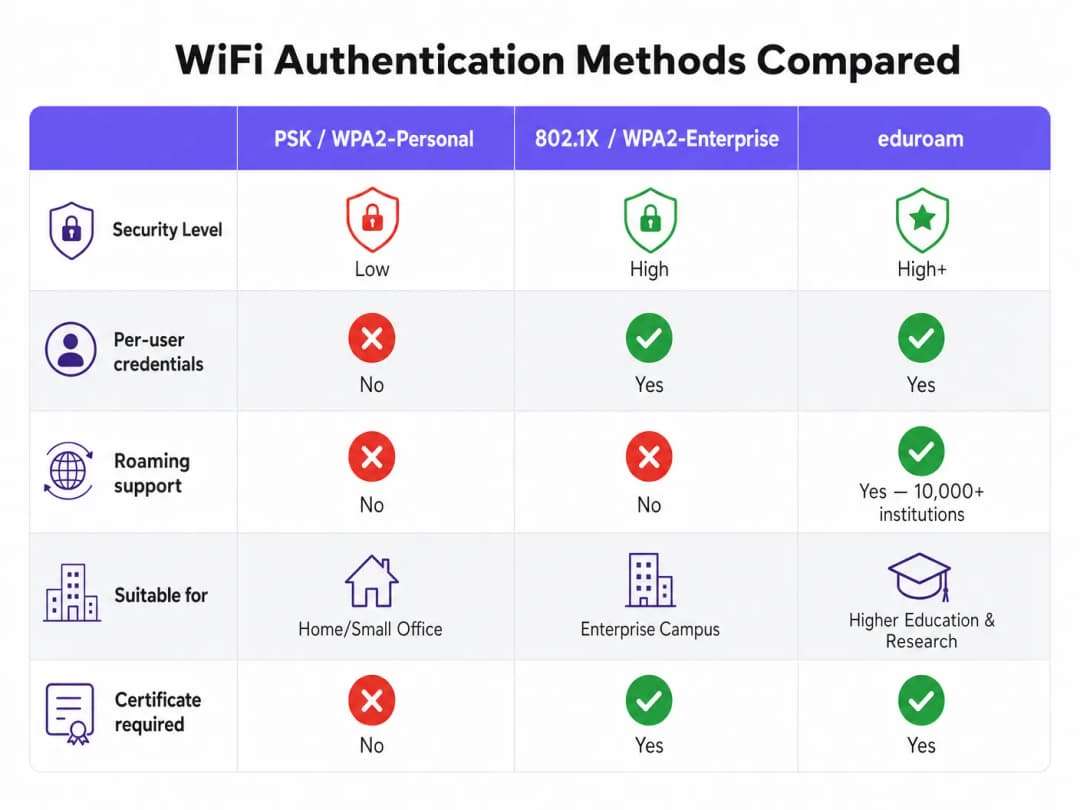
Per gli istituti di istruzione superiore, e per le strutture che servono il loro personale e i loro studenti, fornire una connettività wireless sicura e fluida non è più un lusso - è un requisito operativo. Lo standard per questa connettività è eduroam, un servizio di roaming globale basato sul framework IEEE 802.1X.
Questa guida fornisce ai responsabili IT, agli architetti di rete e ai direttori operativi delle strutture un riferimento completo e indipendente dal fornitore per comprendere, implementare e risolvere i problemi di 802.1X ed eduroam. Andiamo oltre i modelli teorici di base per esaminare come il WiFi di livello enterprise nei campus funzioni effettivamente nella pratica, inclusa la gestione dei certificati, l'architettura dei proxy RADIUS e l'integrazione con una strategia di rete guest più ampia.
Sia che stiate aggiornando una rete universitaria obsoleta o configurando un centro congressi per supportare i visitatori accademici, l'implementazione corretta di 802.1X riduce significativamente i rischi di sicurezza - in particolare il furto di credenziali - riducendo al contempo drasticamente i costi di supporto. Per le strutture al di fuori della tradizionale istruzione superiore, comprendere questi standard è essenziale per valutare le federazioni di roaming commerciale come OpenRoaming, che condividono la stessa architettura di base.
Approfondimento Tecnico: Architettura 802.1X ed eduroam
Nel profondo, eduroam è un'implementazione di IEEE 802.1X, lo standard di controllo dell'accesso alla rete basato su porta. 802.1X è stato originariamente progettato per le reti cablate, ma costituisce la base della sicurezza WPA2-Enterprise e WPA3-Enterprise.
Il Modello a Triangolo di 802.1X
Il framework 802.1X si basa sull'interazione di tre componenti distinti per autorizzare l'accesso:
- Supplicant (Richiedente): Il dispositivo client che richiede l'accesso alla rete (ad esempio, il laptop o lo smartphone di uno studente).
- Authenticator (Autenticatore): Il dispositivo di accesso alla rete (ad esempio, un access point wireless o uno switch gestito). Agisce come un guardiano, bloccando tutto il traffico ad eccezione dei messaggi di autenticazione fino a quando il dispositivo non viene autorizzato.
- Authentication Server (Server di Autenticazione): Il sistema di back-end che convalida le credenziali, quasi universalmente un server RADIUS (Remote Authentication Dial-In User Service).
Quando un dispositivo si connette, l'autenticatore stabilisce una porta controllata. Trasmette i messaggi EAP (Extensible Authentication Protocol) tra il richiedente e il server di autenticazione. Se le credenziali sono valide, il server restituisce un messaggio RADIUS Access-Accept e l'autenticatore apre la porta per consentire il passaggio del normale traffico IP.

Gerarchia Proxy RADIUS di eduroam
Ciò che rende eduroam unico è la sua architettura federata. Consente agli utenti di autenticarsi presso qualsiasi istituto partecipante utilizzando le proprie credenziali d'origine, senza che l'istituto ospitante conservi mai una copia di tali credenziali.
Questo si ottiene attraverso una catena gerarchica di proxy RADIUS. Quando un utente di username@university.ac.uk si connette al SSID eduroam presso una sede ospitante:
- Il dispositivo dell'utente invia una richiesta di autenticazione nel formato
username@university.ac.uk. - Il server RADIUS della sede ospitante ispeziona il realm (la parte dopo il simbolo
@). Riconoscendolo come dominio esterno, inoltra la richiesta tramite proxy al server RADIUS nazionale di primo livello (gestito dalla National Research and Education Network, o NREN). - Il server nazionale instrada la richiesta al server RADIUS dell'istituto d'origine (
university.ac.uk). - L'istituto d'origine convalida le credenziali e restituisce un messaggio di
Access-AcceptoAccess-Rejectlungo la catena.
L'intero processo si completa in genere in meno di due secondi. Aspetto fondamentale, la password dell'utente non viene mai esposta all'istituto ospitante o ai server proxy intermedi; è protetta all'interno di un tunnel EAP crittografato stabilito direttamente tra il richiedente e il server RADIUS d'origine.
Metodi EAP: il compromesso tra sicurezza e facilità di implementazione
La scelta del metodo EAP determina il modo in care viene formato il tunnel crittografato e come vengono scambiate le credenziali. La definizione del servizio di policy eduroam limita rigorosamente i metodi consentiti per garantire la sicurezza.
- PEAP (Protected EAP): Il metodo di implementazione più comune. Utilizza un certificato lato server sul server RADIUS per stabilire un tunnel TLS. Il client si autentica quindi all'interno di quel tunnel, in genere utilizzando MSCHAPv2 (nome utente e password). È relativamente facile da distribuire, ma è vulnerabile ad attacchi di rogue access point se i client non sono configurati per convalidare rigorosamente il certificato del server.
- EAP-TLS: Lo standard di riferimento per la sicurezza. Richiede l'autenticazione reciproca, il che significa che sia il server RADIUS che il dispositivo client devono presentare certificati validi. Sebbene sia immune al phishing delle credenziali, richiede un'infrastruttura a chiave pubblica (PKI) robusta per emettere e gestire i certificati client, rendendo più complessa l'implementazione su larga scala.
Hai domande sulla tua configurazione specifica?
Il nostro team collabora con gestori di sedi, responsabili IT e ingegneri di rete in 80.000 sedi. Prenota una chiamata di 20 minuti e ti mostreremo come altri professionisti come te hanno risolto il problema.
Guida all'implementazione
L'implementazione di 802.1X ed eduroam richiede un'attenta coordinazione tra l'infrastruttura di rete, la gestione delle identità e la configurazione dei client.
1. Preparazione dell'infrastruttura
Assicurati che i tuoi access point e controller wireless supportino WPA2-Enterprise/WPA3-Enterprise e 802.1X. Qualsiasi hardware moderno di livello enterprise (Cisco, Aruba, Juniper e altri) soddisferà questo requisito. È inoltre necessario distribuire un'infrastruttura RADIUS robusta (come FreeRADIUS, Cisco ISE o Aruba ClearPass) in grado di gestire il carico di autenticazione previsto e di fungere da proxy per le richieste.
2. Gestione dei certificati
Per le distribuzioni PEAP, il server RADIUS necessita di un certificato TLS emesso da un'autorità di certificazione (CA) attendibile per i client. Non utilizzare mai certificati autofirmati in una distribuzione eduroam di produzione. I certificati devono essere rinnovati regolarmente per evitare interruzioni dell'autenticazione.
3. Configurazione del client (lo strumento CAT)
Il punto di errore più comune nelle distribuzioni eduroam è la configurazione errata del client. Quando gli utenti si connettono manualmente, spesso non riescono a configurare la convalida del certificato, rimanendo esposti ad attacchi di raccolta delle credenziali.
Per mitigare questo rischio, gli istituti devono utilizzare l'eduroam Configuration Assistant Tool (CAT) o una soluzione MDM per distribuire profili preconfigurati. Questi profili configurano automaticamente il metodo EAP corretto, associano il certificato del server RADIUS previsto e impostano il protocollo di autenticazione interno appropriato.
4. Assegnazione e segmentazione della VLAN
Una distribuzione matura utilizza gli attributi RADIUS per assegnare in modo dinamico le VLAN in base all'identità dell'utente.
- Utenti interni: Assegnati a VLAN interne con accesso appropriato alle risorse del campus.
- Utenti ospiti: Assegnati a una VLAN guest limitata che offre solo l'accesso a Internet.
Questa segmentazione è fondamentale per la sicurezza e la conformità, garantendo che i dispositivi dei visitatori non possano accedere a reti interne sensibili.
Best practice e raccomandazioni indipendenti dai fornitori
- Dai priorità a WPA3: Per le nuove distribuzioni, abilita WPA3-Enterprise per ottenere la crittografia obbligatoria a 192 bit e una migliore protezione contro gli attacchi di dizionario offline.
- Imponi la convalida del certificato: Richiedi l'uso di profili di configurazione (tramite CAT o MDM) per garantire che il supplicant convalidi rigorosamente il certificato del server RADIUS prima di trasmettere le credenziali.
- Usa RadSec: Quando configuri le connessioni proxy RADIUS alla federazione nazionale, utilizza RadSec (RADIUS su TLS) anziché il semplice UDP. Questo crittografa il traffico proxy e migliora l'affidabilità sui collegamenti geografici.
- Integra con una soluzione per ospiti: eduroam serve solo utenti con credenziali accademiche. È necessario mantenere una soluzione di Guest WiFi separata e sicura per appaltatori, membri del pubblico e partecipanti agli eventi.
- Esamina l'infrastruttura correlata: Assicurati che la tua rete sottostante sia sicura. Leggi la nostra guida Garantire la sicurezza della rete con DNS robusti e sicurezza per maggiori dettagli. Se stai distribuendo un'infrastruttura temporanea per eventi universitari, consulta WiFi per Eventi: Pianificazione e Distribuzione di Reti Wireless Temporanee o la versione in lingua portoghese Event WiFi: Planeamento e Implementação de Redes Sem Fios Temporárias.
Risoluzione dei Problemi e Mitigazione dei Rischi
Quando l'autenticazione fallisce, una risoluzione dei problemi sistematica è essenziale.
- Isola il dominio di errore: Determina se il guasto è locale (che interessa gli utenti sulla tua rete), remoto (che interessa i tuoi utenti altrove) o in entrata (che interessa i visitatori sulla tua rete).
- Controlla i log RADIUS: I log del server RADIUS sono la fonte autorevole di verità. Cerca i messaggi di
Access-Reject(che indicano credenziali errate o violazioni delle policy) o timeout (che indicano problemi di connettività del proxy). - Verifica la validità del certificato: Assicurati che il certificato del server RADIUS non sia scaduto e che l'intera catena di certificati venga presentata ai client.
- Monitora la latenza a monte: Un'elevata latenza verso il proxy RADIUS nazionale può causare timeout dei client, con conseguenti connessioni fallite anche quando le credenziali sono corrette.
ROI e Impatto Aziendale
Per gli istituti di istruzione superiore, il ritorno sull'investimento di un'implementazione eduroam correttamente configurata si traduce in una drastica riduzione dei ticket di supporto. Eliminando i Captive Portal e l'inserimento manuale delle password, gli helpdesk IT registrano un calo significativo delle chiamate relative alla connettività. (L'impegno di Purple in questo settore è evidente; vedi Purple nomina Tim Peers come VP di Education, sottolineando le sue ambizioni nel settore dell'istruzione superiore).
Per i locali commerciali - come hospitality, retail, healthcare o transport - il supporto a eduroam Visitor Access (eVA) o a federazioni simili come OpenRoaming offre un'esperienza senza intoppi per un target demografico di alto valore. Garantisce che i visitatori accademici si connettano automaticamente e in modo sicuro, migliorando la soddisfazione e consentendo al locale di mantenere una rigorosa segmentazione della rete. Se la tua struttura ha bisogno di una larghezza di banda dedicata per supportare questa domanda, considera la lettura di Cos'è una linea dedicata? Internet su misura per le aziende.
Quando si pianificano gli aggiornamenti di rete, l'integrazione della funzionalità 802.1X assicura che la tua infrastruttura sia pronta per il moderno networking basato sull'identità, ponendo le basi per servizi avanzati di WiFi Analytics e servizi basati sulla posizione.
Definizioni chiave
802.1X
Uno standard IEEE per il controllo dell'accesso alla rete basato su porta (PNAC). Fornisce un meccanismo di autenticazione ai dispositivi che desiderano connettersi a una LAN o WLAN.
Il protocollo fondamentale per la sicurezza WiFi di livello enterprise, che sostituisce le password condivise (PSK) con un'autenticazione personalizzata.
RADIUS (Remote Authentication Dial-In User Service)
Un protocollo di rete che fornisce una gestione centralizzata di autenticazione, autorizzazione e tracciamento (AAA) per gli utenti che si connettono e utilizzano un servizio di rete.
Il server backend in un'implementazione 802.1X che controlla effettivamente le credenziali dell'utente rispetto a una directory (come Active Directory).
EAP (Extensible Authentication Protocol)
Un framework di autenticazione utilizzato frequentemente nelle reti wireless e nelle connessioni point-to-point. Consente il trasporto e l'utilizzo di vari meccanismi di autenticazione.
La lingua parlata tra il dispositivo client e il server RADIUS durante l'handshake 802.1X.
Supplicant
Il dispositivo client (ad esempio, laptop, smartphone) o il software su tale dispositivo che tenta di autenticarsi a una rete utilizzando 802.1X.
L'entità che richiede l'accesso. La sua configurazione (specialmente per quanto riguarda la convalida del certificato) è fondamentale per la sicurezza.
Authenticator
Il dispositivo di rete (ad esempio, access point wireless, switch Ethernet) che facilita il processo di autenticazione 802.1X trasmettendo messaggi tra il Supplicant e il server di autenticazione.
Il guardiano che blocca il traffico di rete finché il server RADIUS non dà il via libera.
PEAP (Protected Extensible Authentication Protocol)
Un metodo EAP che incapsula la transazione EAP all'interno di un tunnel TLS stabilito utilizzando un certificato lato server, proteggendo l'autenticazione interna (solitamente una password).
Il metodo di autenticazione più comune per eduroam, in grado di bilanciare la sicurezza con la facilità di implementazione.
RadSec
Un protocollo per la trasmissione di dati RADIUS su TCP e TLS, invece del tradizionale UDP.
Consigliato per proteggere le connessioni proxy tra le istituzioni e la federazione nazionale eduroam, impedendo l'intercettazione del traffico di autenticazione.
Realm
La parte dell'identità di un utente che segue il simbolo "@" (ad esempio, "university.ac.uk" in "user@university.ac.uk").
Utilizzato dai server proxy RADIUS per determinare dove instradare la richiesta di autenticazione in un ambiente federato come eduroam.
Esempi pratici
Un hotel per conferenze da 400 camere adiacente a una grande università ospita frequentemente simposi accademici. Il Direttore IT desidera consentire agli accademici in visita di connettersi automaticamente senza utilizzare il Captive Portal standard dell'hotel, ma deve garantire che questi visitatori non possano accedere alla rete aziendale dell'hotel o alla VLAN della rete ospiti standard.
L'hotel dovrebbe implementare eduroam Visitor Access (eVA) o aderire a una federazione commerciale come OpenRoaming.
- L'hotel configura un nuovo SSID ("eduroam" o "OpenRoaming") sui propri access point aziendali.
- Gli AP sono configurati per utilizzare WPA2-Enterprise/802.1X.
- L'hotel distribuisce un server RADIUS locale configurato per inoltrare le richieste di autenticazione per i domini esterni alla federazione nazionale (per eduroam) o all'hub OpenRoaming.
- Fondamentalmente, il server RADIUS locale è configurato per restituire un attributo ID VLAN specifico nel messaggio
Access-Acceptper tutte le autenticazioni tramite proxy. - Gli access point inseriscono questi utenti autenticati su una VLAN isolata, di solo internet, completamente segmentata dal traffico aziendale e ospiti standard dell'hotel.
Un team IT universitario nota un picco di account studenteschi compromessi. Le indagini rivelano che gli studenti si connettono a un access point canaglia che trasmette l'SSID "eduroam" presso una caffetteria locale. L'AP canaglia utilizza un certificato autofirmato per raccogliere le credenziali tramite PEAP.
Il team IT deve imporre immediatamente una rigida convalida dei certificati su tutti i dispositivi client.
- Devono smettere di consigliare agli studenti di connettersi manualmente all'SSID e di "accettare l'avviso del certificato".
- Distribuiscono l'eduroam Configuration Assistant Tool (CAT) per i dispositivi BYOD e aggiornano i profili MDM per i dispositivi gestiti.
- Questi profili configurano il supplicant per considerare attendibile solo la specifica Certificate Authority (CA) che ha emesso il certificato del server RADIUS dell'università e per verificare il Common Name (CN) del server.
- Una volta configurato, se il dispositivo di uno studente incontra l'AP canaglia, l'attivazione del tunnel EAP fallirà perché il certificato canaglia non corrisponde alla CA/CN associata, impedendo la trasmissione delle credenziali.
Una catena di negozi di vendita al dettaglio desidera offrire OpenRoaming in 50 sedi utilizzando la propria infrastruttura WiFi per gli ospiti esistente, che attualmente si basa su un SSID aperto con un Captive Portal.
La catena di negozi deve aggiornare la propria rete per supportare il proxy 802.1X e RADIUS.
- Il team di rete abilita un nuovo SSID che trasmette l'OI (Organisation Identifier) di OpenRoaming Consortium.
- Configura gli access point per l'autenticazione tramite 802.1X.
- Configura il proprio server RADIUS centrale per inoltrare le richieste tramite proxy all'hub della federazione OpenRoaming.
- Si assicura che la propria connessione internet di backhaul possa supportare l'aumento previsto delle connessioni automatiche, aggiornando potenzialmente a linee dedicate se necessario.
Domande di esercitazione
Q1. La tua università sta implementando una nuova rete wireless. Il CISO esige che il phishing delle credenziali tramite access point non autorizzati sia matematicamente impossibile. Quale metodo EAP devi selezionare?
Suggerimento: Considera quale metodo si affida alle password rispetto a quello che si affida interamente a chiavi crittografiche.
Visualizza risposta modello
È necessario selezionare EAP-TLS. A differenza di PEAP, che si affida a una password all'interno di un tunnel TLS, EAP-TLS richiede un'autenticazione reciproca dei certificati. Poiché il dispositivo client si autentica utilizzando un certificato crittografico anziché una password, non ci sono credenziali che un access point non autorizzato possa sottrarre tramite phishing.
Q2. Un ricercatore ospite proveniente da un'altra università lamenta l'impossibilità di connettersi alla tua rete eduroam. I tuoi utenti locali si connettono correttamente. Controlli i log del tuo server RADIUS locale e vedi che la richiesta arriva, ma va in timeout prima che venga ricevuto un Access-Accept. Qual è la causa più probabile?
Suggerimento: Pensa al percorso che la richiesta di autenticazione compie per un utente ospite rispetto a un utente locale.
Visualizza risposta modello
La causa più probabile è un problema di connettività o di latenza tra il tuo server RADIUS locale e il proxy RADIUS NREN nazionale. Poiché gli utenti locali si autenticano direttamente sul tuo server, non sono interessati dal problema. La richiesta dell'utente ospite deve essere inoltrata tramite proxy a monte e un timeout indica che la risposta dell'istituto di origine non ritorna in tempo.
Q3. Sei un network architect per una catena di negozi situata vicino a una grande università. Desideri offrire un accesso WiFi trasparente agli studenti che utilizzano eduroam Visitor Access (eVA), ma devi rispettare lo standard PCI-DSS per i tuoi terminali POS. Come puoi integrare in modo sicuro eVA?
Suggerimento: In che modo l'802.1X consente all'access point di rete di differenziare il traffico dopo l'autenticazione?
Visualizza risposta modello
Integri eVA configurando il tuo server RADIUS per assegnare tutte le autenticazioni eVA andate a buon fine a una VLAN guest dedicata, solo internet. Il messaggio Access-Accept dal server RADIUS deve includere l'ID VLAN specifico. Ciò garantisce che i dispositivi degli studenti siano completamente segmentati dalla VLAN conforme a PCI utilizzata dai terminali del punto vendita, soddisfacendo i requisiti di conformità.
Continua a leggere questa serie
Guida per amministratori di rete alla configurazione dell'autenticazione RADIUS per il WiFi ospiti
Un riferimento tecnico completo per gli amministratori di rete sulla distribuzione dell'autenticazione RADIUS per il WiFi ospiti. Copre l'architettura, i passaggi di configurazione indipendenti dal fornitore, le migliori pratiche di sicurezza e la risoluzione dei problemi comuni di implementazione.
Implementazione di SCEP per BYOD sicuro e WiFi 802.1X nell'istruzione superiore
Questa guida tecnica illustra come i team IT dell'istruzione superiore possono automatizzare la registrazione dei certificati 802.1X per migliaia di dispositivi BYOD tramite SCEP. Copre l'architettura, i vantaggi in termini di sicurezza e i passaggi pratici di distribuzione per sostituire il provisioning manuale con un modello di accesso alla rete sicuro e zero-touch.
Configuring RADIUS Authentication for Guest and Staff WiFi Networks
Questa guida di riferimento tecnica descrive l'architettura, la configurazione e l'implementazione dell'autenticazione RADIUS per le reti WiFi aziendali per ospiti e personale. Fornisce ai network architect e ai manager IT i protocolli esatti, gli standard di sicurezza e le metodologie di risoluzione dei problemi necessari per creare sistemi di controllo degli accessi wireless sicuri e scalabili.
Hai domande sulla tua configurazione specifica?
Il nostro team collabora con gestori di sedi, responsabili IT e ingegneri di rete in 80.000 sedi. Prenota una chiamata di 20 minuti e ti mostreremo come altri professionisti come te hanno risolto il problema.