
Filtraggio DNS per il WiFi Ospiti: Blocco di Malware e Contenuti Inappropriati
Questa guida fornisce a responsabili IT, architetti di rete e direttori delle operazioni di sede un riferimento tecnico definitivo per l'implementazione del filtraggio DNS sulle reti WiFi ospiti. Copre l'architettura del blocco delle minacce a livello DNS, un confronto tra i principali servizi DNS cloud, una guida all'implementazione passo-passo e casi di studio reali da ambienti di ospitalità e vendita al dettaglio. Il filtraggio DNS è la prima linea di difesa più conveniente contro malware, phishing e contenuti inappropriati sulle reti pubbliche, e questa guida fornisce ai team gli strumenti per implementarlo con fiducia e in conformità con i requisiti PCI DSS, GDPR e HIPAA.
Ascolta questa guida
Visualizza trascrizione del podcast

Riepilogo Esecutivo
Il filtraggio DNS per il WiFi ospiti non è più un miglioramento di sicurezza opzionale — è un controllo di base per qualsiasi sede che gestisce una rete pubblica. Quando un hotel, uno stadio, una catena di negozi o un centro conferenze offre WiFi ospiti, si assume la responsabilità del traffico che attraversa la sua infrastruttura. Senza il filtraggio a livello DNS, quella rete è un condotto aperto per callback di malware, sessioni di phishing e contenuti inappropriati, esponendo l'organizzazione a responsabilità normative, rischio reputazionale e potenziale compromissione della rete.
Questa guida spiega come funziona il filtraggio DNS a livello tecnico, confronta i principali servizi DNS cloud disponibili per gli operatori di sede e fornisce una roadmap di implementazione strutturata. Affronta il requisito critico di applicazione — l'intercettazione delle query DNS hardcoded — che la maggior parte delle implementazioni trascura, e copre la gestione dei falsi positivi, l'allineamento alla conformità e la sfida emergente dei protocolli DNS crittografati. I clienti Purple possono sovrapporre il filtraggio DNS direttamente alla loro infrastruttura Guest WiFi , ottenendo sia sicurezza che la visibilità per correlare gli eventi di minaccia con i dati di WiFi Analytics .
Approfondimento Tecnico
Come Funziona il Filtraggio DNS
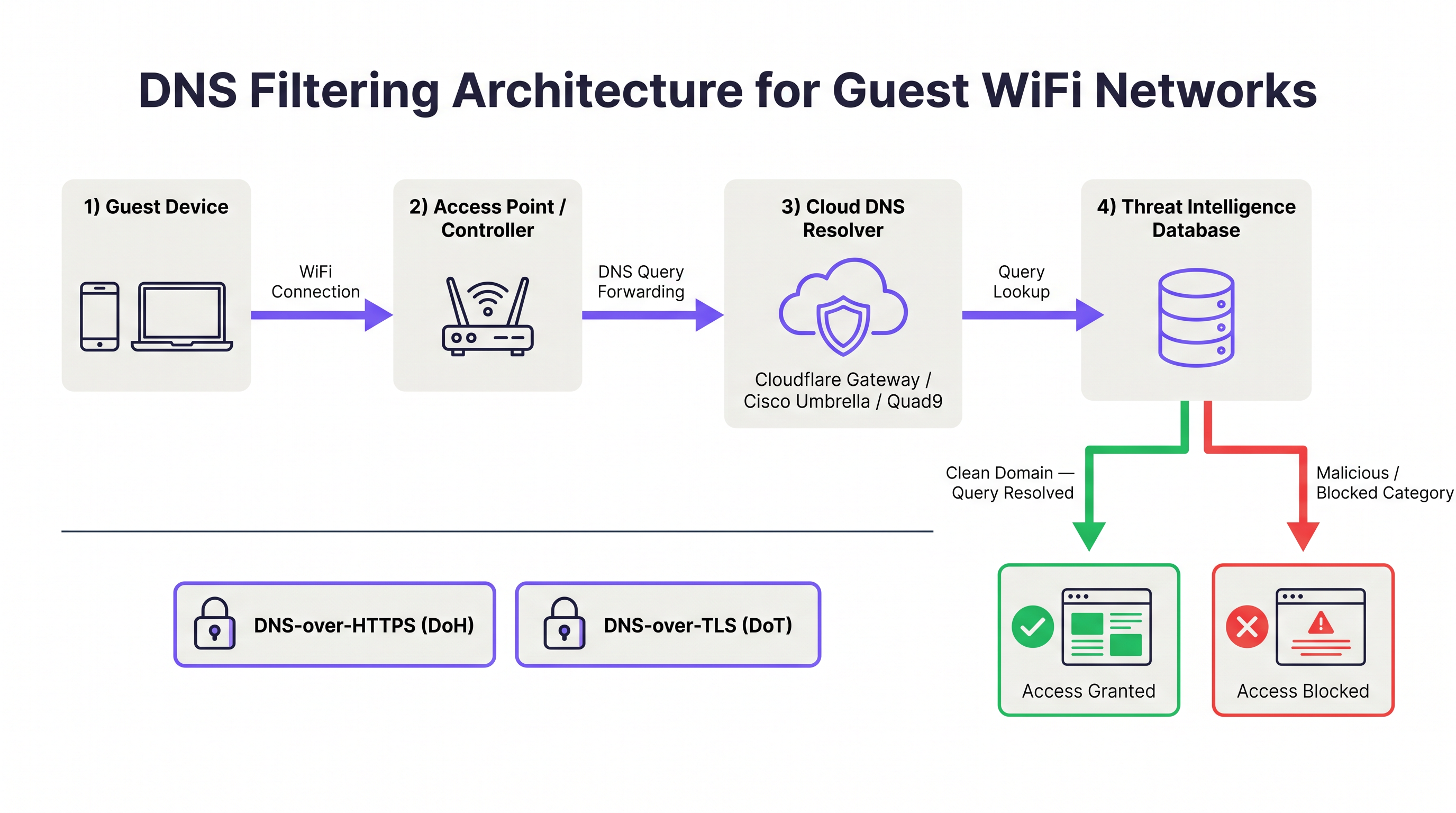
Il Domain Name System (DNS) è lo strato di risoluzione fondamentale di internet. Ogni volta che un dispositivo tenta di connettersi a una risorsa web, emette prima una query DNS per risolvere il nome di dominio in un indirizzo IP. Il filtraggio DNS intercetta questo processo di risoluzione e valuta il dominio richiesto rispetto a un database di threat intelligence prima di restituire una risposta. Se il dominio è classificato come dannoso — ospita malware, opera come sito di phishing o funge da endpoint di comando e controllo (C2) di una botnet — il resolver restituisce un indirizzo non instradabile o reindirizza il client a una pagina di blocco. La connessione TCP/IP all'host dannoso non viene mai stabilita.
Questa architettura offre un vantaggio fondamentale in termini di efficienza rispetto ai firewall con ispezione dei pacchetti. Un firewall deve ispezionare i dati dopo che una connessione è stata avviata; il filtraggio DNS impedisce del tutto l'avvio della connessione. Per gli ambienti WiFi ospiti dove centinaia di dispositivi non attendibili possono essere attivi contemporaneamente, questa intercettazione a monte riduce drasticamente il volume di traffico dannoso che raggiunge il perimetro della rete.
Cosa il Filtraggio DNS Può e Non Può Bloccare
Comprendere l'ambito del filtraggio DNS è essenziale per stabilire aspettative accurate con gli stakeholder.
| Categoria di Minaccia | Efficacia del Filtraggio DNS | Note |
|---|---|---|
| Domini di distribuzione malware | Alta | Blocca il download di payload dannosi |
| Siti di phishing | Alta | Blocca le pagine di raccolta credenziali |
| Comunicazioni C2 di botnet | Alta | Interrompe il malware già presente sul dispositivo |
| Server di staging ransomware | Alta | Impedisce il recupero del payload e lo scambio di chiavi |
| Contenuti per adulti / inappropriati | Alta | Filtraggio basato su categoria |
| Pool di cryptomining | Alta | Blocca le connessioni pool basate su dominio |
| Minacce basate su IP (senza dominio) | Nessuna | Richiede firewall o IPS |
| Payload crittografati in HTTPS | Nessuna | Richiede ispezione TLS |
| Traffico tunnelizzato VPN | Nessuna | Richiede blocco VPN al firewall |
| Movimento laterale (LAN) | Nessuna | Richiede segmentazione della rete |
Il filtraggio DNS non è una soluzione di sicurezza completa. È uno strato in un'architettura di difesa in profondità. Per una sicurezza completa del WiFi ospiti, dovrebbe affiancarsi alla segmentazione VLAN, all'autenticazione tramite captive portal, ai controlli di timeout di sessione (vedi Timeout di Sessione WiFi Ospiti: Bilanciare UX e Sicurezza ) e, ove giustificato, all'ispezione TLS.
Filtraggio DNS Cloud: Architettura e Confronto Servizi
I servizi di filtraggio DNS cloud operano reti anycast globali, il che significa che le query DNS vengono instradate al data center più vicino, minimizzando la latenza. I quattro servizi principali rilevanti per gli operatori di sede sono Cloudflare Gateway, Cisco Umbrella, Quad9 e NextDNS.
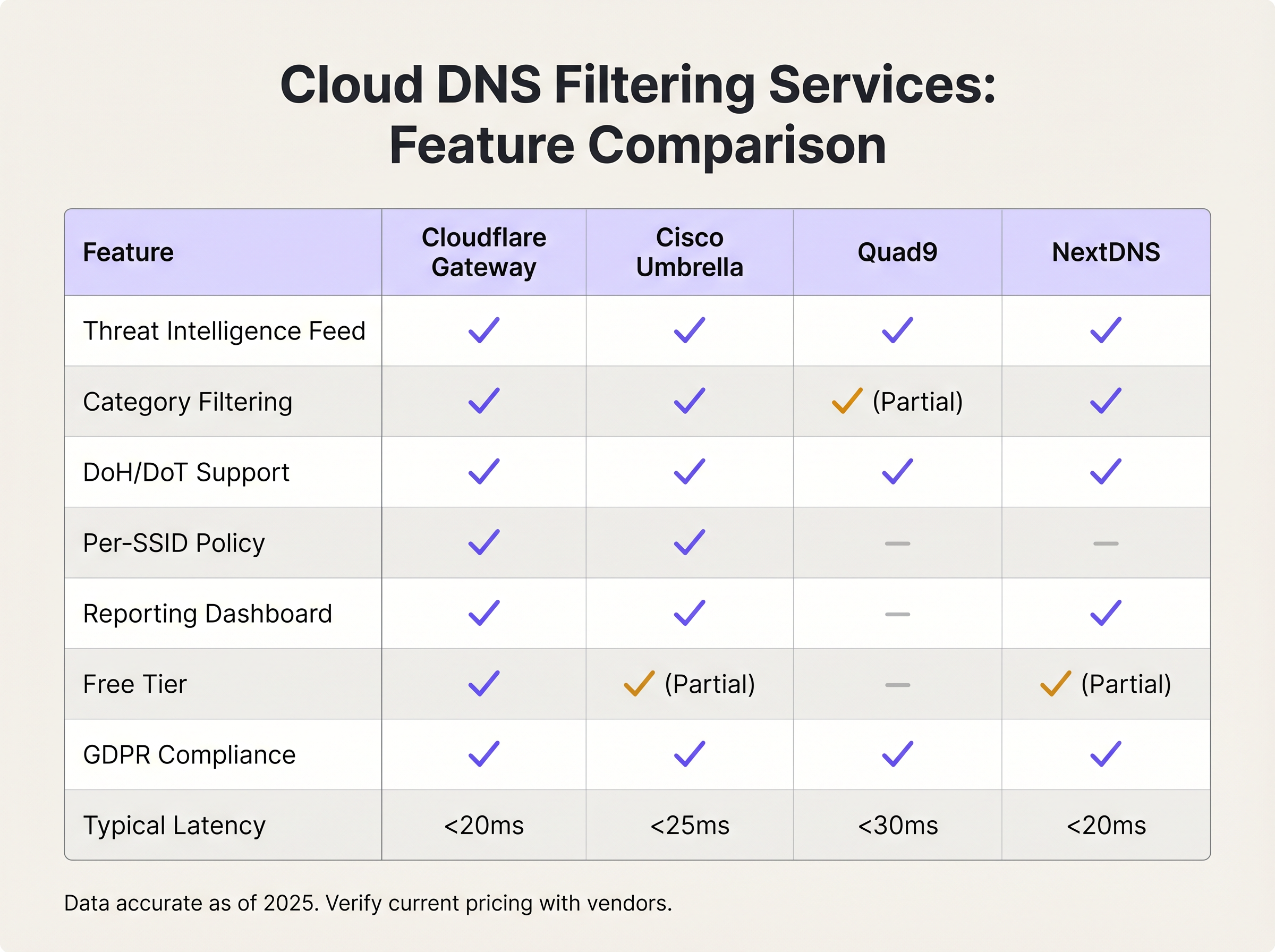
Cloudflare Gateway (parte della piattaforma Cloudflare Zero Trust) offre una latenza di risoluzione inferiore a 20ms a livello globale, filtraggio granulare per categoria, applicazione delle policy per località e un accordo di elaborazione dati conforme al GDPR. Il suo livello gratuito supporta il blocco di base delle minacce; i livelli a pagamento aggiungono filtraggio avanzato per categoria, logging e accesso API per l'automazione delle policy.
Cisco Umbrella è lo standard aziendale per le organizzazioni con infrastrutture Cisco esistenti. Fornisce il feed di threat intelligence più completo — informato da Cisco Talos, una delle più grandi organizzazioni commerciali di ricerca sulle minacce — e supporta l'applicazione delle policy per SSID, che è fondamentale per le sedi che operano più SSID (personale, ospiti, IoT). Umbrella si integra con il più ampio portfolio di sicurezza di Cisco, inclusi gli access point Meraki, semplificando l'implementazione per le reti basate su Meraki.
Quad9 (gestito dalla Quad9 Foundation, un'organizzazione svizzera senza scopo di lucro) si concentra esclusivamente sul filtraggio di sicurezza piuttosto che sulla categorizzazione dei contenuti. Blocca i domini dannosi utilizzando la threat intelligence di oltre 20 partner, non registra informazioni di identificazione personale ed è gratuito da usare. È una scelta eccellente per le organizzazioni con rigorosi requisiti di sovranità dei dati oper budget limitati, sebbene manchi delle capacità di filtraggio per categoria e di reporting delle alternative commerciali.
NextDNS offre un servizio DNS cloud altamente configurabile con un'ampia libreria di filtraggio per categoria, profili per dispositivo e registrazione dettagliata delle query. Il suo modello di prezzo — basato sul volume mensile delle query — lo rende conveniente per implementazioni di piccole e medie dimensioni. Supporta nativamente DNS-over-HTTPS e DNS-over-TLS.
Filtraggio DNS Self-Hosted: Quando Ha Senso
Le soluzioni self-hosted — più comunemente Pi-hole con blocklist commerciali, o un'implementazione BIND con Response Policy Zones (RPZ) — offrono completa sovranità dei dati e controllo delle policy. Sono appropriate per organizzazioni con rigorosi requisiti normativi sui dati delle query DNS, o per quelle con team infrastrutturali esistenti in grado di gestire il sovraccarico operativo. Il compromesso è significativo: le soluzioni self-hosted richiedono un'implementazione ad alta disponibilità (configurazioni active-passive o active-active — vedi RADIUS সার্ভার হাই অ্যাভেইলেবিলিটি: Active-Active বনাম Active-Passive per una discussione parallela dei modelli HA), aggiornamenti manuali dei feed di minacce e monitoraggio interno. Per la maggior parte degli operatori di sedi, il costo operativo supera il beneficio.
DNS Crittografato: Considerazioni su DoH e DoT
DNS-over-HTTPS (DoH) e DNS-over-TLS (DoT) crittografano le query DNS, proteggendo la privacy degli utenti su reti non attendibili. Tuttavia, creano anche un vettore di bypass per il filtraggio DNS. Un dispositivo configurato per utilizzare un resolver DoH pubblico (come https://cloudflare-dns.com/dns-query) crittograferà le sue query DNS all'interno del traffico HTTPS sulla porta 443, rendendo inefficace l'intercettazione tradizionale sulla porta 53.
La strategia di mitigazione ha due componenti. Primo, configura il tuo firewall o controller wireless per bloccare le connessioni in uscita verso endpoint resolver DoH pubblici noti. Cloudflare, Google e altri provider pubblicano i loro intervalli IP degli endpoint DoH. Secondo, assicurati che il servizio di filtraggio DNS scelto supporti nativamente DoH e DoT, in modo che i dispositivi configurati per utilizzare DNS crittografato possano essere indirizzati al tuo resolver sicuro anziché a uno pubblico. Cisco Umbrella e Cloudflare Gateway supportano entrambi questa configurazione.
Guida all'Implementazione
Passaggio 1: Seleziona il Tuo Servizio di Filtraggio DNS
I criteri di selezione dovrebbero essere guidati da tre fattori: scala, granularità delle policy e requisiti di conformità. Il seguente framework si applica alla maggior parte delle implementazioni in sedi.
| Scala di Implementazione | Servizio Consigliato | Motivazione |
|---|---|---|
| < 100 utenti concorrenti | Cloudflare Gateway (gratuito) o Quad9 | Costo zero, blocco delle minacce adeguato |
| 100–500 utenti concorrenti | NextDNS (a pagamento) o Cloudflare Gateway | Filtraggio per categoria, dashboard di reporting |
| 500+ utenti concorrenti, sito singolo | Cisco Umbrella Essentials | Policy per SSID, SLA aziendale |
| Azienda multi-sito | Cisco Umbrella Advantage o Cloudflare Gateway Enterprise | Gestione centralizzata delle policy, automazione API |
| Ambienti sanitari / regolamentati | Cisco Umbrella o RPZ self-hosted | Sovranità dei dati, registrazione audit HIPAA |
Passaggio 2: Configura il DHCP sull'SSID Ospite
Naviga all'interfaccia di gestione del tuo controller wireless o access point e configura l'ambito DHCP per l'SSID ospite per assegnare gli indirizzi IP del resolver del servizio di filtraggio DNS. Non utilizzare i server DNS predefiniti dell'ISP a monte. Per Cloudflare Gateway, usa gli IP del resolver forniti nella tua dashboard Zero Trust. Per Cisco Umbrella, usa gli IP del resolver Umbrella (208.67.222.222 e 208.67.220.220 per implementazioni legacy; IP di appliance virtuali per implementazioni moderne).
Per le reti gestite da Purple, questa configurazione viene applicata a livello di controller, garantendo un'applicazione coerente delle policy su tutti gli access point sull'SSID ospite.
Passaggio 3: Applica l'Intercettazione DNS al Margine della Rete
Questo è il passaggio più frequentemente trascurato. Configura il tuo firewall o controller wireless per intercettare tutto il traffico in uscita sulla porta UDP 53 e sulla porta TCP 53 e reindirizzarlo al tuo resolver di filtraggio DNS. Ciò impedisce ai dispositivi con impostazioni DNS hardcoded di bypassare il filtro. Su Cisco Meraki, questo è implementato tramite una regola di traffic shaping. Su Fortinet FortiGate, usa una policy di proxy DNS. Su pfSense o OPNsense, configura una regola di reindirizzamento NAT.
Inoltre, blocca le connessioni in uscita verso endpoint resolver DoH pubblici noti sulla porta 443 per prevenire il bypass DNS crittografato. Mantieni un elenco regolarmente aggiornato degli intervalli IP dei resolver DoH.
Passaggio 4: Definisci la Tua Policy di Filtraggio
Inizia con la baseline di sicurezza — categorie che dovrebbero essere bloccate universalmente indipendentemente dal tipo di sede:
- Distribuzione di malware
- Phishing e raccolta di credenziali
- Command-and-control di botnet
- Staging di ransomware
- Cripto-mining
Quindi applica categorie di contenuto specifiche per la sede basate sulla tua policy di utilizzo accettabile:
| Tipo di Sede | Categorie Aggiuntive Consigliate da Bloccare |
|---|---|
| Commercio al dettaglio per famiglie / centro commerciale | Contenuti per adulti, gioco d'azzardo, contenuti estremisti |
| Hotel (rete ospite) | Materiale pedopornografico (obbligatorio), contenuti estremisti |
| Stadio / sede eventi | Contenuti per adulti, contenuti estremisti, streaming illegale |
| Centro conferenze | Condivisione file peer-to-peer, proxy anonimizzanti |
| Struttura sanitaria | Contenuti per adulti, gioco d'azzardo, social media (opzionale) |
| Settore pubblico / biblioteca | Contenuti per adulti, contenuti estremisti, gioco d'azzardo |
Passaggio 5: Testa e Convalida
Prima di andare online, convalida la configurazione utilizzando un dispositivo di test sull'SSID ospite. Tenta di accedere a un dominio di test malware noto (la maggior parte dei servizi di filtraggio DNS fornisce domini di test a questo scopo). Conferma che la pagina di blocco venga visualizzata. Tenta di utilizzare un server DNS hardcoded (es. nslookup google.com 8.8.8.8) e conferma che la query venga intercettata e reindirizzata. Testa il bypass DoH configurando un browser per utilizzare un resolver DoH pubblico e conferma che la connessione sia bloccata.
Passaggio 6: Monitora, Ottimizza e Riporta
Rivedi quotidianamente la dashboard di filtraggio DNS per il fiprime quattro settimane. Le metriche chiave da monitorare includono il totale delle query, le query bloccate per categoria, i domini più bloccati e i rapporti di falsi positivi dagli utenti. Stabilire un processo di revisione della whitelist — qualsiasi dominio aggiunto alla whitelist dovrebbe essere documentato con una giustificazione aziendale e rivisto trimestralmente. Programmare rapporti mensili per il CISO o il direttore IT che mostrino i volumi delle minacce e le suddivisioni per categoria.
Migliori Pratiche
Segmentare le politiche DNS per ospiti e aziendali. Non applicare mai la stessa politica di filtro DNS agli SSID per ospiti e per il personale. Le reti per ospiti richiedono un filtro dei contenuti più rigoroso; le reti per il personale potrebbero richiedere l'accesso a categorie che sarebbero inappropriate per gli utenti pubblici. Cisco Umbrella e Cloudflare Gateway supportano entrambi politiche per località o per rete.
Allineare la politica di utilizzo accettabile con la configurazione del filtro DNS. La politica di filtro visualizzata nei termini di servizio del captive portal deve riflettere accuratamente ciò che viene bloccato. Il disallineamento crea esposizione legale. Collaborare con il team legale per garantire che l'AUP faccia esplicito riferimento al filtro dei contenuti a livello DNS. Il captive portal Guest WiFi di Purple supporta testo AUP personalizzabile a questo scopo.
Implementare resolver DNS ridondanti. Configurare due indirizzi IP di resolver nell'ambito DHCP — uno primario e uno secondario. I servizi DNS cloud forniscono più endpoint di resolver per la ridondanza. Un singolo punto di guasto nella risoluzione DNS renderà l'intera rete ospite non funzionale.
Registrare le query DNS in conformità con la politica di conservazione dei dati. I log delle query DNS sono preziosi per le indagini di sicurezza ma possono costituire dati personali ai sensi del GDPR se possono essere collegati a un individuo. Assicurarsi che l'accordo sul trattamento dei dati del servizio di filtro DNS sia compatibile con gli obblighi GDPR e configurare i periodi di conservazione dei log di conseguenza.
Rivedere l'architettura SD-WAN per la coerenza della politica DNS. Per le implementazioni multi-sito, la politica di filtro DNS deve essere applicata in modo coerente su tutti i siti. Le piattaforme SD-WAN possono centralizzare la gestione delle politiche DNS — vedere I principali vantaggi SD-WAN per le aziende moderne per una discussione più ampia sul ruolo di SD-WAN nella gestione della rete aziendale.
Considerare l'interazione con l'analisi del settore retail. Negli ambienti Retail , i log di filtro DNS possono integrare i dati di WiFi Analytics per identificare modelli di comportamento insoliti dei dispositivi. Un dispositivo che genera un volume insolitamente elevato di query DNS bloccate può indicare un dispositivo compromesso che merita un'indagine.
Risoluzione dei Problemi e Mitigazione del Rischio
Modalità di Guasto Comuni
Bypass DNS tramite resolver hardcoded. Sintomo: i log di filtro DNS mostrano bassi volumi di query rispetto al numero di dispositivi connessi. Causa principale: i dispositivi utilizzano server DNS hardcoded che bypassano i resolver assegnati tramite DHCP. Risoluzione: implementare l'intercettazione e il reindirizzamento della porta 53 sul firewall.
Falsi positivi che bloccano servizi legittimi. Sintomo: reclami degli utenti riguardo a specifici siti web inaccessibili. Causa principale: il servizio di filtro DNS ha classificato erroneamente un dominio legittimo. Risoluzione: verificare la categorizzazione del dominio nello strumento di ricerca del servizio, inviare una richiesta di ricategorizzazione e aggiungere il dominio alla whitelist in attesa di correzione.
Bypass DoH. Sintomo: alcuni dispositivi sembrano bypassare il filtro nonostante l'intercettazione della porta 53. Causa principale: il dispositivo utilizza DNS-over-HTTPS verso un resolver pubblico. Risoluzione: bloccare le connessioni in uscita verso intervalli IP di resolver DoH noti sul firewall.
Errori di convalida DNSSEC. Sintomo: alcuni domini restituiscono risposte SERVFAIL. Causa principale: il servizio di filtro DNS sta eseguendo la convalida DNSSEC e i record DNSSEC del dominio sono configurati in modo errato. Risoluzione: verificare la configurazione DNSSEC del dominio utilizzando un analizzatore DNSSEC online; se il dominio è legittimo, aggiungerlo alla whitelist.
Elevata latenza DNS che causa caricamenti lenti delle pagine. Sintomo: gli utenti segnalano una navigazione lenta nonostante una larghezza di banda adeguata. Causa principale: il resolver di filtro DNS è geograficamente distante o sta subendo un carico. Risoluzione: verificare che il routing anycast funzioni correttamente; considerare il passaggio a un resolver con un data center più vicino alla propria sede.
Quadro di Mitigazione del Rischio
Il seguente registro dei rischi riassume i rischi principali associati all'implementazione del filtro DNS e le relative mitigazioni.
| Rischio | Probabilità | Impatto | Mitigazione |
|---|---|---|---|
| Bypass DNS tramite resolver hardcoded | Alta | Alto | Intercettazione e reindirizzamento della porta 53 |
| Falsi positivi che bloccano servizi critici per l'azienda | Media | Alto | Processo di whitelist, test pre-implementazione |
| Guasto di un singolo resolver che causa interruzione della rete | Media | Alto | Configurazione di resolver ridondanti |
| Bypass DoH che elude il filtro | Media | Medio | Blocco degli endpoint DoH noti sul firewall |
| Non conformità GDPR tramite logging DNS eccessivo | Bassa | Alto | Politica di conservazione dei dati, revisione DPA |
| Obsolescenza del feed di threat intelligence (self-hosted) | Bassa | Alto | Aggiornamenti automatici del feed, servizio cloud preferito |
ROI e Impatto Commerciale
Quantificare il Valore del Filtro DNS
Il ritorno sull'investimento per il filtro DNS sul WiFi per ospiti è determinato da tre fattori: evitamento dei costi degli incidenti, riduzione dei costi di conformità ed efficienza operativa.
L'evitamento dei costi degli incidenti è il fattore più significativo. Un singolo incidente malware originato da una rete ospite — che si traduce in una notifica di abuso da parte dell'ISP, un'indagine normativa o un danno reputazionale — può costare decine di migliaia di sterline in bonifiche, spese legali e perdita di affari. I servizi di filtro DNS cloud costano tra zero e poche centinaia di sterline al mese per la maggior parte delle implementazioni in sede. Il rapporto costo-beneficio è convincente.
La riduzione dei costi di conformità è sempre più rilevante man mano che i quadri normativi si inaspriscono. PCI DSS v4.0, GDPR e l'Online Safety Act del Regno Unito creano tutti obblighi in materia di monitoraggio della rete e controllo dei contenuti. Il filtro DNS fornisce documenprove documentate di controlli di sicurezza proattivi, che riducono l'ambito e il costo degli audit di conformità.
Efficienza operativa è un vantaggio meno ovvio ma reale. Il filtro DNS riduce il volume di traffico dannoso che raggiunge il firewall e l'infrastruttura di monitoraggio della sicurezza, riducendo l'affaticamento da avvisi e il sovraccarico operativo dell'indagine su falsi allarmi.
Risultati Attesi
Basandosi su implementazioni in ambienti Ospitalità , Retail , Sanità e Trasporti , le organizzazioni che implementano il filtro DNS sul guest WiFi possono aspettarsi i seguenti risultati entro 90 giorni:
| Metrica | Risultato Tipico |
|---|---|
| Richieste di domini dannosi bloccate al giorno (per 100 dispositivi) | 50–200 |
| Riduzione delle segnalazioni di abuso da parte degli ISP | 80–100% |
| Riduzione degli incidenti di sicurezza sulla rete ospite | 60–80% |
| Tempo di rilevamento di un dispositivo compromesso (tramite anomalia DNS) | < 24 ore |
| Riduzione dei rilievi degli audit di conformità | 20–40% |
Per le sedi che già utilizzano la piattaforma Guest WiFi di Purple, l'integrazione del filtro DNS non richiede hardware aggiuntivo e un tempo di configurazione minimo — tipicamente da due a quattro ore per un'implementazione su singolo sito, scalabile a uno o due giorni per un rollout aziendale multi-sito con personalizzazione delle policy per sito.
Definizioni chiave
DNS Filtering
A security control that intercepts DNS queries and blocks resolution of domains classified as malicious or policy-violating, preventing the client device from establishing a connection to the target host.
IT teams encounter this when evaluating guest WiFi security controls. It is the most cost-effective first layer of defence against malware, phishing, and inappropriate content on public-facing networks.
Anycast Network
A routing methodology in which multiple servers share the same IP address, and client queries are automatically routed to the nearest server based on network topology. Used by cloud DNS providers to minimise query latency globally.
Relevant when evaluating cloud DNS filtering services. Anycast ensures that DNS queries from a venue in Manchester are resolved by a UK data centre, not a US one, keeping latency under 20ms.
Response Policy Zone (RPZ)
A DNS extension that allows a resolver to override standard DNS responses based on a locally defined policy zone. Used in self-hosted DNS filtering implementations to block or redirect queries for specific domains.
Encountered in self-hosted DNS filtering deployments using BIND or Unbound. RPZ provides fine-grained control over DNS responses without requiring a commercial cloud service.
DNS-over-HTTPS (DoH)
A protocol that encrypts DNS queries within HTTPS traffic on port 443, protecting query privacy but also creating a potential bypass vector for DNS filtering systems that rely on port 53 interception.
Increasingly relevant as browsers and operating systems adopt DoH by default. IT teams must account for DoH bypass when deploying DNS filtering on guest networks.
DNS-over-TLS (DoT)
A protocol that encrypts DNS queries using TLS on port 853, providing similar privacy benefits to DoH but using a dedicated port that is easier to detect and manage at the network edge.
Less commonly used than DoH in consumer devices but relevant in enterprise environments. DoT traffic on port 853 can be blocked or redirected at the firewall more straightforwardly than DoH.
Threat Intelligence Feed
A continuously updated database of known malicious domains, IP addresses, and URLs, maintained by security researchers and used by DNS filtering services to classify and block threats in real time.
The quality and freshness of the threat intelligence feed is the primary differentiator between DNS filtering services. Cloud providers like Cisco Talos process billions of queries daily to maintain feed accuracy.
Botnet Command-and-Control (C2)
A server or domain used by malware operators to issue instructions to compromised devices (bots) and receive exfiltrated data. DNS filtering blocks C2 domain resolution, disrupting malware already installed on a guest device.
Critical for guest WiFi security because a guest device may already be infected before connecting to the network. DNS filtering prevents the malware from communicating with its operators, limiting the damage.
DNSSEC (DNS Security Extensions)
A suite of IETF specifications that add cryptographic signatures to DNS responses, allowing resolvers to verify that responses have not been tampered with in transit. Distinct from DNS filtering but complementary.
IT teams may encounter DNSSEC validation failures when deploying DNS filtering if the filtering service performs DNSSEC validation and a domain's records are misconfigured. Understanding the distinction between DNSSEC and DNS filtering prevents diagnostic confusion.
Acceptable Use Policy (AUP)
A formal policy document that defines the permitted and prohibited uses of a network or computing resource. For guest WiFi, the AUP is typically presented at the captive portal and must accurately reflect the DNS filtering categories in effect.
Legal teams require the AUP to reference DNS-level content filtering explicitly to establish a defensible position under GDPR and the UK Online Safety Act. Misalignment between the AUP and the actual filtering policy creates legal exposure.
Per-SSID Policy
A DNS filtering configuration capability that allows different filtering policies to be applied to different wireless network names (SSIDs) — for example, a strict content policy on the guest SSID and a security-only policy on the staff SSID.
Essential for venues operating multiple SSIDs. Without per-SSID policy support, the same filtering rules apply to all networks, which either over-restricts staff access or under-protects guest access.
Esempi pratici
A 350-room hotel group operating 12 properties across the UK is receiving ISP abuse notices about malware traffic originating from guest devices. Their guest WiFi is managed through Purple. They need to deploy DNS filtering across all properties within 30 days, with minimal disruption to guests and no additional on-site hardware.
The recommended approach is to deploy Cloudflare Gateway (Zero Trust) as the cloud DNS filtering service, configured at the wireless controller level for the guest SSID across all 12 properties.
Week 1 — Service Configuration: Create a Cloudflare Zero Trust account and configure a DNS filtering policy with the security baseline (malware, phishing, botnet C2, ransomware) enabled. Add the hotel's acceptable use categories: adult content and extremist material. Configure the policy to display a branded block page with the hotel's logo and a contact number for guests who believe a site has been incorrectly blocked.
Week 2 — Network Configuration: For each property, access the wireless controller management interface and update the DHCP scope for the guest SSID to assign Cloudflare Gateway's resolver IPs. Configure the firewall at each property to intercept outbound port 53 traffic and redirect to the Cloudflare resolver. Register each property's egress IP in the Cloudflare Zero Trust dashboard to associate queries with the correct location policy.
Week 3 — Testing and Validation: At two pilot properties, connect a test device to the guest SSID and validate: (a) malicious test domain is blocked, (b) hardcoded DNS query is intercepted, (c) legitimate hotel services (booking engine, streaming services) are accessible. Review the Cloudflare dashboard for false positives and whitelist as required.
Week 4 — Full Rollout and Monitoring: Roll out to remaining 10 properties. Configure weekly email reports from the Cloudflare dashboard to the group IT director. Establish a whitelist review process with a designated contact at each property.
Expected outcome: ISP abuse notices cease within 30 days. Dashboard reveals an average of 340 blocked malicious requests per day across the estate. One property shows anomalously high blocked request volume, traced to a compromised IoT device in a conference room, which is isolated and remediated.
A retail chain with 200 stores across Europe is experiencing two problems on its in-store guest WiFi: guests are accessing adult content and video streaming services, causing reputational risk and network congestion. The IT director needs a solution that enforces content filtering consistently across all stores, integrates with the existing Cisco Meraki infrastructure, and provides documented evidence of compliance with GDPR and the UK Online Safety Act.
Deploy Cisco Umbrella Advantage, integrated with the existing Meraki infrastructure via the Meraki-Umbrella integration.
Phase 1 — Policy Design: Define two DNS filtering policies: (a) Guest SSID policy — security baseline plus adult content, video streaming, peer-to-peer file sharing, and anonymising proxies blocked; (b) Staff SSID policy — security baseline only. Work with the legal team to update the captive portal AUP to reference DNS-level content filtering explicitly.
Phase 2 — Meraki Integration: In the Cisco Umbrella dashboard, enable the Meraki integration and link the Umbrella organisation to the Meraki dashboard. Assign the Guest SSID policy to all guest network SSIDs across the 200-store estate. The Meraki integration automatically configures DNS forwarding to Umbrella resolvers — no manual DHCP configuration required per store.
Phase 3 — Enforcement: Configure Meraki to block outbound port 53 traffic to non-Umbrella resolvers using a traffic shaping rule. Enable Umbrella's intelligent proxy to inspect and block DoH traffic to known public resolvers.
Phase 4 — Compliance Documentation: Export Umbrella's policy configuration and audit logs monthly. Store these in the organisation's ISMS (Information Security Management System) as evidence of content filtering controls. Ensure Umbrella's data processing agreement is signed and filed with the DPO.
Expected outcome: Guest network utilisation drops by 35% as video streaming is blocked. Zero adult content incidents reported in the 12 months following deployment. Compliance audit confirms documented filtering controls satisfy Online Safety Act obligations.
Domande di esercitazione
Q1. A conference centre operator runs three SSIDs: 'Guest-Public' (open to all attendees), 'Exhibitor-WiFi' (for trade show exhibitors processing card payments), and 'Staff-Internal' (for venue employees). They want to deploy DNS filtering. How should they structure their filtering policies, and what compliance considerations apply to the Exhibitor SSID?
Suggerimento: Consider the different risk profiles and regulatory requirements for each SSID. PCI DSS applies to any network where card data may be present or adjacent.
Visualizza risposta modello
Three distinct policies are required. Guest-Public: full security baseline (malware, phishing, C2, ransomware) plus content categories appropriate for a professional environment (adult content, extremist material, anonymising proxies). Exhibitor-WiFi: security baseline only — do not apply content filtering that might block legitimate business tools. Critically, because this SSID is used by exhibitors processing card payments, PCI DSS v4.0 applies. The SSID must be on a separate VLAN with no path to the cardholder data environment, and DNS filtering logs must be retained for at least 12 months as part of the audit trail. Consider deploying Cisco Umbrella with its PCI DSS compliance reporting feature. Staff-Internal: security baseline only, with a documented exception process for staff who need access to categories that might otherwise be blocked. The key compliance consideration for the Exhibitor SSID is that PCI DSS Requirement 6.4 mandates protection of public-facing web applications, and Requirement 10.2 mandates audit log retention — DNS filtering logs satisfy part of this requirement.
Q2. A hotel IT manager deploys Cloudflare Gateway on the guest SSID. After two weeks, the dashboard shows that DNS query volumes are 40% lower than expected based on the number of connected devices. What is the most likely cause, and how should the IT manager investigate and resolve it?
Suggerimento: Think about what could cause DNS queries to bypass the cloud resolver entirely. Consider both device-level and network-level bypass vectors.
Visualizza risposta modello
The most likely cause is that a significant proportion of guest devices are using hardcoded DNS resolvers (such as 8.8.8.8 or 1.1.1.1) rather than the DHCP-assigned Cloudflare Gateway resolver. This indicates that the port 53 interception rule at the firewall has not been configured, or is not functioning correctly. Investigation steps: (1) On the firewall, check whether a NAT redirect rule exists for outbound UDP/TCP port 53 traffic from the guest VLAN. (2) From a test device on the guest SSID, run 'nslookup google.com 8.8.8.8' — if this returns a result rather than being intercepted, the firewall rule is missing or misconfigured. (3) Check the firewall logs for outbound port 53 traffic to non-Cloudflare IP addresses. Resolution: configure the firewall to intercept all outbound port 53 traffic from the guest VLAN and redirect it to the Cloudflare Gateway resolver IPs. After implementing this, query volumes should normalise. Additionally, check whether any devices are using DoH — if query volumes remain low after port 53 interception, DoH bypass may be a secondary factor.
Q3. A retail chain's IT director is evaluating DNS filtering for 200 stores. The security team wants Cisco Umbrella for its Talos threat intelligence; the finance team is pushing for a free solution to minimise cost. The stores use Cisco Meraki access points. How should the IT director frame the ROI argument, and what is the recommended solution?
Suggerimento: Consider the total cost of ownership, not just the licensing cost. Factor in the operational overhead of a free solution at scale, and the value of native infrastructure integration.
Visualizza risposta modello
The IT director should frame the ROI argument around three cost categories: (1) Incident cost avoidance — a single malware incident at a store, resulting in an ISP abuse notice, regulatory investigation, or POS system compromise, can cost £20,000–£100,000 in remediation and legal fees. At 200 stores, even a 1% annual incident rate without DNS filtering represents a significant expected cost. (2) Operational cost — a free solution like Pi-hole would require deployment and maintenance at 200 stores, with no centralised management. At 1 hour of IT time per store per quarter, this is 800 hours annually — likely exceeding the cost of Cisco Umbrella's licensing. (3) Integration value — Cisco Umbrella's native Meraki integration eliminates per-store DHCP configuration, reduces deployment time from weeks to days, and provides centralised policy management. The recommended solution is Cisco Umbrella Essentials or Advantage, integrated with Meraki. The finance team's concern about cost is valid, but the comparison must be total cost of ownership, not licensing cost alone. The Meraki-Umbrella integration is the decisive factor: it makes the 200-store deployment operationally feasible in a way that no free solution can match at this scale.
Continua a leggere questa serie
Il Futuro della Sicurezza Wi-Fi: NAC basato su AI e Rilevamento delle Minacce
Questa guida autorevole esplora l'evoluzione della sicurezza Wi-Fi aziendale, dal WPA2 tradizionale al Network Access Control (NAC) basato su AI e al rilevamento delle minacce. Progettata per i leader IT, fornisce strategie di implementazione attuabili per la messa in sicurezza di ambienti ad alta densità come negozi al dettaglio, strutture ricettive e stadi, utilizzando le reti basate sull'identità di Purple.
Gestire la sicurezza dei dispositivi IoT con NAC e MPSK
Questa guida tecnica illustra come le aziende possano proteggere i dispositivi IoT headless utilizzando l'architettura Multiple Pre-Shared Key (MPSK) e il Network Access Control (NAC). Fornisce passaggi di implementazione pratici per ottenere la micro-segmentazione, contenere i raggi di esplosione della sicurezza e mantenere la conformità senza sacrificare la scalabilità.
RadSec: Come RADIUS su TLS migliora la sicurezza dell'autenticazione WiFi
Questo riferimento tecnico autorevole spiega come RadSec (RFC 6614) protegge l'autenticazione WiFi aziendale incapsulando il traffico RADIUS tradizionale nella crittografia TLS. Progettato per manager IT e architetti di rete, copre architettura, strategie di implementazione e passaggi pratici per mitigare i rischi del traffico RADIUS UDP non crittografato attraverso reti aziendali e guest.