

La Guida Definitiva ai Canali WiFi: 2.4GHz vs 5GHz Spiegati
Questa guida autorevole illustra le differenze critiche tra i canali WiFi a 2.4GHz e 5GHz per gli ambienti aziendali. Fornisce a IT manager e architetti di rete strategie attuabili per la pianificazione dei canali, la mitigazione delle interferenze e l'ottimizzazione delle implementazioni in luoghi ad alta densità per aumentare il ROI.
Ascolta questa guida
Visualizza trascrizione del podcast
Riepilogo Esecutivo
Per gli IT manager e gli architetti di rete che implementano infrastrutture wireless ad alta densità, la scelta tra 2.4GHz e 5GHz non è più un semplice binomio di portata contro velocità. Negli ambienti aziendali moderni—dagli hotel con 500 camere ai vasti complessi commerciali—la selezione dei canali è la decisione architetturale fondamentale che determina il throughput della rete, l'esperienza del client e la postura di sicurezza. Questa guida fornisce un approfondimento tecnico definitivo sul miglior canale per il WiFi a 5GHz, sulla mitigazione delle interferenze co-canale a 2.4GHz e sulla strutturazione di un piano di canali scalabile.
Standardizzando il 5GHz per l'accesso primario dei client e limitando il 2.4GHz ai dispositivi IoT legacy, gli operatori delle strutture possono aumentare drasticamente la capacità aggregata della rete. Se abbinato a Guest WiFi e a robuste WiFi Analytics , un piano di canali pulito trasforma un centro di costo in un motore affidabile per l'acquisizione di dati e il coinvolgimento dei clienti.
Approfondimento Tecnico: Comprendere le Bande di Frequenza e i Canali
Per architettare una rete resiliente, dobbiamo distinguere tra le bande di frequenza e i canali al loro interno. Una banda di frequenza rappresenta l'ampio spettro radio allocato per la comunicazione wireless, mentre i canali sono le specifiche suddivisioni in cui gli access point (AP) e i dispositivi client negoziano le connessioni.
La Banda a 2.4GHz: Vincoli Legacy e Interferenze
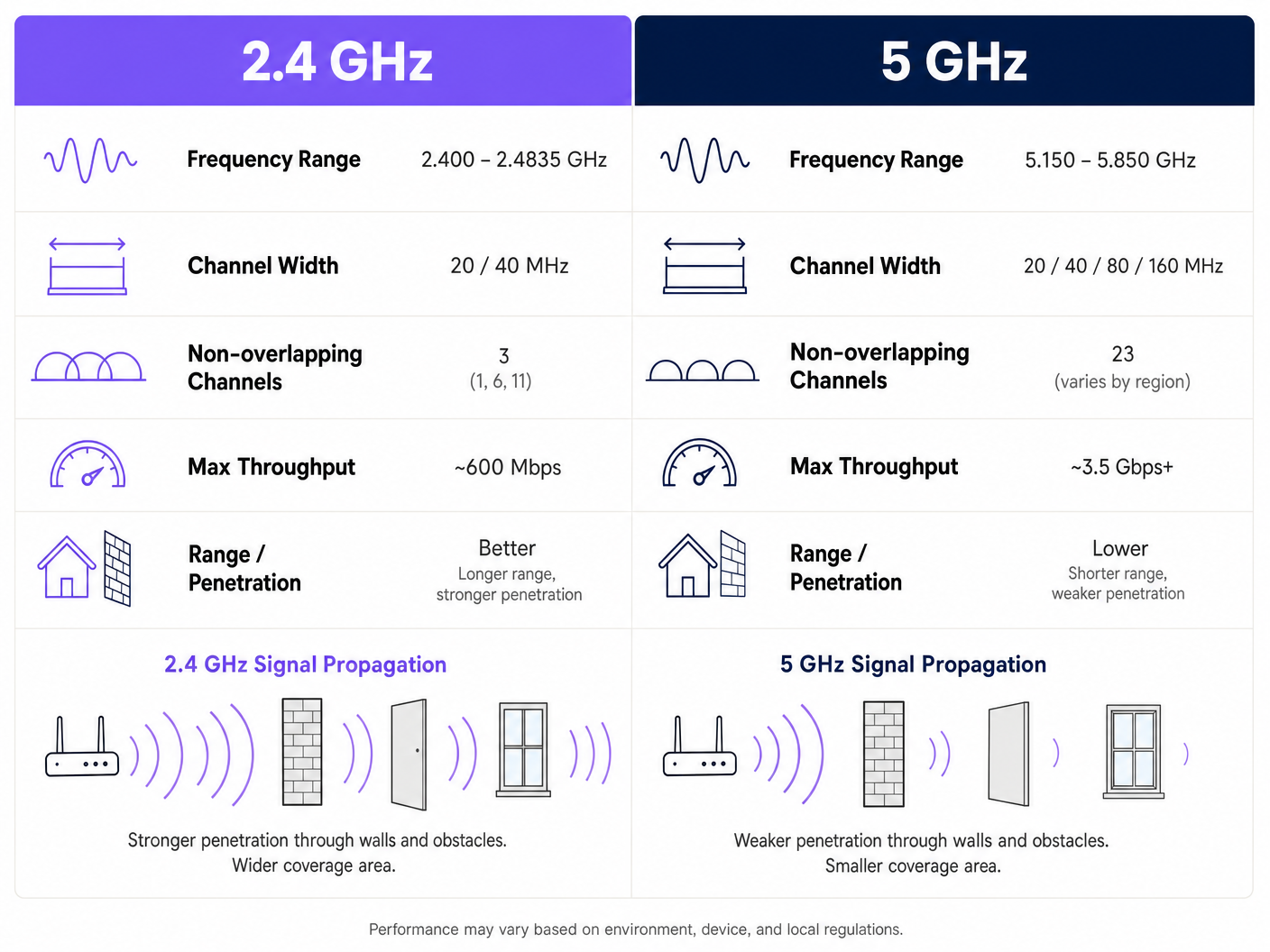
La banda a 2.4GHz (2.400 – 2.4835 GHz) è il cavallo di battaglia legacy del networking wireless. Il suo vantaggio principale è la propagazione del segnale; le onde a bassa frequenza penetrano pareti, porte e pavimenti più efficacemente delle frequenze più alte. Tuttavia, questa portata comporta una grave penalità architetturale nelle implementazioni ad alta densità.
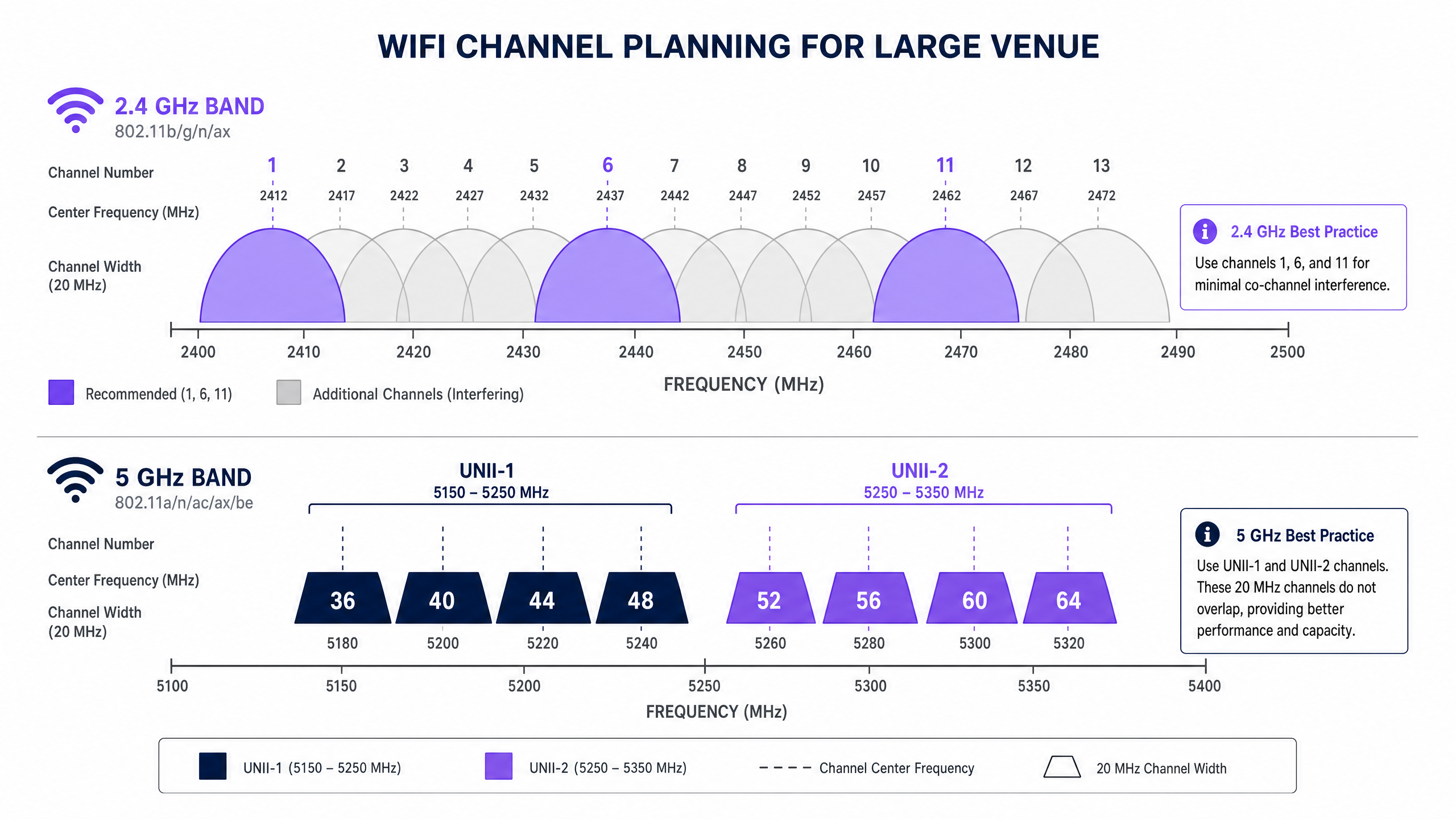
Nel Regno Unito e in Europa, la banda a 2.4GHz offre 13 canali. Ogni canale è largo 20MHz, ma sono distanziati di soli 5MHz. Questa sovrapposizione strutturale significa che solo tre canali—1, 6 e 11—sono veramente non sovrapposti. In un ambiente denso, come una struttura Hospitality con AP distribuiti in ogni seconda stanza, forzare centinaia di dispositivi su tre canali porta inevitabilmente a gravi interferenze co-canale (CCI). Inoltre, lo spettro a 2.4GHz è pesantemente inquinato da interferenti non-WiFi, inclusi forni a microonde, dispositivi Bluetooth e telefoni DECT.
La Banda a 5GHz: Capacità e la Sfida DFS
La banda a 5GHz (5.150 – 5.850 GHz) altera fondamentalmente l'equazione della capacità. Fornisce uno spettro significativamente più utilizzabile, consentendo canali più ampi e velocità di dati più elevate. Nel Regno Unito, la banda a 5GHz è segmentata in sottobande Unlicensed National Information Infrastructure (UNII), offrendo fino a 19 canali non sovrapposti da 20MHz.
Nel determinare il miglior canale per il WiFi a 5GHz, gli architetti di rete devono gestire la Dynamic Frequency Selection (DFS). DFS è un requisito normativo progettato per impedire alle reti WiFi di interferire con i sistemi radar esistenti, come i radar meteorologici e militari.
- UNII-1 (Canali 36, 40, 44, 48): Questi canali non richiedono DFS. Sono lo standard d'oro per le implementazioni aziendali perché gli AP non cambieranno improvvisamente canale se viene rilevato un radar, garantendo una connettività client stabile.
- UNII-2A e UNII-2C (Canali 52-144): Questi sono canali DFS. Se un AP rileva una firma radar sul suo canale operativo, deve immediatamente abbandonare quel canale e spostarsi su un altro, potenzialmente interrompendo le sessioni client attive.
- UNII-3 (Canali 149-165): La disponibilità varia in base alla regione, ma questi sono generalmente canali non-DFS dove consentito.
Guida all'Implementazione: Costruire il Piano dei Canali
Un'implementazione di successo richiede un approccio alla pianificazione dei canali neutrale rispetto al fornitore e basato sui dati. Sia che tu stia implementando in un ambiente Retail o aggiornando un hub Transport , questi passaggi costituiscono la base per una rete ad alte prestazioni.
1. Condurre un'Indagine Attiva del Sito RF
Non affidarsi mai esclusivamente alla modellazione predittiva. Condurre un'indagine attiva utilizzando un analizzatore di spettro per mappare l'ambiente RF esistente. Identificare AP non autorizzati, interferenze non-WiFi e reti vicine. Questi dati empirici sono essenziali per assegnare canali che evitino la congestione esistente.
2. Definire le Larghezze dei Canali in Modo Conservativo
L'istinto di massimizzare il throughput aggregando i canali (ad esempio, utilizzando larghezze di 80MHz o 160MHz) è un errore architetturale comune in luoghi densi.
- Su 5GHz: Standardizzare larghezze di canale di 20MHz o 40MHz. Sebbene le velocità di picco per client siano inferiori rispetto ai canali da 80MHz, il throughput aggregato della rete aumenta perché si preservano più canali non sovrapposti, riducendo così il CCI.
- Su 2.4GHz: Applicare rigorosamente larghezze di canale di 20MHz. L'uso di 40MHz su 2.4GHz in un ambiente aziendale garantisce gravi interferenze.
3. Implementare il Band Steering
Gli AP aziendali moderni supportano il band steering, una funzionalità che incoraggia i client dual-band a connettersi alla banda a 5GHz. Ciò libera lo spettro a 2.4GHz per i dispositivi legacy e i sensori IoT, come quelli discussi nella nostra guida su BLE Low Energy Explained for Enterprise .
4. Ottimizzare la Potenza di Trasmissione
Un'elevata potenza di trasmissione non equivale a prestazioni migliori; equivale a un dominio di interferenza più ampio. In un'implementazione ad alta densità, abbassare la potenza di trasmissione sulle radio a 2.4GHz (ad esempio, 8-11 dBm) per ridurre le dimensioni della cella e limitare la CCI. Le radio a 5GHz possono operare a una potenza leggermente superiore (ad esempio, 14-17 dBm) per compensare le loro ridotte capacità di penetrazione.
Best Practice e Standard di Settore
Per mantenere la conformità e l'eccellenza operativa, attenersi a queste raccomandazioni standard del settore:
- Standardizzare su UNII-1 per le Infrastrutture Critiche: Utilizzare i canali 36, 40, 44 e 48 per le aree che richiedono stabilità assoluta, come sale riunioni direzionali o cluster di punti vendita (POS).
- Sfruttare gli Analytics per l'Ottimizzazione Dinamica: Utilizzare piattaforme come Purple per monitorare continuamente l'ambiente RF. Se un inquilino vicino implementa un AP non autorizzato, i vostri analytics dovrebbero rilevare l'aumento dell'utilizzo del canale e attivare una regolazione automatica o manuale del canale. Per approfondimenti sull'ottimizzazione degli ambienti d'ufficio, fare riferimento a Office Wi Fi: Ottimizza la tua moderna rete Wi-Fi per ufficio .
- Verificare il Comportamento DFS Prima del Go-Live: Se si utilizzano canali UNII-2, condurre test rigorosi per monitorare la frequenza con cui gli AP attivano eventi DFS. Se il rilevamento radar è frequente (ad esempio, vicino a un aeroporto), rimuovere tali canali specifici dall'elenco dei canali consentiti dell'AP.
- Prepararsi per il Wi-Fi 6E: Se si sta intraprendendo un aggiornamento hardware, valutare il Wi-Fi 6E (802.11ax operante nella banda a 6GHz). Lo spettro a 6GHz fornisce fino a 500MHz di larghezza di banda aggiuntiva e priva di interferenze nel Regno Unito, risolvendo efficacemente il problema della capacità ad alta densità. Maggiori informazioni in Wi Fi Frequencies: Una Guida alle Frequenze Wi-Fi nel 2026 .
Risoluzione dei Problemi e Mitigazione del Rischio
Anche con una pianificazione meticolosa, gli ambienti RF sono dinamici. Le modalità di guasto comuni includono:
- Il Problema del "Client Appiccicoso": I client che si rifiutano di passare a un AP più vicino, mantenendo una connessione debole che rallenta le prestazioni complessive della cella. Mitigazione: Implementare soglie RSSI minime e utilizzare i protocolli 802.11k/v/r per facilitare il roaming senza interruzioni.
- Catastrofi dell'Auto-Canale: Gli algoritmi di auto-canale basati su controller spesso convergono sugli stessi pochi canali, causando una CCI diffusa. Mitigazione: Utilizzare le funzionalità di auto-canale solo durante la distribuzione iniziale o le finestre di manutenzione programmate. Per il funzionamento continuo, affidarsi a una mappa dei canali statica e meticolosamente pianificata, convalidata dagli analytics.
- Degradazione della Postura di Sicurezza: Una scarsa pianificazione dei canali può mascherare la presenza di AP non autorizzati o attacchi evil twin. Mitigazione: Un ambiente RF pulito rende il rilevamento delle anomalie significativamente più affidabile. Assicurarsi che l'architettura sia allineata con i moderni framework di sicurezza, come discusso in La lista de verificación para migrar de NAC heredado a NAC nativo de la nube e A Lista de Verificação para Migrar de NAC Legado para NAC Nativo da Nuvem .
ROI e Impatto sul Business
L'impatto sul business di una rete wireless correttamente progettata si estende ben oltre la riduzione dei ticket dell'helpdesk IT. Nel commercio al dettaglio e nell'ospitalità, la rete WiFi è il principale canale per il coinvolgimento degli ospiti e l'acquisizione di dati.
Quando l'interferenza co-canale viene eliminata e i client vengono indirizzati con successo a canali puliti a 5GHz, la rete può supportare densità di client più elevate senza degrado. Questa affidabilità garantisce che i captive portals si carichino istantaneamente, aumentando il tasso di conversione dei login Guest WiFi. L'acquisizione di dati di prima parte che ne deriva alimenta campagne di marketing mirate, influenzando direttamente il risultato finale.
Ascolta il nostro briefing tecnico completo su questo argomento:
Definizioni chiave
Co-Channel Interference (CCI)
Interference caused when two or more access points operate on the exact same channel and their coverage areas overlap.
CCI forces devices to wait their turn to transmit, drastically reducing network throughput in dense deployments.
Dynamic Frequency Selection (DFS)
A regulatory mandate requiring WiFi devices operating in certain 5GHz bands to detect and avoid incumbent radar systems.
If an AP detects radar on a DFS channel, it must immediately switch channels, causing brief connectivity drops for connected clients.
Band Steering
A feature on enterprise APs that detects dual-band capable clients and actively encourages them to connect to the 5GHz band rather than 2.4GHz.
Essential for preserving the limited 2.4GHz spectrum for legacy IoT devices and ensuring high-performance clients get optimal speeds.
Channel Bonding
The practice of combining two or more adjacent 20MHz channels into a single wider channel (e.g., 40MHz, 80MHz) to increase data throughput.
While it increases speed, it reduces the total number of non-overlapping channels available, making it dangerous in high-density environments.
UNII-1 Band
The lower segment of the 5GHz spectrum (channels 36, 40, 44, 48) that does not require DFS compliance.
The most stable and reliable channels for mission-critical enterprise wireless traffic.
Adjacent Channel Interference (ACI)
Interference caused by transmissions on overlapping but not identical frequencies (e.g., using channel 3 and channel 6 in 2.4GHz).
ACI is more destructive than CCI because devices cannot properly decode the overlapping signals, leading to high packet loss.
RSSI (Received Signal Strength Indicator)
A measurement of the power present in a received radio signal.
Used by network administrators to set minimum connection thresholds, forcing 'sticky clients' to roam to closer access points.
BSS Coloring
A feature introduced in Wi-Fi 6 (802.11ax) that adds a 'color' identifier to transmissions, allowing APs on the same channel to ignore each other's traffic if the color doesn't match.
Significantly mitigates the impact of co-channel interference in extremely dense deployments like stadiums.
Esempi pratici
A 400-room hotel in a dense urban environment is experiencing widespread guest complaints regarding WiFi speeds during the evening peak (7 PM - 10 PM). The current deployment uses dual-band APs in every other room, with auto-channel selection enabled and 80MHz channel widths on 5GHz.
- Disable auto-channel selection to prevent continuous channel thrashing. 2. Reduce 5GHz channel width from 80MHz to 20MHz to increase the number of available non-overlapping channels and eliminate co-channel interference. 3. Statically assign 5GHz channels, prioritizing UNII-1 (36, 40, 44, 48) and clean UNII-2 channels. 4. Reduce 2.4GHz transmit power to 8dBm and restrict to channels 1, 6, and 11 to minimize cell overlap.
A large retail chain is deploying a new point-of-sale (POS) system that relies on wireless connectivity. The store is located in a shopping centre with dozens of neighboring retail WiFi networks visible. The POS vendor recommends using 2.4GHz for 'better range'.
- Reject the vendor's 2.4GHz recommendation for critical infrastructure. 2. Configure a dedicated SSID for the POS system operating exclusively on the 5GHz band. 3. Assign this SSID to UNII-1 channels (36, 40, 44, 48) to avoid any potential DFS radar disruptions. 4. Implement band steering on the public Guest WiFi SSID to keep consumer devices off the 2.4GHz spectrum as much as possible.
Domande di esercitazione
Q1. You are deploying WiFi in a hospital where life-critical telemetry equipment operates on 2.4GHz. The hospital also wants to offer high-speed Guest WiFi in the waiting areas. How do you architect the channel plan?
Suggerimento: Consider physical separation and band dedication.
Visualizza risposta modello
- Dedicate the 2.4GHz band entirely to the telemetry equipment, statically assigning channels 1, 6, and 11. 2. Disable the Guest WiFi SSID on the 2.4GHz radios completely. 3. Broadcast the Guest WiFi exclusively on the 5GHz band using UNII-1 and UNII-2 channels. This ensures the life-critical 2.4GHz spectrum remains uncontended while providing high capacity for guests.
Q2. A stadium deployment is suffering from massive interference on 5GHz, despite using 20MHz channels. The APs are mounted very high up and are 'hearing' each other across the bowl. What configuration change is required?
Suggerimento: Think about how far the signal is traveling and how APs decide when the channel is clear.
Visualizza risposta modello
- Significantly reduce the transmit (Tx) power on the 5GHz radios to shrink the cell size. 2. Increase the RX-SOP (Receive Start of Packet) threshold, which makes the AP 'deaf' to weak signals from distant APs across the stadium bowl, allowing it to transmit simultaneously without triggering carrier sense mechanisms.
Q3. Your corporate office is located less than 2 miles from a major commercial airport. You are currently using channels 36, 40, 44, 48, 52, 56, 60, and 64. Users are complaining of random, brief disconnects. What is the likely cause and solution?
Suggerimento: Consider the regulatory requirements for specific 5GHz channels.
Visualizza risposta modello
The disconnects are caused by DFS (Dynamic Frequency Selection) events. The APs on channels 52-64 are detecting airport radar and vacating the channel. The solution is to remove the UNII-2 DFS channels (52-64) from the allowed channel list and rely solely on the non-DFS UNII-1 channels (36-48), or upgrade to Wi-Fi 6E to utilize the non-DFS 6GHz band.