

Migliori Pratiche per la Sicurezza delle Reti Scolastiche K-12 con NAC
Questa guida di riferimento tecnico fornisce strategie attuabili per i responsabili IT per architettare, implementare e gestire il Network Access Control (NAC) negli ambienti scolastici K-12. Copre argomenti essenziali dall'autenticazione 802.1X e la segmentazione VLAN alla gestione dei dispositivi IoT con MAB e MPSK, garantendo una solida protezione e conformità.
Listen to this guide
View podcast transcript
Riepilogo Esecutivo
La messa in sicurezza di una rete scolastica K-12 è fondamentalmente un esercizio di mitigazione del rischio, gestione delle identità e conformità. I responsabili IT affrontano la complessa sfida di fornire un accesso senza interruzioni a una base di utenti altamente diversificata — personale, studenti, visitatori e appaltatori — garantendo al contempo la sicurezza di una gamma sempre più ampia di dispositivi IoT come lavagne interattive e telecamere di sicurezza. Il Network Access Control (NAC) basato su IEEE 802.1X fornisce le fondamenta architettoniche per una robusta segmentazione della rete, assicurando che i dispositivi siano autenticati, autorizzati e opportunamente isolati prima che venga loro concesso l'accesso alla rete.
Questa guida fornisce un quadro tecnico completo per l'implementazione del NAC negli ambienti educativi. Dettaglia le migliori pratiche per l'integrazione RADIUS, l'architettura VLAN, il controllo della postura degli endpoint e l'onboarding sicuro degli ospiti. Implementando queste strategie, i direttori delle operazioni della sede e gli architetti di rete possono ridurre significativamente la loro superficie di attacco, proteggere i dati sensibili di salvaguardia e mantenere una stretta conformità con gli standard normativi come GDPR e CIPA, il tutto senza compromettere l'efficienza operativa della scuola.
Approfondimento Tecnico
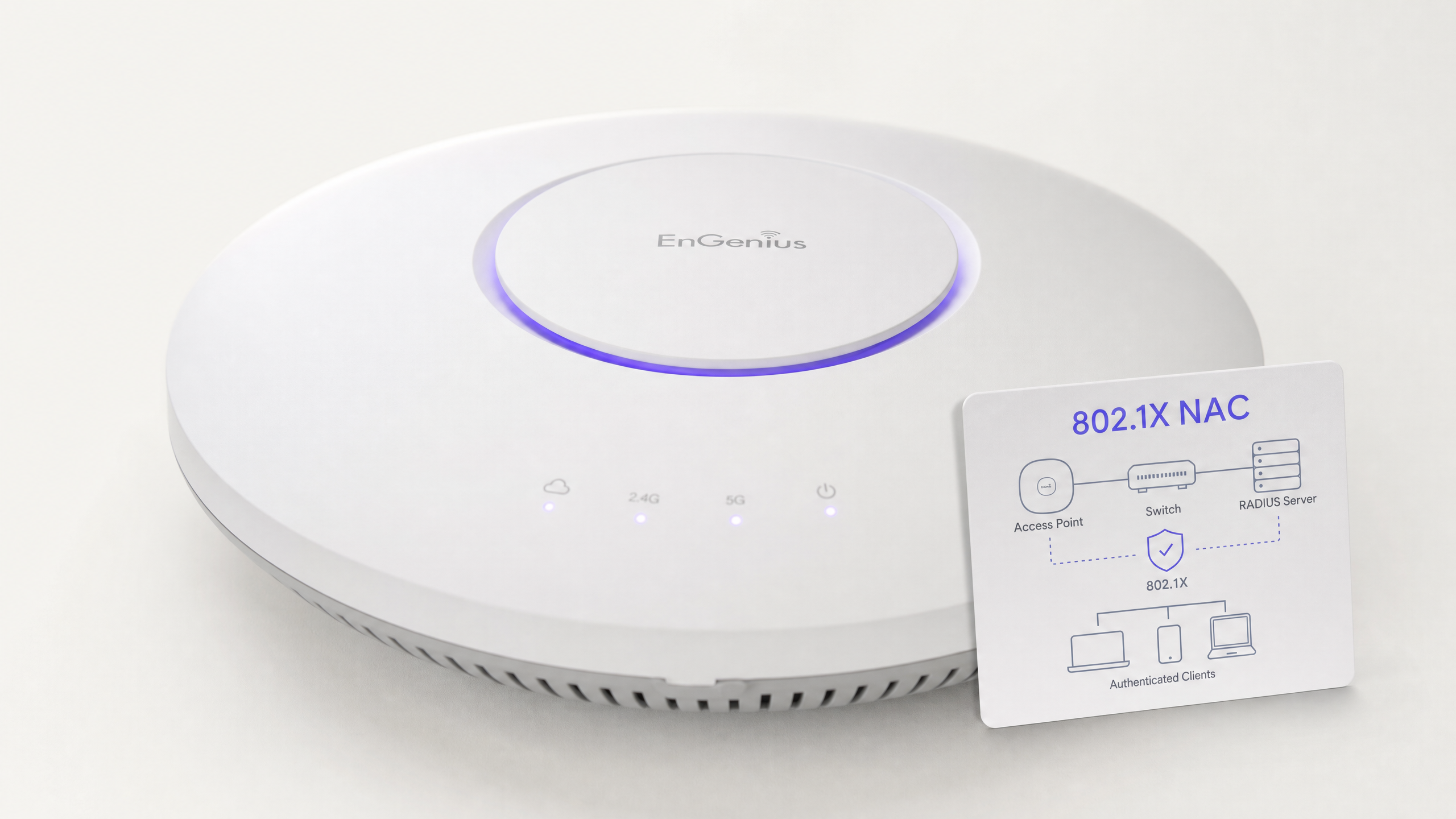
Al suo interno, il NAC opera sul principio dello zero trust al bordo della rete. Quando un dispositivo (il supplicante) si connette a uno switch di accesso o a un access point wireless (l'autenticatore), viene posto in uno stato limitato. L'autenticatore inoltra le credenziali a un server di autenticazione (tipicamente un server RADIUS) utilizzando il protocollo 802.1X. Solo dopo un'autenticazione e una valutazione della policy riuscite, il dispositivo viene assegnato alla VLAN appropriata con l'applicazione di specifiche liste di controllo degli accessi (ACL).
Il Protocollo 802.1X e i Metodi EAP
Il framework Extensible Authentication Protocol (EAP) fornisce il meccanismo di trasporto per vari metodi di autenticazione all'interno di 802.1X. In un ambiente K-12, le implementazioni più comuni sono:
- PEAP-MSCHAPv2: Spesso utilizzato per i dispositivi del personale e degli studenti che si autenticano con le credenziali di Active Directory. Sebbene più facile da implementare, è vulnerabile al furto di credenziali se il certificato del server non è strettamente convalidato dal client.
- EAP-TLS: Lo standard d'oro per la sicurezza aziendale. Si basa sull'autenticazione reciproca basata su certificati, eliminando completamente la necessità di password. Questo è altamente raccomandato per i dispositivi gestiti (come i Chromebook forniti dalla scuola o i laptop del personale) dove una soluzione Public Key Infrastructure (PKI) o Mobile Device Management (MDM) può provvedere automaticamente ai certificati necessari.
Standard di Sicurezza Wireless: WPA3-Enterprise
Per le reti wireless, WPA3-Enterprise è il punto di riferimento attuale. Impone l'uso di Protected Management Frames (PMF) per prevenire attacchi di deautenticazione e offre una modalità di sicurezza a 192 bit per ambienti altamente sensibili (ad esempio, la rete del personale/amministratori). Per le reti studentesche dove WPA3-Enterprise potrebbe essere troppo complesso per scenari BYOD, WPA3-Personal con Simultaneous Authentication of Equals (SAE) fornisce una robusta protezione contro gli attacchi a dizionario offline, un miglioramento significativo rispetto al più vecchio standard WPA2-PSK.
Architettura di Segmentazione della Rete
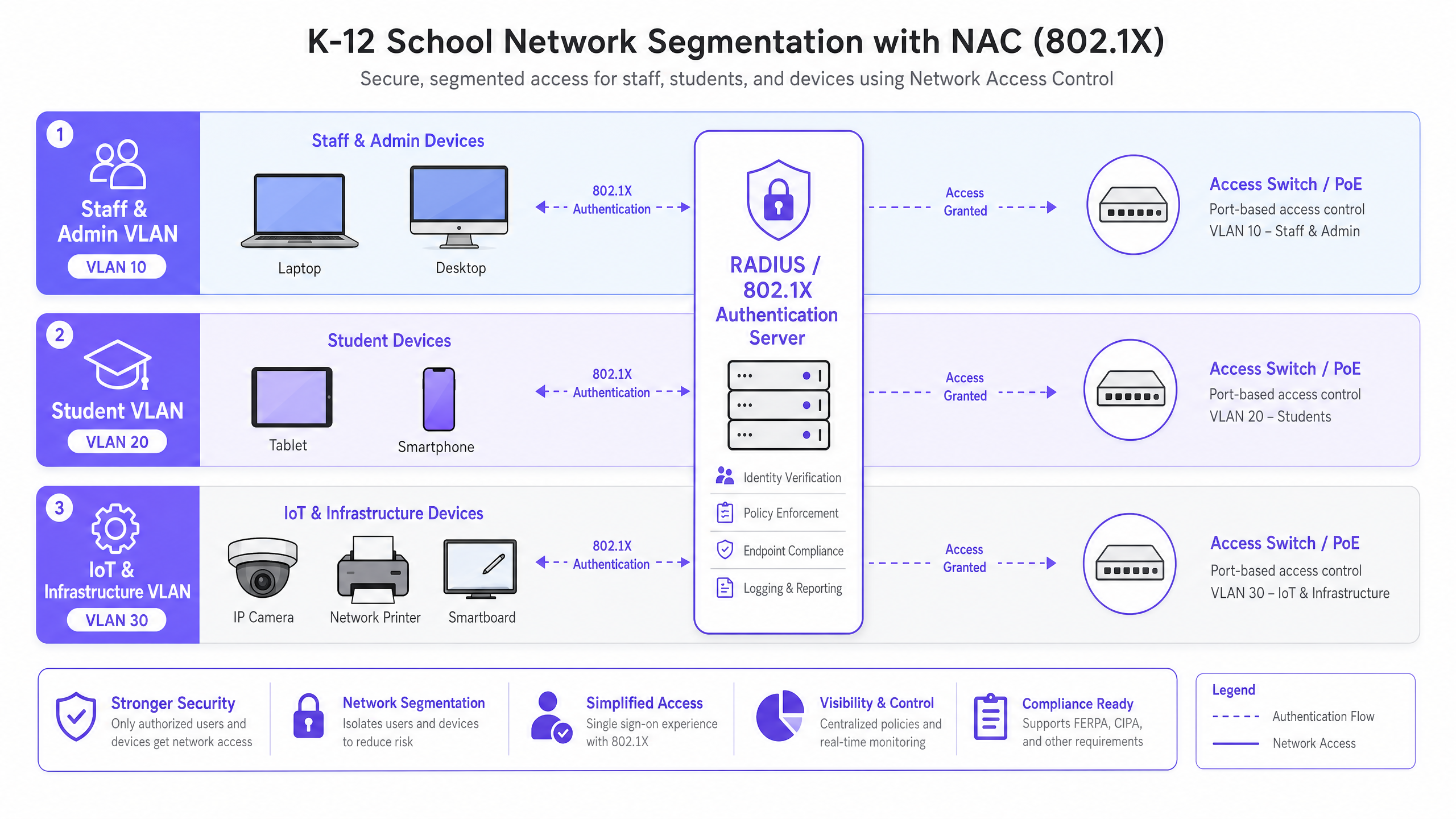
Un NAC efficace si basa su una rigorosa segmentazione della rete. Un'architettura di rete piatta è una vulnerabilità critica. Un'implementazione K-12 standard dovrebbe, come minimo, implementare la seguente struttura VLAN:
- VLAN Personale e Amministrazione: Accesso completo alle risorse interne, ai sistemi MIS e a internet. Movimento laterale altamente limitato da altre VLAN.
- VLAN Studenti: Accesso a internet filtrato con rigoroso controllo dei contenuti applicato. Nessun accesso alle risorse del personale o alle interfacce di gestione.
- VLAN IoT e Infrastruttura: Ospita lavagne interattive, telecamere IP e sistemi di gestione degli edifici. Questa VLAN non dovrebbe avere accesso a internet in uscita a meno che non sia esplicitamente richiesto da un dispositivo specifico, e dovrebbe essere isolata dalle VLAN utente.
- VLAN Ospiti: Accesso solo a internet, isolata da tutte le reti interne, tipicamente preceduta da un captive portal per l'accettazione dei termini e la cattura dell'identità.
Guida all'Implementazione
L'implementazione del NAC richiede un approccio metodico e a fasi per evitare di interrompere le operazioni educative.
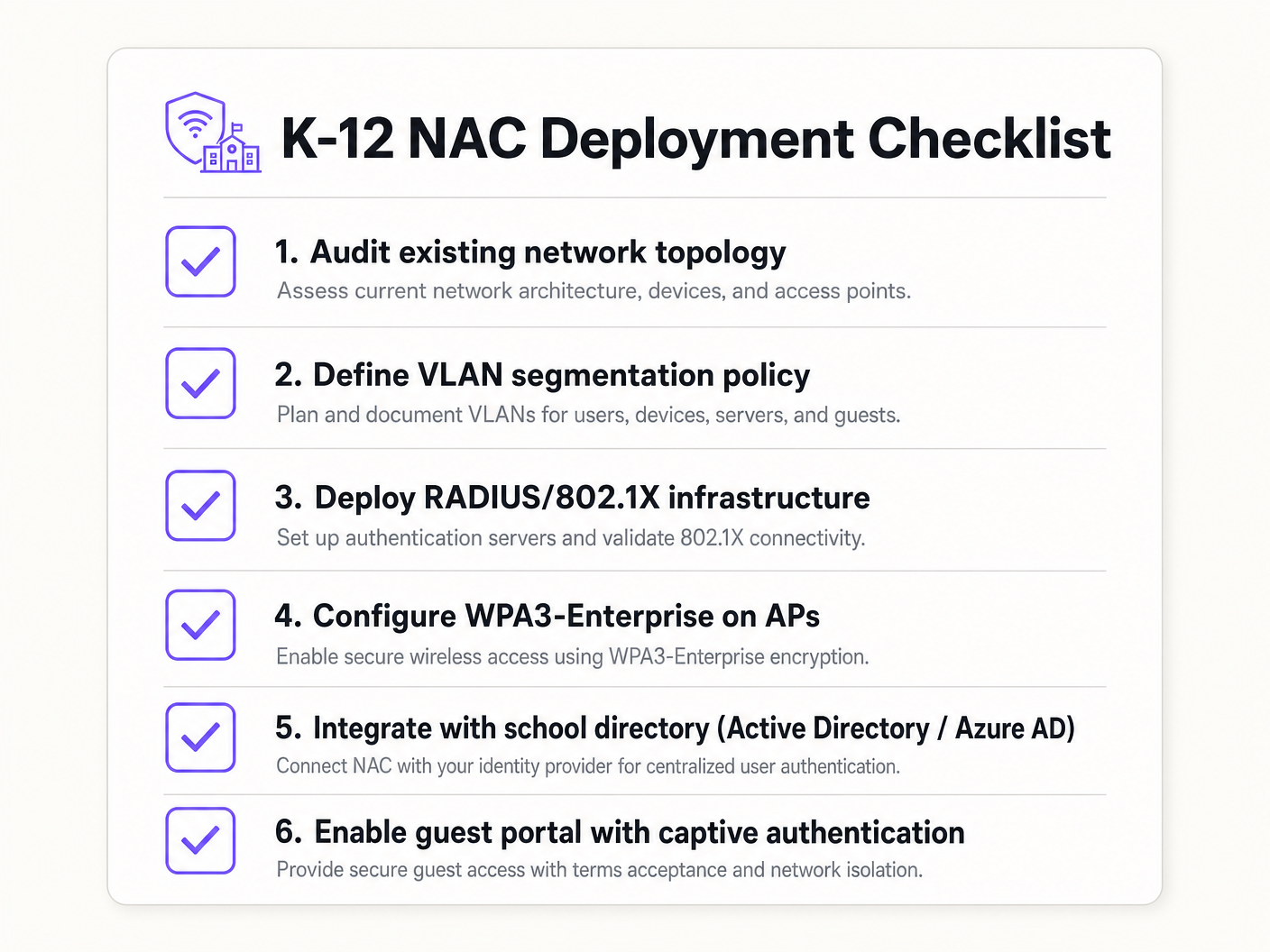
Fase 1: Scoperta e Audit
Prima di implementare qualsiasi applicazione, condurre un audit di rete completo. Utilizzare strumenti per scoprire tutti i dispositivi connessi, identificare l'IT ombra (switch o access point non autorizzati) e documentare lo stato attuale della rete. Questa fase è cruciale per costruire liste bianche accurate di MAC Authentication Bypass (MAB) per i dispositivi legacy.
Fase 2: Implementazione dell'Infrastruttura RADIUS
Implementare la propria infrastruttura RADIUS. Se si utilizza Active Directory on-premises, Network Policy Server (NPS) è una scelta comune. Per ambienti cloud-centrici (Azure AD, Google Workspace), le soluzioni RADIUS cloud offrono un'integrazione semplificata. Assicurarsi che il server RADIUS sia configurato correttamente per comunicare con il servizio di directory e che le regole del firewall consentano il traffico LDAP/LDAPS.
Fase 3: Modalità Monitoraggio
Abilitare 802.1X sugli switch di accesso e sui controller wireless in modalità monitoraggio (a volte chiamata modalità aperta). In questo stato, l'autenticatore valuta le credenziali 802.1X e registra il risultato, ma non blocca l'accesso se l'autenticazione fallisce. Ciò consente ai team IT di identificare dispositivi mal configurati, certificati mancanti o apparecchiature legacy che richiedono MAB, senza causare interruzioni di rete.
Fase 4: Applicazione e Segmentazione
Una volta che i log della modalità monitoraggio mostrano un alto tasso di successo e tutte le eccezioni sono state considerate, iniziare ad applicare 802.Autenticazione 1X. Implementare questa soluzione in fasi, iniziando con un gruppo pilota (ad esempio, il reparto IT), quindi estendendo al personale e infine agli studenti. Implementare l'assegnazione dinamica delle VLAN tramite attributi RADIUS (Tunnel-Type, Tunnel-Medium-Type, Tunnel-Private-Group-ID) per garantire che gli utenti siano inseriti nel segmento di rete corretto in base alla loro appartenenza al gruppo di directory.
Migliori Pratiche
- Implementare MAB e MPSK per l'IoT: I dispositivi legacy e gli endpoint IoT headless spesso non dispongono di supplicanti 802.1X. Utilizzare il MAC Authentication Bypass (MAB) per le apparecchiature legacy, ma preferire il Multi-PSK (MPSK) per i moderni dispositivi IoT. MPSK assegna una chiave pre-condivisa unica a ciascun dispositivo, garantendo che se una chiave viene compromessa, il resto della rete rimanga sicuro. Per una guida dettagliata alla configurazione, fare riferimento alla guida Gestione della sicurezza dei dispositivi IoT con NAC e MPSK .
- Applicare il Controllo della Postura degli Endpoint: Andare oltre la semplice autenticazione integrando i controlli di postura. Prima di concedere l'accesso, la soluzione NAC dovrebbe verificare che l'endpoint abbia un software antivirus attivo, sia completamente aggiornato e abbia la crittografia del disco abilitata. I dispositivi non conformi dovrebbero essere collocati in una VLAN di rimedio.
- Integrare l'Accesso Ospiti con gli Analytics: Le reti ospiti devono essere isolate e conformi. L'integrazione di una piattaforma come Guest WiFi garantisce che l'accesso dei visitatori sia sicuro, conforme al GDPR e fornisca preziosi WiFi Analytics per comprendere l'utilizzo della sede e l'affluenza.
- Utilizzare l'Autenticazione Basata su Certificati (EAP-TLS) ove possibile: Per i dispositivi gestiti, EAP-TLS elimina la dipendenza dalle password, riducendo significativamente il rischio di furto di credenziali e attacchi di phishing.
Risoluzione dei Problemi e Mitigazione del Rischio
Modalità di Guasto Comuni
- Errori di Fiducia del Certificato: Se agli utenti BYOD viene richiesto di accettare un certificato server non attendibile durante l'autenticazione PEAP, ciò li abitua a ignorare gli avvisi di sicurezza, creando una massiccia vulnerabilità al phishing. Mitigazione: Utilizzare sempre un certificato firmato da un'Autorità di Certificazione (CA) pubblicamente attendibile per il server RADIUS, o assicurarsi che il certificato root della CA interna sia distribuito a tutti i dispositivi gestiti tramite MDM.
- Errori di Integrazione della Directory: L'autenticazione RADIUS fallirà se il server non può comunicare con il servizio di directory (ad esempio, i controller di dominio AD sono irraggiungibili o la password dell'account di servizio è scaduta). Mitigazione: Implementare server RADIUS ridondanti e monitorare continuamente lo stato dell'integrazione della directory.
- Il 'Problema della Stampante' (Blocco dei Dispositivi Legacy): L'applicazione di 802.1X senza una whitelist MAB completa disconnetterà immediatamente stampanti legacy, apparecchiature AV e lavagne interattive più vecchie. Mitigazione: La fase di monitoraggio è critica. Non passare all'applicazione finché tutti i dispositivi non autenticanti non sono stati identificati e profilati.
ROI e Impatto sul Business
Sebbene NAC sia principalmente un investimento in sicurezza e conformità, offre un valore aziendale misurabile:
- Mitigazione del Rischio: Il costo finanziario e reputazionale di una violazione dei dati che coinvolge i registri degli studenti è catastrofico. NAC riduce drasticamente la superficie di attacco e previene il movimento laterale, contenendo potenziali violazioni.
- Efficienza Operativa: L'assegnazione dinamica delle VLAN riduce il sovraccarico amministrativo della configurazione manuale delle porte degli switch. Il personale IT dedica meno tempo alla gestione delle VLAN e più tempo a iniziative strategiche.
- Garanzia di Conformità: Un'implementazione NAC robusta fornisce i registri di audit e i controlli di accesso necessari per dimostrare la conformità con GDPR, CIPA e le normative locali di salvaguardia, semplificando gli audit e riducendo l'esposizione legale.
Key Definitions
Network Access Control (NAC)
A security architecture that enforces policy on devices attempting to access a network, ensuring only authenticated and compliant devices are granted entry.
Essential for IT teams to prevent unauthorized access and segment network traffic based on user roles (e.g., staff vs. student).
IEEE 802.1X
The IEEE standard for port-based Network Access Control, providing an authentication mechanism to devices wishing to attach to a LAN or WLAN.
The foundational protocol that allows switches and access points to verify user identity before granting network access.
RADIUS (Remote Authentication Dial-In User Service)
A networking protocol that provides centralized Authentication, Authorization, and Accounting (AAA) management for users who connect and use a network service.
The 'brain' of the NAC deployment, responsible for verifying credentials against a directory (like Active Directory) and assigning VLANs.
MAC Authentication Bypass (MAB)
A technique used to authenticate devices that do not support 802.1X by using their MAC address as the credential against a pre-approved whitelist.
Crucial for allowing legacy devices like older printers and smartboards onto the network without compromising the 802.1X requirement for modern devices.
Multi-PSK (MPSK)
A wireless security feature that allows multiple unique Pre-Shared Keys to be used on a single SSID, with each key assigning specific network policies or VLANs.
The best practice for securing modern IoT devices that cannot perform 802.1X authentication, isolating them securely.
Dynamic VLAN Assignment
The process where a RADIUS server instructs the switch or access point to place an authenticated user into a specific VLAN based on their directory group membership.
Reduces administrative overhead by allowing a single SSID or switch port configuration to serve multiple user types securely.
EAP-TLS (Extensible Authentication Protocol - Transport Layer Security)
An 802.1X authentication method that requires mutual certificate authentication between the client and the server, eliminating the use of passwords.
The most secure authentication method, highly recommended for school-issued managed devices to prevent credential theft.
Endpoint Posture Checking
The process of evaluating a device's security state (e.g., antivirus status, OS patch level) before granting it network access.
Ensures that even authenticated users cannot introduce malware into the network via compromised or unpatched devices.
Worked Examples
A 1500-student secondary school needs to deploy 200 new wireless environmental sensors across the campus. These sensors only support WPA2-Personal and do not have an 802.1X supplicant. How should the network architect secure these devices without compromising the main network?
The architect should deploy a dedicated hidden SSID for IoT devices and implement Multi-PSK (MPSK). Each sensor (or group of sensors) is assigned a unique, complex pre-shared key. The wireless controller or RADIUS server is configured to map these specific keys to the isolated 'IoT & Infrastructure VLAN'. This VLAN must have strict ACLs applied, denying all access to the Staff and Student VLANs, and restricting outbound internet access only to the specific cloud endpoints required by the environmental sensors.
During the rollout of 802.1X (PEAP-MSCHAPv2) for BYOD student devices, the IT helpdesk is overwhelmed with tickets from students reporting that their devices are warning them about an 'untrusted network certificate'. How should this be resolved?
The issue occurs because the RADIUS server is using a certificate signed by the school's internal, private Certificate Authority (CA), which the BYOD devices do not natively trust. The immediate fix is to replace the RADIUS server's certificate with one issued by a widely recognized public CA (e.g., DigiCert, Let's Encrypt). Long-term, the school should implement an onboarding portal that securely configures the supplicant and installs the necessary trust anchors before the device attempts to connect.
Practice Questions
Q1. A school district is migrating its directory services entirely to Google Workspace and phasing out on-premises Active Directory. They currently use NPS for RADIUS. What architectural change is required to maintain 802.1X authentication for their fleet of managed Chromebooks?
Hint: Consider how Chromebooks authenticate natively and what infrastructure is needed when AD is removed.
View model answer
The district should migrate to a cloud RADIUS provider (e.g., SecureW2, Foxpass) that integrates natively with Google Workspace, or utilize Google's own Cloud RADIUS capabilities if available in their licensing tier. They should configure the Chromebooks via the Google Admin Console to use EAP-TLS, leveraging device certificates automatically provisioned by Google's certificate management, completely removing the reliance on passwords and on-premises NPS servers.
Q2. During a network audit, the IT team discovers a consumer-grade wireless router plugged into a classroom wall port, broadcasting a hidden SSID. How does a properly configured NAC solution prevent this shadow IT from compromising the network?
Hint: Think about what happens at the switch port level when an unmanaged device is connected.
View model answer
With 802.1X enforced on the wired switch ports, the consumer router will fail authentication because it lacks valid credentials or a certificate. The switch port will either remain in an unauthorized state (blocking all traffic) or dynamically assign the port to an isolated remediation VLAN. Additionally, enterprise NAC solutions can detect the presence of NAT or multiple MAC addresses behind a single port, triggering an automatic port shutdown to isolate the rogue device.
Q3. A venue operations director at a large educational campus wants to provide seamless WiFi access for visiting parents during a sports tournament, but the IT team is concerned about GDPR compliance and network security. What is the recommended approach?
Hint: Consider the balance between ease of access and the legal requirements for capturing user data.
View model answer
The IT team should provision a dedicated Guest VLAN that is strictly isolated from all internal resources and has internet-only access. They should deploy a captive portal solution, such as Purple's Guest WiFi platform, to handle onboarding. This ensures that visitors must accept the terms and conditions and provide explicit consent for data processing before gaining access, satisfying GDPR requirements while keeping the core network secure.