
Migrazione da RADIUS (NPS) On-Premise a RADIUS as a Service
Questa guida autorevole descrive in dettaglio l'architettura tecnica, la metodologia di implementazione e l'impatto aziendale della migrazione da Microsoft Network Policy Server (NPS) on-premise a un modello RADIUS as a Service nativo del cloud. Fornisce a leader IT e architetti di rete framework pratici per ridurre il carico operativo, eliminare i punti singoli di guasto e proteggere l'autenticazione aziendale in sedi distribuite.
Ascolta questa guida
Visualizza trascrizione del podcast
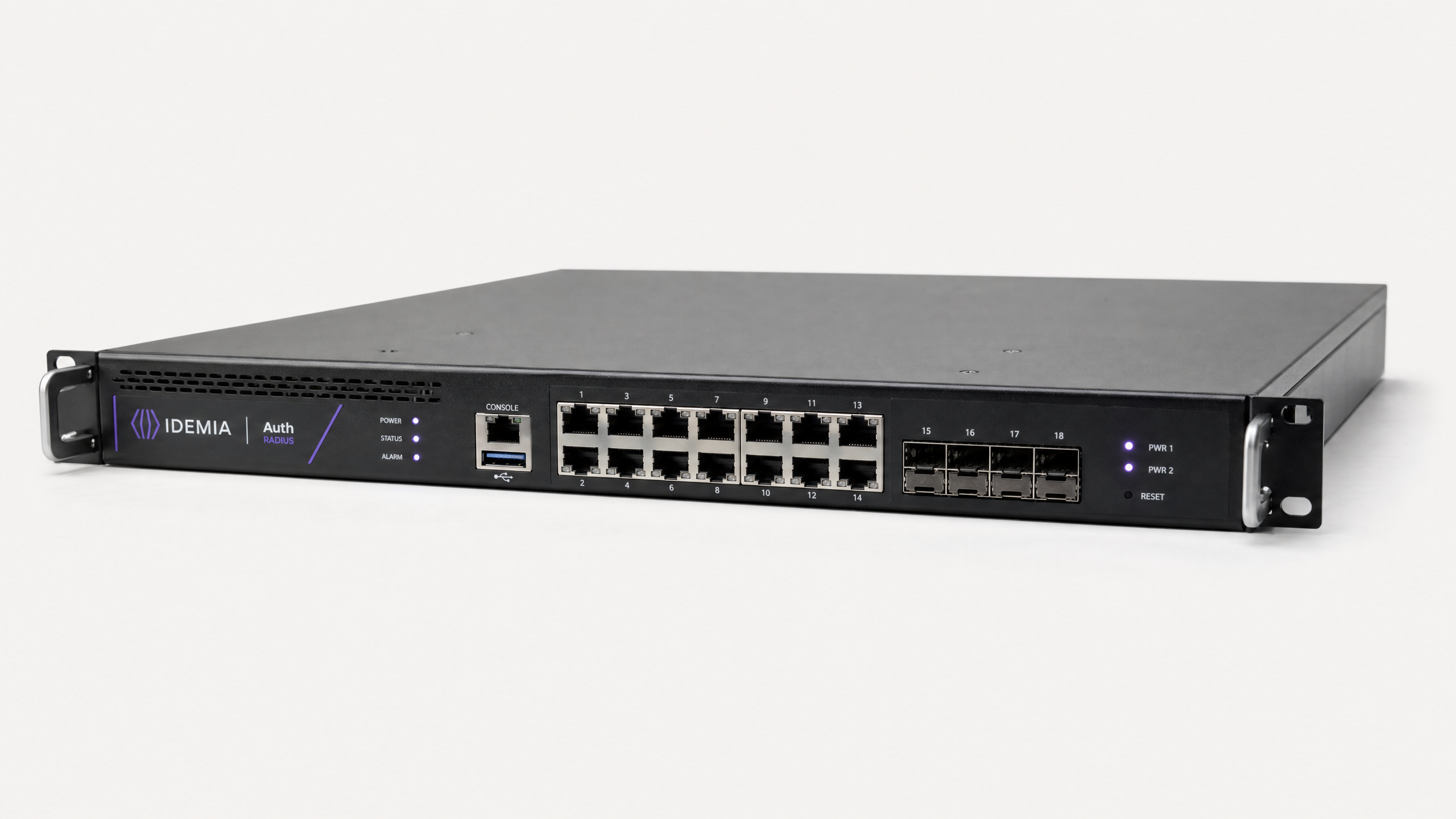
Riepilogo Esecutivo
Per quasi due decenni, il Network Policy Server (NPS) di Microsoft è stato l'implementazione RADIUS predefinita per le reti aziendali. Tuttavia, man mano che gli operatori di sedi si espandono in località distribuite — dalle catene di negozi ai gruppi di ospitalità globali — il carico operativo della gestione dell'infrastruttura di autenticazione on-premise è diventato una passività significativa.
La migrazione a RADIUS as a Service sposta l'autenticazione da un componente hardware gestito a un servizio cloud consumato. Questa transizione architetturale elimina il punto singolo di guasto inerente alle implementazioni NPS standalone, rimuove i cicli di aggiornamento hardware e fornisce la scalabilità elastica richiesta per ambienti ad alta densità come stadi e centri congressi. Per i manager IT e gli architetti di rete, questa guida fornisce una metodologia strutturata e vendor-neutral per la migrazione dell'autenticazione 802.1X al cloud senza impattare il traffico di produzione, garantendo la conformità con PCI DSS e GDPR, e riducendo l'OpEx dell'infrastruttura di autenticazione fino all'80%.
Approfondimento Tecnico: Architettura e Standard
Per comprendere la migrazione, dobbiamo prima esaminare il cambiamento architetturale nel modo in cui viene fornito il controllo degli accessi basato su porta IEEE 802.1X.
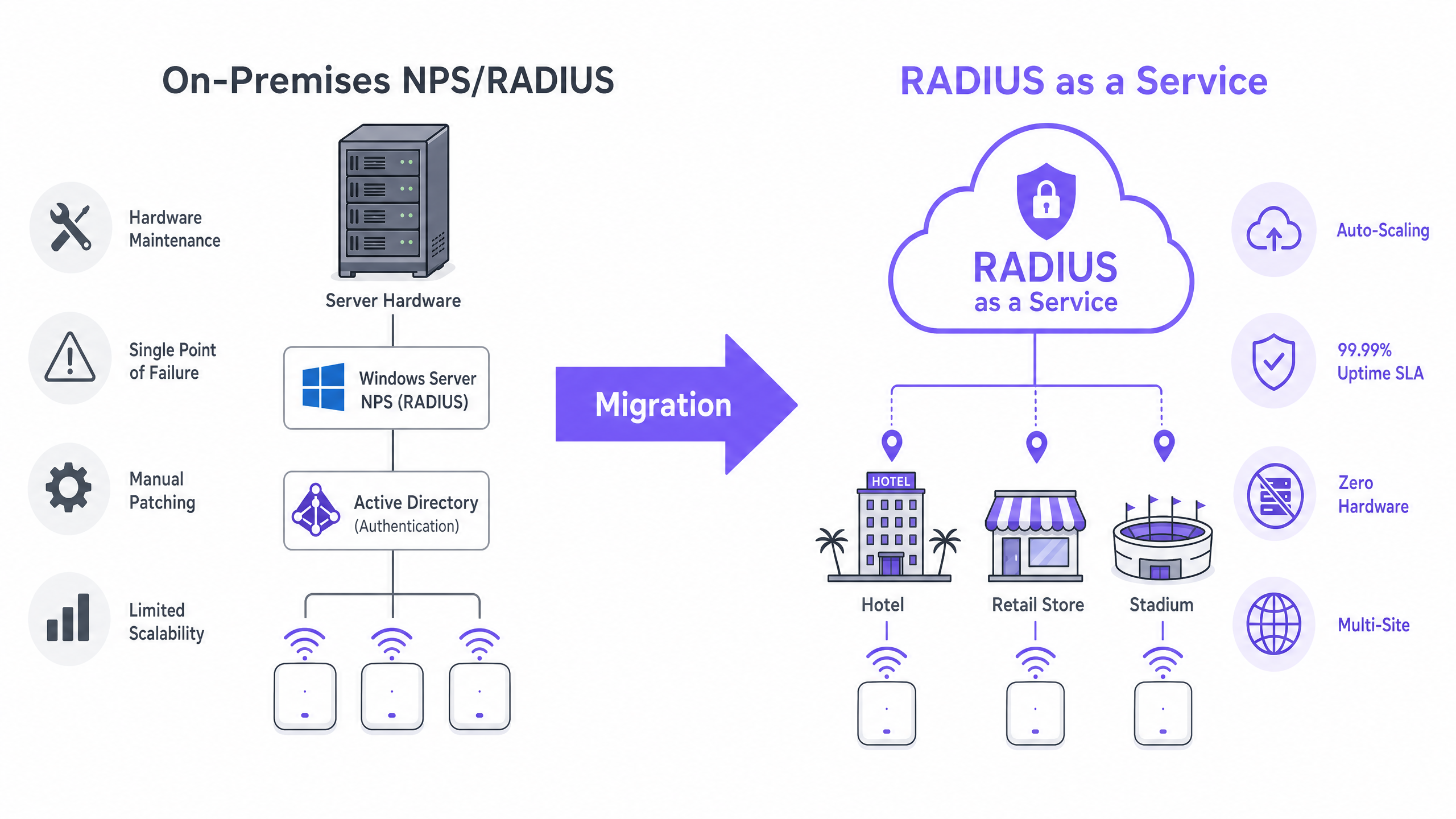
Le Limitazioni di NPS On-Premise
In un'implementazione tradizionale, gli access point agiscono come Network Access Server (NAS), inoltrando le richieste di autenticazione a un server NPS on-premise. Il server NPS valuta le policy di richiesta di connessione, convalida le credenziali rispetto a un archivio di identità (tipicamente Active Directory tramite LDAP) e restituisce un messaggio di Access-Accept o Access-Reject.
Questo modello presenta tre vincoli critici per le reti moderne:
- Dipendenza Hardware e Manutenzione: NPS richiede macchine fisiche o virtuali dedicate, che richiedono patching continuo, pianificazione della capacità e gestione del ciclo di vita.
- Complessità dell'Alta Disponibilità: Il raggiungimento della ridondanza richiede l'implementazione di NPS in una coppia di failover, raddoppiando i costi di licenza senza fornire una vera ridondanza geografica.
- Colli di Bottiglia del Throughput: Durante la massima concorrenza — come l'ingresso in uno stadio o le ore di punta del commercio al dettaglio — una singola istanza NPS può diventare un collo di bottiglia, portando a timeout di autenticazione e un'esperienza utente degradata.
L'Architettura RADIUS Cloud
RADIUS as a Service astrae il livello di autenticazione. I fornitori di servizi cloud gestiscono cluster di server RADIUS distribuiti e geo-ridondanti. Il NAS punta a questi endpoint cloud e le richieste vengono bilanciate automaticamente.
Sicurezza del Trasporto: Il Ruolo di RadSec Quando si sposta RADIUS nel cloud, il traffico di autenticazione attraversa la rete internet pubblica. Mentre il RADIUS tradizionale utilizza una chiave segreta condivisa e l'hashing MD5, le implementazioni moderne devono implementare RadSec (RADIUS over TLS, RFC 6614). RadSec avvolge l'intera conversazione RADIUS in un tunnel TLS (tipicamente porta TCP 2083), fornendo crittografia a livello di trasporto equivalente a HTTPS e autenticazione reciproca tra il NAS e l'endpoint RADIUS cloud.
Integrazione dell'Identità RADIUS Cloud non richiede la migrazione della tua directory utente. I servizi tipicamente supportano connessioni LDAPS verso Active Directory on-premise o integrazioni API native con Azure Active Directory (Entra ID) tramite SAML o SCIM. Ciò garantisce che i tuoi processi di gestione del ciclo di vita degli utenti esistenti rimangano intatti.
Per le sedi che sfruttano piattaforme Guest WiFi , RADIUS cloud si integra direttamente, fornendo un piano di controllo unificato sia per l'autenticazione aziendale 802.1X che per l'accesso alla rete guest, completo di avanzate WiFi Analytics .
Guida all'Implementazione: Una Metodologia a 5 Fasi
L'esecuzione di una migrazione senza tempi di inattività richiede un approccio strutturato e a fasi.
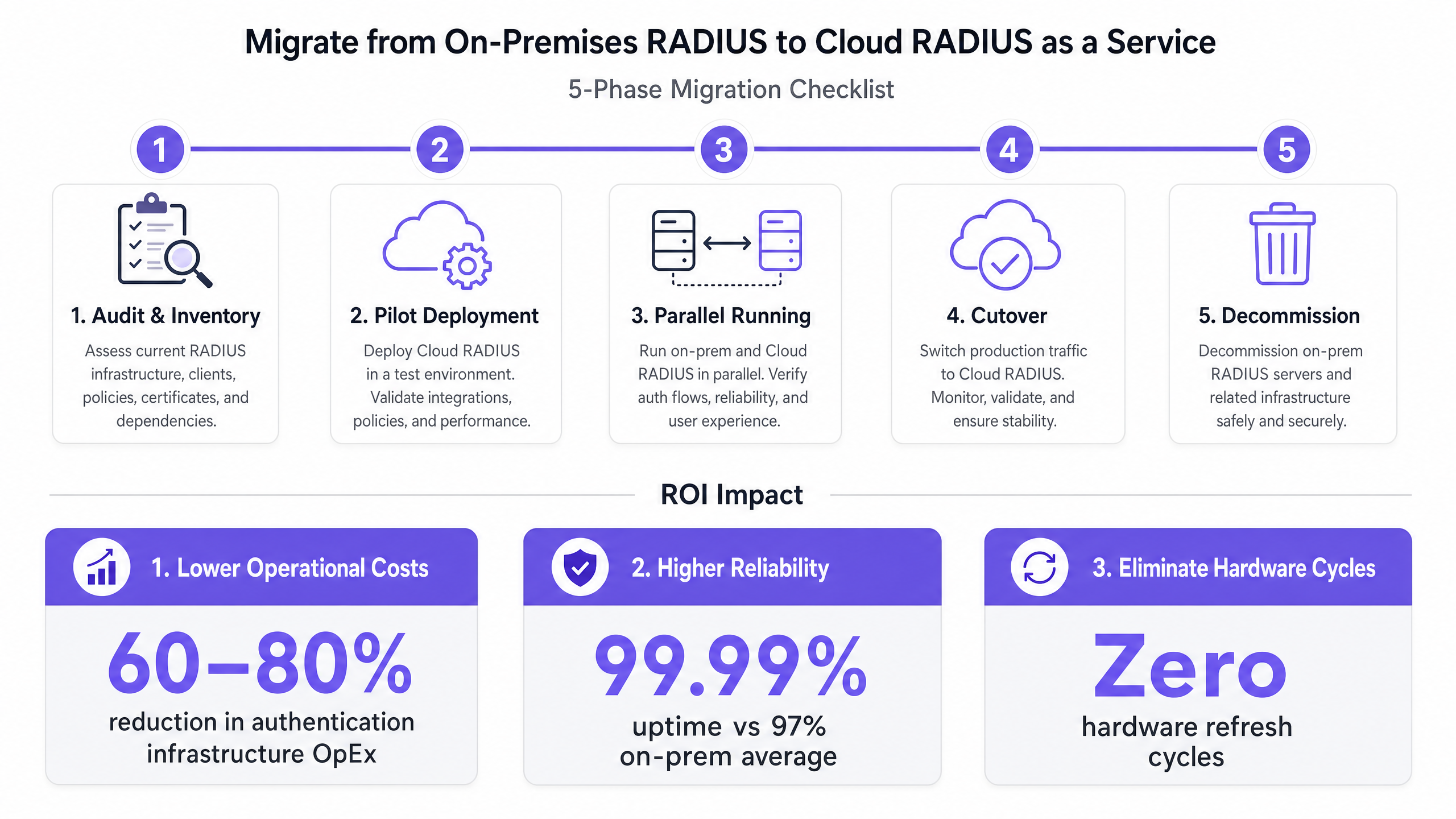
Fase 1: Audit e Inventario
Prima di apportare modifiche, documentare lo stato attuale:
- Client RADIUS: Identificare ogni NAS (access point, switch, concentratori VPN).
- Policy: Documentare le policy di richiesta di connessione e di rete NPS esistenti, inclusi gli attributi specifici del fornitore (VSA) utilizzati per l'assegnazione VLAN.
- Metodi EAP: Identificare quali metodi di Extensible Authentication Protocol sono in uso (es. EAP-TLS, PEAP-MSCHAPv2).
Fase 2: Implementazione Pilota
Provisionare l'istanza RADIUS cloud e configurare un SSID non di produzione o un singolo sito di test. Convalidare l'integrazione della directory di identità (es. sincronizzazione Entra ID) e assicurarsi che il metodo EAP funzioni end-to-end.
Fase 3: Esecuzione Parallela (Mitigazione del Rischio)
Configurare i dispositivi NAS di produzione per utilizzare sia il server RADIUS cloud (Primario) che il server NPS legacy (Fallback). Eseguire questa configurazione per un minimo di due settimane. Monitorare i tassi di successo dell'autenticazione, le metriche di latenza e i flussi di dati di accounting per identificare eventuali discrepanze nelle policy prima del cutover.
Fase 4: Cutover
Durante una finestra di manutenzione programmata, rimuovere la configurazione di fallback NPS legacy dai dispositivi NAS. Impegnarsi completamente nell'infrastruttura cloud. Assicurarsi che la procedura di rollback sia documentata e testata.
Fase 5: Dismissione
Dopo 30 giorni di funzionamento stabile, dismettere in sicurezza i server NPS legacy e recuperare le risorse di calcolo.
Best Practice e Conformità
Quando si progetta l'architettura RADIUS cloud, attenersi ai seguenti standard:
- Obbligo di RadSec: Non inviare mai traffico RADIUS su internet pubblico utilizzando UDP standard 1812/1813 se RadSec (TCP 2083) è supportato dal tuo hardware NAS.
- Catene di Fiducia dei Certificati: Assicurarsi che i dispositivi client si fidino del CertAutorità di Certificazione (CA) che ha emesso il certificato del server RADIUS cloud. Invia la CA radice ai dispositivi gestiti tramite MDM o Criteri di gruppo prima della migrazione.
- Posizione di Conformità: Scegli un provider RADIUS cloud che mantenga la certificazione SOC 2 Tipo II e l'accreditamento ISO 27001. Questo semplifica significativamente le tue valutazioni annuali PCI DSS, in particolare per gli ambienti Retail e Hospitality .
Per principi di progettazione di rete più ampi, consulta le nostre guide su Configurazione del WiFi per le Aziende: Un Manuale 2026 e Comprendere RSSI e Potenza del Segnale per una Pianificazione Ottimale dei Canali .
Risoluzione dei Problemi e Mitigazione del Rischio
| Modalità di Guasto | Causa Radice | Strategia di Mitigazione |
|---|---|---|
| Timeout di Autenticazione | Firewall che blocca UDP 1812/1813 o TCP 2083 in uscita. | Verificare che le regole del firewall perimetrale consentano il traffico in uscita verso gli specifici intervalli IP del provider RADIUS cloud. |
| Errori di Fiducia del Certificato | I dispositivi client non dispongono della CA radice nel loro archivio attendibile. | Distribuire la CA radice tramite MDM/GPO prima della Fase 3 (Esecuzione Parallela). |
| Assegnazione VLAN Fallita | Attributi Specifici del Fornitore (VSA) non mappati correttamente nelle policy cloud. | Replicare i formati esatti delle stringhe VSA da NPS al motore delle policy RADIUS cloud durante la Fase 1. |
| Impatto dell'Interruzione WAN | La perdita di internet interrompe l'accesso al RADIUS cloud. | Implementare collegamenti WAN ridondanti o un proxy RADIUS locale che memorizza le credenziali per i dispositivi noti. |
ROI e Impatto sul Business
La migrazione a RADIUS as a Service offre risultati di business misurabili:
- Riduzione dei Costi: Elimina l'acquisto di hardware, le licenze di Windows Server e le ore di ingegneria dedicate a patching e manutenzione. La riduzione tipica dell'OpEx è del 60-80%.
- SLA di Affidabilità: I provider cloud offrono SLA di uptime del 99,99% con garanzia finanziaria, rispetto al tipico 97-98% raggiunto dalle implementazioni NPS a sito singolo.
- Agilità: Nuovi siti possono essere attivati istantaneamente senza il provisioning di hardware di autenticazione locale, accelerando i tempi di implementazione per gli hub di Trasporto e le strutture Sanitarie .
Ascolta il nostro team di consulenza senior discutere le implicazioni strategiche in questo briefing di 10 minuti:
Definizioni chiave
RADIUS (Remote Authentication Dial-In User Service)
A networking protocol that provides centralized Authentication, Authorization, and Accounting (AAA) management for users who connect and use a network service.
The core protocol used by enterprise WiFi networks to validate user credentials before granting network access.
NPS (Network Policy Server)
Microsoft's implementation of a RADIUS server and proxy, bundled as a role in Windows Server.
The legacy on-premises infrastructure that organizations are actively migrating away from to reduce maintenance overhead.
NAS (Network Access Server)
The device that acts as the gateway to the network and passes authentication requests to the RADIUS server.
In a wireless context, the NAS is typically the WiFi Access Point or Wireless LAN Controller.
RadSec (RADIUS over TLS)
A protocol defined in RFC 6614 that transports RADIUS packets over a TCP connection encrypted with TLS.
Essential for cloud RADIUS deployments to ensure credential data is encrypted while traversing the public internet.
EAP (Extensible Authentication Protocol)
An authentication framework frequently used in wireless networks and point-to-point connections.
Determines how the client and server securely exchange credentials (e.g., certificates via EAP-TLS, or passwords via PEAP).
VSA (Vendor-Specific Attribute)
Custom attributes defined by hardware vendors within the RADIUS protocol to support proprietary features.
Crucial during migration; VSAs are often used to assign authenticated users to specific network VLANs dynamically.
LDAPS (Lightweight Directory Access Protocol over SSL)
A secure protocol for querying and modifying directory services like Active Directory.
Used by cloud RADIUS services to securely query on-premises identity stores without migrating the user directory to the cloud.
802.1X
An IEEE standard for port-based network access control (PNAC).
The underlying standard that uses RADIUS to ensure only authenticated devices can pass traffic onto the enterprise LAN or WLAN.
Esempi pratici
A 200-property hotel group currently runs local NPS servers at each site for staff 802.1X authentication. They are migrating to Entra ID (Azure AD) and want to decommission the local servers. How should they approach the migration?
- Deploy a cloud RADIUS service that integrates natively with Entra ID via SAML/SCIM.
- Configure the cloud RADIUS policies to map Entra ID groups (e.g., 'Front Desk', 'Management') to specific VLAN VSAs.
- At a pilot property, configure the access points to use RadSec to connect to the cloud RADIUS endpoint.
- Push the cloud RADIUS server's Root CA to all staff devices via Microsoft Intune.
- Run parallel authentication at the pilot site, then execute a phased rollout across the remaining 199 properties.
A stadium with 50,000 capacity experiences authentication failures on their corporate SSID during major events because their on-premises NPS server cannot handle the throughput of thousands of devices roaming simultaneously.
- Audit the existing NPS policies and EAP methods.
- Provision a cloud RADIUS service capable of auto-scaling to handle high authentications per second (APS).
- Establish an LDAPS connection from the cloud RADIUS service to the stadium's on-premises Active Directory.
- Update the stadium's high-density wireless LAN controllers to point to the cloud RADIUS endpoints as the primary authentication servers.
Domande di esercitazione
Q1. Your organization is migrating to Cloud RADIUS. The security team mandates that no authentication traffic can be sent over the internet in cleartext or using deprecated hashing algorithms like MD5. What protocol must you configure on your wireless LAN controllers?
Suggerimento: Look for the protocol that wraps RADIUS in a TLS tunnel.
Visualizza risposta modello
You must configure RadSec (RADIUS over TLS). RadSec establishes a TLS tunnel over TCP port 2083 between the NAS and the cloud RADIUS server, providing transport-layer encryption and mutual authentication, satisfying the security team's requirements.
Q2. During Phase 3 (Parallel Running) of your migration, you notice that users are authenticating successfully against the cloud RADIUS server, but they are not being placed in the correct network segments. What is the most likely configuration gap?
Suggerimento: How does a RADIUS server tell an access point which network segment to use?
Visualizza risposta modello
The Vendor-Specific Attributes (VSAs) for dynamic VLAN assignment have not been configured correctly in the cloud RADIUS policies. You must ensure the exact VSA strings used in the legacy NPS server are replicated in the cloud environment so the NAS knows which VLAN to assign to the user.
Q3. A client device is repeatedly failing EAP-TLS authentication against the new cloud RADIUS service, but it works fine against the legacy NPS server. The device logs show an 'untrusted server' error. How do you resolve this?
Suggerimento: EAP-TLS requires the client to trust the server's identity.
Visualizza risposta modello
The client device does not have the Root Certificate Authority (CA) that issued the cloud RADIUS server's certificate in its trusted root store. You must deploy the Root CA to the client device using a Mobile Device Management (MDM) solution or Group Policy.