
NHS Staff WiFi: Come implementare reti wireless sicure nel settore sanitario
Questa guida di riferimento tecnica illustra l'architettura, i protocolli di sicurezza e le strategie di implementazione per NHS Staff WiFi, coprendo l'autenticazione 802.1X, la segmentazione VLAN, le politiche BYOD e la conformità al DSP Toolkit. Fornisce indicazioni pratiche per i responsabili IT sull'implementazione di reti wireless di livello enterprise che servono utenti clinici, amministrativi e ospiti su un'infrastruttura fisica condivisa senza compromettere la sicurezza. Sia che si stia pianificando una nuova implementazione o rafforzando un'infrastruttura esistente, questa guida fornisce i quadri decisionali e i passaggi di implementazione necessari per agire in questo trimestre.
Ascolta questa guida
Visualizza trascrizione del podcast
Riepilogo Esecutivo
L'implementazione di un WiFi sicuro e affidabile nelle strutture NHS non è più un servizio opzionale, ma un'infrastruttura clinica critica. Il passaggio a un'assistenza paziente mobile-first, alle cartelle cliniche elettroniche (EHR) e ai dispositivi medici connessi richiede un'architettura wireless che bilanci il roaming senza interruzioni con rigorosi controlli di sicurezza.
Per i responsabili IT, gli architetti di rete e i CTO, la sfida principale è accogliere diversi gruppi di utenti — personale clinico, personale amministrativo, pazienti e ospiti — su un'infrastruttura fisica condivisa senza compromettere i requisiti del NHS Data Security and Protection (DSP) Toolkit. Questa guida illustra i requisiti tecnici per NHS Staff WiFi, concentrandosi su robusti framework di autenticazione come IEEE 802.1X, la segmentazione logica della rete tramite VLAN e l'onboarding sicuro degli endpoint Bring Your Own Device (BYOD).
Abbandonando le chiavi pre-condivise (PSK) legacy e adottando politiche di accesso basate sull'identità, le organizzazioni sanitarie possono mitigare il rischio di violazioni, ridurre l'attrito operativo e fornire le basi wireless per i programmi di trasformazione digitale. Il caso commerciale è altrettanto solido: riduzione dei costi di helpdesk, conformità dimostrabile al DSP Toolkit e una rete in grado di supportare future innovazioni cliniche senza richiedere una ricostruzione completa dell'infrastruttura.
Approfondimento Tecnico
Autenticazione e Controllo degli Accessi
La base di una rete wireless sicura nel settore sanitario è il controllo degli accessi basato sull'identità. Le reti WPA2-Personal legacy che utilizzano chiavi pre-condivise sono fondamentalmente inadatte per gli ambienti clinici. Non offrono alcuna responsabilità individuale, complicano il processo di offboarding quando il personale lascia l'organizzazione e presentano un singolo punto di fallimento se la credenziale viene compromessa o condivisa oltre il gruppo previsto.
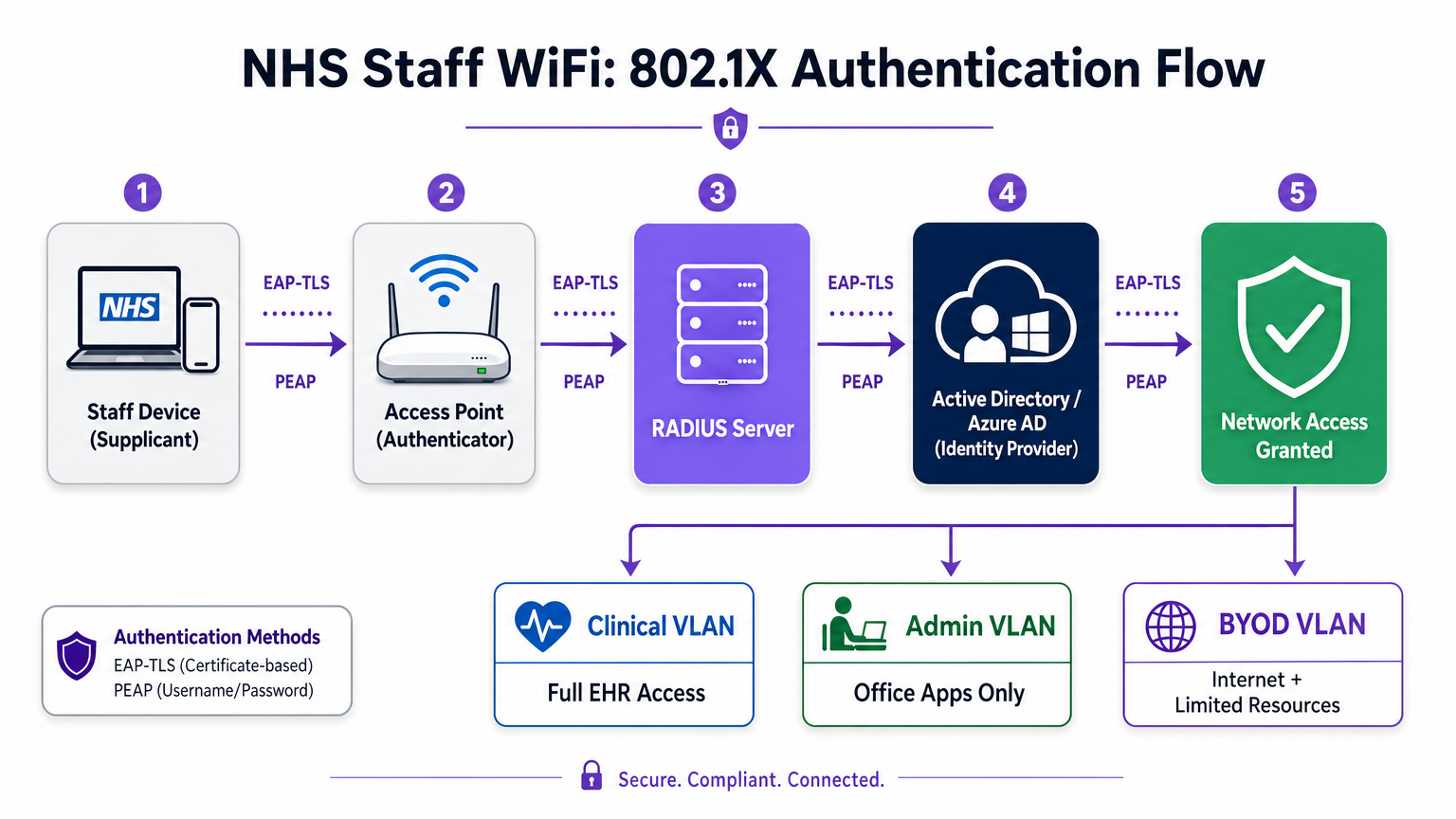
Le moderne implementazioni NHS devono imporre l'autenticazione WPA3-Enterprise (o WPA2-Enterprise come stato di transizione minimo) utilizzando IEEE 802.1X. Questo framework richiede che ogni utente o dispositivo presenti credenziali uniche prima che venga concesso l'accesso alla rete, e il risultato di tale autenticazione determina su quale segmento di rete logico viene posizionato il dispositivo.
Due metodi EAP dominano le implementazioni sanitarie:
| Metodo EAP | Meccanismo di Autenticazione | Ideale per | Livello di Sicurezza |
|---|---|---|---|
| EAP-TLS | Certificato digitale lato client | Dispositivi clinici gestiti dall'azienda | Massimo — nessuna password da sottrarre tramite phishing |
| PEAP-MSCHAPv2 | Nome utente/password in tunnel crittografato | BYOD, personale amministrativo, dispositivi legacy | Alto — credenziali protette da TLS |
EAP-TLS è lo standard d'oro per i dispositivi aziendali. I certificati vengono distribuiti tramite piattaforme di Mobile Device Management (MDM), consentendo l'autenticazione zero-touch — il dispositivo si autentica silenziosamente in background. PEAP-MSCHAPv2 esegue il tunneling sicuro delle credenziali di Active Directory o Azure AD all'interno di una sessione TLS crittografata, rendendolo adatto per scenari BYOD in cui la gestione dei certificati è impraticabile.
L'integrazione dell'infrastruttura wireless con il provider di identità centrale (IdP) dell'organizzazione garantisce che l'accesso venga automaticamente revocato quando l'account AD di un membro del personale viene disabilitato, soddisfacendo direttamente i requisiti del DSP Toolkit per la gestione del ciclo di vita degli accessi.
Segmentazione della Rete e Zone di Fiducia
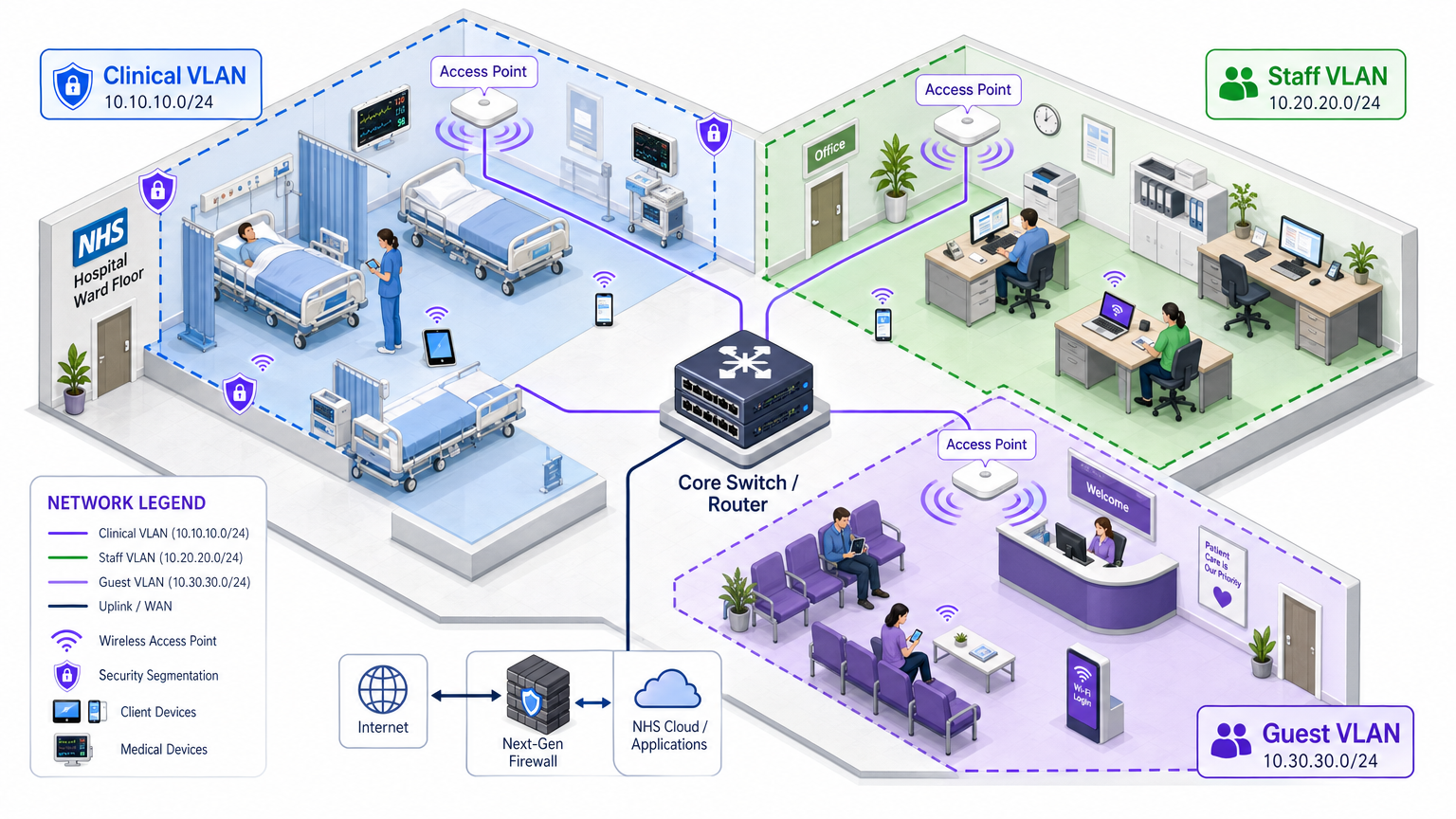
Gli access point fisici trasmettono su tutto il piano dell'ospedale, ma la segmentazione logica garantisce che il traffico rimanga isolato in base al principio del privilegio minimo. Un'architettura di rete piatta in un ambiente sanitario è una grave vulnerabilità di sicurezza, consentendo a un dispositivo ospite compromesso o a un sensore IoT vulnerabile di potenzialmente accedere ai sistemi clinici.
La best practice prevede la creazione di Virtual Local Area Networks (VLAN) distinte mappate a specifici SSID, con regole firewall che impongono i confini del traffico tra di esse:
| Zona | SSID | Autenticazione | Accesso | Priorità QoS |
|---|---|---|---|---|
| Clinica | NHS-Clinical | EAP-TLS (certificato) | EHR, PACS, messaggistica clinica | Massima |
| Amministrativa | NHS-Staff | PEAP (credenziali AD) | App Office, internet | Media |
| IoT Medico | Hidden/MAB | MAC Authentication Bypass | Solo controller dispositivo | Alta |
| Ospiti / Pazienti | NHS-Guest | Captive portal | Solo internet | Bassa |
| BYOD | NHS-BYOD | PEAP (credenziali AD) | Internet, VDI limitato | Bassa |
La VLAN per l'IoT Medico merita particolare attenzione. Molti dispositivi medici connessi — pompe per infusione, monitor paziente, sistemi di chiamata wireless — non possono supportare 802.1X. MAC Authentication Bypass (MAB) è il fallback, ma deve essere abbinato a rigide Access Control Lists (ACL) del firewall che limitano questi dispositivi a comunicare solo con i loro server di gestione designati.
La Sfida BYOD
Le politiche Bring Your Own Device sono sempre più comuni per il personale amministrativo e i medici in visita. Tuttavia, i dispositivi personali non gestiti rappresentano un rischio significativo se consentiti su segmenti di rete affidabili.
Un'implementazione BYOD sicura comporta l'onboarding di questi dispositivi su una VLAN BYOD dedicata. Questa zona fornisce accesso a internet e forse accesso limitato a risorse interne specifiche e non sensibili tramite un gateway sicuro o un'infrastruttura di desktop virtuale (VDI). Non deve assolutamente avere routing diretto a sistemi clinici o archivi di dati dei pazienti.
Guida all'Implementazione
L'implementazione di un'architettura WiFi sicura per il personale NHS richiede un approccio graduale per minimizzare le interruzioni delle operazioni cliniche in corso.
Fase 1: Valutazione e Progettazione
Iniziare con un'indagine completa del sito wireless. Gli ambienti sanitari sono notoriamente difficili per la propagazione RF a causa di pareti rivestite in piombo, macchinari pesanti e alta densità di occupazione. La progettazione deve tenere conto della capacità, non solo della copertura, garantendo una densità sufficiente di punti di accesso in aree ad alto traffico come i pronto soccorso e le cliniche ambulatoriali.
Definire gli SSID richiesti e mapparli alle VLAN e alle politiche di sicurezza corrispondenti. Mantenere il numero di SSID trasmessi al minimo — idealmente non più di quattro — per ridurre il sovraccarico di gestione e minimizzare la congestione dei frame beacon, che degrada le prestazioni complessive della rete.
Fase 2: Configurazione dell'Infrastruttura
Configurare l'infrastruttura di switching e routing principale per supportare le VLAN definite. Implementare regole firewall ai confini tra i segmenti per applicare il principio del minimo privilegio. Configurare il server RADIUS (ad esempio, Cisco ISE, Aruba ClearPass o un RADIUS-as-a-Service basato su cloud) e integrarlo con il provider di identità centrale. Per gli ambienti in cui è implementata la piattaforma Purple, l'integrazione di WiFi Analytics in questa fase fornisce visibilità sull'utilizzo della rete, sui modelli di roaming e sui punti critici di capacità.
Fase 3: Applicazione delle Politiche e Onboarding
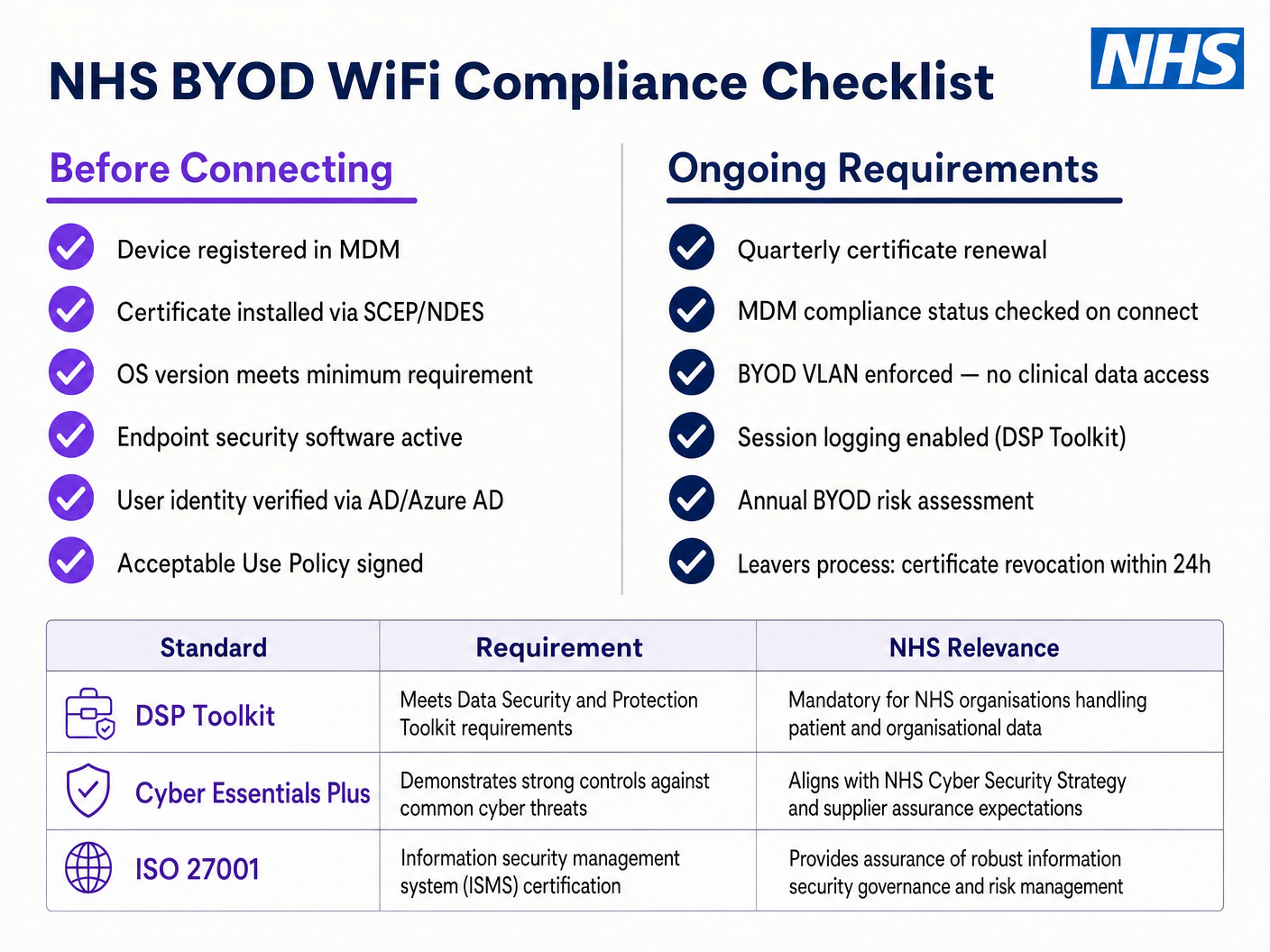
Implementare le politiche di autenticazione. Per i dispositivi aziendali, utilizzare la soluzione MDM per distribuire i profili wireless e i certificati client necessari (per EAP-TLS). Ciò garantisce che i dispositivi gestiti si connettano automaticamente e in modo sicuro senza l'intervento dell'utente.
Per il BYOD, stabilire un flusso di lavoro di onboarding chiaro — tipicamente un portale di onboarding che guida l'utente attraverso l'autenticazione con le proprie credenziali aziendali, l'accettazione di una Politica di Utilizzo Accettabile e lo spostamento del dispositivo alla VLAN BYOD sicura. La piattaforma Guest WiFi di Purple può essere implementata come livello di captive portal per l'SSID di pazienti e ospiti, gestendo la raccolta dati conforme al GDPR e l'accettazione dei termini su larga scala.
Fase 4: Test e Validazione
Prima del lancio, condurre test end-to-end di ogni percorso di autenticazione, assegnazione VLAN e regola firewall. Validare specificamente il comportamento di roaming camminando per il reparto clinico con un dispositivo di test, monitorando gli eventi di riautenticazione. Confermare che i protocolli di roaming veloce (802.11r e 802.11k) funzionino correttamente e che le sessioni delle applicazioni sopravvivano alle transizioni tra AP.
Migliori Pratiche
Eliminare le Chiavi Pre-Condivise. Transizionare tutte le reti del personale e cliniche all'autenticazione 802.1X per garantire la responsabilità individuale e il controllo centralizzato degli accessi. Questo è un requisito non negoziabile per la conformità al DSP Toolkit.
Applicare una Segmentazione Rigorosa. Non consentire mai traffico guest, BYOD o IoT sullo stesso segmento logico dei dati clinici. Utilizzare firewall stateful per controllare il routing inter-VLAN, con regole di negazione esplicite come politica predefinita.
Dare Priorità al Traffico Clinico. Implementare politiche QoS sui controller wireless e sugli switch per dare priorità alle applicazioni cliniche — voce su WLAN, accesso EHR — rispetto al traffico guest o amministrativo, specialmente durante periodi di elevata congestione.
Abilitare il Roaming Veloce. Implementare 802.11r (Fast BSS Transition) e 802.11k (Radio Resource Measurement) per garantire che il personale clinico possa muoversi all'interno della struttura senza subire timeout delle applicazioni o interruzioni di connessione.
Monitoraggio Continuo. Utilizzare piattaforme di analisi per monitorare lo stato della rete, identificare punti di accesso non autorizzati e tracciare il comportamento di roaming degli utenti. Comprendere i flussi di persone e i modelli di utilizzo — una tecnica comprovata negli ambienti Retail e Hospitality — è altrettanto prezioso in un contesto ospedaliero per la pianificazione della capacità e la risoluzione dei problemi.
Audit Regolari. Condurre valutazioni annuali del rischio wireless per garantire la conformità continua con il DSP Toolkit, Cyber Essentials Plus e ISO 27001, ove applicabile.
Risoluzione dei Problemi e Mitigazione del Rischio
Timeout di Autenticazione
In ambienti con elevata densità di client, i server RADIUS possono essere sovraccaricati, portando a timeout di autenticazione e interruzioni di connessione. Assicurarsi che l'infrastruttura RADIUS sia adeguatamente scalata e altamente disponibile. Implementare il bilanciamento del carico su più server di autenticazione e monitorare i tempi di risposta RADIUS come metrica operativa chiave.
Problemi di Roaming
Il personale clinico che si sposta rapidamente tra i reparti può subire interruzioni di connessione se l'infrastruttura wireless non supporta i protocolli di roaming veloce. Abilitare 802.11r e 802.11k sui controller wireless e assicurarsi che i dispositivi client supportino questi standard. Condurre indagini di roaming post-implementazione per identificare e risolvere lacune di copertura o problemi di 'client appiccicoso', dove un dispositivo si aggrappa a un AP distante e più debole invece di passare a uno più vicino.
Incompatibilità con Dispositivi Legacy
I dispositivi medici più vecchi potrebbero non supportare i moderni protocolli di sicurezza come WPA3 o 802.1X. Isolare questi dispositivi su una VLAN IoT dedicata utilizzando MAB. Implementare regole firewall rigorose per limitare la loro comunicazione solo ai server di gestione necessari. Considerare aggiornamenti hardware o bridge wireless per dispositivi critici che non possono essere protetti nativamente.
Scadenza Certificati
Le implementazioni EAP-TLS si basano su certificati con periodi di scadenza definiti. Se i certificati scadono senza rinnovo, i dispositivi non riusciranno ad autenticarsi, causando un'ampia interruzione clinica. Implementare il rinnovo automatico dei certificati tramite SCEP (Simple Certificate Enrolment Protocol) attraverso la piattaforma MDM e monitorare proattivamente le date di scadenza dei certificati.
ROI e Impatto sul Business
Investire in un'architettura wireless sicura e di livello enterprise offre ritorni misurabili in ambito clinico, operativo e IT.
Efficienza Clinica. Affidabla connettività assicura che i clinici abbiano accesso immediato alle cartelle cliniche dei pazienti nel punto di cura, riducendo il tempo speso nella ricerca di informazioni o nella gestione di connessioni interrotte. Ciò influisce direttamente sulla produttività dei pazienti e sulla qualità dell'erogazione delle cure.
Riduzione dell'overhead IT. Il passaggio da password condivise e onboarding manuale all'autenticazione automatizzata basata su certificati riduce significativamente i ticket dell'helpdesk relativi a reimpostazioni di password e problemi di connettività. Un NHS Trust ha riportato una riduzione del 40% delle chiamate all'helpdesk relative al wireless in seguito a una migrazione a 802.1X.
Mitigazione del rischio. La segmentazione rigorosa e l'autenticazione robusta sono fondamentali per soddisfare i requisiti del DSP Toolkit, mitigando i rischi finanziari e reputazionali associati a violazioni dei dati o fallimenti di conformità. Il costo di una violazione dei dati supera di gran lunga l'investimento in un'infrastruttura wireless adeguatamente progettata.
Prospettiva futura. Una rete wireless ben progettata fornisce le basi per future iniziative di salute digitale — servizi basati sulla posizione, tracciamento degli asset in tempo reale, applicazioni avanzate di telemedicina — allineandosi con obiettivi strategici più ampi in Healthcare e settori correlati come Transport dove la connettività mobile è alla base dell'efficienza operativa.
Per le organizzazioni che desiderano capire come la piattaforma di Purple si integri con lo strato WiFi per ospiti e pazienti di questa architettura, la pagina del settore Healthcare fornisce una panoramica dettagliata delle funzionalità di captive portal compatibile con NHS, di analisi e di gestione dei dati conforme al GDPR. Gli stessi principi di analisi che guidano il coinvolgimento dei clienti nel Retail si traducono direttamente in intelligenza operativa per i team di gestione delle strutture ospedaliere.
Definizioni chiave
IEEE 802.1X
An IEEE standard for port-based Network Access Control (PNAC). It provides an authentication mechanism to devices wishing to attach to a LAN or WLAN, requiring each device to present credentials before being granted access.
This is the mandatory standard for replacing insecure shared passwords with individual, identity-based logins for staff and clinical devices. It is the cornerstone of a DSP Toolkit-compliant wireless architecture.
VLAN (Virtual Local Area Network)
A logical subnetwork that groups a collection of devices from different physical network segments. VLANs allow network administrators to partition a single switched network to match the functional and security requirements of different user groups.
VLANs are essential for segmenting clinical traffic from guest and administrative traffic, limiting the blast radius of a potential security breach and enforcing the principle of least privilege.
RADIUS (Remote Authentication Dial-In User Service)
A networking protocol that provides centralised Authentication, Authorisation, and Accounting (AAA) management for users who connect and use a network service.
The RADIUS server acts as the decision engine between the wireless access points and the central identity database (Active Directory), deciding who gets access and to which VLAN they are assigned.
EAP-TLS (Extensible Authentication Protocol - Transport Layer Security)
An EAP method that relies on client and server certificates to establish a secure, mutually authenticated connection. Neither party trusts the other without a valid certificate.
The most secure method for authenticating hospital-owned devices. Certificates distributed via MDM ensure that only managed, trusted endpoints can access the clinical network, with no password to phish or share.
MAB (MAC Authentication Bypass)
A method of authenticating devices based on their hardware MAC address, used as a fallback for devices that do not support 802.1X.
Necessary for legacy medical IoT devices that need network access but cannot handle complex authentication protocols. Must always be paired with strict firewall ACLs to contain the device to its permitted communication paths.
DSP Toolkit (Data Security and Protection Toolkit)
An online self-assessment tool mandated by NHS England that all organisations must complete if they have access to NHS patient data and systems. It maps to the National Data Guardian's ten data security standards.
Compliance with the DSP Toolkit is mandatory for NHS organisations and their suppliers. Robust wireless security — including 802.1X, segmentation, and access lifecycle management — is a critical component of demonstrating compliance.
SSID (Service Set Identifier)
The primary name associated with an 802.11 wireless local area network, broadcast by access points to allow client devices to identify and connect to the network.
Hospitals should minimise the number of broadcast SSIDs (e.g., NHS-Clinical, NHS-Guest) to reduce management overhead and RF overhead. Each SSID should map to a specific security policy and VLAN.
QoS (Quality of Service)
Technologies that manage data traffic to reduce packet loss, latency, and jitter on a network by prioritising certain types of traffic over others.
Crucial in healthcare to ensure that life-critical clinical applications and voice communications are always prioritised over less important traffic such as guest video streaming or software updates.
802.11r (Fast BSS Transition)
An IEEE amendment that enables fast roaming between access points by pre-authenticating the client to the target AP before the physical transition occurs, dramatically reducing roaming latency.
Essential for clinical environments where staff are constantly moving. Without 802.11r, devices must perform a full RADIUS re-authentication on every AP transition, which can cause application sessions to time out.
Esempi pratici
An NHS Trust is deploying new mobile workstations (Workstations on Wheels) across multiple wards. The IT team needs to ensure these devices maintain connectivity as nurses move between access points, while also guaranteeing that only authorised devices can access the clinical VLAN containing the Electronic Health Record system.
The Trust should implement an 802.1X authentication framework using EAP-TLS. The IT team will use their MDM solution to push a unique client certificate and the corresponding wireless profile to each workstation. The wireless controllers will be configured to authenticate these devices against a RADIUS server, which verifies the certificate against the internal PKI. Upon successful authentication, the RADIUS server dynamically assigns the workstation to the dedicated Clinical VLAN via a RADIUS attribute (e.g., Tunnel-Private-Group-ID). To address the roaming requirement, 802.11r (Fast BSS Transition) and 802.11k (Radio Resource Measurement) must be enabled on the wireless infrastructure to allow the workstations to transition seamlessly between access points without performing a full re-authentication cycle against the RADIUS server each time.
A hospital needs to provide internet access for visiting locum doctors using their personal laptops (BYOD). These doctors need to access cloud-based medical reference tools but must be strictly prohibited from accessing the hospital's internal patient databases.
The hospital should deploy a dedicated BYOD SSID mapped to an isolated BYOD VLAN. Authentication should be handled via 802.1X using PEAP-MSCHAPv2, allowing the locums to log in using temporary Active Directory credentials provided by HR upon arrival. The core firewall must be configured with an ACL that explicitly denies any routing from the BYOD VLAN to the Clinical or Administrative VLANs, permitting only outbound traffic to the internet. Additionally, a captive portal can be utilised upon initial connection to enforce an Acceptable Use Policy before granting full internet access. When the locum's temporary AD account is disabled at the end of their engagement, their wireless access is automatically revoked.
Domande di esercitazione
Q1. A new wing is being added to the hospital, and the facilities team wants to deploy wireless temperature sensors in the medication storage fridges. These sensors only support WPA2-Personal (Pre-Shared Key) and cannot use 802.1X. How should the network architect integrate these securely?
Suggerimento: Consider the principle of least privilege and how to isolate non-compliant devices from clinical systems.
Visualizza risposta modello
The architect should create a dedicated, hidden SSID mapped to a specific 'Facilities IoT' VLAN. The sensors will connect using the PSK. Crucially, strict firewall ACLs must be applied to this VLAN, allowing the sensors to communicate only with their specific central management server and denying all other traffic — particularly routing to the Clinical VLAN or the internet. MAC Authentication Bypass (MAB) should also be configured to ensure only the specific MAC addresses of the purchased sensors are permitted on that VLAN, preventing rogue devices from joining using the same PSK.
Q2. During a busy morning shift, nurses report that their tablets are frequently dropping connection to the EHR system as they walk the length of the ward, requiring them to log in again. The wireless coverage survey shows strong signal strength throughout the ward. What is the likely cause and solution?
Suggerimento: Strong signal does not guarantee seamless transitions between access points. Consider the authentication overhead on each AP transition.
Visualizza risposta modello
The likely cause is a lack of fast roaming protocols. As the tablet moves out of range of one AP and connects to the next, it is being forced to perform a full 802.1X re-authentication against the RADIUS server, which introduces enough latency to cause the EHR application session to time out. The solution is to enable 802.11r (Fast BSS Transition) on the wireless controllers, which allows the client to securely roam between APs without the latency of a full re-authentication cycle. 802.11k should also be enabled to help the device identify the optimal target AP before the transition occurs.
Q3. An NHS Trust is preparing for its annual DSP Toolkit assessment. The auditor notes that the administrative staff use a shared password to access the Staff WiFi network. What is the primary risk identified here, and what is the recommended remediation?
Suggerimento: Focus on individual accountability and the access lifecycle when staff leave the organisation.
Visualizza risposta modello
The primary risk is a lack of individual accountability and poor access lifecycle management. If an administrative staff member leaves the Trust, the shared password remains valid, potentially allowing unauthorised access. Furthermore, it is impossible to audit which specific user performed an action on the network. The remediation is to deprecate the shared password (PSK) network and migrate administrative staff to an 802.1X authenticated network using PEAP-MSCHAPv2 with their Active Directory credentials. This ensures individual accountability and automatic access revocation when their AD account is disabled upon leaving, directly addressing the DSP Toolkit's requirements for access control and audit logging.
Continua a leggere questa serie
Il Futuro della Sicurezza Wi-Fi: NAC basato su AI e Rilevamento delle Minacce
Questa guida autorevole esplora l'evoluzione della sicurezza Wi-Fi aziendale, dal WPA2 tradizionale al Network Access Control (NAC) basato su AI e al rilevamento delle minacce. Progettata per i leader IT, fornisce strategie di implementazione attuabili per la messa in sicurezza di ambienti ad alta densità come negozi al dettaglio, strutture ricettive e stadi, utilizzando le reti basate sull'identità di Purple.
Gestire la sicurezza dei dispositivi IoT con NAC e MPSK
Questa guida tecnica illustra come le aziende possano proteggere i dispositivi IoT headless utilizzando l'architettura Multiple Pre-Shared Key (MPSK) e il Network Access Control (NAC). Fornisce passaggi di implementazione pratici per ottenere la micro-segmentazione, contenere i raggi di esplosione della sicurezza e mantenere la conformità senza sacrificare la scalabilità.
RadSec: Come RADIUS su TLS migliora la sicurezza dell'autenticazione WiFi
Questo riferimento tecnico autorevole spiega come RadSec (RFC 6614) protegge l'autenticazione WiFi aziendale incapsulando il traffico RADIUS tradizionale nella crittografia TLS. Progettato per manager IT e architetti di rete, copre architettura, strategie di implementazione e passaggi pratici per mitigare i rischi del traffico RADIUS UDP non crittografato attraverso reti aziendali e guest.