
PSK per dispositivo per fornitore: confronto tra iPSK, DPSK, MPSK e PPSK (e supporto WPA3)
Un confronto completo delle implementazioni di per-device PSK tra Cisco Meraki, HPE Aruba, Ruckus, Juniper Mist, Extreme, Fortinet e Ubiquiti UniFi. Scopri come WPA3-SAE influisce sulle strategie delle chiavi per singolo dispositivo e quando distribuire le modalità di transizione rispetto al passaggio a 802.1X.
Video overview
Ascolta questa guida
Visualizza trascrizione del podcast
Parte della nostra serie principale: Enterprise WiFi Security Guide →
Sintesi Esecutiva
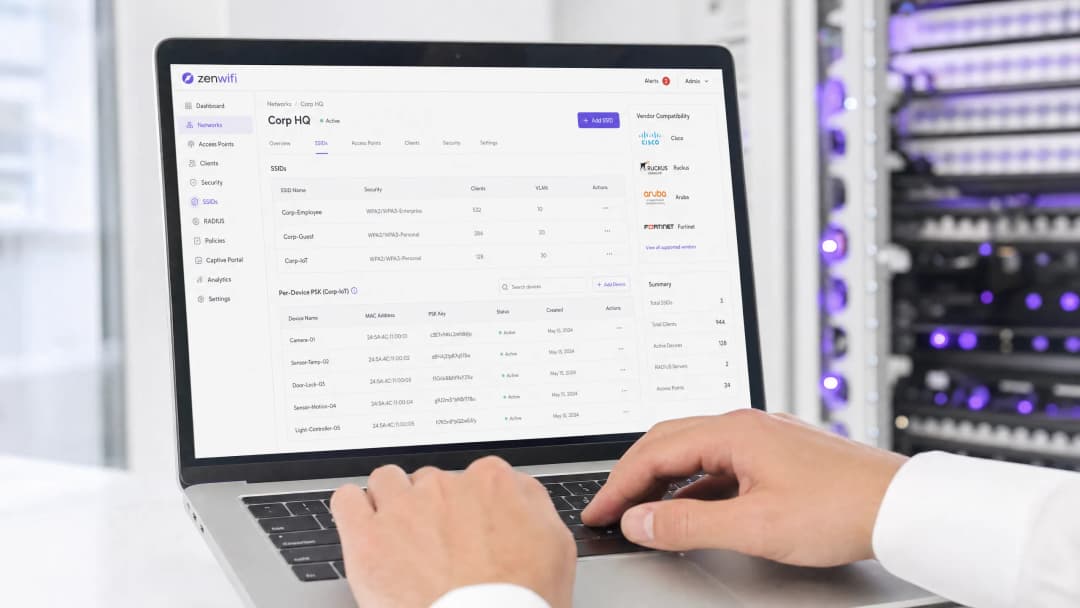
La Pre-Shared Key (PSK) per singolo dispositivo rappresenta la tecnologia di transizione essenziale per le reti aziendali che necessitano di visibilità per singolo dispositivo senza la complessità di una configurazione completa di autenticazione 802.1X. Sebbene i diversi vendor utilizzino nomenclature differenti - Cisco Meraki iPSK, HPE Aruba MPSK, Ruckus DPSK, Juniper Mist PPSK - l'obiettivo fondamentale è lo stesso: assegnare una password univoca a ogni dispositivo su un singolo SSID.
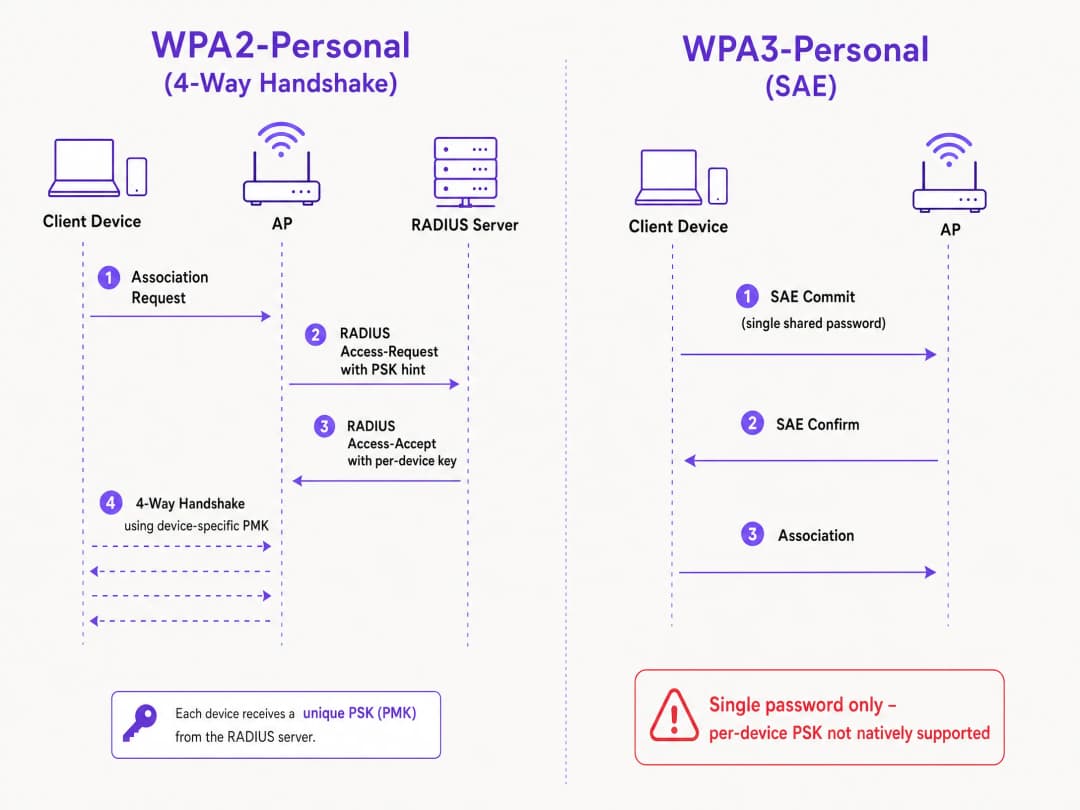
Tuttavia, il passaggio a WPA3 introduce un vincolo architetturale significativo. WPA3 sostituisce il tradizionale handshake a quattro vie di WPA2 con il protocollo Simultaneous Authentication of Equals (SAE). Il protocollo SAE richiede che la password sia nota sia all'access point che al client prima che lo scambio abbia inizio, interrompendo così il meccanismo standard di ricerca basato su RADIUS utilizzato dalla maggior parte delle implementazioni di PSK per singolo dispositivo. Questa guida descrive dettagliatamente come ciascun principale vendor gestisce la PSK per singolo dispositivo, come memorizza e ricerca le chiavi e come affronta la sfida di WPA3-SAE - dalle modalità di transizione WPA3 fino a estensioni proprietarie come Ruckus DPSK3.
Analisi Tecnica Approfondita
L'Architettura della PSK per Singolo Dispositivo
La tecnologia tradizionale WPA2-Personal utilizza un'unica passphrase condivisa per un intero SSID. Poiché ogni dispositivo utilizza la stessa password, non è possibile revocare l'accesso a un singolo dispositivo senza dover cambiare la password per tutti gli utenti. Inoltre, non si dispone di visibilità o di applicazione delle policy per singolo dispositivo.
La PSK per singolo dispositivo risolve questo problema emettendo una credenziale univoca per ciascun dispositivo o utente. In questo modo è possibile revocare una singola chiave senza interferire con le altre, nonché assegnare VLAN, policy di larghezza di banda o pianificazioni di accesso differenti per ciascuna chiave.
Il meccanismo tecnico si basa sull'handshake a quattro vie di WPA2. Quando un client si associa, l'access point invia l'indirizzo MAC del client a un server RADIUS (o a un database locale) all'interno di un messaggio di Access-Request. Il server RADIUS risponde con un messaggio di Access-Accept contenente la chiave specifica per quel dispositivo. L'access point completa quindi l'handshake a quattro vie utilizzando quella specifica chiave per derivare la Pairwise Master Key (PMK).
La Sfida di WPA3-SAE
WPA3-Personal sostituisce l'handshake a quattro vie con SAE. SAE è un protocollo basato su Diffie-Hellman in cui entrambe le parti si impegnano su un elemento di password condiviso derivato dalla passphrase prima del completamento dell'associazione.
La differenza fondamentale risiede nel fatto che la password deve essere nota a entrambe le parti prima dell'inizio dello scambio SAE. Non esiste alcun momento all'interno del protocollo in cui un server RADIUS possa inserire una chiave diversa per ciascun dispositivo. L'access point e il client stanno già eseguendo uno scambio crittografico basato su un singolo valore condiviso. Si tratta di un vincolo di protocollo definito dallo standard IEEE 802.11, non di una limitazione del vendor.
Confronto tra le Implementazioni dei Vendor
Tutti i principali vendor enterprise supportano le PSK per singolo dispositivo, ma le loro implementazioni e la compatibilità con WPA3 variano.
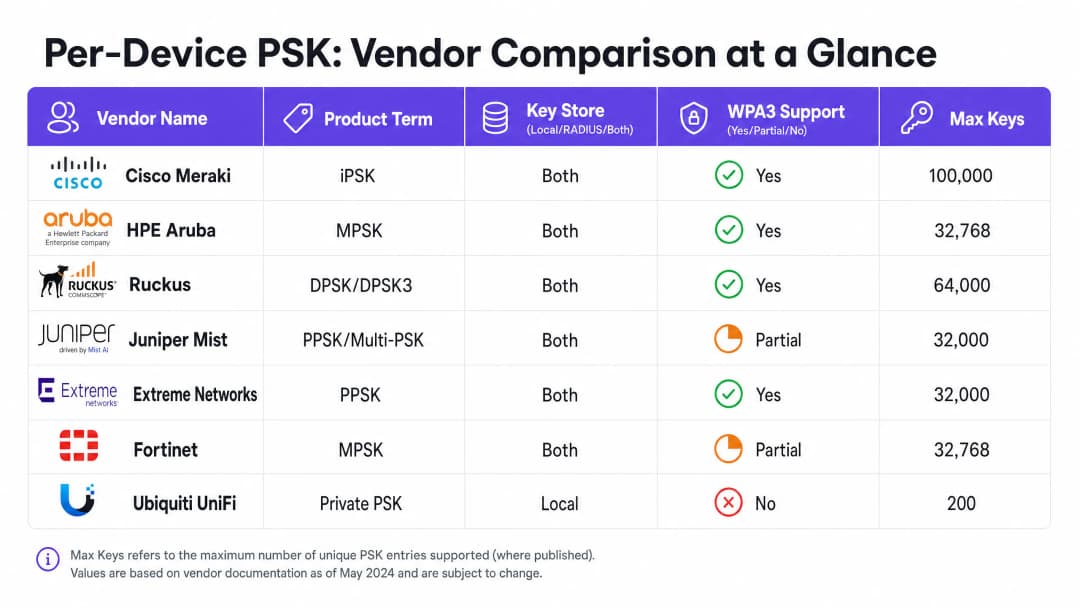
Cisco Meraki (iPSK) Cisco Meraki definisce questa tecnologia Identity Pre-Shared Key (iPSK). Supporta due modalità. Senza RADIUS, è possibile configurare fino a cinque PSK esclusive direttamente nella dashboard Meraki. Con RADIUS - solitamente Cisco ISE - è possibile scalare fino a 100.000 chiavi. Il server RADIUS esegue la ricerca e restituisce la chiave per singolo dispositivo. Per WPA3, Meraki si affida alla modalità di transizione WPA3 (modalità mista WPA2/WPA3), in cui i client WPA2 utilizzano l'handshake a quattro vie e ricevono chiavi per singolo dispositivo, mentre i client WPA3 utilizzano SAE con una singola password condivisa.
HPE Aruba (MPSK) HPE Aruba definisce questa tecnologia Multiple Pre-Shared Key (MPSK). Aruba supporta MPSK Local, dove le chiavi sono memorizzate sul controller, e MPSK con ClearPass, che funge da RADIUS e motore di policy. ClearPass può contenere decine di migliaia di chiavi e assegnare VLAN dinamiche. Come per Meraki, il supporto WPA3 è attualmente gestito tramite la modalità di transizione.
Ruckus (DPSK e DPSK3) Ruckus definisce questa tecnologia Dynamic Pre-Shared Key (DPSK). Si tratta di una delle implementazioni più mature, disponibile fin dai primi giorni di SmartZone. In modalità RADIUS, si integra con Cloudpath. Ruckus si distingue per DPSK3, la loro estensione WPA3. DPSK3 opera in modalità mista WPA2/WPA3 e richiede Cloudpath come backend RADIUS. Consente ai dispositivi compatibili con WPA3 di utilizzare SAE mentre il sistema gestisce l'associazione delle chiavi per singolo dispositivo attraverso l'integrazione con Cloudpath.
Juniper Mist (PPSK / Multi-PSK) Juniper Mist definisce questa tecnologia Private Pre-Shared Key (PPSK) o Multi-PSK. Mist memorizza le chiavi nel database cloud, con un limite di 5.000 chiavi per sito. Le chiavi possono essere assegnate per utente, per dispositivo o per gruppo. Mist si integra con il suo servizio Access Assurance, che aggiunge la ricerca PSK basata su RADIUS. Juniper supporta la PSK RADIUS WPA3 tramite Access Assurance, consentendo a un singolo SSID WPA3-Personal di gestire più passphrase.
Extreme Networks (PPSK) Extreme Networks definisce questa tecnologia Private Pre-Shared Key (PPSK) tramite ExtremeCloud IQ. Supporta la memorizzazione locale delle chiavi sull'access point stesso, utile per le sedi remote, oltre alla ricerca basata su RADIUS tramite il servizio RADIUS cloud di ExtremeCloud IQ. Extreme supporta il MAC binding per associare una PPSK a un dispositivo specifico.
Fortinet (MPSK) Fortinet definisce questa tecnologia Multiple Pre-Shared Key (MPSK), gestita tramite FortiAP e il controller wireless FortiGate. Fortinet supporta esplicitamente le modalità di sicurezza WPA3-SAE e WPA3-SAE Transition nei suoi profili MPSK. È possibile creare un profilo MPSK con chiavi WPA3-SAE, assegnarle a un VAP e abilitare l'assegnazione dinamica delle VLAN.
Ubiquiti UniFi (Private PSK) Ubiquiti UniFi chiama questa funzione Private Pre-Shared Keys. L'implementazione è solo locale; le chiavi sono memorizzate nel controller UniFi Network. È possibile assegnare VLAN diverse per ciascuna chiave. Tuttavia, UniFi Private PSK funziona solo su reti WPA2 sulle bande a 2.4 GHz e 5 GHz. Le reti WPA3 e a 6 GHz non sono supportate.
Hai domande sulla tua configurazione specifica?
Il nostro team collabora con gestori di sedi, responsabili IT e ingegneri di rete in 80.000 sedi. Prenota una chiamata di 20 minuti e ti mostreremo come altri professionisti come te hanno risolto il problema.
Guida all'implementazione
Quando si distribuisce il PSK per singolo dispositivo, seguire questi passaggi per garantire un'architettura sicura e scalabile.
- Analisi dei dispositivi presenti: Identificare quali dispositivi supportano WPA3 e quali si affidano a WPA2. I dispositivi IoT legacy richiederanno probabilmente WPA2 per il prossimo futuro.
- Selezionare la giusta strategia SSID: Per un ambiente misto, distribuire un design SSID ibrido. Mantenere un SSID WPA2-Personal con PSK per singolo dispositivo per l'IoT legacy e i dispositivi degli ospiti. Distribuire un SSID WPA3-Enterprise per i dispositivi gestiti del personale.
- Implementare la modalità di transizione con attenzione: Se si utilizza la modalità di transizione WPA3 sull'SSID ospite principale, assicurarsi che gli access point e i server RADIUS siano configurati correttamente per gestire i flussi di autenticazione misti.
- Integrare la gestione delle identità: Non gestire le chiavi manualmente. Integrare il provisioning delle chiavi con il flusso di lavoro di gestione dei dispositivi o con un identity provider come Microsoft Entra ID o Okta.
- Configurare VLAN dinamiche: Associare ogni PSK per singolo dispositivo a una VLAN specifica per applicare la segmentazione della rete. Questo è fondamentale per isolare i dispositivi IoT dal traffico degli ospiti.
Best Practice
- Applicare la gestione del ciclo di vita: Il PSK per singolo dispositivo richiede una gestione rigorosa del ciclo di vita. È necessario disporre di un processo per revocare le chiavi quando i dispositivi vengono dismessi per evitare la proliferazione incontrollata delle chiavi.
- Utilizzare 802.1X per gli endpoint gestiti: Per i laptop aziendali e i dispositivi del personale, passare a WPA3-Enterprise con EAP-TLS. Offre una sicurezza più solida e una compatibilità nativa con i modelli zero-trust.
- Testare gli aggiornamenti WPA3: Non abilitare mai il WPA3 su un SSID esistente con PSK per singolo dispositivo senza prima effettuare test in un sito pilota. Verificare le versioni del firmware e la compatibilità del server RADIUS.
- Sfruttare Purple per l'identità: Integrare Purple per gestire il livello di identità. Purple funge da overlay cloud, fornendo autenticazione, acquisizione dati e gestione del consenso, e restituisce l'assegnazione della VLAN appropriata all'hardware tramite RADIUS. Per maggiori dettagli, consultare Enterprise WiFi Security: A Complete Guide for 2026.
Risoluzione dei problemi e mitigazione dei rischi
- Mancata connessione dei client su WPA3: Se i dispositivi legacy non riescono a connettersi a un SSID in modalità di transizione WPA3, spesso la causa è da ricercarsi in driver wireless incompatibili. Assicurarsi che i driver dei client siano aggiornati. Se il problema persiste, spostare i dispositivi legacy su un SSID dedicato esclusivamente a WPA2.
- Timeout RADIUS: Se l'access point va in timeout in attesa della chiave per singolo dispositivo dal server RADIUS, verificare il percorso di rete e assicurarsi che il server RADIUS sia dimensionato per gestire il carico di autenticazione.
- Errori di assegnazione VLAN: Se un dispositivo si connette ma riceve l'indirizzo IP errato, verifica la mappatura VLAN nel messaggio RADIUS Access-Accept e assicurati che la VLAN esista sull'access point e sulla porta dello switch.
ROI e impatto sul business
L'implementazione delle PSK per dispositivo offre un valore aziendale misurabile, riducendo i ticket di supporto e migliorando la sicurezza.
- Riduzione del carico di lavoro dell'helpdesk: L'automazione del provisioning e della revoca delle chiavi elimina le reimpostazioni manuali delle password.
- Miglioramento della postura di sicurezza: L'isolamento dei dispositivi su VLAN separate in base alla loro chiave univoca riduce l'area di impatto di un dispositivo compromesso.
- Maggiore visibilità: Le chiavi per dispositivo offrono una visibilità granulare sull'utilizzo della rete, consentendo di identificare chi consuma troppa larghezza di banda e di ottimizzare la pianificazione della capacità.
Definizioni chiave
Per-Device PSK
Un meccanismo di sicurezza che assegna una chiave pre-condivisa unica a ciascun dispositivo o utente su un singolo SSID, consentendo la revoca individuale e l'assegnazione dinamica delle policy.
Utilizzato quando i team IT necessitano di visibilità e controllo per singolo dispositivo senza distribuire l'autenticazione 802.1X completa.
WPA3-SAE
Simultaneous Authentication of Equals. Il protocollo di stabilizzazione della chiave sicura utilizzato in WPA3-Personal, che sostituisce l'handshake a quattro vie di WPA2.
Rilevante quando si esegue l'aggiornamento a WPA3 o si distribuiscono reti a 6 GHz, poiché cambia radicalmente il modo in cui le password vengono autenticate.
Transition Mode
Una configurazione in modalità mista in cui un SSID annuncia il supporto sia per WPA2-PSK che per WPA3-SAE, consentendo ai client legacy e moderni di connettersi allo stesso nome di rete.
L'approccio standard per la migrazione delle reti esistenti a WPA3 senza isolare i dispositivi legacy.
MAC Binding
Il processo di associazione di un per-device PSK specifico con l'indirizzo MAC hardware di un dispositivo specifico, impedendo che la chiave venga utilizzata su un altro dispositivo.
Utilizzato per impedire la condivisione delle credenziali e garantire un controllo degli accessi rigoroso per i dispositivi IoT.
Dynamic VLAN Assignment
La capacità di assegnare un dispositivo a una specifica VLAN in base alle sue credenziali di autenticazione (come il suo per-device PSK), anziché all'SSID a cui si connette.
Essenziale per la segmentazione della rete, consente all'IT di isolare il traffico degli ospiti dal traffico aziendale sullo stesso access point.
iPSK
Identity Pre-Shared Key. L'implementazione di Cisco Meraki del per-device PSK.
Si incontra durante la gestione delle reti wireless Cisco Meraki.
DPSK
Dynamic Pre-Shared Key. L'implementazione di Ruckus del per-device PSK, con DPSK3 che rappresenta la versione compatibile con WPA3.
Si incontra durante la gestione delle reti wireless Ruckus.
MPSK
Multiple Pre-Shared Key. Il termine utilizzato da HPE Aruba e Fortinet per le loro implementazioni di per-device PSK.
Si incontra durante la gestione delle reti wireless HPE Aruba o Fortinet.
Esempi pratici
Un hotel con 200 camere ha l'esigenza di fornire un servizio Guest WiFi sicuro e isolare le smart TV in ogni stanza. Attualmente utilizzano un'unica password WPA2-Personal per tutti gli ospiti e i dispositivi.
Distribuire il per-device PSK utilizzando un backend RADIUS. Integrare Purple per acquisire i dati degli ospiti ed emettere un PSK unico per ciascun ospite al momento della registrazione. Per le smart TV, generare un PSK unico per ogni TV e mapparlo su una VLAN IoT dedicata. Configurare i PSK degli ospiti in modo che siano mappati su una VLAN Guest separata con client isolation abilitato.
Un campus universitario sta effettuando l'aggiornamento a WiFi 6E e deve supportare WPA3 sulla banda a 6 GHz, ma dispone di migliaia di dispositivi IoT legacy che supportano solo WPA2.
Implementare un design SSID ibrido. Creare un SSID WPA3-Enterprise per i laptop e gli smartphone di studenti e personale, utilizzando 802.1X per l'autenticazione. Creare un SSID WPA2-Personal separato con per-device PSK sulle bande a 2.4 GHz e 5 GHz specificamente per i dispositivi IoT legacy.
Domande di esercitazione
Q1. Si stanno distribuendo access point WiFi 6E e si ha la necessità di supportare client a 6 GHz. La rete esistente a 5 GHz utilizza iPSK per i dispositivi IoT. È possibile estendere la configurazione iPSK alla banda a 6 GHz?
Suggerimento: Considerare i protocolli di sicurezza obbligatori per la banda a 6 GHz.
Q2. Una catena retail utilizza Aruba MPSK per assegnare chiavi uniche ai terminali point-of-sale. Desidera aggiornare il proprio SSID principale a WPA3 per una maggiore sicurezza. Qual è l'approccio consigliato?
Suggerimento: Aruba MPSK richiede l'handshake a quattro vie di WPA2.
Visualizza risposta modello
Abilitare la modalità di transizione WPA3 (modalità mista WPA2/WPA3) sull'SSID. I terminali point-of-sale continueranno a connettersi utilizzando WPA2 e MPSK, mentre i dispositivi più recenti potranno connettersi utilizzando WPA3-SAE con una password condivisa.
Q3. Gestisci una rete Ruckus e desideri implementare chiavi PSK per dispositivo per i client WPA3. Quale configurazione specifica è richiesta?
Suggerimento: Considera l'estensione proprietaria offerta da Ruckus e i relativi requisiti di backend.
Visualizza risposta modello
È necessario implementare Ruckus DPSK3. Ciò richiede access point WiFi 6 o successivi con firmware 7.0 o superiore, la configurazione dell'SSID per la modalità mista WPA2/WPA3 e l'uso di Ruckus Cloudpath come server RADIUS.
Continua a leggere questa serie
Risoluzione dei problemi 802.1X su iOS e macOS: una checklist di distribuzione per Intune, Jamf e Microsoft Entra ID
Utilizza questa checklist per diagnosticare i motivi per cui iPhone, iPad e Mac non riescono a completare l'autenticazione 802.1X su Intune o Jamf Pro. Ogni errore è riconducibile a una di quattro cause: attendibilità del server, certificato di identità, modalità macOS o ambito del gruppo Microsoft Entra ID. Confermerai la causa dai log di eapolclient e RADIUS, applicherai la correzione e pianificherai le future rotazioni dei certificati.
Attendibilità server per profilo WiFi Intune: elenco di controllo dei nomi dei server certificati e della CA radice per Entra ID
Sarai in grado di configurare la convalida lato server di un profilo WiFi Intune in modo che EAP-TLS e PEAP si connettano su Windows, Apple e Android. Associerai i nomi dei server dei certificati al certificato RADIUS, distribuirai la CA radice corretta, allineerai le assegnazioni dei gruppi Entra ID e pianificherai i rinnovi dei certificati prima che interrompano silenziosamente le connessioni.
Risoluzione dei problemi Android 802.1X ed EAP-TLS: una checklist di implementazione per Intune e Microsoft Entra ID
Sarà possibile individuare esattamente perché i telefoni Android gestiti non riescono a eseguire EAP-TLS sul vostro SSID del personale e risolvere il problema in Intune. Abbinate ogni sintomo alle quattro cause principali - CA o dominio mancanti, certificato client nel profilo errato, un valore dei nomi dei server RADIUS non corrispondente o una root attendibile non consegnata. Applicate poi una checklist di roll-out che previene il ripetersi di interruzioni.
Hai domande sulla tua configurazione specifica?
Il nostro team collabora con gestori di sedi, responsabili IT e ingegneri di rete in 80.000 sedi. Prenota una chiamata di 20 minuti e ti mostreremo come altri professionisti come te hanno risolto il problema.