

Perché il nostro WiFi per gli ospiti è così lento? Diagnosi della congestione della rete
Questa guida diagnostica i fattori nascosti della congestione del WiFi per gli ospiti — telemetria in background, reti pubblicitarie programmatiche e aggiornamenti automatici del sistema operativo — che collettivamente consumano fino al 40% della larghezza di banda WiFi pubblica prima ancora che un ospite apra un browser. Fornisce un framework di implementazione graduale e indipendente dal fornitore per il filtraggio DNS e le politiche QoS che recuperano tale larghezza di banda, migliorano l'esperienza degli ospiti e offrono un ROI misurabile. Rivolto a Direttori IT e Responsabili Operativi in ambienti di ospitalità, vendita al dettaglio, eventi e settore pubblico.
Ascolta questa guida
Visualizza trascrizione del podcast
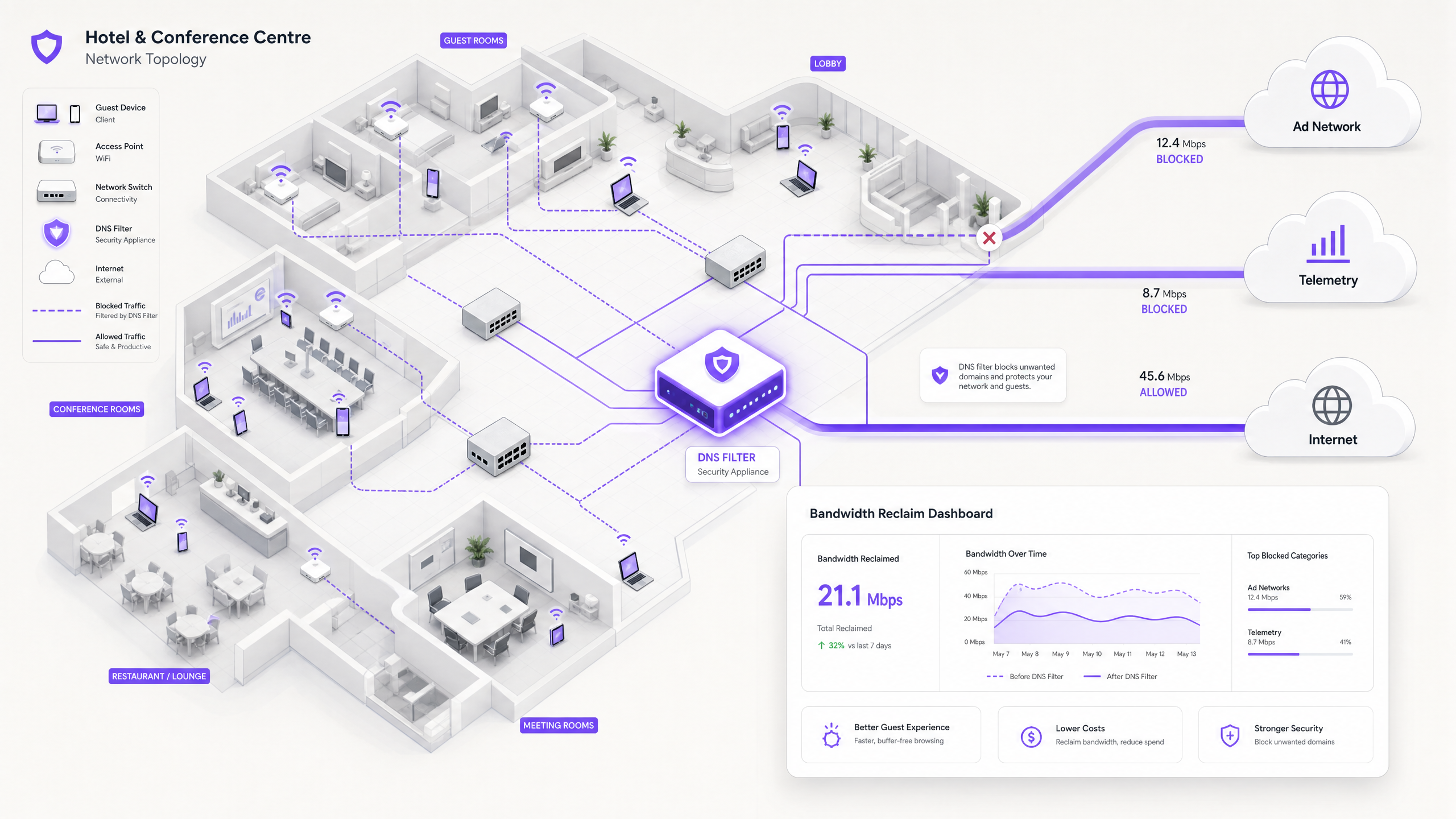
Riepilogo Esecutivo
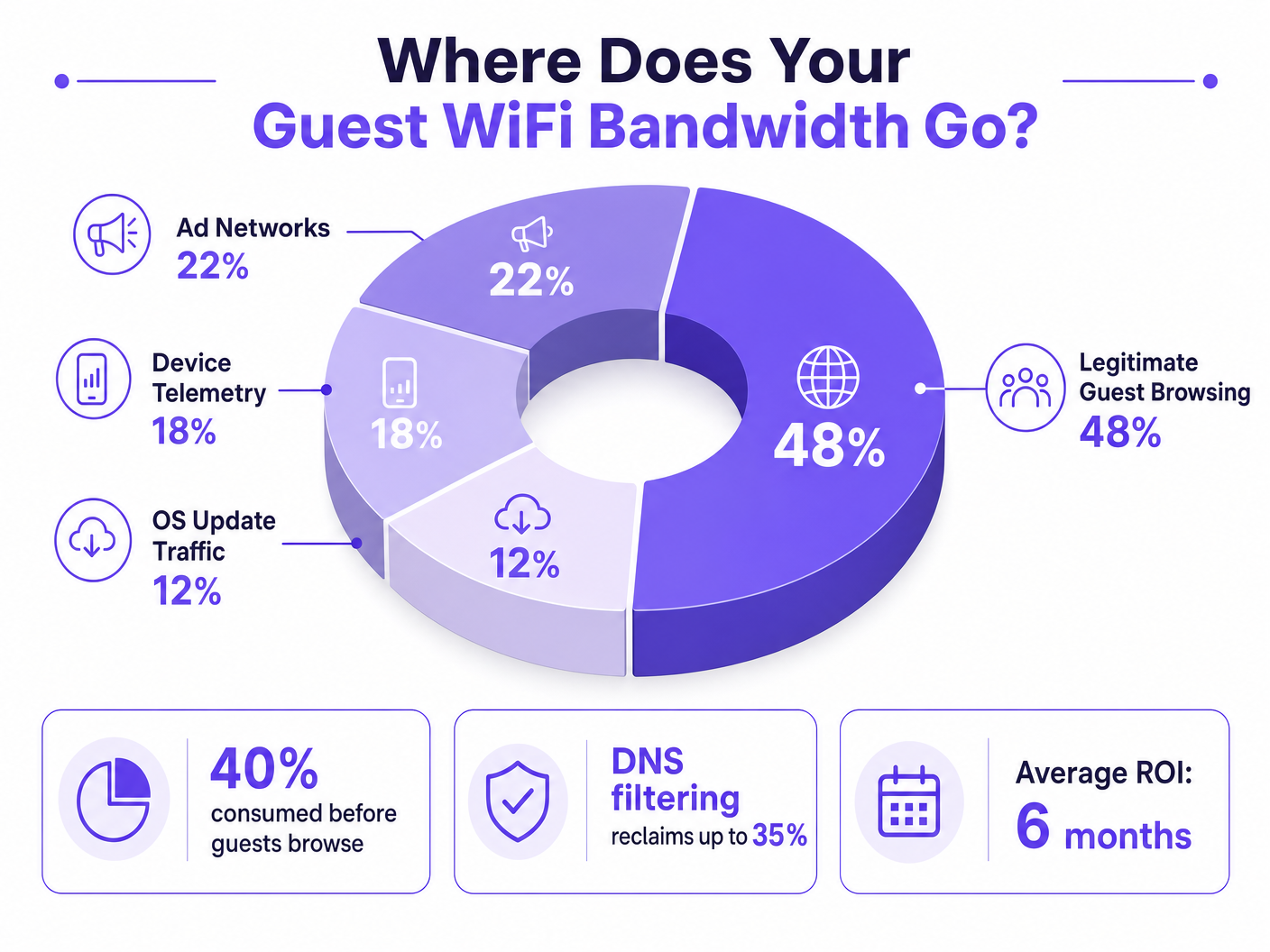
Per i Direttori IT e i Responsabili Operativi che supervisionano sedi ad alta densità, garantire un'esperienza Guest WiFi affidabile è una battaglia costante contro la congestione della rete. Mentre gli approcci tradizionali si concentrano sull'aumento della larghezza di banda complessiva o sulla distribuzione di punti di accesso aggiuntivi, la causa principale della bassa velocità di trasmissione spesso non risiede nel traffico utente legittimo, ma nello strato nascosto dei dati in background. Negli ambienti moderni — dai complessi Hospitality estesi agli spazi Retail ad alto traffico — fino al 40% della larghezza di banda WiFi pubblica viene consumato dalla telemetria dei dispositivi, dalle reti pubblicitarie programmatiche e dagli aggiornamenti automatici del sistema operativo prima ancora che un ospite apra un browser.
Questa guida di riferimento tecnico fornisce una metodologia definitiva per diagnosticare questa congestione e implementare mitigazioni strategiche. Implementando il filtraggio DNS a livello di rete e le Response Policy Zones (RPZ), gli architetti di rete aziendali possono recuperare una significativa larghezza di banda, ridurre la latenza e migliorare drasticamente l'esperienza dell'utente finale senza incorrere in spese in conto capitale per l'aggiornamento dell'infrastruttura. Esploreremo l'architettura tecnica di queste soluzioni, casi di studio di implementazione reali e il ROI misurabile del recupero della vostra rete.
Approfondimento Tecnico
L'Anatomia della Congestione in Background
Quando un dispositivo ospite si autentica a una rete pubblica, avvia immediatamente una raffica di connessioni in background. Queste connessioni sono principalmente guidate da tre categorie di traffico che, nel loro insieme, costituiscono ciò che gli ingegneri di rete chiamano il carico fantasma — larghezza di banda consumata dalla rete prima che si verifichi qualsiasi attività deliberata dell'ospite.
1. Telemetria e Analisi dei Dispositivi
I sistemi operativi moderni (iOS, Android, Windows) e le applicazioni installate trasmettono costantemente dati di utilizzo, metriche di posizione, rapporti di crash e analisi comportamentali a server remoti. In un ambiente denso come un hub di Trasporto o un centro congressi, migliaia di dispositivi che trasmettono simultaneamente payload di telemetria piccoli ma frequenti possono esaurire il tempo di trasmissione wireless disponibile e sovraccaricare le tabelle NAT. Un singolo dispositivo iOS può generare oltre 200 query DNS in background distinte entro i primi 60 secondi dalla connessione a una rete non a consumo.
2. Reti Pubblicitarie Programmatiche
Molte applicazioni gratuite si basano su ecosistemi pubblicitari programmatici. Nel momento in cui un dispositivo rileva una connessione WiFi non a consumo, queste app iniziano a pre-caricare annunci video, banner display ad alta risoluzione e script di tracciamento dalle piattaforme di scambio pubblicitario. Questo traffico è sia ad alta larghezza di banda che sensibile alla latenza, e competerà aggressivamente per il tempo di trasmissione con la navigazione legittima degli ospiti. L'analisi delle reti di luoghi pubblici mostra costantemente che il traffico pubblicitario programmatico rappresenta il 15-22% dell'utilizzo totale della WAN durante le ore di punta.
3. Aggiornamenti Automatici del Sistema Operativo e delle Applicazioni
Senza una corretta gestione del traffico, i dispositivi tenteranno di scaricare patch di sistema operativo e aggiornamenti di applicazioni di grandi dimensioni non appena rilevano una connessione WiFi non a consumo. Un singolo aggiornamento maggiore di iOS può essere di 3-5 GB. In un ambiente con 500 dispositivi, un trigger di aggiornamento simultaneo — comune quando viene rilasciata una nuova versione del sistema operativo — può saturare anche un collegamento WAN da 1 Gbps in pochi minuti.
Perché gli Approcci Tradizionali Falliscono
La risposta convenzionale alla congestione del WiFi per gli ospiti è aumentare la larghezza di banda WAN o implementare punti di accesso aggiuntivi. Sebbene entrambe le misure abbiano il loro posto, nessuna delle due affronta il carico fantasma. L'aggiunta di maggiore larghezza di banda fornisce semplicemente più capacità per il consumo del traffico in background. La Deep Packet Inspection (DPI), l'altro strumento tradizionale, è sempre meno efficace: l'adozione diffusa di TLS 1.3 e della crittografia end-to-end significa che la maggior parte dei payload di traffico sono opachi ai motori di ispezione. Non è possibile limitare ciò che non è possibile classificare.
Per una discussione più ampia su come le frequenze wireless interagiscono con le implementazioni ad alta densità, consultate la nostra guida su Frequenze Wi-Fi: Una Guida alle Frequenze Wi-Fi nel 2026 .
Filtraggio DNS: La Contromisura Efficiente
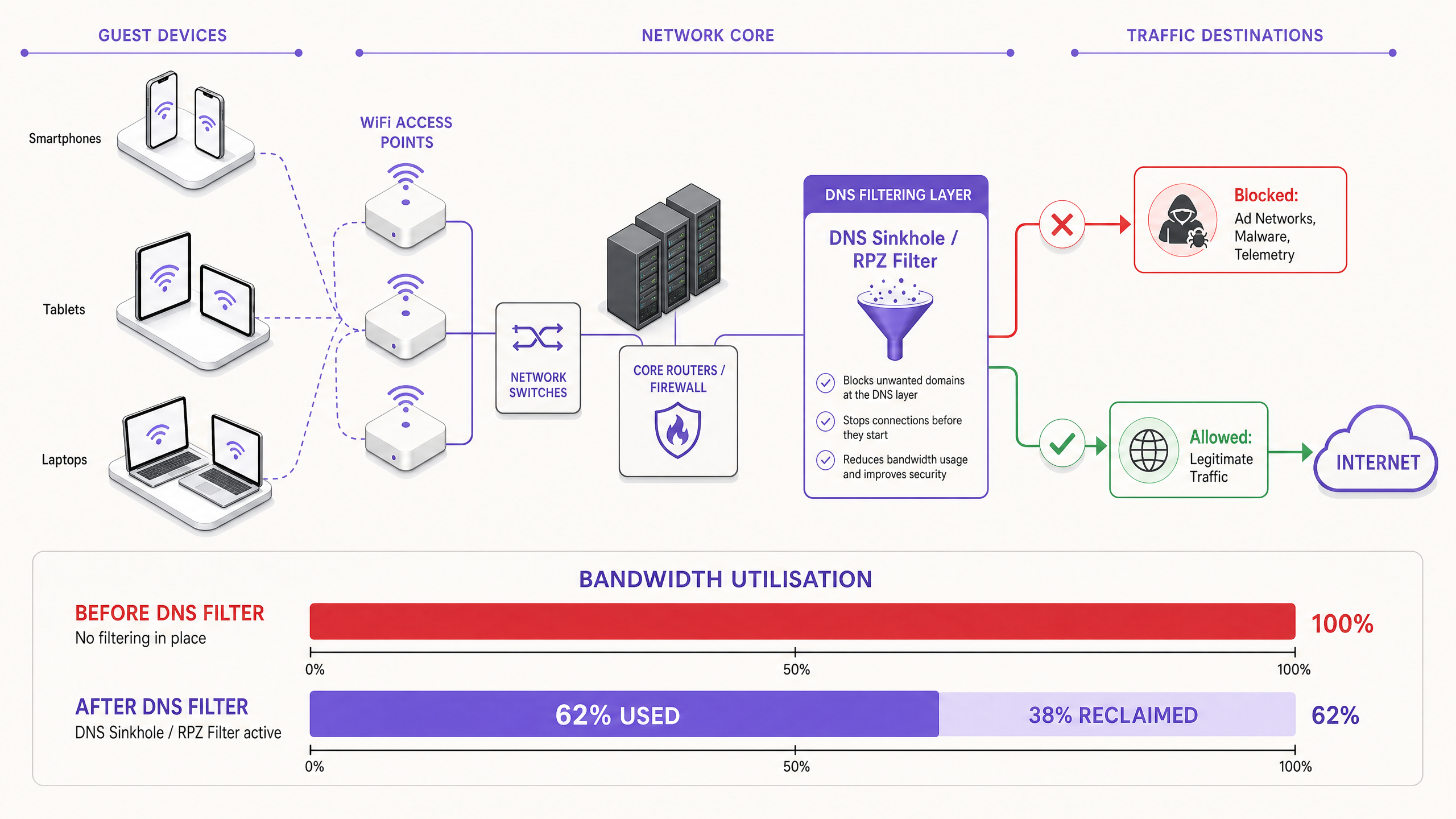
La soluzione moderna e scalabile è il filtraggio DNS al bordo della rete. Invece di ispezionare i payload del traffico, il filtraggio DNS opera a livello di risoluzione — impedendo che le connessioni vengano stabilite in primo luogo.
Quando un dispositivo richiede l'accesso a una rete pubblicitaria o a un dominio di telemetria noto, il risolutore DNS verifica la richiesta rispetto a una Response Policy Zone (RPZ). Se il dominio appare nella blacklist, il risolutore restituisce una risposta NXDOMAIN (Dominio Non Esistente) o instrada il traffico a un indirizzo IP nullo locale. La connessione viene terminata prima che avvenga l'handshake TCP, preservando sia il tempo di trasmissione wireless che la larghezza di banda WAN. Questo approccio è computazionalmente poco costoso, scala linearmente con la capacità del risolutore e non è influenzato dalla crittografia del payload.
La Dimensione della Sicurezza
Il filtraggio DNS offre un significativo beneficio secondario: la sicurezza. Bloccando i domini noti di Command and Control (C2) di malware, l'infrastruttura di phishing e le reti di distribuzione di exploit kit a livello DNS, la rete ospite diventa sostanzialmente più difendibilesibile. Ciò è direttamente rilevante per gli obblighi di conformità nell'ambito di framework quali PCI DSS (che richiede la segmentazione e il monitoraggio della rete per gli ambienti di dati dei titolari di carta) e il GDPR (che impone misure tecniche appropriate per proteggere i dati personali). Per un trattamento dettagliato dei requisiti di audit trail in questo contesto, vedere Spiegazione dell'audit trail per la sicurezza IT nel 2026 .
Per le organizzazioni che gestiscono ambienti educativi in cui il blocco degli annunci serve anche una funzione di salvaguardia, i principi trattati in Ridurre al minimo le distrazioni degli studenti con il blocco degli annunci a livello di rete sono direttamente applicabili.
Guida all'implementazione
Il deployment di un'architettura di filtraggio DNS robusta richiede un'attenta pianificazione per evitare di interrompere i servizi legittimi per gli ospiti. L'implementazione dovrebbe seguire un approccio a fasi.
Fase 1: Valutazione della baseline e visibilità
Prima di implementare qualsiasi blocco, stabilire una baseline dei modelli di traffico attuali. Utilizzare WiFi Analytics per identificare i domini e le categorie che consumano più larghezza di banda in un periodo rappresentativo di 7-14 giorni. Questa fase di audit è fondamentale per comprendere il profilo di traffico specifico della propria sede e per costruire il business case per l'investimento. Le metriche chiave da acquisire includono:
| Metrica | Baseline target | Note |
|---|---|---|
| I 20 principali domini DNS per volume di query | Elenco completo | Identificare i domini di telemetria e annunci |
| Utilizzo WAN per categoria | % di suddivisione | Quantificare il carico fantasma |
| Numero massimo di dispositivi concorrenti | Numero | Dimensionare l'infrastruttura del resolver |
| Tasso di fallimento delle query DNS | < 0,1% | Stabilire un benchmark pre-deployment |
Fase 2: Deployment RPZ a fasi
Iniziare il deployment dell'RPZ in modalità solo log. Ciò consente di verificare l'accuratezza delle blocklist senza influire sull'esperienza utente. Concentrarsi prima sulle categorie ad alta confidenza:
- Domini Malware e C2 noti: Beneficio di sicurezza immediato con rischio quasi nullo di falsi positivi. Utilizzare feed di threat intelligence da fornitori affidabili.
- Reti pubblicitarie programmatiche ad alta larghezza di banda: Mirare alle principali piattaforme di scambio di annunci video. Queste sono ben documentate e improbabili che ospitino contenuti legittimi.
- Endpoint di telemetria aggressivi: Bloccare i domini di tracciamento non essenziali. Mantenere un'attenta allow-list per i domini richiesti per i flussi di autenticazione del Captive Portal.
Una volta che la modalità solo log conferma tassi di falsi positivi accettabili (obiettivo < 0,5% delle query), passare alla modalità di applicazione.
Fase 3: Traffic Shaping e integrazione QoS
Per il traffico che non può essere bloccato del tutto (ad esempio, aggiornamenti del sistema operativo da Apple, Microsoft e Google), implementare politiche di Quality of Service (QoS). Limitare la velocità dei server di aggiornamento a un tetto definito — tipicamente il 10-15% della capacità WAN totale — assicurando che il traffico interattivo degli ospiti (navigazione web, VoIP, videoconferenze) riceva una coda prioritaria. Ciò è particolarmente importante per gli ambienti Sanitari dove il personale clinico può condividere un segmento di rete con gli ospiti.
Per indicazioni sull'ottimizzazione di ambienti di rete più ampi, inclusi deployment in uffici e ad uso misto, vedere Wi-Fi per Uffici: Ottimizza la Tua Rete Wi-Fi Moderna per Uffici .
Best Practice
Mantenere Allow-list Esplicite per i Servizi Critici. Assicurarsi che i domini essenziali per l'autenticazione del Captive Portal, i gateway di pagamento (conformità PCI DSS) e le operazioni principali della sede siano esplicitamente consentiti. Una blocklist mal configurata che interrompe il flusso di login genererà un carico di supporto immediato e significativo.
Comunicare la Politica in Modo Trasparente. I Termini di Servizio dovrebbero dichiarare che il traffico di rete è gestito per garantire un'esperienza di alta qualità a tutti gli utenti. Questa è sia una best practice legale ai sensi del GDPR sia una misura ragionevole per stabilire le aspettative degli ospiti.
Automatizzare gli Aggiornamenti delle Blocklist. Il panorama delle reti pubblicitarie e dei domini di telemetria cambia costantemente. I feed di threat intelligence e le liste RPZ devono essere aggiornati dinamicamente — idealmente con un ciclo inferiore alle 24 ore — per rimanere efficaci.
Affrontare Proattivamente l'Evasione DNS. Implementare regole firewall per intercettare e reindirizzare tutto il traffico in uscita sulla porta 53 (UDP e TCP) al resolver locale. Ciò impedisce ai client di aggirare il filtraggio codificando server DNS esterni.
Pianificare per DNS over HTTPS (DoH). Con l'aumento dell'adozione di DoH, i client potrebbero instradare le query DNS su HTTPS per aggirare completamente i resolver locali. Valutare se bloccare i provider DoH noti (ad esempio, dns.google, cloudflare-dns.com) o implementare un proxy DoH trasparente che applichi la politica locale.
Allinearsi con IEEE 802.1X e WPA3. Assicurarsi che l'architettura di filtraggio DNS sia compatibile con il framework di autenticazione. Negli ambienti che utilizzano IEEE 802.1X con autenticazione basata su RADIUS, le politiche di filtraggio DNS possono essere applicate per VLAN o per gruppo di utenti, consentendo un controllo granulare.
Risoluzione dei Problemi e Mitigazione del Rischio
Modalità di Fallimento Comuni
| Modalità di Fallimento | Sintomo | Mitigazione |
|---|---|---|
| Sovra-blocco (collisione CDN) | Pagine web interrotte, immagini mancanti | Blocklist granulari; processo rapido di allow-listing |
| Evasione DNS (resolver hardcoded) | Filtraggio aggirato da app specifiche | Regole di reindirizzamento firewall per la porta 53 |
| Bypass DoH | Filtraggio aggirato dai browser moderni | Bloccare i provider DoH noti o implementare un proxy DoH |
| Collo di bottiglia delle prestazioni del resolver | Latenza DNS aumentata per tutti i client | Scalare l'infrastruttura del resolver; implementare anycast |
| Rottura del Captive Portal | Gli ospiti non possono autenticarsi | Allow-list esplicita per i domini del portale e gli endpoint di rilevamento del sistema operativo |
| Blocklist obsolete | Nuovi domini pubblicitari non bloccati | Automatizzare gli aggiornamenti dei feed; monitorare i log delle query per nuovi domini ad alto volume |
Risposta agli Incidenti di Sicurezza
Se un dispositivo ospite viene identificato come in comunicazione con un dominio C2 malware noto (visibile nei log delle query DNS), l'RPZ bloccherà automaticamente ulteriori comunicazioni. Assicurati che il tuo processo di risposta agli incidenti includa un flusso di lavoro per la revisione di questi eventi, poiché potrebbero indicare un dispositivo compromesso che richiede l'isolamento dalla VLAN ospite.
ROI e Impatto sul Business
L'implementazione del filtro DNS a livello di rete offre risultati di business misurabili e quantificabili su più dimensioni.
Recupero della Larghezza di Banda e Rinvio del CapEx. Le strutture tipicamente recuperano il 20–40% della loro larghezza di banda WAN totale. Questo si traduce direttamente in risparmi sui costi, posticipando la necessità di costosi aggiornamenti dei circuiti. Per una struttura che attualmente paga per una linea dedicata da 500 Mbps, recuperare il 30% della capacità equivale a ottenere 150 Mbps di throughput effettivo a costo zero aggiuntivo.
Miglioramento della Soddisfazione degli Ospiti e del NPS. Eliminando la congestione di fondo, la velocità percepita e l'affidabilità del WiFi Ospite migliorano drasticamente. La latenza ridotta e il throughput costante portano a Net Promoter Score più elevati e a un minor numero di escalation del supporto operativo.
Miglioramento della Sicurezza e della Conformità. Il blocco di malware e domini di phishing a livello DNS riduce significativamente il rischio di una violazione della sicurezza originata dalla rete ospite. Ciò supporta direttamente la conformità ai requisiti di segmentazione della rete PCI DSS e l'obbligo del GDPR di implementare misure di sicurezza tecniche appropriate.
Efficienza Operativa. Il filtro DNS automatizzato riduce il carico di lavoro manuale sui team di operazioni di rete. Invece di rispondere reattivamente agli eventi di congestione, la rete gestisce proattivamente il proprio profilo di traffico.
| Risultato | Intervallo Tipico | Metodo di Misurazione |
|---|---|---|
| Larghezza di banda recuperata | 20–40% della capacità WAN | Monitoraggio dell'utilizzo WAN prima/dopo |
| Tasso di blocco delle query DNS | 15–35% di tutte le query | Log delle query del resolver |
| Miglioramento della soddisfazione degli ospiti | +8–15 punti NPS | Sondaggi post-soggiorno/post-visita |
| Rinvio del CapEx | 1–3 anni sull'aggiornamento del circuito | Modellazione dei costi |
| Riduzione degli incidenti di sicurezza | 40–60% in meno di rilevamenti C2 | Correlazione SIEM |
Trattando la rete non solo come un condotto, ma come un gateway intelligente e filtrato, i leader IT possono offrire un'esperienza di connettività superiore, sicura ed economicamente vantaggiosa — una che si adatta alla crescita della struttura senza un investimento infrastrutturale proporzionale.
Definizioni chiave
Response Policy Zone (RPZ)
A mechanism in DNS servers that allows the modification of DNS responses based on a defined policy. When a queried domain matches an entry in the RPZ, the resolver can return a synthetic response (e.g., NXDOMAIN or a sinkhole IP) instead of the real answer.
The primary technical mechanism for implementing network-wide DNS filtering. IT teams configure RPZs on their internal resolvers to block ad networks, malware domains, and telemetry endpoints without requiring client-side software.
Deep Packet Inspection (DPI)
A form of network packet filtering that examines the data payload of a packet as it passes an inspection point, searching for protocol non-compliance, specific content, or defined criteria.
Traditionally used for traffic classification and shaping. Increasingly limited by the widespread adoption of TLS 1.3 end-to-end encryption, which renders payloads opaque. DNS filtering is the preferred alternative for encrypted traffic environments.
NXDOMAIN
A DNS response code (RCODE 3) indicating that the queried domain name does not exist in the DNS namespace.
Returned by a filtering DNS resolver to intentionally block a connection to an unwanted domain. The client application receives this response and abandons the connection attempt, preventing any bandwidth from being consumed.
DNS over HTTPS (DoH)
A protocol for performing DNS resolution via the HTTPS protocol (RFC 8484), encrypting DNS queries and responses between the client and a DoH-capable resolver.
Can bypass local network DNS filtering if clients are configured to use external DoH providers. Network administrators must implement firewall rules or proxy DoH traffic to enforce local RPZ policies.
Quality of Service (QoS)
A set of network mechanisms that control traffic prioritisation, rate-limiting, and queuing to ensure the performance of critical applications.
Used alongside DNS filtering to manage legitimate but high-bandwidth traffic (e.g., OS updates) that cannot be blocked. QoS ensures that interactive guest traffic receives priority over background bulk transfers.
Telemetry
The automated collection and transmission of operational data from devices to remote servers for monitoring, analytics, and diagnostics.
In the context of guest WiFi, device telemetry from mobile operating systems and applications can silently consume 15–20% of available bandwidth. It is a primary target for DNS filtering in public network deployments.
DNS Sinkholing
A technique in which a DNS server is configured to return a false IP address (typically a local null address) for specific domains, redirecting traffic away from its intended destination.
Used to neutralise malware C2 traffic and aggressively block high-bandwidth ad networks. More definitive than NXDOMAIN responses, as it allows the sinkhole server to log connection attempts for security analysis.
Airtime Fairness
A wireless network feature that allocates equal access to the wireless medium across all connected clients, regardless of their individual data rates.
Critical in high-density environments. Without airtime fairness, a single slow device (e.g., an older 802.11g client) can disproportionately consume airtime, degrading throughput for all other clients. Background telemetry traffic from many devices exacerbates this effect.
Phantom Load
Bandwidth consumed by automated background processes on connected devices before any deliberate user activity occurs.
The collective term for telemetry, ad network pre-fetching, and OS update traffic. Understanding and quantifying the phantom load is the first step in any guest WiFi congestion diagnosis.
Esempi pratici
A 400-room resort hotel is experiencing severe network congestion every evening between 7:00 PM and 10:00 PM. The 1 Gbps WAN link is saturated, and guests are complaining about slow streaming and dropped VoIP calls. The IT Director needs to identify the root cause and implement a solution without upgrading the circuit.
Step 1 — Traffic Analysis: Deploy a network flow analyser (NetFlow/IPFIX) on the core router and run it for 5 days across peak and off-peak periods. Correlate with DNS query logs from the existing resolver. The analysis reveals that 35% of evening traffic is destined for known programmatic video ad networks (DoubleClick, AppNexus) and automated app update servers (Apple Software Update, Google Play). Legitimate guest browsing accounts for only 52% of total traffic.
Step 2 — DNS Filtering Deployment: Configure the core firewall to redirect all guest VLAN DNS queries (UDP/TCP port 53) to a locally hosted RPZ-enabled resolver. Import a curated blocklist covering the identified ad networks and telemetry domains. Run in log-only mode for 48 hours to validate false positive rates.
Step 3 — Policy Enforcement: After validating a false positive rate below 0.3%, switch to enforcement mode. Simultaneously, implement a QoS policy that rate-limits Apple and Google update servers to a combined ceiling of 80 Mbps during the 6 PM–11 PM window.
Step 4 — Validation: Monitor WAN utilisation over the following 7 days. Peak utilisation drops from 98% to 61%, resolving guest complaints. The hotel defers a planned circuit upgrade by an estimated 18 months.
A large conference centre is hosting a technology summit with 5,000 attendees. During the keynote, the WiFi network becomes completely unusable. Post-incident analysis shows that thousands of devices simultaneously attempted to download a major iOS update that was released that morning.
Immediate Mitigation (Day of Event): The network operations team identifies the surge via real-time DNS query monitoring. They immediately sinkhole the specific Apple software update domains (mesu.apple.com, appldnld.apple.com, updates.cdn-apple.com) at the DNS layer. Within 4 minutes, WAN utilisation drops from 99% to 68%, and the network stabilises.
Short-Term Fix (Same Event): A QoS policy is applied to rate-limit all remaining update traffic to 50 Mbps for the duration of the event.
Long-Term Strategy (Post-Event): The network team implements a dynamic QoS policy that automatically activates when total WAN utilisation exceeds 75%, throttling known update servers to 10% of total capacity. A pre-event checklist is created that includes temporarily sinkholes of major update domains during the 2 hours before and after high-profile sessions. The team also subscribes to Apple's and Microsoft's update release notification feeds to anticipate future surge events.
Domande di esercitazione
Q1. You are the IT Manager for a national retail chain. After deploying a DNS filtering solution across 50 stores, several store managers report that the captive portal login page is failing to load for guests. The support team is receiving high call volumes. What is the most likely cause, and what is the immediate remediation step?
Suggerimento: Consider the full dependency chain of a modern captive portal authentication flow, including OS-level captive portal detection mechanisms.
Visualizza risposta modello
The most likely cause is over-blocking. The DNS filter is blocking a domain required for the captive portal to function. Modern mobile operating systems use specific domains to detect captive portals (e.g., captive.apple.com for iOS, connectivitycheck.gstatic.com for Android). If these are blocked, the OS will not trigger the captive portal browser, and the guest will see no login prompt. Additionally, the portal itself may depend on a CDN or third-party authentication provider (e.g., social login via Facebook or Google) whose domains are inadvertently blocked.
Immediate remediation: Review the DNS query logs for NXDOMAIN responses originating from the guest subnet during the authentication phase. Identify all blocked domains that are queried before a successful login. Add these domains to the global allow-list. Implement a standard allow-list template for captive portal deployments that includes all major OS detection endpoints and common authentication provider domains.
Q2. A stadium network architect notices that despite implementing aggressive DNS filtering, WAN utilisation remains critically high during matches. Further investigation reveals a sustained high volume of UDP port 443 traffic that does not correlate with any blocked domains in the DNS logs. What is happening, and how should it be addressed?
Suggerimento: Consider modern transport protocols and how they interact with DNS-layer controls.
Visualizza risposta modello
The high volume of UDP 443 traffic indicates the use of QUIC (HTTP/3). QUIC is a UDP-based transport protocol used by major platforms (Google, Meta, YouTube) that bypasses traditional TCP-based proxies and DPI engines. More critically, clients using QUIC may also be using DNS over HTTPS (DoH) to resolve domains, completely bypassing the local RPZ resolver and rendering DNS filtering ineffective for those clients.
To address this: First, implement firewall rules to block outbound DoH traffic to known public DoH providers (Google, Cloudflare, NextDNS) on TCP/UDP port 443 by destination IP, forcing clients to fall back to the local resolver. Second, evaluate blocking outbound UDP 443 entirely (or rate-limiting it aggressively) to force QUIC clients to fall back to TCP-based HTTP/2, which is subject to existing traffic management policies. Third, review whether a transparent DoH proxy can be deployed to intercept and inspect DoH queries while enforcing local RPZ policies.
Q3. You are designing a QoS policy for a large public hospital's guest WiFi network. The network is shared between patient entertainment devices, visitor personal devices, and a small number of clinical staff using VoIP softphones on their personal mobiles. Prioritise the following traffic types: VoIP (SIP/RTP), Guest Web Browsing (HTTP/HTTPS), Windows/iOS Updates, and Streaming Video (Netflix/YouTube).
Suggerimento: Consider both latency sensitivity and the business/clinical impact of each traffic type. Also consider the regulatory context of a healthcare environment.
Visualizza risposta modello
Priority 1 — VoIP (SIP/RTP): Strict Priority Queuing (Expedited Forwarding, DSCP EF). VoIP is highly sensitive to latency (target < 150ms one-way) and jitter (target < 30ms). Packet loss above 1% causes audible degradation. In a clinical context, a dropped call could have patient safety implications.
Priority 2 — Guest Web Browsing (HTTP/HTTPS): Assured Forwarding (AF31). This is the primary expected use case for both patients and visitors. It requires reasonable responsiveness but is tolerant of moderate latency.
Priority 3 — Streaming Video (Netflix/YouTube): Rate-limited per client (e.g., 3–5 Mbps cap) with Assured Forwarding (AF21). While important for patient experience during long stays, uncapped streaming will saturate the link. A per-client cap ensures equitable access. Consider time-of-day policies that relax limits during off-peak hours.
Priority 4 — OS/App Updates (Scavenger Class, DSCP CS1): Lowest priority, best-effort queuing, with an aggregate rate limit (e.g., 50 Mbps total across all update traffic). These are background tasks with no latency sensitivity. They should only consume spare capacity. In a healthcare environment, also consider whether the guest network is fully isolated from clinical systems — if not, update traffic management becomes a security concern as well as a bandwidth one.