
Perché il WiFi del tuo Stadio si Blocca (e Come Risolverlo)
Questa autorevole guida tecnica esamina la causa principale della congestione del WiFi negli stadi — il "chiacchiericcio" simultaneo in background di 50.000 dispositivi che caricano pubblicità programmatiche e telemetria — e fornisce un progetto architettonico dettagliato per l'implementazione del filtraggio DNS edge come strategia di mitigazione primaria. Progettata per IT Director, CTO e Network Architect, offre indicazioni pratiche per l'implementazione, casi di studio reali e framework di ROI misurabili per aiutare gli operatori delle sedi a recuperare larghezza di banda e fornire connettività ad alte prestazioni su larga scala.
Ascolta questa guida
Visualizza trascrizione del podcast
Riepilogo Esecutivo
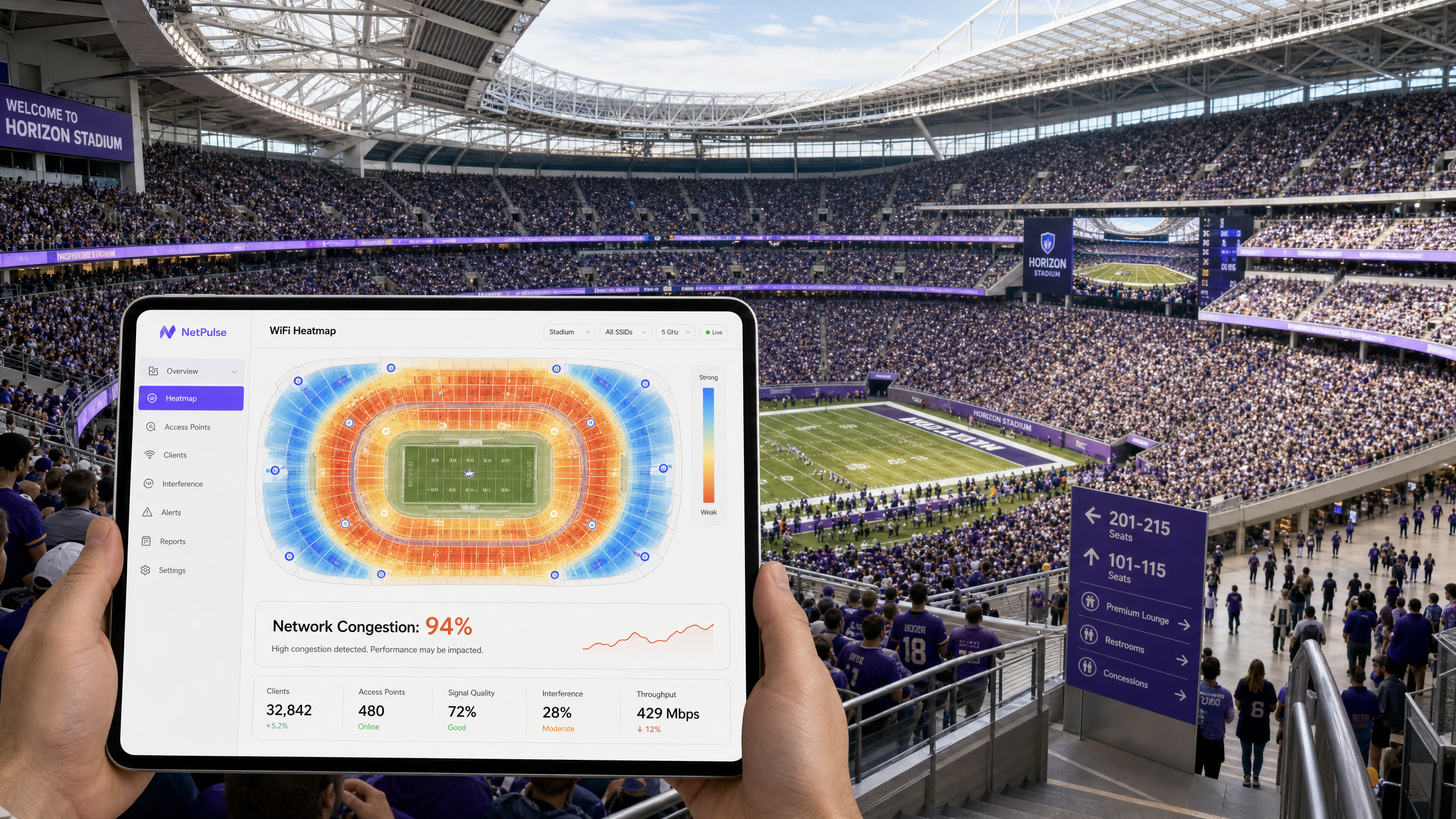
Per i CTO e gli IT Director che gestiscono sedi ad alta densità, il fenomeno del WiFi lento negli stadi è un rischio operativo persistente e costoso. Nonostante significativi investimenti di capitale in backhaul multi-gigabit, access point ad alta densità e una meticolosa pianificazione RF, le reti si bloccano frequentemente quando la capacità della sede supera l'80%. La causa principale raramente è una limitazione hardware. È l'invisibile valanga di traffico in background. Quando 50.000 dispositivi si connettono simultaneamente a una rete Guest WiFi , avviano milioni di micro-transazioni — caricando pubblicità programmatiche, sincronizzando telemetria ed eseguendo chiamate SDK in background. Questo "chiacchiericcio" può consumare fino al 60% della larghezza di banda disponibile prima che un singolo utente navighi attivamente sul web, esaurendo i pool NAT e saturando l'airtime. Questa guida descrive in dettaglio i meccanismi tecnici di questa congestione, fornisce un progetto architettonico vendor-neutral per l'implementazione del filtraggio DNS edge e ne quantifica il ROI.
Approfondimento Tecnico: L'Anatomia della Congestione ad Alta Densità
La Valanga di Traffico in Background
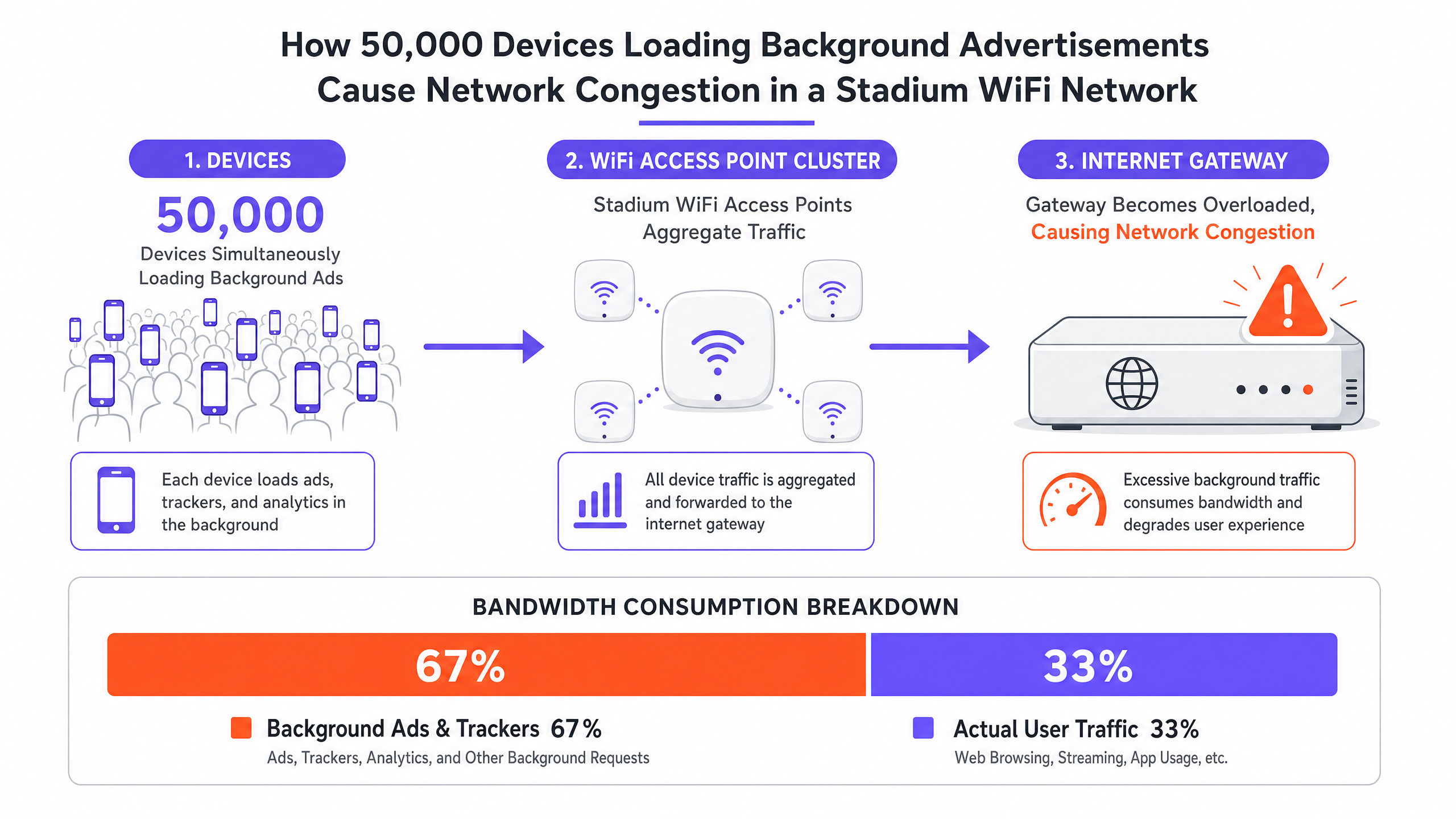
Quando un dispositivo si associa a una rete guest WiFi, avvia immediatamente una cascata di attività in background che non ha nulla a che fare con ciò che l'utente sta facendo attivamente. Le moderne applicazioni mobili sono integrate con numerosi SDK di terze parti — per piattaforme di analisi, servizi di segnalazione crash e reti pubblicitarie programmatiche. Ogni SDK opera indipendentemente, interrogando i propri server secondo la propria pianificazione. In un ambiente stadio, 50.000 dispositivi che eseguono queste azioni simultaneamente creano un profilo di traffico fondamentalmente diverso da qualsiasi altro scenario di implementazione.
Questo traffico è caratterizzato da richieste ad alto volume e basso payload: handshake TCP di piccoli pacchetti, query DNS e richieste HTTP GET per pixel di tracciamento e creatività pubblicitarie. Sebbene il totale dei dati trasferiti per dispositivo possa sembrare trascurabile in isolamento, l'effetto aggregato sull'efficienza spettrale della rete è devastante. Lo standard IEEE 802.11 stabilisce che il WiFi è un mezzo condiviso; ogni pacchetto trasmesso da qualsiasi dispositivo deve competere per l'airtime. Milioni di micro-transazioni in background saturano questo mezzo condiviso, lasciando insufficiente airtime per le sessioni utente legittime.
Tre Modalità di Fallimento su Larga Scala
La congestione ad alta densità si manifesta tipicamente attraverso tre distinte modalità di fallimento, che spesso si verificano simultaneamente:
| Modalità di Fallimento | Causa Tecnica | Sintomo Percepito dall'Utente |
|---|---|---|
| Esaurimento della Tabella di Stato | Il firewall/gateway NAT esaurisce la memoria di tracciamento delle connessioni | Pacchetti persi, timeout di connessione, fallimenti del captive portal |
| Saturazione dell'Airtime | Il mezzo RF condiviso è sopraffatto da micro-transazioni in background | Latenza elevata, throughput scarso nonostante il basso numero di client AP |
| Sovraccarico del DNS Resolver | I resolver locali sono sopraffatti dalle query di reti pubblicitarie e telemetria | Caricamento lento delle pagine, fallimenti delle app, ritardi nell'autenticazione |
L'Esaurimento della Tabella di Stato è il più insidioso di questi. Un firewall aziendale tipico può essere dimensionato per gestire da 500.000 a 1.000.000 di stati di connessione concorrenti. In uno stadio con 50.000 dispositivi, con ogni dispositivo che mantiene da 20 a 30 connessioni in background, il conteggio teorico degli stati di connessione supera il milione prima di considerare qualsiasi traffico utente attivo. Il risultato è la perdita di pacchetti e connessioni fallite su tutta la linea, influenzando ogni utente indipendentemente dal proprio comportamento.
La Saturazione dell'Airtime è aggravata dal meccanismo di contesa 802.11 (CSMA/CA). Ogni dispositivo deve ascoltare prima di trasmettere, e la probabilità di collisione aumenta esponenzialmente con la densità dei dispositivi. Il traffico in background proveniente dalle reti pubblicitarie e dai servizi di telemetria costringe il traffico utente legittimo a mettersi in coda, aumentando la latenza e riducendo il throughput effettivo ben al di sotto della capacità teorica degli access point.
Il Sovraccarico del DNS Resolver è spesso trascurato. In una tipica implementazione in uno stadio, WiFi Analytics rivela che i domini delle reti pubblicitarie — come quelli gestiti dalle principali piattaforme di pubblicità programmatica — appaiono costantemente tra le prime cinque voci DNS più interrogate. Ogni query, sebbene individualmente piccola, contribuisce al carico aggregato sui resolver locali e innesca tentativi di connessione TCP a valle che gravano ulteriormente sulla tabella di stato.
Guida all'Implementazione: Architettura di Filtraggio DNS Edge
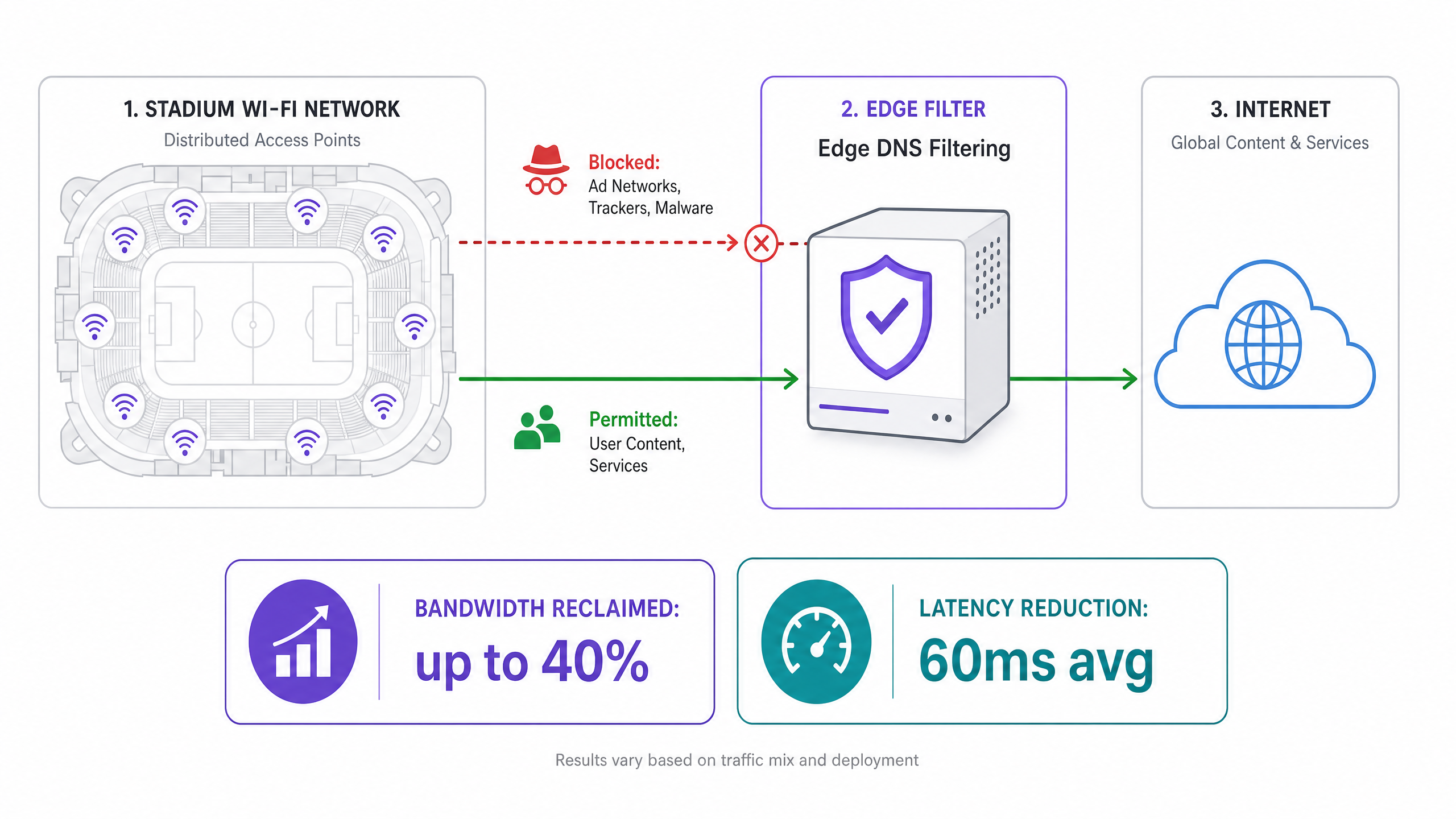
La risposta strategica a questo modello di fallimento non è fornire più hardware, ma eliminare la fonte del rumore. Il Filtraggio DNS Edge è la principale strategia di mitigazione e, se correttamente implementato, può recuperare fino al 40% della larghezza di banda WAN e ridurre la latenza media di 60ms o più.
Progetto Architettonico
Il filtraggio DNS edge opera intercettando le query DNS al perimetro della rete. Quando un dispositivo richiede l'indirizzo IP di una rete pubblicitaria nota, un server di telemetria o un dominio malware, il filtro risponde con una rotta nulla — restituendo 0.0.0.0 o una risposta NXDOMAIN. Ciò impedisce al dispositivo di stabilire una connessione TCP, eliminando l'overhead associato alla tabella di stato, il consumo di airtime e l'utilizzo della larghezza di banda WAN.
Fasi di Implementazione
Fase 1: Implementare Resolver DNS Locali Implementare resolver DNS locali ad alta disponibilità al perimetro della sede. Questi devono essere in grado di gestire il carico completo di query della popolazione di dispositivi connessi. Non affidarsi esclusivamente ai resolver ISP a monte, poiché ciò introduce latenza e remmigliora la tua capacità di filtrare.
Fase 2: Integrare i feed di Threat Intelligence e Ad-Blocking Iscriviti a feed di threat intelligence di livello enterprise che includano domini di reti pubblicitarie noti, server di telemetria e infrastrutture malware. Questi feed devono essere aggiornati dinamicamente — idealmente ogni poche ore — per rilevare i domini di nuova registrazione utilizzati dalle reti pubblicitarie per eludere il blocco.
Fase 3: Configurare la policy DHCP Configura i server DHCP per distribuire gli indirizzi IP dei resolver locali e filtrati a tutti i dispositivi guest. Questo è il meccanismo di applicazione primario per dirigere il traffico DNS del client attraverso il filtro.
Fase 4: Implementare le regole del firewall in uscita (Egress) Questo passaggio è critico e spesso omesso. Implementa regole rigorose del firewall in uscita per bloccare tutto il traffico DNS in uscita (TCP/UDP Porta 53) verso qualsiasi destinazione diversa dai resolver locali approvati. Ciò impedisce ai dispositivi con impostazioni DNS hardcoded di bypassare il filtro.
Fase 5: Gestire DNS over HTTPS (DoH) Come dettagliato nella nostra guida su DNS Over HTTPS (DoH): Implicazioni per la Filtraggio di WiFi Pubblico , i sistemi operativi e i browser moderni utilizzano sempre più DoH per crittografare le query DNS, instradandole a resolver esterni e bypassando completamente il filtraggio locale. Gli amministratori di rete devono bloccare esplicitamente gli indirizzi IP dei provider DoH noti a livello di firewall. Questo costringe il client a ripiegare sul DNS standard, non crittografato, che può quindi essere filtrato. L'equivalente in lingua portoghese di questa guida è disponibile su DNS Over HTTPS (DoH): Implicações para a Filtragem de WiFi Público per implementazioni internazionali.
Fase 6: Integrare con la gestione delle identità e degli accessi Per la massima efficacia, collega le policy di filtraggio DNS all'autenticazione utente. Sfruttare l' autenticazione basata su profilo — come esplorato nella nostra guida del 2026 sull'accesso senza password — consente alle sedi di applicare policy di filtraggio differenziate in base ai ruoli utente. Gli utenti con accesso generale ricevono un filtraggio aggressivo; gli utenti della stampa, aziendali o VIP possono ricevere policy più permissive che consentono applicazioni aziendali specifiche.
Casi di Studio
Caso di Studio 1: Stadio di Calcio da 60.000 Posti, Regno Unito
Un club di calcio della Premier League stava riscontrando un grave degrado della rete durante l'intervallo, con il captive portal che andava in timeout e la condivisione sui social media che falliva nei momenti di punta. Il circuito WAN era una connessione dedicata da 10Gbps, che operava solo al 28% di utilizzo durante l'incidente. La tabella di stato del firewall, tuttavia, era al 97% della capacità.
In seguito a un audit del traffico utilizzando WiFi Analytics , il team ha identificato che i domini delle reti pubblicitarie rappresentavano il 61% di tutte le query DNS. I primi cinque domini erano tutti infrastrutture pubblicitarie programmatiche. Il filtraggio DNS perimetrale è stato implementato con una blocklist di 1,2 milioni di domini, combinata con regole di egress rigorose che bloccavano la Porta 53 e gli IP dei provider DoH.
Il risultato: l'utilizzo della tabella di stato è sceso al 34% alla massima capacità, la latenza media è diminuita da 280ms a 95ms e l'utilizzo della larghezza di banda WAN al picco è sceso dal 28% al 17% — una riduzione del 39% della larghezza di banda consumata nonostante nessun cambiamento nel numero di dispositivi connessi.
Caso di Studio 2: Centro Congressi Internazionale, Settore Hospitality
Un importante centro congressi che ospitava un summit tecnologico con 15.000 delegati stava riscontrando lamentele da parte dei partecipanti riguardo alla lentezza del WiFi nonostante un'infrastruttura recentemente aggiornata. La sede aveva implementato 400 access point di livello enterprise e un circuito WAN da 5Gbps.
L'analisi del traffico ha rivelato che i dispositivi dei delegati — prevalentemente laptop aziendali con più applicazioni enterprise in esecuzione — generavano una media di 45 connessioni in background per dispositivo. Il resolver DNS elaborava 2,3 milioni di query all'ora, con il 68% destinato a reti pubblicitarie e piattaforme di analisi.
Dopo l'implementazione del filtraggio DNS perimetrale con integrazione delle policy legate al sistema di registrazione della conferenza, la sede ha registrato una riduzione del 52% del volume delle query DNS, una riduzione del 41% dell'utilizzo della tabella di stato del firewall e un miglioramento misurato del tempo medio di stabilimento della connessione TCP da 180ms a 62ms. I punteggi di soddisfazione dei delegati per la qualità del WiFi sono aumentati da 3,1 a 4,6 su 5.
Best Practice e Standard
Le seguenti best practice, indipendenti dai fornitori, riflettono gli attuali standard del settore per le implementazioni WiFi ad alta densità:
- IEEE 802.11ax (Wi-Fi 6/6E): Implementa access point Wi-Fi 6 o 6E. Le funzionalità OFDMA e BSS Colouring riducono significativamente la contesa del tempo di trasmissione in ambienti ad alta densità, complementando la riduzione del traffico ottenuta dal filtraggio DNS.
- WPA3-Enterprise: Applica WPA3-Enterprise con autenticazione IEEE 802.1X per qualsiasi implementazione che gestisca dati sensibili. Questo è un requisito di base per la conformità PCI DSS negli ambienti Retail e si allinea ai principi di minimizzazione dei dati del GDPR.
- Conformità GDPR: Comunica in modo trasparente l'uso di strumenti di ottimizzazione della rete, incluso il filtraggio DNS, nei termini di servizio del captive portal. Gli utenti devono essere informati che le query DNS vengono elaborate localmente come parte della funzione di gestione della rete.
- Monitoraggio e Analytics: Monitora continuamente i domini più richiesti utilizzando WiFi Analytics e adegua le policy di filtraggio di conseguenza. Le reti pubblicitarie registrano regolarmente nuovi domini per eludere il blocco; le blocklist statiche diventano obsolete in pochi giorni.
- Implementazioni nel Settore Pubblico: Per le implementazioni WiFi nel settore pubblico e nelle smart city, come discusso nel contesto dell' espansione di Purple nel settore pubblico , il filtraggio DNS svolge anche una funzione di salvaguardia, bloccando l'accesso a categorie di contenuti dannosi in conformità con i requisiti delle autorità locali.
Risoluzione dei Problemi e Mitigazione dei Rischi
Falsi Positivi
Rischio: Un filtraggio eccessivamente aggressivo potrebbe "bloccare funzionalità legittime delle applicazioni, come app di ticketing, servizi di navigazione per sedi o endpoint VPN aziendali.
Mitigazione: Implementare una allowlist rigorosa per i domini mission-critical identificati durante una fase di baseline di solo monitoraggio. Non passare mai direttamente alla modalità di applicazione in un ambiente di produzione. Un periodo di monitoraggio di due settimane è la baseline minima raccomandata prima dell'applicazione.
Bypass del Captive Portal tramite traffico in background
Rischio: I dispositivi potrebbero non attivare il Captive Portal se il traffico in background soddisfa il meccanismo di rilevamento del Captive Portal del sistema operativo (ad esempio, il controllo captive.apple.com di Apple) prima che l'utente apra un browser.
Mitigazione: Restringere il walled garden per consentire solo i domini specifici richiesti per il rilevamento e l'autenticazione del Captive Portal. Tutto il resto del traffico deve essere bloccato finché l'utente non è completamente autenticato e la politica di filtraggio non è applicata alla sua sessione.
Bypass DoH
Rischio: I dispositivi che utilizzano DoH bypasseranno il filtraggio DNS locale, rendendo l'intera strategia inefficace per tali client.
Mitigazione: Mantenere una blocklist aggiornata degli indirizzi IP dei provider DoH e bloccarli sul firewall. Questa non è una configurazione una tantum; nuovi provider DoH emergono regolarmente e devono essere monitorati.
Servizi di mappe e navigazione offline
Per le sedi che implementano la navigazione interna insieme al WiFi — come quelle che utilizzano la Modalità Mappe Offline di Purple — assicurarsi che i server delle tessere della mappa e le API di navigazione siano esplicitamente inclusi nella allowlist. Questi servizi sono fondamentali per l'esperienza dell'utente e non devono essere intercettati da regole di filtraggio ampie per le reti pubblicitarie.
ROI e Impatto Commerciale
Il caso aziendale per il filtraggio DNS edge è convincente sotto molteplici dimensioni:
| Metrica | Risultato Tipico | Impatto Commerciale |
|---|---|---|
| Riduzione della larghezza di banda WAN | 30–40% | Costi di aggiornamento del circuito posticipati; ciclo di vita dell'infrastruttura esteso |
| Riduzione della latenza | 40–70ms in media | Maggiore coinvolgimento degli utenti con le app della sede e i servizi digitali |
| Utilizzo della tabella di stato | Riduzione del 50–65% al picco | Aggiornamento hardware del firewall posticipato; rischio di incidenti ridotto |
| Volume di query DNS | Riduzione del 40–60% | Carico del resolver ridotto; velocità di autenticazione migliorata |
| Soddisfazione dell'utente | Miglioramento misurabile del NPS | Tempo di permanenza più lungo, aumento della spesa F&B, miglioramento della percezione del marchio |
Per uno stadio che spende £80.000 all'anno per la connettività WAN e affronta un ciclo di aggiornamento hardware di £200.000, una riduzione della larghezza di banda del 35% si traduce in circa £28.000 di risparmi annuali sulla WAN e una potenziale estensione di 18 mesi del ciclo di aggiornamento hardware — un risparmio combinato di tre anni che supera le £100.000, a fronte di un costo di implementazione tipicamente compreso tra £15.000 e £30.000 per una sede di questa scala.
Ascolta il Briefing Tecnico
Definizioni chiave
State Table Exhaustion
A condition where a firewall or NAT gateway runs out of memory allocated for tracking active network connections, causing it to drop new connection requests.
Occurs in high-density venues when tens of thousands of devices simultaneously initiate micro-connections to ad networks and telemetry servers. The primary cause of the 'stadium WiFi slow' paradox where the WAN circuit appears underutilised but the network is effectively broken.
Airtime Utilisation
The percentage of time the RF spectrum on a given WiFi channel is actively being used to transmit data or management frames.
High airtime utilisation from background chatter reduces the capacity available for active user sessions. In a high-density stadium, background traffic can drive airtime utilisation above 80%, leaving insufficient capacity for legitimate user traffic.
Edge DNS Filtering
The practice of intercepting DNS queries at the network perimeter and blocking resolution for known malicious, high-overhead, or policy-violating domains by returning a null route or NXDOMAIN response.
The primary architectural mitigation for background traffic congestion in high-density venues. Prevents devices from establishing connections to ad networks and telemetry servers, reclaiming bandwidth and reducing state table load.
DNS over HTTPS (DoH)
A protocol for performing DNS resolution via the HTTPS protocol, encrypting the DNS query and routing it to an external resolver, bypassing local DNS infrastructure.
The primary bypass mechanism for edge DNS filtering. Must be explicitly blocked at the IP level to ensure all DNS traffic passes through the local, filtered resolver.
Null Route
A network route that discards traffic destined for a specific IP address or domain, effectively dropping it without forwarding.
Used by DNS filters to respond to blocked domains — returning 0.0.0.0 or NXDOMAIN — preventing the client from initiating a TCP connection and eliminating the associated network overhead.
Walled Garden
A restricted network environment that limits device access to a predefined set of resources, typically used to enforce captive portal authentication before granting full internet access.
Must be strictly configured to prevent background traffic from satisfying OS captive portal detection mechanisms before the user authenticates, which would allow unrestricted background traffic to flow without a filtering policy being applied.
Profile-Based Authentication
An authentication method that dynamically applies specific network policies — including DNS filtering rules, bandwidth limits, and access controls — based on the authenticated user's identity or role.
Enables venues to offer differentiated network experiences, applying aggressive filtering to general admission users while providing more permissive policies to VIPs, press, or corporate guests.
OFDMA (Orthogonal Frequency Division Multiple Access)
A multi-user version of OFDM that allows a single WiFi 6 (802.11ax) transmission to be split across multiple users simultaneously, reducing contention and improving spectral efficiency.
A key feature of Wi-Fi 6 that directly addresses airtime contention in high-density deployments. Works in conjunction with DNS filtering to maximise the usable capacity of each access point.
Spectral Efficiency
The amount of useful data that can be transmitted over a given bandwidth in a specific communication system.
Reduced by background micro-transactions that consume airtime without delivering value to end users. Edge filtering and Wi-Fi 6 features like OFDMA work together to maximise spectral efficiency.
Esempi pratici
A 50,000-seat stadium is experiencing severe network degradation during halftime. The IT team has verified that the 10Gbps WAN circuit is only at 30% utilisation, but APs are reporting high airtime utilisation and the firewall state table is at 95% capacity. Adding more APs has not improved performance.
The issue is not raw bandwidth or AP density, but connection state exhaustion caused by background application chatter. The solution requires deploying an Edge DNS Filter in a phased approach. Phase 1: Deploy local DNS resolvers and configure them in monitor-only mode for two weeks. Analyse the top 100 queried domains. Phase 2: Configure DHCP to point all guest clients to the local resolvers. Implement egress firewall rules blocking outbound TCP/UDP Port 53 to all external IPs. Phase 3: Block the IP addresses of known DoH providers (Cloudflare 1.1.1.1, Google 8.8.8.8, etc.) at the firewall. Phase 4: Activate enforcement mode on the DNS filter with a blocklist targeting the identified ad network and telemetry domains. Phase 5: Monitor state table utilisation and airtime metrics over the next three events to validate the improvement.
A major transport hub wants to implement DNS filtering across 12 terminal buildings to improve network performance for 80,000 daily passengers. They are concerned about breaking legitimate airline ticketing applications and airport operations systems.
Implement a centralised, cloud-managed DNS filtering platform with local forwarders at each terminal. Phase 1: Deploy local forwarders in all 12 terminals, pointing to a centralised management plane. Phase 2: Run in monitor-only mode for 30 days across all terminals simultaneously. Use the analytics to build a comprehensive allowlist of airline ticketing domains, airport operations APIs, and ground handling system endpoints. Phase 3: Segment the network into guest WiFi and operational technology (OT) VLANs. Apply aggressive filtering to guest WiFi; apply a strict allowlist-only policy to OT VLANs. Phase 4: Enforce filtering on guest WiFi. Phase 5: Implement automated allowlist management — when a new airline begins operations at the terminal, their domain requirements are added to the allowlist via a change management process.
Domande di esercitazione
Q1. You have deployed an Edge DNS filter and configured DHCP to point all clients to the local resolver. After the first major event, you find that bandwidth utilisation has only dropped by 5%, and traffic analysis shows many devices are still successfully resolving ad network domains. What is the most likely architectural oversight, and what is the remediation?
Suggerimento: Consider how modern browsers and operating systems handle DNS resolution by default, and what happens when a device has a hardcoded DNS server configured.
Visualizza risposta modello
There are two likely causes. First, the network is failing to block DNS over HTTPS (DoH) traffic. Modern browsers will attempt to use DoH, routing encrypted DNS queries to external resolvers like Cloudflare or Google, bypassing the local filter entirely. The remediation is to implement egress firewall rules blocking the IP addresses of known DoH providers. Second, some devices may have hardcoded DNS server addresses (e.g., 8.8.8.8) in their network configuration, bypassing DHCP-assigned resolvers. The remediation is to implement egress firewall rules blocking all outbound TCP/UDP Port 53 traffic to any destination other than the local resolvers, forcing all DNS traffic through the filter regardless of client configuration.
Q2. During a major event, the captive portal is timing out for users attempting to connect, even though the APs show relatively low client counts (only 40% of capacity). The WAN circuit is at 15% utilisation. What is the likely cause, and what architectural changes would prevent this at the next event?
Suggerimento: Think about what happens to device traffic in the period between WiFi association and captive portal authentication, and what network resource is most likely to be exhausted.
Visualizza risposta modello
The firewall's state table is likely exhausted by background traffic from devices that have associated with the AP but not yet authenticated through the captive portal. In the unauthenticated state, if the walled garden is too permissive, background traffic flows freely, creating thousands of connection state entries per device. With 40% of 50,000 seats occupied (20,000 devices), even a brief window of unrestricted background traffic can exhaust the state table before users attempt to authenticate. The architectural remediation requires two changes: First, tighten the walled garden to permit only the minimum required traffic — DHCP (UDP 67/68), DNS to the local resolver only, and HTTP/HTTPS to the captive portal IP. Block all other traffic until authentication is complete. Second, consider deploying a dedicated stateless ACL at the AP or switch level to drop background traffic in the pre-authentication state, preventing it from even reaching the stateful firewall.
Q3. A retail chain with 500 locations wants to implement DNS filtering to improve POS system reliability and reduce WAN costs. They need uniform policy enforcement but also need to ensure that new point-of-sale software vendors can be onboarded without causing outages. What architectural approach should be taken, and what operational process should accompany it?
Suggerimento: Consider the tension between centralised policy management and the operational agility needed to support a dynamic retail technology stack.
Visualizza risposta modello
Deploy a cloud-managed DNS filtering solution with local forwarders at each site. The centralised management plane allows for uniform policy definition and threat feed updates across all 500 locations simultaneously, while the local forwarders ensure low-latency resolution and resilience against WAN link degradation. For operational agility, implement a tiered allowlist management process: a permanent allowlist for core POS and payment processing domains (which should be treated as change-controlled infrastructure), a temporary allowlist for new vendor onboarding (with a 90-day review cycle), and a self-service request process for store managers to flag false positives. Critically, the PCI DSS requirement for network segmentation means the POS VLAN must be isolated from the guest WiFi VLAN, with separate filtering policies applied to each. The guest WiFi policy can be aggressive; the POS policy should be allowlist-only, permitting only explicitly approved payment processor and software update domains.