
Criteri BYOD sicuri per le reti WiFi del personale
Questa guida autorevole offre ai leader IT un framework indipendente dai vendor per configurare in modo sicuro i dispositivi personali del personale. Descrive in dettaglio le decisioni architetturali critiche - tra cui la segmentazione della rete, l'autenticazione EAP-TLS e l'integrazione MDM - necessarie per supportare il BYOD senza compromettere l'infrastruttura aziendale principale.
Video overview
Ascolta questa guida
Visualizza trascrizione del podcast
Parte della nostra serie principale: Enterprise WiFi Security Guide →

Executive Summary
Il moderno ambiente aziendale richiede flessibilità e le aspettative dei dipendenti riguardo all'accesso Bring Your Own Device (BYOD) non sono più negoziabili. Tuttavia, l'integrazione di dispositivi personali non gestiti all'interno delle reti wireless aziendali introduce significativi rischi di sicurezza e conformità. Questa guida di riferimento tecnica fornisce ad architetti di rete e direttori IT un framework solido per implementare politiche BYOD sicure per le reti WiFi del personale. Vengono delineate le decisioni architetturali critiche, concentrandosi su segmentazione di rete, autenticazione IEEE 802.1X e integrazione con Mobile Device Management (MDM). Abbandonando le passphrase condivise e l'autenticazione basata su MAC a favore dell'identità basata su certificati (EAP-TLS) e della crittografia WPA3-Enterprise, le organizzazioni possono offrire una connettività fluida senza compromettere la propria infrastruttura core. Sia che operiate nei settori del retail, della sanità, dell'hospitality o dei trasporti, questa guida fornisce le best practice indipendenti dai singoli vendor necessarie per proteggere il perimetro della vostra rete supportando al contempo la produttività del personale.
Ascoltate il nostro podcast di approfondimento per ottenere una panoramica esecutiva su questi concetti:
Approfondimento Tecnico
Architettura di Rete e Segmentazione
Il principio fondamentale di qualsiasi distribuzione BYOD sicura è una rigorosa segmentazione della rete. I dispositivi personali non devono mai risiedere sulla stessa Virtual Local Area Network (VLAN) dell'infrastruttura aziendale, dei sistemi Point-of-Sale (POS) o dei database sensibili. Una VLAN BYOD dedicata funge da livello intermedio sicuro, logicamente isolato sia dal nucleo aziendale che dalle reti Guest WiFi.
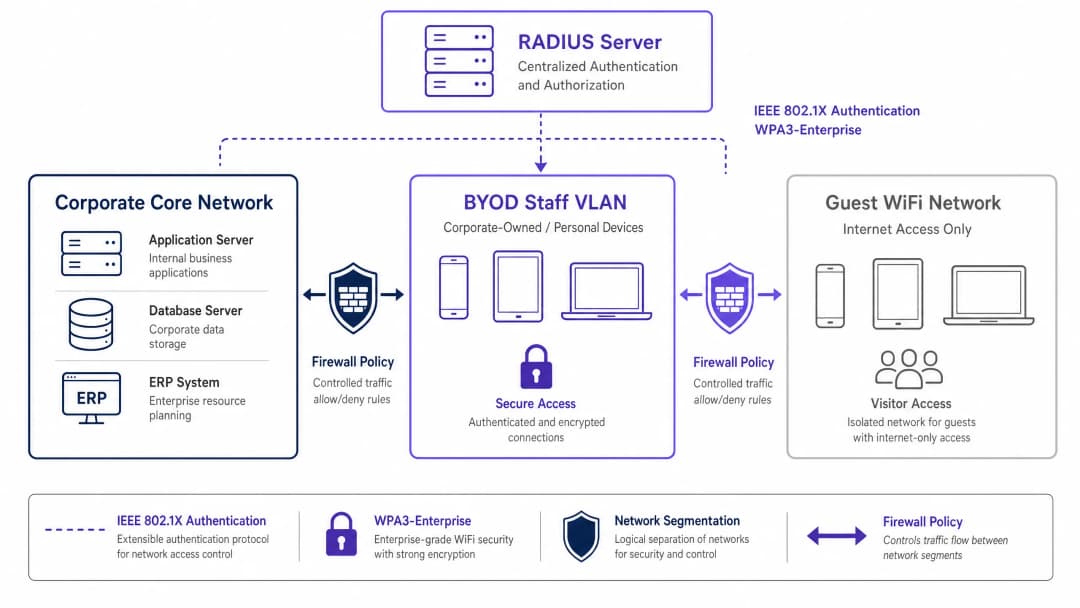
Questa segmentazione garantisce che, anche nel caso in cui il dispositivo personale di un dipendente venga compromesso, la minaccia rimanga contenuta. L'accesso dalla VLAN BYOD alle risorse aziendali interne deve essere disciplinato da rigide Access Control Lists (ACL) del firewall, che operano su un principio di negazione predefinita con autorizzazioni esplicite solo per i servizi essenziali (ad esempio, portali intranet o specifiche applicazioni cloud).
Autenticazione: Lo Standard IEEE 802.1X
La protezione del perimetro BYOD richiede un'autenticazione robusta. Lo standard IEEE 802.1X fornisce un controllo dell'accesso alla rete basato su porte, garantendo che i dispositivi siano autenticati prima di ottenere l'accesso a livello di rete. All'interno del framework 802.1X, l'Extensible Authentication Protocol con Transport Layer Security (EAP-TLS) rappresenta lo standard di riferimento per gli ambienti BYOD.
EAP-TLS si affida all'autenticazione reciproca basata su certificati. Al posto di password deboli, il dispositivo presenta un certificato digitale rilasciato dalla Public Key Infrastructure (PKI) dell'organizzazione. Il server RADIUS convalida questo certificato, garantendo la verifica sia dell'identità del dispositivo che di quella dell'utente. Questo approccio mitiga i rischi associati al furto di credenziali, al phishing e all'onere operativo del ripristino delle password.
Crittografia e Conformità
I dati in transito devono essere protetti dalle intercettazioni. WPA3-Enterprise è lo standard attuale per la sicurezza del traffico wireless, che sostituisce il WPA2 eliminando vulnerabilità come l'attacco KRACK. WPA3-Enterprise impone una modalità di sicurezza a 192 bit per gli ambienti altamente sensibili e garantisce la forward secrecy tramite la Simultaneous Authentication of Equals (SAE). L'implementazione di WPA3-Enterprise sta diventando rapidamente un requisito obbligatorio per i framework di conformità, tra cui PCI-DSS 4.0 e vari standard di sicurezza dei dati sanitari.
Inoltre, la conformità richiede una visibilità completa. Ogni evento di connessione sulla rete BYOD deve essere registrato, inclusi l'identità del dispositivo, l'identità dell'utente, i timestamp e l'assegnazione della VLAN. Questo audit trail è fondamentale per dimostrare la conformità a normative come l'Articolo 32 del GDPR. Per ulteriori informazioni sui requisiti di registrazione, consultare la nostra guida su Che cos'è un audit trail per la sicurezza informatica spiegato per il 2026.
Hai domande sulla tua configurazione specifica?
Il nostro team collabora con gestori di sedi, responsabili IT e ingegneri di rete in 80.000 sedi. Prenota una chiamata di 20 minuti e ti mostreremo come altri professionisti come te hanno risolto il problema.
Guida all'Implementazione
La distribuzione di una rete BYOD sicura richiede il coordinamento tra policy, gestione delle identità e infrastruttura di rete.

Implementazione passo dopo passo
- Definizione delle policy: Prima di apportare modifiche all'infrastruttura, definisci la policy BYOD. Determina i gruppi di utenti idonei, i tipi di dispositivi approvati e le risorse aziendali specifiche accessibili dalla VLAN BYOD. Ottieni l'approvazione formale dai responsabili legali, delle risorse umane e della sicurezza.
- Integrazione MDM e provisioning dei certificati: Sfrutta la tua piattaforma di Mobile Device Management (MDM) (ad esempio, Intune, Jamf) per distribuire i certificati EAP-TLS ai dispositivi del personale. Utilizza il Simple Certificate Enrollment Protocol (SCEP) per automatizzare questa distribuzione. L'MDM funge anche da motore di applicazione per i controlli dello stato di sicurezza del dispositivo (ad esempio, la verifica dei livelli di patch del sistema operativo e dello stato di crittografia) prima che venga concesso l'accesso alla rete.
- Configurazione RADIUS: Configura il server RADIUS con policy specifiche per i dispositivi BYOD. Quando un dispositivo BYOD si autentica correttamente tramite il suo certificato, il server RADIUS deve restituire un attributo di assegnazione dinamica della VLAN (ad esempio,
Tunnel-Private-Group-ID) per inserire il dispositivo nella VLAN BYOD isolata. - Configurazione dell'infrastruttura Wireless: Implementa l'assegnazione dinamica della VLAN sull'SSID aziendale esistente. Questo offre un'esperienza utente fluida: i dipendenti si connettono a un'unica rete e l'infrastruttura li instrada alla VLAN appropriata in base alla loro identità autenticata.
- Firewall e controllo degli accessi: Applica ACL rigorose al confine tra la VLAN BYOD e il core aziendale. Documenta ogni regola di autorizzazione e stabilisci un processo di revisione trimestrale per evitare l'espansione incontrollata dei permessi.
- Monitoraggio e analisi: Integra i log di connessione BYOD con il tuo sistema di Security Information and Event Management (SIEM). Utilizza piattaforme come WiFi Analytics per monitorare le prestazioni della rete, la distribuzione dei dispositivi e le potenziali anomalie.
Best Practice
- Abbandona l'autenticazione basata su MAC: I moderni sistemi operativi mobili (iOS, Android) rendono casuali gli indirizzi MAC per proteggere la privacy dell'utente. Questo interrompe il tracciamento e l'autenticazione tradizionali basati su MAC. Affidati interamente all'identità basata su certificati (EAP-TLS) collegata all'utente, piuttosto che agli indirizzi hardware.
- Implementa la valutazione dello stato di sicurezza (Posture Assessment): Una policy BYOD non è completa senza controlli dello stato di sicurezza. Assicurati che la tua soluzione di Network Access Control (NAC) interroghi l'MDM prima di concedere l'accesso per verificare che i dispositivi soddisfino i requisiti minimi di sicurezza (ad esempio, non sottoposti a jailbreak, blocco schermo abilitato). I dispositivi non conformi devono essere instradati verso una VLAN di riparazione.* Automate Certificate Lifecycle Management: I certificati scadono. Configura il tuo MDM per rinnovare automaticamente i certificati ben prima della scadenza (ad esempio, 30 giorni prima) per prevenire guasti di connettività su larga scala. Inoltre, integra la revoca dei certificati con il tuo processo di offboarding delle risorse umane per interrompere immediatamente l'accesso quando un dipendente lascia l'azienda.
- Maintain Strict Isolation: Garantisci un isolamento completo tra la VLAN BYOD e la rete guest. Un dispositivo compromesso sulla rete guest non deve avere alcun percorso di movimento laterale verso i dispositivi del personale. Per la risoluzione dei problemi relativi all'accesso dei guest, consulta Risoluzione dell'errore Connesso ma Senza Internet su WiFi Guest.
Risoluzione dei Problemi e Mitigazione dei Rischi
- Firewall Rule Scope Creep: La causa di errore più comune nelle distribuzioni BYOD è la graduale erosione della segmentazione della rete. Le regole di accesso temporaneo diventano permanenti, fondendo di fatto la rete BYOD e quella aziendale. Mitigazione: Implementa un rigoroso processo di gestione delle modifiche per le regole del firewall BYOD ed effettua revisioni trimestrali obbligatorie.
- Certificate Expiration Outages: La mancata gestione del ciclo di vita dei certificati porta a improvvise interruzioni della connettività per ampi gruppi di personale. Mitigazione: Implementa il rinnovo automatico tramite SCEP/MDM e configura avvisi proattivi per le scadenze imminenti.
- Incomplete Offboarding: L'accesso persistente per gli ex dipendenti rappresenta una vulnerabilità di sicurezza significativa. Mitigazione: Automatizza la revoca del loro certificato nella PKI non appena lo stato dell'utente cambia nel sistema delle risorse umane.
ROI e Impatto Aziendale
L'implementazione di un'architettura BYOD sicura richiede un investimento iniziale in infrastrutture NAC, MDM e RADIUS. Tuttavia, il Ritorno sull'Investimento (ROI) è sostanziale:
- Mitigazione del Rischio: Isolando i dispositivi non gestiti, l'azienda riduce significativamente la superficie di attacco per ransomware e movimenti laterali, proteggendo le risorse critiche ed evitando costose violazioni dei dati.
- Efficienza Operativa: L'autenticazione basata su certificati elimina il sovraccarico dell'helpdesk IT associato alla reimpostazione delle password e alla gestione delle credenziali condivise.
- Produttività dei Dipendenti: Offrire un accesso sicuro e fluido alle risorse necessarie sui dispositivi personali migliora la soddisfazione e la produttività del personale, in particolare in ambienti dinamici come i punti vendita o i reparti ospedalieri.
- Garanzia di Conformità: Log di controllo completi e una crittografia robusta assicurano che l'azienda soddisfi i requisiti normativi, evitando potenziali sanzioni e danni di reputazione.
Mentre le organizzazioni espandono la propria impronta digitale, la connettività sicura rimane un elemento fondamentale. Le iniziative come l'integrazione delle smart city supportate dai leader del settore (consultate Purple nomina Iain Fox come VP Growth - Public Sector per guidare l'inclusione digitale e l'innovazione delle smart city) si affidano a solide architetture di sicurezza fondamentali. Inoltre, garantire una navigazione fluida all'interno di grandi spazi, supportata da funzionalità come Purple lancia la modalità Offline Maps Mode per una navigazione fluida e sicura verso gli hotspot WiFi, dipende da un'infrastruttura di rete sottostante affidabile e sicura.
Definizioni chiave
IEEE 802.1X
Uno standard IEEE per il controllo dell'accesso alla rete basato su porta (PNAC). Fornisce un meccanismo di autenticazione per i dispositivi che desiderano connettersi a una LAN o WLAN.
Il protocollo fondamentale utilizzato per autenticare i dispositivi del personale prima che sia consentito l'accesso alla rete BYOD.
EAP-TLS (Extensible Authentication Protocol-Transport Layer Security)
Un metodo EAP che si affida a certificati client e server per stabilire un tunnel di autenticazione reciproca sicuro.
Considerato il metodo di autenticazione più sicuro per il BYOD, in quanto elimina la dipendenza dalle vulnerabili password degli utenti.
RADIUS (Remote Authentication Dial-In User Service)
Un protocollo di rete che fornisce una gestione centralizzata di autenticazione, autorizzazione e tracciabilità (AAA) per gli utenti che si connettono e utilizzano un servizio di rete.
Il server backend che valuta le richieste 802.1X provenienti dagli access point e decide se concedere a un dispositivo l'accesso alla rete.
Assegnazione dinamica della VLAN
Una configurazione di rete in cui il server RADIUS stabilisce in quale VLAN deve essere inserito un utente o un dispositivo in seguito a un'autenticazione riuscita, anziché codificare la VLAN in modo fisso nell'SSID.
Consente alle organizzazioni di trasmettere un singolo SSID separando al contempo in modo sicuro il traffico (ad esempio, aziendale rispetto a BYOD) in base all'identità dell'utente.
Randomizzazione degli indirizzi MAC
Una funzionalità di privacy nei moderni sistemi operativi mobili per cui il dispositivo utilizza un indirizzo MAC generato casualmente invece del suo vero indirizzo hardware durante la scansione o la connessione alle reti.
Questa funzionalità rende obsoleti i vecchi metodi di autenticazione basati su MAC, imponendo il passaggio a un'autenticazione basata sull'identità come 802.1X.
MDM (Mobile Device Management)
Software che consente agli amministratori IT di controllare, proteggere e applicare policy su smartphone, tablet e altri endpoint.
Utilizzato nelle distribuzioni BYOD per distribuire certificati di rete ai dispositivi e verificare il loro stato di sicurezza (ad es. il livello di patch) prima di consentire l'accesso alla rete.
WPA3-Enterprise
L'ultima generazione della sicurezza WiFi, che fornisce una crittografia robusta e richiede l'autenticazione 802.1X per le reti aziendali.
Obbligatorio per le moderne implementazioni sicure per proteggere i dati in transito da attacchi crittografici avanzati.
Posture Assessment
Il processo di valutazione dello stato di sicurezza di un dispositivo (ad es. versione del sistema operativo, stato dell'antivirus, crittografia) prima di concedergli l'accesso alla rete.
Garantisce che il dispositivo personale di un dipendente non ospiti malware o non esegua un sistema operativo obsoleto prima di connettersi alla VLAN BYOD.
Esempi pratici
Un ospedale da 400 posti letto deve consentire al personale infermieristico di utilizzare gli smartphone personali per accedere a un'applicazione interna sicura per la turnistica, ma questi dispositivi devono essere rigorosamente isolati dalla rete clinica contenente le cartelle cliniche dei pazienti (EHR) e i dispositivi medici.
L'ospedale implementa una VLAN BYOD dedicata. Distribuisce una soluzione MDM per inviare certificati EAP-TLS agli smartphone del personale. L'infrastruttura wireless utilizza l'autenticazione 802.1X; quando un infermiere si connette, il server RADIUS convalida il certificato e assegna il dispositivo alla VLAN BYOD. Un firewall si frappone tra la VLAN BYOD e la rete clinica, con una politica di blocco predefinita rigorosa. Una singola regola di autorizzazione esplicita consente il traffico HTTPS dalla VLAN BYOD all'indirizzo IP specifico del server dell'applicazione per la turnistica.
Una catena di vendita al dettaglio nazionale con 150 negozi desidera che i direttori dei punti vendita accedano ai cruscotti di inventario sui propri tablet personali. La catena utilizza attualmente WPA2-Personal con una password condivisa per la rete WiFi dello staff, che viene frequentemente condivisa con il personale non dirigenziale.
Il rivenditore elimina gradualmente l'SSID con password condivisa. Implementa un server RADIUS centralizzato e lo integra con Azure AD. Utilizza l'MDM per distribuire certificati sui tablet dei direttori approvati. I negozi trasmettono un unico SSID aziendale. I direttori si autenticano tramite 802.1X (EAP-TLS) e vengono assegnati dinamicamente a una VLAN "Manager BYOD", che dispone di regole firewall che consentono l'accesso al cruscotto di inventario centralizzato. I dipendenti non dirigenziali privi di certificato non possono connettersi.
Domande di esercitazione
Q1. La tua organizzazione sta implementando un programma BYOD. Il team di rete propone di utilizzare WPA2-Personal con una chiave pre-condivisa (PSK) complessa e a rotazione mensile, sostenendo che sia più semplice da implementare rispetto a 802.1X. In qualità di Direttore IT, come dovresti rispondere?
Suggerimento: Considera i requisiti di responsabilità individuale e l'onere operativo legato alla disattivazione di un dipendente a metà mese.
Visualizza risposta modello
Rifiuta la proposta. Una PSK, anche se a rotazione, non fornisce alcuna tracciabilità per singolo dispositivo o utente. Se un dipendente lascia l'azienda a metà mese, la chiave deve essere cambiata immediatamente, interrompendo il servizio per tutti gli altri utenti. È necessario imporre lo standard IEEE 802.1X (preferibilmente EAP-TLS) per garantire l'autenticazione individuale, consentendo la revoca immediata e mirata dell'accesso senza influire sul resto del personale.
Q2. Un dipendente riferisce di non riuscire a connettere il proprio iPhone personale alla rete BYOD. I log di RADIUS mostrano errori di autenticazione, ma l'utente insiste di aver installato il profilo corretto. I log indicano che il dispositivo presenta un indirizzo MAC diverso a ogni tentativo di connessione. Qual è la causa principale e quale la soluzione architetturale?
Suggerimento: I moderni sistemi operativi mobili implementano funzioni di privacy che influiscono sull'identificazione a livello 2.
Visualizza risposta modello
La causa principale è la randomizzazione dell'indirizzo MAC, una funzione di privacy attiva di default nei moderni dispositivi iOS e Android. La soluzione architetturale consiste nel disaccoppiare completamente l'autenticazione e l'applicazione delle policy dagli indirizzi MAC. La rete deve fare affidamento esclusivamente sull'identità crittografica fornita dal certificato EAP-TLS per l'autenticazione e il successivo tracciamento della sessione.
Q3. Durante un audit di sicurezza, l'auditor nota che la VLAN BYOD ha una regola del firewall che consente tutto il traffico (Any/Any) verso la subnet aziendale che ospita il database delle risorse umane, a causa di un requisito temporaneo di sei mesi fa mai rimosso. Quale fallimento di processo si è verificato e come si rimedia?
Suggerimento: Concentrati sul ciclo di vita delle regole del firewall e sul principio del minimo privilegio.
Visualizza risposta modello
Il fallimento risiede nella proliferazione incontrollata delle regole del firewall ("rule bloat") e nella mancanza di gestione del ciclo di vita dei controlli di accesso. Il rimedio è duplice: in primo luogo, rimuovere immediatamente la regola Any/Any e sostituirla con un permesso esplicito limitato alle sole porte e protocolli necessari (se l'accesso è ancora richiesto). In secondo luogo, implementare un processo di revisione trimestrale obbligatorio per tutte le ACL che controllano il traffico tra la VLAN BYOD e il core aziendale per garantire l'eliminazione delle regole temporanee.
Continua a leggere questa serie
Autenticazione basata su certificati per dispositivi aziendali (EAP-TLS)
Questa guida di riferimento tecnico autorevole copre l'architettura, l'implementazione e le migliori pratiche operative dell'autenticazione basata su certificati EAP-TLS per i dispositivi aziendali. Progettata per gli architetti IT e i responsabili delle operazioni delle sedi, fornisce una roadmap pratica per eliminare i rischi relativi alle credenziali basate su password e ottenere un solido controllo degli accessi alla rete 802.1X in ambienti aziendali multi-sito.
Gestione della sicurezza BYOD (Bring Your Own Device) sulle reti del personale
Una guida di riferimento tecnica e autorevole per manager IT aziendali e architetti di rete sulla sicurezza dell'accesso Bring Your Own Device (BYOD) sulle reti del personale. Questa guida definisce l'esatta architettura di rete, i protocolli di autenticazione e i flussi di integrazione MDM necessari per mitigare le fughe di dati e mantenere la conformità normativa all'interno di ambienti ad alta affluenza.
Mitigazione dei Rogue Access Point sulle reti aziendali
Questa guida di riferimento tecnico descrive dettagliatamente l'architettura, la distribuzione e le procedure operative per la mitigazione dei rogue access point sulle reti aziendali utilizzando Wireless Intrusion Prevention Systems (WIPS) e Wireless Intrusion Detection Systems (WIDS). Fornisce framework pratici per gli amministratori della sicurezza IT per rilevare, classificare e neutralizzare gli AP non autorizzati in ambienti fisici complessi, inclusi settori come hospitality, retail, sanità e spazi pubblici. La guida copre la classificazione delle minacce, i meccanismi di contenimento automatizzati, le implicazioni di conformità (PCI-DSS, GDPR, HIPAA) e i risultati aziendali misurabili.
Hai domande sulla tua configurazione specifica?
Il nostro team collabora con gestori di sedi, responsabili IT e ingegneri di rete in 80.000 sedi. Prenota una chiamata di 20 minuti e ti mostreremo come altri professionisti come te hanno risolto il problema.