
Raccolta dati WiFi: Quali dati la tua rete acquisisce e come utilizzarli
Questa guida di riferimento tecnico descrive le quattro categorie principali di dati acquisiti dalle reti WiFi aziendali gestite. Fornisce ai responsabili IT e agli operatori di sedi architetture di deployment pratiche, framework di conformità e strategie per convertire la telemetria di rete grezza in valore aziendale misurabile.
Ascolta questa guida
Visualizza trascrizione del podcast

Riepilogo Esecutivo
Per i team IT aziendali e gli operatori di sedi, la rete WiFi per gli ospiti non è più solo un'utilità di connettività, ma uno strato critico di acquisizione dati. Tuttavia, molte organizzazioni implementano infrastrutture costose senza una strategia chiara su quali dati raccogliere, come proteggerli o come estrarne valore commerciale.
Questa guida fornisce un riferimento tecnico definitivo sulla raccolta dati WiFi. Analizziamo la telemetria esatta che la tua rete acquisisce, dagli identificatori passivi dei dispositivi ai record di identità autenticati e ai modelli di movimento spaziale. Ancora più importante, delineiamo i framework di conformità—inclusi GDPR, PCI DSS e IEEE 802.1X—necessari per gestire questi dati legalmente. Implementando una pipeline di dati strutturata, le organizzazioni in Vendita al dettaglio , Ospitalità , Sanità e Trasporti possono trasformare la loro infrastruttura di rete da un centro di costo in una risorsa generatrice di entrate che promuove la fedeltà, l'efficienza operativa e un ROI misurabile.
Approfondimento Tecnico: Quali Dati Acquisisce la Tua Rete
Per architettare una strategia di raccolta dati sicura e di valore, è necessario comprendere le quattro distinte categorie di dati generate da una rete WiFi gestita. Confondere queste categorie porta a meccanismi di consenso mal configurati e a un valore aziendale non realizzato.
1. Identificatori del Dispositivo
Prima ancora che un utente si autentichi, qualsiasi dispositivo con la sua radio WiFi abilitata trasmette richieste di probe per scoprire le reti disponibili. Questi probe contengono identificatori hardware critici.
- MAC Address: L'indirizzo Media Access Control è l'identificatore hardware unico "bruciato" nella Network Interface Card (NIC) del dispositivo.
- Organisationally Unique Identifier (OUI): I primi tre ottetti dell'indirizzo MAC identificano il produttore hardware (es. Apple, Samsung, Intel).
- Capacità del Protocollo: La richiesta di probe indica gli standard supportati (es. 802.11ac, Wi-Fi 6, Wi-Fi 6E), il che è essenziale per la pianificazione della capacità di rete.
L'Impatto della Randomizzazione MAC: Da iOS 14 e Android 10, i sistemi operativi mobili implementano la randomizzazione dell'indirizzo MAC per impostazione predefinita per prevenire il tracciamento passivo. Ciò significa che affidarsi esclusivamente a richieste di probe non autenticate per l'analisi a lungo termine non è più fattibile. La soluzione richiede di spostare gli utenti a sessioni autenticate.
2. Dati di Sessione
Una volta che un dispositivo si associa a un SSID e si autentica, il controller di rete o il server RADIUS inizia a registrare la telemetria della sessione. Questa è la base del monitoraggio delle prestazioni di rete.
- Metriche di Connessione: Timestamp di associazione, durata della sessione e byte totali trasferiti (uplink/downlink).
- Dati dell'Infrastruttura: L'SSID specifico a cui è connesso e il BSSID (l'indirizzo MAC dello specifico access point che gestisce il client).
- Metriche del Segnale: Received Signal Strength Indicator (RSSI) e Signal-to-Noise Ratio (SNR), che determinano la qualità della connessione e consentono la triangolazione della posizione.
- Assegnazione di Rete: L'indirizzo IP assegnato dal DHCP e il tag VLAN.
Questi dati sono essenziali per la pianificazione della capacità di throughput e per comprendere il consumo di larghezza di banda per utente, garantendo che la tua infrastruttura possa gestire i carichi di punta.
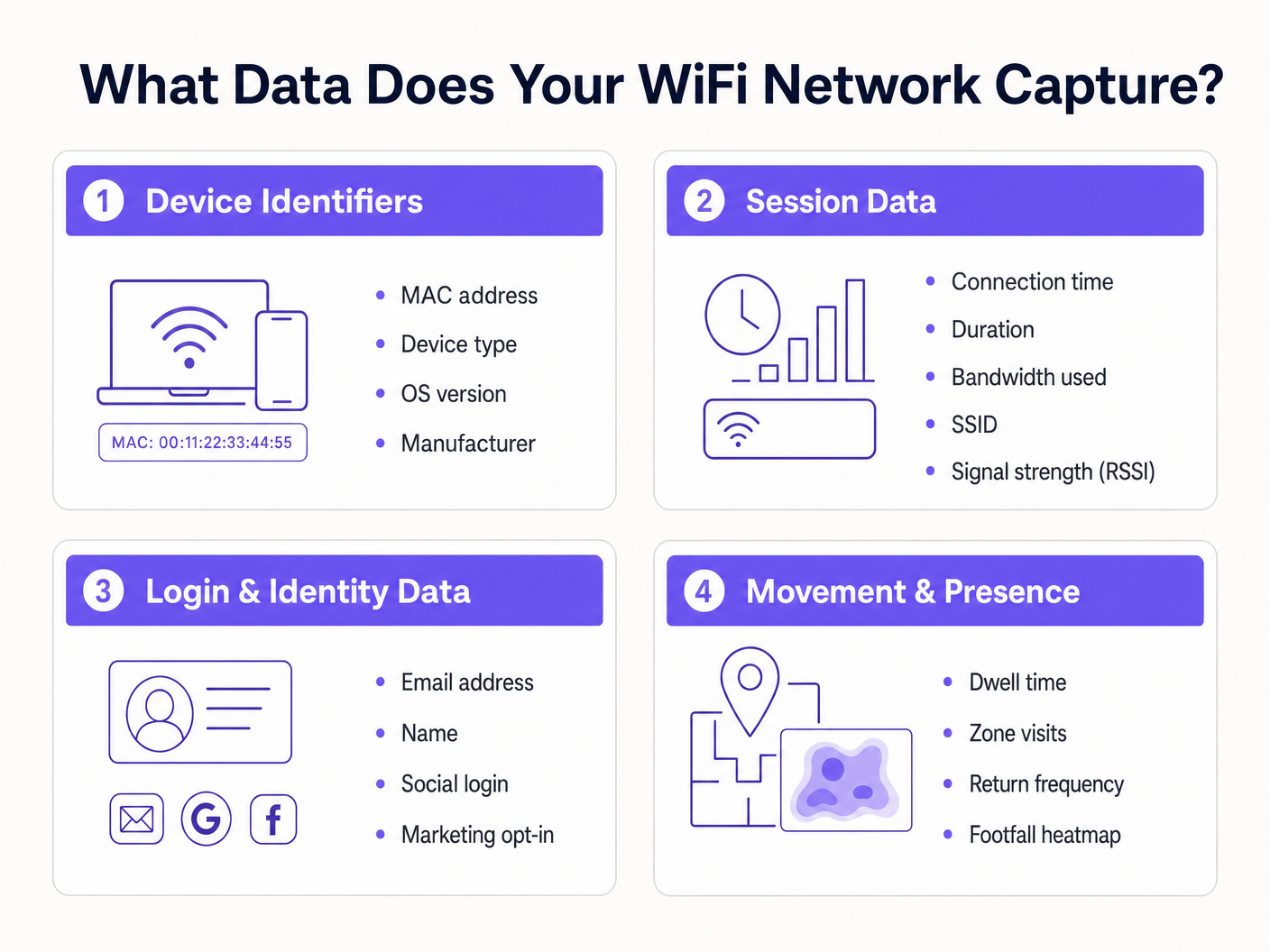
3. Dati di Accesso e Identità
È qui che l'infrastruttura di rete si interseca con il marketing e il CRM. Quando un utente accede a una rete Guest WiFi tramite un captive portal, fornisce dati di identità di prima parte in cambio della connettività.
- Informazioni di Identificazione Personale (PII): Nome, indirizzo email, numero di telefono o data di nascita.
- Metodo di Autenticazione: Se l'utente si è registrato tramite un modulo personalizzato, verifica SMS o OAuth sociale (Google, Facebook, LinkedIn).
- Record di Consenso: Opt-in espliciti per le comunicazioni di marketing e accettazione dei termini di servizio.
L'acquisizione di questi dati consente alle sedi di costruire profili cliente ricchi. La piattaforma Guest WiFi di Purple funge da provider di identità, presentando una splash page personalizzata, registrando il consenso granulare e inviando il record di identità direttamente nel tuo CRM o piattaforma di automazione del marketing tramite webhooks o API native.
4. Dati di Movimento e Presenza
I dati di movimento sono analisi derivate costruite sulla telemetria di sessione e del dispositivo. Correlano le letture RSSI da un singolo dispositivo attraverso più access point, la rete può triangolare la posizione fisica del dispositivo.
- Tempo di Permanenza: Quanto tempo un dispositivo rimane in una specifica zona fisica.
- Flusso dei Visitatori: Il percorso che un utente compie all'interno di una sede, evidenziando colli di bottiglia o percorsi popolari.
- Frequenza di Ritorno: Identificazione dei visitatori abituali basata sull'identità autenticata (aggirando i problemi di randomizzazione MAC).
- Mappe di Calore dell'Affluenza: Rappresentazioni visive della densità della sede nel tempo.
Per un approfondimento su come sfruttare questi dati, consulta la nostra guida WiFi Footfall Analytics: Come Misurare e Agire sui Dati dei Visitatori . (For our Spanish-speaking operators, see Análisis de afluencia WiFi: Cómo medir y actuar sobre los datos de los visitantes ). Questa intelligenza è cruciale per i deployment di Indoor Positioning System: UWB, BLE, & WiFi Guide .
Guida all'Implementazione: Costruire la Data Pipeline
Implementare una raccolta dati WiFiL'architettura di raccolta dati richiede di andare oltre la semplice connettività per stabilire una pipeline di dati sicura e conforme.
Fase 1: Segmentazione e Architettura della Rete
La tua rete guest deve essere logicamente separata dagli ambienti aziendali e di pagamento. Implementa l'SSID guest su una VLAN isolata. Assicurati che le regole del firewall neghino esplicitamente il movimento laterale dalla sottorete guest a qualsiasi risorsa interna. Questo è un requisito fondamentale per la conformità PCI DSS.
Fase 2: Configurazione del Captive Portal
Il Captive Portal è l'interfaccia primaria per l'acquisizione dei dati.
- Onboarding Senza Attriti: Implementa l'autenticazione social OAuth e un'autenticazione senza interruzioni (come l'autenticazione basata su profilo o OpenRoaming) per ridurre i tassi di abbandono.
- Profilazione Progressiva: Non chiedere 10 punti dati alla prima visita. Chiedi prima un indirizzo email, quindi richiedi ulteriori dettagli (come la data di nascita) nelle visite successive.
Fase 3: Integrazione e Automazione
I dati presenti in una dashboard del controller WiFi hanno un valore limitato. Configura webhook o integrazioni API native per inviare dati di identità e sessione in tempo reale al tuo CRM (es. Salesforce, HubSpot) e alle piattaforme di marketing automation. Ciò abilita flussi di lavoro automatizzati, come l'invio di un'email di benvenuto 10 minuti dopo l'accesso di un utente.
Migliori Pratiche e Quadro di Conformità
La raccolta dati comporta significativi obblighi normativi. Un'architettura conforme è non negoziabile.
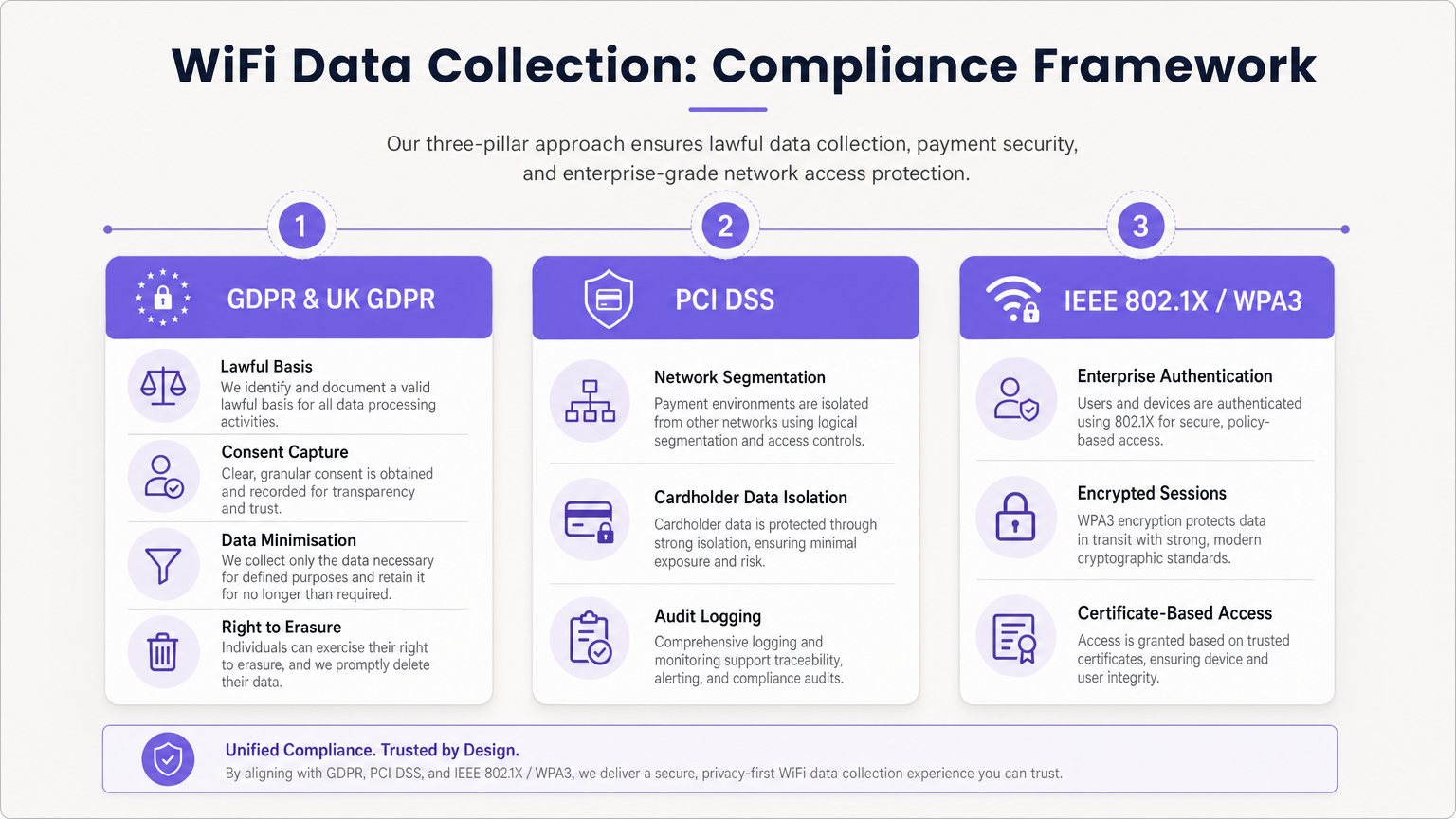
Aderenza a GDPR e UK GDPR
Quando si acquisiscono PII (incluse le email e gli identificatori di dispositivo persistenti), è necessario stabilire una base giuridica per il trattamento.
- Consenso Disaggregato: Il Captive Portal deve presentare caselle di spunta di opt-in separate ed esplicite per i Termini di Servizio, l'Informativa sulla Privacy e le Comunicazioni di Marketing. Le caselle preselezionate sono illegali.
- Minimizzazione dei Dati: Raccogli solo i dati necessari per lo scopo definito.
- Diritto all'Oblio: Implementa flussi di lavoro automatizzati per gestire tempestivamente le richieste di accesso dei soggetti interessati (DSAR) e le richieste di cancellazione.
PCI DSS Segmentation
Se la tua sede elabora carte di credito, la rete WiFi guest non deve condividere l'infrastruttura logica con l'ambiente dei dati del titolare della carta (CDE). La mancata isolazione della rete guest viola i requisiti PCI DSS 1 e 6 e comporterà il fallimento dell'audit.
Standard di Sicurezza Aziendali
Per le reti interne o sicure, implementa IEEE 802.1X con WPA3 Enterprise per l'autenticazione basata su certificati. Per le reti guest, passa a WPA3 Personal con Simultaneous Authentication of Equals (SAE) per proteggere dagli attacchi a dizionario offline e fornire la segretezza in avanti.
Risoluzione dei Problemi e Mitigazione del Rischio
Il "Data Lake" Problema
Problema: Le organizzazioni acquisiscono terabyte di dati di sessione e identità ma non ne estraggono alcun valore di business. Mitigazione: Definisci i casi d'uso commerciali prima dell'implementazione. Se stai raccogliendo indirizzi email, devi avere una strategia di email marketing attiva. Se stai monitorando il traffico pedonale, un team operativo specifico deve essere responsabile della dashboard WiFi Analytics .
Calo delle Analisi dovuto alla Randomizzazione MAC
Problema: Le analisi passive del traffico pedonale mostrano numeri di visitatori artificialmente gonfiati a causa dei dispositivi che ruotano i loro indirizzi MAC. Mitigazione: Sposta la strategia di analisi dal tracciamento passivo delle sonde al tracciamento delle sessioni autenticate. Incentiva gli utenti ad accedere al Captive Portal per stabilire un record di identità persistente.
Conservazione di Dati Obsoleti
Problema: La conservazione indefinita dei dati personali viola i principi di limitazione della conservazione del GDPR e aumenta l'impatto di una violazione. Mitigazione: Implementa politiche automatizzate di conservazione dei dati. Una base standard è di 12-24 mesi per i dati di marketing (aggiornati in caso di visite ripetute) e 90 giorni per i log di sessione grezzi.
ROI e Impatto sul Business
Una strategia di raccolta dati WiFi correttamente architettata trasforma un centro di costo in un motore di entrate.
- ROI di Marketing: Acquisendo dati di prima parte, le sedi riducono la dipendenza da costose pubblicità di terze parti. L'acquisizione di email tramite WiFi vanta spesso un Costo Per Acquisizione (CPA) inferiore rispetto agli annunci digitali.
- Efficienza Operativa: I dati di movimento consentono alle sedi di ottimizzare i livelli di personale in base all'occupazione in tempo reale, riducendo i costi generali durante i periodi di calma e migliorando il servizio durante i picchi.
- Valore per Inquilini e Sponsor: Negli ambienti di vendita al dettaglio e negli stadi, le analisi del traffico pedonale e i dati demografici possono essere monetizzati dimostrando valore agli inquilini o vendendo spazi pubblicitari digitali mirati sulla splash page del Captive Portal. Come discusso nei nostri post Wi Fi in Auto: The Complete 2026 Enterprise Guide e Internet of Things Architecture: A Complete Guide , l'infrastruttura connessa è la base della monetizzazione moderna delle sedi.
Sfruttando la piattaforma completa di Purple, gli operatori aziendali possono garantire che la loro rete non solo fornisca connettività senza interruzioni, ma agisca anche come un motore di acquisizione dati sicuro, conforme e altamente redditizio.
Definizioni chiave
MAC Randomisation
A privacy feature in modern mobile OSs that generates a temporary, fake MAC address when scanning for networks, preventing persistent tracking.
Forces IT teams to rely on authenticated captive portal logins rather than passive probe requests for accurate visitor analytics.
BSSID (Basic Service Set Identifier)
The MAC address of the specific wireless access point radio that a client device is connected to.
Used in location analytics to determine exactly which access point in a venue a user is nearest to, enabling zone-based footfall tracking.
RSSI (Received Signal Strength Indicator)
A measurement of the power present in a received radio signal, typically expressed in negative decibels (-dBm).
The core metric used to triangulate a device's physical location within a venue; a signal closer to 0 indicates closer proximity to the AP.
Captive Portal
A web page that a user is forced to view and interact with before access is granted to a public network.
The primary mechanism for capturing first-party identity data and securing legal consent from network users.
IEEE 802.1X
An IEEE standard for port-based network access control, providing an authentication mechanism to devices wishing to attach to a LAN or WLAN.
The gold standard for enterprise network security, requiring unique credentials or certificates per user rather than a shared password.
VLAN (Virtual Local Area Network)
A logical subnetwork that groups a collection of devices on separate physical local area networks.
Essential for PCI DSS compliance to logically separate guest WiFi traffic from corporate or payment processing traffic on the same physical switches.
Data Minimisation
A GDPR principle stating that personal data collected must be adequate, relevant, and limited to what is necessary for the intended purpose.
Dictates that IT teams should not configure captive portals to ask for unnecessary information (e.g., home address) if the goal is simply email marketing.
OUI (Organisationally Unique Identifier)
The first 24 bits (three octets) of a MAC address, which uniquely identifies the vendor or manufacturer of the network adapter.
Used in network analytics dashboards to categorise the types of devices (e.g., Apple vs. Samsung) connecting to the network.
Esempi pratici
A 200-store retail chain is deploying a new guest WiFi network. They want to track repeat visitor frequency and trigger automated marketing emails. However, their current passive analytics show an impossibly high number of 'unique' visitors due to iOS/Android MAC randomisation. How should the network architect design the solution?
- Deploy a captive portal requiring user authentication (e.g., Email or Social OAuth) to access the internet.
- Configure the portal with GDPR-compliant, unbundled consent checkboxes for marketing communications.
- Integrate the WiFi platform's API with the retailer's CRM.
- When a user logs in, the platform links their authenticated identity (email) to their current session, bypassing the randomised MAC address.
- Configure the CRM to trigger a 'Welcome Back' email workflow when the API registers a new session for an existing identity.
A large conference centre wants to offer free guest WiFi but shares physical network switches with the venue's point-of-sale (POS) payment terminals. How must the IT manager configure the network to ensure PCI DSS compliance while collecting guest session data?
- Implement logical network segmentation using VLANs. Assign the guest WiFi SSID to VLAN 100 and the POS terminals to VLAN 200.
- Configure Access Control Lists (ACLs) and firewall rules at the core router/firewall to explicitly deny all traffic routing between VLAN 100 and VLAN 200.
- Route guest WiFi traffic directly to the internet gateway, bypassing internal corporate subnets entirely.
- Enable client isolation on the guest SSID to prevent guest devices from communicating with each other.
- Log all firewall drops for audit purposes.
Domande di esercitazione
Q1. A marketing director wants to use the guest WiFi network to track exactly how long individual, unnamed customers spend in the 'Shoes' department versus the 'Coats' department to optimise store layout. They plan to use MAC address tracking from probe requests. As the IT Manager, how do you advise them?
Suggerimento: Consider recent changes to mobile operating systems regarding privacy and MAC addresses.
Visualizza risposta modello
I would advise the marketing director that relying on unauthenticated MAC address tracking via probe requests is no longer accurate due to MAC randomisation implemented in modern iOS and Android devices. Devices will appear as multiple unique visitors over time. Instead, we should deploy a captive portal to encourage authenticated sessions. Once a user authenticates, we can track their persistent identity and use RSSI triangulation from authenticated session data to accurately measure dwell time in specific zones.
Q2. During a network audit, the QSA notes that the guest WiFi VLAN can route traffic to the VLAN hosting the venue's Point of Sale (POS) terminals. The venue argues that the POS terminals have host-based firewalls enabled. What is the required remediation?
Suggerimento: Review PCI DSS requirements regarding network segmentation and shared infrastructure.
Visualizza risposta modello
The required remediation is to implement strict network segmentation at the core router or firewall level. Relying solely on host-based firewalls on the POS terminals is insufficient for PCI DSS compliance. Access Control Lists (ACLs) must be configured to explicitly deny all routing between the guest WiFi VLAN and the Cardholder Data Environment (CDE) VLAN. The guest traffic must be routed directly to the internet gateway.
Q3. Your organisation is updating its captive portal splash page. The legal team suggests a single checkbox that says 'I agree to the Terms of Service, Privacy Policy, and to receive marketing emails' to reduce onboarding friction. Is this approach recommended?
Suggerimento: Consider GDPR requirements for valid consent.
Visualizza risposta modello
No, this approach is highly discouraged and violates GDPR requirements for granular consent. Consent for marketing communications must be unbundled from the acceptance of general Terms of Service. If a user is forced to accept marketing to access the WiFi, the consent is not considered 'freely given'. The portal must present separate, unticked checkboxes for TOS/Privacy Policy and Marketing Opt-in.
Continua a leggere questa serie
Privacy by Design: Anonimizzazione dei dati WiFi per la conformità al GDPR
Questa guida autorevole illustra l'architettura tecnica e le strategie di implementazione per l'anonimizzazione dei dati WiFi al fine di garantire la conformità al GDPR. Fornisce a responsabili IT e architetti di rete framework attuabili per bilanciare analisi robuste delle sedi con rigorosi requisiti di privacy dei dati.
Heatmapping vs. Presence Analytics: Differenze Tecniche
Questa guida tecnica autorevole illustra le differenze architettoniche e operative critiche tra il WiFi heatmapping e la presence analytics per gli operatori di sedi aziendali. Fornisce a responsabili IT, architetti di rete e direttori delle operazioni framework di implementazione attuabili, scenari di implementazione reali e best practice neutrali rispetto ai fornitori per massimizzare il ROI dalla loro infrastruttura wireless esistente.
Come Calcolare il Tempo di Permanenza Utilizzando i WiFi Location Analytics
Questa guida fornisce un riferimento tecnico completo per il calcolo del tempo di permanenza WiFi utilizzando i WiFi location analytics, coprendo l'intera architettura dalla cattura delle richieste di probe 802.11 attraverso la trilaterazione basata su RSSI all'analisi delle zone geofenced. È progettata per IT manager, architetti di rete e direttori delle operazioni di sede che necessitano di implementare un'intelligence di localizzazione accurata e scalabile in ambienti di vendita al dettaglio, ospitalità, sanità e settore pubblico. I lettori otterranno indicazioni pratiche sull'implementazione, casi di studio reali e un quadro chiaro per tradurre i dati spaziali grezzi in risultati di business misurabili.