

RadSec: Come RADIUS su TLS migliora la sicurezza dell'autenticazione WiFi
Questo riferimento tecnico autorevole spiega come RadSec (RFC 6614) protegge l'autenticazione WiFi aziendale incapsulando il traffico RADIUS tradizionale nella crittografia TLS. Progettato per manager IT e architetti di rete, copre architettura, strategie di implementazione e passaggi pratici per mitigare i rischi del traffico RADIUS UDP non crittografato attraverso reti aziendali e guest.
Listen to this guide
View podcast transcript
Riepilogo Esecutivo
Il RADIUS tradizionale su UDP (porte 1812/1813) non è stato progettato per il panorama delle minacce aziendali moderne. Basandosi esclusivamente su un segreto condiviso e sull'hashing MD5, lascia le credenziali di autenticazione e gli attributi di sessione vulnerabili all'intercettazione, in particolare quando attraversano reti pubbliche o grandi proprietà distribuite come catene alberghiere e di vendita al dettaglio. RadSec (RADIUS su TLS, RFC 6614) risolve questa lacuna di sicurezza fondamentale incapsulando il traffico RADIUS all'interno di un tunnel TLS 1.3 basato su TCP sulla porta 2083.
Per i CTO e gli architetti di rete, l'implementazione di RadSec non è più solo una best practice, ma un requisito fondamentale per proteggere il WiFi aziendale , mantenere la conformità PCI DSS 4.0 e partecipare a moderni framework di roaming federato come OpenRoaming. Questa guida illustra l'architettura, i modelli di implementazione e i requisiti operativi per la messa in sicurezza della vostra infrastruttura di autenticazione.
Approfondimento Tecnico: RADIUS vs. RadSec
La Vulnerabilità nel RADIUS Tradizionale
In un'implementazione standard 802.1X, l'access point (autenticatore) inoltra le credenziali del client al server RADIUS (server di autenticazione). Nel RADIUS tradizionale, questo payload viene inviato su UDP. L'unica protezione è una chiave pre-condivisa (PSK) utilizzata per offuscare la password tramite MD5.
Questa architettura presenta tre rischi critici:
- Mancanza di Crittografia del Trasporto: Attributi utente, indirizzi MAC e dati di sessione vengono trasmessi in chiaro.
- Debolezza Crittografica: MD5 è vulnerabile ad attacchi a dizionario offline se un attaccante cattura il traffico.
- Nessuna Autenticazione Mutua: L'access point non può verificare crittograficamente di comunicare con il server RADIUS legittimo, consentendo attacchi da parte di server non autorizzati.
L'Architettura RadSec (RFC 6614)
RadSec affronta queste lacune spostando il livello di trasporto da UDP a TCP e incapsulando l'intero payload in TLS.
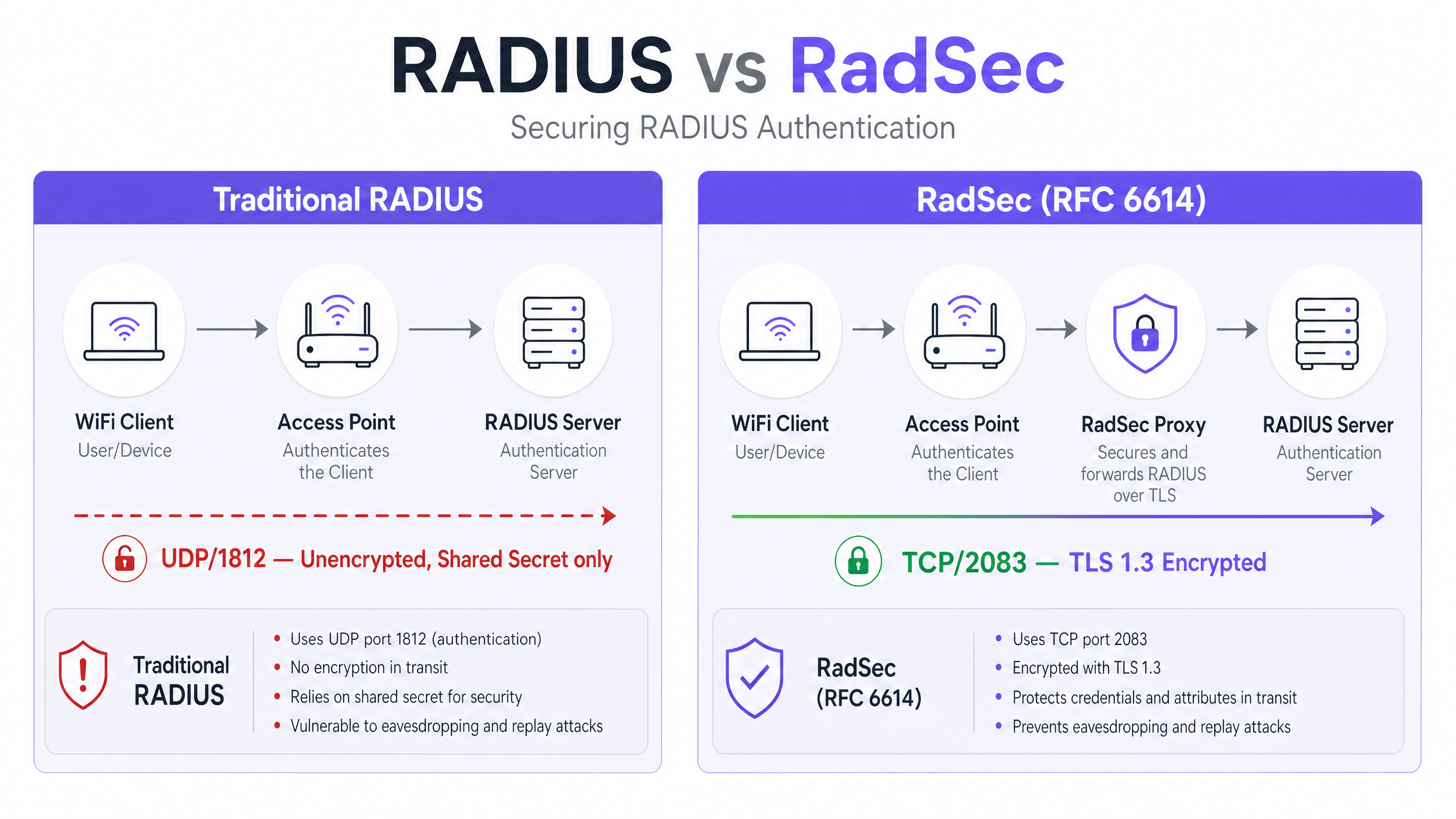
- Trasporto: La porta TCP 2083 garantisce una consegna affidabile e connessioni stateful, migliorando le prestazioni in ambienti ad alta latenza.
- Crittografia: TLS 1.2 o 1.3 fornisce una crittografia robusta e end-to-end di tutti gli attributi RADIUS.
- Autenticazione Mutua: Sia il client RADIUS (o proxy) che il server devono presentare certificati X.509 validi emessi da un'Autorità di Certificazione (CA) fidata. Il segreto condiviso è mantenuto solo per la retrocompatibilità; TLS fornisce la sicurezza effettiva.
Questa architettura è essenziale per ambienti distribuiti, come catene di Vendita al Dettaglio o strutture di Ospitalità , dove gli access point inoltrano le richieste di autenticazione tramite internet pubblico a un server RADIUS centrale o ospitato nel cloud.
Guida all'Implementazione
L'implementazione di RadSec segue tipicamente uno dei due modelli: Supporto Nativo o Basato su Proxy.
Modello 1: RadSec Nativo
Se la vostra infrastruttura lo supporta nativamente (ad esempio, FreeRADIUS 3.0+, Cisco ISE, Aruba ClearPass), configurate i certificati TLS direttamente sul server RADIUS e sugli access point/controller. Ciò fornisce una vera crittografia end-to-end dal bordo alla rete centrale.
Modello 2: Il Proxy RadSec
Molti server RADIUS legacy (in particolare Microsoft NPS) non supportano nativamente RadSec. In questi ambienti, viene distribuito un proxy (come radsecproxy).
- Tratto Locale: L'AP invia il RADIUS UDP standard al proxy locale.
- Tratto WAN: Il proxy incapsula il traffico in TLS e lo invia su TCP 2083 al server upstream.
Questo modello consente di proteggere il traffico su larga scala senza sostituire l'infrastruttura legacy.
Integrazione con Purple
Le piattaforme Guest WiFi e WiFi Analytics di Purple si integrano perfettamente con l'infrastruttura RADIUS aziendale. Con la licenza Connect, Purple funge da provider di identità gratuito per OpenRoaming, dove RadSec è un requisito obbligatorio per la messa in sicurezza del traffico di federazione tra le sedi e l'hub centrale.
Best Practice
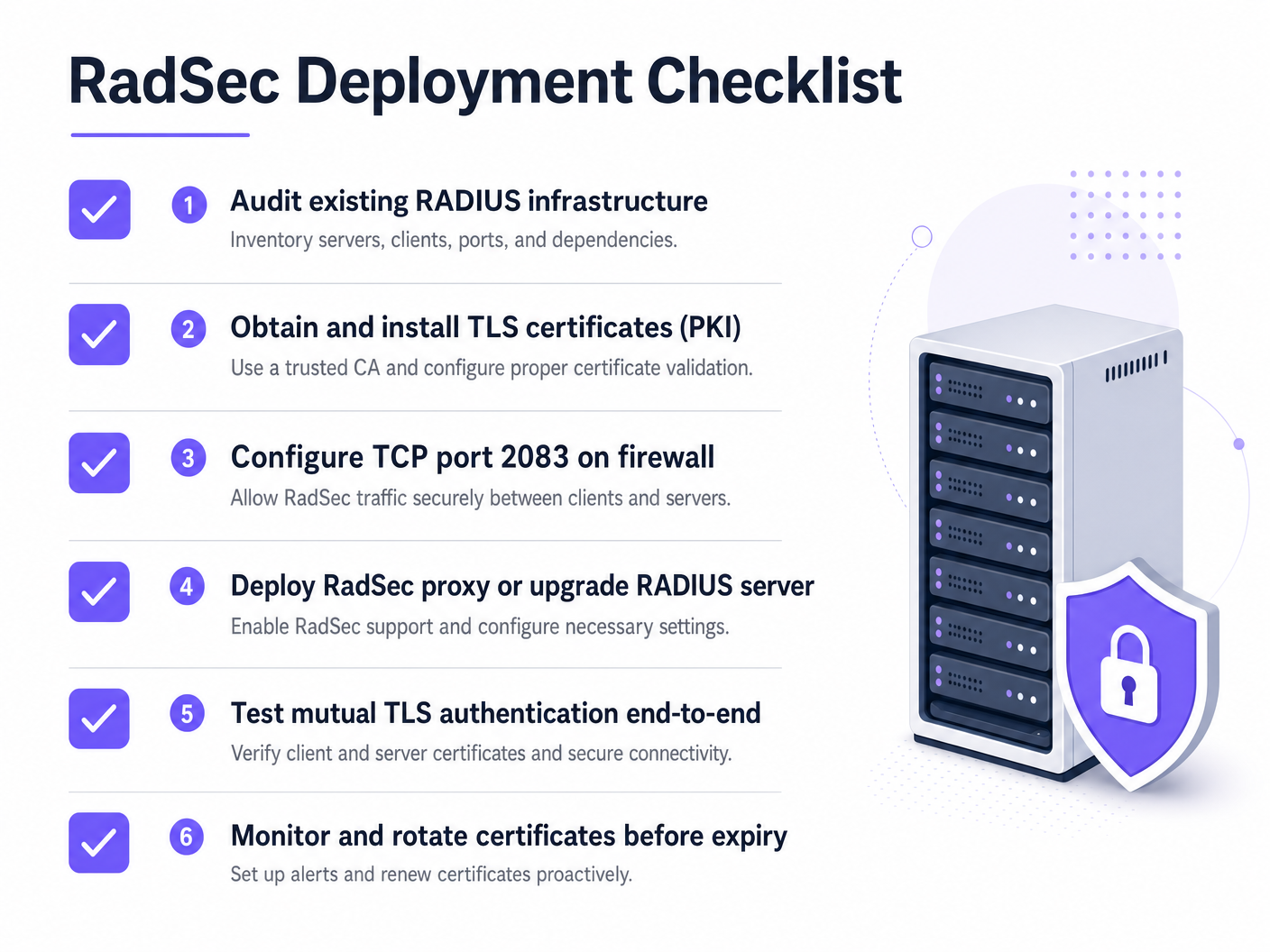
- Gestione del Ciclo di Vita dei Certificati: Il TLS mutuo si basa su certificati validi. Implementare il rinnovo automatizzato (ad esempio, tramite ACME) e un monitoraggio rigoroso. Un certificato scaduto causerà un'interruzione totale dell'autenticazione.
- Configurazione del Firewall: Assicurarsi che la porta TCP 2083 sia esplicitamente consentita sia in uscita dalla sede che in entrata al server RADIUS. Non dare per scontato che le regole UDP 1812 esistenti si applichino.
- Dare Priorità al Traffico ad Alto Rischio: Iniziare l'implementazione su collegamenti che attraversano internet pubblico o WAN non affidabili prima di passare alle VLAN di gestione locali.
Per maggiori informazioni sulla sicurezza del bordo, leggete la nostra guida su Sicurezza degli Access Point: La Vostra Guida Aziendale 2026 .
Risoluzione dei Problemi e Mitigazione del Rischio
Quando RadSec fallisce, raramente è un problema di autenticazione; è quasi sempre un problema di TLS o TCP.
- Sintomo: Gli access point risultano disconnessi dal server RADIUS.
- Verifica: Regole del firewall per TCP 2083. Il RADIUS tradizionale utilizza UDP; i team di rete spesso dimenticano di aprire la porta TCP.
- Sintomo: La connessione TCP si stabilisce, ma l'autenticazione fallisce immediatamente.
- Verifica: Validazione del certificato. Verificare che il Common Name (CN) o il Subject Alternative Name (SAN) corrispondano, che il certificato non sia scaduto e che il client si fidi della CA firmataria. Utilizzare
openssl s_client -connect :2083per il debug dell'handshake.
- Verifica: Validazione del certificato. Verificare che il Common Name (CN) o il Subject Alternative Name (SAN) corrispondano, che il certificato non sia scaduto e che il client si fidi della CA firmataria. Utilizzare
Assicuratevi che i vostri fondamenti di rete siano solidi. Rivedete i nostri consigli su Proteggere la Vostra Rete con DNS e Sicurezza Robusti .
ROI e BuImpatto sul Business
L'implementazione di RadSec è un investimento per la mitigazione del rischio. Il ROI si misura nell'evitare violazioni dei dati, multe per non conformità (PCI DSS, GDPR) e danni alla reputazione. Inoltre, consente la partecipazione a moderne federazioni di roaming come OpenRoaming, che possono migliorare significativamente l'esperienza degli ospiti in ambienti Sanitari e di Trasporto .
Ascolta il Briefing
Per un approfondimento sulle realtà operative dell'implementazione di RadSec, ascolta il nostro briefing tecnico di 10 minuti:
Per i passaggi di configurazione specifici sui dispositivi client, fare riferimento a Come Configurare il WiFi Aziendale su iOS e macOS con 802.1X o alla versione portoghese Como Configurar WiFi Corporativo em iOS e macOS com 802.1X .
Key Definitions
RadSec
An extension to the RADIUS protocol that encapsulates RADIUS traffic within a TLS tunnel over TCP port 2083.
Used to secure authentication traffic when traversing untrusted networks, preventing credential interception.
Mutual TLS (mTLS)
A security process where both the client and the server present X.509 certificates to verify each other's identity before establishing an encrypted connection.
The core authentication mechanism of RadSec, replacing reliance on static shared secrets.
802.1X
The IEEE standard for port-based network access control, used to authenticate devices attempting to connect to a LAN or WLAN.
The framework that relies on RADIUS (and by extension, RadSec) to validate user credentials against a directory.
radsecproxy
An open-source daemon that acts as a proxy, converting standard UDP RADIUS traffic into RadSec (TLS over TCP) and vice versa.
Deployed when native RadSec support is missing from access points or legacy RADIUS servers like Microsoft NPS.
OpenRoaming
A federation standard developed by the Wi-Fi Alliance that allows users to seamlessly and securely connect to participating WiFi networks globally.
OpenRoaming mandates the use of RadSec to secure authentication traffic between venues and identity providers.
Shared Secret
A static text string used in traditional RADIUS to obfuscate passwords and verify the source of requests.
While still technically present in RadSec configurations for backward compatibility, it is superseded by TLS encryption.
FreeRADIUS
A widely deployed open-source RADIUS server that provides native support for RadSec.
Often used in enterprise environments and roaming federations due to its flexibility and native TLS capabilities.
PKI (Public Key Infrastructure)
The framework of roles, policies, and software needed to create, manage, distribute, and revoke digital certificates.
A prerequisite for deploying RadSec, as you must issue and manage certificates for all RADIUS clients and servers.
Worked Examples
A 200-property hotel group uses Microsoft NPS centrally for staff authentication. Access points at each hotel currently send RADIUS requests over the public internet via UDP 1812. The CTO mandates encryption for all authentication traffic, but replacing NPS is not an option this year.
Deploy a RadSec proxy (e.g., radsecproxy) at each hotel site and a corresponding proxy in the central data centre in front of the NPS servers. The local APs send UDP RADIUS to the local proxy. The local proxy establishes a mutual TLS tunnel over TCP 2083 across the internet to the central proxy. The central proxy terminates the TLS tunnel and forwards standard UDP RADIUS to the NPS server.
A large university is deploying OpenRoaming across its campus to allow seamless access for visiting academics. They are running FreeRADIUS 3.0.
Enable native RadSec within FreeRADIUS. Generate X.509 certificates from a CA trusted by the OpenRoaming federation. Configure the campus firewall to allow inbound and outbound TCP 2083 traffic to the federation hubs. Configure the wireless LAN controllers to use RadSec for all federation-bound authentication requests.
Practice Questions
Q1. Your team has deployed native RadSec between your remote branch access points and your central FreeRADIUS server. The APs can ping the server, but authentication requests are timing out completely, and no traffic is hitting the RADIUS logs.
Hint: RadSec uses a different transport protocol and port than traditional RADIUS.
View model answer
The firewall is likely blocking TCP port 2083. Network teams accustomed to traditional RADIUS often only permit UDP ports 1812/1813. You must explicitly allow TCP 2083 outbound from the branch and inbound to the RADIUS server.
Q2. You are auditing a retail client's WiFi architecture. They use Microsoft NPS centrally. Their store APs send authentication requests over the internet via an IPsec VPN. Is RadSec required here?
Hint: Consider the layers of encryption already in place.
View model answer
While RadSec is best practice, the IPsec VPN is already providing transport layer encryption for the UDP RADIUS traffic over the untrusted internet. Deploying RadSec here would provide defence-in-depth but is less urgent than if the traffic were traversing the internet natively.
Q3. A week after a successful RadSec proxy deployment, all WiFi authentication across the enterprise fails simultaneously at 09:00 AM on a Monday. The network team confirms firewall rules are unchanged.
Hint: What is the primary authentication mechanism for the TLS tunnel itself?
View model answer
The X.509 certificates used for mutual TLS authentication have likely expired. When certificates expire, the TLS handshake fails, the TCP connection drops, and RADIUS traffic cannot flow. Implement automated certificate monitoring and rotation to prevent this.