

Risolvere l'errore 'Connesso ma senza Internet' sul Guest WiFi
Questa guida tecnica di riferimento autorevole spiega come i timeout DNS causati da reti congestionate scatenano l'errore 'Connesso, senza Internet' sul Guest WiFi. Fornisce ad architetti di rete e responsabili IT passaggi di implementazione attuabili per distribuire filtri DNS aziendali al fine di risolvere questi colli di bottiglia e migliorare l'onboarding degli ospiti.
Ascolta questa guida
Visualizza trascrizione del podcast
Sintesi Esecutiva
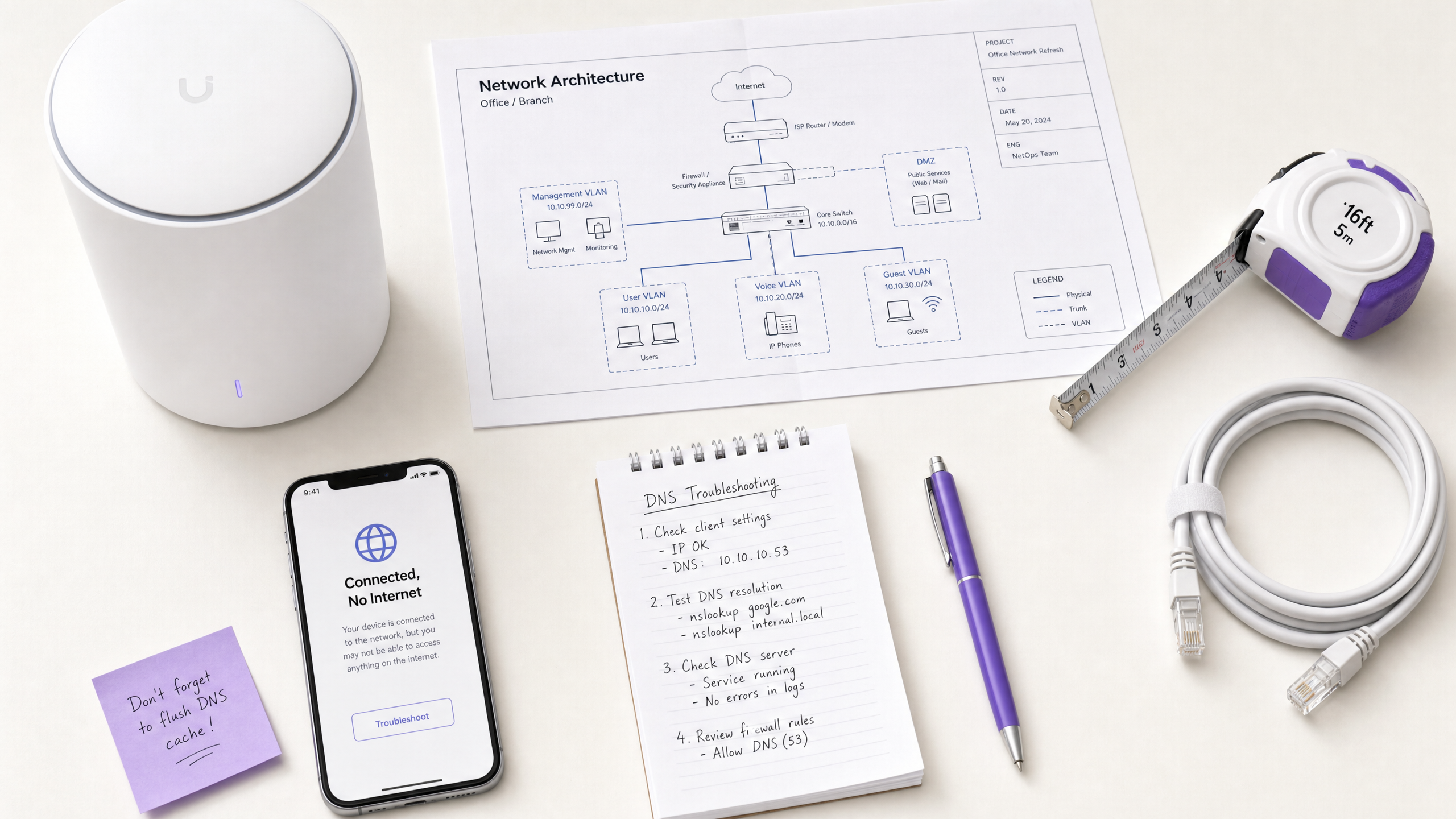
Per i CTO e gli architetti di rete che supervisionano luoghi ad alta densità — come quelli nel Retail , nell' Hospitality , nell' Healthcare e nel Transport — l'errore 'Connesso, senza Internet' sulle reti Guest WiFi è un persistente problema operativo. Sebbene spesso erroneamente diagnosticato come un guasto hardware dell'AP o una larghezza di banda upstream insufficiente, la causa principale negli ambienti aziendali è tipicamente il timeout DNS causato dalla congestione della rete.
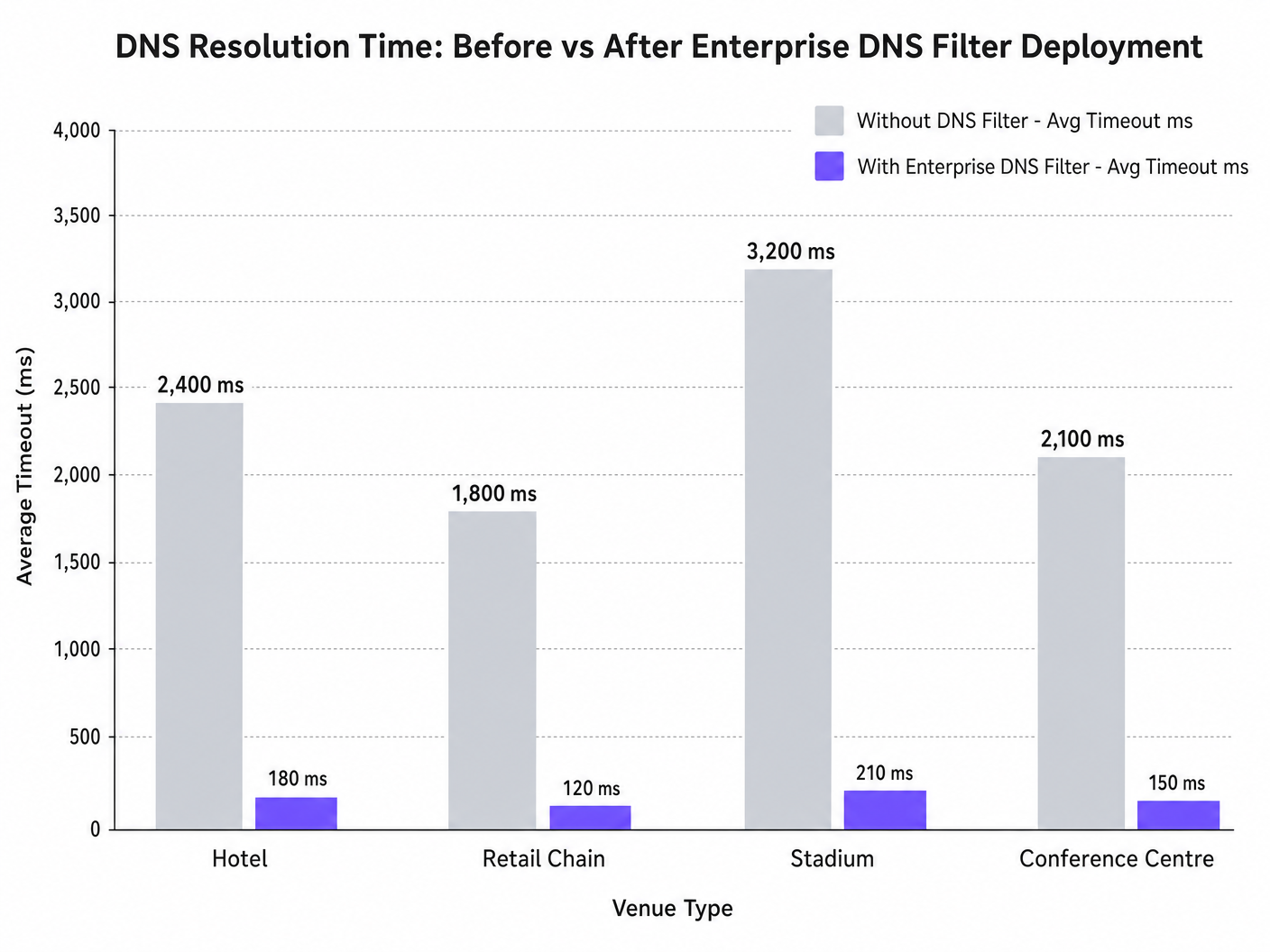
Quando centinaia di dispositivi sondano contemporaneamente per il rilevamento del Captive Portal (ad esempio, captive.apple.com), le query predefinite della porta UDP 53 possono sovraccaricare i resolver upstream standard. Se la risposta DNS supera la finestra di timeout a livello di sistema operativo (tipicamente 1-5 secondi), il dispositivo presume che non esista connettività internet, non riuscendo ad attivare il Captive Portal. Questa guida descrive in dettaglio l'architettura tecnica di questa modalità di errore e dimostra come la distribuzione di un filtro DNS aziendale risolva il collo di bottiglia, riducendo la latenza delle query da migliaia di millisecondi a meno di 200ms, garantendo la conformità a standard come IEEE 802.1X e GDPR, e migliorando drasticamente l'esperienza di onboarding degli ospiti.
Approfondimento Tecnico
Il Meccanismo di Rilevamento del Captive Portal
Quando un dispositivo client si associa a un access point e riceve un lease DHCP, deve verificare la raggiungibilità di internet prima di passare completamente a uno stato connesso. Ciò si ottiene tramite sonde di rilevamento del Captive Portal:
- iOS/macOS: HTTP GET a
captive.apple.com - Android: HTTP GET a
connectivitycheck.gstatic.com - Windows: HTTP GET a
msftconnecttest.com
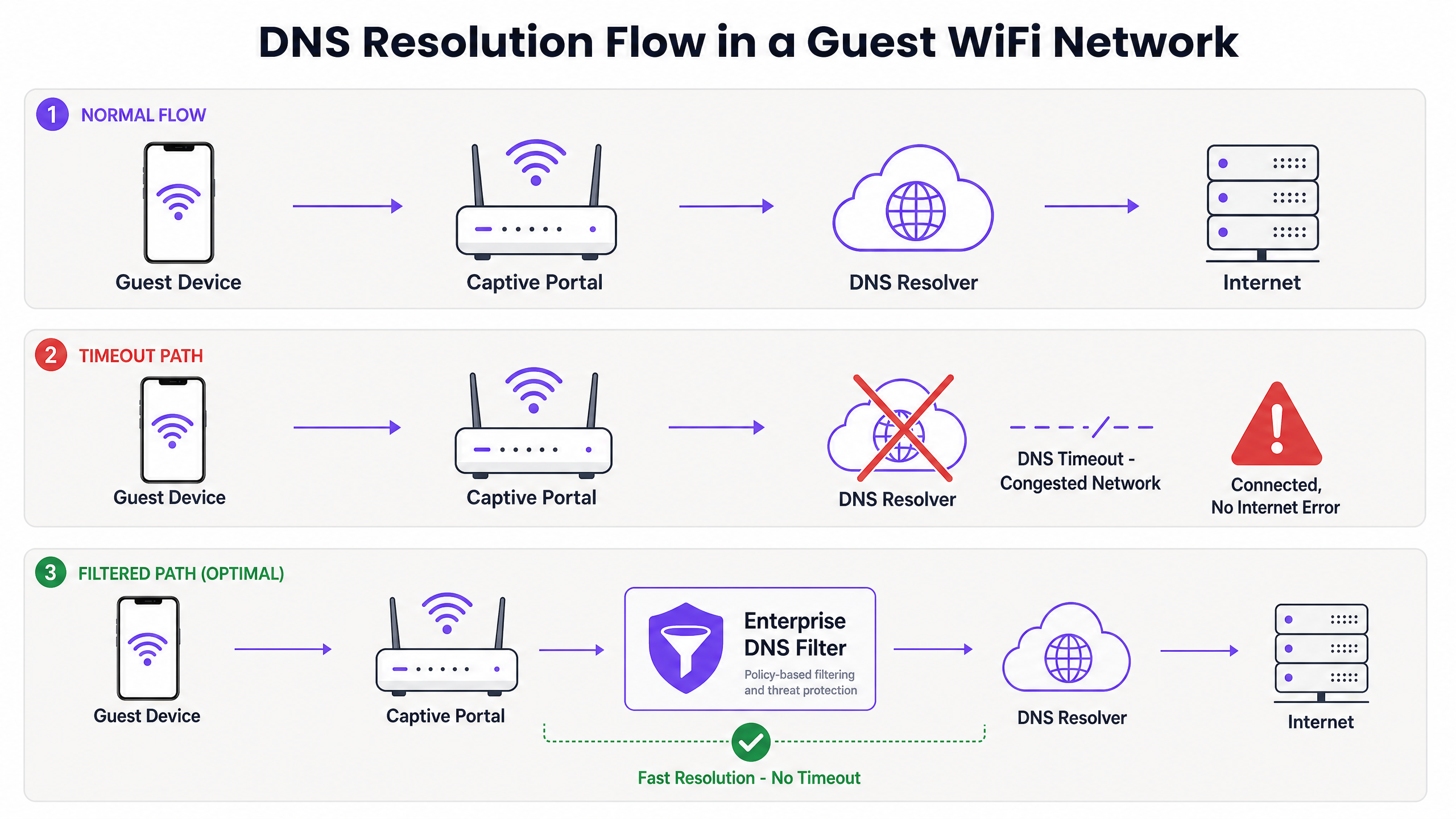
Prima che l'HTTP GET possa essere emesso, il dispositivo deve risolvere il nome host tramite DNS. Questa query DNS iniziale è il punto critico di fallimento negli ambienti ad alta densità.
Perché la Congestione Scatena i Timeout DNS
Le query DNS utilizzano tipicamente UDP, un protocollo senza connessione e senza ritrasmissione a livello di trasporto. In una rete congestionata — come uno stadio durante l'intervallo o un hotel durante le ore di punta mattutine — i pacchetti UDP vengono facilmente persi o ritardati.
Se la sede si affida a un resolver ISP standard o a un servizio DNS pubblico (come 8.8.8.8), il tempo di andata e ritorno (RTT) più il tempo di elaborazione presso il resolver possono superare il limite di timeout hardcoded del sistema operativo. Quando il timeout scade, il dispositivo contrassegna la connessione come 'Connesso, senza Internet' e interrompe il processo di reindirizzamento del Captive Portal.
Inoltre, i valori brevi di Time-To-Live (TTL) su questi domini di sonda aggravano il problema. Poiché i dispositivi si associano e si disassociano costantemente, le voci memorizzate nella cache scadono rapidamente, scatenando un'ondata di query DNS simultanee proprio quando la rete è sotto il massimo carico.
Il Ruolo del Filtro DNS Aziendale
Un filtro DNS aziendale, come quello integrato nella piattaforma WiFi Analytics di Purple, agisce come un resolver ad alte prestazioni, locale o prossimo all'edge. Intercettando le query DNS prima che attraversino il link WAN congestionato, il filtro:
- Memorizza nella cache i Domini ad Alta Frequenza: Serve i domini di sonda localmente, riducendo l'RTT a livelli sub-millisecondi.
- Applicazione delle Policy: Elimina immediatamente le query per domini dannosi o bloccati, conservando la larghezza di banda WAN.
- Registrazione degli Audit: Fornisce una traccia di audit per la sicurezza IT , aiutando nella conformità GDPR e nella risposta agli incidenti.
Guida all'Implementazione
La distribuzione di un filtro DNS aziendale richiede un'attenta pianificazione architetturale per evitare di introdurre nuovi punti di fallimento.
1. Posizionamento del Resolver e Ottimizzazione della Latenza
Distribuire il filtro DNS il più vicino possibile al bordo della rete. Per le catene di vendita al dettaglio distribuite, un nodo edge fornito via cloud è appropriato; per grandi sedi a sito singolo come gli stadi, è preferibile un'appliance localizzata o una macchina virtuale sullo switch core. L'obiettivo è minimizzare il numero di hop di routing tra la VLAN ospite e il resolver.
2. Whitelisting del Captive Portal (Passthrough)
Il passaggio di configurazione più critico è assicurarsi che il dominio del Captive Portal sia esplicitamente inserito nella whitelist. Se il filtro DNS ritarda o blocca la risoluzione del portale di autenticazione stesso, si indurrà l'esatto errore che si sta tentando di risolvere.
3. Ottimizzazione del TTL e Gestione della Cache
Configurare il resolver locale per memorizzare aggressivamente nella cache i domini di sonda del Captive Portal. Sebbene rispettare i TTL upstream sia una pratica standard, sovrascrivere i TTL per captive.apple.com e domini simili a un minimo di 60 secondi localmente può ridurre drasticamente il volume delle query upstream durante gli eventi di associazione di picco.
4. Integrazione con l'Infrastruttura Esistente
Assicurarsi che la distribuzione del filtro DNS sia allineata con la segmentazione della rete esistente. Il traffico DNS degli ospiti deve rimanere isolato dall'infrastruttura DNS aziendale per mantenere la conformità PCI DSS. Questo isolamento è cruciale sia che si stia ottimizzando il WiFi dell'hotel per i viaggiatori d'affari o proteggendo una distribuzione nel settore pubblico.
Ascolta il nostro podcast di briefing tecnico per maggiori dettagli su questi passaggi di implementazione:
Migliori Pratiche
- Evitare Resolver Pubblici per le Reti Ospiti: Affidarsi a 8.8.8.8 o 1.1.1.1 come DIl DNS assegnato dall'HCP per le reti guest ad alta densità introduce una variabilità di latenza inaccettabile.
- Implementare il DNS over HTTPS (DoH) con cautela: Sebbene il DoH migliori la privacy, aggira il tradizionale filtraggio della porta 53. Assicurati che la tua soluzione DNS aziendale possa ispezionare o gestire il traffico DoH, se richiesto dalla politica della sede.
- Monitorare le cadute della porta UDP 53: Configura il tuo firewall o switch di core per avvisare in caso di cadute eccessive di pacchetti sulla porta UDP 53, un indicatore principale di imminenti timeout DNS.
- Rivedere regolarmente le Blocklist: Un filtraggio troppo aggressivo può compromettere applicazioni legittime. Rivedi i log delle query DNS settimanalmente per identificare i falsi positivi.
Per le implementazioni nel settore pubblico, garantire una connettività robusta fa parte di più ampie iniziative di inclusione digitale, come recentemente evidenziato quando Purple nomina Iain Fox VP Growth – Settore Pubblico .
Risoluzione dei problemi e mitigazione dei rischi
Quando si verifica l'errore "Connesso, nessun accesso a Internet", i team IT dovrebbero seguire un percorso diagnostico strutturato anziché presumere immediatamente l'esaurimento della larghezza di banda.
- Cattura di pacchetti (PCAP): Esegui una cattura di pacchetti sulla VLAN guest filtrando per
udp port 53. Cerca query senza risposte corrispondenti entro una finestra di 2 secondi. - Simulare la sonda: Utilizza
curlowgetda un dispositivo di test sulla VLAN guest per raggiungere manualmentehttp://captive.apple.com/hotspot-detect.html. Misura il tempo di risoluzione DNS rispetto al tempo di risposta HTTP. - Controllare le regole del Firewall: Verifica che nessuna politica di rate-limiting o QoS stia inavvertitamente limitando il traffico UDP sulla porta 53 dalla sottorete guest.
- Verificare le capacità offline: In ambienti con connettività WAN intermittente, considera funzionalità come la Modalità Mappe Offline di Purple per mantenere un certo livello di coinvolgimento degli utenti anche quando la connessione internet a monte è degradata.
ROI e impatto aziendale
La risoluzione dei timeout DNS influisce direttamente sul risultato economico per gli operatori delle sedi.
- Riduzione dei costi di supporto: L'errore "Connesso, nessun accesso a Internet" è una causa principale dei ticket di supporto di Livello 1 nel settore dell'ospitalità e del commercio al dettaglio. Eliminarlo riduce le spese operative IT.
- Aumento della raccolta dati: Un caricamento fallito del Captive Portal significa un'opportunità persa per la raccolta dati e l'autenticazione degli utenti. Garantendo un rendering rapido del portale, le sedi massimizzano il ROI delle loro piattaforme di WiFi Analytics .
- Miglioramento della soddisfazione degli ospiti: La connettività senza interruzioni è un'aspettativa di base. Ridurre al minimo l'attrito nell'onboarding si correla direttamente con il miglioramento dei Net Promoter Score (NPS) e recensioni positive della sede.
Spostando la prospettiva da "abbiamo bisogno di più larghezza di banda" a "abbiamo bisogno di una risoluzione DNS ottimizzata", gli architetti di rete possono fornire un WiFi guest di livello enterprise che si adatta elegantemente sotto pressione.
Definizioni chiave
Captive Portal Detection Probe
An automated HTTP request sent by a mobile OS (e.g., to captive.apple.com) immediately upon network association to determine if a login page is required.
If this probe fails due to DNS timeout, the OS assumes there is no internet access and shows the error.
DNS Timeout
The event where a client device abandons a DNS query because the resolver took too long to respond (typically >2-5 seconds).
The primary technical cause of 'Connected, No Internet' errors in high-density environments.
Enterprise DNS Filter
A dedicated DNS resolver that caches queries locally and applies policy-based blocking to prevent access to malicious or unwanted domains.
Used to offload query volume from congested upstream resolvers and reduce latency.
UDP Port 53
The standard connectionless transport protocol and port used for DNS queries.
Because UDP has no guaranteed delivery, DNS packets are easily dropped during network congestion.
Time-To-Live (TTL)
A value in a DNS record that dictates how long a resolver or client should cache the IP address before querying again.
Short TTLs on probe domains cause frequent re-querying, exacerbating congestion.
IEEE 802.1X
A standard for port-based Network Access Control (PNAC) providing an authentication mechanism to devices wishing to attach to a LAN or WLAN.
While secure, 802.1X environments still rely on robust DNS infrastructure for post-authentication routing.
Local Internet Breakout
Routing internet-bound traffic directly from a branch location to the internet, rather than backhauling it to a central data center.
Crucial for reducing DNS latency in distributed retail or hospitality networks.
WPA3
The latest Wi-Fi security standard that provides enhanced encryption for open and password-protected networks.
WPA3 improves security but does not alter the fundamental DNS resolution path or mitigate timeout issues.
Esempi pratici
A 400-room hotel experiences a surge of 'Connected, No Internet' complaints every morning between 7:30 AM and 8:30 AM when guests wake up and connect to the WiFi. The 1Gbps WAN link shows only 40% utilization during this time.
- Run a packet capture on the guest VLAN filtering for UDP port 53 during the morning peak.
- Identify that DNS queries to captive portal probe domains (e.g., captive.apple.com) are taking >3000ms to resolve via the ISP's default DNS.
- Deploy a local enterprise DNS filter on the guest subnet.
- Configure the DHCP server to assign the local DNS filter IP to guest devices.
- Whitelist the hotel's captive portal domain in the filter.
- Monitor resolution times, which should drop to <50ms.
A large retail chain rolls out a new guest WiFi network across 50 stores, but users in high-footfall flagship stores cannot load the captive portal, while users in smaller stores have no issues.
- Analyze the architecture: all 50 stores are tunneling guest traffic back to a central data center firewall, which then forwards DNS queries to a public resolver.
- In high-footfall stores, the sheer volume of concurrent association events exhausts the NAT/PAT state tables on the central firewall, causing UDP port 53 packets to be dropped.
- Implement a cloud-delivered enterprise DNS filter.
- Reconfigure the local branch routers to forward guest DNS queries directly to the cloud filter via local internet breakout, rather than backhauling them to the data center.
Domande di esercitazione
Q1. A stadium IT director notices that during half-time, thousands of users connect to the WiFi but fail to reach the captive portal. The core switch shows heavy UDP packet drops. Should they increase the WAN bandwidth from 2Gbps to 5Gbps?
Suggerimento: Consider what protocol is being dropped and whether it's related to payload bandwidth or connection state limits.
Visualizza risposta modello
No. Increasing WAN bandwidth will not solve the issue. The UDP packet drops indicate that the firewall or resolver cannot handle the sheer volume of concurrent DNS queries (state table exhaustion or CPU limits). The correct approach is to deploy a high-performance local DNS filter at the edge to cache and respond to these queries locally, bypassing the WAN bottleneck entirely.
Q2. You have just deployed an enterprise DNS filter on a hotel guest network. Guests can now resolve public websites quickly, but when they first connect, they are not redirected to the hotel's login page. What is the most likely configuration error?
Suggerimento: Think about the domain name of the login page itself.
Visualizza risposta modello
The most likely error is that the captive portal's own domain has not been explicitly whitelisted (passthrough) in the DNS filter. The filter is either blocking or delaying the resolution of the portal URL, preventing the redirection from completing.
Q3. A public sector organization requires all guest WiFi traffic to be logged for 90 days to comply with security policies. How does deploying an enterprise DNS filter assist with this requirement?
Suggerimento: Consider what data a DNS filter processes versus a standard firewall.
Visualizza risposta modello
An enterprise DNS filter natively logs all DNS queries made by client devices. This provides a clear, searchable audit trail of which domains were requested and when, satisfying the 90-day logging requirement without needing to perform deep packet inspection on all encrypted HTTPS payload traffic.