
Retail WiFi: Come il WiFi in negozio stimola vendite, fedeltà e affluenza
Questa guida tecnica di riferimento autorevole descrive come i team IT e operativi aziendali possono implementare il Retail WiFi come risorsa commerciale strategica. Copre il passaggio dalla connettività di base a un'infrastruttura generatrice di entrate attraverso l'acquisizione di dati di prima parte, l'analisi dell'affluenza e un'architettura di rete sicura e ad alta densità.
Ascolta questa guida
Visualizza trascrizione del podcast
Sintesi Esecutiva
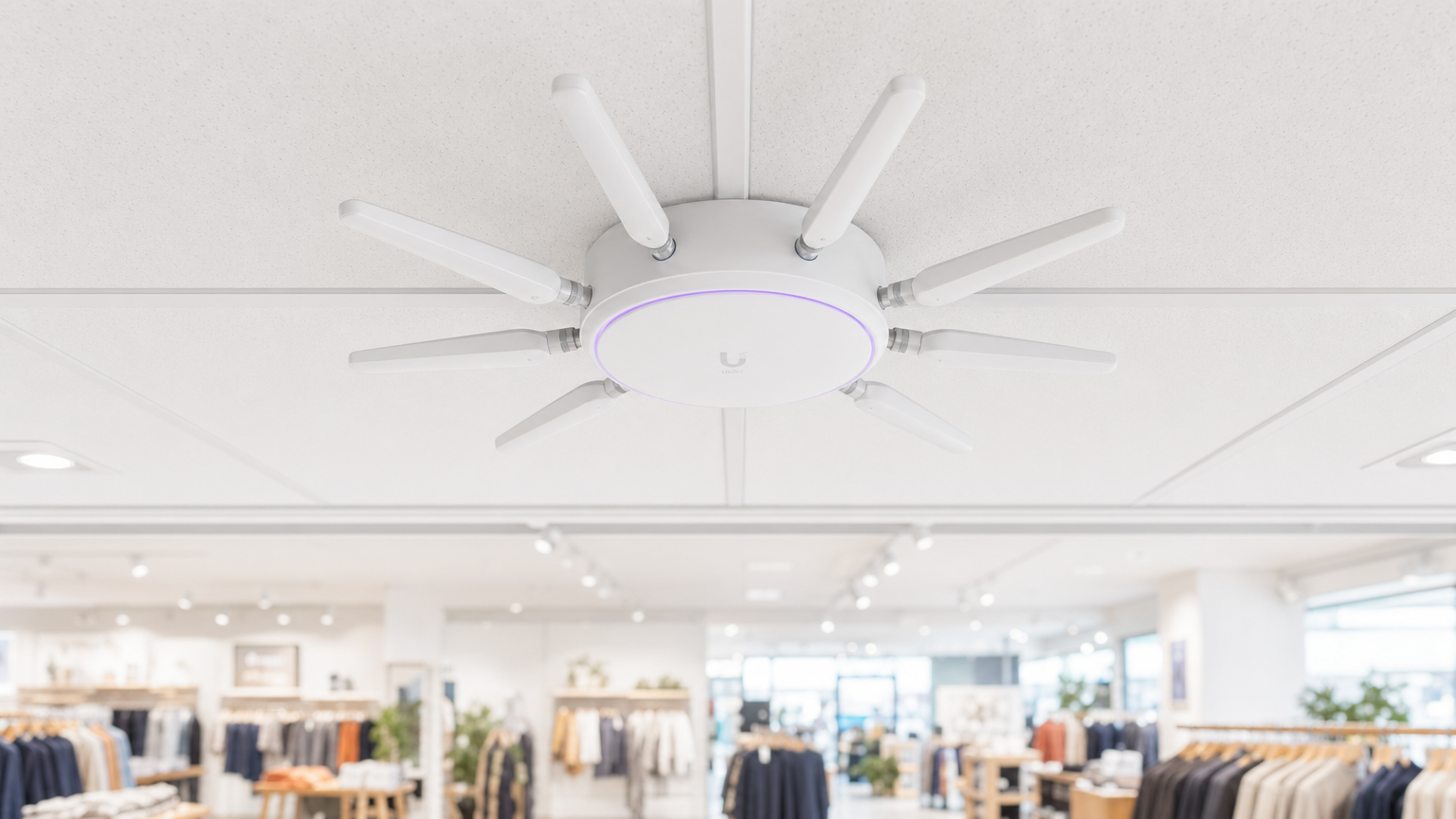
Per gli operatori di locali moderni e le aziende di vendita al dettaglio, fornire il WiFi in negozio non è più una semplice utilità o una piccola comodità per il cliente; è uno strato infrastrutturale commerciale critico. Quando architetti IT e responsabili marketing si allineano sull'implementazione, il WiFi del negozio al dettaglio si trasforma in un potente motore per l'acquisizione di dati di prima parte, l'analisi dell'affluenza e il coinvolgimento personalizzato dei clienti.
Questa guida fornisce a manager IT senior, CTO e architetti di rete un framework strategico per l'implementazione di WiFi ad alta densità nei negozi al dettaglio. Va oltre la semplice fornitura di accesso a Internet per esplorare come lo strato di accesso alla rete, i Captive Portal e le integrazioni di analisi si combinano per fornire un Return on Investment (ROI) misurabile. Esamineremo l'architettura tecnica necessaria per supportare centinaia di connessioni simultanee in modo sicuro, i mandati di conformità che regolano la raccolta dei dati e l'integrazione di piattaforme come Guest WiFi di Purple per stimolare fedeltà e vendite. Sia che stiate aggiornando una singola sede di punta o standardizzando l'infrastruttura in una catena di vendita al dettaglio globale, questo riferimento delinea le migliori pratiche vendor-neutral e le decisioni architetturali necessarie per costruire una rete che serva sia l'utente che l'azienda.
Approfondimento Tecnico: Architettura e Standard
Un'implementazione robusta di Retail WiFi richiede un'architettura strutturata e a più livelli per garantire affidabilità, sicurezza e capacità di estrazione dei dati. L'infrastruttura deve supportare un'alta densità di client mantenendo una stretta separazione tra il traffico degli ospiti e i sistemi aziendali o Point-of-Sale (POS).
Lo Strato di Accesso Radio
La base di qualsiasi implementazione moderna nel settore della vendita al dettaglio è lo strato di accesso radio, che deve essere costruito sullo standard IEEE 802.11ax, commercialmente noto come Wi-Fi 6. Per qualsiasi nuova implementazione nei negozi al dettaglio con WiFi, il Wi-Fi 6 è la base obbligatoria. Il suo vantaggio principale negli ambienti di vendita al dettaglio non è solo la massima velocità di trasmissione, ma la sua capacità di gestire in modo efficiente un'alta densità di client tramite Orthogonal Frequency-Division Multiple Access (OFDMA) e Basic Service Set (BSS) Colouring.
OFDMA consente di dividere un singolo canale wireless in sottocanali più piccoli, permettendo a un access point di comunicare con più dispositivi client contemporaneamente. In un ambiente di vendita al dettaglio affollato, come un grande magazzino durante un periodo di punta, questo previene il degrado della rete che affliggeva le implementazioni Wi-Fi 5 più vecchie. BSS Colouring mitiga l'interferenza co-canale, che è particolarmente critica nei parchi commerciali multi-tenant dove le reti adiacenti spesso si sovrappongono.
Infrastruttura di Rete e Switching
Gli access point devono connettersi a un'infrastruttura cablata resiliente. Gli switch core ed edge dovrebbero fornire Power over Ethernet (PoE+) adeguato per supportare gli access point moderni, insieme a una capacità di uplink sufficiente. Un negozio al dettaglio di medie dimensioni standard richiede almeno un uplink da 1 Gigabit dall'edge al core, mentre gli ambienti ad alta densità o i negozi di punta dovrebbero aggregare a velocità di 10 Gigabit.
Il circuito internet esterno è spesso un collo di bottiglia trascurato. Gli operatori dei locali dovrebbero dare priorità a connessioni dedicate e simmetriche. Come dettagliato nella nostra guida su Cos'è una Linea Dedicata? Internet Aziendale Dedicato , un circuito dedicato fornisce i Service Level Agreements (SLA) necessari per garantire l'uptime sia per i servizi ospiti che per le operazioni critiche di vendita al dettaglio.
Autenticazione e il Captive Portal
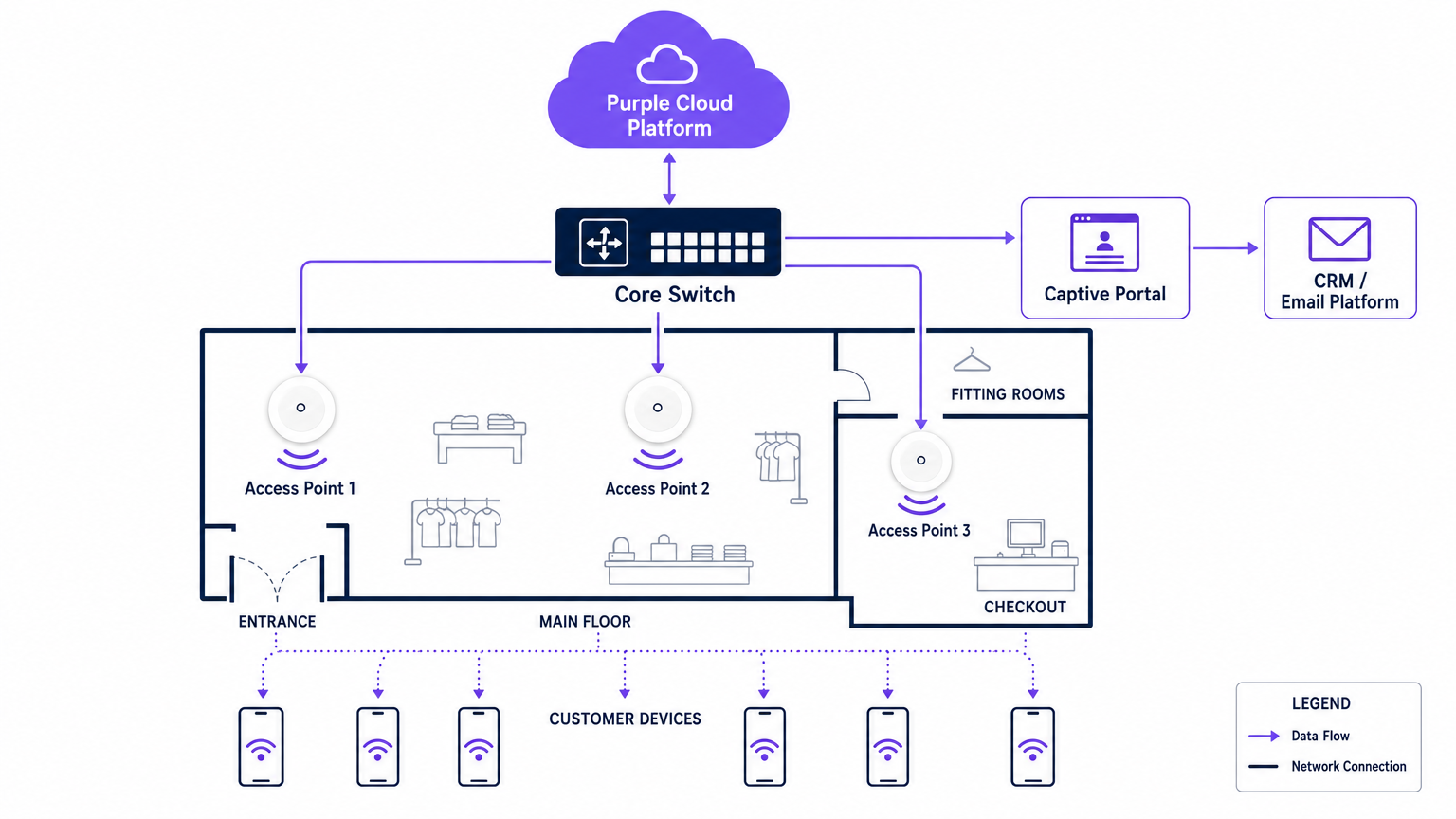
Il Captive Portal è l'interfaccia critica dove l'infrastruttura tecnica incontra la strategia commerciale. Quando un utente si connette alla rete ospite, viene intercettato e reindirizzato a un portale brandizzato che richiede l'autenticazione. Questo è il meccanismo per l'acquisizione di dati di prima parte.
I metodi di autenticazione includono tipicamente email, SMS o social login, sebbene l'email rimanga il più robusto per l'integrazione CRM a lungo termine. Il portale deve operare su HTTPS per proteggere le credenziali dell'utente in transito. Inoltre, il processo di autenticazione deve integrarsi perfettamente con un backend di WiFi Analytics per correlare l'indirizzo MAC del dispositivo con il profilo utente autenticato, consentendo il tracciamento comportamentale successivo.
Sicurezza e Conformità
La sicurezza in un ambiente Retail WiFi è duplice: proteggere la rete aziendale e proteggere l'ospite.
- Segmentazione della Rete: Il traffico degli ospiti deve essere logicamente isolato dal traffico aziendale e POS utilizzando Virtual Local Area Networks (VLAN). Questo è un requisito obbligatorio per la conformità al Payment Card Industry Data Security Standard (PCI DSS). Mescolare il traffico degli ospiti e quello dei pagamenti sulla stessa sottorete comporterà un immediato fallimento dell'audit.
- Standard di Crittografia: Mentre le reti aperte con Captive Portal rimangono comuni, l'industria si sta spostando verso la crittografia WPA3. WPA3-SAE (Simultaneous Authentication of Equals) fornisce la forward secrecy, proteggendo le sessioni passate anche se una password viene compromessa. Per i dispositivi aziendali, l'autenticazione 802.1X dovrebbe essere rigorosamente applicata.
- Privacy dei Dati (GDPR): La raccolta di dati di prima parte tramite il Captive Portal deve essere conforme alle normative regionali sulla privacy, come il GDPR in Europa. Il consenso deve essere esplicitamente dato, specifico e scorporato dai termini e condizioni generali. Il fornitore della piattaforma WiFi deve agire come processore di dati conforme.
Guida all'Implementazione
L'implementazione di una rete WiFi di livello commerciale richiede un approccio sistematico per garantire sia le prestazioni tecniche che l'allineamento aziendale.
Fase 1: Raccolta dei Requisiti e Allineamento degli Stakeholder
L'IT non devenon operare in un silo. Prima di selezionare l'hardware, gli architetti IT devono allinearsi con i direttori marketing e operations per definire gli obiettivi commerciali. Determinare i campi di acquisizione dati richiesti per il captive portal, i punti di integrazione con i sistemi CRM esistenti e le analisi specifiche necessarie (ad es. tempo di permanenza, flusso di zona).
Fase 2: Sopralluogo RF e Modellazione Predittiva
Un sopralluogo professionale di Radio Frequenza (RF) è non negoziabile. Affidarsi a planimetrie per stimare il posizionamento degli access point spesso comporta lacune di copertura in aree critiche come i camerini o le code alle casse.
Gli ingegneri dovrebbero utilizzare software di modellazione predittiva, seguito da un sopralluogo attivo in loco, per tenere conto dell'attenuazione causata da scaffalature, inventario e caratteristiche architettoniche. Una regola generale è un access point ogni 150-200 metri quadrati, ma le zone ad alta densità richiedono una pianificazione specifica della capacità piuttosto che una semplice pianificazione della copertura.
Fase 3: Implementazione e Configurazione dell'Infrastruttura
Durante l'installazione fisica, assicurarsi che tutto il cablaggio soddisfi gli standard Cat6a per supportare futuri access point multi-gigabit. Configurare i controller di rete per imporre l'isolamento del client sulla VLAN ospite, impedendo la comunicazione peer-to-peer tra i dispositivi connessi. Implementare politiche di Quality of Service (QoS) per limitare la larghezza di banda degli ospiti, garantendo che le operazioni retail critiche (come scanner di inventario e terminali POS) ricevano priorità.
Fase 4: Captive Portal e Integrazione CRM
Progettare il captive portal per riflettere l'identità del brand minimizzando l'attrito. Mantenere i campi di acquisizione dati al minimo—tipicamente nome e indirizzo email—per massimizzare i tassi di conversione. Integrare il portal con il CRM del brand o la piattaforma di marketing automation tramite API. Ciò garantisce che quando un cliente si autentica, il suo profilo venga immediatamente aggiornato o creato nel database centrale, attivando flussi di lavoro di benvenuto automatizzati o integrazioni di programmi fedeltà.
Fase 5: Calibrazione e Revisione degli Analytics
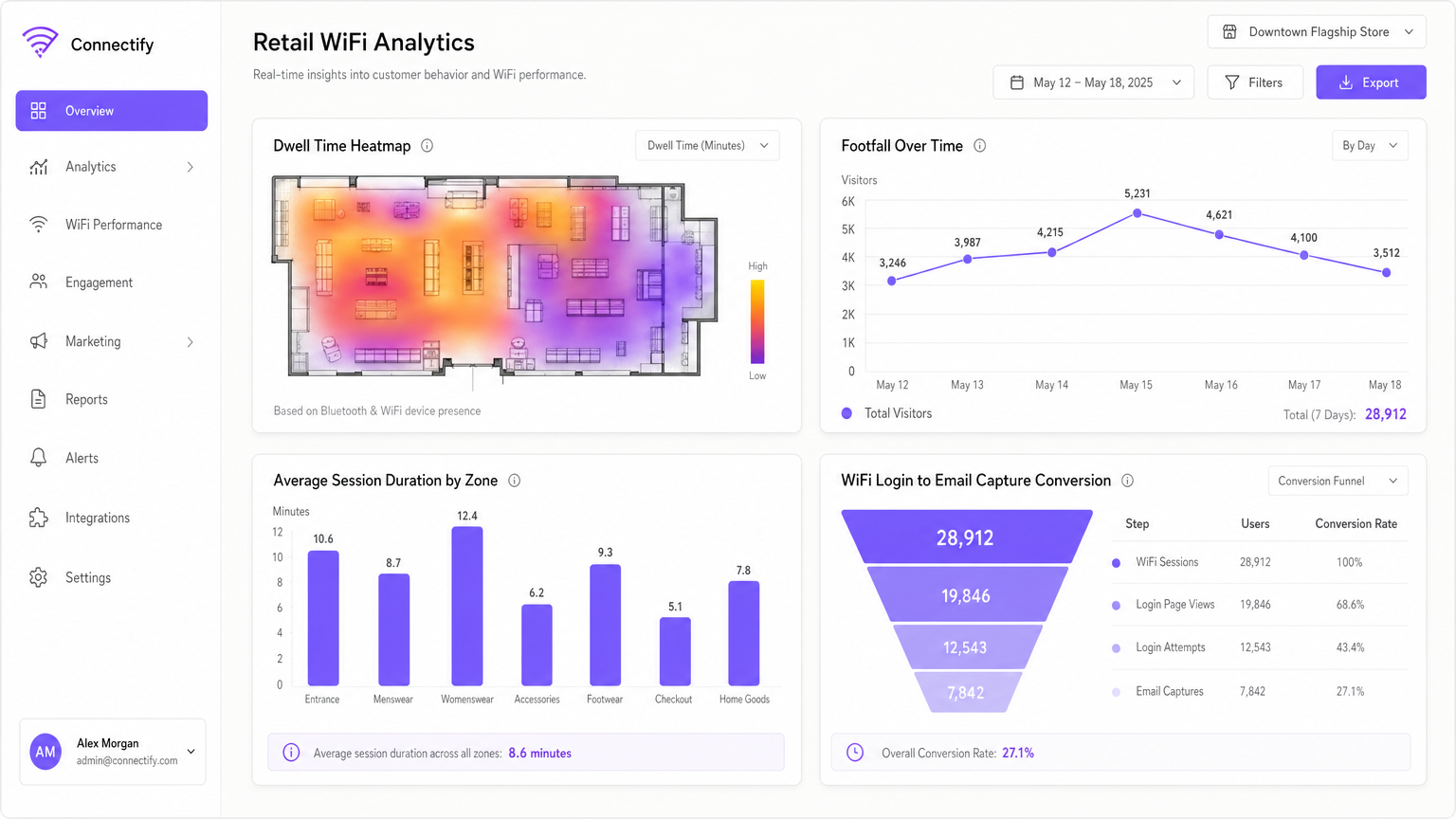
Una volta che la rete è attiva, calibrare la piattaforma di analytics per definire zone fisiche specifiche all'interno del negozio (ad es. 'Abbigliamento Uomo', 'Ingresso', 'Cassa'). Stabilire una cadenza di revisione mensile in cui i team IT e marketing analizzano le tendenze di affluenza, i tempi di permanenza e le metriche di performance della rete per affinare sia la configurazione della rete che il layout del negozio.
Migliori Pratiche
Per massimizzare il ROI del WiFi retail, attenersi alle seguenti migliori pratiche del settore:
- Dare Priorità ai Dati di Prima Parte: Con la deprecazione dei cookie di terze parti, il WiFi in negozio è una una delle fonti più affidabili di dati di prima parte. Assicurarsi che la strategia del captive portal sia ottimizzata per l'acquisizione di dati basata sul consenso.
- Implementare l'Autenticazione Basata su Profilo: L'adozione di metodi di autenticazione sicuri e senza interruzioni, come Passpoint (Hotspot 2.0), consente agli utenti di connettersi automaticamente in diverse sedi senza dover navigare ripetutamente nei captive portal, migliorando significativamente l'esperienza utente e la continuità dei dati.
- Sfruttare gli Analytics di Posizione: Utilizzare i dati di presenza generati dai dispositivi connessi per comprendere il flusso dei clienti. Come si vede negli ambienti Retail , analizzare quali corsie ricevono più traffico può informare le decisioni di merchandising e di personale.
- Garantire la Neutralità del Fornitore: Scegliere un overlay di analytics e captive portal, come Purple, che sia indipendente dall'hardware. Ciò previene il vendor lock-in a livello di infrastruttura e consente analytics standardizzati su un parco hardware misto.
Risoluzione dei Problemi e Mitigazione del Rischio
Anche le reti ben progettate incontrano problemi. Comprendere le modalità di guasto comuni è essenziale per mantenere la continuità del servizio.
| Modalità di Guasto | Sintomo | Causa Radice e Mitigazione |
|---|---|---|
| Guasto del Captive Portal | Gli utenti si connettono all'SSID ma non ricevono accesso a internet e nessun prompt di login. | Causa: Errore di reindirizzamento DNS o errori del certificato SSL sul controller del portal. Mitigazione: Assicurarsi che la configurazione del Walled Garden consenta la risoluzione DNS e l'accesso all'IP/hostname del portal prima dell'autenticazione. Verificare che i certificati SSL siano validi e attendibili. |
| Degradazione ad Alta Densità | Throughput lento e disconnessioni frequenti durante le ore di punta. | Causa: Interferenza co-canale o capacità AP insufficiente (troppi client per radio). Mitigazione: Implementare l'assegnazione dinamica dei canali. Aggiornare agli access point Wi-Fi 6. Ridurre la potenza di trasmissione per rimpicciolire le dimensioni delle celle e incoraggiare il roaming verso AP meno congestionati. |
| Access Point Rogue | Reti non autorizzate che appaiono con SSID simili (attacchi Evil Twin). | Causa: Attori malevoli che tentano di intercettare le credenziali degli ospiti. Mitigazione: Abilitare i Wireless Intrusion Prevention Systems (WIPS) sul controller di rete per rilevare e sopprimere automaticamente gli AP rogue. |
| VLAN Leakage | I dispositivi ospiti possono effettuare ping agli indirizzi IP aziendali. | Causa: Porte switch mal configurate o Access Control Lists (ACLs) mancanti sul router core. Mitigazione: Condurre regolarmente penetration testing. Applicare rigorosamente l'isolamento del client e verificare che le ACLs blocchino tutto lo spazio di indirizzi privati RFC 1918 dalla VLAN ospite. |
ROI e Impatto sul Business
La misura ultima di un'implementazione WiFi retail è il suo impatto sul risultato finale. I leader IT devono articolare questo valore all'intera azienda.
- Aumento del Tempo di Permanenza: Un WiFi affidabile incoraggia i clienti a trascorrere più tempo in negozio, il che si correla direttamente con un aumento della dimensione del carrello.
- Attribuzione Marketing: Monitorando gli indirizzi MAC dei dispositivi, i retailer possono misurare l'impatto offline delle campagne online. Se un cliente riceve un'email promozionale e visita il negozio tre giorni dopo, la rete WiFi fornisce i dati di attribuzione.
- Acquisizione di Fedeltà: Il captive portal è un canale di acquisizione ad alta conversione per i programmi fedeltà. Offrire accesso ad alta velocità in cambio della registrazione alla fedeltà espande rapidamente la base utenti del programma.
- Efficienza Operativa: L'analisi del flusso di visitatori consente modelli di personale dinamici, garantendo una copertura adeguata durante i periodi di punta e riducendo i costi salariali durante i periodi di minore affluenza.
Trattando il WiFi in negozio come una risorsa strategica piuttosto che un costo irrecuperabile, le aziende retail possono costruire una rete che non solo connette i dispositivi, ma che fondamentalmente stimola vendite, fedeltà e intelligenza operativa.
Definizioni chiave
Captive Portal
A web page that a user of a public access network is obliged to view and interact with before access is granted. It is the primary mechanism for authentication, terms of service acceptance, and data capture.
IT teams deploy captive portals to secure the network and ensure legal compliance, while marketing teams use them to acquire customer data and drive loyalty program sign-ups.
MAC Address (Media Access Control)
A unique identifier assigned to a network interface controller (NIC) for use as a network address in communications within a network segment.
In retail WiFi analytics, the MAC address is used to anonymously track device movement across the store, providing data on dwell times and repeat visits, even if the user hasn't authenticated.
Wi-Fi 6 (802.11ax)
The sixth generation of the Wi-Fi standard, designed specifically to improve performance in high-density environments through technologies like OFDMA and BSS Colouring.
When upgrading retail infrastructure, IT managers specify Wi-Fi 6 to ensure the network can handle hundreds of simultaneous shoppers without degrading performance.
VLAN (Virtual Local Area Network)
A logical subnetwork that groups a collection of devices from different physical LANs. It allows network administrators to partition a single switched network to match the functional and security requirements of their systems.
VLANs are critical in retail to separate the untrusted guest WiFi traffic from the highly sensitive Point-of-Sale (POS) traffic, ensuring PCI DSS compliance.
First-Party Data
Information a company collects directly from its customers and owns entirely, such as email addresses, purchase history, and WiFi session data.
With the decline of third-party tracking cookies, retail marketers rely heavily on the guest WiFi network to capture first-party data for targeted campaigns.
Walled Garden
A network configuration that allows unauthenticated users access to a limited set of specific websites or IP addresses, while blocking all other internet access.
IT teams configure walled gardens so users can access the captive portal login page and necessary authentication services (like social media APIs) before they are fully authorised on the network.
Dwell Time
The length of time a customer spends in a specific area of a store, measured by tracking their device's connection or probe requests to the WiFi access points.
Operations directors use dwell time analytics to evaluate the effectiveness of store layouts, window displays, and promotional endcaps.
PCI DSS (Payment Card Industry Data Security Standard)
An information security standard for organizations that handle branded credit cards from the major card schemes.
IT architects must design the retail network to ensure guest WiFi access does not compromise the security of the payment infrastructure, avoiding severe financial penalties.
Esempi pratici
A national retail chain with 50 locations is experiencing low marketing opt-in rates (under 5%) on their current guest WiFi network, which uses a generic, unbranded splash page. The CTO needs to increase data capture to support a new omnichannel loyalty initiative.
The IT team deploys a centralised, hardware-agnostic captive portal solution across all 50 locations. They replace the generic splash page with a branded, responsive portal that clearly articulates the value exchange: 'Log in for free high-speed WiFi and an immediate 10% discount code'. The portal is configured to capture only Name and Email, reducing friction. Crucially, the platform is integrated via API with the retailer's CRM. When a user authenticates, their details are pushed to the CRM, triggering an automated email containing the discount code. The network is also configured to remember the device's MAC address, allowing seamless authentication on subsequent visits to any of the 50 locations.
A large department store is suffering from severe network congestion on weekends. Customers complain that the guest WiFi is unusable, and the store manager reports that POS terminals (which share the physical network infrastructure) are occasionally dropping connections.
The network architect conducts an RF spectrum analysis and identifies severe co-channel interference and AP saturation. The remediation plan involves three steps: 1) Upgrading the highest-density zones (food court, main entrance) to Wi-Fi 6 access points to leverage OFDMA. 2) Implementing strict QoS policies on the core router, guaranteeing bandwidth for the POS VLAN and throttling guest VLAN traffic to 5 Mbps per client. 3) Enabling dynamic channel assignment and reducing the transmit power of the access points to shrink the cell sizes, encouraging client devices to roam more efficiently and reducing overlap.
Domande di esercitazione
Q1. Your retail client wants to implement a guest WiFi network to capture customer emails. They plan to use their existing flat network architecture, connecting the new guest access points directly to the same switch that handles the POS terminals, without VLAN segmentation. What is the primary risk of this approach?
Suggerimento: Consider the security standards required for processing payments.
Visualizza risposta modello
The primary risk is a severe violation of PCI DSS compliance. A flat network allows untrusted guest devices to potentially communicate with or intercept traffic from the POS terminals. The network must be segmented using VLANs to isolate the cardholder data environment from the guest network.
Q2. A venue operator notices that while footfall in the store is high, the capture rate on the captive portal is below 2%. The portal currently asks for First Name, Last Name, Email, Phone Number, Date of Birth, and Postcode. How should the IT and Marketing teams resolve this?
Suggerimento: Consider the friction involved in the authentication process.
Visualizza risposta modello
The low capture rate is due to excessive friction in the authentication process. The teams should redesign the captive portal to request only the minimum necessary information—typically just Name and Email, or offer a social login option. Progressive profiling can be used later to gather more details once the initial relationship is established.
Q3. A newly deployed Wi-Fi 6 network in a busy shopping centre is experiencing poor performance. The IT manager notes that all access points are transmitting at maximum power on the 2.4GHz band. What configuration change is required?
Suggerimento: Think about how RF signals interact in dense environments.
Visualizza risposta modello
The access points are likely causing severe co-channel interference because their cell sizes are too large and overlapping. The IT manager should reduce the transmit power on the access points, particularly on the 2.4GHz band, to shrink the cell sizes. They should also ensure dynamic channel assignment is enabled and encourage clients to steer towards the 5GHz band where possible.
Continua a leggere questa serie
Cos'è una Probe Request? Capire come i dispositivi scoprono le reti
Questa guida di riferimento tecnico offre un'analisi approfondita delle probe request IEEE 802.11, della scansione attiva versus passiva e dell'impatto della randomizzazione MAC sull'analisi dei dati dei luoghi. Fornisce strategie di implementazione attuabili per gli architetti di rete al fine di ottimizzare le implementazioni ad alta densità, mitigare le probe storm e garantire una raccolta dati accurata e conforme al GDPR utilizzando livelli di identità autenticati.
Come Risolvere il WiFi Lento Senza Aggiornare il Tuo Piano Internet
Una guida tecnica di riferimento completa per IT managers e network architects sull'ottimizzazione delle prestazioni WiFi aziendali senza aumentare la ISP bandwidth. Copre RF tuning, la gestione della densità dei client, l'implementazione di QoS e come sfruttare WiFi analytics per diagnosticare e risolvere i colli di bottiglia.
La Checklist per la Migrazione da NAC Legacy a NAC Cloud-Native
Questa guida tecnica di riferimento autorevole fornisce una checklist strutturata in tre fasi per la migrazione da Network Access Control (NAC) legacy a un'architettura cloud-native. Fornisce a manager IT e architetti di rete strategie attuabili per gestire l'integrazione dell'identità, la parità delle policy e la conformità senza interrompere le operazioni della sede.