

Risolvere l'elevata latenza e il jitter sul WiFi del personale
Questa guida tecnica di riferimento autorevole esamina le cause principali dell'elevata latenza e del jitter sulle reti WiFi aziendali del personale, fornendo ad architetti di rete e direttori IT strategie attuabili per diagnosticare e risolvere il degrado delle prestazioni che influisce su applicazioni in tempo reale come Microsoft Teams e Zoom. Copre l'ottimizzazione dell'ambiente RF, l'implementazione QoS end-to-end, le meccaniche di roaming e le tecniche di gestione dei client. Gli operatori di sedi e i team IT troveranno indicazioni concrete per l'implementazione, casi di studio reali e benchmark misurabili per garantire che la loro infrastruttura wireless supporti la mobilità e la collaborazione senza interruzioni del personale.
Ascolta questa guida
Visualizza trascrizione del podcast
Riepilogo Esecutivo
Per le sedi aziendali — dai vasti spazi Retail agli stadi ad alta densità e alle proprietà Hospitality — le prestazioni del WiFi del personale sono una dipendenza operativa critica, non una comodità. Quando la latenza unidirezionale supera i 50ms o il jitter fluttua oltre i 20ms, le piattaforme di comunicazione in tempo reale, inclusi Microsoft Teams e Zoom, si degradano visibilmente: l'audio diventa robotico, il video si blocca e le chiamate cadono. Questa guida fornisce ad architetti di rete e direttori IT la profondità tecnica e le strategie attuabili necessarie per identificare, diagnosticare e risolvere le cause principali dell'elevata latenza WiFi sulle WLAN aziendali. Affrontando le interferenze RF, implementando la Quality of Service end-to-end e ottimizzando i parametri di roaming in linea con IEEE 802.11r/k/v, le organizzazioni possono offrire un'esperienza wireless robusta che supporta la mobilità senza interruzioni del personale. L'investimento è direttamente misurabile: riduzione dei ticket dell'helpdesk, miglioramento della produttività operativa e un'infrastruttura di rete che si adatta all'azienda.
Approfondimento Tecnico
Latenza e Jitter: La Distinzione Fondamentale
La latenza è il tempo necessario affinché un pacchetto di dati viaggi dalla sorgente alla destinazione. Il jitter è la variazione di tale ritardo tra pacchetti consecutivi. Nel contesto delle reti 802.11, entrambe le metriche sono fortemente influenzate dalla natura half-duplex della trasmissione wireless e dal protocollo Carrier Sense Multiple Access with Collision Avoidance (CSMA/CA) — il meccanismo con cui i dispositivi competono per il tempo di trasmissione.

I codec voce e video sono progettati con buffer di jitter fissi. Quando il jitter supera la profondità del buffer — tipicamente 20–30ms per VoIP di livello enterprise — i pacchetti vengono scartati, producendo l'audio caratteristico a scatti o robotico che segnala una chiamata degradata. L'elevata latenza, al contrario, causa il ritardo conversazionale che rende difficile la collaborazione in tempo reale. La raccomandazione ITU-T G.114 specifica un ritardo unidirezionale massimo di 150ms per una qualità vocale accettabile, con 50ms come obiettivo per le implementazioni aziendali.
| Metrica | Ottimale | Accettabile | Degradato |
|---|---|---|---|
| Latenza Unidirezionale | < 20ms | 20–50ms | > 50ms |
| Jitter | < 5ms | 5–20ms | > 20ms |
| Perdita di Pacchetti | < 0.1% | 0.1–1% | > 1% |
Causa Radice 1: Ambiente RF e Interferenza Co-Canale
L'Interferenza Co-Canale (CCI) è la principale causa RF di latenza elevata nelle implementazioni aziendali dense. Quando più Access Point operano sullo stesso canale, condividono il tempo di trasmissione sotto CSMA/CA. Ogni AP deve posticipare la trasmissione quando rileva un altro AP sullo stesso canale che trasmette, serializzando di fatto il traffico e aumentando il ritardo di accodamento. In un negozio al dettaglio con 20 AP su tre canali 2.4GHz non sovrapposti, ogni canale può essere condiviso da sei o sette AP — una configurazione che produrrà una latenza significativa sotto carico.
La banda 5GHz, con il suo piano di canali più ampio (fino a 25 canali 20MHz non sovrapposti sotto 802.11ac/ax in molti domini normativi), offre una capacità sostanzialmente maggiore per la pianificazione del riutilizzo dei canali. Comprendere l'intero panorama delle frequenze è essenziale; la guida Wi Fi Frequencies: A Guide to Wi-Fi Frequencies in 2026 fornisce un riferimento completo per le decisioni di pianificazione delle frequenze.
L'Interferenza da Canale Adiacente (ACI) presenta un rischio secondario. L'ACI si verifica quando i canali non sono sufficientemente separati, causando una sovrapposizione parziale che corrompe i frame e forza le ritrasmissioni — ogni ritrasmissione aggiunge direttamente alla latenza osservata.
Causa Radice 2: Velocità Dati Legacy e Inefficienza del Tempo di Trasmissione
In un BSS 802.11 standard, a tutti i client associati vengono allocate opportunità di trasmissione. Un client che trasmette a 1 Mbps occupa il canale per circa 100 volte più a lungo di un client che trasmette a 100 Mbps per inviare lo stesso payload. Questo consumo sproporzionato del tempo di trasmissione — causato da dispositivi legacy o client al limite della copertura — aumenta il ritardo di accodamento per tutti gli altri client sull'AP. La disabilitazione delle velocità dati inferiori a 12 Mbps sulla banda 5GHz e inferiori a 5.5 Mbps sulla 2.4GHz costringe i client a utilizzare una modulazione più efficiente, riducendo il tempo di trasmissione per frame e migliorando la latenza complessiva.
Causa Radice 3: Errata Configurazione QoS
Senza Quality of Service, un trasferimento di file di grandi dimensioni viene trattato in modo identico a una chiamata Teams. Wi-Fi Multimedia (WMM), l'implementazione QoS 802.11e, definisce quattro Categorie di Accesso: Voice (AC_VO), Video (AC_VI), Best Effort (AC_BE) e Background (AC_BK). Ogni categoria ha parametri di Contention Window distinti che determinano quanto aggressivamente compete per il tempo di trasmissione. Il traffico vocale utilizza finestre di contesa più piccole e spazi inter-frame di arbitraggio (AIFS) più brevi, conferendogli una priorità statistica rispetto ai dati di massa.
Il dettaglio implementativo critico che molte distribuzioni trascurano è il limite di fiducia sull'infrastruttura cablata. WMM opera a Layer 2 all'interno del dominio wireless. Affinché la QoS sia mantenuta end-to-end, le porte dello switch che collegano gli AP e i Wireless LAN Controllers devono essere configurate per fidarsi delle marcature DSCP applicate dall'infrastruttura wireless. Senza questo, i pacchetti vengono riclassificati come Best Effort al primo hop cablato, rendendo inefficace la configurazione QoS wireless oltre l'AP.
Per gli ambienti Healthcare in cui le comunicazioni cliniche tramite VoWLAN sono critiche per la sicurezza, questa catena QoS end-to-end non è negoziabile.
Causa Radice 4: Latenza di Roaming e Overhead di Autenticazione
La latenza indotta dal roaming è la causa più operativamente dirompente del degrado della qualità delle chiamate negli ambienti con personale mobile. Quando un client effettua la transizione tra AP, il processo comporta: attivo o scansione passiva per scoprire AP candidati, autenticazione e riassociazione. Con WPA3-Enterprise e 802.1X, la fase di autenticazione richiede uno scambio RADIUS completo, che può richiedere 300-800 ms a seconda del tempo di risposta del server RADIUS e della topologia di rete. Questo ritardo viene percepito direttamente come una caduta di chiamata.
IEEE 802.11r (Fast BSS Transition) risolve questo problema consentendo al client di pre-negoziare la Pairwise Transient Key con l'AP di destinazione prima del roaming, utilizzando una chiave PMK-R1 memorizzata nella cache e distribuita dal WLC. Ciò riduce la fase di autenticazione a uno scambio di due frame, portando il tempo totale di roaming al di sotto di 50 ms. Per ambienti con significativa mobilità del personale — hub Trasporto , reparti ospedalieri, piani di magazzino — 802.11r non è opzionale; è un requisito di base.
IEEE 802.11k (Radio Resource Measurement) fornisce ai client un Neighbour Report, eliminando la necessità di scansionare ogni possibile canale per scoprire AP candidati. IEEE 802.11v (BSS Transition Management) consente alla rete di suggerire proattivamente AP migliori ai client, risolvendo il problema del client "appiccicoso". Per un trattamento completo dell'architettura di roaming, fare riferimento a Risoluzione dei problemi di roaming nelle WLAN aziendali .
Guida all'implementazione
Fase 1: Audit RF e Pianificazione dei Canali
Iniziare con un'indagine completa del sito wireless utilizzando un analizzatore di spettro per identificare le fonti di interferenza, incluse quelle non-WiFi come Bluetooth, telefoni DECT e forni a microonde. Documentare il posizionamento degli AP, i livelli di potenza di trasmissione e le assegnazioni dei canali. Identificare gli AP con un'utilizzazione del canale costantemente superiore al 50% — questi sono i principali hotspot di latenza.
Ridurre la potenza di trasmissione degli AP al livello minimo richiesto per mantenere una copertura adeguata (RSSI di -67 dBm al bordo della cella per le applicazioni vocali). Ciò riduce l'impronta CCI di ciascun AP, consentendo un riutilizzo più stretto dei canali. Abilitare la gestione RF automatizzata sul WLC, ma configurare restrizioni orarie per prevenire modifiche ai canali durante l'orario di lavoro, che possono causare brevi interruzioni di connettività.
Fase 2: Ottimizzazione della Velocità Dati
Sulla banda a 5GHz, disabilitare tutte le velocità obbligatorie e supportate inferiori a 12 Mbps. Sulla banda a 2.4GHz, disabilitare le velocità inferiori a 5.5 Mbps. Ciò costringe i client ad associarsi a velocità più elevate, riducendo il consumo di tempo di trasmissione per frame. Abilitare Airtime Fairness per impedire a un singolo client di monopolizzare il canale.
Fase 3: Implementazione QoS End-to-End
Abilitare WMM su tutti gli SSID aziendali. Configurare le mappature DSCP-to-WMM: DSCP EF (46) a AC_VO, DSCP AF41 (34) a AC_VI. Sull'infrastruttura cablata, configurare le porte degli switch che si connettono agli AP e ai WLC con mls qos trust dscp (sintassi Cisco IOS) o equivalente. Verificare la catena QoS utilizzando una cattura di pacchetti sul router WAN per confermare che il traffico vocale arrivi con le marcature DSCP corrette.
Utilizzare WiFi Analytics per identificare le applicazioni ad alta intensità di banda che consumano un tempo di trasmissione sproporzionato e applicare limiti di velocità o politiche di traffic shaping per proteggere il traffico voce e video.
Fase 4: Ottimizzazione del Roaming
Abilitare 802.11r, 802.11k e 802.11v sull'SSID del personale. Si noti che alcuni client legacy potrebbero non supportare questi standard; testare accuratamente prima dell'implementazione. Configurare il WLC per disassociare i client con RSSI inferiore a -75 dBm per affrontare i client "appiccicosi". Impostare la soglia RSSI minima per l'associazione a -80 dBm per impedire ai client di associarsi ad AP distanti.
Best Practice
Sicurezza e Prestazioni: Implementare WPA3-Enterprise con 802.1X per l'SSID del personale. Sebbene 802.1X introduca un overhead di autenticazione iniziale, 802.11r lo elimina durante il roaming. Assicurarsi che i server RADIUS siano implementati con ridondanza e tempi di risposta inferiori a 100 ms. La conformità con GDPR e PCI DSS richiede che il traffico del personale e del Guest WiFi sia logicamente separato utilizzando VLAN e SSID distinti.
Segmentazione della Rete: Mantenere una rigorosa separazione tra le reti del personale e degli ospiti. Il traffico degli ospiti dovrebbe essere isolato su un SSID dedicato con autenticazione Captive Portal, impedendo ai dispositivi degli ospiti di influire sulle prestazioni della rete del personale. Ciò è particolarmente rilevante per le proprietà Ospitalità dove la densità del WiFi degli ospiti può essere estremamente elevata.
Monitoraggio e Definizione della Baseline: Stabilire misurazioni di latenza e jitter di riferimento durante le ore non di punta. Configurare trap SNMP o telemetria in streaming per avvisare quando l'utilizzazione del canale supera il 50% o l'RSSI del client scende sotto i -70 dBm. Il monitoraggio proattivo previene interventi reattivi.
Per una strategia di connettività più ampia sul posto di lavoro, Office Wi Fi: Ottimizza la tua Rete Wi-Fi Moderna per Ufficio fornisce indicazioni complementari sulla progettazione di WLAN aziendali.
Risoluzione dei Problemi e Mitigazione del Rischio
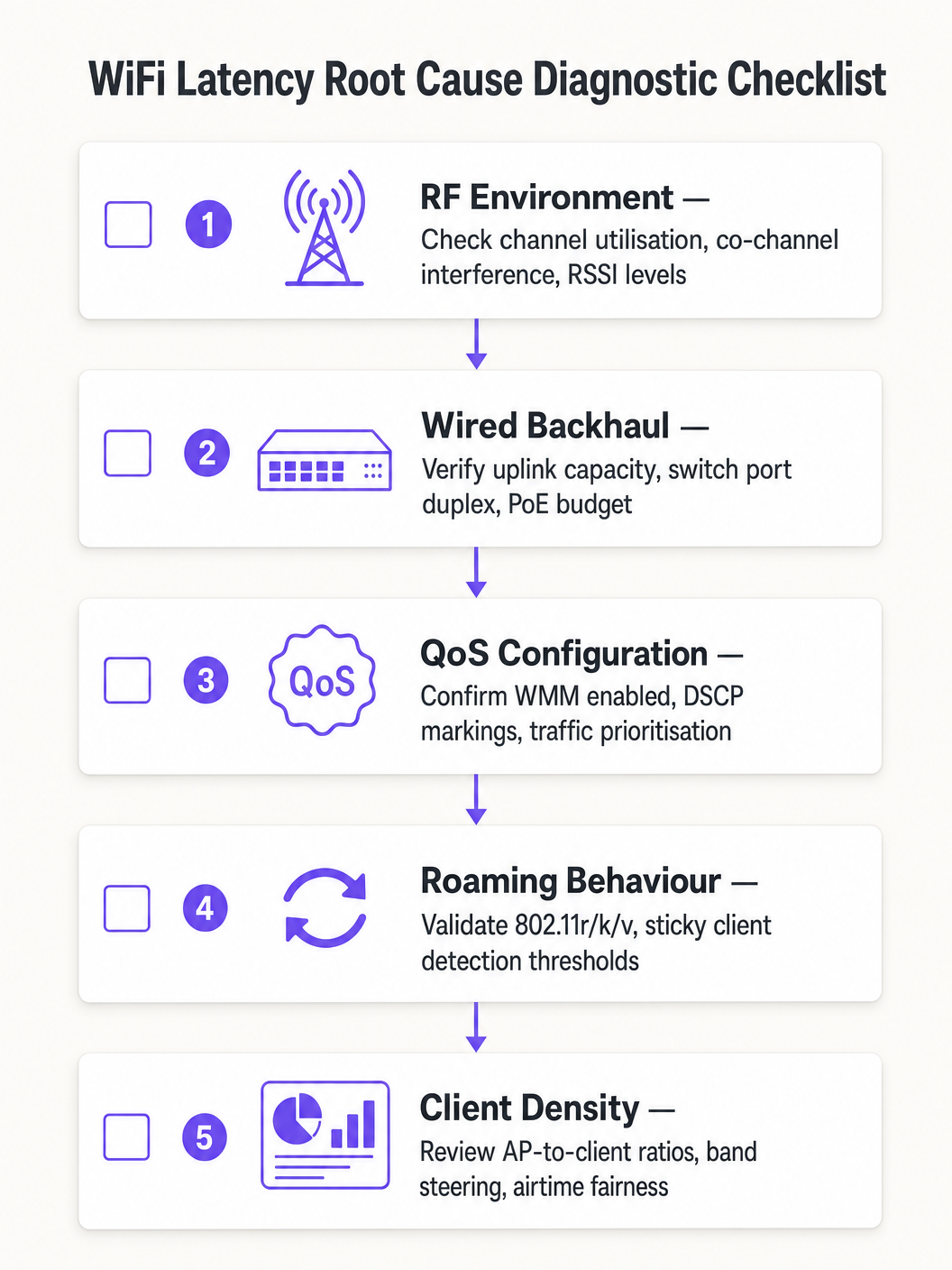
Seguire un approccio diagnostico strutturato per evitare di attribuire erroneamente la causa principale:
- Isolare il dominio: Effettuare un ping al gateway predefinito locale dal client interessato. Se la latenza è bassa, la rete wireless funziona adeguatamente e il problema risiede nel dominio cablato o WAN. Se la latenza è alta, procedere con la diagnostica wireless.
- Verificare l'utilizzazione del canale: Un'utilizzazione elevata (>50%) indica CCI o vincoli di capacità. Un'utilizzazione bassa con latenza elevata indica problemi di QoS o di roaming.
- Rivedere l'associazione dei client: Identificare i client associati a basse velocità dati o con RSSI debole. Questi probabilmente stanno causando inefficienza del tempo di trasmissione o stanno riscontrando una scarsa copertura.
- Convalidare il QoS end-to-end: Catturare i pacchetti sull'interfaccia WAN e verificare le marcature DSCP sul traffico vocale.
- Testare il roaming: Utilizzare uno strumento di diagnostica WiFi per misurare i tempi di transizione del roaming. Qualsiasi valore superiore a 100 ms indica che 802.11r non funziona correttamente.
Modalità di Guasto Comuni:
| Sintomo | Causa Probabile | Risoluzione |
|---|---|---|
| Picchi di latenza durante le ore di punta | CCI / elevato utilizzo del canale | Ridurre la potenza dell'AP, migrare a 5GHz |
| Interruzioni audio durante la deambulazione | Roaming lento / mancanza di 802.11r | Abilitare 802.11r, regolare le soglie RSSI |
| Latenza elevata costante, basso utilizzo | Limite di fiducia QoS mancante | Configurare la fiducia DSCP sulle porte dello switch |
| Perdita di pacchetti intermittente | ACI / sovrapposizione di canali | Correggere il piano dei canali, aumentare la separazione dei canali |
ROI e Impatto sul Business
Il business case per l'ottimizzazione della latenza WiFi è semplice. In un'operazione di magazzino o logistica, la riduzione della latenza dello scanner da 150ms a meno di 20ms può aumentare la produttività di prelievo e imballaggio del 10-15%, influenzando direttamente i costi operativi. In un ambiente aziendale, l'eliminazione delle chiamate Teams interrotte riduce i ticket dell'helpdesk IT — che tipicamente costano £25–£50 per ticket da risolvere — e migliora la produttività dei dirigenti e del personale.
Per le organizzazioni Sanitarie che implementano VoWLAN per le comunicazioni cliniche, il valore di mitigazione del rischio è ancora più elevato: comunicazioni inaffidabili in un contesto clinico comportano implicazioni per la sicurezza del paziente che superano di gran lunga il costo dell'ottimizzazione della rete.
Misurare il successo rispetto a questi KPI: latenza media unidirezionale per il traffico vocale, misurazioni del jitter, tempi di transizione del roaming, percentuali di utilizzo del canale e volume dei ticket dell'helpdesk relativi alle prestazioni WiFi. Stabilire baseline pre e post-ottimizzazione per quantificare il miglioramento e costruire il business case per gli investimenti continui.
Definizioni chiave
Latency
The one-way time delay for a data packet to travel from source to destination, measured in milliseconds.
High latency causes conversational delay in voice calls and video conferencing. The ITU-T G.114 standard specifies a maximum acceptable one-way latency of 150ms, with 50ms as the enterprise target.
Jitter
The statistical variation in packet arrival times, representing the inconsistency of latency across a stream of packets.
High jitter causes choppy or robotic audio as the receiving application's jitter buffer is overwhelmed and packets are discarded. Target jitter below 20ms for enterprise voice applications.
CSMA/CA (Carrier Sense Multiple Access with Collision Avoidance)
The medium access protocol used in 802.11 WiFi networks, where devices listen for channel activity before transmitting and back off randomly if the channel is busy.
The half-duplex nature of CSMA/CA means only one device can transmit at a time on a given channel. In dense environments, this contention mechanism is the primary source of variable latency.
Co-Channel Interference (CCI)
Interference caused when multiple Access Points or clients transmit on the same frequency channel within range of each other.
CCI forces APs to defer transmission, increasing queuing delay. It is the primary RF cause of high latency in dense enterprise deployments and is mitigated through careful channel planning and power management.
WMM (Wi-Fi Multimedia)
The 802.11e QoS implementation for wireless networks, defining four Access Categories (Voice, Video, Best Effort, Background) with differentiated contention parameters.
WMM is the mechanism that gives voice and video traffic statistical priority over bulk data on the wireless medium. It must be enabled on all SSIDs carrying real-time traffic.
802.11r (Fast BSS Transition)
An IEEE standard that allows a client to pre-negotiate security credentials with a target AP before roaming, eliminating the need for a full RADIUS re-authentication during the handoff.
Without 802.11r, roaming under WPA2/WPA3-Enterprise can take 300–800ms, causing audible call dropouts. With 802.11r, roaming completes in under 50ms.
Sticky Client
A wireless device that remains associated to an AP with a degraded signal, even when a closer AP with a stronger signal is available.
Sticky clients experience high latency due to poor signal quality and consume disproportionate airtime at low data rates. WLC-side RSSI threshold enforcement is required to force these clients to roam.
Airtime Fairness
A wireless scheduling mechanism that allocates equal transmission time to all associated clients, rather than equal numbers of transmission opportunities.
Without airtime fairness, a single slow client can monopolise the channel, increasing latency for all other clients on the AP. Enabling airtime fairness protects high-speed clients from the impact of legacy or distant devices.
DSCP (Differentiated Services Code Point)
A 6-bit field in the IP header used to classify and prioritise network traffic for QoS purposes.
DSCP EF (46) is used for voice traffic; DSCP AF41 (34) for video. These markings must be trusted by wired switches to maintain QoS end-to-end from the wireless client to the WAN.
Esempi pratici
A 1,200-delegate conference centre reports that staff using mobile devices experience dropped Zoom calls when moving between exhibition halls. Signal strength is consistently above -65 dBm throughout the venue, and the wireless controller shows no obvious errors. The issue is intermittent and correlates with staff movement.
A wireless packet capture during a roaming event revealed that clients were taking 480–650ms to complete the roaming process due to full 802.1X re-authentication with the RADIUS server at each AP transition. The RADIUS server was located off-site, adding approximately 80ms of round-trip WAN latency to each authentication exchange.
The resolution involved three steps: First, enable 802.11r (Fast BSS Transition) on the staff SSID to eliminate full RADIUS re-authentication during roams. Second, deploy a local RADIUS proxy or cache to reduce authentication latency for initial associations. Third, enable 802.11k to provide clients with neighbour reports, reducing the scanning phase from 200ms+ to under 30ms. Post-implementation roaming times measured at 35–45ms, eliminating all call dropouts during staff movement.
A national retail chain with 85 stores reports that inventory management scanners on the warehouse floor experience severe latency (150–200ms) during peak trading hours, despite a recent AP hardware refresh. Signal strength is strong, and the WLC dashboard shows no alarms. The issue is worst between 10am and 2pm.
Analysis of the WLC RF dashboard revealed channel utilisation on the 2.4GHz band exceeding 75% during peak hours. The store had 18 APs deployed, all operating on the 2.4GHz band across channels 1, 6, and 11 — meaning six APs per channel were competing for airtime. Additionally, the scanner devices were legacy 802.11n devices operating at data rates as low as 6 Mbps.
The remediation plan: Migrate the scanner SSID exclusively to the 5GHz band, leveraging the wider channel plan to reduce co-channel contention. Disable data rates below 12 Mbps on the 5GHz SSID. Enable WMM and configure the scanner traffic (UDP, port 9100) to be marked as DSCP AF41 (Video class) at the WLC. Configure switch ports to trust DSCP. Post-implementation latency measured at 8–12ms during peak hours.
Domande di esercitazione
Q1. You are the network architect for a 450-bed hospital deploying VoWLAN handsets for clinical staff across three floors. During UAT, nurses report that calls drop for approximately half a second when moving between wards. Signal strength throughout the building is consistently -62 to -68 dBm. The WLC shows no errors and channel utilisation is below 35%. What is the most likely root cause and what is your recommended resolution?
Suggerimento: Consider what happens at the network layer when a client moves from one AP to another under WPA2-Enterprise authentication. Signal strength and channel utilisation are both healthy, so the issue is not RF-related.
Visualizza risposta modello
The root cause is roaming latency caused by full 802.1X re-authentication at each AP transition. With healthy RSSI and low channel utilisation, the RF environment is not the issue. The half-second dropout is characteristic of a RADIUS authentication exchange occurring during the roam. The recommended resolution is to enable IEEE 802.11r (Fast BSS Transition) on the VoWLAN SSID, which pre-negotiates the PMK-R1 key with the target AP before the roam occurs, reducing transition time to under 50ms. Additionally, enable 802.11k to provide clients with neighbour reports and reduce scanning time, and verify that the RADIUS server response time is below 100ms. Test all handset models for 802.11r compatibility before full deployment.
Q2. A large retail distribution centre has 40 APs deployed across a 20,000 sq ft warehouse floor, all operating on the 2.4GHz band using channels 1, 6, and 11. Barcode scanners used by warehouse operatives are experiencing 120–180ms latency during peak shift hours, causing the inventory management system to time out. Signal strength is strong throughout. What is the primary architectural problem and what is the remediation strategy?
Suggerimento: Calculate how many APs are sharing each channel. Consider the fundamental limitation of the 2.4GHz band in terms of non-overlapping channel availability.
Visualizza risposta modello
The primary problem is severe Co-Channel Interference (CCI). With 40 APs sharing only three non-overlapping channels, approximately 13–14 APs are competing for airtime on each channel. Under CSMA/CA, this creates extreme contention and queuing delay, producing the observed 120–180ms latency. The remediation strategy is: (1) Migrate the scanner SSID exclusively to the 5GHz band, which provides up to 25 non-overlapping 20MHz channels in most regulatory domains, dramatically reducing per-channel AP density. (2) Disable data rates below 12 Mbps to reduce per-frame airtime consumption. (3) Enable WMM and mark scanner UDP traffic as DSCP AF41 to protect it from bulk data traffic. (4) Configure switch ports to trust DSCP markings. (5) Reduce AP transmit power to minimise the CCI footprint of each AP.
Q3. Your network team has implemented WMM on all corporate SSIDs and configured DSCP EF markings for Teams voice traffic at the wireless controller. However, a packet capture taken at the WAN firewall shows Teams voice traffic arriving with DSCP 0 (Best Effort). Helpdesk tickets for call quality issues have not reduced. What has been missed and how do you resolve it?
Suggerimento: QoS is only effective if it is maintained end-to-end. Consider what happens to DSCP markings as packets traverse the wired network infrastructure between the AP and the WAN firewall.
Visualizza risposta modello
The wired network infrastructure is not configured to trust the DSCP markings applied by the wireless controller. When packets leave the AP and traverse the access layer switches, the switch ports are re-marking all traffic to DSCP 0 (Best Effort) because they are not configured to trust incoming DSCP values. The resolution is to configure all switch ports connecting to APs and the WLC with DSCP trust (e.g., 'mls qos trust dscp' in Cisco IOS, or equivalent in other vendor platforms). Additionally, verify that distribution and core layer switches are configured to honour DSCP markings in their QoS policies. After implementing the trust boundary configuration, re-capture at the WAN firewall to confirm that Teams voice traffic is now arriving with DSCP EF (46).