
Soluzioni WiFi per l'Ospitalità: Cosa Cercare in un Fornitore
Questa guida autorevole illustra le considerazioni tecniche e commerciali critiche per la selezione di un fornitore di WiFi per l'ospitalità. Copre l'architettura di rete, gli standard di sicurezza, la progettazione del Captive Portal e l'analisi dei dati conforme al GDPR per aiutare i responsabili IT a implementare soluzioni che generano entrate ed efficienza operativa.
Ascolta questa guida
Visualizza trascrizione del podcast
Sintesi Esecutiva
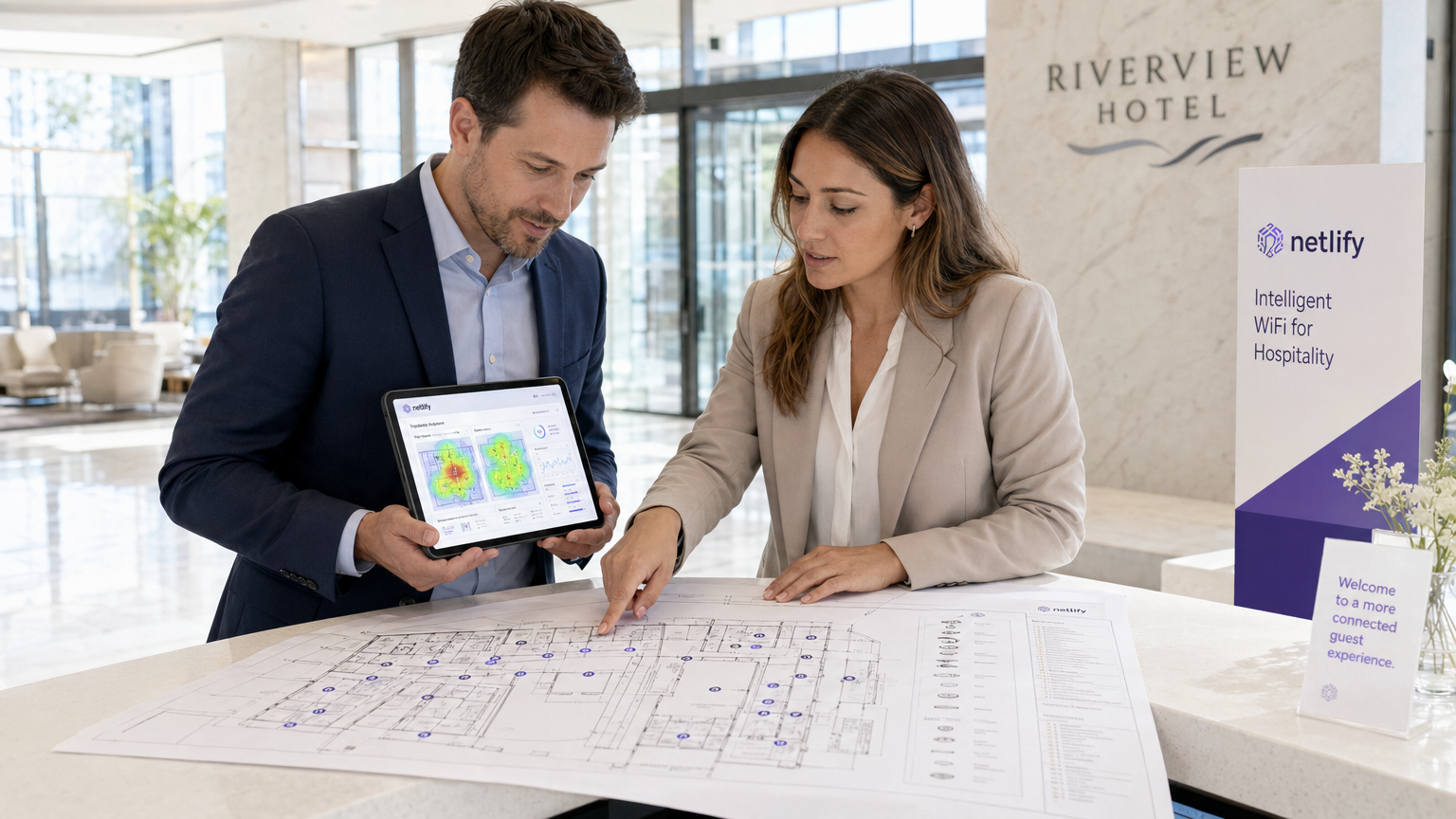
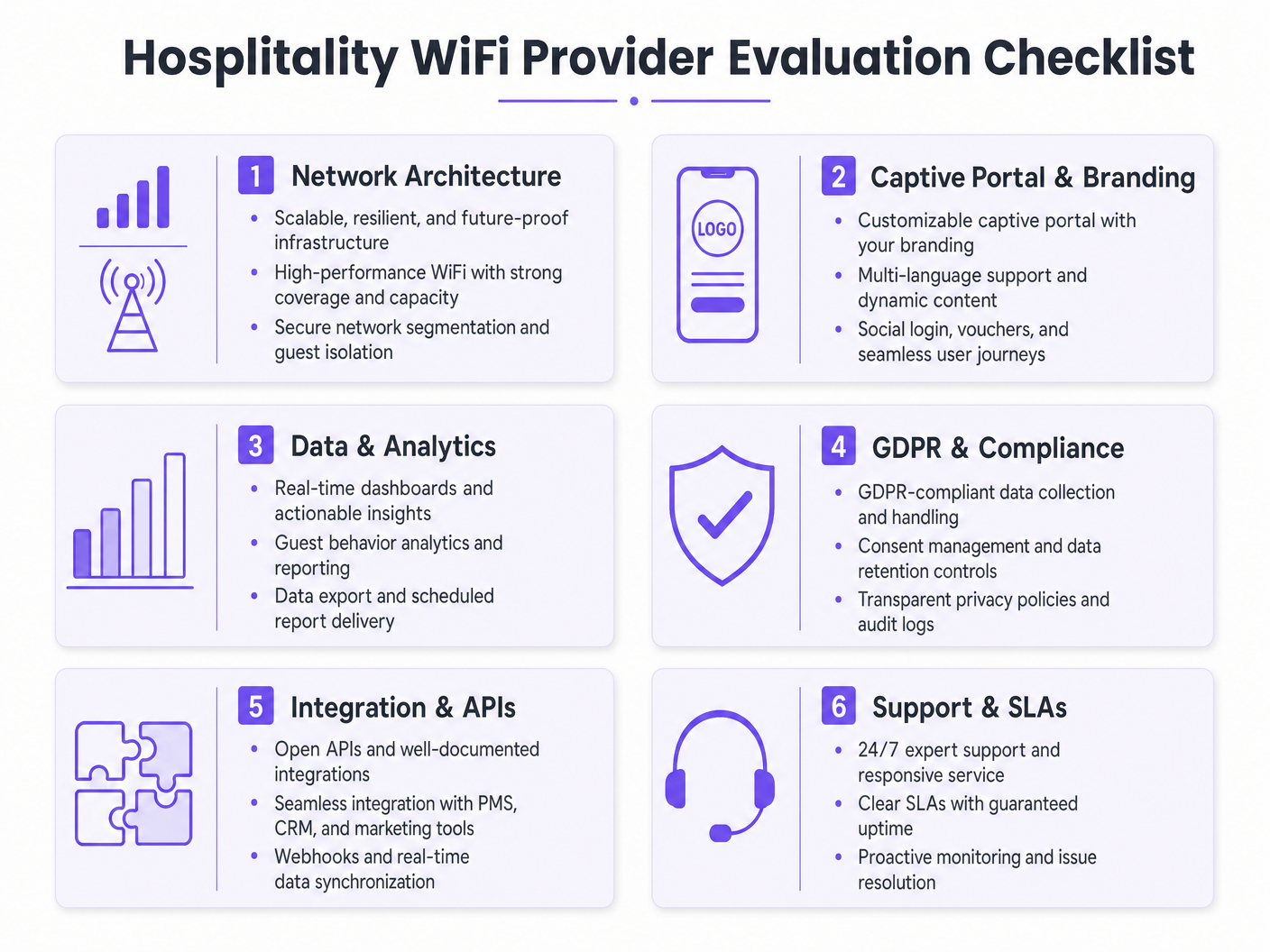
Per gli operatori di strutture moderne, il Guest WiFi non è più un centro di costo; è una risorsa di dati critica e un motore di entrate. Mentre i responsabili IT, gli architetti di rete e i CTO valutano le soluzioni WiFi per l'ospitalità, l'attenzione deve spostarsi dalla connettività di base all'analisi, alla conformità e all'integrazione di livello enterprise. Questa guida fornisce un framework neutrale rispetto al fornitore per la valutazione dei fornitori di Guest WiFi, dettagliando l'architettura di rete essenziale, i requisiti del Captive Portal e le capacità di analisi dei dati necessarie per un'implementazione di successo in ambienti di ospitalità, vendita al dettaglio e settore pubblico.
L'implementazione di una robusta soluzione Guest WiFi richiede un equilibrio tra prestazioni ad alta densità e rigorosi standard di sicurezza come WPA3 e PCI DSS. Inoltre, la capacità di acquisire dati di prima parte tramite una piattaforma WiFi Analytics trasforma la rete in un motore di marketing. Questa guida di riferimento delinea le specifiche tecniche e le considerazioni sull'impatto aziendale necessarie per selezionare un fornitore in grado di offrire sia connettività sicura che intelligenza azionabile.
Approfondimento Tecnico
Architettura di Rete e Standard Radio
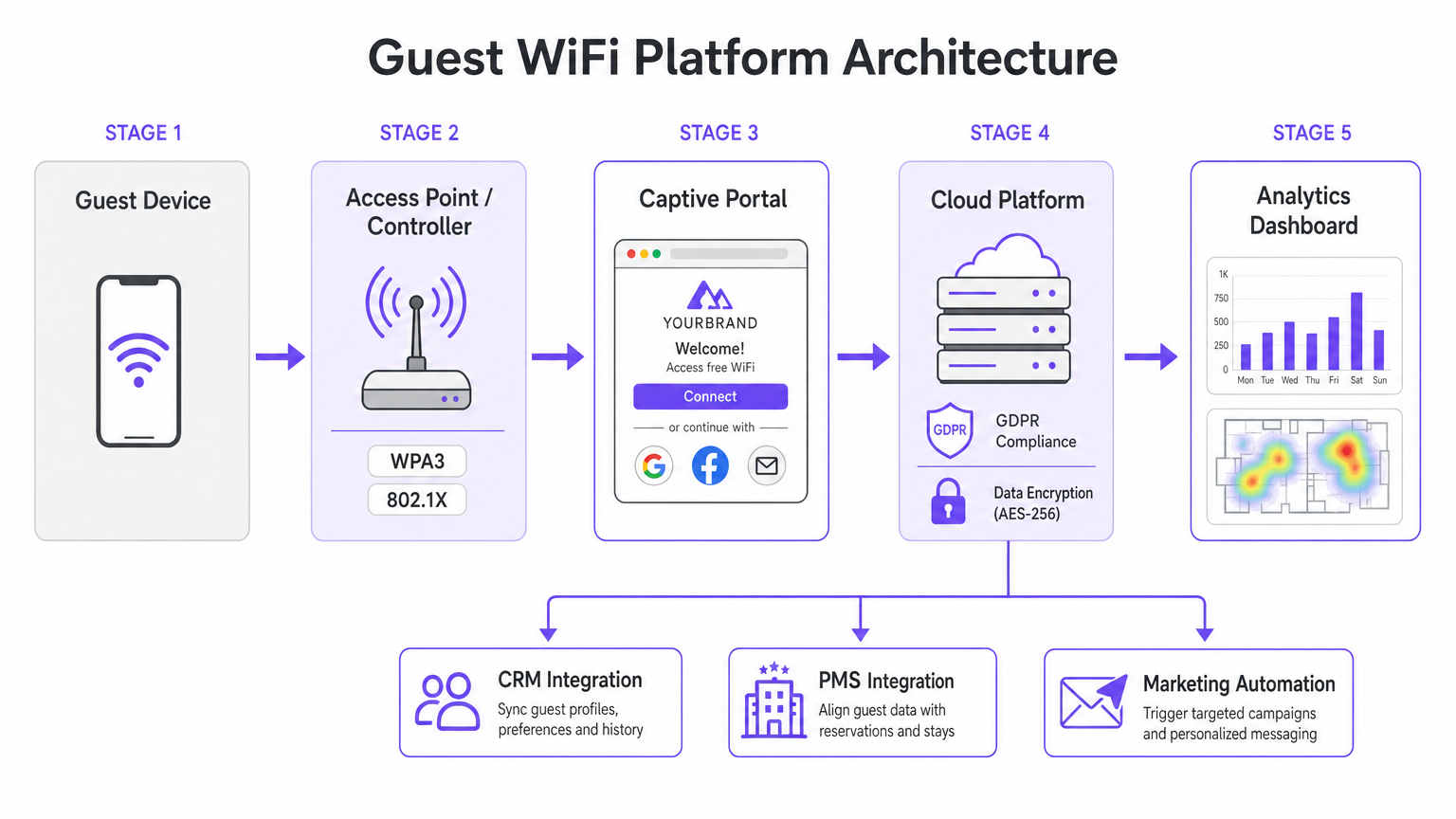
La base di qualsiasi implementazione WiFi enterprise è l'architettura di rete sottostante. Per gli operatori multi-sito, un'architettura gestita in cloud è nettamente superiore ai tradizionali controller on-premise. La gestione cloud consente il provisioning zero-touch, l'applicazione centralizzata delle policy e aggiornamenti firmware senza interruzioni su centinaia di sedi senza richiedere risorse IT locali.
Quando si valutano le specifiche degli access point (AP), il Wi-Fi 6 (802.11ax) deve essere lo standard di riferimento. Il Wi-Fi 6 introduce l'Orthogonal Frequency Division Multiple Access (OFDMA), che consente a un singolo AP di comunicare con più client contemporaneamente su diversi sottocanali. In ambienti ad alta densità – come centri congressi o aree comuni di stadi – questo riduce drasticamente la latenza e migliora la velocità di trasmissione rispetto al più vecchio standard Wi-Fi 5 (802.11ac). Per le strutture che prevedono una densità di dispositivi estrema, il Wi-Fi 6E estende queste capacità nello spettro non congestionato dei 6 GHz.
Sicurezza e Segmentazione della Rete
L'architettura di sicurezza nel WiFi per l'ospitalità deve affrontare sia la sicurezza degli ospiti che la conformità aziendale. La segmentazione della rete è un requisito non negoziabile; il traffico degli ospiti deve essere logicamente isolato dalle reti aziendali e dei punti vendita (POS). Ciò si ottiene tipicamente utilizzando il VLAN tagging a livello di AP, applicato da rigide regole firewall al gateway. Questo isolamento è un requisito fondamentale per la conformità PCI DSS se i terminali di pagamento condividono l'infrastruttura di rete fisica.
Gli standard di autenticazione sono altrettanto critici. WPA3 dovrebbe essere l'impostazione predefinita per tutte le nuove reti ospiti, mitigando le vulnerabilità intrinseche in WPA2 (come gli attacchi KRACK). Per le reti del personale interno che operano sullo stesso hardware, l'autenticazione IEEE 802.1X supportata da un server RADIUS fornisce una sicurezza robusta basata su certificati che supera di gran lunga la protezione delle chiavi pre-condivise.
Guida all'Implementazione
Il Captive Portal e l'Acquisizione Dati
Il Captive Portal funge da gateway tra l'access point e internet, agendo come interfaccia primaria per l'interazione con gli ospiti e l'acquisizione dei dati. Una pagina HTML statica di base è insufficiente per le implementazioni enterprise. Gli operatori richiedono un portale dinamico, completamente personalizzato con il brand, che supporti molteplici metodi di autenticazione, inclusi il social login (Google, Facebook), la registrazione via email e la verifica tramite SMS.
Ogni metodo di autenticazione produce diversi asset di dati. Il social login fornisce dati demografici verificati, mentre la registrazione via email è cruciale per costruire un database di marketing. Tuttavia, questa acquisizione di dati deve essere strettamente regolata da protocolli di gestione del consenso. Secondo il GDPR, il consenso al marketing deve essere esplicito, informato e liberamente dato. I fornitori devono supportare caselle di controllo separate, non pre-selezionate, per l'accesso alla rete e le comunicazioni di marketing, insieme a meccanismi trasparenti per le richieste di accesso ai dati da parte degli interessati (DSAR).
Integrazione e Analisi
Il vero valore di una moderna soluzione WiFi per l'ospitalità risiede nelle sue capacità di analisi. I conteggi di connessione di base sono inadeguati; i team IT e di marketing necessitano di insight azionabili derivanti dall'analisi del tempo di permanenza, dall'identificazione dei visitatori abituali e dalle mappe di calore del flusso di persone.
Per massimizzare il ROI, la piattaforma WiFi deve integrarsi perfettamente con lo stack tecnologico esistente della struttura. Cercate fornitori che offrano API robuste e supporto webhook per la sincronizzazione dei dati in tempo reale con i sistemi CRM, le piattaforme di automazione del marketing e i Property Management Systems (PMS). Questa integrazione consente campagne automatizzate e mirate basate sul comportamento degli ospiti in tempo reale.
Migliori Pratiche
- Condurre Rigorose RF Site Surveys: Non stimare mai il posizionamento degli AP basandosi esclusivamente sulle planimetrie. Condurre RF Site Surveys complete per tenere conto dell'attenuazione dovuta a pareti, strutture in acciaio e cluster di utenti ad alta densità. Una regola pratica comune per le aree ad alta densità è un AP per 25-30 utenti contemporanei.
- Garantire un Backhaul Adeguato: La rete Wi-Fi 6 più veloce fallirà se il collegamento internet in uplink è un collo di bottiglia. Per le strutture che supportano oltre 100 utenti contemporanei, investire in linee dedicate per garantire una larghezza di banda non contesa. Per maggiori informazioni, consultate la nostra guida: Cos'è una Linea Dedicata? Internet Aziendale Dedicato .
- Continuously Ottimizza il Portale: Tratta il captive portal come un canale di marketing dinamico. Aggiorna il branding, le promozioni e i messaggi di fidelizzazione stagionalmente per massimizzare l'engagement e i tassi di acquisizione dati.
Risoluzione dei Problemi e Mitigazione del Rischio
Modalità di Guasto Comuni
- Segmentazione della Rete Inadeguata: La mancata separazione del traffico degli ospiti dai sistemi POS espone la sede a significativi rischi di conformità PCI DSS e a potenziali violazioni dei dati. Verificare sempre le configurazioni VLAN e le regole del firewall durante l'implementazione.
- Acquisizione Dati Non Conforme: Raggruppare l'accettazione dei Termini di Servizio con il consenso marketing viola il GDPR. Assicurarsi che il captive portal utilizzi meccanismi di opt-in espliciti e separati per evitare sanzioni normative e danni alla reputazione.
- Densità di AP Insufficiente: Il dispiegamento di un numero troppo esiguo di access point in aree ad alto traffico porta a contese di canale, disconnessioni e una scarsa esperienza per gli ospiti. Progettare per la capacità, non solo per la copertura.
ROI e Impatto sul Business
Il ritorno sull'investimento per una soluzione WiFi aziendale per l'ospitalità va oltre la connettività di base. Sfruttando una piattaforma WiFi Analytics , le sedi possono trasformare il traffico pedonale anonimo in profili cliente noti. Questi dati di prima parte guidano campagne di marketing mirate, aumentando i tassi di visite ripetute e la spesa media per ospite.
Inoltre, si ottengono efficienze operative grazie alla gestione cloud centralizzata e alle integrazioni CRM automatizzate, riducendo il carico di lavoro IT. In definitiva, una soluzione WiFi ben progettata migliora l'esperienza degli ospiti fornendo al contempo business intelligence misurabile ai team operativi e di marketing, in particolare in settori chiave come Hospitality e Retail .
Definizioni chiave
Wi-Fi 6 (802.11ax)
The current standard for wireless networking that significantly improves performance in high-density environments through technologies like OFDMA.
Essential for venues with large numbers of simultaneous users, such as conference centres and stadiums, to prevent network congestion.
OFDMA (Orthogonal Frequency Division Multiple Access)
A technology that allows a single wireless channel to be divided into smaller sub-channels, enabling an access point to communicate with multiple clients simultaneously.
Crucial for reducing latency and improving throughput when many guests are trying to access the network at the same time.
Network Segmentation
The practice of dividing a computer network into multiple logical subnets (VLANs) to improve performance and security.
Mandatory for isolating untrusted guest traffic from sensitive corporate data and payment processing systems.
Captive Portal
A web page that a user of a public-access network is obliged to view and interact with before access is granted.
The primary touchpoint for guest interaction, branding, and GDPR-compliant data capture.
WPA3
The latest Wi-Fi security certification program, providing stronger encryption and better protection against offline dictionary attacks compared to WPA2.
The baseline security standard that should be deployed on all new guest and corporate wireless networks.
PCI DSS (Payment Card Industry Data Security Standard)
An information security standard for organizations that handle branded credit cards from the major card schemes.
Relevant when a venue processes payments; requires strict isolation of the payment network from the guest WiFi network.
Webhook
A method of augmenting or altering the behaviour of a web page or web application with custom callbacks, allowing real-time data transfer between applications.
Used to instantly sync guest data captured on the WiFi portal with a venue's CRM or marketing automation platform.
Dwell Time
The length of time a visitor spends in a specific physical location, measured by tracking the presence of their mobile device's MAC address.
A key analytics metric used by operations teams to understand venue utilization and by marketing teams to gauge engagement.
Esempi pratici
A 200-room hotel needs to upgrade its legacy Wi-Fi 4 network to support high-density conference facilities and seamless guest roaming, while ensuring PCI DSS compliance for its new mobile point-of-sale terminals.
Deploy a cloud-managed Wi-Fi 6 architecture with access points configured for OFDMA to handle the high client density in the conference rooms. Implement strict network segmentation using VLANs to isolate guest traffic from the mobile POS devices, enforcing the separation at the gateway firewall. Configure the captive portal to require explicit GDPR-compliant consent for marketing data capture.
A national pub chain wants to use guest WiFi to build a marketing database and understand customer dwell times across its 50 locations.
Implement an enterprise guest WiFi platform featuring a branded captive portal with social login and email registration options. Ensure the portal includes separate, un-ticked checkboxes for marketing consent. Utilize the platform's analytics dashboard to track MAC addresses (hashed for privacy) to calculate dwell times and repeat visit frequencies. Set up webhook integrations to push verified email addresses directly to the chain's CRM system in real-time.
Domande di esercitazione
Q1. Your marketing director wants to automatically add every guest who connects to the WiFi to the weekly promotional email blast to increase F&B revenue. How do you configure the captive portal to support this?
Suggerimento: Consider GDPR requirements regarding consent for marketing communications.
Visualizza risposta modello
You cannot automatically add guests to a marketing list just because they connected to the WiFi. The captive portal must be configured with a clear privacy notice and a separate, un-ticked checkbox explicitly requesting consent for marketing communications. Only guests who actively check this box can be synced to the CRM via API or webhook for the email blast.
Q2. A stadium IT director is evaluating a vendor who proposes deploying 802.11ac (Wi-Fi 5) access points, arguing it will save 30% on hardware costs while providing sufficient coverage. How should the director respond?
Suggerimento: Consider the difference between coverage and capacity in a stadium environment.
Visualizza risposta modello
The director should reject the proposal. While Wi-Fi 5 might provide adequate physical coverage, it lacks the capacity management features required for a stadium. Wi-Fi 6 (802.11ax) is essential in this environment because OFDMA allows the APs to handle many simultaneous connections efficiently, preventing the network from collapsing under high client density.
Q3. During a network upgrade at a retail chain, the deployment team suggests running the new guest WiFi and the staff inventory scanners on the same VLAN to simplify IP address management. What is the risk, and what is the correct approach?
Suggerimento: Think about security best practices and compliance requirements.
Visualizza risposta modello
Running guest and corporate traffic on the same VLAN is a severe security risk and violates best practices (and potentially PCI DSS if payment data is involved). It exposes internal systems to untrusted guest devices. The correct approach is strict network segmentation: configure separate SSIDs mapped to separate VLANs, and use firewall rules to block all traffic between the guest VLAN and the corporate VLAN.
Continua a leggere questa serie
Cos'è una Probe Request? Capire come i dispositivi scoprono le reti
Questa guida di riferimento tecnico offre un'analisi approfondita delle probe request IEEE 802.11, della scansione attiva versus passiva e dell'impatto della randomizzazione MAC sull'analisi dei dati dei luoghi. Fornisce strategie di implementazione attuabili per gli architetti di rete al fine di ottimizzare le implementazioni ad alta densità, mitigare le probe storm e garantire una raccolta dati accurata e conforme al GDPR utilizzando livelli di identità autenticati.
Come Risolvere il WiFi Lento Senza Aggiornare il Tuo Piano Internet
Una guida tecnica di riferimento completa per IT managers e network architects sull'ottimizzazione delle prestazioni WiFi aziendali senza aumentare la ISP bandwidth. Copre RF tuning, la gestione della densità dei client, l'implementazione di QoS e come sfruttare WiFi analytics per diagnosticare e risolvere i colli di bottiglia.
La Checklist per la Migrazione da NAC Legacy a NAC Cloud-Native
Questa guida tecnica di riferimento autorevole fornisce una checklist strutturata in tre fasi per la migrazione da Network Access Control (NAC) legacy a un'architettura cloud-native. Fornisce a manager IT e architetti di rete strategie attuabili per gestire l'integrazione dell'identità, la parità delle policy e la conformità senza interrompere le operazioni della sede.