
Velocità WiFi in hotel: cosa si aspettano gli ospiti e come fornirla
Questa guida tecnica di riferimento autorevole fornisce a IT manager, architetti di rete e CTO strategie attuabili per la pianificazione della larghezza di banda WiFi in hotel, l'implementazione di QoS e modelli di prezzo a livelli. Dettaglia come dimensionare correttamente la capacità di rete per soddisfare le moderne aspettative degli ospiti — da 15 Mbps per camera in proprietà di fascia media a oltre 50 Mbps in sedi di lusso e per conferenze — garantendo al contempo implementazioni aziendali sicure, conformi e scalabili. Integrando la piattaforma Guest WiFi e di analisi di Purple, gli operatori delle strutture possono trasformare la loro rete da centro di costo a risorsa generatrice di entrate e basata sui dati.
Ascolta questa guida
Visualizza trascrizione del podcast
Riepilogo Esecutivo
Per i direttori IT e i CTO che gestiscono portafogli nel settore dell'ospitalità, il WiFi per gli ospiti si è evoluto da un servizio di base a un'infrastruttura di utilità critica per la missione. Una connessione scadente influisce direttamente sui punteggi di soddisfazione degli ospiti, sulla reputazione del marchio e sulle entrate. Questa guida illustra i requisiti tecnici per il dimensionamento corretto della larghezza di banda, l'implementazione della Quality of Service (QoS) e la distribuzione di architetture WiFi a livelli in proprietà che vanno dagli hotel business di fascia media ai marchi di lusso. Abbandonando i modelli di larghezza di banda a tariffa fissa tradizionali, le strutture possono ottimizzare le prestazioni della rete, gestire la domanda di picco e monetizzare i servizi premium. L'integrazione di una robusta Guest WiFi piattaforma come Purple consente l'autenticazione sicura, la modellazione del traffico e l'acquisizione di preziosi dati di prima parte — trasformando un tradizionale centro di costo in una risorsa strategica. Questa guida è ugualmente rilevante per gli operatori dei settori Ospitalità , Retail , Sanità e Trasporti dove il wireless ad alta densità e alta affidabilità è un requisito di base.
Approfondimento Tecnico
Pianificazione e Capacità della Larghezza di Banda
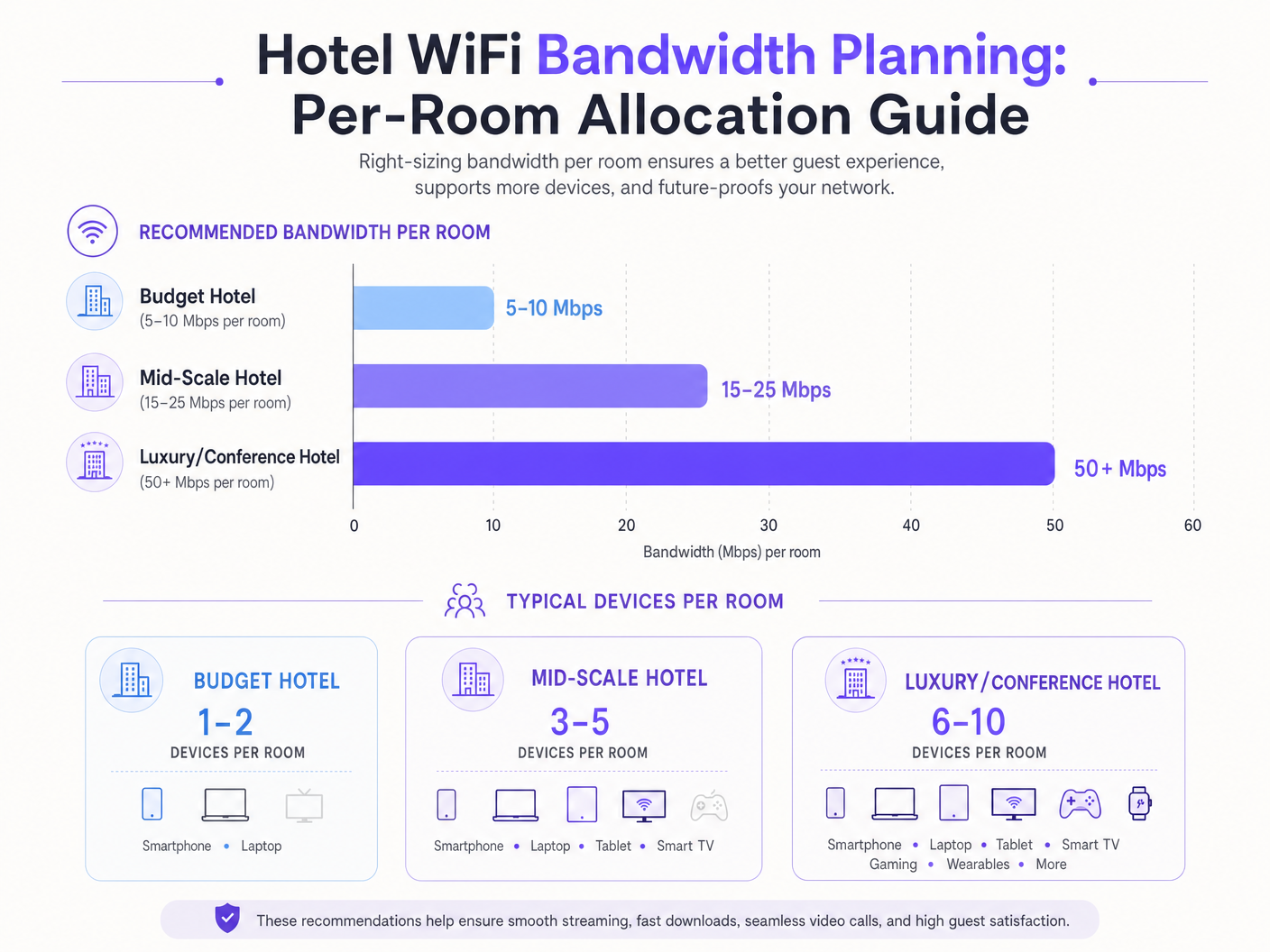
La sfida fondamentale nella progettazione di reti per l'ospitalità è la pianificazione della capacità. L'approccio tradizionale di allocare una larghezza di banda fissa di 5–10 Mbps per camera è insufficiente per le esigenze degli ospiti moderni. Oggi, una singola camera per gli ospiti ospita tipicamente 3–5 dispositivi connessi — smartphone, laptop, tablet, dispositivi indossabili e smart TV che trasmettono contenuti 4K. Secondo la Wi-Fi Alliance, il numero medio di dispositivi connessi per persona ha superato i 9 a livello globale entro il 2025, con gli ambienti dell'ospitalità che registrano la più alta densità di dispositivi per camera di qualsiasi settore.
Per un hotel di fascia media, gli architetti IT devono prevedere 15–25 Mbps per camera. Nelle strutture di lusso o focalizzate sulle conferenze, questo requisito si estende a oltre 50 Mbps per camera. Ciò richiede implementazioni di access point (AP) ad alta densità — spesso un AP per camera o ogni due camere, a seconda dei materiali da costruzione — per garantire una forza del segnale e una capacità adeguate. Gli spazi per conferenze richiedono AP specializzati ad alta densità in grado di gestire centinaia di connessioni simultanee, isolati dal traffico delle camere degli ospiti tramite pool di larghezza di banda dedicati e VLAN.
Il backhaul cablato è altrettanto critico. Ogni access point richiede un uplink Gigabit Ethernet, idealmente tramite switch PoE+. Lo strato di switching centrale deve gestire il throughput aggregato di tutti gli AP contemporaneamente. Un hotel di 200 camere con AP per camera potrebbe generare 10 Gbps o più di traffico aggregato durante le ore di punta. L'uplink internet — tipicamente una linea dedicata — deve essere dimensionato di conseguenza, con una raccomandazione minima di 1 Gbps per le proprietà di fascia media e 10 Gbps per le grandi sedi di conferenze.
Standard e Tecnologia Wireless
Le implementazioni moderne dovrebbero utilizzare Wi-Fi 6 (802.11ax) come minimo. Wi-Fi 6 ha introdotto OFDMA (Orthogonal Frequency Division Multiple Access), che consente a un singolo AP di servire più client contemporaneamente, migliorando drasticamente l'efficienza in ambienti densi. Per le implementazioni più recenti, Wi-Fi 6E estende questa capacità nella banda a 6 GHz, riducendo l'interferenza co-canale (CCI) e fornendo spettro aggiuntivo per applicazioni ad alta larghezza di banda. La sicurezza deve essere applicata tramite WPA3 Enterprise con autenticazione 802.1X per i dispositivi aziendali e WPA3 Personal per le reti ospiti.
Quality of Service (QoS) e Gestione del Traffico
Aumentare semplicemente la larghezza di banda grezza è raramente la soluzione più conveniente. La gestione intelligente del traffico utilizzando gli standard 802.11e QoS è essenziale. Prioritizzando le applicazioni sensibili alla latenza — videoconferenze, VoIP — rispetto ai trasferimenti di dati di massa, gli amministratori di rete possono garantire un'esperienza senza interruzioni per i viaggiatori d'affari anche durante le ore di utilizzo di punta (tipicamente dalle 19:00 alle 22:00). La Deep Packet Inspection (DPI) consente alla rete di classificare il traffico per tipo di applicazione e di applicare dinamicamente le politiche QoS appropriate.
Guida all'Implementazione
Architettura del Servizio a Livelli
Un modello WiFi a livelli è lo standard del settore per bilanciare la soddisfazione degli ospiti con i costi dell'infrastruttura. Questa architettura prevede tipicamente tre livelli di servizio distinti:
| Tier | Speed | Use Case | Pricing Model |
|---|---|---|---|
| Base Gratuito | 5 Mbps | Messaggistica, navigazione leggera | Gratuito |
| Ospite Standard | 15 Mbps | Social media, streaming SD | £4.99/giorno o incluso per i membri fedeltà |
| Business Premium | 50+ Mbps garantiti | VPN, streaming 4K, videoconferenze | £9.99/giorno |
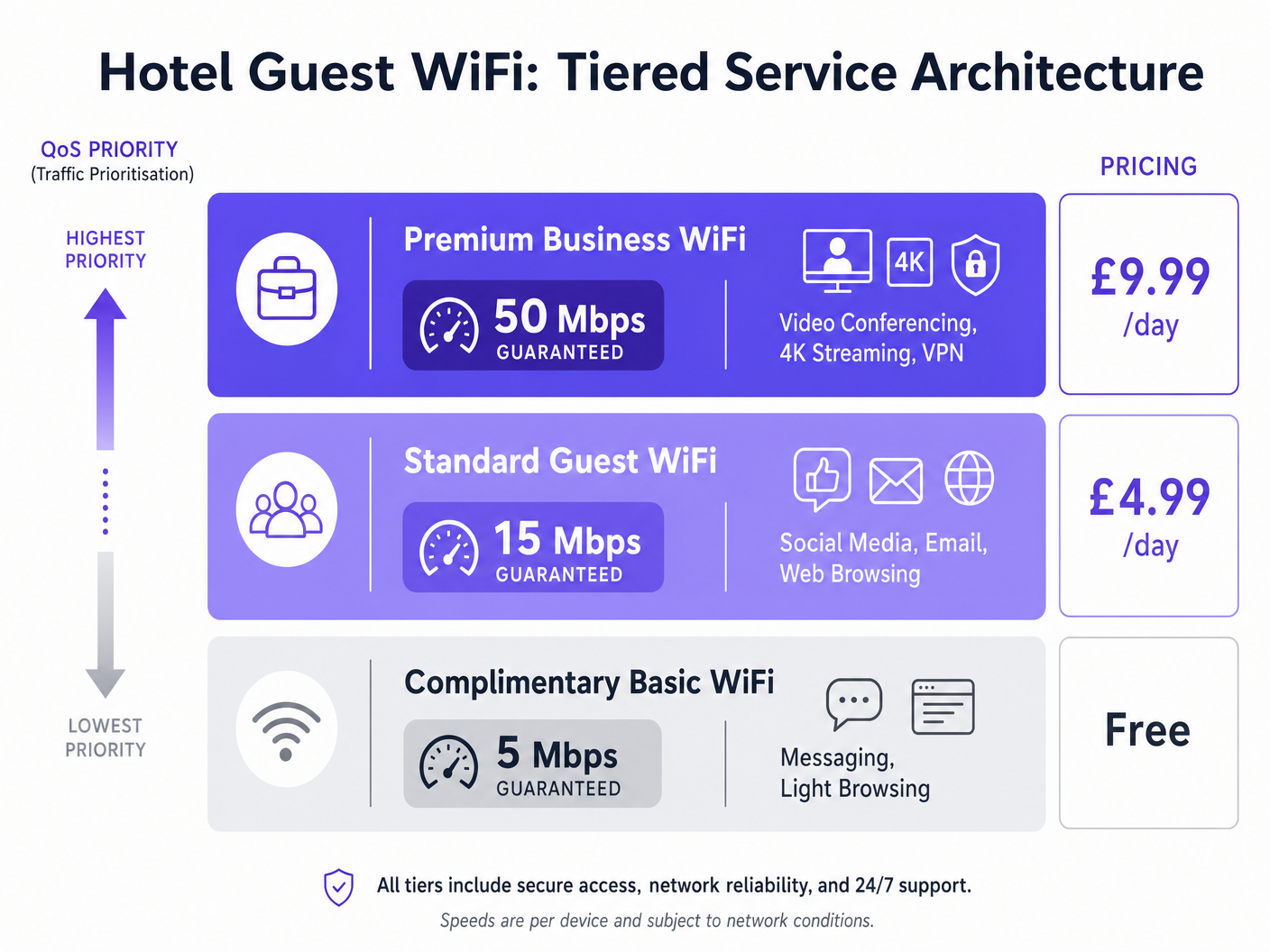
L'implementazione di questa architettura richiede un robusto captive portal, un server RADIUS per l'autenticazione e un motore di applicazione delle policy. Piattaforme come Purple fungono da provider di identità gratuito per servizi come OpenRoaming sotto la licenza Connect, semplificando il processo di onboarding e applicando limiti di larghezza di banda e acquisendo analisi utente tramite la loro dashboard WiFi Analytics . Il captive portal stesso è il punto di contatto primario per l'acquisizione di dati di prima parte — indirizzi email, profili social e informazioni demografiche — che confluiscono direttamente nei flussi di lavoro di CRM e automazione del marketing.
Lista di Controllo per la Distribuzione
Prima di andare online, convalidare quanto segue:
- Site Survey: Condurre un'indagine RF predittiva per identificare lacune di copertura, fonti di interferenza e posizionamento ottimale degli AP. Tenere conto dimateriali da costruzione (cemento, acciaio, vetro) che attenuano il segnale.
- Densità AP: Implementare un AP per stanza o ogni due stanze. Per gli spazi conferenze, implementare AP ad alta densità con antenne direzionali per creare micro-celle.
- Segmentazione VLAN: Isolare le reti ospiti, aziendali, IoT e di pagamento su VLAN separate con ACL rigorose applicate al firewall.
- Politica QoS: Configurare i profili 802.11e WMM (Wi-Fi Multimedia) per dare priorità al traffico voce e video. Applicare la limitazione della velocità per SSID o per utente.
- Captive Portal: Implementare un portale conforme al GDPR con opt-in esplicito per le comunicazioni di marketing. Integrare con Purple per l'analisi e la gestione delle identità.
- Monitoraggio: Configurare SNMP o una piattaforma di gestione della rete basata su cloud per avvisare in caso di guasti AP, utilizzo elevato e picchi di latenza.
Migliori Pratiche
Sicurezza e Segmentazione non sono negoziabili. Il traffico degli ospiti deve essere rigorosamente isolato dalle reti aziendali e di elaborazione dei pagamenti utilizzando le VLAN per mantenere la conformità PCI DSS. L'implementazione della crittografia WPA3 e di una robusta autenticazione 802.1X è obbligatoria per le implementazioni aziendali. L'isolamento del client dovrebbe essere abilitato sugli SSID degli ospiti per prevenire movimenti laterali tra i dispositivi degli ospiti.
Privacy dei Dati e Conformità richiedono che il Captive Portal e le pratiche di raccolta dati siano conformi al GDPR e ad altre normative regionali sulla privacy. Termini di servizio chiari e meccanismi di opt-in non preselezionati per le comunicazioni di marketing sono legalmente obbligatori nel Regno Unito e nell'UE. La piattaforma di Purple fornisce strumenti integrati per la conformità al GDPR, inclusa la gestione del consenso e i controlli di conservazione dei dati.
Monitoraggio Continuo è essenziale. Basarsi esclusivamente sulle metriche di uptime è insufficiente. I team IT devono monitorare la latenza, la perdita di pacchetti e l'utilizzo degli AP durante le ore di punta per identificare e risolvere proattivamente i problemi di congestione. Una connessione può essere tecnicamente 'attiva' ma completamente inutilizzabile per una videochiamata se la latenza supera i 150ms o la perdita di pacchetti supera l'1%.
Per ulteriori letture sulla strategia di rete completa per hotel, consultare Hotel WiFi: The Complete Guide for Hoteliers e l'equivalente in lingua spagnola WiFi para Hoteles: La Guía Completa para Hoteleros .
Risoluzione dei Problemi e Mitigazione dei Rischi
Interferenza Co-Canale (CCI): In implementazioni dense, i canali sovrapposti degradano gravemente le prestazioni. Implementare la Gestione Automatica delle Risorse Radio (RRM) per regolare dinamicamente le assegnazioni dei canali e la potenza di trasmissione. Evitare di implementare più AP sullo stesso canale a portata l'uno dell'altro.
Frizione del Captive Portal: Processi di login complessi o mal progettati frustrano gli ospiti e riducono i tassi di acquisizione dati. Utilizzare metodi di autenticazione senza interruzioni — social login, OpenRoaming o accesso basato su codice QR — per ridurre la frizione mantenendo la conformità.
Backhaul Inadeguato: La rete wireless è veloce solo quanto il suo backhaul cablato. Assicurarsi che gli switch core e la connessione internet possano supportare il throughput aggregato di tutti gli AP. Una singola porta uplink satura può degradare le prestazioni per un intero piano.
Access Point Rogue: In grandi proprietà, gli ospiti occasionalmente collegano router da viaggio personali o hotspot, creando interferenze e rischi per la sicurezza. Implementare funzionalità di Wireless Intrusion Prevention System (WIPS) per rilevare e avvisare sui dispositivi rogue.
ROI e Impatto sul Business
Investire in un'infrastruttura WiFi di livello enterprise offre ritorni misurabili su più dimensioni. Un modello di prezzi a livelli genera entrate dirette dai livelli premium — un hotel di 200 camere con un'adozione del 30% del livello premium a £9.99/giorno può generare oltre £200.000 all'anno solo in entrate WiFi, spesso sufficienti a finanziare l'aggiornamento della rete entro 12-18 mesi.
Oltre alle entrate dirette, l'integrazione di una piattaforma come Purple consente alle strutture di acquisire preziosi dati di prima parte, abilitando campagne di marketing mirate, aumentando le iscrizioni ai programmi fedeltà e promuovendo prenotazioni ripetute. La piattaforma WiFi Analytics di Purple fornisce analisi del tempo di permanenza, mappe di calore del flusso di visitatori e tracciamento dei visitatori di ritorno — intuizioni che informano le decisioni sul personale, il posizionamento di F&B e l'ottimizzazione del layout del negozio. Questo approccio è ugualmente applicabile nei settori Retail e Transport .
Il rischio di non investire è altrettanto quantificabile. Uno studio sulla soddisfazione degli ospiti d'albergo di J.D. Power del 2024 ha rilevato che le prestazioni del WiFi sono il fattore più citato nelle recensioni online negative per gli hotel business. Un calo di una stella nella valutazione di TripAdvisor è correlato a una riduzione del 5-9% del ricavo per camera disponibile (RevPAR).
Ascolta il podcast completo del briefing tecnico qui sopra — circa 10 minuti, che copre la pianificazione della larghezza di banda, l'architettura QoS, le insidie dell'implementazione e una sessione di domande e risposte a ritmo serrato.
Definizioni chiave
Quality of Service (QoS)
Network mechanisms used to prioritise certain types of traffic — such as voice and video — over less critical data, ensuring consistent performance during periods of congestion.
Essential for ensuring business travellers have a seamless video conferencing experience even when the network is under heavy load from other guests.
VLAN (Virtual Local Area Network)
A logical grouping of network devices that allows administrators to segment a physical network into multiple distinct broadcast domains, each with its own security and traffic policies.
Crucial for separating guest traffic from secure corporate networks and payment processing environments to maintain PCI DSS compliance.
Captive Portal
A web page that users must interact with before accessing a public WiFi network, typically used for authentication, terms of service acceptance, or payment processing.
The primary touchpoint for guest onboarding and first-party data capture; its design directly impacts user friction, conversion rates, and GDPR compliance.
802.11e / WMM
An IEEE standard that defines Quality of Service enhancements for wireless LAN through modifications to the MAC layer. Wi-Fi Multimedia (WMM) is the consumer certification based on this standard.
The underlying protocol enabling traffic prioritisation for voice and video over WiFi. Must be enabled on both the AP and client device to be effective.
OpenRoaming
A federation of WiFi networks that allows users to automatically and securely connect without repeatedly entering credentials or interacting with captive portals, using a Passpoint/Hotspot 2.0 framework.
Reduces onboarding friction for guests; Purple acts as a free identity provider for this service under the Connect licence.
Throughput
The actual rate of successful data delivery over a communication channel, measured in bits per second (bps). Distinct from theoretical maximum bandwidth.
The practical speed a guest experiences, which is typically 40–70% of the theoretical maximum due to protocol overhead, interference, and concurrent users.
Co-Channel Interference (CCI)
Performance degradation that occurs when multiple access points operating on the same channel can detect each other, causing them to defer transmission and reducing overall throughput.
A major issue in high-density deployments. Requires careful channel planning, automated radio resource management (RRM), and ideally a move to the less congested 5 GHz or 6 GHz bands.
PCI DSS
Payment Card Industry Data Security Standard — a mandatory set of security standards for organisations that process, store, or transmit payment card data.
If the hotel processes payments over the same physical network infrastructure as guest WiFi, strict segmentation and compliance controls are legally required.
OFDMA (Orthogonal Frequency Division Multiple Access)
A multi-user version of OFDM that allows a single access point to simultaneously serve multiple clients by dividing the channel into smaller sub-channels called Resource Units (RUs).
Introduced in Wi-Fi 6 (802.11ax), OFDMA is the primary reason Wi-Fi 6 outperforms Wi-Fi 5 in dense environments like hotel lobbies and conference spaces.
Esempi pratici
A 400-room luxury hotel is experiencing severe network congestion between 7 PM and 10 PM, saturating their 1 Gbps leased line. The IT Director needs to resolve this without immediately committing to a 10 Gbps circuit upgrade. What is the recommended approach?
The IT Director should implement a tiered QoS strategy in three phases. Phase one: enforce a 5 Mbps hard cap on the complimentary guest tier using per-user rate limiting on the wireless controller. This prevents a small number of users from monopolising bandwidth with bulk downloads or torrenting. Phase two: prioritise traffic for the premium tier (50 Mbps guaranteed) using 802.11e WMM QoS tags, ensuring video conferencing and VPN traffic receive priority queuing over best-effort traffic. Phase three: deploy Purple's WiFi Analytics to analyse traffic patterns, identify peak-hour application types, and implement application-aware QoS policies using Deep Packet Inspection. Monitor peak utilisation over a 30-day period to determine whether a circuit upgrade is still required.
A large conference hotel hosting a 500-person technology event finds that ballroom WiFi is completely unusable during keynote sessions. The venue has a 10 Gbps leased line and three access points in the ballroom. What is the architectural failure and how is it resolved?
The failure is a coverage-versus-capacity design error. Three APs provide adequate coverage (signal strength) for the space, but cannot handle the concurrent association requests and data throughput of 500+ attendees with 1,500+ devices. The resolution is to deploy 12 high-density APs with directional antennas, creating smaller non-overlapping micro-cells. Each AP should be configured on non-overlapping channels (1, 6, 11 on 2.4 GHz; multiple channels on 5 GHz using 20 MHz channel widths to maximise the number of available channels). A dedicated conference SSID should be provisioned on a separate VLAN with a dedicated bandwidth pool, isolated from the guest room network. Band steering should be enabled to push capable devices to the 5 GHz or 6 GHz bands.
Domande di esercitazione
Q1. A hotel is hosting a major tech conference. The IT team has provisioned 50 Mbps per room in the guest towers, but 500 attendees in the main ballroom are reporting slow speeds and frequent disconnections. The venue has a 10 Gbps leased line and three access points in the ballroom. What is the most likely architectural flaw, and what is the remediation plan?
Suggerimento: Consider the difference between coverage-based and capacity-based design. Signal strength is not the same as capacity.
Visualizza risposta modello
The network in the ballroom was designed for coverage rather than capacity. Three APs provide adequate signal but cannot handle the concurrent association requests and throughput of 500+ attendees with 1,500+ devices. The remediation plan is to deploy 12 high-density APs with directional antennas to create smaller non-overlapping micro-cells. Configure non-overlapping channels, enable band steering to push capable devices to 5 GHz or 6 GHz, and provision a dedicated conference SSID on a separate VLAN with a dedicated bandwidth pool isolated from the guest room network.
Q2. The marketing director wants to capture email addresses from all guests using the WiFi, but the IT director is concerned about GDPR compliance and onboarding friction. What is the recommended architecture?
Suggerimento: How can you balance data collection with user experience and legal requirements? Consider what constitutes valid consent under GDPR.
Visualizza risposta modello
Implement a captive portal integrated with Purple. Offer social login (Google, Facebook, Apple) for a frictionless experience. The portal must include explicit, un-ticked opt-in checkboxes for marketing communications — pre-ticked boxes are not valid consent under GDPR. Include a clear link to the privacy policy. Store consent records with timestamps in the Purple platform for audit purposes. This approach maximises data capture while maintaining full legal compliance.
Q3. A mid-scale hotel wants to introduce a premium WiFi tier at £9.99/day but is concerned that guests will bypass the fee by sharing a single connection via a travel router. How can this be technically mitigated?
Suggerimento: What network-level controls can identify or restrict specific device types? Consider both device fingerprinting and session management.
Visualizza risposta modello
The network can utilise MAC address filtering combined with device fingerprinting (via DHCP fingerprinting or HTTP User-Agent analysis) to detect travel routers and NAT devices. Additionally, the captive portal can enforce a strict device limit — typically 3 devices — per premium access credential, making it impractical to share. Implementing IP TTL analysis can also detect NAT traversal, as packets routed through a travel router typically arrive with a reduced TTL. For persistent offenders, the RADIUS server can flag the MAC address and require re-authentication.
Q4. A 300-room business hotel is planning a full network refresh. The IT Director must choose between deploying one AP per room versus one AP per corridor (every 3–4 rooms). What factors should drive this decision, and what is the recommended approach?
Suggerimento: Consider building construction materials, guest device density, and the cost-benefit of per-room versus corridor deployment.
Visualizza risposta modello
The decision hinges on construction materials and expected device density. In modern concrete-and-steel construction, fire-rated doors and thick walls significantly attenuate 5 GHz signals, making per-room APs the recommended approach for a business hotel where guests routinely use VPNs and video conferencing. In lighter construction (e.g., drywall partitions), corridor APs may suffice for budget properties. For a 300-room business hotel, the incremental cost of per-room APs (approximately £150–£250 per AP) is justified by the improvement in guest satisfaction and the ability to support 6–10 devices per room reliably.
Continua a leggere questa serie
Cos'è una Probe Request? Capire come i dispositivi scoprono le reti
Questa guida di riferimento tecnico offre un'analisi approfondita delle probe request IEEE 802.11, della scansione attiva versus passiva e dell'impatto della randomizzazione MAC sull'analisi dei dati dei luoghi. Fornisce strategie di implementazione attuabili per gli architetti di rete al fine di ottimizzare le implementazioni ad alta densità, mitigare le probe storm e garantire una raccolta dati accurata e conforme al GDPR utilizzando livelli di identità autenticati.
Come Risolvere il WiFi Lento Senza Aggiornare il Tuo Piano Internet
Una guida tecnica di riferimento completa per IT managers e network architects sull'ottimizzazione delle prestazioni WiFi aziendali senza aumentare la ISP bandwidth. Copre RF tuning, la gestione della densità dei client, l'implementazione di QoS e come sfruttare WiFi analytics per diagnosticare e risolvere i colli di bottiglia.
La Checklist per la Migrazione da NAC Legacy a NAC Cloud-Native
Questa guida tecnica di riferimento autorevole fornisce una checklist strutturata in tre fasi per la migrazione da Network Access Control (NAC) legacy a un'architettura cloud-native. Fornisce a manager IT e architetti di rete strategie attuabili per gestire l'integrazione dell'identità, la parità delle policy e la conformità senza interrompere le operazioni della sede.