
Wi-Fi 7 (802.11be) Spiegato: Cosa Cambia per il WiFi Aziendale
Questa guida fornisce un riferimento tecnico definitivo su Wi-Fi 7 (IEEE 802.11be) per responsabili IT, architetti di rete e CTO che pianificano aggiornamenti dell'infrastruttura nel 2026–2027. Copre i quattro progressi architettonici fondamentali — Multi-Link Operation (MLO), canali a 320 MHz, modulazione 4K-QAM e Multi-RU — con un confronto lucido rispetto a Wi-Fi 6E, scenari di implementazione reali da hospitality e retail, e una valutazione onesta degli aggiornamenti hardware e di switching richiesti. Purple è indipendente dall'hardware e supporta qualsiasi implementazione Wi-Fi 7, rendendo questa guida un punto di ingresso naturale per i team che valutano il loro stack di guest WiFi e analytics insieme a un aggiornamento degli AP.
Ascolta questa guida
Visualizza trascrizione del podcast

Riepilogo Esecutivo
Wi-Fi 7 (IEEE 802.11be) non è un aggiornamento incrementale. È la prima riprogettazione fondamentale dell'architettura di accesso al mezzo wireless da quando OFDMA è stato introdotto in Wi-Fi 6. Le quattro modifiche principali — Multi-Link Operation (MLO), ampiezze di canale a 320 MHz, modulazione 4K-QAM e allocazione Multi-Resource Unit (Multi-RU) — si combinano per offrire un throughput teorico massimo di 46 Gbps, quasi cinque volte quello di Wi-Fi 6E. Ancora più importante per gli operatori aziendali, offrono connettività deterministica a bassa latenza che rende le prestazioni wireless paragonabili all'Ethernet cablato in ambienti ad alta densità.
Per i team di rete che pianificano un aggiornamento degli AP nel 2026–2027, la decisione fondamentale è binaria: investire in Wi-Fi 6E come passo transitorio, o attendere e implementare direttamente Wi-Fi 7. Le prove favoriscono nettamente quest'ultima opzione. Wi-Fi 6E ha introdotto lo spettro a 6 GHz ma ha mantenuto l'architettura a collegamento singolo di 802.11ax. L'MLO di Wi-Fi 7 rende obsoleta tale limitazione architettonica. L'hardware Wi-Fi 6E esistente non può essere aggiornato a Wi-Fi 7 tramite firmware — sono necessari nuovi AP. La pianificazione del budget deve anche tenere conto di budget di alimentazione PoE più elevati (802.3bt/PoE++) e uplink Ethernet a 10 Gigabit al bordo della rete. La piattaforma di Purple è completamente indipendente dall'hardware e si integra con qualsiasi implementazione Wi-Fi 7, garantendo che le tue capacità di Guest WiFi e WiFi Analytics si adattino alla tua nuova infrastruttura.
Approfondimento Tecnico
I Quattro Pilastri del Wi-Fi 7
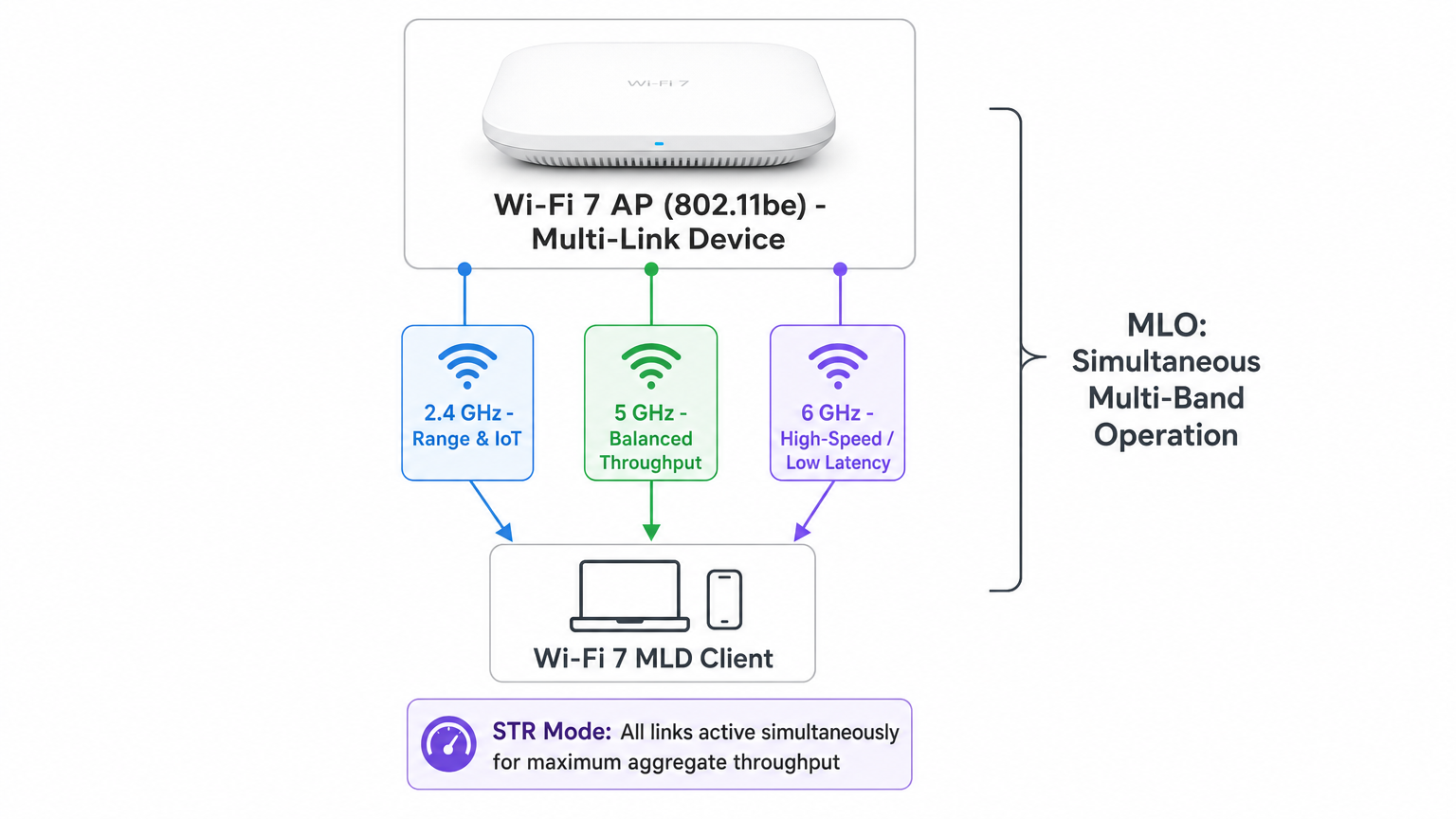
Multi-Link Operation (MLO) è il cambiamento architettonico distintivo in 802.11be. In ogni generazione Wi-Fi precedente, un dispositivo client manteneva una singola associazione a una singola banda in un dato momento. Il band steering e il roaming erano processi reattivi, guidati dal client, che introducevano latenza e interruzioni di connessione. MLO cambia fondamentalmente questo modello. Un dispositivo Multi-Link (MLD) Wi-Fi 7 — sia l'access point che il client — può stabilire associazioni simultanee attraverso le bande a 2.4 GHz, 5 GHz e 6 GHz. Lo stack di rete li tratta come un unico collegamento logico, consentendo lo steering del traffico in tempo reale, il bilanciamento del carico e il failover tra le bande senza alcuna interruzione visibile al client.
MLO opera in diverse modalità. STR (Simultaneous Transmit and Receive) è la modalità più capace e più ampiamente implementata, che consente operazioni Tx e Rx concorrenti su più bande senza vincoli di sincronizzazione. In un test di laboratorio Cisco utilizzando la modalità STR, Wi-Fi 7 ha fornito un throughput aggregato di 747 Mbps contro 506 Mbps per Wi-Fi 6 in condizioni identiche — un miglioramento del 47 percento. eMLSR (Enhanced Multi-Link Single Radio) utilizza una singola radio che commuta rapidamente tra i collegamenti, offrendo un percorso conveniente per i dispositivi client che non possono supportare l'hardware STR completo. MLSR (Multi-Link Single Radio) è la base obbligatoria che tutti gli MLD devono supportare.
Ampiezze di Canale a 320 MHz rappresentano un raddoppio dell'ampiezza massima di canale disponibile in Wi-Fi 6E (160 MHz). Questi canali più ampi sono disponibili solo nella banda a 6 GHz, dove esiste uno spettro contiguo sufficiente. Nella banda a 5 GHz, i vincoli normativi e le implementazioni esistenti limitano le ampiezze di canale pratiche a 80 o 160 MHz. La banda a 6 GHz nel Regno Unito e nell'UE fornisce 500 MHz di spettro, consentendo fino a due canali a 320 MHz non sovrapposti. Per le implementazioni aziendali in ambienti urbani densi, la pianificazione dei canali a 320 MHz richiede un'attenta indagine RF per evitare interferenze co-canale, ma i guadagni di throughput in ambienti a bassa interferenza sono sostanziali.
4K-QAM (4096-QAM) aggiorna la densità di modulazione dalla 1024-QAM utilizzata in Wi-Fi 6 e 6E. La modulazione QAM codifica i dati variando l'ampiezza e la fase del segnale portante; ordini QAM più elevati impacchettano più bit in ogni simbolo. Il passaggio da 1024-QAM (10 bit per simbolo) a 4096-QAM (12 bit per simbolo) offre un aumento del 20 percento nel data rate di picco in condizioni di segnale ideali. L'avvertenza pratica è che 4K-QAM richiede un segnale forte e pulito — è più efficace a corto-medio raggio con un buon SNR. In ambienti RF rumorosi o congestionati, l'access point tornerà automaticamente a ordini QAM inferiori.
Multi-RU (Multiple Resource Units) affronta uno dei problemi più persistenti nelle implementazioni aziendali dense: l'interferenza parziale del canale. In Wi-Fi 6, OFDMA divideva il canale in Resource Unit (RU) fisse assegnate ai singoli client. Se una porzione del canale era bloccata da interferenze, l'intera RU interessata era inutilizzabile. Il Multi-RU di Wi-Fi 7 consente a un singolo client di essere assegnato a più RU non contigue all'interno della stessa opportunità di trasmissione (TXOP), e introduce il Preamble Puncturing, che consente all'AP di contrassegnare dinamicamente i sottocanali interferiti come non disponibili e di instradare il traffico attorno ad essi. Questo è particolarmente prezioso negli ambienti retail e hospitality dove la banda a 5 GHz è spesso congestionata da reti vicine.
Wi-Fi 7 vs Wi-Fi 6E: Il Caso Architettonico
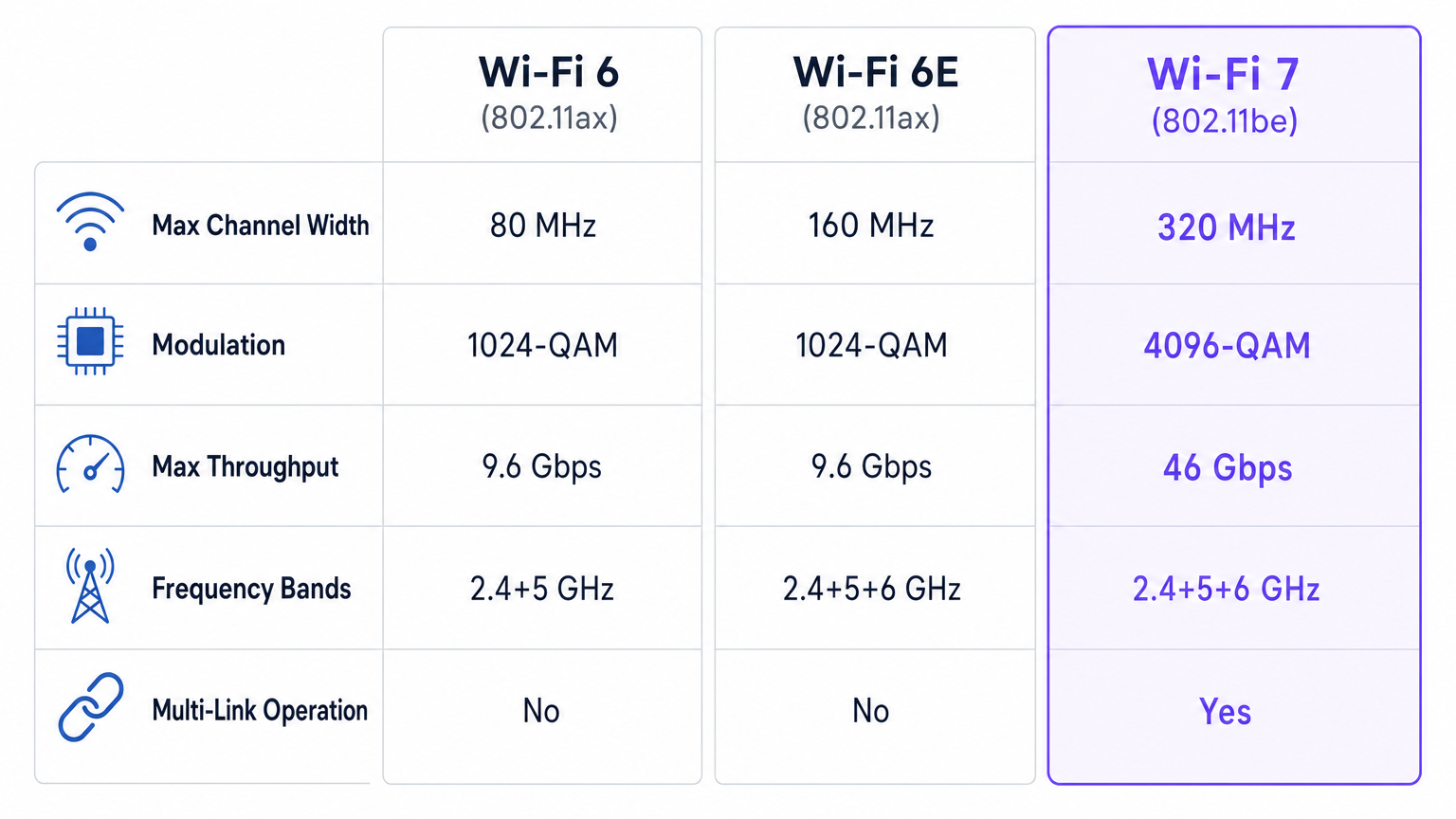
La questione se implementare Wi-Fi 6E o attendere Wi-Fi 7 è stata dibattuta dall'industria dal 2023. La risposta, per la maggior parte degli operatori aziendali che pianificano un aggiornamento nel 2026–2027, è chiara: saltare il 6E. Wi-Fi 6E ha aggiunto la banda a 6 GHz ma ha mantenuto l'architettura 802.11ax a collegamento singolo. Ha offerto più spettro ma nessun miglioramento nel modo in cui tale spettro viene gestito. L'MLO di Wi-Fi 7, al contrario, cambia la relazione fondamentale tra il client e la rete. Lo spettro a 6 GHz introdotto dal Wi-Fi 6E è ancora pienamente utilizzato dal Wi-Fi 7 — ma ora come uno dei tre collegamenti simultanei anziché l'unica opzione.
| Caratteristica | Wi-Fi 6 (802.11ax) | Wi-Fi 6E (802.11ax) | Wi-Fi 7 (802.11be) |
|---|---|---|---|
| Larghezza massima del canale | 80 MHz | 160 MHz | 320 MHz |
| Modulazione | 1024-QAM | 1024-QAM | 4096-QAM |
| Throughput massimo | 9.6 Gbps | 9.6 Gbps | 46 Gbps |
| Bande di frequenza | 2.4 + 5 GHz | 2.4 + 5 + 6 GHz | 2.4 + 5 + 6 GHz |
| Operazione Multi-Link | No | No | Sì |
| Preamble Puncturing | No | No | Sì |
| Multi-RU | No | No | Sì |
| Stream spaziali | Fino a 8 | Fino a 8 | Fino a 16 |
Per gli ambienti sanitari dove l'affidabilità della rete è fondamentale per la sicurezza, o per gli hub di trasporto dove devono essere gestite migliaia di sessioni concorrenti, i benefici di affidabilità del solo MLO giustificano l'investimento nel Wi-Fi 7 rispetto al 6E.
Guida all'Implementazione
Fase 1: Valutazione della Prontezza dell'Infrastruttura
Prima di acquistare un singolo AP Wi-Fi 7, condurre un audit completo dell'infrastruttura. Il fallimento di implementazione più comune non è lo strato wireless, ma l'infrastruttura cablata sottostante. Gli AP Wi-Fi 7 che operano con MLO su tre bande e canali a 320 MHz possono generare un throughput aggregato che saturerà un uplink da 1 Gigabit sotto carico moderato. L'uplink minimo raccomandato è 10 Gigabit Ethernet (10GbE) per AP nelle zone ad alta densità. Verificare che gli switch di bordo supportino porte 10GbE e che la struttura di switching centrale possa gestire il carico aggregato.
Il budget PoE è il secondo vincolo critico. Gli AP Wi-Fi 7 con radio tri-band e capacità MLO richiedono tipicamente 30–60 watt per AP, rispetto ai 15–25 watt di un tipico AP Wi-Fi 6. Ciò richiede switch IEEE 802.3bt (PoE++), che erogano fino a 90 watt per porta. Verificare l'infrastruttura PoE esistente e prevedere aggiornamenti degli switch dove necessario.
Fase 2: Rilievo RF e Pianificazione dei Canali
Condurre un rilievo RF predittivo utilizzando gli strumenti di pianificazione del fornitore scelto prima di qualsiasi installazione fisica. Per il Wi-Fi 7, il rilievo deve tenere conto di tutte e tre le bande contemporaneamente, con particolare attenzione alle caratteristiche di propagazione a 6 GHz. La banda a 6 GHz ha una portata più breve rispetto a quella a 5 GHz a causa di una maggiore perdita di percorso nello spazio libero, il che significa che la densità degli AP potrebbe dover aumentare in grandi spazi aperti. Per le implementazioni di canali a 320 MHz, identificare i canali non sovrapposti disponibili nel proprio dominio normativo e pianificare la mitigazione delle interferenze co-canale.
Negli ambienti ospitalità come gli hotel, la raccomandazione standard è un AP ogni due o tre camere per gli ospiti per il Wi-Fi 6. Per il Wi-Fi 7 con MLO, la stessa densità è appropriata, ma il piano dei canali deve essere rivisto per massimizzare l'utilizzo dei 6 GHz nei corridoi e nelle aree comuni dove la densità dei dispositivi è più alta.
Fase 3: Architettura di Sicurezza
Il Wi-Fi 7 impone WPA3 come standard minimo di sicurezza. Per le implementazioni aziendali, implementare WPA3-Enterprise con autenticazione IEEE 802.1X utilizzando certificati EAP-TLS o PEAP-MSCHAPv2. La segmentazione della rete è critica: separare il traffico degli ospiti, i dispositivi aziendali e gli endpoint IoT in VLAN distinte con politiche firewall appropriate tra di essi.
Per le implementazioni di Guest WiFi — hotel, negozi, centri congressi, luoghi del settore pubblico — una soluzione di captive portal conforme è essenziale. La piattaforma Guest WiFi di Purple gestisce la raccolta dati conforme al GDPR, la gestione del consenso marketing e la segmentazione della rete allineata al PCI DSS out of the box, integrandosi con qualsiasi fornitore di AP Wi-Fi 7. Questo rimuove l'onere di conformità dal team di rete e assicura che i dati acquisiti tramite la vostra nuova rete ad alte prestazioni siano utilizzabili tramite la piattaforma WiFi Analytics di Purple.
Fase 4: Rollout a Fasi
Non tentare un'implementazione Wi-Fi 7 a livello di campus in una singola fase. Iniziare con zone ad alta densità o mission-critical dove il ROI è più immediato: sale conferenze, hall, sale di trading, aree di transito degli stadi o casse dei negozi. Convalidare le prestazioni, affinare i piani dei canali e acquisire familiarità operativa prima di espandere. Un approccio a fasi consente anche all'ecosistema dei dispositivi client di maturare — l'adozione dei client Wi-Fi 7 sta accelerando rapidamente, con la maggior parte degli smartphone e laptop di punta che vengono spediti con chipset Wi-Fi 7 dal 2024 in poi.
Best Practices
Le implementazioni Wi-Fi 7 aziendali che mantengono le loro promesse di prestazioni condividono diverse caratteristiche comuni. In primo luogo, trattano l'infrastruttura cablata come una preoccupazione di primaria importanza, non un ripensamento. Lo strato wireless può funzionare solo quanto l'infrastruttura di switching e uplink sottostante. In secondo luogo, impongono WPA3 e IEEE 802.1X dal primo giorno, piuttosto che adattare la sicurezza a una rete già implementata. In terzo luogo, segmentano il traffico in modo aggressivo — il traffico degli ospiti, aziendale e IoT non dovrebbe mai condividere la stessa VLAN o SSID.
Per gli ambienti ricchi di IoT, l'MLO del Wi-Fi 7 fornisce un meccanismo di segmentazione naturale: i dispositivi IoT possono essere bloccati sulla banda a 2.4 GHz per la portata e l'efficienza energetica, mentre i dispositivi aziendali sfruttano le bande a 5 GHz e 6 GHz tramite MLO. Questo è direttamente rilevante per i modelli architettonici descritti nella guida Internet of Things Architecture di Purple, dove la segmentazione della rete e la gestione delle bande sono identificate come principi di progettazione critici.
Per le sedi che implementano sistemi di posizionamento indoor , le capacità migliorate di temporizzazione e ranging del Wi-Fi 7 — abilitate dalle maggiori larghezze di canale e dalla programmazione OFDMA più precisa — migliorano l'accuratezza dei servizi di localizzazione basati su Wi-Fi. Questo è particolarmente rilevante per grandi ambienti di vendita al dettaglio e hub di trasporto dove la ricerca di percorso e il tracciamento degli asset sono priorità operative.
Risoluzione dei problemi e mitigazione dei rischi
Le modalità di guasto più comuni nelle implementazioni Wi-Fi 7 sono prevedibili ed evitabili. I colli di bottiglia del backhaul sono la causa principale delle prestazioni insufficienti: un AP che fornisce un throughput wireless aggregato di oltre 2 Gbps collegato tramite un uplink da 1 Gbps si saturerà immediatamente sotto carico. Verificare la capacità dell'uplink prima dell'implementazione. L'esaurimento del budget PoE è il secondo problema più comune — uno switch con un budget PoE insufficiente limiterà la potenza dell'AP, causando il funzionamento delle radio a potenza ridotta o la loro disattivazione completa. Calcolare sempre il consumo totale di PoE su tutti gli AP di uno switch prima dell'implementazione.
La compatibilità del client è un rischio sfumato. MLO richiede che sia l'AP che il client siano compatibili con Wi-Fi 7 MLD. I client legacy si assoceranno normalmente ma non beneficeranno di MLO. Negli ambienti con client misti, assicurarsi che l'implementazione del fornitore dell'AP gestisca l'associazione dei client legacy in modo elegante senza degradare le prestazioni dei client Wi-Fi 7. Il Preamble Puncturing può causare problemi di interoperabilità con alcuni client legacy — testare accuratamente in un ambiente di laboratorio prima del lancio in produzione.
Per la conformità normativa, verificare che l'implementazione a 6 GHz sia conforme ai requisiti normativi locali. Nel Regno Unito, Ofcom ha approvato la banda a 6 GHz per l'uso interno secondo le regole Low Power Indoor (LPI). Le implementazioni a 6 GHz all'aperto richiedono il funzionamento a potenza standard con Automated Frequency Coordination (AFC), il che aggiunge complessità operativa. Consultare la documentazione del fornitore dell'AP per la guida all'integrazione AFC.
ROI e impatto sul business
Il caso aziendale per il Wi-Fi 7 è più forte negli ambienti in cui le prestazioni della rete influiscono direttamente sui ricavi o sull'efficienza operativa. Nel settore ospitalità , uno studio del 2024 ha rilevato che la qualità del WiFi per gli ospiti è il terzo fattore più citato nei punteggi delle recensioni degli hotel, dopo la pulizia della camera e il servizio del personale. Un'implementazione Wi-Fi 7 che elimina il buffering e le disconnessioni comuni negli ambienti alberghieri densi ha un impatto diretto e misurabile sui punteggi di soddisfazione degli ospiti e sui tassi di prenotazione ripetuta.
Nel retail , il calcolo del ROI si concentra sull'affidabilità del punto vendita e sul tempo di permanenza del cliente. L'MLO di Wi-Fi 7 garantisce che i terminali di pagamento mantengano una connessione affidabile anche durante i periodi di punta, quando l'ambiente RF è più congestionato. Per i rivenditori che utilizzano la piattaforma WiFi Analytics di Purple, l'affidabilità migliorata della connessione significa anche dati di sessione più completi, tassi di completamento del Captive Portal più elevati e analisi del traffico pedonale più accurate.
Per gli operatori di stadi e centri congressi, i guadagni di capacità derivanti dai canali a 320 MHz e dal Multi-RU sono trasformativi. Uno stadio da 50.000 posti con 40.000 dispositivi connessi contemporaneamente è uno degli ambienti RF più esigenti esistenti. La capacità del Wi-Fi 7 di gestire lo spettro dinamicamente, instradare il traffico su più bande contemporaneamente e perforare le interferenze lo rende il primo standard wireless realmente in grado di fornire connettività affidabile a quella scala senza richiedere densità di AP impraticabili.
Il modello di costo per il Wi-Fi 7 deve tenere conto dell'intera infrastruttura: AP, switch PoE++, cablaggio e uplink 10GbE e licenze della piattaforma di gestione. Per la maggior parte degli operatori aziendali, il costo totale di un aggiornamento Wi-Fi 7 è superiore del 30-50 percento rispetto a un'implementazione Wi-Fi 6 equivalente. Tuttavia, se ammortizzato su un ciclo di vita hardware di 5-7 anni, e se si considerano i risparmi operativi derivanti dalla riduzione della risoluzione dei problemi, da un minor numero di chiamate di supporto e da prestazioni applicative migliorate, il caso del TCO per il Wi-Fi 7 rispetto al Wi-Fi 6E è convincente.
Per un confronto dettagliato su come la piattaforma di Purple si integra con le implementazioni Wi-Fi aziendali tra i vari fornitori, consultare la guida al confronto Purple vs Cloud4Wi . Per gli ambienti automobilistici e di flotte che considerano il Wi-Fi 7 per l'infrastruttura dei veicoli connessi, la Wi-Fi in Auto: The Complete 2026 Enterprise Guide fornisce un framework di implementazione specifico per il settore.
Definizioni chiave
Multi-Link Operation (MLO)
An 802.11be capability that allows a Wi-Fi 7 Multi-Link Device (MLD) to establish and maintain simultaneous associations across multiple frequency bands (2.4 GHz, 5 GHz, 6 GHz). The network stack presents these as a single logical link, enabling real-time traffic steering, load balancing, and seamless failover across bands.
MLO is the defining architectural change in Wi-Fi 7. IT teams encounter this when evaluating whether Wi-Fi 7 APs and client devices are 'MLD-capable' — both ends of the link must support MLO for the feature to activate. Legacy clients will associate normally but will not benefit from MLO.
STR (Simultaneous Transmit and Receive)
The most capable MLO operating mode, in which a Multi-Link Device can transmit and receive data on multiple bands concurrently without synchronisation constraints. STR requires dedicated radio hardware for each active link and is the mode implemented by most enterprise AP vendors.
When evaluating Wi-Fi 7 AP specifications, network architects should confirm that the AP supports STR mode rather than only eMLSR. STR delivers the full MLO throughput and latency benefits; eMLSR is a cost-reduced alternative that switches between links rather than operating them simultaneously.
4K-QAM (4096-QAM)
A modulation scheme that encodes 12 bits per symbol by varying the amplitude and phase of the carrier signal across 4,096 distinct states. This represents a 20 percent increase in spectral efficiency over the 1024-QAM (10 bits per symbol) used in Wi-Fi 6 and 6E, but requires a high signal-to-noise ratio to operate reliably.
IT teams will encounter 4K-QAM in AP specification sheets as a headline throughput figure. The practical caveat is that 4K-QAM only activates at close range with strong SNR — at the cell edge, the AP falls back to lower QAM orders. Design AP placement to ensure adequate SNR for 4K-QAM in high-priority zones.
Multi-RU (Multiple Resource Units)
An 802.11be feature that allows a single client device to be assigned multiple non-contiguous Resource Units (RUs) within a single OFDMA transmission opportunity. This enables more efficient spectrum utilisation and, combined with Preamble Puncturing, allows the AP to route traffic around interfered sub-channels.
Multi-RU is particularly valuable in high-density environments where partial channel interference is common. Network teams in retail and hospitality environments will see the most benefit from Multi-RU, as it directly addresses the spectrum fragmentation caused by neighbouring networks and legacy devices.
Preamble Puncturing
A Wi-Fi 7 mechanism that allows an access point to mark specific 20 MHz sub-channels within a wider channel as unavailable due to interference, and transmit data across the remaining sub-channels. This prevents the entire wide channel from being abandoned when only a portion is affected by interference.
Preamble Puncturing is a key enabler of 320 MHz channel deployments in environments where the full channel width cannot always be used cleanly. IT teams should verify that their AP vendor's implementation handles Preamble Puncturing gracefully with legacy clients, as some older devices may not decode punctured preambles correctly.
MLD (Multi-Link Device)
A Wi-Fi 7 device — either an access point or a client — that supports Multi-Link Operation. An AP MLD manages multiple affiliated APs (one per band), while a non-AP MLD (client) manages multiple affiliated stations. Both ends of a link must be MLD-capable for MLO to activate.
When procuring Wi-Fi 7 APs and evaluating client device compatibility, the MLD designation is the key indicator of MLO support. Not all Wi-Fi 7 certified devices are MLD-capable — verify this explicitly in vendor specifications, particularly for IoT devices and low-cost client hardware.
IEEE 802.3bt (PoE++)
The IEEE standard for Power over Ethernet that delivers up to 90 watts per port (Type 4), compared to 30 watts for 802.3at (PoE+). Wi-Fi 7 APs with tri-band radios and MLO capability typically require 30–60 watts, making 802.3bt switches a prerequisite for full-performance Wi-Fi 7 deployments.
PoE budget is the most commonly overlooked infrastructure constraint in Wi-Fi 7 planning. IT teams must audit existing switch PoE capabilities before AP procurement. Deploying a Wi-Fi 7 AP on a switch that cannot supply sufficient power will result in radios operating at reduced power or being disabled entirely.
WPA3-Enterprise
The Wi-Fi Alliance's enterprise security certification for WPA3, requiring IEEE 802.1X authentication with EAP (Extensible Authentication Protocol) and, in its 192-bit mode, AES-256-GCMP encryption. WPA3 is mandatory for Wi-Fi 7 certification and provides significantly stronger protection against offline dictionary attacks than WPA2.
IT teams must ensure their RADIUS infrastructure and client supplicant configurations are updated to support WPA3-Enterprise before deploying Wi-Fi 7. In environments with legacy devices that only support WPA2, a transition mode SSID may be required, but this should be treated as a temporary measure with a defined sunset date.
AFC (Automated Frequency Coordination)
A regulatory mechanism required for Standard Power operation in the 6 GHz band, in which an AP queries a cloud-based AFC database to determine which channels and power levels are available at its specific location without causing interference to incumbent fixed and satellite services.
AFC is relevant for enterprise operators deploying Wi-Fi 7 APs outdoors or in locations where Standard Power operation is required for coverage. Indoor Low Power Indoor (LPI) deployments do not require AFC in most regulatory domains, including the UK. IT teams planning outdoor 6 GHz deployments must ensure their AP vendor supports AFC and that the AFC service is configured correctly.
Esempi pratici
A 350-room full-service hotel is running Wi-Fi 6 deployed in 2021. The network team is seeing increasing guest complaints about buffering during peak evening hours (7–10 PM) when occupancy exceeds 80 percent. The CTO wants to know whether to upgrade to Wi-Fi 6E now or wait for Wi-Fi 7, and what the full infrastructure scope of a Wi-Fi 7 deployment would look like.
The recommendation is to skip Wi-Fi 6E entirely and plan a Wi-Fi 7 deployment for Q3 2026. The evening peak complaints are a classic symptom of spectrum congestion in the 5 GHz band — the 2.4 GHz band is saturated by IoT devices, and the 5 GHz band is being contested by hundreds of concurrent client sessions. Wi-Fi 6E would add 6 GHz capacity but would not address the fundamental single-link architecture that forces clients to compete for a single band. Wi-Fi 7's MLO would allow each client device to simultaneously use 5 GHz and 6 GHz, effectively doubling available throughput per client during peak periods.
Infrastructure scope: The hotel has 350 rooms across 8 floors, plus lobby, restaurant, meeting rooms, and pool area — approximately 180 APs total. Current switches are 1 GbE PoE (802.3at). Required upgrades: (1) Replace all edge switches with 802.3bt PoE++ switches supporting 10GbE uplinks — budget approximately £800–£1,200 per switch, 18 switches required. (2) Deploy Wi-Fi 7 APs at existing mounting locations — budget approximately £400–£700 per AP depending on vendor. (3) Verify fibre uplinks from IDF to MDF are 10GbE capable. (4) Deploy Purple's Guest WiFi platform for GDPR-compliant captive portal and analytics, replacing the existing legacy splash page. Total estimated infrastructure investment: £180,000–£280,000, with a projected 5-year TCO saving of £40,000–£60,000 versus a Wi-Fi 6E deployment that would require replacement again in 3–4 years.
A national retail chain with 120 stores is planning a network refresh. Each store has approximately 15–20 APs, a mix of payment terminals, staff tablets, digital signage, and customer guest WiFi. The IT director wants to understand whether Wi-Fi 7 is justified for retail, or whether the investment is better directed at improving the wired backbone.
Wi-Fi 7 is justified for this retail deployment, but the business case must be built on operational reliability rather than raw throughput. The critical use case is payment terminal reliability. Under PCI DSS, payment card data must be transmitted over a network that meets specific security and availability requirements. In a busy retail environment during peak trading (Black Friday, Christmas), the 5 GHz band can become severely congested, causing intermittent payment terminal failures. Wi-Fi 7's MLO and Preamble Puncturing directly address this: payment terminals can be assigned dedicated 6 GHz links via MLO, isolated from the congested 5 GHz band used by customer devices.
Deployment recommendation: Deploy Wi-Fi 7 APs in a phased rollout starting with the 20 highest-volume stores. Configure three SSIDs per store: (1) Corporate/POS — WPA3-Enterprise, 802.1X, VLAN-isolated, 6 GHz preferred via MLO band steering. (2) Staff devices — WPA3-Personal, 5 GHz. (3) Guest WiFi — Purple captive portal, GDPR-compliant, 2.4/5 GHz, analytics-enabled. Use Purple's WiFi Analytics platform to measure customer dwell time, footfall patterns, and return visit rates across the rollout stores versus control stores. This creates a measurable ROI dataset to justify the remaining 100-store rollout. Per-store infrastructure cost estimate: £8,000–£15,000 including APs and switch upgrades.
Domande di esercitazione
Q1. Your organisation operates a 15,000-seat conference centre. During major events, the network team reports that 5 GHz throughput collapses when attendance exceeds 8,000. You have been asked to evaluate whether Wi-Fi 7 would resolve this and to outline the key infrastructure changes required. What is your recommendation and what are the three most critical infrastructure prerequisites?
Suggerimento: Consider how MLO and Multi-RU specifically address high-density spectrum congestion, and what the wired infrastructure must support to avoid backhaul bottlenecks.
Visualizza risposta modello
Wi-Fi 7 is the correct solution for this scenario. The 5 GHz collapse at 8,000+ attendees is a classic high-density spectrum congestion problem that Wi-Fi 6E would only partially address (by adding 6 GHz capacity) but Wi-Fi 7 solves architecturally through MLO and Multi-RU. MLO allows each client to simultaneously use 5 GHz and 6 GHz, effectively doubling available spectrum per client. Multi-RU and Preamble Puncturing allow the AP to route traffic around interfered sub-channels, maintaining throughput even when the RF environment is heavily contested.
The three critical infrastructure prerequisites are: (1) 10 Gigabit Ethernet uplinks from every AP to the edge switch — at 15,000 seats with high device density, 1 GbE uplinks will be saturated. (2) IEEE 802.3bt (PoE++) switches — Wi-Fi 7 tri-band APs require 30–60W per AP, exceeding the 30W limit of 802.3at switches. (3) A revised 6 GHz channel plan — the conference centre must map available 6 GHz spectrum, plan non-overlapping 320 MHz channels, and verify that 6 GHz propagation characteristics provide adequate coverage at the planned AP density.
Q2. A retail IT director asks: 'We have 200 stores on Wi-Fi 6. Our payment terminals are reliable and our guest WiFi works. Should we upgrade to Wi-Fi 7 now, or wait until Wi-Fi 6 hardware reaches end-of-support?' What is your recommendation and how do you frame the business case?
Suggerimento: Consider the hardware lifecycle, the skip-6E argument, and how to frame a phased pilot with measurable ROI rather than a full-fleet commitment.
Visualizza risposta modello
The recommendation is to plan a phased Wi-Fi 7 pilot now, targeting the 20 highest-volume stores, rather than waiting for Wi-Fi 6 end-of-support. The rationale is twofold. First, Wi-Fi 6 hardware deployed in 2020–2022 will reach end-of-support around 2027–2028, at which point the only upgrade path is Wi-Fi 7 (Wi-Fi 6E is a dead-end transition). Starting a pilot now builds operational expertise and creates a measurable ROI dataset before the forced upgrade. Second, Wi-Fi 7's MLO provides a genuine operational benefit for retail: POS terminals can be assigned dedicated 6 GHz links via MLO, isolated from the congested 5 GHz band used by customer devices, improving payment terminal reliability during peak trading.
The business case should be framed around three measurable outcomes from the pilot stores: (1) Payment terminal uptime during peak trading hours (target: 99.9% vs current baseline). (2) Customer dwell time and return visit rate, measured via Purple's WiFi Analytics platform. (3) IT support ticket volume for network-related issues. If the pilot stores show improvement across these metrics, the board-level case for the remaining 180-store rollout is data-driven rather than speculative.
Q3. A network architect is designing a Wi-Fi 7 deployment for a 500-bed NHS hospital. The deployment must support clinical applications (electronic patient records, medical imaging), staff devices, and patient guest WiFi. What are the three most important security and compliance considerations, and how does Wi-Fi 7 specifically address them?
Suggerimento: Consider WPA3 requirements, network segmentation for clinical vs guest traffic, IoT medical device management, and the specific compliance frameworks relevant to NHS environments.
Visualizza risposta modello
The three most important security and compliance considerations are: (1) Network segmentation and traffic isolation. Clinical applications (EPR, PACS/DICOM imaging) must be completely isolated from patient guest WiFi and staff personal devices. Wi-Fi 7's MLO enables band-level traffic segmentation: clinical devices can be assigned dedicated 6 GHz links with WPA3-Enterprise and 802.1X authentication, while patient guest WiFi operates on separate 2.4/5 GHz SSIDs with a GDPR-compliant captive portal. VLANs and firewall policies enforce the segmentation at the wired layer. (2) Medical IoT device management. NHS hospitals have large populations of legacy medical IoT devices (infusion pumps, monitoring equipment) that may only support WPA2 or even WPA. Wi-Fi 7 APs must support a transition mode SSID for these devices, with strict VLAN isolation and NAC policies to prevent lateral movement. MLO's ability to pin IoT traffic to the 2.4 GHz band while clinical applications use 6 GHz provides a natural architectural separation. (3) Compliance with NHS DSPT (Data Security and Protection Toolkit) and GDPR. Patient guest WiFi must capture only the minimum necessary personal data, with explicit consent, and must be stored in compliance with GDPR data residency requirements. A platform like Purple's Guest WiFi handles consent management and data minimisation out of the box, reducing the compliance burden on the network team.
Continua a leggere questa serie
Wi-Fi 6E vs Wi-Fi 7: Dovresti saltare il 6E e passare direttamente al 7?
Una guida decisionale completa per direttori IT e architetti di rete che valutano un aggiornamento hardware wireless nel 2026. Fornisce un confronto tecnico tra Wi-Fi 6E e Wi-Fi 7, una matrice di prezzi dei fornitori attuale e raccomandazioni di implementazione attuabili per luoghi ad alta densità nei settori dell'ospitalità, della vendita al dettaglio e pubblico — aiutando i team a determinare se il sovrapprezzo del Wi-Fi 7 sia giustificato per le loro specifiche esigenze operative.
Wi-Fi 7 per Luoghi ad Alta Densità: Stadi, Sale Conferenze e Terminal
Questa guida di riferimento tecnica fornisce a leader IT e architetti di rete strategie attuabili per l'implementazione del Wi-Fi 7 in luoghi ad alta densità come stadi e terminal di transito. Esplora come la Multi-Link Operation (MLO), il 4K-QAM e la progettazione di AP sotto i sedili migliorino drasticamente la capacità, riducano i requisiti hardware e forniscano un ROI misurabile.
Multi-Link Operation (MLO) in Wi-Fi 7: Come funziona e perché è importante
Questa guida di riferimento tecnica offre un'analisi approfondita della Multi-Link Operation (MLO) in Wi-Fi 7, spiegando come essa cambi radicalmente la connettività wireless abilitando la trasmissione simultanea multi-banda. Fornisce a IT manager, architetti di rete e CTO strategie di implementazione pratiche, esplorando le modalità STR, NSTR ed EMLSR per ottimizzare le reti per carichi di lavoro a bassa latenza in ambienti aziendali e luoghi pubblici.