
WiFi negli Stadi: Come Fornire Connettività su Larga Scala per i Fan
Questa autorevole guida tecnica di riferimento fornisce indicazioni pratiche per IT manager, architetti di rete e direttori delle operazioni di venue sulla progettazione, implementazione e monetizzazione di reti WiFi per stadi ad alta densità. Copre l'architettura RF per densità di dispositivi estreme, l'autenticazione sicura su larga scala, la segmentazione della rete e la mitigazione dei rischi, insieme a casi di studio pratici e un chiaro framework per la misurazione del ROI. Le venue che implementano correttamente possono trasformare la loro infrastruttura WiFi da centro di costo a piattaforma strategica per il coinvolgimento dei fan, i media retail e l'intelligence operativa.
Ascolta questa guida
Visualizza trascrizione del podcast
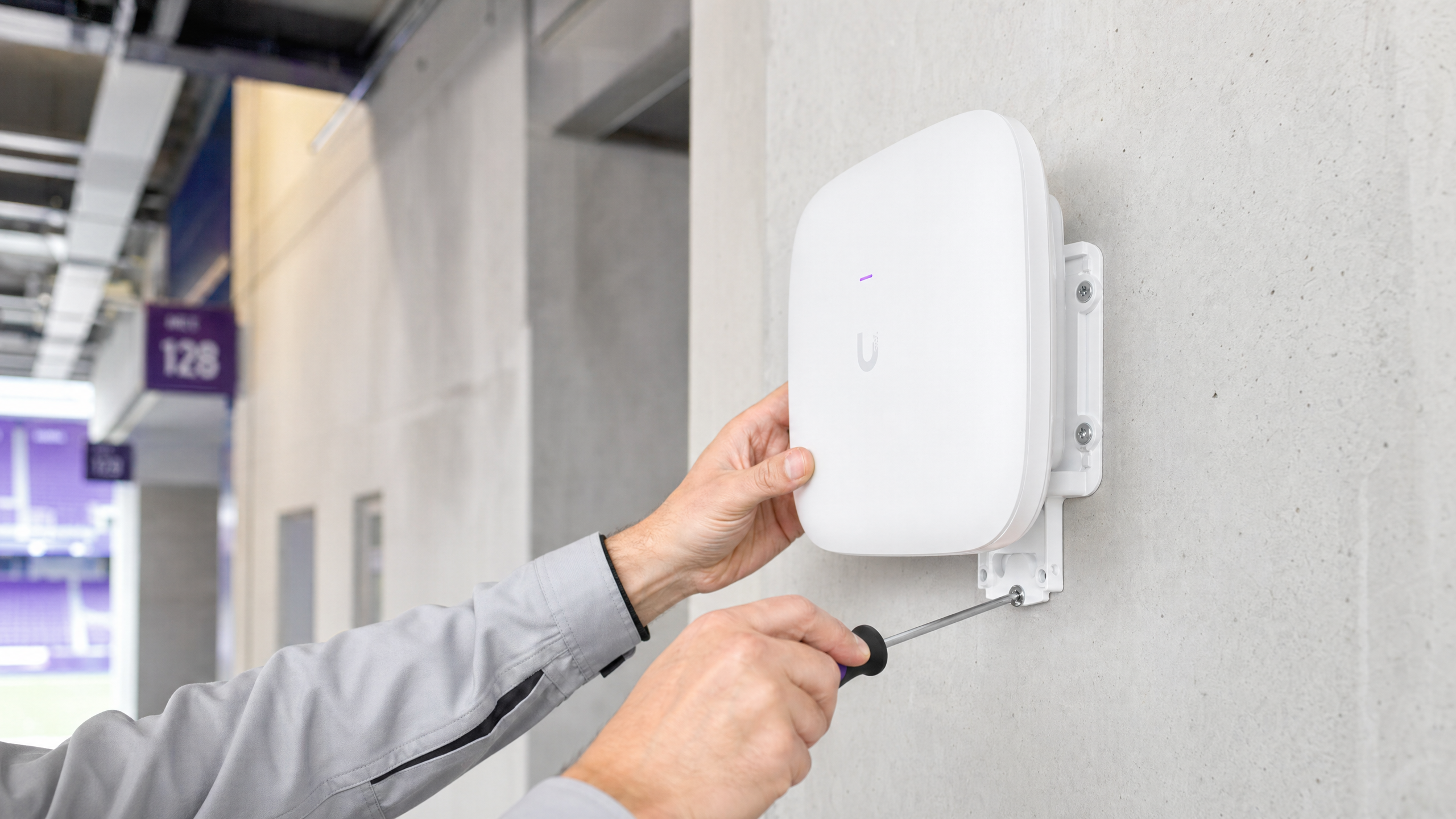
Riepilogo Esecutivo
Fornire WiFi affidabile in un ambiente stadio è una delle sfide più impegnative nell'ingegneria di rete. Per IT manager, CTO e direttori delle operazioni di venue, l'obiettivo non è più semplicemente fornire connettività di base, ma abilitare un'esperienza digitale fluida per i fan generando un ROI misurabile. Gli stadi affrontano densità di dispositivi estreme, picchi massicci di utilizzo durante l'intervallo e la necessità di supportare sistemi operativi critici insieme all'accesso degli ospiti. Questa guida delinea l'architettura tecnica, le strategie di implementazione e le tattiche di mitigazione del rischio necessarie per fornire venue wifi su larga scala. Integrando una robusta progettazione RF con piattaforme come Guest WiFi e WiFi Analytics di Purple, le venue possono trasformare la loro rete da centro di costo in un asset strategico che guida la monetizzazione dei media retail e l'intelligence operativa. I principi qui si applicano ugualmente a venue hospitality , ambienti retail e hub di transport — ovunque convergano densità estrema e coinvolgimento dei fan.
Approfondimento Tecnico
La Sfida RF: Densità Estrema e Interferenza Co-Canale
La sfida fondamentale del WiFi negli stadi è la gestione della densità estrema dei client all'interno di uno spazio fisico confinato. I modelli di implementazione aziendale tradizionali – che si basano su antenne omnidirezionali per coprire ampie aree – falliscono in condizioni di stadio a causa dell'Interferenza Co-Canale (CCI). Quando più access point trasmettono sullo stesso canale di frequenza, i dispositivi trascorrono la maggior parte del loro tempo in attesa di tempo di trasmissione libero anziché trasmettere dati. In una tribuna con 50.000 dispositivi, questo è catastrofico.
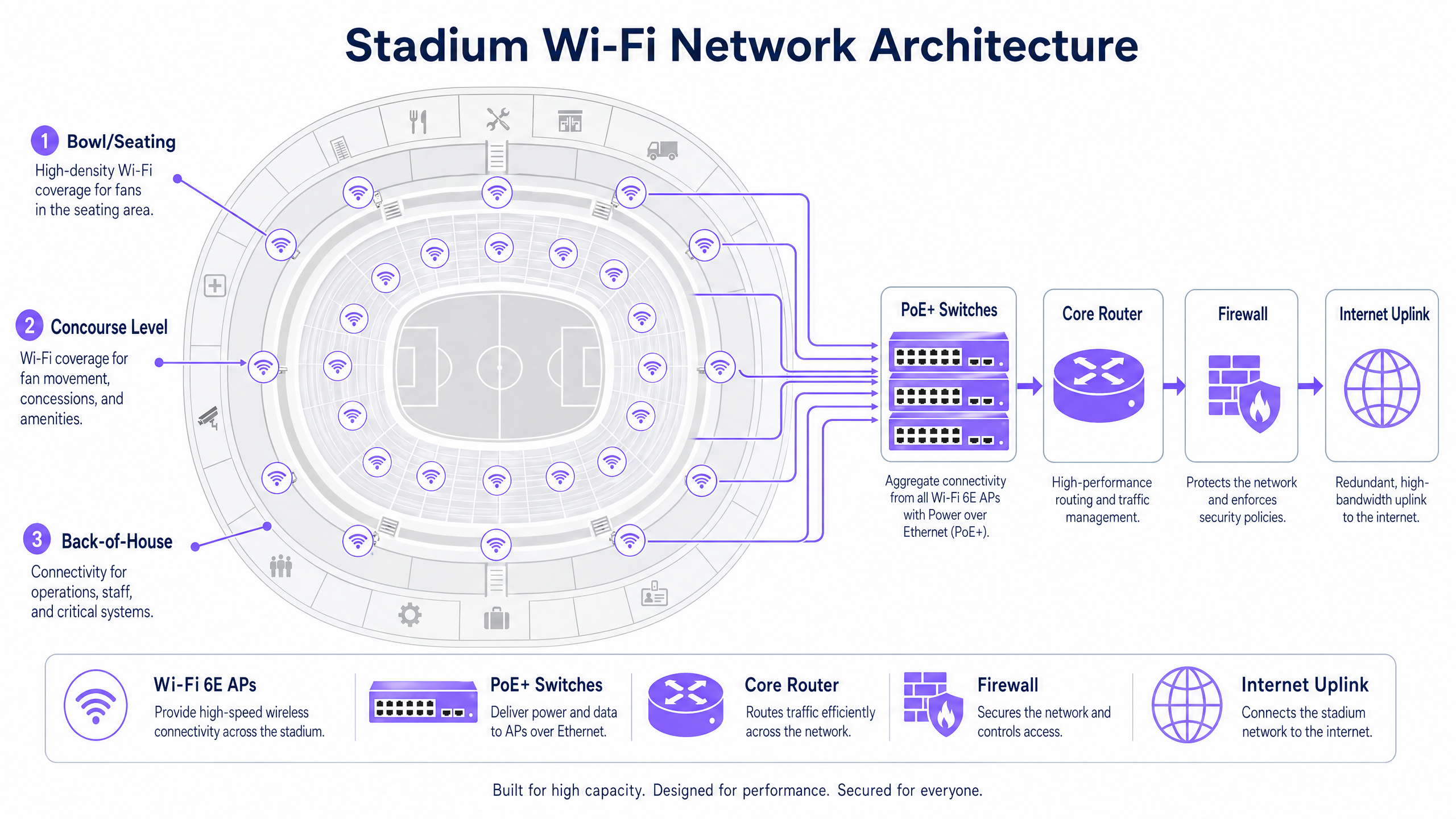
Per combattere la CCI, gli architetti di rete devono progettare per micro-celle. Ciò comporta l'implementazione di un gran numero di antenne altamente direzionali e a fascio stretto – tipicamente con ampiezze di fascio di 30 gradi o meno – per suddividere la tribuna in piccole zone di copertura isolate. Ogni micro-cella serve un numero limitato di dispositivi, mantenendo un throughput elevato e una bassa contesa. Le opzioni di montaggio includono contenitori sotto i sedili (preferiti per la parte inferiore della tribuna) e AP direzionali montati su corrimano per i livelli superiori.
Wi-Fi 6E e Allocazione dello Spettro
Le moderne implementazioni negli stadi devono sfruttare il Wi-Fi 6E. L'aggiunta della banda di spettro a 6 GHz fornisce fino a 1.200 MHz di spettro pulito e contiguo, libero dai vincoli radar Dynamic Frequency Selection (DFS) che complicano le implementazioni a 5 GHz in ambienti complessi. Ciò consente canali più ampi (160 MHz o 320 MHz con Wi-Fi 7), un throughput significativamente più elevato per i dispositivi compatibili e una latenza ridotta – tutti elementi essenziali per applicazioni ad alta intensità di banda come i replay video in-seat e la condivisione sui social media.
La tabella seguente riassume le principali differenze tra gli standard Wi-Fi rilevanti per le implementazioni negli stadi:
| Standard | Bande di Frequenza | Larghezza Massima Canale | Vantaggio Chiave per gli Stadi |
|---|---|---|---|
| Wi-Fi 5 (802.11ac) | 5 GHz | 80 MHz | Ampiamente supportato, ma spettro limitato |
| Wi-Fi 6 (802.11ax) | 2.4 / 5 GHz | 160 MHz | OFDMA e BSS Colouring riducono le interferenze |
| Wi-Fi 6E (802.11ax) | 2.4 / 5 / 6 GHz | 160 MHz | Spettro pulito a 6 GHz, nessun vincolo DFS |
| Wi-Fi 7 (802.11be) | 2.4 / 5 / 6 GHz | 320 MHz | Multi-Link Operation per throughput estremo |
Autenticazione e Sicurezza su Larga Scala
L'onboarding senza attriti è fondamentale su larga scala. I Captive Portal, sebbene preziosi per la raccolta di dati di prima parte, possono creare un grave collo di bottiglia quando 50.000 fan tentano di connettersi nei quindici minuti prima del calcio d'inizio. L'industria si sta muovendo verso l'autenticazione basata su profilo, in particolare OpenRoaming – una federazione che consente ai dispositivi di connettersi automaticamente e in modo sicuro utilizzando 802.1X e WPA3-Enterprise. Purple agisce come identity provider in questo ecosistema, garantendo un accesso sicuro e senza interruzioni, associando comunque ogni sessione del dispositivo a un profilo utente persistente per scopi analitici.
Per le venue che richiedono ancora l'onboarding tramite Captive Portal per la raccolta dei dati, la soluzione è pre-organizzare l'autenticazione: consentire ai dispositivi di associarsi e ottenere un indirizzo IP immediatamente, quindi presentare il portal in modo asincrono. Ciò previene la tempesta di DHCP e associazione che si verifica quando tutti i dispositivi raggiungono il portal contemporaneamente.
Per un trattamento dettagliato dei principi di sicurezza delle reti pubbliche – direttamente applicabili agli ambienti degli stadi – consultare la nostra guida su Sicurezza WiFi negli Aeroporti: Come Proteggere i Passeggeri sulle Reti Pubbliche . I principi di segmentazione e sicurezza DNS trattati lì sono ugualmente rilevanti qui. Inoltre, Proteggi la Tua Rete con DNS e Sicurezza Robusti fornisce indicazioni specifiche sulle difese a livello DNS per le reti pubbliche.
Guida all'Implementazione
Fase 1: Site Survey e Pianificazione RF
Prima di posare un singolo cavo, è essenziale un modello RF predittivo dettagliato della venue. Utilizzare strumenti come Ekahau o iBwave per modellare il posizionamento degli AP, i pattern delle antenne e la copertura prevista. Convalidare il modello con un site survey fisico, prestando particolare attenzione ai materiali utilizzati nella tribuna (cemento, metallo, vetro) e a qualsiasi fonte di interferenza (apparecchiature di trasmissione, strutture temporanee).
Fase 2: Implementazione Fisica
Il posizionamento degli AP nella tribuna rientra tipicamente in due categorie:
Implementazione Sotto-Sedile: Gli AP sono montati in contenitori robusti, con grado di protezione IP67, sotto i sedili. Ciò fornisce un'eccellente linea di vista ai dispositivi direttamente sopra, e humaI corpi presenti nei sedili attenuano naturalmente il segnale RF, riducendo l'CCI tra celle adiacenti. Il cablaggio è più complesso ma le prestazioni RF sono superiori.
Installazione a Soffitto / su Corrimano: Gli AP direzionali sono montati su passerelle, corrimano o pannelli frontali, puntando verso specifiche sezioni di posti a sedere. Questo è più facile da cablare ma richiede una mira precisa dell'antenna ed è più suscettibile alle interferenze in un ambiente a cielo aperto.
Per il corridoio, gli AP standard da soffitto per aziende sono appropriati, poiché la densità è inferiore e l'ambiente è più controllato.
Fase 3: Segmentazione della Rete
Una rete da stadio è un ambiente multi-tenant. Una rigorosa segmentazione del traffico tramite VLAN e policy firewall è obbligatoria:
| VLAN | Scopo | Requisito Chiave |
|---|---|---|
| VLAN 10 | WiFi Ospiti / Fan | Captive portal o onboarding OpenRoaming |
| VLAN 20 | Punto Vendita / Retail | Conformità PCI DSS, isolato dal traffico ospiti |
| VLAN 30 | Operazioni / Personale | Autenticazione 802.1X, accesso limitato |
| VLAN 40 | Gestione Edificio | Isolato, nessun accesso a internet |
Questo principio di segmentazione è coerente tra i settori — sia che si implementi in ambienti retail o strutture sanitarie , la separazione del traffico operativo e degli ospiti è una base di sicurezza non negoziabile.
Fase 4: Dimensionamento del Backhaul e dell'Infrastruttura
La copertura RF è inutile senza un backhaul adeguato. Assicurati che i tuoi switch edge PoE+ abbiano uplink da 10 Gbps al livello di aggregazione come minimo, con 40 Gbps per i punti di aggregazione ad alta densità che servono la zona dei posti a sedere. L'uplink internet principale deve essere dimensionato per l'utilizzo simultaneo di picco — una linea dedicata con failover ridondante è lo standard per sedi di questa scala. Per maggiori informazioni sulle opzioni di connettività dedicate, consulta Cos'è una Linea Dedicata? Internet Aziendale Dedicato .
Fase 5: Integrazione degli Analytics
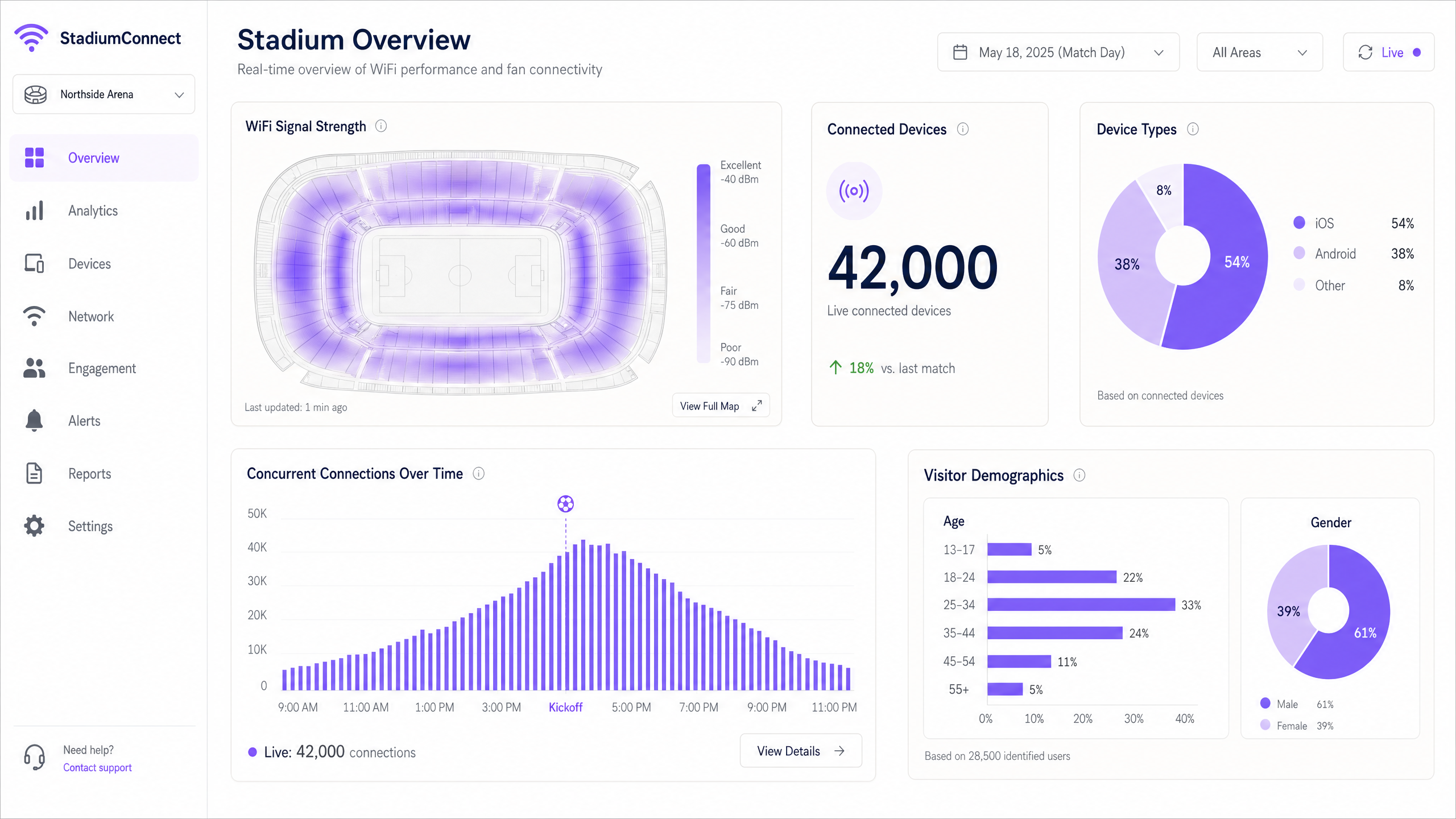
Una volta che la rete è operativa, integrala con una piattaforma come Purple per iniziare a catturare e agire sui dati. La piattaforma WiFi Analytics di Purple fornisce dashboard in tempo reale per il conteggio dei dispositivi, le mappe di calore del segnale e i dati demografici dei visitatori — trasformando la rete in uno strato di intelligenza operativa.
Migliori Pratiche
Gestione Aggressiva del Tasso di Dati: Disabilita tutte le velocità legacy 802.11b e 802.11g. Imposta la velocità base minima obbligatoria a 12 Mbps o 24 Mbps. Questo costringe i client "sticky" a spostarsi verso un AP più vicino anziché rimanere aggrappati a uno distante con un segnale debole, e impedisce ai dispositivi lenti di consumare un tempo di trasmissione sproporzionato.
Band Steering: Configura gli AP per indirizzare i dispositivi compatibili alle bande a 5 GHz e 6 GHz, mantenendo la banda a 2.4 GHz libera per i dispositivi IoT e l'hardware legacy.
Dimensionamento del Pool DHCP: Dimensiona generosamente le subnet VLAN ospiti (una /16 o /20) e imposta tempi di lease brevi di 30–60 minuti per recuperare gli indirizzi IP dai dispositivi che hanno lasciato la sede. L'esaurimento del DHCP è una delle cause più comuni di interruzioni di connettività a metà evento.
Rilevamento AP Rogue: Implementa il rilevamento e il contenimento degli AP rogue. Fan e broadcaster che creano hotspot personali possono causare gravi interferenze sui canali adiacenti.
Sicurezza DNS: Implementa il filtraggio DNS sulla rete ospiti per bloccare l'accesso a domini dannosi e ridurre il rischio di propagazione di malware. Consulta Proteggi la Tua Rete con DNS e Sicurezza Robusti per indicazioni sull'implementazione.
Modalità di Transizione WPA3: Abilita WPA3-SAE in modalità di transizione per supportare contemporaneamente client WPA2 e WPA3, fornendo sicurezza avanzata per i dispositivi compatibili senza escludere l'hardware legacy.
Risoluzione dei Problemi e Mitigazione dei Rischi
Modalità di Guasto 1: Il Picco di Metà Evento
Sintomo: I dispositivi mostrano un forte segnale WiFi ma non riescono a caricare pagine web o a completare transazioni.
Causa: Esaurimento del pool DHCP o collo di bottiglia della rete core — non un problema RF.
Risoluzione: Verifica l'utilizzo dell'ambito DHCP in tempo reale. Aumenta la dimensione della subnet e riduci i tempi di lease. Controlla l'utilizzo dell'uplink dagli switch edge al router core. Questo è un guasto di Livello 3, non un problema di Livello 1/2 — l'aggiunta di ulteriori AP non aiuterà e potrebbe peggiorare l'interferenza RF.
Modalità di Guasto 2: Interferenza Rogue
Sintomo: Degradazione improvvisa in specifiche sezioni di posti a sedere durante l'evento.
Causa: Un broadcaster o un fan ha creato un hotspot o un router portatile su un canale adiacente.
Risoluzione: Utilizza gli strumenti di analisi dello spettro del controller wireless per identificare il dispositivo interferente. Implementa policy di contenimento degli AP rogue. Considera l'implementazione di un analizzatore di spettro dedicato per eventi importanti.
Modalità di Guasto 3: Danno Fisico
Sintomo: AP individuali che vanno offline durante o dopo gli eventi.
Causa: Versamenti, impatto fisico o infiltrazioni atmosferiche sugli alloggiamenti sotto i sedili.
Risoluzione: Specifica alloggiamenti con classificazione IP67 per tutti gli AP sotto i sedili. Implementa il monitoraggio dello stato degli AP in tempo reale con avvisi. Mantieni uno stock di AP di ricambio e assicurati che siano in atto procedure di sostituzione rapida per gli incidenti del giorno della partita.
Modalità di Guasto 4: La Randomizzazione dell'Indirizzo MAC che Compromette gli Analytics
Sintomo: I dati sul conteggio dei visitatori appaiono incoerenti; i visitatori di ritorno appaiono come nuovi utenti.
Causa: I moderni dispositivi iOS e Android randomizzano il loro indirizzo MAC per rete, impedendo il tracciamento basato su MAC.
Risoluzione: Passa dal tracciamento basato su MAC all'autenticazione basata su profilo. Quando gli utenti si autenticano tramite OpenRoaming o un'app brandizzata, l'identità è legata a un profilo persistente anziché a un indirizzo hardware. La piattaforma di Purple gestisce questo in modo nativo.
ROI e Impatto sul Business
L'implementazione del WiFi negli stadi è una spesa in conto capitale significativa. Uno stadio da 50.000 posti può richiedere 500-1.000 access point, un'infrastruttura di cablaggio sostanziale e costi operativi continui. Per giustificare questo investimento, le strutture devono sfruttare la rete per l'intelligence operativa e la generazione di entrate.
Utilizzando la piattaforma WiFi Analytics di Purple, le strutture possono quantificare il ROI su diverse dimensioni:
| Categoria di Entrate / Risparmi | Meccanismo | Impatto Indicativo |
|---|---|---|
| Monetizzazione dei Media Retail | Messaggi di sponsorizzazione mirati consegnati ai fan autenticati | Nuovo flusso di entrate dagli sponsor |
| Ottimizzazione delle Concessioni | Analisi del flusso di persone per identificare i colli di bottiglia delle code e ottimizzare il personale | Tempi di attesa ridotti, aumento della spesa pro capite |
| Costi di Supporto IT Ridotti | L'autenticazione basata su profilo riduce le chiamate all'helpdesk nei giorni delle partite | Minori costi operativi |
| Sicurezza e Conformità | Monitoraggio in tempo reale della densità della folla per la pianificazione dell'evacuazione | Mitigazione del rischio, beneficio assicurativo |
| Fidelizzazione dei Fan | Campagne di coinvolgimento personalizzate basate sulla cronologia delle visite | Aumento dei tassi di rinnovo degli abbonamenti stagionali |
La capacità di raccolta dati WiFi di una rete di stadio ben implementata è una risorsa commerciale significativa. I dati di prima parte acquisiti durante l'autenticazione — con pieno consenso GDPR — consentono alla struttura di costruire profili dettagliati dei fan che supportano il marketing mirato, esperienze in-app personalizzate e attivazioni di sponsor.
Per le strutture in settori adiacenti, si applicano gli stessi principi: gli operatori del settore ospitalità utilizzano l'analisi WiFi per comprendere il comportamento degli ospiti tra le diverse proprietà, mentre gli hub di trasporto sfruttano i dati sul flusso di persone per il posizionamento dei negozi e la pianificazione della capacità.
Definizioni chiave
Co-Channel Interference (CCI)
Degradation that occurs when multiple access points transmit on the same frequency channel within range of each other, causing devices to defer transmission and wait for clear airtime.
The primary RF failure mode in high-density stadium deployments. Mitigated by micro-cell architecture and careful channel planning.
Micro-Cell Architecture
A wireless network design using highly directional, narrow-beam antennas to create small, isolated coverage zones, each serving a limited number of devices.
The mandatory design pattern for stadium seating bowls. Contrasts with traditional omnidirectional AP deployments used in office environments.
OpenRoaming
A Wireless Broadband Alliance federation that enables devices to automatically and securely connect to participating WiFi networks using 802.1X and WPA3-Enterprise, without captive portal interaction.
Eliminates the authentication bottleneck at large events. Purple acts as an identity provider in the OpenRoaming ecosystem.
Airtime Fairness
A wireless scheduling mechanism that allocates equal transmission time to each connected device, regardless of its connection speed, preventing slow legacy devices from consuming disproportionate airtime.
Critical in stadiums where a mix of new and old smartphones compete for the same wireless medium.
802.1X
An IEEE standard for port-based network access control, providing an authentication framework for devices connecting to a LAN or WLAN, typically using RADIUS for credential validation.
Used for secure, enterprise-grade authentication for staff devices, PoS terminals, and OpenRoaming-enabled guest devices.
PCI DSS
Payment Card Industry Data Security Standard. A mandatory compliance framework for any network that processes, stores, or transmits payment card data.
Applies to any stadium network segment supporting concession stand PoS terminals. Requires strict isolation from guest WiFi traffic.
DHCP Exhaustion
A network failure condition where the DHCP server has assigned all available IP addresses in its pool and cannot service new connection requests.
A common cause of half-time connectivity failures in stadiums. Mitigated by large subnet sizing (/16 or /20) and short lease times (30–60 minutes).
Wi-Fi 6E
An extension of the IEEE 802.11ax (Wi-Fi 6) standard that adds support for the 6 GHz frequency band, providing up to 1,200 MHz of additional clean spectrum.
The recommended standard for new stadium deployments. The 6 GHz band is free from DFS constraints and legacy device congestion, making it ideal for high-density environments.
BSS Colouring
A Wi-Fi 6 mechanism that tags transmissions with a colour identifier to allow APs to distinguish between overlapping networks on the same channel, reducing unnecessary deferral.
Reduces the impact of Co-Channel Interference in dense deployments where perfect channel separation is not achievable.
WPA3-SAE
Wi-Fi Protected Access 3 with Simultaneous Authentication of Equals. Replaces the WPA2-PSK handshake with a more secure Dragonfly key exchange, resistant to offline dictionary attacks.
The recommended security standard for guest WiFi networks. Should be deployed in transition mode to support both WPA2 and WPA3 clients.
Esempi pratici
A 45,000-seat football stadium is experiencing severe connectivity failures during half-time. Users report full WiFi signal bars but cannot load web pages or complete mobile payments at concession stands. The network was deployed three years ago using 300 ceiling-mounted omnidirectional APs. What is the diagnosis and recommended remediation plan?
This is a multi-layer failure. The strong signal with no usable connectivity is the classic signature of a Layer 3 failure, not a Layer 1/2 RF problem. Immediate diagnostics: 1) Check DHCP pool utilisation — if scope utilisation exceeds 90%, IP address exhaustion is the primary cause. Increase the guest VLAN subnet from a /24 to a /16 and reduce lease times to 30 minutes. 2) Check uplink utilisation on edge switches — if 1 Gbps uplinks are saturated, upgrade to 10 Gbps. 3) Check core router CPU and memory utilisation for signs of bottlenecking. For the longer term, the omnidirectional AP deployment must be replaced with a micro-cell architecture using directional under-seat or handrail-mounted APs. The current deployment is causing severe Co-Channel Interference under load, which compounds the Layer 3 issues. Upgrade to Wi-Fi 6E hardware during the redeployment.
A major conference centre hosting a 10,000-delegate technology summit needs to deploy temporary WiFi for a three-day large wifi network event. The venue has existing infrastructure but it was designed for 2,000 concurrent users. How should the temporary deployment be architected?
For a temporary high-density deployment: 1) Conduct a rapid site survey to identify coverage gaps and interference sources. 2) Deploy temporary high-density APs (Wi-Fi 6 or 6E) on portable stands or clipped to existing infrastructure in the main hall and breakout rooms. Target one AP per 50-75 devices. 3) Provision a dedicated VLAN and DHCP scope for the event, sized for 15,000 devices (allowing for multiple devices per delegate). 4) Arrange a temporary bandwidth upgrade or secondary internet circuit for the event duration. 5) Integrate with Purple's Guest WiFi platform to provide a branded captive portal for delegate onboarding and real-time analytics. 6) Pre-stage authentication by pre-loading the event WiFi profile on delegate devices via the conference app. This is a wifi indoor event deployment pattern that prioritises rapid provisioning and monitoring over long-term infrastructure investment.
Domande di esercitazione
Q1. You are the network architect for a 60,000-seat stadium. The venue director wants to save capital expenditure by using 150 standard enterprise omnidirectional APs mounted on the roof of the upper tier, rather than 800 directional under-seat APs. How do you advise, and what is the technical justification?
Suggerimento: Consider the impact of Co-Channel Interference (CCI) and the physics of RF propagation in an open bowl environment.
Visualizza risposta modello
Advise strongly against the omnidirectional approach. In an open seating bowl, omnidirectional APs mounted at height will have overlapping coverage areas across multiple sections, creating severe Co-Channel Interference. Under load, devices will hear 5–10 APs on the same channel simultaneously, causing constant transmission deferral and effectively collapsing throughput to unusable levels. The 150-AP approach will appear to work in testing with low device counts but will fail catastrophically at capacity. The 800 directional under-seat APs create isolated micro-cells, each serving approximately 50–75 devices, with human bodies providing natural RF attenuation between cells. The higher capital cost is justified by the performance difference — the omnidirectional approach will generate significant reputational damage and costly remediation work post-deployment.
Q2. During a sold-out match, the concession stand PoS terminals are experiencing slow transaction times and occasional failures. The PoS terminals share the same physical APs as the fan guest network but are on a separate VLAN. What are the likely causes and how do you remediate?
Suggerimento: Consider both RF-layer and network-layer causes. Think about Quality of Service (QoS) and VLAN traffic prioritisation.
Visualizza risposta modello
Two likely causes: 1) RF contention — the PoS terminals are competing for airtime with thousands of fan devices on the same APs. Remediation: implement QoS policies on the APs and switches to mark PoS traffic with a higher DSCP value (e.g., CS5) and prioritise it in the transmission queue. 2) Uplink saturation — if the edge switch uplinks are saturated with guest traffic, PoS packets are being dropped or delayed. Remediation: ensure PoS VLANs have guaranteed bandwidth allocation at the switch level using traffic shaping policies. For a permanent fix, consider deploying dedicated APs for the PoS network, physically separated from the guest WiFi APs, to eliminate RF contention entirely.
Q3. A venue director asks how the WiFi network can help them understand why fans are spending less at the merchandise store in the east concourse compared to the west concourse. What data does the network provide and how would you present the business case for investing in WiFi analytics?
Suggerimento: Consider footfall analytics, dwell time, and the correlation between network data and commercial outcomes.
Visualizza risposta modello
Using Purple's WiFi Analytics platform, the network provides: 1) Footfall counts — how many devices pass through or enter the east concourse area. 2) Dwell time — how long devices remain in the merchandise store area. 3) Journey mapping — where fans go before and after visiting the store. If the data shows high footfall but low dwell time in the east store, it indicates queue abandonment or poor product visibility. If footfall itself is low, the issue is wayfinding or fan routing. The business case: the analytics platform converts an existing infrastructure investment into a commercial intelligence tool. The cost of the analytics licence is typically recovered within one or two events through optimised staffing, improved product placement, or targeted promotional campaigns delivered via the guest WiFi portal.
Continua a leggere questa serie
Cos'è una Probe Request? Capire come i dispositivi scoprono le reti
Questa guida di riferimento tecnico offre un'analisi approfondita delle probe request IEEE 802.11, della scansione attiva versus passiva e dell'impatto della randomizzazione MAC sull'analisi dei dati dei luoghi. Fornisce strategie di implementazione attuabili per gli architetti di rete al fine di ottimizzare le implementazioni ad alta densità, mitigare le probe storm e garantire una raccolta dati accurata e conforme al GDPR utilizzando livelli di identità autenticati.
Come Risolvere il WiFi Lento Senza Aggiornare il Tuo Piano Internet
Una guida tecnica di riferimento completa per IT managers e network architects sull'ottimizzazione delle prestazioni WiFi aziendali senza aumentare la ISP bandwidth. Copre RF tuning, la gestione della densità dei client, l'implementazione di QoS e come sfruttare WiFi analytics per diagnosticare e risolvere i colli di bottiglia.
La Checklist per la Migrazione da NAC Legacy a NAC Cloud-Native
Questa guida tecnica di riferimento autorevole fornisce una checklist strutturata in tre fasi per la migrazione da Network Access Control (NAC) legacy a un'architettura cloud-native. Fornisce a manager IT e architetti di rete strategie attuabili per gestire l'integrazione dell'identità, la parità delle policy e la conformità senza interrompere le operazioni della sede.