
WiFi per Caffè: Come Configurare, Proteggere e Monetizzare la Tua Rete Ospiti
Un riferimento tecnico completo per i responsabili IT e gli operatori di locali sulla progettazione, la sicurezza e la monetizzazione delle reti WiFi per caffè. Copre la segmentazione essenziale della rete, l'implementazione hardware Wi-Fi 6, i captive portal conformi al GDPR e l'automazione del marketing per generare un ROI misurabile.
Ascolta questa guida
Visualizza trascrizione del podcast
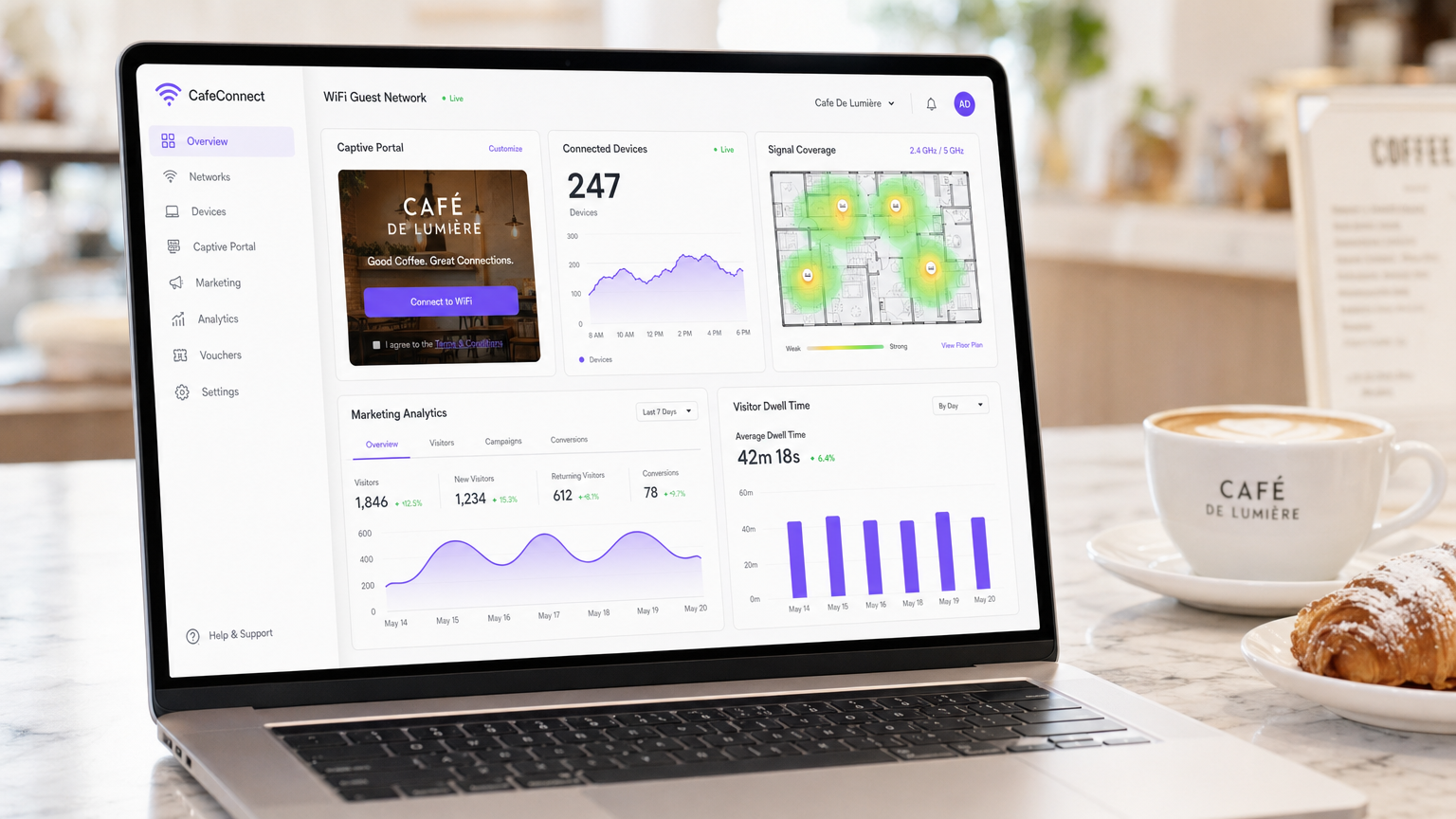
Sintesi Esecutiva
Per i moderni locali di ospitalità, il WiFi per caffè non è più una semplice utilità operativa: è una risorsa critica di dati di prima parte, un canale di automazione del marketing e un rigoroso obbligo di conformità. Questa guida di riferimento tecnico fornisce a responsabili IT, architetti di rete e direttori delle operazioni dei locali un quadro completo per la progettazione, l'implementazione e la monetizzazione delle reti ospiti.
Dai caffè indipendenti alle catene aziendali multisito, i principi architetturali rimangono coerenti. È necessario imporre una rigorosa segmentazione della rete per mantenere la conformità PCI DSS, implementare hardware 802.11ax (Wi-Fi 6) di livello aziendale per ambienti con client densi e implementare un captive portal robusto per acquisire il consenso marketing esplicito e conforme al GDPR.
Passando da router consumer non gestiti a una piattaforma Guest WiFi aziendale, i locali possono trasformare un centro di costo in un motore di entrate misurabile. Questa guida delinea le specifiche hardware esatte, gli standard di sicurezza, i calcoli della larghezza di banda e i flussi di lavoro di automazione del marketing necessari per costruire una rete ospiti resiliente e redditizia.
Approfondimento Tecnico
Architettura e Segmentazione della Rete
Il principio fondamentale di qualsiasi rete rivolta al pubblico è l'assoluta separazione logica dall'infrastruttura operativa. L'implementazione di una singola rete piatta che ospita sia i sistemi di punto vendita (POS) che il traffico degli ospiti è un fallimento critico sia in termini di sicurezza che di conformità.
Implementazione VLAN: La tua infrastruttura di routing e switching deve supportare il tagging VLAN IEEE 802.1Q. Un'implementazione standard richiede un minimo di due Virtual Local Area Networks:
- VLAN 10 (Operativa): Dedicata ai terminali POS, ai PC di back-office e ai dispositivi IoT.
- VLAN 20 (Ospiti): Dedicata esclusivamente alla rete WiFi ospiti del caffè.
Il traffico tra queste VLAN deve essere bloccato a livello di firewall. Gli Access Point (AP) trasmetteranno Service Set Identifier (SSID) distinti mappati direttamente alle rispettive VLAN. Questo isolamento è un requisito non negoziabile per la conformità PCI DSS, garantendo che l'ambiente dei dati dei titolari di carta (CDE) non possa essere compromesso da attori malintenzionati connessi alla rete ospiti.
Standard Wireless e Selezione Hardware
Per ambienti con alta densità di dispositivi, come un caffè affollato dove 40-80 client possono eseguire streaming, navigare e sincronizzare contemporaneamente, l'hardware di livello consumer si degraderà rapidamente.
Requisiti 802.11ax (Wi-Fi 6): Le implementazioni moderne dovrebbero utilizzare esclusivamente access point Wi-Fi 6. Il vantaggio critico del Wi-Fi 6 negli ambienti di ospitalità è l'Orthogonal Frequency-Division Multiple Access (OFDMA). A differenza degli standard più vecchi che servono i client in sequenza, l'OFDMA consente a un singolo AP di comunicare con più dispositivi contemporaneamente dividendo i canali in sottoportanti più piccole. Ciò riduce drasticamente la latenza e migliora la produttività in ambienti congestionati.
Dimensionamento Hardware:
- Sito Singolo (50-150 mq): 1-2 AP Wi-Fi 6 montati a soffitto, uno switch gestito PoE+ e un firewall/router di livello aziendale.
- Implementazioni Multi-Sito: L'infrastruttura gestita in cloud è obbligatoria per la visibilità centralizzata, la gestione del firmware e la risoluzione dei problemi da remoto su impronte retail distribuite.
Protocolli di Sicurezza
L'era del WiFi pubblico aperto e non crittografato sta finendo. Mentre WPA2-Personal rimane comune, le nuove implementazioni dovrebbero sfruttare WPA3.
Per le reti ospiti che utilizzano un captive portal, la trasmissione wireless sottostante dovrebbe comunque essere crittografata. WPA3-SAE (Simultaneous Authentication of Equals) fornisce la forward secrecy, mitigando gli attacchi a dizionario offline. Se si implementa una rete aperta con un captive portal (spesso fatto per la massima compatibilità), assicurarsi che l'isolamento del client sia abilitato a livello di AP in modo che i dispositivi non possano comunicare tra loro sulla sottorete locale.
Guida all'Implementazione
L'implementazione di una rete WiFi per caffè sicura e monetizzata richiede un approccio strutturato. Segui questa sequenza di implementazione neutrale rispetto al fornitore:
Fase 1: Sopralluogo e Pianificazione della Larghezza di Banda
Prima di acquistare l'hardware, conduci un sopralluogo fisico per identificare le interferenze RF (ad es. microonde, acciaio strutturale) e determinare il posizionamento ottimale degli AP.
Calcola i tuoi requisiti di larghezza di banda. Una regola generale standard è quella di prevedere 2 Mbps per utente simultaneo per la navigazione generale e 5 Mbps se lo streaming video è comune. Per un caffè che prevede 50 utenti simultanei, si consiglia una connessione simmetrica minima di 100 Mbps. Se il tuo locale ospita eventi aziendali o richiede un uptime garantito, consulta la nostra guida su Cos'è una Linea Dedicata? Internet Aziendale Dedicato per le opzioni di connettività aziendale. Per calcoli dettagliati della larghezza di banda, consulta la nostra guida Velocità WiFi Hotel: Cosa si Aspettano gli Ospiti e Come Offrirla .
Fase 2: Configurazione dell'Infrastruttura
Installa il tuo router, lo switch gestito e gli access point. Configura le tue VLAN e le regole del firewall prima di collegare gli AP. Assicurati che i pool DHCP per la VLAN ospiti siano dimensionati in modo appropriato (ad es. una sottorete /23 che fornisce 510 indirizzi IP) con tempi di lease brevi (ad es. 2 ore) per prevenire l'esaurimento degli IP durante i periodi di grande affluenza.
Fase 3: Implementazione del Captive Portal
Il captive portal è l'interfaccia critica tra la tua rete e il tuo database di marketing.
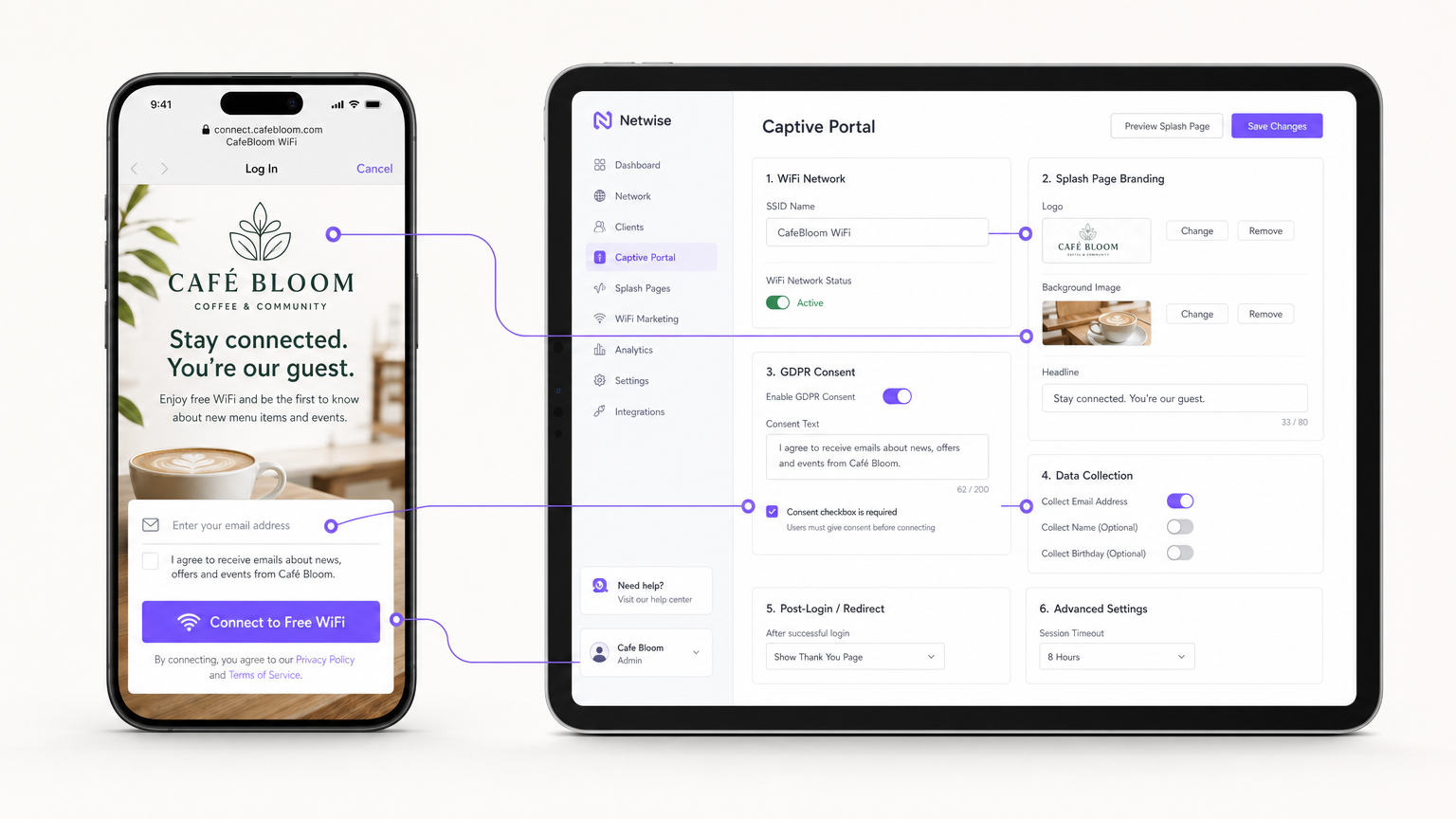
Invece di ospitare server portal on-premises, integra il tuo "AP (tramite RADIUS o API) con una piattaforma Guest WiFi basata su cloud come Purple. Configura la splash page con il branding della tua sede e imposta i metodi di autenticazione (ad es. email, social login o autenticazione basata su profilo senza interruzioni come OpenRoaming).
Passaggio 4: Gestione della conformità e del consenso
Configura i campi di raccolta dati. Ai sensi del GDPR, il consenso al marketing deve essere esplicito, informato e inequivocabile. Assicurati che il tuo Captive Portal includa una casella di controllo non selezionata per l'opt-in marketing. La piattaforma deve registrare il timestamp, l'indirizzo IP, l'indirizzo MAC e l'esatta formulazione del consenso mostrata all'utente per fornire una traccia di audit verificabile.
Passaggio 5: Integrazione dell'automazione del marketing
Collega la piattaforma WiFi al tuo CRM o utilizza gli strumenti nativi di WiFi Analytics della piattaforma per creare campagne automatizzate. Imposta i trigger per:
- Visitatori per la prima volta: Email di benvenuto con uno sconto fedeltà.
- Visitatori inattivi: Offerta di re-engagement dopo 30 giorni di assenza.
- Visitatori frequenti: Invito al programma VIP.
Migliori pratiche
- Abilita l'isolamento client: Abilita sempre l'isolamento client di Livello 2 sull'SSID ospite. Ciò impedisce ai dispositivi connessi di vedersi o comunicare tra loro, mitigando il rischio di movimento laterale di malware o di sniffing di pacchetti.
- Implementa la Quality of Service (QoS): Configura le regole QoS sul tuo router per dare priorità al traffico operativo (POS, VoIP) rispetto al traffico ospite. Implementa limiti di larghezza di banda per client (ad es. limitando gli ospiti a 5 Mbps in download/upload) per impedire a un singolo utente di saturare il collegamento WAN.
- Riduci i tempi di lease DHCP: In ambienti ad alto ricambio come i caffè, imposta i tempi di lease DHCP a 1-2 ore anziché le 24 ore standard per prevenire l'esaurimento del pool di IP.
- Sfrutta l'autenticazione basata su profilo: Per catene multi-sito o ambienti Retail , implementa protocolli di autenticazione senza interruzioni (come Passpoint/OpenRoaming) per consentire agli utenti di ritorno di connettersi automaticamente senza doversi riautenticare al portale, migliorando significativamente l'esperienza utente pur mantenendo il tracciamento dei dati.
Risoluzione dei problemi e mitigazione del rischio
| Modalità di guasto | Causa principale | Strategia di mitigazione |
|---|---|---|
| Esaurimento IP | Gli ospiti non riescono a connettersi perché il server DHCP ha esaurito gli indirizzi IP disponibili. | Espandere la subnet mask (ad es. da /24 a /23) e ridurre i tempi di lease DHCP a 1-2 ore. |
| Interferenza co-canale | Più AP trasmettono sullo stesso canale, causando alta latenza e perdita di pacchetti. | Implementare l'assegnazione dinamica dei canali sul controller wireless; evitare i canali a 2.4GHz diversi da 1, 6 e 11. |
| Bypass del Captive Portal | I dispositivi si connettono ma non attivano il reindirizzamento alla splash page, lasciando gli utenti offline. | Assicurarsi che il firewall consenta il traffico DNS e HTTP/HTTPS verso gli indirizzi IP del walled garden del portale prima dell'autenticazione. |
| Violazione della conformità | Raccolta di email tramite un modulo aperto senza registrazione esplicita del consenso. | Utilizzare una piattaforma Captive Portal certificata che gestisca nativamente la registrazione del consenso GDPR e le politiche di conservazione dei dati. |
ROI e impatto sul business
Il passaggio da un WiFi non gestito a una rete ospite aziendale trasforma l'infrastruttura IT da un costo irrecuperabile a una risorsa di marketing misurabile.
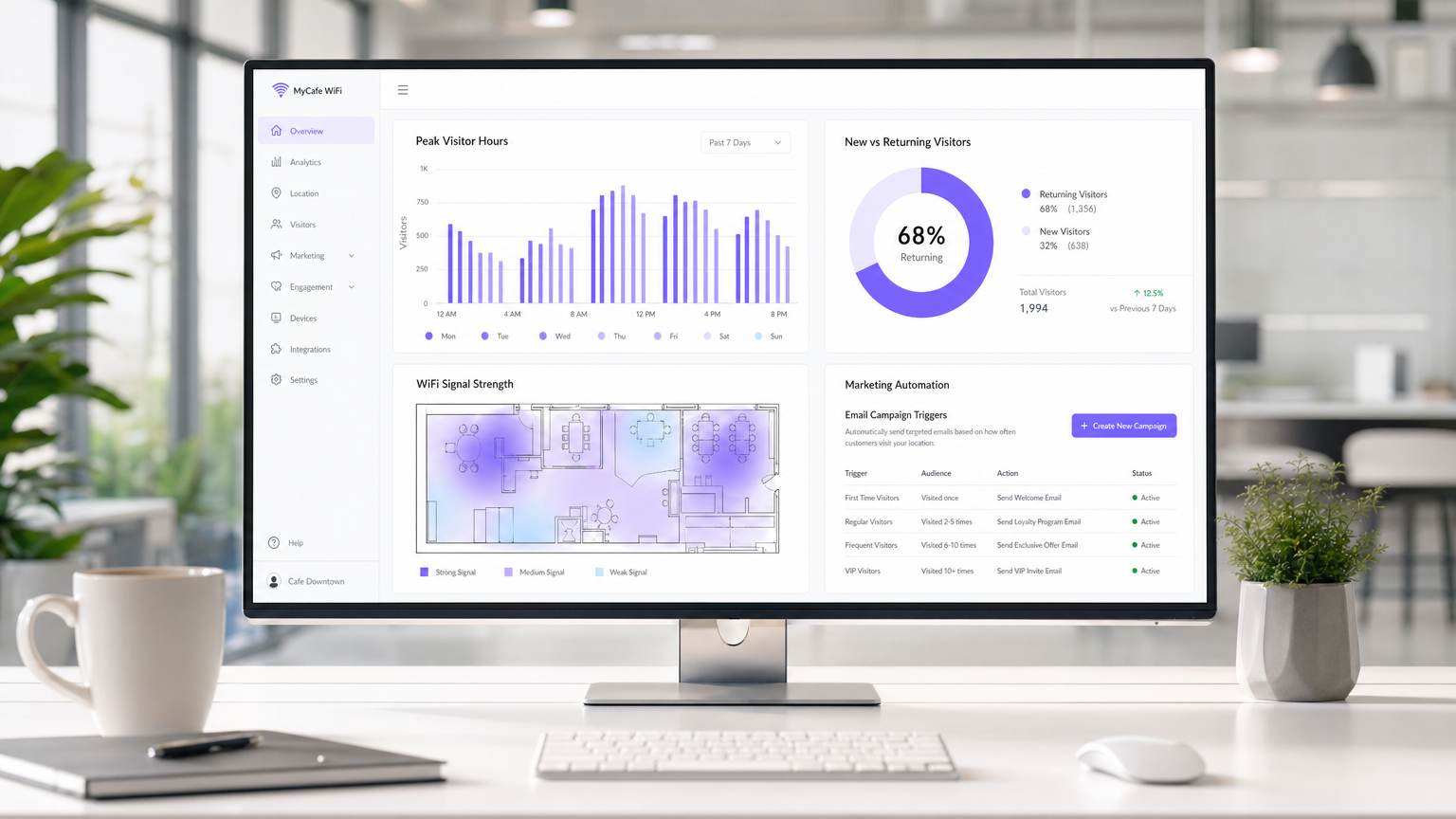
Misurare il successo: Il ROI di un'implementazione WiFi in un caffè è calcolato attraverso tre metriche principali:
- Tasso di acquisizione dati: La percentuale di utenti connessi che acconsentono alle comunicazioni di marketing. Un portale ben ottimizzato dovrebbe raggiungere un tasso di acquisizione del 30-40%.
- Conversione della campagna: Il traffico generato da campagne email/SMS automatizzate attivate dalla piattaforma WiFi. Ad esempio, tracciare quanti utenti tornano entro 7 giorni dalla ricezione di un'offerta "ci manchi".
- Ottimizzazione del tempo di permanenza: Utilizzare l'analisi per correlare il tempo di permanenza dei visitatori con il valore medio della transazione, consentendo ai team operativi di ottimizzare la disposizione dei posti a sedere e la velocità del servizio.
Catturando dati di prima parte e promuovendo visite ripetute tramite marketing mirato, una soluzione WiFi ospite gestita raggiunge tipicamente il ROI entro 3-6 mesi dall'implementazione, in particolare in ambienti Hospitality competitivi.
Definizioni chiave
VLAN (Virtual Local Area Network)
A logical subnetwork that groups a collection of devices from different physical LANs. Used to securely separate guest traffic from operational traffic.
Essential for maintaining PCI DSS compliance and preventing guests from accessing back-office systems.
Captive Portal
A web page that the user of a public-access network is obliged to view and interact with before access is granted.
The primary mechanism for capturing user data, presenting terms of service, and securing GDPR marketing consent.
Client Isolation
A wireless security feature that prevents devices connected to the same AP from communicating with each other.
Crucial for public networks to prevent malicious users from scanning or attacking other guests' devices.
OFDMA (Orthogonal Frequency-Division Multiple Access)
A feature of Wi-Fi 6 that allows an AP to subdivide a channel to communicate with multiple devices simultaneously.
Solves the 'latency' problem in dense café environments where dozens of devices are competing for airtime.
PCI DSS
Payment Card Industry Data Security Standard. A set of security standards designed to ensure that all companies that accept, process, store or transmit credit card information maintain a secure environment.
The regulatory reason why network segmentation between POS and guest WiFi is legally required.
First-Party Data
Information a company collects directly from its customers and owns entirely.
The core asset generated by a guest WiFi platform, insulating venues from the deprecation of third-party cookies.
QoS (Quality of Service)
Technologies that manage data traffic to reduce packet loss, latency and jitter on the network.
Used to prioritize critical business traffic (like payment processing) over guest Netflix streaming.
Walled Garden
A restricted environment that controls user access to web content and services.
Required configuration on the firewall to allow unauthenticated users to access the captive portal and its associated resources (like social login APIs) before granting full internet access.
Esempi pratici
A growing independent café chain with 3 locations is experiencing network dropouts during peak hours. Their POS terminals frequently disconnect, and guests complain about slow speeds. They are currently using consumer-grade routers provided by their ISP, broadcasting a single SSID for both staff and guests.
- Replace consumer routers with a cloud-managed business gateway and Wi-Fi 6 access points at each location.
- Implement VLAN tagging: VLAN 10 for POS/Staff, VLAN 20 for Guests.
- Configure firewall rules to block inter-VLAN routing, securing the POS network.
- Set up QoS to prioritize VLAN 10 traffic over VLAN 20, and implement a 5 Mbps per-client bandwidth cap on the guest network.
- Deploy a centralized captive portal to manage guest access and collect GDPR-compliant marketing data.
A large conference centre café needs to provide seamless WiFi for returning delegates without forcing them to log in via the captive portal every day, while still tracking their presence for analytics.
Deploy a profile-based authentication system utilizing Passpoint (Hotspot 2.0) or OpenRoaming. Guests authenticate via the captive portal on their first visit, downloading a secure profile to their device. On subsequent visits, their device authenticates automatically via WPA2/3-Enterprise using EAP-TTLS, bypassing the splash page while still registering their MAC address and presence in the analytics dashboard.
Domande di esercitazione
Q1. A retail café chain wants to implement a guest WiFi network. The marketing director insists on making email collection mandatory for access to maximize database growth. The IT director is concerned about compliance. What is the correct architectural approach?
Suggerimento: Consider the specific requirements of GDPR regarding 'freely given' consent.
Visualizza risposta modello
Under GDPR, consent for marketing cannot be a precondition for service. The captive portal must allow users to access the WiFi without opting into marketing emails. The correct approach is to offer a clear, unticked checkbox for marketing consent, while allowing users to connect simply by accepting the terms and conditions. The marketing team should instead incentivize opt-ins by offering a clear value exchange (e.g., 'Sign up for 10% off your next coffee').
Q2. During peak hours (12:00 PM - 2:00 PM), guests at a busy city-centre café report that they can see the WiFi network with strong signal, but cannot connect or obtain an IP address. The network works perfectly in the morning and evening. What is the most likely cause and solution?
Suggerimento: Think about the lifecycle of a connection in a high-turnover environment.
Visualizza risposta modello
The most likely cause is DHCP IP pool exhaustion. Because the café has high footfall but short dwell times, the default 24-hour DHCP leases are tying up IP addresses long after the guests have left. The solution is to reduce the DHCP lease time for the guest VLAN to 1 or 2 hours, and potentially expand the subnet from a /24 (254 addresses) to a /23 (510 addresses).
Q3. A venue operator wants to deploy a single unified network for both their EPOS systems and guest WiFi to save on hardware costs, using a standard consumer broadband router. What are the specific technical and business risks of this approach?
Suggerimento: Evaluate the scenario against PCI DSS requirements and wireless performance standards.
Visualizza risposta modello
- Compliance Failure: A flat network violates PCI DSS requirements for isolating the Cardholder Data Environment, risking heavy fines and loss of card processing abilities. 2. Security Risk: Without client isolation and VLANs, guests can potentially access or attack the EPOS systems. 3. Performance Degradation: Consumer routers lack QoS to prioritize EPOS traffic, meaning guest streaming could cause payment processing to time out. 4. Device Limitations: Consumer routers cannot handle the concurrent connections typical in a café, leading to network crashes.
Continua a leggere questa serie
Cos'è una Probe Request? Capire come i dispositivi scoprono le reti
Questa guida di riferimento tecnico offre un'analisi approfondita delle probe request IEEE 802.11, della scansione attiva versus passiva e dell'impatto della randomizzazione MAC sull'analisi dei dati dei luoghi. Fornisce strategie di implementazione attuabili per gli architetti di rete al fine di ottimizzare le implementazioni ad alta densità, mitigare le probe storm e garantire una raccolta dati accurata e conforme al GDPR utilizzando livelli di identità autenticati.
Come Risolvere il WiFi Lento Senza Aggiornare il Tuo Piano Internet
Una guida tecnica di riferimento completa per IT managers e network architects sull'ottimizzazione delle prestazioni WiFi aziendali senza aumentare la ISP bandwidth. Copre RF tuning, la gestione della densità dei client, l'implementazione di QoS e come sfruttare WiFi analytics per diagnosticare e risolvere i colli di bottiglia.
La Checklist per la Migrazione da NAC Legacy a NAC Cloud-Native
Questa guida tecnica di riferimento autorevole fornisce una checklist strutturata in tre fasi per la migrazione da Network Access Control (NAC) legacy a un'architettura cloud-native. Fornisce a manager IT e architetti di rete strategie attuabili per gestire l'integrazione dell'identità, la parità delle policy e la conformità senza interrompere le operazioni della sede.