
WiFi per Eventi: Pianificazione e Implementazione di Reti Wireless Temporanee
Questa guida fornisce a manager IT, architetti di rete e direttori delle operazioni di sede un riferimento tecnico completo per la pianificazione e l'implementazione di reti WiFi temporanee per eventi di qualsiasi scala. Copre la pianificazione della capacità, la selezione dell'hardware, l'architettura VLAN, l'integrazione del captive portal, la conformità GDPR e l'analisi post-evento, con casi di studio concreti da ambienti di ospitalità e conferenze su larga scala. Per i produttori di eventi e le aziende AV, descrive l'intero ciclo di vita di un progetto WiFi per eventi, dal sopralluogo iniziale allo smontaggio e alla reportistica.
Ascolta questa guida
Visualizza trascrizione del podcast
Riepilogo Esecutivo
Il WiFi per eventi è una disciplina ingegneristica distinta. A differenza delle implementazioni aziendali permanenti, le reti wireless temporanee devono assorbire una densità di client estrema in tempi compressi, operare su infrastrutture prese in prestito o noleggiate e soddisfare gli obblighi di conformità, il tutto fornendo un'esperienza utente impeccabile che si riflette direttamente sul marchio dell'evento. Una rete fallita a una conferenza di 3.000 persone non è un inconveniente; è un incidente reputazionale e commerciale.
Questa guida affronta l'intero ciclo di vita dell'implementazione: modellazione della capacità, noleggio hardware, provisioning del backhaul, architettura VLAN, progettazione del captive portal e gestione in loco. È scritta per il professionista IT che deve prendere decisioni di acquisto e architettura in questo trimestre, non per una panoramica teorica degli standard wireless. Laddove la piattaforma Guest WiFi e WiFi Analytics di Purple aggiunge valore specifico — in particolare per quanto riguarda la gestione del captive portal, l'acquisizione di dati conforme al GDPR e la reportistica post-evento — tali punti di integrazione sono esplicitamente evidenziati.
Approfondimento Tecnico
Perché il WiFi per Eventi è Diverso
La sfida fondamentale del WiFi per eventi è la densità combinata con la simultaneità. In un'implementazione d'ufficio standard, potresti avere 100 dispositivi distribuiti su 1.000 metri quadrati, con tempi di connessione scaglionati durante la giornata lavorativa. A un keynote di una conferenza, potresti avere 2.000 dispositivi che tentano di associarsi entro una finestra di cinque minuti mentre i partecipanti entrano in una sala. L'ambiente RF, l'infrastruttura DHCP e il backend di autenticazione devono essere tutti progettati per quel carico di picco, non per la media.
Tre variabili guidano ogni decisione architetturale in un'implementazione per eventi: numero di client, requisito di throughput per utente e durata dell'evento. Sbagliare questi aspetti in fase di pianificazione e nessuna quantità di risoluzione dei problemi in loco potrà recuperare la situazione.
Pianificazione della Capacità: I Numeri Che Contano
Il riferimento del settore per il WiFi ad alta densità è un access point per 25-50 utenti concorrenti, ma questa cifra richiede significative precisazioni. Il rapporto dipende dalle capacità radio dell'AP, dal mix previsto di client a 2.4 GHz e 5 GHz e se l'evento comporta un consumo elevato di media (live streaming, videochiamate) o un traffico più leggero di navigazione e messaggistica.
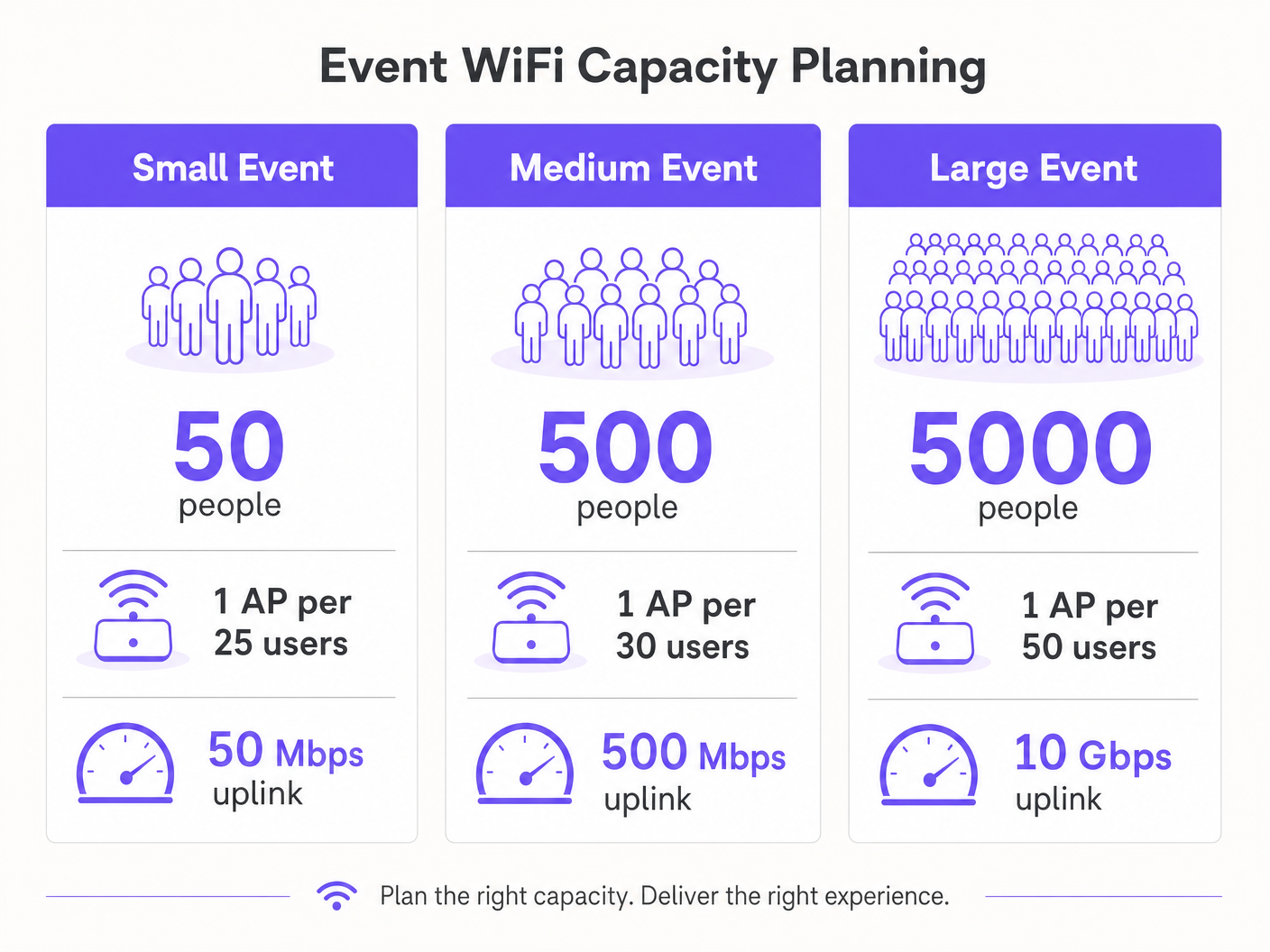
Per la pianificazione del throughput, una stima conservativa di 1-2 Mbps per utente attivo è appropriata per l'uso generale in conferenze o fiere. Per eventi con requisiti di live streaming o video di qualità broadcast — come lanci di prodotti o eventi stampa — prevedere 5-10 Mbps per utente attivo sulla VLAN di produzione. Il tuo uplink deve essere dimensionato per accogliere l'aggregato di tutte le VLAN contemporaneamente, con almeno il 20% di margine.
| Scala Evento | Partecipanti | AP Consigliati | Uplink Minimo | DHCP Scope |
|---|---|---|---|---|
| Piccolo | Fino a 100 | 4–6 | 50 Mbps | /24 |
| Medio | 100–500 | 15–25 | 200–500 Mbps | /23 |
| Grande | 500–2.000 | 50–100 | 1–2 Gbps | /21 |
| Aziendale | 2.000+ | 100+ | 5–10 Gbps | /20 o superiore |
Backhaul: La Fondazione Non Negoziabile
Nessuna infrastruttura wireless ben progettata può compensare un backhaul inadeguato. Per eventi con più di 200 partecipanti, una linea dedicata è l'unica soluzione di uplink appropriata. Una linea dedicata fornisce una connessione sincrona e non contesa con un SLA garantito — tipicamente il 99,95% di uptime — che è fondamentalmente diversa dalla banda larga condivisa e asimmetrica che la maggior parte delle sedi ha installato per le proprie operazioni.
Il provisioning di una linea dedicata richiede tipicamente un preavviso di quattro-sei settimane. Questo è il fallimento di pianificazione più comune nelle implementazioni WiFi per eventi: team che iniziano la progettazione della rete due settimane prima di un evento e scoprono di non poter ottenere un circuito dedicato in tempo. Per eventi in cui una linea dedicata è realmente impraticabile — festival all'aperto, strutture temporanee — una soluzione 4G/5G aggregata che utilizza più schede SIM di diversi operatori fornisce un'alternativa valida, sebbene con un throughput garantito inferiore e una latenza maggiore.
Architettura di Rete e Progettazione VLAN
Una rigorosa segmentazione della rete è un requisito sia di performance che di conformità. L'architettura minima raccomandata per qualsiasi implementazione di eventi utilizza tre VLAN:
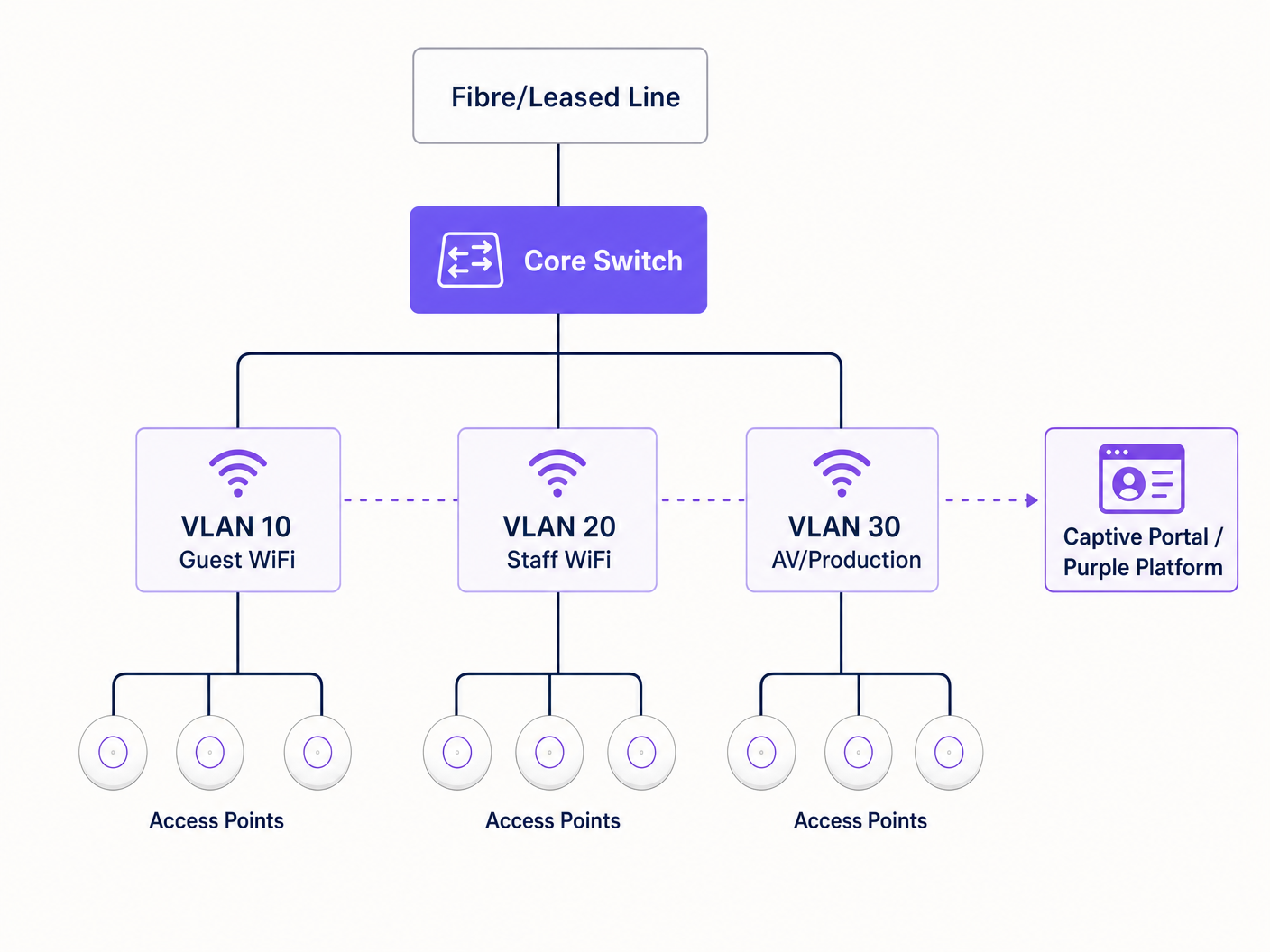
VLAN 10 — Guest WiFi: Tutto il traffico pubblico dei partecipanti. Questa VLAN si connette al captive portal per l'autenticazione e l'acquisizione dei dati. L'isolamento dei client deve essere abilitato per prevenire movimenti laterali tra i dispositivi. Il filtraggio DNS dovrebbe essere applicato per bloccare i domini dannosi — consulta la guida di Purple su come proteggere la tua rete con DNS e sicurezza robusti per i dettagli di implementazione.
VLAN 20 — Staff e Punto Vendita: Traffico operativo per il personale dell'evento, sistemi di biglietteria e terminali di pagamento con carta. Se i pagamenti con carta vengono elaborati su questa VLAN, si applica l'ambito PCI DSS e la VLAN deve essere completamente isolata dalla rete guest senza routing tra di esse.
VLAN 30 — AV e Produzione: Dedicata ad apparecchiature di trasmissione, sistemi di presentazione e personale di produzione. Questa VLAN richiede tipicamente il throughput garantito più elevato e la latenza più bassa, e dovrebbe essere provdotato di policy QoS che lo privilegiano rispetto al traffico degli ospiti.
Per eventi più grandi, VLAN aggiuntive per espositori, stampa e sistemi di sicurezza sono comuni. Ogni SSID dovrebbe essere mappato a una singola VLAN, e il routing inter-VLAN dovrebbe essere disabilitato sullo switch core a meno che non sia esplicitamente richiesto.
Pianificazione della Frequenza Radio
In ambienti ad alta densità, il comportamento predefinito della maggior parte degli AP aziendali — selezione automatica del canale e massima potenza di trasmissione — è attivamente dannoso. L'interferenza co-canale tra AP adiacenti sullo stesso canale degrada le prestazioni molto più di una leggera riduzione dell'area di copertura.
L'approccio corretto è assegnare manualmente i canali e ridurre la potenza di trasmissione. Sulla banda a 5 GHz, utilizzare i canali non sovrapposti disponibili nelle bande UNII-1 (36, 40, 44, 48), UNII-2 (52–64) e UNII-3 (149–165). Ridurre la potenza di trasmissione degli AP a 8–12 dBm in implementazioni dense. Questo crea celle più piccole e pulite con meno interferenze, il che migliora il throughput aggregato in tutta la sede.
Il band steering dovrebbe essere abilitato su tutti gli AP per allontanare i client compatibili con 5 GHz — che sono la stragrande maggioranza degli smartphone e laptop moderni — dallo spettro congestionato a 2.4 GHz. Riservare i 2.4 GHz per dispositivi IoT legacy e apparecchiature di accessibilità che non possono connettersi a 5 GHz.
Per eventi all'aperto, l'ambiente RF è fondamentalmente diverso. Senza pareti e soffitti a contenere il segnale, le celle di copertura sono più grandi e l'interferenza da implementazioni adiacenti o hotspot consumer è più difficile da controllare. Le antenne settoriali direzionali sono preferibili agli AP omnidirezionali in ambienti esterni, poiché consentono di focalizzare la copertura su zone specifiche — l'area del palco principale, la zona ristorazione, la coda di registrazione — piuttosto che trasmettere indiscriminatamente. Tutto l'hardware per esterni deve avere almeno un grado di protezione IP55; IP67 è preferibile per ambienti festival o esposti.
Architettura del Captive Portal e Conformità GDPR
Il Captive Portal è la prima interazione dell'utente con la rete del tuo evento e il tuo meccanismo primario sia per la conformità che per l'acquisizione dei dati. Un portale mal progettato che va in timeout, non riesce a reindirizzare correttamente su iOS, o presenta un flusso di consenso poco chiaro genererà un volume sproporzionato di richieste di supporto e minerà la fiducia dei partecipanti nella rete.
Da una prospettiva GDPR, qualsiasi raccolta di dati personali — indirizzi email, token di accesso social o identificatori di dispositivo — richiede una base giuridica, un'informativa sulla privacy chiara e un consenso esplicito per qualsiasi uso di marketing. Il consenso deve essere granulare: il consenso all'uso del WiFi non è lo stesso del consenso a ricevere comunicazioni di marketing. La piattaforma Guest WiFi di Purple gestisce questo flusso di consenso in modo nativo, presentando flussi di opt-in conformi e archiviando i registri di consenso con timestamp e indirizzi IP come richiesto dall'Articolo 7 del GDPR.
L'architettura tecnica del Captive Portal è importante per le prestazioni. Un portale ospitato nel cloud che reindirizza le richieste di autenticazione a un server esterno introduce latenza nel flusso di login. A carico di picco — quando centinaia di utenti si autenticano simultaneamente — questa latenza può causare timeout e login falliti. La piattaforma di Purple è progettata esattamente per questo caso d'uso, con un'infrastruttura auto-scalabile che gestisce carichi di autenticazione a raffica senza degrado.
Guida all'Implementazione
Fase 1: Sopralluogo e Modellazione della Capacità (8 Settimane Prima dell'Evento)
Iniziare con un sopralluogo fisico. Percorrere ogni area in cui saranno presenti i partecipanti e documentare altezze dei soffitti, materiali delle pareti, ostruzioni strutturali e infrastrutture esistenti (passaggi cavi, prese di corrente, porte dati). Utilizzare uno strumento di rilevamento WiFi — Ekahau Site Survey o iBwave sono gli standard del settore — per modellare la copertura prevista e identificare le zone morte prima di ordinare l'hardware.
Contemporaneamente, confermare l'infrastruttura di rete esistente della sede. Identificare le porte dati disponibili, la posizione del main distribution frame e la capacità di eventuali switch esistenti. Determinare se il cablaggio esistente della sede può supportare PoE+ (802.3at) per gli AP che si intendono implementare, o se è necessario portare i propri switch e cablaggi PoE.
Finalizzare il modello di capacità basato sul numero previsto di partecipanti, il programma dell'evento (una sessione keynote crea un profilo di carico molto diverso da un ricevimento di networking) e i requisiti di throughput di eventuali sistemi di produzione.
Fase 2: Approvvigionamento Hardware e Ordine Backhaul (6–8 Settimane Prima dell'Evento)
Ordinare la linea dedicata immediatamente dopo il sopralluogo. La finestra di provisioning di quattro-sei settimane è il percorso critico per l'intera implementazione. Se la sede dell'evento ha già una linea dedicata, negoziare l'allocazione di banda dedicata con il team IT della sede — non dare per scontato che l'infrastruttura esistente sarà resa disponibile.
Per l'hardware, la scelta tra acquisto e noleggio dipende dalla frequenza degli eventi. Per le organizzazioni che implementano WiFi per eventi più di quattro volte all'anno, la proprietà di un kit portatile — AP aziendali, uno switch PoE gestito, un router rack-mount e cablaggio — è più conveniente rispetto al noleggio ripetuto. Per eventi una tantum, le aziende specializzate nel noleggio di WiFi per eventi forniscono hardware preconfigurato con supporto in loco, il che riduce significativamente il rischio di implementazione.
Quando si specificano gli AP per il noleggio o l'acquisto, dare priorità all'hardware WiFi 6 (802.11ax) per qualsiasi implementazione superiore a 200 utenti. Le funzionalità OFDMA e BSS Colouring del WiFi 6 offrono miglioramenti significativi delle prestazioni in ambienti ad alta densità rispetto al WiFi 5 (802.11ac).
Fase 3: Configurazione e Test Pre-Evento (1–2 Settimane Prima dell'Evento)
Configurare tutte le apparecchiature di rete in un ambiente di staging prima di arrivare in loco. Questo include la configurazione VLAN sullo switch core, la mappatura SSID-to-VLAN sul controller wireless, la configurazione dello scope DHCP e l'integrazione del Captive Portal. Il testing in un ambiente di staging è molto più efficiente della risoluzione dei problemi il giorno dell'evento.
For capticonfigurazione del Captive Portal, integra la piattaforma di Purple in questa fase. Configura la splash page personalizzata, il metodo di autenticazione (e-mail, social login o SMS), il flusso di consenso e qualsiasi reindirizzamento post-autenticazione. Testa l'intero percorso utente su più tipi di dispositivi — iOS, Android, Windows e macOS gestiscono tutti il rilevamento del Captive Portal in modo diverso, e ognuno ha requisiti specifici affinché il meccanismo di reindirizzamento funzioni correttamente.
Conduci un test di carico utilizzando un simulatore di client WiFi per verificare che lo scope DHCP, il backend di autenticazione e l'uplink possano gestire il carico di picco previsto. Strumenti come Spirent o Ixia possono simulare centinaia di client WiFi concorrenti a questo scopo.
Fase 4: Implementazione in loco (il giorno prima dell'evento)
Arriva in loco con tempo sufficiente per completare l'installazione e i test prima che la sede apra ai partecipanti. Monta gli AP secondo il piano di rilevamento del sito — il montaggio a soffitto è preferibile per una copertura omnidirezionale; il montaggio a parete è accettabile dove l'accesso al soffitto non è disponibile. Installa ed etichetta tutti i cavi e documenta la posizione fisica di ogni AP con una fotografia e un'annotazione sulla planimetria.
Una volta installato tutto l'hardware, conduci un'indagine post-installazione utilizzando un laptop o un dispositivo di rilevamento dedicato per convalidare la copertura. Percorri l'intera area dei partecipanti e conferma una potenza del segnale di -65 dBm o migliore ovunque. Identifica e risolvi eventuali lacune di copertura prima dell'apertura dell'evento.
Testa il percorso utente end-to-end: collega un dispositivo di test a ogni SSID, completa l'autenticazione del Captive Portal e verifica che l'accesso a Internet sia disponibile. Testa i terminali di pagamento con carta sulla VLAN del personale. Conferma che l'attrezzatura AV sulla VLAN di produzione possa raggiungere tutte le destinazioni richieste.
Fase 5: Gestione e monitoraggio in loco
Durante l'evento, monitora la rete in tempo reale utilizzando la dashboard di gestione del controller wireless. Le metriche chiave da osservare sono: conteggi delle associazioni AP (segnala qualsiasi AP che superi l'80% della sua capacità client raccomandata), utilizzo del canale, utilizzo del pool DHCP e throughput dell'uplink. La piattaforma WiFi Analytics di Purple fornisce un ulteriore livello di visibilità sul comportamento degli utenti — tempo di permanenza, periodi di connessione di picco e tassi di conversione del portale — che è prezioso sia per la gestione in tempo reale che per la reportistica post-evento.
Definisci un chiaro processo di escalation per i problemi di rete. Designa un unico punto di contatto per tutte le richieste di supporto relative alla rete da parte del personale dell'evento e assicurati che l'ingegnere di rete in loco abbia accesso remoto a tutte le apparecchiature tramite una connessione di gestione out-of-band indipendente dalla rete guest.
Best Practice
Le seguenti raccomandazioni rappresentano le best practice neutrali rispetto al fornitore, derivate da implementazioni di eventi su larga scala in ambienti ospitalità , retail e conferenze.
Disabilita la trasmissione SSID per le reti del personale e di produzione. Non esiste alcuna ragione operativa per cui questi SSID debbano essere visibili ai partecipanti. Nasconderli riduce la superficie di attacco e previene connessioni accidentali.
Imposta tempi di lease DHCP aggressivi sulla VLAN guest. Un tempo di lease di 30-60 minuti assicura che gli indirizzi IP dei dispositivi disconnessi vengano prontamente recuperati. Questo è particolarmente importante negli eventi di più giorni in cui la popolazione dei partecipanti cambia significativamente tra le sessioni.
Implementa l'autenticazione 802.1X sulle VLAN del personale e di produzione. WPA3-Enterprise con 802.1X fornisce l'autenticazione per utente ed elimina il rischio che una chiave pre-condivisa venga compromessa. Per le reti guest, WPA3-Personal o una rete aperta con un Captive Portal è l'approccio standard.
Utilizza DNS-over-HTTPS o il filtraggio DNS sulla VLAN guest. Le reti pubbliche per eventi sono un bersaglio per il dirottamento DNS e gli attacchi di phishing. L'applicazione del filtraggio DNS — sia tramite il tuo provider upstream che tramite un servizio di sicurezza DNS dedicato — fornisce un significativo livello di protezione per i partecipanti. La piattaforma di Purple si integra con i provider di sicurezza DNS per applicare questo filtraggio a livello di Captive Portal.
Documenta tutto. Crea un diagramma di rete, un programma di cablaggio e una mappa di posizionamento degli AP prima di arrivare in loco. Questa documentazione è preziosa per la risoluzione dei problemi durante l'evento e per la pianificazione di future implementazioni nella stessa sede.
Per le implementazioni in aeroporti e hub di trasporto, si applicano considerazioni di sicurezza aggiuntive — la guida di Purple sulla sicurezza WiFi negli aeroporti copre il modello di minaccia specifico e le strategie di mitigazione rilevanti per ambienti pubblici ad alto traffico.
Risoluzione dei problemi e mitigazione dei rischi
Esaurimento del pool DHCP
Questa è la modalità di guasto più comune nel WiFi per eventi. I sintomi includono dispositivi che si connettono al WiFi ma non riescono a ottenere un indirizzo IP, o che ricevono un indirizzo APIPA (169.254.x.x). La soluzione è aumentare la dimensione dello scope DHCP e ridurre il tempo di lease. La prevenzione è semplice: dimensiona il tuo scope DHCP ad almeno il doppio del numero di client di picco previsto e imposta i tempi di lease a 30-60 minuti.
Sovraccarico del server di autenticazione
Al carico di picco, un gran numero di richieste di autenticazione simultanee può sovraccaricare un server RADIUS on-premises o un backend di Captive Portal. Questo si manifesta con accessi lenti o falliti. Le piattaforme cloud come Purple si auto-scalano per gestire carichi di picco, il che rappresenta un significativo vantaggio architettonico rispetto alle implementazioni on-premises per i casi d'uso degli eventi.
Interferenza co-canale
Se più AP operano sullo stesso canale in stretta prossimità, le prestazioni si degradano significativamente. I sintomi includono un throughput basso nonostante una buona potenza del segnale e alti tassi di ritrasmissione visibili nel controller wireless. La soluzione è rivedere le assegnazioni dei canali e assicurarsi che gli AP adiacenti siano su canali non sovrapposti. Ridurre la potenza di trasmissione aiuta anche a ridurre il raggio di interferenza di ciascun AP.
Errori di reindirizzamento del Captive Portal
Diverse opei sistemi di valutazione utilizzano diversi meccanismi per rilevare i captive portal. iOS utilizza un CNA (Captive Network Assistant) dedicato che effettua richieste HTTP a URL Apple specifici. Android utilizza un meccanismo simile con i server di controllo della connettività di Google. Se il tuo captive portal non risponde correttamente a queste sonde, il portale non si aprirà automaticamente e gli utenti dovranno navigare manualmente all'URL del portale. Assicurati che il tuo captive portal sia configurato per intercettare e rispondere a queste specifiche richieste di sonda.
Guasto dell'Uplink
Un singolo punto di guasto sull'uplink è il rischio con il maggiore impatto in una distribuzione per eventi. Mitiga questo rischio fornendo una connessione di backup 4G/5G che si attiva automaticamente se la linea dedicata primaria fallisce. La maggior parte dei router aziendali supporta il failover dual-WAN con tempi di commutazione inferiori al secondo. Testa il meccanismo di failover durante la configurazione pre-evento, non durante l'evento stesso.
ROI e Impatto Commerciale
Il WiFi per eventi è sempre più riconosciuto non solo come un'utilità ma come un asset di dati. Ogni partecipante che si connette alla rete del tuo evento e si autentica tramite un captive portal fornisce dati di prima parte — indirizzo email, informazioni demografiche e dati comportamentali — che hanno un valore commerciale significativo per gli organizzatori di eventi, gli operatori delle sedi e gli sponsor.
La piattaforma WiFi Analytics di Purple quantifica direttamente questo valore. I report post-evento forniscono dati su connessioni uniche totali, utenti simultanei di picco, durata media della sessione, tassi di conversione del portale e tassi di opt-in per le comunicazioni di marketing. Per una conferenza con 2.000 partecipanti e un tasso di opt-in del portale del 70%, ciò rappresenta 1.400 nuovi contatti di marketing con consenso acquisiti in un singolo evento — un costo per acquisizione difficile da eguagliare tramite qualsiasi altro canale.
Per gli operatori di sedi nel settore hospitality , lo strato di analisi fornisce valore aggiuntivo attraverso l'analisi del flusso di visitatori e la mappatura del tempo di permanenza. Comprendere quali aree di una sede attraggono il maggior coinvolgimento — e per quanto tempo — informa le decisioni di layout, il posizionamento di F&B e il posizionamento degli sponsor per eventi futuri.
Il calcolo del ROI per l'investimento nel WiFi per eventi dovrebbe tenere conto di tre categorie di ritorno: operativo (costi di supporto ridotti da una rete ben progettata rispetto a una ad-hoc), commerciale (acquisizione di dati di prima parte e opt-in di marketing) e reputazionale (il valore del marchio di una rete affidabile e veloce che migliora l'esperienza dei partecipanti). Per eventi su larga scala, il solo ritorno commerciale giustifica tipicamente l'investimento in infrastrutture entro due o tre eventi.
Definizioni chiave
Access Point (AP)
A hardware device that creates a wireless local area network (WLAN) by transmitting and receiving WiFi signals. In event deployments, enterprise-grade APs are used rather than consumer devices, as they support multiple SSIDs, VLAN tagging, centralised management, and higher concurrent client counts.
IT teams encounter AP specifications when sizing a deployment. Key parameters are the maximum concurrent client count (typically 100–200 for enterprise APs), the supported WiFi standard (802.11ax/WiFi 6 is current best practice), and the ingress protection rating (IP55+ for outdoor use).
VLAN (Virtual Local Area Network)
A logical network segment created within a physical network infrastructure using IEEE 802.1Q tagging. VLANs allow multiple isolated networks to share the same physical switches and cabling, with traffic between VLANs controlled by routing policies.
VLANs are the primary mechanism for network segmentation in event deployments. Separating guest, staff, and production traffic onto different VLANs is both a performance best practice and a PCI DSS compliance requirement where card payments are involved.
Captive Portal
A web page presented to users when they first connect to a WiFi network, requiring authentication or acceptance of terms before internet access is granted. Captive portals are the standard mechanism for guest WiFi access control, GDPR consent capture, and first-party data collection.
The captive portal is the user's first interaction with the event network. Its performance under load — particularly during peak authentication bursts — directly affects the attendee experience. Cloud-hosted portals like Purple's platform scale automatically to handle burst loads.
DHCP (Dynamic Host Configuration Protocol)
A network protocol that automatically assigns IP addresses to devices when they connect to a network. The DHCP server maintains a pool of available addresses (the scope) and assigns them to clients for a defined period (the lease time).
DHCP pool exhaustion — where all available IP addresses are in use and new devices cannot connect — is the most common failure mode in event WiFi. Correct scope sizing and lease time configuration are critical planning steps.
Leased Line
A dedicated, synchronous, uncontended data connection between two points, provided by a telecommunications carrier with a guaranteed Service Level Agreement (SLA). Unlike broadband, a leased line provides equal upload and download speeds and is not shared with other customers.
A leased line is the recommended uplink for event WiFi deployments above 200 attendees. The key differentiator from broadband is the SLA guarantee and the uncontended nature of the connection. Provisioning typically takes 4–6 weeks.
802.11ax (WiFi 6)
The current generation WiFi standard, introducing OFDMA (Orthogonal Frequency Division Multiple Access) and MU-MIMO (Multi-User Multiple Input Multiple Output) to improve performance in high-density environments. WiFi 6 allows an AP to serve multiple clients simultaneously on the same channel, rather than sequentially.
WiFi 6 is the recommended standard for event deployments above 200 users. Its high-density performance improvements over WiFi 5 (802.11ac) are most pronounced in exactly the kind of environment that event WiFi creates: many clients, high contention, mixed device types.
GDPR (General Data Protection Regulation)
EU regulation (2016/679) governing the collection, processing, and storage of personal data. For event WiFi, GDPR requires a lawful basis for data collection, a clear privacy notice, explicit and granular consent for marketing use, and the ability to demonstrate compliance through consent records.
Any event WiFi deployment that collects personal data — email addresses, social login tokens, or device identifiers — must comply with GDPR. The captive portal is the primary compliance enforcement point. Consent for WiFi access and consent for marketing communications must be separate, granular opt-ins.
PCI DSS (Payment Card Industry Data Security Standard)
A set of security standards mandating how organisations that process, store, or transmit card payment data must protect that data. PCI DSS requires that cardholder data environments are network-segmented from any public-facing systems.
Any event that processes card payments — ticketing, F&B, merchandise — must ensure that payment systems are on a network segment that is completely isolated from the guest WiFi network. Placing payment terminals on the same VLAN as public WiFi is a PCI DSS compliance failure.
Band Steering
A wireless network feature that actively encourages dual-band capable client devices to connect to the 5 GHz band rather than 2.4 GHz, by delaying or declining association requests on 2.4 GHz from clients that are capable of 5 GHz.
In high-density event environments, the 2.4 GHz spectrum quickly becomes saturated. Band steering is a standard configuration on enterprise APs that reduces 2.4 GHz congestion by pushing capable clients to the less congested 5 GHz band.
QoS (Quality of Service)
Network traffic management techniques that prioritise certain types of traffic over others, ensuring that high-priority applications receive the bandwidth and latency they require even when the network is congested.
QoS is used in event deployments to guarantee bandwidth for production and press VLANs, and to limit the per-user throughput on the guest VLAN to prevent individual heavy users from degrading the experience for all attendees.
Esempi pratici
A 3,000-seat conference centre is hosting a two-day technology summit. The event includes a 2,500-person keynote hall, 12 breakout rooms of 50–150 people each, an exhibition floor with 80 exhibitor stands, and a press room with 30 journalists requiring reliable high-throughput connectivity. The venue has existing Cat6 cabling throughout but only a 200 Mbps shared broadband connection. How should the network be designed?
The first priority is backhaul. A 200 Mbps shared broadband connection is wholly inadequate for this event. A dedicated leased line of at least 2 Gbps should be ordered immediately — this is the critical path item with a 4–6 week lead time. A 4G/5G bonded backup should be provisioned as a failover.
For the wireless architecture, the keynote hall requires the most careful planning. With 2,500 potential concurrent users, plan for 60–80 APs in the hall alone, deployed at high density with reduced transmit power (8–10 dBm) and manually assigned channels. WiFi 6 APs are essential at this scale.
VLAN design: VLAN 10 (Guest/Attendee), VLAN 20 (Staff/Registration), VLAN 30 (Exhibitor), VLAN 40 (Press/Production), VLAN 50 (AV/Broadcast). The press VLAN should have guaranteed bandwidth allocation via QoS — budget 5 Mbps per journalist for video upload capability.
For exhibitors, provision a separate SSID on VLAN 30 with WPA2-PSK and a unique password per stand distributed at registration. This prevents exhibitors from accessing each other's networks while keeping the provisioning process manageable.
DHCP: Use a /20 scope for the guest VLAN (4,094 usable addresses), /24 for each operational VLAN. Set guest lease time to 30 minutes.
Captive portal: Deploy Purple's Guest WiFi platform on the attendee VLAN with email or social login authentication, a branded splash page, and explicit GDPR consent for post-event marketing. Estimated opt-in yield at 65–70%: approximately 1,600–1,750 consented marketing contacts.
A major retail chain is running a three-day outdoor pop-up event in a city centre square. Expected footfall is 500–800 visitors per day. The event includes a product demonstration area, a payment kiosk, and a social media activation zone where visitors are encouraged to share content. There is no fixed infrastructure — no cabling, no power, no existing network. How do you provision connectivity?
With no fixed infrastructure, the deployment must be entirely self-contained. The network stack consists of: a 5G bonded router (using SIM cards from two different carriers for resilience) providing the uplink; a managed PoE switch powered from a generator or portable UPS; and outdoor-rated WiFi 6 APs with IP67 ingress protection mounted on temporary rigging or event structures.
For an outdoor environment, use directional sector antennas rather than omnidirectional APs to focus coverage on the event footprint and minimise interference with the surrounding area. Position APs at height — 4–6 metres — to maximise coverage radius while reducing ground-level interference.
VLAN design: VLAN 10 (Visitor WiFi with captive portal), VLAN 20 (Staff and Payment Kiosk — PCI DSS scoped), VLAN 30 (Social Media Activation Zone — higher bandwidth allocation). The payment kiosk VLAN must be completely isolated from visitor traffic and should use a wired connection to the PoE switch rather than WiFi where possible.
For the social media activation zone, configure QoS to prioritise upload traffic (Instagram, TikTok uploads are upload-heavy) and ensure the uplink has sufficient headroom. At 800 concurrent visitors with 10% actively uploading content at any given time, budget 5 Mbps per active uploader: 80 users × 5 Mbps = 400 Mbps upload capacity required.
Captive portal: Deploy Purple's platform with a branded splash page tied to the campaign. Collect email addresses and social handles, with opt-in for post-event follow-up. The social media activation zone can be configured to automatically redirect authenticated users to the campaign hashtag page.
For weather resilience, all equipment should be housed in weatherproof enclosures rated to IP65 or above. Have a spare AP and spare PoE injector on site for rapid replacement.
Domande di esercitazione
Q1. You are the IT director for a conference centre that hosts 20 events per year, ranging from 50-person boardroom meetings to 1,500-person annual conferences. The venue currently has a 500 Mbps shared broadband connection and a mix of consumer-grade WiFi routers installed by the previous IT team. Attendee complaints about WiFi quality are increasing. What is your infrastructure upgrade roadmap, and what is the business case for the investment?
Suggerimento: Consider the range of event sizes and the different network requirements for each. Think about whether a single infrastructure can serve all event types, or whether a tiered approach is needed. The business case should address both the cost of the current situation (complaints, lost business) and the revenue opportunity (data capture, premium WiFi as a service offering).
Visualizza risposta modello
The upgrade roadmap has three components. First, replace the shared broadband with a dedicated leased line of at least 1 Gbps — this is the single highest-impact change and addresses the root cause of most performance complaints. Second, replace the consumer WiFi routers with a managed enterprise wireless infrastructure: a wireless controller, enterprise-grade APs deployed according to a proper site survey, and a managed PoE switch. For a venue of this size, 20–30 APs covering all event spaces is a reasonable starting point. Third, deploy a captive portal platform — Purple's Guest WiFi solution — to provide branded authentication, GDPR-compliant data capture, and analytics reporting.
The business case has two components. The cost of the current situation includes reputational damage from poor WiFi (quantifiable through attendee feedback scores), potential lost bookings from event organisers who specify WiFi quality in their venue requirements, and the IT team time spent responding to complaints. The revenue opportunity includes first-party data capture from every event (at 20 events per year with average 500 attendees and 65% opt-in, that is 6,500 new marketing contacts per year), the ability to offer premium WiFi as a billable service to event organisers, and the analytics data that informs venue layout and F&B decisions.
Q2. An outdoor music festival with 8,000 attendees has hired your company to provide event WiFi services. The site is a greenfield location with no existing infrastructure — no power, no cabling, no fixed structures. The event runs for three days. What are the five highest-risk items in this deployment, and how do you mitigate each one?
Suggerimento: Think about the dependencies that are most likely to fail in an outdoor, infrastructure-free environment. Consider weather, power, connectivity, hardware failure, and human factors. For each risk, think about both prevention and contingency.
Visualizza risposta modello
Risk 1 — Uplink failure: With no fixed infrastructure, a leased line is not an option. The mitigation is a bonded 5G solution using SIM cards from at least two different carriers, with automatic failover. Budget for 4–5 SIM cards across carriers with the best coverage at the specific site location (verify this with a site visit before the event). Risk 2 — Power failure: All network equipment runs from generators. The mitigation is a UPS (uninterruptible power supply) between the generator and the network equipment, providing 15–30 minutes of runtime during generator transitions or refuelling. Have a spare generator on site. Risk 3 — Hardware failure: In an outdoor environment, hardware failure rates are higher due to weather, vibration, and physical damage. Bring 20% spare hardware — spare APs, spare PoE injectors, spare patch cables. Document the configuration of every device so that a replacement can be provisioned in under 10 minutes. Risk 4 — Weather damage: All outdoor hardware must be IP67 rated. All cabling must be run in conduit or cable management rated for outdoor use. All equipment enclosures must be sealed and elevated off the ground to prevent water ingress. Risk 5 — DHCP exhaustion: At 8,000 attendees, a standard DHCP scope will fail. Configure a /19 subnet (8,190 usable addresses) with a 30-minute lease time. Monitor the DHCP pool utilisation in real time and have a plan to expand the scope if utilisation exceeds 80%.
Q3. A legal conference is using your event WiFi service. The event organiser wants to collect attendee email addresses through the captive portal and use them for post-event marketing. The event has attendees from both the UK and the EU. What GDPR compliance requirements apply, and how should the captive portal be configured to meet them?
Suggerimento: Consider the distinction between the lawful basis for providing WiFi access and the lawful basis for marketing communications. Think about what information must be presented to users, what consent records must be kept, and how the rights of data subjects are handled.
Visualizza risposta modello
Under GDPR (and the UK GDPR post-Brexit), the collection of email addresses and their use for marketing requires explicit, informed, and freely given consent. The captive portal must be configured as follows. First, the splash page must include a clear privacy notice that identifies the data controller (the event organiser), specifies what data is collected, how it will be used, and how long it will be retained. Second, consent for WiFi access and consent for marketing communications must be separate opt-ins — a single checkbox that conflates the two is non-compliant. Users must be able to access the WiFi without consenting to marketing. Third, the marketing opt-in checkbox must be unchecked by default (no pre-ticked boxes). Fourth, the consent record — including the timestamp, the IP address, and the specific consent text presented — must be stored and retrievable, as required by Article 7(1) GDPR. Fifth, the privacy notice must include information about data subject rights (access, erasure, portability) and provide a contact mechanism for exercising those rights. Purple's Guest WiFi platform handles all of these requirements natively, storing consent records with full audit trail and providing a compliant consent workflow out of the box. For a UK/EU mixed audience, the same GDPR standard applies to both — UK GDPR and EU GDPR are substantively identical in their consent requirements.
Continua a leggere questa serie
Cos'è una Probe Request? Capire come i dispositivi scoprono le reti
Questa guida di riferimento tecnico offre un'analisi approfondita delle probe request IEEE 802.11, della scansione attiva versus passiva e dell'impatto della randomizzazione MAC sull'analisi dei dati dei luoghi. Fornisce strategie di implementazione attuabili per gli architetti di rete al fine di ottimizzare le implementazioni ad alta densità, mitigare le probe storm e garantire una raccolta dati accurata e conforme al GDPR utilizzando livelli di identità autenticati.
Come Risolvere il WiFi Lento Senza Aggiornare il Tuo Piano Internet
Una guida tecnica di riferimento completa per IT managers e network architects sull'ottimizzazione delle prestazioni WiFi aziendali senza aumentare la ISP bandwidth. Copre RF tuning, la gestione della densità dei client, l'implementazione di QoS e come sfruttare WiFi analytics per diagnosticare e risolvere i colli di bottiglia.
La Checklist per la Migrazione da NAC Legacy a NAC Cloud-Native
Questa guida tecnica di riferimento autorevole fornisce una checklist strutturata in tre fasi per la migrazione da Network Access Control (NAC) legacy a un'architettura cloud-native. Fornisce a manager IT e architetti di rete strategie attuabili per gestire l'integrazione dell'identità, la parità delle policy e la conformità senza interrompere le operazioni della sede.