
WiFi per Musei e Gallerie: Creare un'Esperienza del Visitatore Connessa
Questa guida fornisce un progetto tecnico completo per l'implementazione di WiFi ad alta densità in musei e gallerie. Tratta l'architettura di rete, le strategie di coinvolgimento dei visitatori e come sfruttare l'analisi WiFi per aumentare il ROI e l'efficienza operativa.
Ascolta questa guida
Visualizza trascrizione del podcast
Sintesi Esecutiva
Per i musei e le gallerie moderni, il WiFi non è più un'utilità passiva; è l'infrastruttura fondamentale del percorso digitale del visitatore. Mentre le istituzioni culturali passano da esposizioni statiche ad ambienti interattivi e ricchi di contenuti multimediali, la domanda sulle reti wireless è cresciuta esponenzialmente. Questa guida fornisce a responsabili IT, architetti di rete e direttori delle operazioni delle sedi un progetto pratico per la progettazione e l'implementazione di reti WiFi ad alta densità in complessi contesti culturali.
Esploreremo le specifiche sfide RF presentate da edifici storici e dall'elevato afflusso di pubblico, i requisiti architettonici per una connettività senza interruzioni e come piattaforme come Purple possano trasformare un centro di costo in una risorsa strategica attraverso l'onboarding Guest WiFi e l'analisi WiFi Analytics avanzata. Implementando le strategie qui delineate, le sedi possono fornire connettività affidabile per la biglietteria digitale, l'orientamento e le mostre interattive, acquisendo al contempo dati di prima parte utilizzabili per aumentare l'adesione e i ricavi.
Approfondimento Tecnico
La Sfida RF nelle Istituzioni Culturali
I musei presentano ambienti RF (Radio Frequenza) unici. A differenza degli spazi ufficio standard, queste sedi spesso presentano spesse pareti in pietra, ampie strutture metalliche e layout estesi su più livelli. Queste caratteristiche fisiche causano una significativa attenuazione del segnale e interferenze multipath.
Inoltre, la densità degli utenti può fluttuare notevolmente. Una mostra speciale potrebbe attrarre migliaia di visitatori in uno spazio confinato, sovraccaricando una rete mal progettata. Per mitigare questi problemi, è necessaria un'architettura di rete robusta e ad alta densità.
Architettura di Rete ad Alta Densità
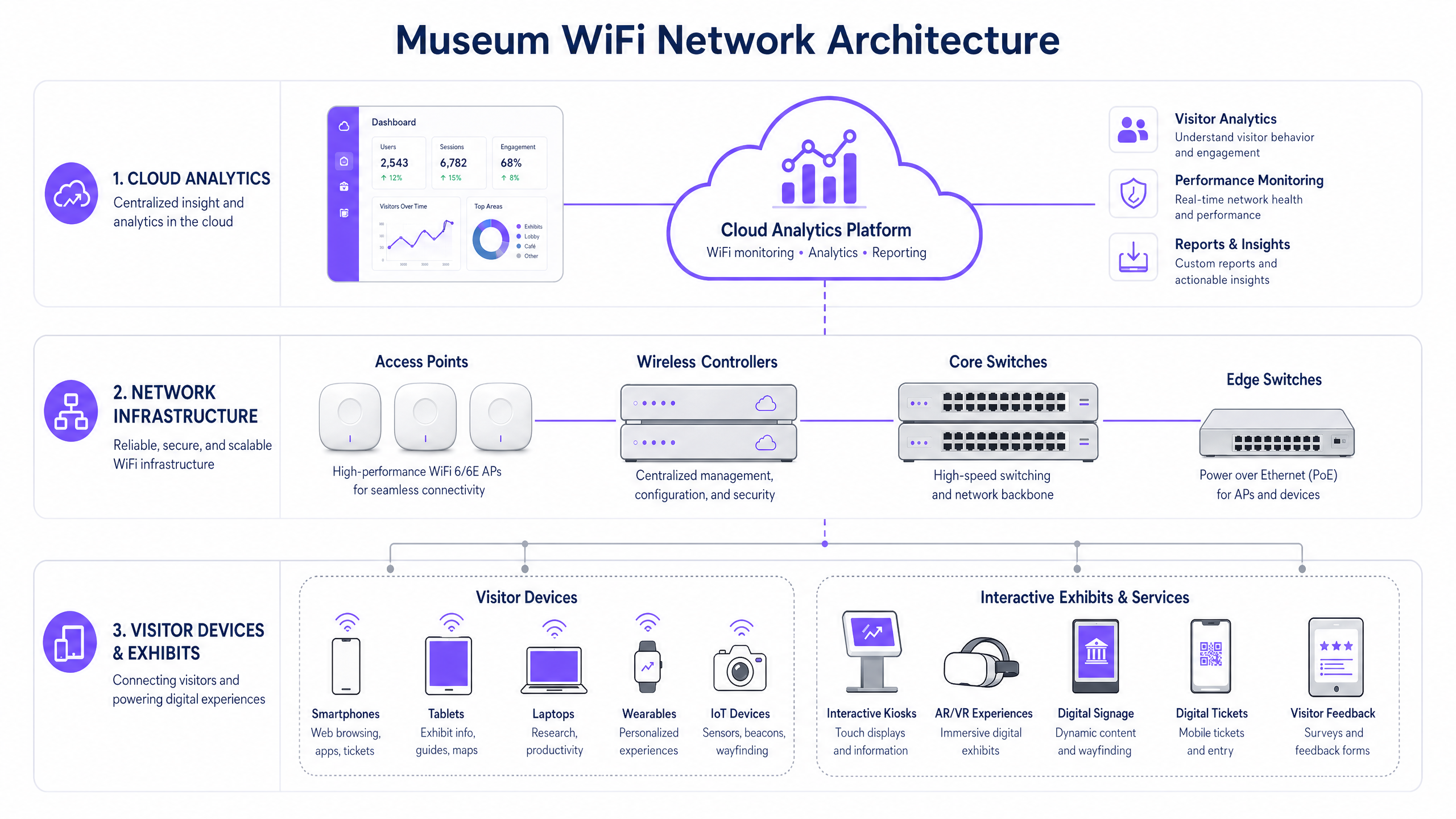
Per supportare un'esperienza del visitatore connessa, l'infrastruttura sottostante deve essere resiliente e scalabile.
- Standard WiFi 6/6E: L'implementazione di IEEE 802.11ax (WiFi 6) o WiFi 6E è fondamentale. Questi standard introducono OFDMA (Orthogonal Frequency-Division Multiple Access) e MU-MIMO (Multi-User, Multiple Input, Multiple Output), che migliorano drasticamente l'efficienza della rete in ambienti ad alta densità consentendo ai punti di accesso di comunicare con più dispositivi contemporaneamente.
- Densità e Posizionamento degli Access Point (AP): Un'indagine predittiva del sito è irrinunciabile. Gli AP devono essere posizionati strategicamente per fornire una copertura sovrapposta senza causare interferenze co-canale. Negli edifici storici dove il cablaggio è limitato, potrebbero essere necessari il mesh networking o ponti wireless punto-punto, sebbene le connessioni cablate siano sempre preferite per l'infrastruttura core.
- Segregazione della Rete: Il traffico dei visitatori deve essere rigorosamente segregato dalle reti aziendali, dai sistemi Point of Sale (POS) e dai Building Management Systems (BMS). Ciò si ottiene tipicamente utilizzando VLAN (Virtual Local Area Networks) e robuste politiche firewall per garantire sicurezza e conformità.
Guida all'Implementazione
L'implementazione di una rete WiFi museale richiede un'attenta pianificazione per bilanciare prestazioni, estetica ed esperienza utente.
Fase 1: L'Esperienza di Onboarding Digitale
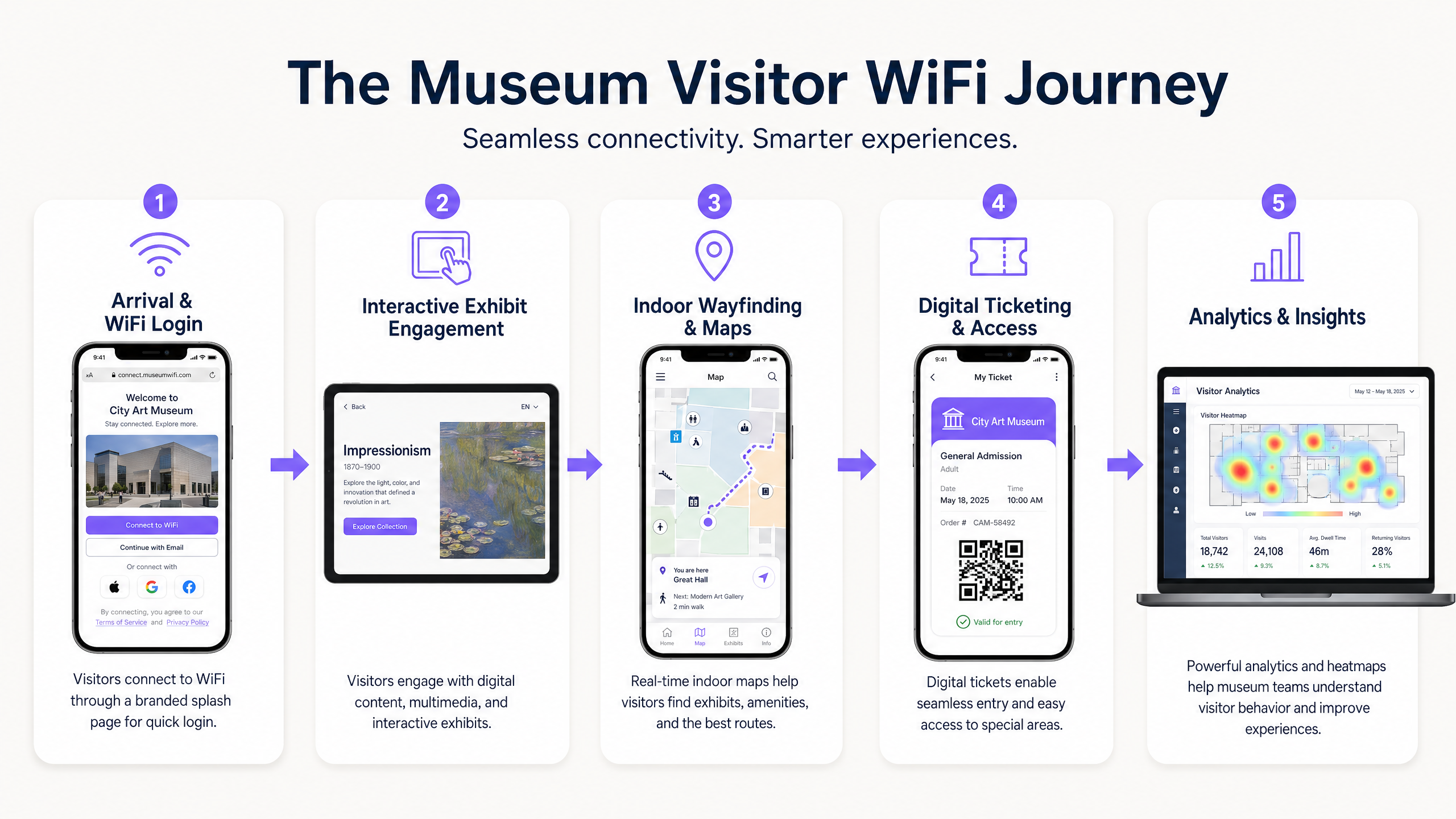
Il captive portal è il primo punto di contatto digitale. Deve essere senza attriti ma sicuro. L'integrazione di una soluzione come Guest WiFi di Purple consente l'autenticazione basata su profilo. I visitatori possono autenticarsi tramite social media, email o protocolli senza interruzioni come OpenRoaming. Ciò riduce l'attrito e incoraggia l'adozione della rete, il che è cruciale per la raccolta dei dati.
Fase 2: Abilitare il Percorso del Visitatore
Una volta connessa, la rete deve supportare l'intero percorso del visitatore:
- Biglietteria Digitale e Accesso: L'alta disponibilità ai punti di ingresso è essenziale per la scansione dei biglietti digitali senza ritardi.
- Mostre Interattive: La larghezza di banda dedicata deve essere allocata per lo streaming multimediale e le esperienze AR/VR associate alle mostre.
- Orientamento Interno: Utilizzando la rete WiFi in combinazione con i beacon BLE (Bluetooth Low Energy), le sedi possono offrire una navigazione interna precisa, guidando i visitatori attraverso complessi layout di gallerie.
Fase 3: Acquisizione Dati e Analisi
Il vero valore della rete risiede nei dati che genera. L'implementazione di WiFi Analytics consente ai team IT e marketing di visualizzare il comportamento dei visitatori. Le heatmap possono rivelare mostre popolari, tempi di permanenza e schemi di flusso. Questi dati sono inestimabili per ottimizzare i layout delle sedi, programmare il personale e personalizzare le campagne di marketing.
Migliori Pratiche
- Dare Priorità a Sicurezza e Conformità: Assicurarsi che la rete sia conforme alle normative sulla protezione dei dati come il GDPR. Quando si acquisiscono dati dei visitatori, i meccanismi di opt-in devono essere trasparenti e chiaramente comunicati. Proteggere la rete utilizzando la crittografia WPA3 ove possibile e imporre una rigorosa isolamento tra il traffico guest e quello aziendale.
- Implementare la Gestione della Larghezza di Banda: Utilizzare i protocolli Quality of Service (QoS) per dare priorità al traffico critico (ad esempio, scanner di biglietti) rispetto alla navigazione generale degli ospiti. Implementare limiti di larghezza di banda per utente per evitare che un singolo utente degradi l'esperienza per gli altri.
- Monitoraggio Continuo: Le prestazioni della rete non sono statiche. Utilizzare dashboard di gestione basate su cloud per monitorare lo stato degli AP, i tassi di connessione dei client e la produttività complessiva della rete in tempo reale.
Risoluzione dei Problemi e Mitigazione dei Rischi
Anche le reti meglio progettate incontrano problemi. Le modalità di guasto comuni include:
- Interferenza Co-Canale (CCI): In implementazioni dense, gli AP sullo stesso canale possono interferire tra loro. Mitigazione: Implementare l'assegnazione dinamica dei canali e regolare attentamente i livelli di potenza di trasmissione.
- Guasti del Captive Portal: Se il captive portal non si carica, i visitatori non possono connettersi. Mitigazione: Garantire che l'infrastruttura DNS sia robusta e considerare l'implementazione di un accesso 'walled garden' per i servizi essenziali anche prima dell'autenticazione completa. (Vedi: Proteggi la tua rete con DNS e sicurezza robusti ).
- Incompatibilità dei Dispositivi: La rete deve supportare una vasta gamma di dispositivi client, inclusi hardware legacy più datati. Mitigazione: Mantenere il supporto per gli standard più vecchi (es. 802.11ac) ottimizzando al contempo per i dispositivi moderni, assicurando che il minimo comune denominatore non rallenti le prestazioni complessive della rete.
ROI e Impatto sul Business
L'implementazione di una rete WiFi di livello enterprise è un investimento significativo. Tuttavia, il ROI è misurabile su diverse dimensioni:
- Efficienza Operativa: La raccolta dati automatizzata riduce la necessità di sondaggi manuali sui visitatori. Il wayfinding indoor riduce l'onere per il personale di fornire indicazioni.
- Aumento dei Ricavi: Campagne di marketing mirate, alimentate da dati di prima parte acquisiti tramite Guest WiFi , possono favorire upgrade di abbonamento, vendite di biglietti per mostre speciali e acquisti al dettaglio/caffetteria.
- Miglioramento della Soddisfazione dei Visitatori: Un'esperienza digitale senza interruzioni si correla direttamente con punteggi di soddisfazione dei visitatori più elevati e recensioni online positive, stimolando la partecipazione futura.
Considerando la rete WiFi non solo come una spesa IT, ma come una piattaforma strategica per l'engagement e l'analisi, musei e gallerie possono migliorare significativamente il loro successo operativo e commerciale.
Definizioni chiave
High-Density Environment
A physical space where a large number of client devices are connecting to the network simultaneously, requiring specialized RF design and AP configuration.
Museum atriums, special exhibition halls, and auditoriums are prime examples where standard office WiFi designs will fail.
Captive Portal
A web page that the user of a public-access network is obliged to view and interact with before access is granted.
This is the primary tool for visitor onboarding and data capture in a museum setting, often integrated with CRM systems.
WiFi 6 (802.11ax)
The current standard for wireless networks, designed specifically to improve efficiency and capacity in high-density environments.
Essential for modern museum deployments to handle the multitude of visitor smartphones and interactive exhibit devices.
VLAN (Virtual Local Area Network)
A logical grouping of devices on a network, allowing for the segmentation of traffic even if devices share the same physical infrastructure.
Used to separate visitor WiFi traffic from sensitive corporate or ticketing data, ensuring security.
Band Steering
A feature that encourages dual-band capable clients to connect to the less congested 5GHz or 6GHz bands rather than the crowded 2.4GHz band.
Crucial for optimizing performance in crowded museum spaces.
First-Party Data
Information a company collects directly from its customers and owns.
Gathered via the WiFi captive portal, this data is highly valuable for targeted marketing and understanding the visitor demographic.
RSSI (Received Signal Strength Indicator)
A measurement of the power present in a received radio signal.
Used during site surveys and troubleshooting to determine if a visitor has sufficient signal strength to maintain a reliable connection.
OpenRoaming
A roaming federation service enabling an automatic and secure WiFi experience globally.
Allows visitors to seamlessly connect to the museum WiFi without manually interacting with a captive portal, improving the user experience.
Esempi pratici
A historic gallery with strict preservation orders needs to deploy WiFi to support a new AR (Augmented Reality) exhibit. Running new CAT6 cabling to the exhibit space is prohibited. How should the network architect proceed?
The architect should design a wireless mesh network or utilize point-to-point wireless bridges. High-capacity APs (WiFi 6) should be placed at the perimeter where cabling is permitted. These edge APs will wirelessly backhaul traffic from mesh APs located near the AR exhibit. The mesh APs should be housed in aesthetically appropriate, non-metallic enclosures to comply with preservation orders.
A large science museum is experiencing network congestion in its main atrium during peak weekend hours, leading to slow captive portal load times and visitor complaints.
The IT team should implement several optimization steps: 1) Enable band steering to force capable devices onto the less congested 5GHz band. 2) Implement strict per-user bandwidth limits (e.g., 5 Mbps down/up) to prevent bandwidth hogging. 3) Review the AP deployment in the atrium; if APs are maxed out on client connections, additional APs with directional antennas may be required to sectorize the coverage area and increase overall capacity.
Domande di esercitazione
Q1. A museum is planning a temporary outdoor exhibit in an adjacent courtyard. The exhibit will require reliable WiFi for digital interactive kiosks. Running cabling to the courtyard is not feasible. What is the most appropriate wireless architecture?
Suggerimento: Consider the need for reliable backhaul for the kiosks without physical cabling.
Visualizza risposta modello
Deploy a point-to-multipoint wireless bridge from the main building to the courtyard. Use outdoor-rated, directional antennas on the building to establish a strong backhaul link to outdoor APs in the courtyard. These outdoor APs will then provide localized WiFi coverage for the kiosks.
Q2. The marketing director wants to use WiFi analytics to track how many visitors enter a specific, small gallery room (5m x 5m). Currently, there is one AP in the adjacent hallway providing coverage to the room. Will this setup provide accurate location data for that specific room?
Suggerimento: Think about how location tracking works using WiFi and the requirements for accuracy.
Visualizza risposta modello
No, it will likely not provide accurate data. WiFi location analytics generally require trilateration, meaning a client device needs to be heard by at least three APs to accurately determine its position. A single AP in an adjacent hallway can only determine that the device is nearby, not its precise location within a small 5x5m room. Additional APs or BLE beacons would be required for precise indoor location tracking.
Q3. During a busy weekend, the IT dashboard shows that the 2.4GHz band is heavily congested, while the 5GHz band has plenty of capacity. However, many dual-band capable devices are still connecting to 2.4GHz. What configuration change should be implemented?
Suggerimento: What feature forces or encourages capable devices to use a specific frequency band?
Visualizza risposta modello
Enable and aggressively configure 'Band Steering' on the wireless controller. This feature will actively encourage dual-band capable clients to connect to the 5GHz band, freeing up airtime on the 2.4GHz band for legacy devices that only support 2.4GHz.
Continua a leggere questa serie
Cos'è una Probe Request? Capire come i dispositivi scoprono le reti
Questa guida di riferimento tecnico offre un'analisi approfondita delle probe request IEEE 802.11, della scansione attiva versus passiva e dell'impatto della randomizzazione MAC sull'analisi dei dati dei luoghi. Fornisce strategie di implementazione attuabili per gli architetti di rete al fine di ottimizzare le implementazioni ad alta densità, mitigare le probe storm e garantire una raccolta dati accurata e conforme al GDPR utilizzando livelli di identità autenticati.
Come Risolvere il WiFi Lento Senza Aggiornare il Tuo Piano Internet
Una guida tecnica di riferimento completa per IT managers e network architects sull'ottimizzazione delle prestazioni WiFi aziendali senza aumentare la ISP bandwidth. Copre RF tuning, la gestione della densità dei client, l'implementazione di QoS e come sfruttare WiFi analytics per diagnosticare e risolvere i colli di bottiglia.
La Checklist per la Migrazione da NAC Legacy a NAC Cloud-Native
Questa guida tecnica di riferimento autorevole fornisce una checklist strutturata in tre fasi per la migrazione da Network Access Control (NAC) legacy a un'architettura cloud-native. Fornisce a manager IT e architetti di rete strategie attuabili per gestire l'integrazione dell'identità, la parità delle policy e la conformità senza interrompere le operazioni della sede.