
WPA2-Enterprise vs Personal per appartamenti e co-working
Questa guida tecnica di riferimento valuta WPA2-Enterprise rispetto a WPA2-Personal per ambienti multi-tenant come appartamenti e spazi di co-working. Fornisce ai network architect e ai responsabili IT informazioni pratiche sull'autenticazione 802.1X, l'assegnazione dinamica delle VLAN e la conformità della sicurezza, dimostrando perché le password condivise introducono rischi inaccettabili nei moderni spazi condivisi. I gestori delle strutture troveranno linee guida concrete per l'implementazione, casi di studio reali e analisi del ROI per supportare una decisione di migrazione in questo trimestre.
Video overview
Ascolta questa guida
Visualizza trascrizione del podcast
Parte della nostra serie principale: Guida al WiFi Multi-Tenant →
Sintesi Esecutiva
Per i CTO, i network architect e i direttori operativi che gestiscono ambienti multi-tenant - come spazi di co-working e complessi residenziali ad alta densità - affidarsi a WPA2-Personal (Pre-Shared Key o PSK) rappresenta un rischio operativo e di sicurezza. Sebbene WPA2-Personal sia sufficiente per un'abitazione monofamiliare, l'implementazione in ambienti in cui più utenti non correlati condividono lo stesso spazio aereo fisico crea gravi vulnerabilità. Una password condivisa significa un rischio condiviso: una chiave compromessa mette a rischio l'intero segmento di rete, non soddisfacendo gli standard di conformità di base come PCI-DSS e GDPR.
Questa guida fornisce un confronto tecnico completo tra WPA2-Personal e WPA2-Enterprise (802.1X). Dettaglia la necessità architetturale di un'autenticazione individualizzata, i meccanismi di assegnazione dinamica delle VLAN per l'isolamento dei tenant e l'impatto aziendale concreto della transizione a una postura di sicurezza di livello enterprise. Integrando la gestione delle identità con l'accesso alla rete, i team IT possono ottenere un controllo granulare, la revoca immediata delle credenziali e una completa verificabilità - proteggendo in ultima analisi sia la reputazione della struttura che i dati dei tenant.
Analisi tecnica approfondita: WPA2-Personal vs WPA2-Enterprise
Vulnerabilità della chiave pre-condivisa (PSK)
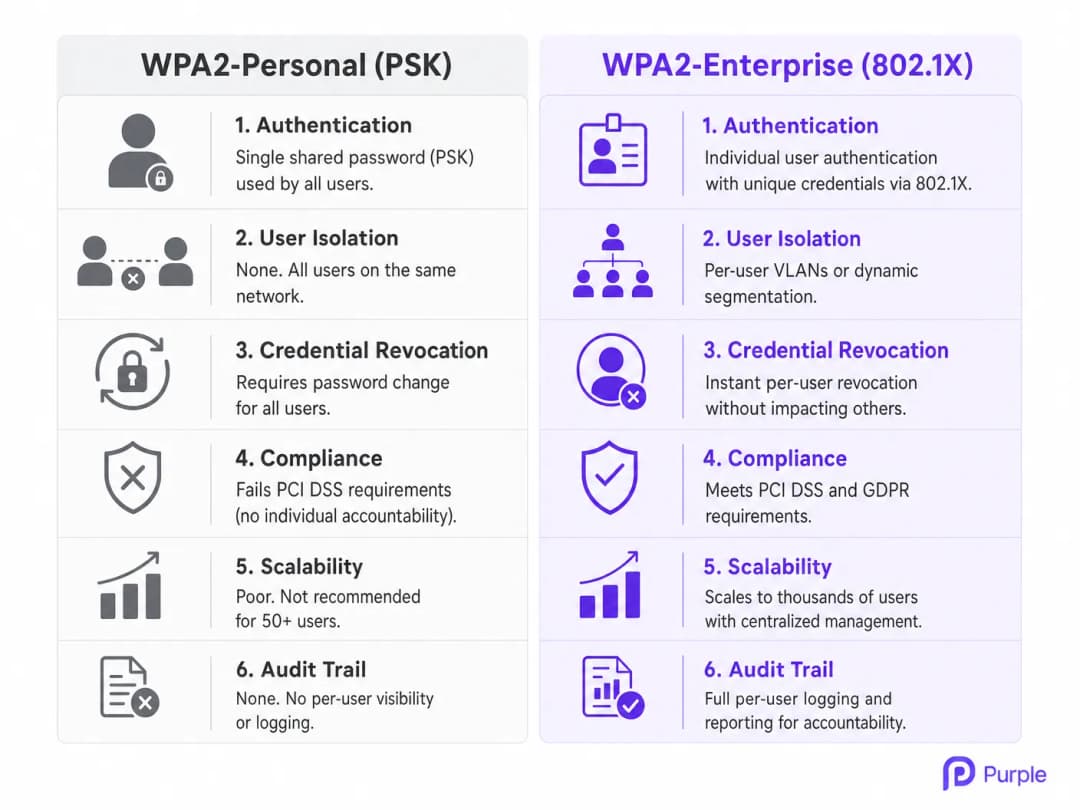
Il WPA2-Personal si basa su una singola chiave pre-condivisa (PSK) per autenticare tutti gli utenti che si connettono a un determinato SSID. In un ambiente multi-tenant, questa architettura è fondamentalmente carente. Quando un membro di un co-working o un residente di un appartamento si connette, condivide la stessa base crittografica di ogni altro utente su quella rete. Questa mancanza di isolamento significa che qualsiasi utente in possesso della PSK può potenzialmente decifrare il traffico altrui, intercettare dati sensibili o lanciare attacchi laterali contro i dispositivi sulla stessa sottorete.
Inoltre, il sovraccarico operativo della gestione delle PSK su larga scala è insostenibile. Quando un tenant se ne va, l'unico modo per revocare il suo accesso consiste nel cambiare la PSK per l'intera rete, costringendo tutti i restanti tenant a eseguire nuovamente l'autenticazione. Questo attrito porta a una pratica comune e pericolosa: la password non viene mai cambiata, garantendo a ex inquilini e visitatori non autorizzati un accesso permanente. Per i proprietari del settore Retail e gli operatori dell'hospitality Hospitality che gestiscono decine di tenant, questo non è un rischio teorico - si tratta di un problema operativo quotidiano.
Architettura 802.1X: sicurezza individualizzata
Basato sullo standard IEEE 802.1X, il WPA2-Enterprise sposta radicalmente il modello di sicurezza dall'autenticazione a livello di rete all'autenticazione a livello di utente. Invece di una password condivisa, ogni utente (o dispositivo) si autentica utilizzando credenziali uniche - solitamente un nome utente e una password, o un certificato digitale - convalidate rispetto a un archivio di identità centrale come Active Directory, LDAP o un servizio RADIUS basato su cloud.
Questa architettura comprende tre componenti principali:
Supplicant: Il dispositivo client che tenta di connettersi (laptop, smartphone).
Authenticator: L'access point (AP) WiFi o lo switch di rete che controlla l'accesso fisico alla rete.
Authentication Server: Il server RADIUS che convalida le credenziali e autorizza l'accesso.
Quando un supplicant si associa all'AP, l'AP blocca tutto il traffico ad eccezione dei messaggi Extensible Authentication Protocol (EAP). L'AP inoltra le credenziali dell'utente al server RADIUS. Solo a seguito di una convalida riuscita, il server RADIUS indica all'AP di aprire la porta e consentire il traffico di rete. Ciò garantisce che ogni sessione sia crittografata con una chiave unica generata dinamicamente, impedendo agli utenti di spiarsi a vicenda.
Assegnazione dinamica delle VLAN e micro-segmentazione
Una delle funzionalità più potenti di WPA2-Enterprise negli ambienti multi-tenant è l'assegnazione dinamica della VLAN. Quando il server RADIUS autentica un utente, può restituire attributi specifici all'AP, incluso un ID VLAN. Ciò consente all'infrastruttura di rete di inserire dinamicamente l'utente in una specifica rete locale virtuale (VLAN) in base alla sua identità, al suo ruolo o alla sua affiliazione al tenant, indipendentemente dall'AP fisico a cui si connette.
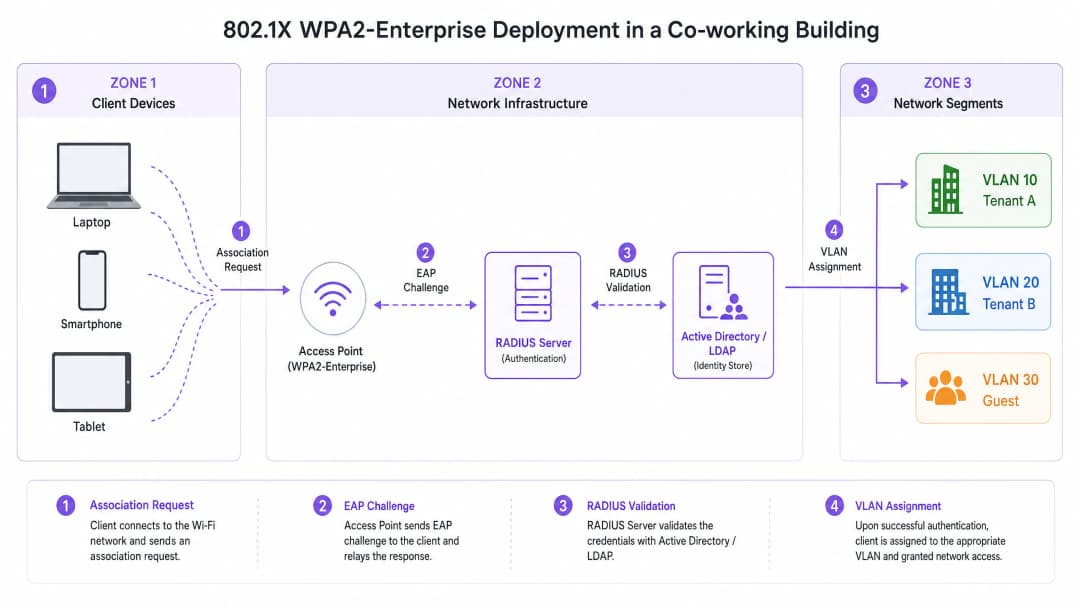
Ad esempio, in uno spazio di co-working, il Tenant A e il Tenant B possono connettersi allo stesso SSID fisico (es. "CoWorking_Secure"). Tuttavia, al momento dell'autenticazione, il server RADIUS assegna i dispositivi del Tenant A alla VLAN 10 e i dispositivi del Tenant B alla VLAN 20. Ciò fornisce un isolamento di Layer 2 robusto, garantendo che il Tenant A non possa accedere ai server, alle stampanti o ai dispositivi client del Tenant B. Questa micro-segmentazione è fondamentale per soddisfare i requisiti di conformità e proteggere la proprietà intellettuale dei tenant. Per le strutture che gestiscono tenant in ambito Healthcare o società di servizi finanziari, questo livello di isolamento non è negoziabile.
Hai domande sulla tua configurazione specifica?
Il nostro team collabora con gestori di sedi, responsabili IT e ingegneri di rete in 80.000 sedi. Prenota una chiamata di 20 minuti e ti mostreremo come altri professionisti come te hanno risolto il problema.
Guida all'implementazione
L'implementazione di WPA2-Enterprise richiede un'attenta pianificazione e integrazione tra l'infrastruttura wireless e il sistema di gestione delle identità. I passaggi seguenti delineano una strategia di implementazione indipendente dal fornitore.
Passaggio 1: Stabilire l'Identity Provider (IdP)
La base di WPA2-Enterprise è un archivio di identità robusto. Per le implementazioni moderne, le directory basate su cloud (es. Microsoft Entra ID, Google Workspace) sono preferite rispetto ad Active Directory on-premise per via della loro scalabilità e facilità di integrazione. Assicurarsi che l'IdP scelto supporti i protocolli necessari (es. SAML, LDAP) per comunicare con l'infrastruttura RADIUS.
Purple, con la licenza Connect, può fungere da identity provider gratuito per servizi come OpenRoaming, semplificando l'implementazione per le strutture che desiderano snellire l'accesso senza gestire complesse directory on-premise.
Passaggio 2: Implementare e configurare l'infrastruttura RADIUS
Il server RADIUS funge da ponte tra gli AP e l'IdP. Le soluzioni Cloud RADIUS eliminano la necessità di hardware on-premise e offrono un'elevata disponibilità. Configurare il server RADIUS per comunicare in modo sicuro con l'IdP e definire le policy di autenticazione.
Seleziona il metodo EAP appropriato in base ai requisiti di sicurezza e alle capacità dei dispositivi client. PEAP-MSCHAPv2 è comune per gli ambienti che utilizzano l'autenticazione tramite nome utente/password, in quanto stabilisce un tunnel TLS sicuro prima di trasmettere le credenziali. EAP-TLS è il metodo più sicuro, che richiede certificati digitali sia sul server che sui dispositivi client; questo elimina completamente le password e fornisce un'autenticazione fluida - anche se richiede una soluzione Public Key Infrastructure (PKI) o Mobile Device Management (MDM) per la distribuzione dei certificati.
Passo 3: Configurare l'infrastruttura wireless
Configura il controller WLAN o gli AP gestiti in cloud in modo che puntino al server RADIUS per l'autenticazione. Definisci lo SSID WPA2-Enterprise e configura gli attributi RADIUS necessari per l'assegnazione dinamica della VLAN. Definisci gli indirizzi IP del server RADIUS, le porte (tipicamente 1812 per l'autenticazione, 1813 per l'accounting) e i segreti condivisi sugli AP o sul controller. Abilita l'assegnazione dinamica della VLAN (spesso denominata "AAA Override" o terminologia simile specifica del fornitore) nella configurazione dello SSID.
Passo 4: Provisioning e onboarding dei client
L'onboarding dei client è la sfida più critica nelle distribuzioni WPA2-Enterprise. Gli utenti devono configurare correttamente i propri dispositivi per connettersi alla rete 802.1X. La configurazione manuale è soggetta a errori e genera ticket di assistenza. Implementa una soluzione di onboarding automatizzata - in genere un portale di onboarding sicuro accessibile tramite un SSID di onboarding aperto - che guidi l'utente attraverso l'installazione di un profilo o di un certificato sul proprio dispositivo. Una volta configurato, il dispositivo si connette automaticamente allo SSID WPA2-Enterprise sicuro. Per ulteriori indicazioni sull'ottimizzazione delle distribuzioni wireless di livello aziendale, consulta la nostra guida su Office WiFi: Optimize Your Modern Office WiFi Network.
Best Practice
Imporre la convalida del certificato è la decisione di configurazione più critica in una distribuzione WPA2-Enterprise. Assicurati che i dispositivi client siano configurati per convalidare il certificato del server RADIUS. La mancata esecuzione di questa operazione lascia gli utenti vulnerabili agli attacchi "Evil Twin", in cui un AP canaglia imita la rete legittima per rubare le credenziali.
Combina l'autenticazione 802.1X con la profilazione dei dispositivi per identificare i dispositivi headless - stampanti, sensori IoT, sistemi di gestione degli edifici - che non possono supportare l'802.1X. Utilizza il MAC Authentication Bypass (MAB) per questi dispositivi, limitando però il loro accesso a VLAN isolate con rigide policy di firewall. Configura gli AP per inviare messaggi di accounting RADIUS al server per fornire una traccia di controllo dettagliata delle sessioni utente, inclusi i tempi di connessione, l'utilizzo dei dati e i motivi della disconnessione, il che è fondamentale per la risoluzione dei problemi e la conformità. Mantieni una rete Guest WiFi separata e isolata per i visitatori. Questa rete dovrebbe utilizzare un Captive Portal per l'accettazione dei termini di servizio e l'acquisizione dei dati, integrandola con WiFi Analytics per ottenere informazioni dettagliate sulla sede, mantenendo al contempo il traffico degli ospiti completamente segregato dalla rete aziendale. Per gli hub di Transport e i centri congressi, questa segregazione rappresenta un requisito normativo ai sensi del GDPR.
Risoluzione dei problemi e mitigazione dei rischi
Modalità di guasto comuni
La causa più comune di errori di autenticazione improvvisi e diffusi negli ambienti WPA2-Enterprise è la scadenza del certificato. Se il certificato del server RADIUS scade o viene emesso da una Certificate Authority (CA) non attendibile, i dispositivi client rifiuteranno la connessione. Implementa un monitoraggio proattivo e un sistema di alert per la scadenza dei certificati con un preavviso minimo di 60 giorni.
L'indisponibilità del server RADIUS è la seconda modalità di guasto più critica. Se gli AP non riescono a raggiungere il server RADIUS, nessun utente potrà autenticarsi. Distribuisci server RADIUS ridondanti in diverse regioni geografiche o zone di disponibilità per garantire un'elevata affidabilità. L'errata configurazione del client è la fonte più frequente di ticket di assistenza: gli utenti che configurano manualmente i propri dispositivi spesso selezionano il metodo EAP errato o non considerano attendibile il certificato del server. Affidati a strumenti di onboarding automatizzati o a soluzioni MDM per applicare configurazioni client coerenti.
Mitigazione del rischio: La sfida del roaming
Nelle grandi sedi, gli utenti si spostano frequentemente tra gli AP. Con WPA2-Enterprise, un ciclo di autenticazione 802.1X completo può richiedere diverse centinaia di millisecondi, causando interruzioni evidenti nelle applicazioni in tempo reale come VoIP o videoconferenze. Per mitigare questo problema, implementa protocolli di roaming rapido come 802.11r (Fast BSS Transition) e Opportunistic Key Caching (OKC). Questi standard consentono al client e alla rete di memorizzare nella cache le chiavi di autenticazione, riducendo significativamente il tempo necessario per il roaming tra gli AP. Per un approfondimento tecnico dettagliato sull'ottimizzazione delle prestazioni di roaming nelle WLAN aziendali, consulta la nostra guida su Risoluzione dei problemi di roaming nelle WLAN aziendali. Anche la comprensione del comportamento RF sottostante è essenziale; la nostra guida su Frequenze WiFi: Una guida alle frequenze WiFi nel 2026 fornisce un riferimento fondamentale.
ROI e impatto aziendale
La migrazione da WPA2-Personal a WPA2-Enterprise richiede un investimento iniziale nell'infrastruttura RADIUS e nelle soluzioni di onboarding, ma il ritorno sull'investimento (ROI) a lungo termine è sostanziale, in particolare nei settori Retail, Hospitality e del settore immobiliare commerciale.
| Driver del ROI | WPA2-Personal | WPA2-Enterprise |
|---|---|---|
| Revoca delle credenziali | Interruzione totale della rete | Immediata, per singolo utente |
| Sovraccarico dell'helpdesk | Elevato (reimpostazione password) | Basso (onboarding automatizzato) |
| Postura di Conformità | Non soddisfa PCI-DSS / GDPR | Soddisfa PCI-DSS / GDPR |
| Isolamento dei Tenant | Nessuno | Micro-segmentazione VLAN completa |
| Audit Trail | Nessuno | Registrazione completa delle sessioni per singolo utente |
| Scalabilità | Scarsa (oltre 50 utenti) | Scalabile fino a migliaia |
Eliminare la necessità di aggiornare manualmente le PSK quando i tenant se ne vanno riduce significativamente i ticket di helpdesk e il carico amministrativo. L'onboarding automatizzato semplifica il processo di provisioning, liberando il personale IT per concentrarsi su iniziative strategiche. Offrendo responsabilità individuale e segmentazione della rete, WPA2-Enterprise consente alle strutture di soddisfare rigorosi requisiti di conformità come PCI-DSS e GDPR, riducendo il rischio di costose violazioni dei dati e sanzioni normative.
Offrire una sicurezza di livello enterprise rappresenta un elemento di differenziazione competitiva per gli spazi di co-working e gli appartamenti di fascia alta. I tenant richiedono una connettività WiFi sicura e affidabile per proteggere la propria proprietà intellettuale. Un'implementazione solida di WPA2-Enterprise valorizza la proposta commerciale della struttura, supportando una maggiore fidelizzazione dei tenant e modelli tariffari premium. Poiché la domanda di spazi di lavoro sicuri e flessibili continua a crescere, affidarsi a modelli di sicurezza legacy non è più fattibile. WPA2-Enterprise fornisce la base scalabile e sicura necessaria per supportare i moderni ambienti multi-tenant.
Definizioni chiave
802.1X
Uno standard IEEE per il controllo dell'accesso alla rete basato su porta che fornisce un meccanismo di autenticazione ai dispositivi che desiderano collegarsi a una rete LAN o WLAN. Definisce l'incapsulamento di EAP su reti IEEE 802.
Il protocollo fondamentale che abilita WPA2-Enterprise, spostando la sicurezza da una password condivisa all'autenticazione del singolo utente tramite un modello a tre parti: Supplicant, Authenticator e Authentication Server.
RADIUS (Remote Authentication Dial-In User Service)
Un protocollo di rete che fornisce una gestione centralizzata di autenticazione, autorizzazione e contabilità (AAA) per gli utenti che si connettono e utilizzano un servizio di rete. Definito in RFC 2865.
Il server centrale che convalida le credenziali dell'utente rispetto a un archivio di identità e indica all'AP se concedere l'accesso e quale VLAN assegnare.
Assegnazione VLAN Dinamica
Il processo di assegnazione di un utente a una specifica Virtual Local Area Network (VLAN) in base alla sua identità o al suo ruolo, restituito come attributo RADIUS (Tunnel-Private-Group-ID) durante il processo di autenticazione 802.1X.
Cruciale per gli ambienti multi-tenant per garantire che diverse aziende o residenti siano isolati su segmenti di rete separati senza richiedere SSID distinti.
EAP (Extensible Authentication Protocol)
Un framework di autenticazione utilizzato frequentemente nelle reti wireless e nelle connessioni point-to-point, che supporta molteplici metodi di autenticazione tra cui EAP-TLS, PEAP e EAP-TTLS.
Il protocollo utilizzato per trasportare i messaggi di autenticazione tra il dispositivo client (Supplicant) e il server RADIUS, incapsulato all'interno del framework 802.1X.
Supplicant
Un client software su un dispositivo (laptop, smartphone) che comunica con l'Authenticator per ottenere l'accesso alla rete tramite 802.1X. Integrato in tutti i sistemi operativi moderni, inclusi Windows, macOS, iOS e Android.
Il dispositivo dell'utente finale che tenta di connettersi alla rete WiFi aziendale. La sua corretta configurazione - in particolare la convalida del certificato del server RADIUS - è fondamentale per la sicurezza.
MAB (MAC Authentication Bypass)
Un metodo per concedere l'accesso alla rete in base all'indirizzo MAC del dispositivo, utilizzato come alternativa per i dispositivi che non supportano l'autenticazione 802.1X. L'indirizzo MAC viene inviato al server RADIUS sia come nome utente che come password.
Utilizzato per proteggere i dispositivi headless come stampanti, sensori IoT e terminali POS in un ambiente aziendale. Questi dispositivi dovrebbero essere sempre collocati in una VLAN limitata e isolata.
Attacco Evil Twin
Un access point wireless non autorizzato che si maschera da access point WiFi legittimo trasmettendo lo stesso SSID, utilizzato per intercettare le comunicazioni wireless o sottrarre le credenziali degli utenti.
Una minaccia primaria nelle distribuzioni WPA2-Enterprise. Mitigata richiedendo ai dispositivi client di convalidare il certificato digitale del server RADIUS, che un AP non autorizzato non può replicare.
EAP-TLS (EAP-Transport Layer Security)
Il metodo EAP più sicuro, che richiede un'autenticazione reciproca tramite certificati digitali sia sul server RADIUS che sul dispositivo client. Elimina completamente l'autenticazione basata su password.
Il metodo di autenticazione consigliato per ambienti ad alta sicurezza. Richiede una soluzione PKI o MDM per la distribuzione dei certificati ai dispositivi client, ma fornisce un'autenticazione fluida e senza password.
PEAP-MSCHAPv2 (Protected EAP with Microsoft Challenge Handshake Authentication Protocol v2)
Un metodo EAP ampiamente diffuso che stabilisce un tunnel TLS utilizzando solo un certificato lato server, quindi autentica l'utente tramite nome utente e password all'interno di tale tunnel.
Una scelta pragmatica per gli ambienti in cui la distribuzione dei certificati lato client non è fattibile. Sicuro se combinato con la convalida obbligatoria del certificato del server sui dispositivi client.
Esempi pratici
Un complesso di appartamenti premium da 200 camere utilizza attualmente una singola rete WPA2-Personal per tutti i residenti. Il gestore della proprietà riferisce che gli ex inquilini accedono ancora alla rete dalla strada e i residenti si lamentano della lentezza dovuta a dispositivi non autorizzati. Hanno la necessità di proteggere la rete senza richiedere al personale IT di configurare manualmente ogni laptop e smartphone dei residenti.
Distribuire un server RADIUS basato su cloud integrato con un sistema di gestione immobiliare (PMS) o una directory dedicata agli inquilini. Configurare i controller wireless per utilizzare WPA2-Enterprise (802.1X) con PEAP-MSCHAPv2. Implementare un portale di onboarding self-service accessibile tramite un SSID di onboarding aperto e temporaneo. Quando un nuovo residente si trasferisce, riceve un'e-mail con un link al portale di onboarding. Il portale lo guida a scaricare un profilo di rete sicuro che configura i suoi dispositivi per la rete 802.1X utilizzando le sue credenziali univoche. Alla scadenza del contratto di locazione, il suo account nella directory viene disattivato, revocando istantaneamente l'accesso al WiFi senza influire sugli altri residenti. I dispositivi headless come smart TV e sensori IoT vengono gestiti tramite MAC Authentication Bypass, inseriti in una VLAN IoT dedicata all'unità.
Un grande spazio di co-working ospita 15 diverse start-up, ciascuna con 5 - 20 dipendenti. Devono garantire che i dispositivi appartenenti alla Start-up A non possano comunicare con i dispositivi appartenenti alla Start-up B, anche se si connettono tutti agli stessi Access Point fisici. Devono anche essere in grado di revocare istantaneamente l'accesso a un'azienda che non paga la quota associativa mensile.
Implementare WPA2-Enterprise con assegnazione dinamica delle VLAN. Creare una directory di identità centrale (ad esempio, Google Workspace o Microsoft Entra ID) e organizzare gli utenti in gruppi in base alla loro affiliazione alla start-up. Configurare il server RADIUS per restituire un attributo ID VLAN specifico in base all'appartenenza al gruppo dell'utente durante il processo di autenticazione 802.1X. Configurare gli switch di rete e gli AP per mappare questi ID VLAN su subnet isolate con regole di firewall rigorose che impediscono il routing inter-VLAN. Quando l'iscrizione di un'azienda scade, disattivare il relativo gruppo nella directory. Tutte le sessioni attive vengono interrotte e non è possibile stabilire nuove sessioni. Le restanti 14 aziende rimangono del tutto inalterate.
Domande di esercitazione
Q1. Un complesso commerciale offre il WiFi ai singoli negozi in affitto. Vogliono implementare WPA2-Enterprise ma temono che i terminali POS (point-of-sale) e gli scanner di codici a barre non supportino l'autenticazione 802.1X. In che modo l'architetto di rete dovrebbe progettare la policy di accesso per accogliere questi dispositivi mantenendo al contempo la sicurezza?
Suggerimento: Considera come gestire i dispositivi che non dispongono di un supplicant mantenendo al contempo la sicurezza e l'isolamento.
Visualizza risposta modello
L'architetto dovrebbe implementare il MAC Authentication Bypass (MAB) insieme a 802.1X. Il server RADIUS deve essere configurato per tentare prima l'autenticazione 802.1X. Se il dispositivo va in timeout (perché privo di un supplicant), l'AP ripiega sull'invio del MAC address del dispositivo al server RADIUS. Il server RADIUS verifica il MAC address confrontandolo con un database pre-approvato di terminali POS e scanner noti. Se viene trovata una corrispondenza, il dispositivo viene autorizzato e inserito in una VLAN altamente limitata e isolata, designata per le apparecchiature POS, con regole di firewall che consentono solo il traffico verso il gateway di pagamento. Ciò garantisce che i dispositivi POS siano in rete senza essere mescolati con i dati degli utenti dei negozi, soddisfacendo i requisiti di segmentazione PCI-DSS.
Q2. Durante l'implementazione di WPA2-Enterprise in uno spazio di co-working, gli utenti segnalano che viene spesso richiesto loro di "Accettare il certificato" quando si connettono alla rete per la prima volta. Il responsabile IT teme che ciò possa indurre gli utenti ad accettare certificati canaglia in un attacco Evil Twin. Qual è il modo più efficace per risolvere questo problema?
Suggerimento: Affidarsi agli utenti per convalidare manualmente i certificati rappresenta un rischio per la sicurezza. In che modo è possibile automatizzare questo processo per imporre il corretto trust anchor?
Visualizza risposta modello
Il responsabile IT dovrebbe implementare una soluzione di onboarding automatizzata (come un portale di onboarding sicuro o un profilo di rete distribuito tramite MDM). Questa soluzione configura automaticamente le impostazioni del supplicant del dispositivo client, definendo esplicitamente quale certificato del server RADIUS considerare attendibile e quale Certificate Authority (CA) lo ha emesso. Preconfigurando il trust anchor, il dispositivo eseguirà l'autenticazione in modo silenzioso e sicuro sulla rete legittima e rifiuterà automaticamente qualsiasi AP canaglia che presenti un certificato diverso, senza mostrare alcun avviso all'utente. Il portale di onboarding deve essere fornito tramite HTTPS su un SSID aperto temporaneo, e il profilo deve bloccare la configurazione del supplicant per impedire agli utenti di sovrascriverla.
Q3. La suite executive di uno stadio richiede un WiFi sicuro e isolato per clienti aziendali di alto profilo durante gli eventi. Il design attuale utilizza un SSID e una password WPA2-Personal separati per ciascuna delle 50 suite, con la conseguente trasmissione simultanea di 50 SSID. Le prestazioni del WiFi sono scarse. Qual è la causa tecnica all'origine del problema e in che modo WPA2-Enterprise lo risolve?
Suggerimento: Considera i limiti fisici dello spettro RF e l'overhead generato dai frame di gestione.
Visualizza risposta modello
La trasmissione di 50 SSID separati crea un gravoso overhead di frame di gestione. Ciascun SSID richiede che gli AP trasmettano beacon frame a intervalli regolari (in genere ogni 102.4 ms). Con 50 SSID, gli AP consumano una parte significativa del tempo di trasmissione RF disponibile per inviare beacon prima che venga trasmesso qualsiasi traffico dati effettivo. Ciò riduce direttamente la velocità di trasmissione e aumenta la latenza per tutti gli utenti. WPA2-Enterprise risolve questo problema consolidando tutte le suite su un unico SSID sicuro. Utilizzando l'assegnazione dinamica della VLAN, il server RADIUS autentica le credenziali del client aziendale e lo inserisce dinamicamente in una VLAN isolata specifica per la sua suite. Ciò garantisce la sicurezza e l'isolamento richiesti, ottimizzando al contempo le prestazioni RF ed eliminando l'eccesso di SSID. Il massimo raccomandato è di 3 - 4 SSID per AP in ambienti ad alta densità.
Continua a leggere questa serie
Gestione della larghezza di banda nelle reti di alloggi per studenti
Questa guida fornisce ai responsabili IT, agli architetti di rete e ai direttori delle operazioni immobiliari un riferimento tecnico indipendente dai fornitori per la gestione della larghezza di banda WiFi in ambienti ad alta densità come gli alloggi per studenti. Copre la segmentazione VLAN, la progettazione delle policy di Quality of Service (QoS), il traffic shaping basato sull'identità e la visibilità a livello applicativo - i quattro pilastri di una rete scalabile e ad accesso equo. Con scenari di implementazione reali, risultati misurabili e framework decisionali, questo è il manuale operativo per qualsiasi team responsabile dell'infrastruttura di rete residenziale su larga scala.
Best practice di micro-segmentazione per reti WiFi condivise
Questa guida di riferimento tecnica fornisce strategie pratiche per implementare la micro-segmentazione su infrastrutture WiFi condivise. Descrive dettagliatamente come i responsabili IT e gli architetti di rete possono isolare in modo sicuro il traffico di ospiti, IoT e personale per mitigare i rischi, garantire la conformità e ottimizzare le prestazioni della rete.
Come funziona l'assegnazione Dynamic VLAN negli edifici multitenant
Questa guida di riferimento tecnica dettaglia l'architettura e l'implementazione dell'assegnazione Dynamic VLAN utilizzando 802.1X e RADIUS in ambienti multitenant. Fornisce indicazioni pratiche per IT manager e progettisti di rete per ridurre il sovraccarico di SSID, applicare l'isolamento a livello Layer 2 e garantire una connettività sicura e scalabile all'interno di edifici condivisi.
Hai domande sulla tua configurazione specifica?
Il nostro team collabora con gestori di sedi, responsabili IT e ingegneri di rete in 80.000 sedi. Prenota una chiamata di 20 minuti e ti mostreremo come altri professionisti come te hanno risolto il problema.