

Multi-Link Operation (MLO) Wi-Fi 7 मध्ये: ते कसे कार्य करते आणि ते महत्त्वाचे का आहे
हे तांत्रिक संदर्भ मार्गदर्शक Wi-Fi 7 मधील Multi-Link Operation (MLO) मध्ये सखोल माहिती देते, ते एकाच वेळी मल्टी-बँड ट्रान्समिशन सक्षम करून वायरलेस कनेक्टिव्हिटीमध्ये मूलभूतपणे कसे बदल घडवते हे स्पष्ट करते. हे IT व्यवस्थापक, नेटवर्क आर्किटेक्ट आणि CTOs यांना STR, NSTR आणि EMLSR मोड्सचा शोध घेऊन एंटरप्राइझ आणि सार्वजनिक ठिकाणांच्या वातावरणात कमी-विलंब असलेल्या वर्कलोडसाठी नेटवर्क ऑप्टिमाइझ करण्यासाठी व्यावहारिक उपयोजन धोरणे प्रदान करते.
🎧 हे मार्गदर्शक ऐका
ट्रान्सक्रिप्ट पहा
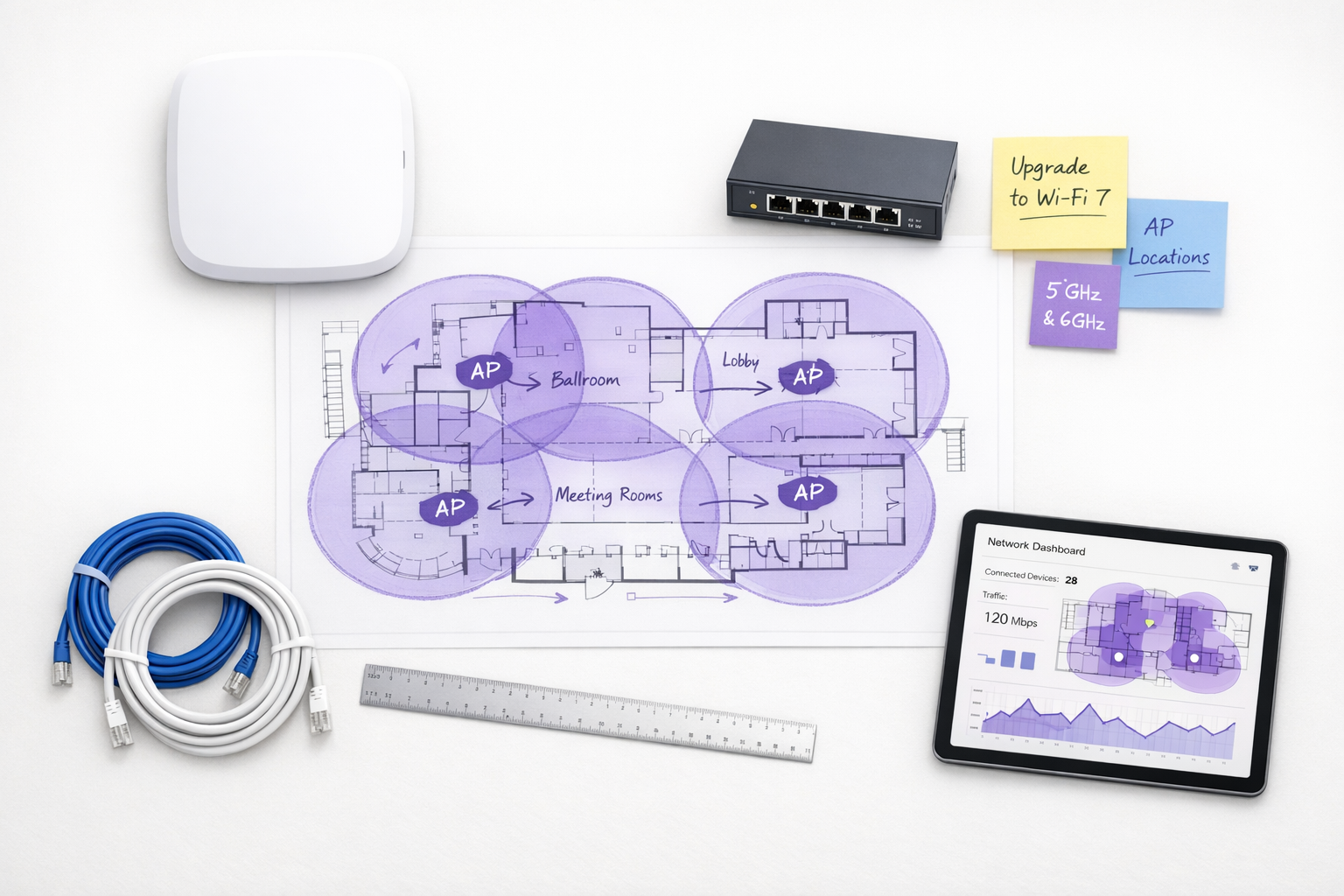
कार्यकारी सारांश
Multi-Link Operation (MLO) हे IEEE 802.11be (Wi-Fi 7) मानकातील निश्चित आर्किटेक्चरल बदल आहे. जुन्या बँड स्टीयरिंगच्या विपरीत, जे क्लायंटला एकाच फ्रिक्वेन्सी बँड निवडण्यास प्रतिक्रियात्मकपणे भाग पाडते, MLO एकाच वेळी अनेक बँड्सवर (2.4 GHz, 5 GHz, आणि 6 GHz) एकच लॉजिकल कनेक्शन सक्षम करते. एंटरप्राइझ नेटवर्क आर्किटेक्ट्स, CTOs आणि ठिकाणांच्या ऑपरेटर्ससाठी, MAC लेयरवर विलंबता, विश्वसनीयता आणि थ्रुपुट कसे व्यवस्थापित केले जाते यात हा एक मूलभूत बदल आहे.
हे मार्गदर्शक कमी-विलंब असलेल्या वर्कलोडसाठी डिझाइन करणाऱ्या IT नेत्यांसाठी MLO मध्ये तांत्रिक सखोल माहिती देते. हे Simultaneous Transmit and Receive (STR), Non-Simultaneous Transmit and Receive (NSTR), आणि Enhanced Multi-Link Single Radio (EMLSR) मोड्समधील महत्त्वपूर्ण फरक शोधते. महत्त्वाचे म्हणजे, MLO XR आणि रिअल-टाइम व्हॉइससाठी प्रत्यक्षात 5ms पेक्षा कमी विलंबता कुठे देते आणि दाट सार्वजनिक क्षेत्रातील आणि हॉस्पिटॅलिटी उपयोजनांमध्ये गर्दी कशी कमी करते हे स्पष्ट करते. आम्ही 6 GHz स्पेक्ट्रमची आवश्यकता आणि क्लायंट डिव्हाइस समर्थनाची सद्यस्थिती यासह अंमलबजावणीच्या वास्तविकतेवर देखील चर्चा करू, जेणेकरून तुम्हाला तुमच्या पुढील इन्फ्रास्ट्रक्चर रिफ्रेशची आत्मविश्वासाने योजना करता येईल.
तांत्रिक सखोल माहिती
MLO Wi-Fi 7 चा प्रभाव समजून घेण्यासाठी, आपण प्रथम त्याची मल्टी-बँड वातावरणाकडे असलेल्या ऐतिहासिक दृष्टिकोनाशी तुलना केली पाहिजे.
बँड स्टीयरिंगची समस्या
ऐतिहासिकदृष्ट्या, ॲक्सेस पॉइंट्स क्लायंट व्यवस्थापित करण्यासाठी बँड स्टीयरिंग वापरत होते. कंट्रोलर 2.4 GHz बँडवरील क्लायंटचे निरीक्षण करेल आणि त्याच्या प्रोब विनंत्यांकडे दुर्लक्ष करून किंवा डीऑथेंटिकेशन फ्रेम्स पाठवून त्याला 5 GHz बँडवर सक्तीने पाठवण्याचा प्रयत्न करेल. हा दृष्टिकोन नेहमीच प्रतिक्रियात्मक आणि व्यत्यय आणणारा राहिला आहे. क्लायंट डिव्हाइस एका वेळी फक्त एक सक्रिय रेडिओ लिंक राखते. जर RF वातावरण बदलले, तर स्टीयरिंग इव्हेंट घडणे आवश्यक आहे, ज्यामुळे थोडासा डिस्कनेक्शन होतो. Retail पॉइंट-ऑफ-सेल सिस्टीम किंवा Healthcare टेलीमेट्री सारख्या रिअल-टाइम ॲप्लिकेशन्ससाठी, हे सूक्ष्म-व्यत्यय लक्षात घेण्यासारख्या कार्यक्षमतेच्या घसरणीत जमा होतात.
MLO आर्किटेक्चर
Multi-Link Operation हे प्रतिमान बदलते. MLO वातावरणात, AP आणि क्लायंट डिव्हाइस Multi-Link Device (MLD) संबंध स्थापित करतात. यामुळे MAC लेयर अनेक भौतिक लिंक्स (उदा. 5 GHz लिंक आणि 6 GHz लिंक) एकाच लॉजिकल कनेक्शनमध्ये एकत्रित करू शकते. लिंक ॲडॉप्टेशन आणि ट्रॅफिक वितरण ॲप्लिकेशन लेयरच्या खाली होते, जे वापरकर्त्यासाठी पूर्णपणे अदृश्य असते.
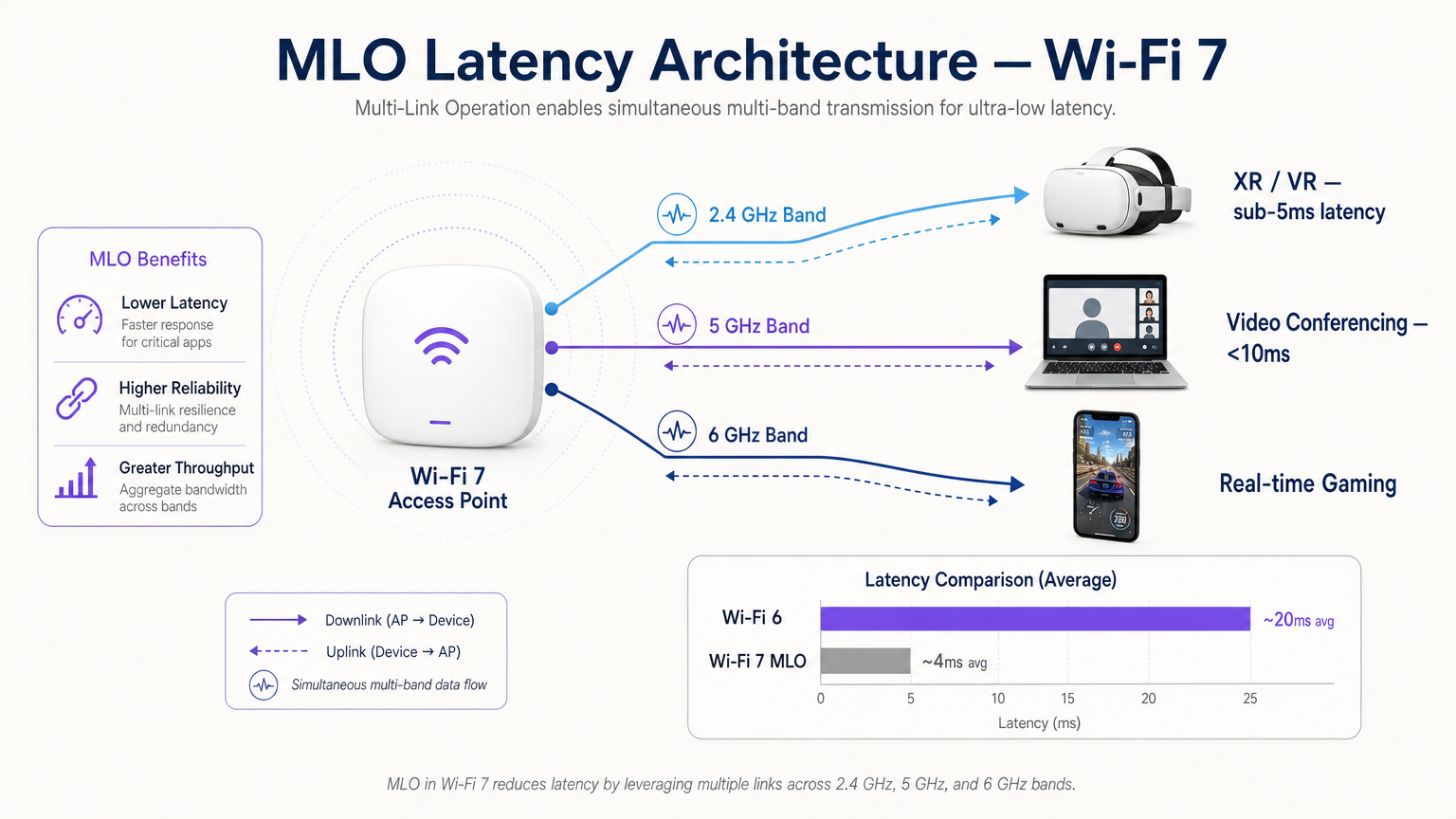
हे आर्किटेक्चर तीन प्राथमिक फायदे देते:
- निश्चित विलंबता: अनेक मार्ग उपलब्ध असल्याने, शेड्यूलर चॅनेल स्पर्धेतील विलंब टाळून, पहिल्या उपलब्ध लिंकवर डेटा प्रसारित करू शकतो.
- अखंड विश्वसनीयता: जर एका बँडवर हस्तक्षेप वाढला, तर रीकनेक्शन इव्हेंटशिवाय ट्रॅफिक दुसऱ्या बँडवर अखंडपणे सुरू राहते.
- एकत्रित थ्रुपुट: मोठ्या फाइल ट्रान्सफरसाठी, डेटा एकाच वेळी अनेक लिंक्सवर स्ट्रिप केला जाऊ शकतो.
MLO चे तीन मोड्स
सर्व MLO अंमलबजावणी समान नसतात. मानक क्लायंट डिव्हाइसच्या रेडिओ आयसोलेशन क्षमतेवर आधारित तीन ऑपरेटिंग मोड्स परिभाषित करते.
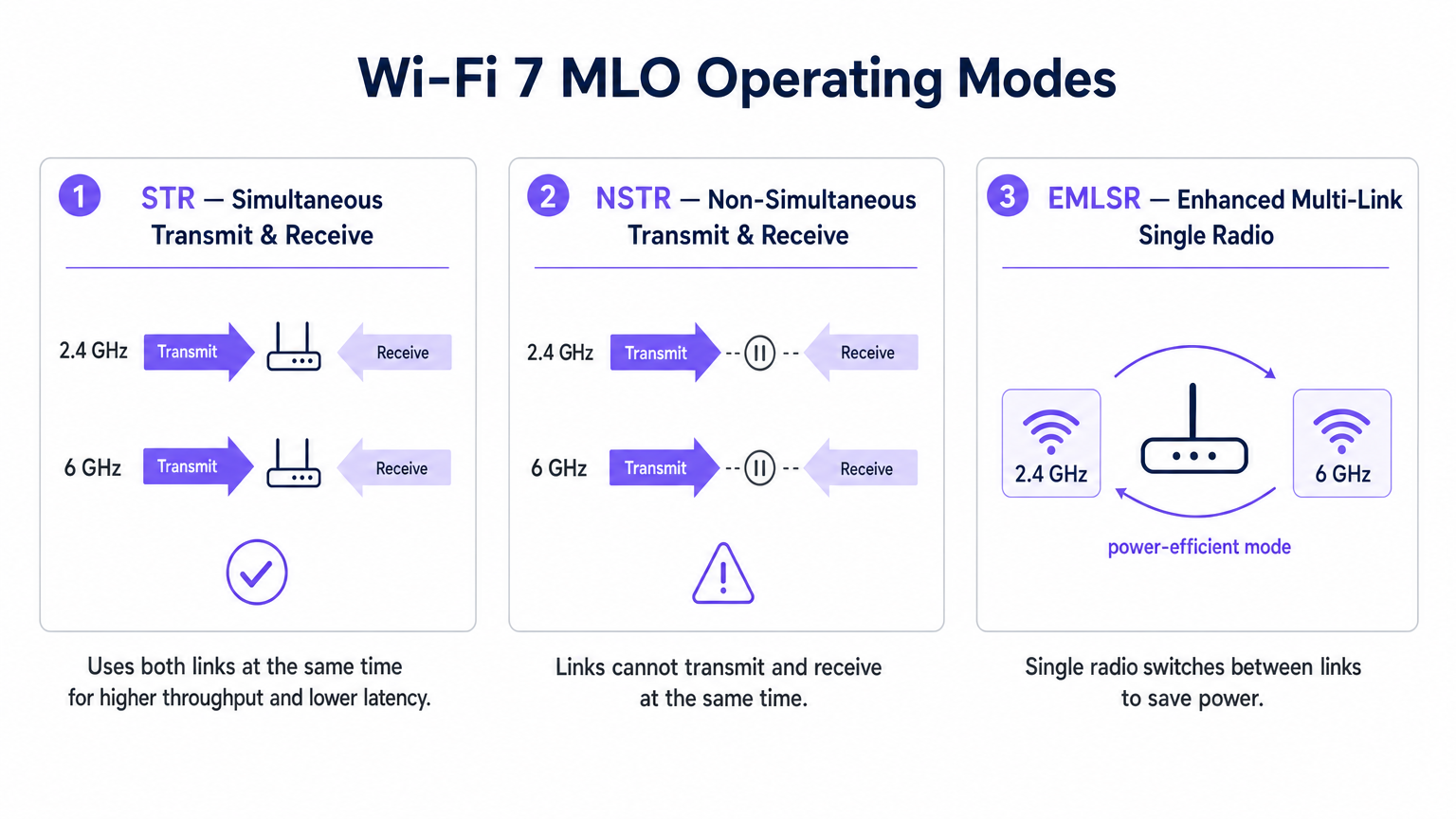
1. STR (Simultaneous Transmit and Receive)
ही इष्टतम MLO अंमलबजावणी आहे. STR-सक्षम डिव्हाइसमध्ये त्याच्या रेडिओ चेन्समध्ये पुरेसे भौतिक अलगाव असते ज्यामुळे एका लिंकवर (उदा. 5 GHz) प्रसारित करताना दुसऱ्या लिंकवर (उदा. 6 GHz) एकाच वेळी प्राप्त करता येते, ज्यामुळे स्व-हस्तक्षेप होत नाही. हा मोड खरे समांतर ऑपरेशन प्रदान करतो आणि विस्तारित वास्तविकता (XR) आणि स्थानिक कंप्यूटिंग वर्कलोडसाठी 5ms पेक्षा कमी विलंबता प्राप्त करण्याची गुरुकिल्ली आहे.
2. NSTR (Non-Simultaneous Transmit and Receive)
अनेक पहिल्या पिढीच्या Wi-Fi 7 क्लायंटमध्ये, ज्यात अनेक स्मार्टफोन आणि लॅपटॉप समाविष्ट आहेत, STR साठी आवश्यक असलेल्या अँटेना आयसोलेशनची कमतरता आहे. NSTR मोडमध्ये, डिव्हाइस अनेक लिंक्स राखते, परंतु MAC लेयरने त्यांना समन्वयित केले पाहिजे जेणेकरून ट्रान्समिट आणि रिसीव्ह ऑपरेशन्स एकमेकांवर ओव्हरलॅप होणार नाहीत. जरी तुम्ही पूर्ण समांतरता गमावत असाल तरी, NSTR अजूनही सिंगल-लिंक Wi-Fi 6 च्या तुलनेत महत्त्वपूर्ण विश्वसनीयता फायदे आणि लोड-बॅलन्सिंग क्षमता प्रदान करते.
3. EMLSR (Enhanced Multi-Link Single Radio)
IoT सेन्सर्स आणि वेअरेबल्स सारख्या पॉवर-प्रतिबंधित उपकरणांसाठी डिझाइन केलेले, EMLSR एकच रेडिओ वापरते जे मायक्रोसेकंदमध्ये फ्रिक्वेन्सी बँड्समध्ये स्विच करू शकते. डिव्हाइस कमी-पॉवर स्थितीत अनेक लिंक्सवर ऐकते आणि येणारा फ्रेम आढळलेल्या लिंकवर त्याचा सक्रिय रेडिओ वेगाने स्विच करते. हे अनेक सक्रिय रेडिओ चालवण्याच्या बॅटरी ड्रेनशिवाय MLO ची लवचिकता प्रदान करते.
अंमलबजावणी मार्गदर्शक
एंटरप्राइझ वातावरणात MLO तैनात करण्यासाठी काळजीपूर्वक नियोजन आवश्यक आहे. IT व्यवस्थापक आणि नेटवर्क आर्किटेक्ट्ससाठी येथे एक व्यावहारिक फ्रेमवर्क आहे.
1. क्लायंट इस्टेटचे ऑडिट करा
MLO चे फायदे पूर्णपणे क्लायंट समर्थनावर अवलंबून आहेत. 2025 च्या सुरुवातीस, MLO ला Qualcomm Snapdragon 8 Gen 3, MediaTek Filogic 380/680, आणि Intel BE200 सारख्या प्रीमियम चिपसेट्सद्वारे समर्थन दिले जाते. तथापि, तुमची महत्त्वपूर्ण उपकरणे STR किंवा NSTR ला समर्थन देतात की नाही हे तुम्हाला निश्चित करावे लागेल. जर तुमच्या वातावरणात NSTR क्लायंटचे वर्चस्व असेल, तर त्यानुसार तुमच्या विलंबतेच्या अपेक्षा समायोजित करा.
2. 6 GHz कव्हरेजला प्राधान्य द्या
Wi-Fi 7 च्या मुख्य कार्यक्षमतेचे मेट्रिक्स प्राप्त करण्यासाठी, 5 GHz लिंकला 6 GHz लिंकशी जोडणे आवश्यक आहे. 6 GHz बँड स्वच्छ स्पेक्ट्रम आणि 320 MHz चॅनेल प्रदान करतो. जर तुम्ही Hospitality किंवा Transport ठिकाणी तैनात करत असाल, तर तुमच्या AP घनता योजनेत 6 GHz च्या प्रसार वैशिष्ट्यांचा विचार केला गेला आहे याची खात्री करा, जे 5 GHz पेक्षा भौतिक अडथळ्यांमधून वेगाने क्षीण होते.
3. MLD कॉन्फिगरेशन सत्यापित करा
केवळ Wi-Fi 7 ॲक्सेस पॉइंट स्थापित केल्याने MLO आपोआप सक्षम होत नाही. AP ला त्याच्या बीकन फ्रेम्समध्ये मल्टी-लिंक एलिमेंट प्रसारित करण्यासाठी कॉन्फिगर करणे आवश्यक आहे आणि BSS ला मल्टी-लिंक BSS म्हणून कॉन्फिगर करणे आवश्यक आहे. तुमच्या विक्रेता दस्तऐवजांचा सल्ला घ्या, कारण काही एंटरप्राइझ APs मध्ये पुढील इंटरऑपरेबिलिटी प्रमाणीकरण होईपर्यंत MLO डीफॉल्टनुसार अक्षम केलेले असते.
4. वायर्ड बॅकहॉल अपग्रेड करा
मल्टी-गिगाबिट वायरलेस थ्रुपुट आणि 5ms पेक्षा कमी विलंबता प्रदान करणारा ॲक्सेस पॉइंट तुमच्या वायर्ड इन्फ्रास्ट्रक्चरमधील अडथळे त्वरित उघड करेल. तुमचे नेटवर्क स्विचेस 2.5GbE किंवा 5GbE (NBASE-T) ला समर्थन देतात आणि तुमचे WAN अपलिंक्स एकत्रित ट्रॅफिक हाताळण्यासाठी तयार केले आहेत याची खात्री करा.
सर्वोत्तम पद्धती
MLO साठी डिझाइन करताना, या विक्रेता-तटस्थ सर्वोत्तम पद्धतींचे पालन करा:
- सुरक्षा स्थिती: MLO PHY लेयरच्या वर कार्य करते, याचा अर्थ WPA3 हे मानक राहते. तुमचे RADIUS सर्व्हर आणि 802.1X इन्फ्रास्ट्रक्चर WPA3-Enterprise शी पूर्णपणे सुसंगत असल्याची खात्री करा. सार्वजनिक उपयोजनांसाठी, कॅनडामधील गेस्ट WiFi साठी PIPEDA अनुपालन यासारख्या अनुपालन आवश्यकतांचे पुनरावलोकन करा.
- चॅनल नियोजन: दाट उपयोजनांमध्ये, NSTR उपकरणे लिंक समन्वयामुळे अतिरिक्त व्यवस्थापन फ्रेम ओव्हरहेड तयार करू शकतात. सह-चॅनल हस्तक्षेप कमी करण्यासाठी कठोर चॅनल नियोजन लागू करा, विशेषतः 5 GHz बँडवर.
- ॲनालिटिक्ससह एकत्रीकरण: MLO द्वारे व्युत्पन्न केलेल्या टेलीमेट्रीचा लाभ घ्या. प्रति-लिंक वापर आणि रोमिंग डेटा हे एका मजबूत WiFi Analytics प्लॅटफॉर्मसाठी अमूल्य इनपुट आहेत, जे तुम्हाला रिअल-टाइम RF परिस्थितीनुसार Guest WiFi अनुभव ऑप्टिमाइझ करण्यास अनुमती देतात.
- IoT धोरण: कमी-शक्तीच्या EMLSR उपकरणांच्या एकत्रीकरणाच्या विस्तृत संदर्भासाठी, आमच्या इंटरनेट ऑफ थिंग्ज आर्किटेक्चर: एक संपूर्ण मार्गदर्शक चा संदर्भ घ्या.
समस्यानिवारण आणि जोखीम कमी करणे
काळजीपूर्वक नियोजनानंतरही, MLO उपयोजनांमध्ये समस्या येऊ शकतात. या सामान्य अपयश पद्धतींकडे लक्ष द्या:
- विषम लिंक गुणवत्ता: जर 5 GHz लिंकची सिग्नल स्ट्रेंथ उत्कृष्ट असेल परंतु भिंतीच्या क्षीणतेमुळे 6 GHz लिंक कमकुवत असेल, तर MLD शेड्यूलरला ट्रॅफिक कार्यक्षमतेने संतुलित करण्यात अडचण येऊ शकते. शमन: दोन्ही बँडवर ओव्हरलॅपिंग कव्हरेज सुनिश्चित करण्यासाठी Wi-Fi 7 सक्षम मापन साधनांचा वापर करून सखोल सक्रिय साइट सर्वेक्षण करा.
- लेगसी क्लायंटची उपासमार: मिश्र वातावरणात, जर AP एकत्रित MLO ट्रान्समिशनला प्राधान्य देत असेल, तर लेगसी Wi-Fi 5/6 क्लायंटला एअरटाइमची कमतरता भासू शकते. शमन: एअरटाइम फेअरनेस वैशिष्ट्यांचा वापर करा आणि समान प्रवेश सुनिश्चित करण्यासाठी EDCA (Enhanced Distributed Channel Access) पॅरामीटर्स काळजीपूर्वक ट्यून करा.
- EMLSR मध्ये स्विचिंग विलंबता: जर EMLSR उपकरणांना जास्त विलंबता येत असेल, तर मॉनिटर लिंक्सवरील जास्त हस्तक्षेपामुळे मायक्रोसेकंड स्विचिंग यंत्रणा अयशस्वी होऊ शकते. शमन: स्पेक्ट्रम ॲनालिसिस वापरून नॉन-Wi-Fi हस्तक्षेपाच्या संभाव्य स्त्रोतांचा शोध घ्या. स्थान सेवा वापरणाऱ्या वातावरणासाठी, तुमच्या इनडोअर पोझिशनिंग सिस्टम: UWB, BLE, आणि WiFi मार्गदर्शक शी सुसंगतता सुनिश्चित करा.
ROI आणि व्यावसायिक परिणाम
CTO आणि ठिकाण चालकांसाठी, MLO-सक्षम Wi-Fi 7 नेटवर्कचा ROI केवळ कच्च्या गतीपलीकडे जातो.
- हॉस्पिटॅलिटी: प्राथमिक फायदा म्हणजे हिटलेस विश्वसनीयता. लॉबीतून त्यांच्या खोलीत व्हिडिओ कॉलवर चालणाऱ्या पाहुण्याला पारंपारिक बँड स्टीयरिंगशी संबंधित व्यत्यय आणणारा एक-सेकंदाचा फ्रीझ अनुभव येणार नाही. याचा थेट पाहुण्यांच्या समाधानावर परिणाम होतो.
- एंटरप्राइझ/कॉर्पोरेट: निश्चित विलंबता प्राप्त करून, संस्था वायर्ड इथरनेट कनेक्शनची आवश्यकता नसताना वायरलेस XR प्रशिक्षण ॲप्लिकेशन्स आणि उच्च-घनतेचे व्हिडिओ कॉन्फरन्सिंग आत्मविश्वासाने तैनात करू शकतात, ज्यामुळे केबलिंग खर्च कमी होतो.
- सार्वजनिक क्षेत्र/कार्यक्रम: MLO ची एकत्रित थ्रुपुट आणि गर्दी कमी करण्याची क्षमता ठिकाणांना समवर्ती वापरकर्त्यांची उच्च घनता समर्थन करण्यास अनुमती देते, ज्यामुळे उच्च-बँडविड्थ फॅन एंगेजमेंट ॲप्लिकेशन्स आणि स्थान-आधारित सेवांसाठी संधी निर्माण होतात.
महत्त्वाच्या संज्ञा आणि व्याख्या
Multi-Link Operation (MLO)
A Wi-Fi 7 feature allowing a single logical connection to simultaneously use multiple frequency bands and channels.
Crucial for network architects designing networks that require deterministic latency and hitless reliability, moving away from legacy band steering.
Simultaneous Transmit and Receive (STR)
An MLO mode where a device can transmit on one frequency link while receiving on another at the exact same time.
The gold standard for XR, VR, and ultra-low latency applications, requiring advanced radio isolation in client devices.
Non-Simultaneous Transmit and Receive (NSTR)
An MLO mode where a device maintains multiple links but must coordinate them so transmit and receive operations do not overlap.
The most common mode for early Wi-Fi 7 smartphones and laptops, offering reliability benefits but not the full latency reduction of STR.
Enhanced Multi-Link Single Radio (EMLSR)
An MLO mode using a single radio that rapidly switches between multiple listening links to receive incoming frames.
Ideal for battery-powered IoT devices and wearables that need network resilience without the power draw of multiple active radios.
Multi-Link Device (MLD)
A logical entity in Wi-Fi 7 that contains multiple affiliated stations (STAs) or access points (APs) operating across different links.
The foundational relationship established between a Wi-Fi 7 client and AP to enable MLO capabilities.
Band Steering
A legacy technique where a wireless controller attempts to force a client device to connect to a specific frequency band (usually 5 GHz).
A reactive, disruptive process that MLO replaces by allowing seamless, simultaneous multi-band operation.
Hitless Reliability
The ability of a network connection to survive interference or signal degradation on one link without dropping packets or disconnecting.
A key business driver for MLO in enterprise and hospitality environments, ensuring uninterrupted VoIP and video calls.
Deterministic Latency
Network performance where data delivery times are highly predictable and consistent, with minimal jitter.
Essential for industrial automation, real-time gaming, and spatial computing, achieved in Wi-Fi 7 via STR MLO.
केस स्टडीज
A 400-room luxury hotel is upgrading to Wi-Fi 7 to support a new wireless IPTV system and improve guest video conferencing. The IT team is concerned about roaming drops in the corridors.
Deploy Wi-Fi 7 APs with 5 GHz and 6 GHz radios enabled for MLO. Configure the BSS as a Multi-Link BSS. Ensure the IPTV devices support at least NSTR MLO. This allows the devices to maintain a logical connection across both bands. As the guest moves and the 6 GHz signal attenuates faster than the 5 GHz signal, the MAC layer seamlessly shifts traffic to the 5 GHz link without a deauthentication or steering event.
A retail chain is deploying real-time AR (Augmented Reality) inventory headsets for warehouse staff. They require sub-5ms latency, but the warehouse has high 2.4 GHz interference from legacy scanners.
Audit the AR headsets to ensure they feature STR (Simultaneous Transmit and Receive) capable Wi-Fi 7 chipsets. Deploy 6 GHz-capable Wi-Fi 7 APs. Configure an MLO profile aggregating the 5 GHz and 6 GHz bands, completely excluding the congested 2.4 GHz band from the MLD relationship for these specific devices.
परिस्थिती विश्लेषण
Q1. You are designing the Wi-Fi 7 infrastructure for a high-density university lecture theatre. You have provisioned 2.4 GHz, 5 GHz, and 6 GHz coverage. During testing, you notice that while overall throughput is high, management frame overhead is causing utilization spikes on the 5 GHz band. What is the most likely cause related to MLO?
💡 संकेत:Consider the operational overhead of the most common early Wi-Fi 7 client devices.
शिफारस केलेला दृष्टिकोन दाखवा
The environment likely has a high concentration of NSTR (Non-Simultaneous Transmit and Receive) capable smartphones and laptops. NSTR requires the MAC layer to coordinate transmit and receive windows across links to prevent self-interference, which generates additional management frame overhead. To mitigate this, you should optimize your channel planning to reduce co-channel interference and consider tuning EDCA parameters.
Q2. A hospital IT director wants to deploy Wi-Fi 7 to support wireless telemetry monitors on patient beds. Battery life is the primary concern, as the monitors must run for 48 hours between charges, but the connection must be highly resilient to interference. Which MLO mode should the procurement team ensure the new telemetry monitors support?
💡 संकेत:Which mode provides multi-link resilience without running multiple active radios simultaneously?
शिफारस केलेला दृष्टिकोन दाखवा
The procurement team should specify EMLSR (Enhanced Multi-Link Single Radio) support. EMLSR uses a single radio that listens in a low-power state and rapidly switches between bands (e.g., 5 GHz and 6 GHz) to receive data. This provides the reliability benefits of MLO—avoiding interference on a single band—without the heavy battery drain associated with STR or NSTR modes.
Q3. Your network monitoring dashboard shows that a VIP user's Wi-Fi 7 laptop is utilizing MLO, but the latency metrics are hovering around 15-20ms, similar to Wi-Fi 6, rather than the expected sub-5ms range. The AP is broadcasting on 2.4 GHz and 5 GHz only, as the venue has not yet upgraded to 6 GHz APs. Why is the latency not improving significantly?
💡 संकेत:Consider the spectrum characteristics required to achieve the lowest possible latency in MLO.
शिफारस केलेला दृष्टिकोन दाखवा
To achieve sub-5ms deterministic latency, MLO relies on the clean spectrum and wide channels (up to 320 MHz) available in the 6 GHz band. While MLO can aggregate 2.4 GHz and 5 GHz links, the 2.4 GHz band is typically too congested and narrow to provide a reliable low-latency path. Upgrading to 6 GHz-capable APs is required to unlock the full latency benefits of STR MLO.




