

Multi-Link Operation (MLO) in Wi-Fi 7: How It Works and Why It Matters
This technical reference guide provides a deep-dive into Multi-Link Operation (MLO) in Wi-Fi 7, explaining how it fundamentally changes wireless connectivity by enabling simultaneous multi-band transmission. It equips IT managers, network architects, and CTOs with practical deployment strategies, exploring STR, NSTR, and EMLSR modes to optimize networks for low-latency workloads in enterprise and public venue environments.
🎧 Listen to this Guide
View Transcript
Executive Summary
Multi-Link Operation (MLO) is the defining architectural shift in the IEEE 802.11be (Wi-Fi 7) standard. Unlike legacy band steering which reactively forces a client to choose a single frequency band, MLO enables a single logical connection across multiple bands (2.4 GHz, 5 GHz, and 6 GHz) simultaneously. For enterprise network architects, CTOs, and venue operators, this represents a fundamental change in how latency, reliability, and throughput are managed at the MAC layer.
This guide provides a technical deep-dive into MLO for IT leaders designing for low-latency workloads. It explores the critical distinctions between Simultaneous Transmit and Receive (STR), Non-Simultaneous Transmit and Receive (NSTR), and Enhanced Multi-Link Single Radio (EMLSR) modes. Crucially, it unpacks where MLO actually delivers sub-5ms latency for XR and real-time voice, and how it mitigates congestion in dense public-sector and hospitality deployments. We will also cover implementation realities, including the necessity of 6 GHz spectrum and the current state of client device support, to help you plan your next infrastructure refresh with confidence.
Technical Deep-Dive
To understand the impact of MLO Wi-Fi 7, we must first contrast it with the historical approach to multi-band environments.
The Problem with Band Steering
Historically, access points used band steering to manage clients. The controller would observe a client on the 2.4 GHz band and attempt to force it onto the 5 GHz band by ignoring its probe requests or sending deauthentication frames. This approach has always been reactive and disruptive. The client device maintains only one active radio link at a time. If the RF environment changes, a steering event must occur, resulting in a brief disconnection. For real-time applications like Retail point-of-sale systems or Healthcare telemetry, these micro-outages accumulate into noticeable performance degradation.
The MLO Architecture
Multi-Link Operation replaces this paradigm. In an MLO environment, the AP and the client device establish a Multi-Link Device (MLD) relationship. This allows the MAC layer to aggregate multiple physical links (e.g., a 5 GHz link and a 6 GHz link) into a single logical connection. The link adaptation and traffic distribution happen below the application layer, completely invisible to the user.
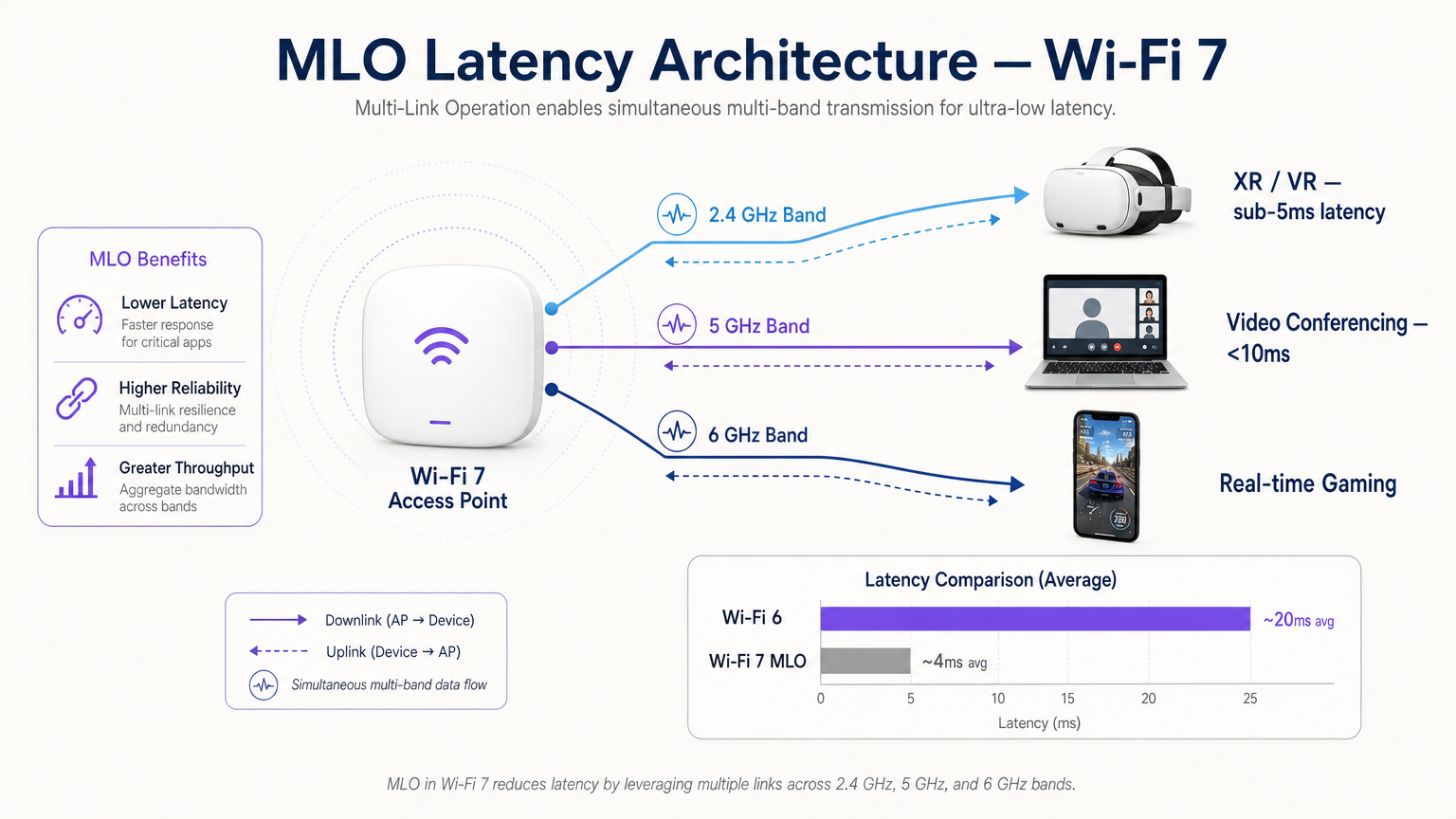
This architecture delivers three primary benefits:
- Deterministic Latency: By having multiple paths available, the scheduler can transmit data on the first available link, bypassing channel contention delays.
- Hitless Reliability: If interference spikes on one band, traffic seamlessly continues on the other without a reconnection event.
- Aggregated Throughput: For large file transfers, data can be striped across multiple links simultaneously.
The Three Modes of MLO
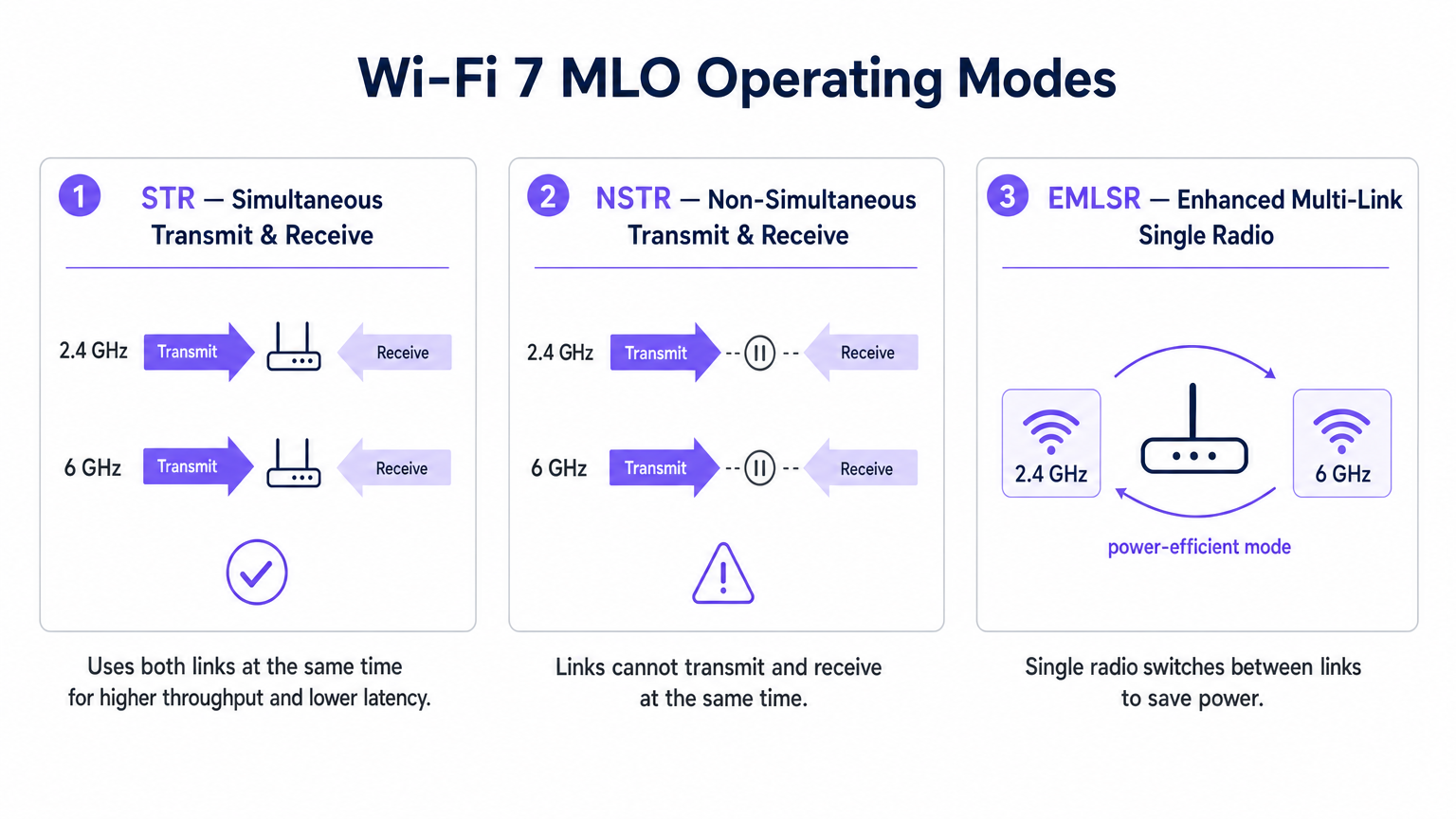
Not all MLO implementations are created equal. The standard defines three operating modes based on the radio isolation capabilities of the client device.
1. STR (Simultaneous Transmit and Receive)
This is the optimal MLO implementation. An STR-capable device has sufficient physical isolation between its radio chains to transmit on one link (e.g., 5 GHz) while simultaneously receiving on another (e.g., 6 GHz) without causing self-interference. This mode delivers true parallel operation and is the key to achieving sub-5ms latency for extended reality (XR) and spatial computing workloads.
2. NSTR (Non-Simultaneous Transmit and Receive)
Many first-generation Wi-Fi 7 clients, including several smartphones and laptops, lack the antenna isolation required for STR. In NSTR mode, the device maintains multiple links, but the MAC layer must coordinate them so that transmit and receive operations do not overlap. While you lose full parallelism, NSTR still provides significant reliability benefits and load-balancing capabilities over single-link Wi-Fi 6.
3. EMLSR (Enhanced Multi-Link Single Radio)
Designed for power-constrained devices like IoT sensors and wearables, EMLSR utilizes a single radio that can switch between frequency bands in microseconds. The device listens on multiple links in a low-power state and rapidly switches its active radio to the link where an incoming frame is detected. This provides the resilience of MLO without the battery drain of running multiple active radios.
Implementation Guide
Deploying MLO in an enterprise environment requires careful planning. Here is a practical framework for IT managers and network architects.
1. Audit the Client Estate
The benefits of MLO are entirely dependent on client support. As of early 2025, MLO is supported by premium chipsets like the Qualcomm Snapdragon 8 Gen 3, MediaTek Filogic 380/680, and Intel BE200. However, you must determine whether your critical devices support STR or NSTR. If your environment is dominated by NSTR clients, calibrate your latency expectations accordingly.
2. Prioritize 6 GHz Coverage
To achieve the headline performance metrics of Wi-Fi 7, pairing a 5 GHz link with a 6 GHz link is essential. The 6 GHz band offers clean spectrum and 320 MHz channels. If you are deploying in a Hospitality or Transport venue, ensure your AP density plan accounts for the propagation characteristics of 6 GHz, which attenuates faster through physical obstacles than 5 GHz.
3. Verify MLD Configuration
MLO is not automatically enabled by simply installing Wi-Fi 7 access points. The AP must be configured to broadcast a Multi-Link Element in its beacon frames, and the BSS must be configured as a Multi-Link BSS. Consult your vendor documentation, as some enterprise APs ship with MLO disabled by default pending further interoperability validation.
4. Upgrade the Wired Backhaul
An access point delivering multi-gigabit wireless throughput and sub-5ms latency will immediately expose bottlenecks in your wired infrastructure. Ensure your access switches support 2.5GbE or 5GbE (NBASE-T) and that your WAN uplinks are provisioned to handle the aggregated traffic.
Best Practices
When designing for MLO, adhere to these vendor-neutral best practices:
- Security Posture: MLO operates above the PHY layer, meaning WPA3 remains the standard. Ensure your RADIUS servers and 802.1X infrastructure are fully compatible with WPA3-Enterprise. For public deployments, review compliance requirements such as PIPEDA Compliance for Guest WiFi in Canada .
- Channel Planning: In dense deployments, NSTR devices can generate additional management frame overhead due to link coordination. Implement strict channel planning to minimize co-channel interference, particularly on the 5 GHz band.
- Integration with Analytics: Leverage the telemetry generated by MLO. The per-link utilization and roaming data are invaluable inputs for a robust WiFi Analytics platform, allowing you to optimize the Guest WiFi experience based on real-time RF conditions.
- IoT Strategy: For broader context on integrating low-power EMLSR devices, refer to our Internet of Things Architecture: A Complete Guide .
Troubleshooting & Risk Mitigation
Even with careful planning, MLO deployments can encounter issues. Watch for these common failure modes:
- Asymmetric Link Quality: If the 5 GHz link has excellent signal strength but the 6 GHz link is weak due to wall attenuation, the MLD scheduler may struggle to balance traffic efficiently. Mitigation: Conduct a thorough active site survey using Wi-Fi 7 capable measuring tools to ensure overlapping coverage on both bands.
- Legacy Client Starvation: In mixed environments, legacy Wi-Fi 5/6 clients may be starved of airtime if the AP prioritizes aggregated MLO transmissions. Mitigation: Utilize Airtime Fairness features and carefully tune EDCA (Enhanced Distributed Channel Access) parameters to ensure equitable access.
- Switching Latency in EMLSR: If EMLSR devices experience high latency, the microsecond switching mechanism may be failing due to excessive interference on the monitor links. Mitigation: Investigate potential sources of non-Wi-Fi interference using spectrum analysis. For environments utilizing location services, ensure compatibility with your Indoor Positioning System: UWB, BLE, & WiFi Guide .
ROI & Business Impact
For CTOs and venue operators, the ROI of an MLO-capable Wi-Fi 7 network extends beyond raw speed.
- Hospitality: The primary benefit is hitless reliability. A guest walking from the lobby to their room on a video call will not experience the disruptive one-second freeze associated with traditional band steering. This directly impacts guest satisfaction scores.
- Enterprise/Corporate: By achieving deterministic latency, organizations can confidently deploy wireless XR training applications and high-density video conferencing without requiring wired Ethernet connections, reducing cabling costs.
- Public Sector/Events: The aggregated throughput and congestion mitigation of MLO allow venues to support a higher density of concurrent users, opening opportunities for high-bandwidth fan engagement applications and location-based services.
Key Terms & Definitions
Multi-Link Operation (MLO)
A Wi-Fi 7 feature allowing a single logical connection to simultaneously use multiple frequency bands and channels.
Crucial for network architects designing networks that require deterministic latency and hitless reliability, moving away from legacy band steering.
Simultaneous Transmit and Receive (STR)
An MLO mode where a device can transmit on one frequency link while receiving on another at the exact same time.
The gold standard for XR, VR, and ultra-low latency applications, requiring advanced radio isolation in client devices.
Non-Simultaneous Transmit and Receive (NSTR)
An MLO mode where a device maintains multiple links but must coordinate them so transmit and receive operations do not overlap.
The most common mode for early Wi-Fi 7 smartphones and laptops, offering reliability benefits but not the full latency reduction of STR.
Enhanced Multi-Link Single Radio (EMLSR)
An MLO mode using a single radio that rapidly switches between multiple listening links to receive incoming frames.
Ideal for battery-powered IoT devices and wearables that need network resilience without the power draw of multiple active radios.
Multi-Link Device (MLD)
A logical entity in Wi-Fi 7 that contains multiple affiliated stations (STAs) or access points (APs) operating across different links.
The foundational relationship established between a Wi-Fi 7 client and AP to enable MLO capabilities.
Band Steering
A legacy technique where a wireless controller attempts to force a client device to connect to a specific frequency band (usually 5 GHz).
A reactive, disruptive process that MLO replaces by allowing seamless, simultaneous multi-band operation.
Hitless Reliability
The ability of a network connection to survive interference or signal degradation on one link without dropping packets or disconnecting.
A key business driver for MLO in enterprise and hospitality environments, ensuring uninterrupted VoIP and video calls.
Deterministic Latency
Network performance where data delivery times are highly predictable and consistent, with minimal jitter.
Essential for industrial automation, real-time gaming, and spatial computing, achieved in Wi-Fi 7 via STR MLO.
Case Studies
A 400-room luxury hotel is upgrading to Wi-Fi 7 to support a new wireless IPTV system and improve guest video conferencing. The IT team is concerned about roaming drops in the corridors.
Deploy Wi-Fi 7 APs with 5 GHz and 6 GHz radios enabled for MLO. Configure the BSS as a Multi-Link BSS. Ensure the IPTV devices support at least NSTR MLO. This allows the devices to maintain a logical connection across both bands. As the guest moves and the 6 GHz signal attenuates faster than the 5 GHz signal, the MAC layer seamlessly shifts traffic to the 5 GHz link without a deauthentication or steering event.
A retail chain is deploying real-time AR (Augmented Reality) inventory headsets for warehouse staff. They require sub-5ms latency, but the warehouse has high 2.4 GHz interference from legacy scanners.
Audit the AR headsets to ensure they feature STR (Simultaneous Transmit and Receive) capable Wi-Fi 7 chipsets. Deploy 6 GHz-capable Wi-Fi 7 APs. Configure an MLO profile aggregating the 5 GHz and 6 GHz bands, completely excluding the congested 2.4 GHz band from the MLD relationship for these specific devices.
Scenario Analysis
Q1. You are designing the Wi-Fi 7 infrastructure for a high-density university lecture theatre. You have provisioned 2.4 GHz, 5 GHz, and 6 GHz coverage. During testing, you notice that while overall throughput is high, management frame overhead is causing utilization spikes on the 5 GHz band. What is the most likely cause related to MLO?
💡 Hint:Consider the operational overhead of the most common early Wi-Fi 7 client devices.
Show Recommended Approach
The environment likely has a high concentration of NSTR (Non-Simultaneous Transmit and Receive) capable smartphones and laptops. NSTR requires the MAC layer to coordinate transmit and receive windows across links to prevent self-interference, which generates additional management frame overhead. To mitigate this, you should optimize your channel planning to reduce co-channel interference and consider tuning EDCA parameters.
Q2. A hospital IT director wants to deploy Wi-Fi 7 to support wireless telemetry monitors on patient beds. Battery life is the primary concern, as the monitors must run for 48 hours between charges, but the connection must be highly resilient to interference. Which MLO mode should the procurement team ensure the new telemetry monitors support?
💡 Hint:Which mode provides multi-link resilience without running multiple active radios simultaneously?
Show Recommended Approach
The procurement team should specify EMLSR (Enhanced Multi-Link Single Radio) support. EMLSR uses a single radio that listens in a low-power state and rapidly switches between bands (e.g., 5 GHz and 6 GHz) to receive data. This provides the reliability benefits of MLO—avoiding interference on a single band—without the heavy battery drain associated with STR or NSTR modes.
Q3. Your network monitoring dashboard shows that a VIP user's Wi-Fi 7 laptop is utilizing MLO, but the latency metrics are hovering around 15-20ms, similar to Wi-Fi 6, rather than the expected sub-5ms range. The AP is broadcasting on 2.4 GHz and 5 GHz only, as the venue has not yet upgraded to 6 GHz APs. Why is the latency not improving significantly?
💡 Hint:Consider the spectrum characteristics required to achieve the lowest possible latency in MLO.
Show Recommended Approach
To achieve sub-5ms deterministic latency, MLO relies on the clean spectrum and wide channels (up to 320 MHz) available in the 6 GHz band. While MLO can aggregate 2.4 GHz and 5 GHz links, the 2.4 GHz band is typically too congested and narrow to provide a reliable low-latency path. Upgrading to 6 GHz-capable APs is required to unlock the full latency benefits of STR MLO.




