

Operación Multi-Enlace (MLO) en Wi-Fi 7: Cómo funciona y por qué es importante
Esta guía de referencia técnica ofrece un análisis profundo de la Operación Multi-Enlace (MLO) en Wi-Fi 7, explicando cómo cambia fundamentalmente la conectividad inalámbrica al permitir la transmisión simultánea multibanda. Proporciona a gerentes de TI, arquitectos de red y CTOs estrategias prácticas de implementación, explorando los modos STR, NSTR y EMLSR para optimizar redes para cargas de trabajo de baja latencia en entornos empresariales y de espacios públicos.
🎧 Escucha esta guía
Ver transcripción
Resumen Ejecutivo
La Operación Multi-Enlace (MLO) es el cambio arquitectónico definitorio en el estándar IEEE 802.11be (Wi-Fi 7). A diferencia de la dirección de banda tradicional que fuerza reactivamente a un cliente a elegir una única banda de frecuencia, MLO permite una única conexión lógica a través de múltiples bandas (2.4 GHz, 5 GHz y 6 GHz) simultáneamente. Para arquitectos de red empresariales, CTOs y operadores de recintos, esto representa un cambio fundamental en cómo se gestionan la latencia, la fiabilidad y el rendimiento en la capa MAC.
Esta guía proporciona un análisis técnico profundo de MLO para líderes de TI que diseñan para cargas de trabajo de baja latencia. Explora las distinciones críticas entre los modos de Transmisión y Recepción Simultánea (STR), Transmisión y Recepción No Simultánea (NSTR) y Radio Única Multi-Enlace Mejorada (EMLSR). Crucialmente, desglosa dónde MLO realmente ofrece una latencia inferior a 5 ms para XR y voz en tiempo real, y cómo mitiga la congestión en implementaciones densas del sector público y la hostelería. También cubriremos las realidades de la implementación, incluyendo la necesidad del espectro de 6 GHz y el estado actual del soporte de dispositivos cliente, para ayudarle a planificar su próxima actualización de infraestructura con confianza.
Análisis Técnico Profundo
Para comprender el impacto de MLO Wi-Fi 7, primero debemos contrastarlo con el enfoque histórico de los entornos multibanda.
El Problema con la Dirección de Banda
Históricamente, los puntos de acceso utilizaban la dirección de banda para gestionar a los clientes. El controlador observaba a un cliente en la banda de 2.4 GHz e intentaba forzarlo a la banda de 5 GHz ignorando sus solicitudes de sondeo o enviando tramas de desautenticación. Este enfoque siempre ha sido reactivo y disruptivo. El dispositivo cliente mantiene solo un enlace de radio activo a la vez. Si el entorno de RF cambia, debe ocurrir un evento de dirección, lo que resulta en una breve desconexión. Para aplicaciones en tiempo real como los sistemas de punto de venta de Retail o la telemetría de Healthcare , estas micro-interrupciones se acumulan en una degradación notable del rendimiento.
La Arquitectura MLO
La Operación Multi-Enlace reemplaza este paradigma. En un entorno MLO, el AP y el dispositivo cliente establecen una relación de Dispositivo Multi-Enlace (MLD). Esto permite que la capa MAC agregue múltiples enlaces físicos (por ejemplo, un enlace de 5 GHz y un enlace de 6 GHz) en una única conexión lógica. La adaptación del enlace y la distribución del tráfico ocurren por debajo de la capa de aplicación, completamente invisibles para el usuario.
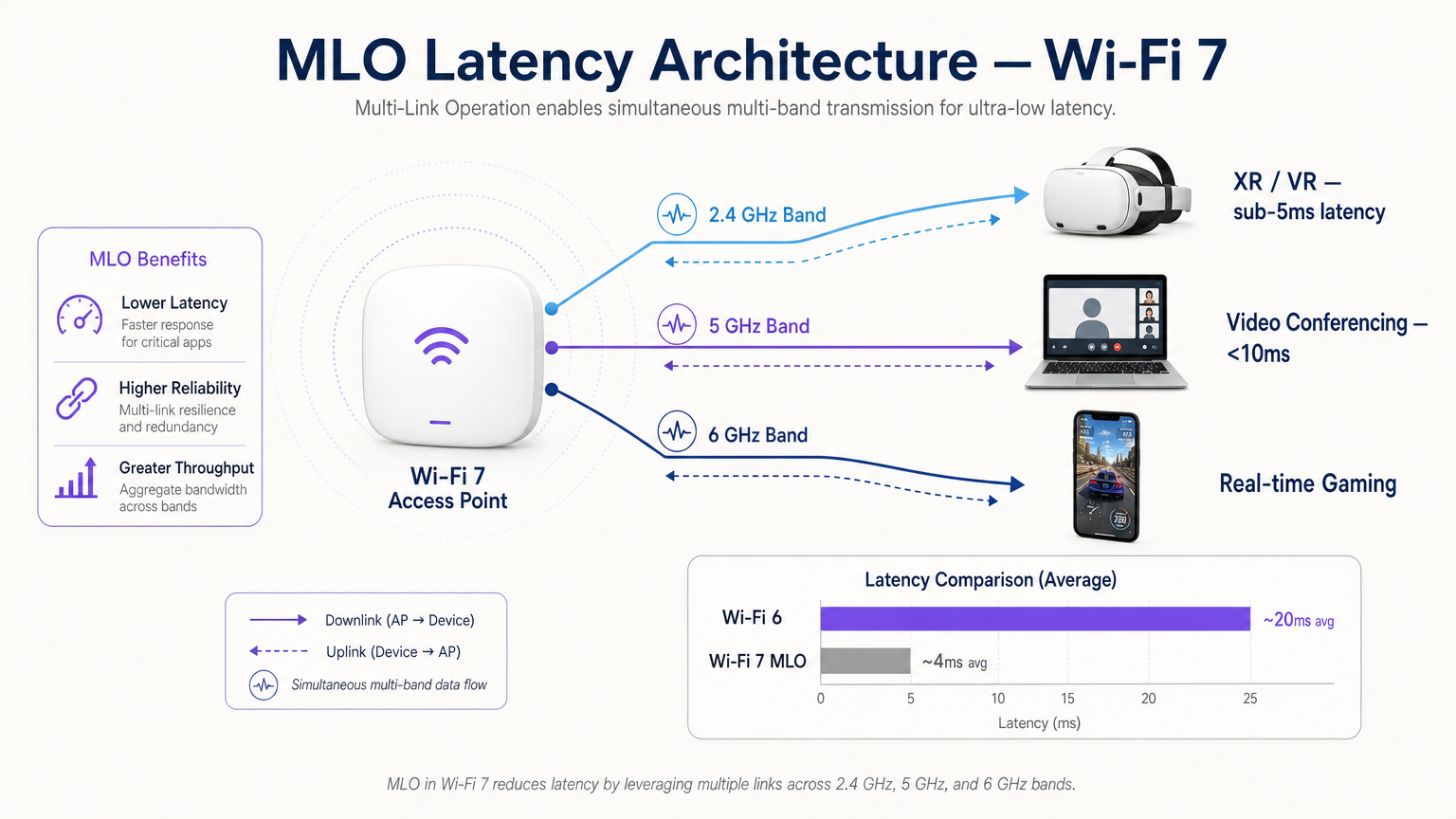
Esta arquitectura ofrece tres beneficios principales:
- Latencia Determinista: Al tener múltiples rutas disponibles, el programador puede transmitir datos en el primer enlace disponible, evitando retrasos por contención de canal.
- Fiabilidad sin Interrupciones: Si la interferencia aumenta en una banda, el tráfico continúa sin problemas en la otra sin un evento de reconexión.
- Rendimiento Agregado: Para transferencias de archivos grandes, los datos pueden distribuirse a través de múltiples enlaces simultáneamente.
Los Tres Modos de MLO
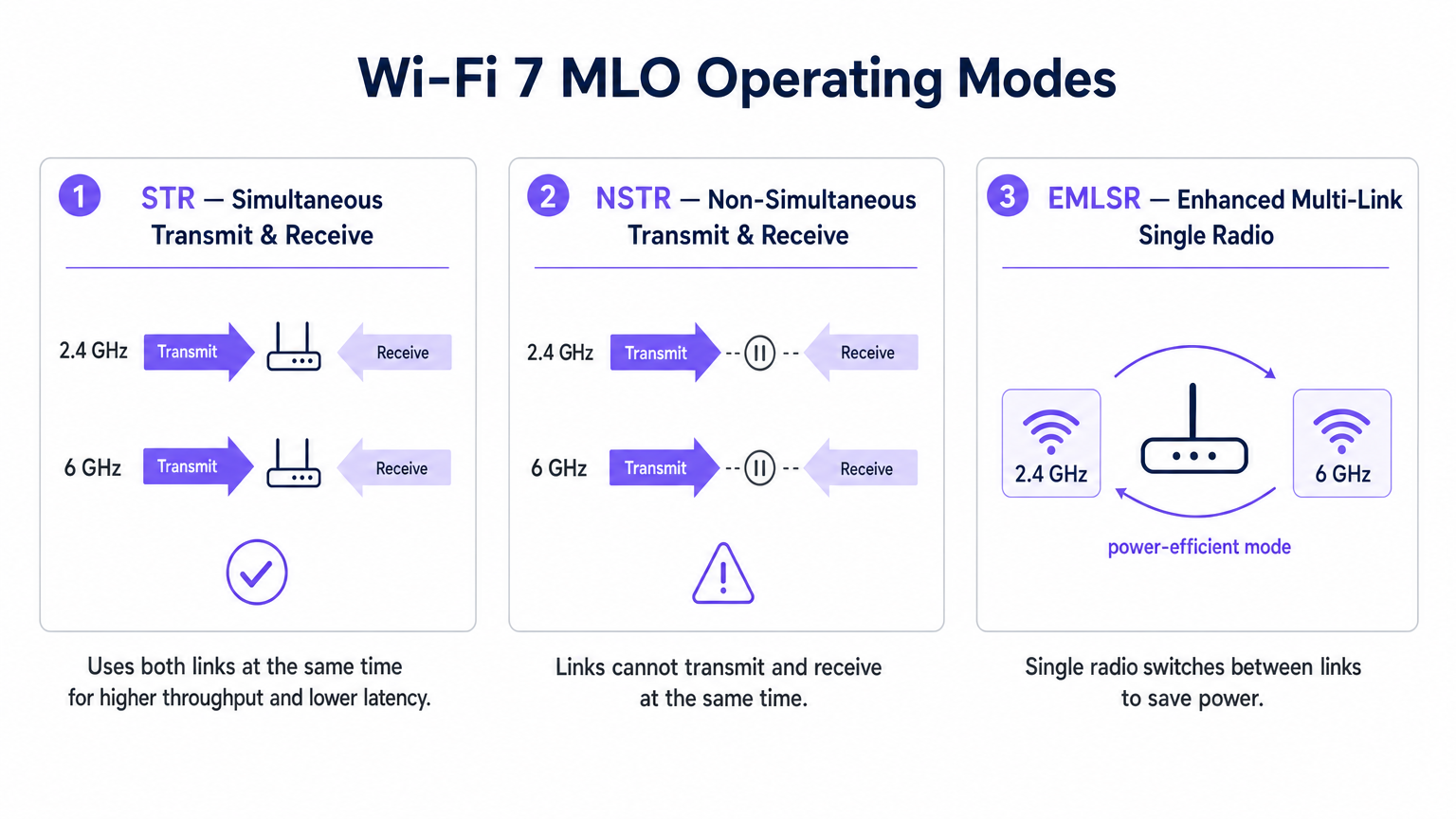
No todas las implementaciones de MLO son iguales. El estándar define tres modos de operación basados en las capacidades de aislamiento de radio del dispositivo cliente.
1. STR (Transmisión y Recepción Simultánea)
Esta es la implementación MLO óptima. Un dispositivo compatible con STR tiene suficiente aislamiento físico entre sus cadenas de radio para transmitir en un enlace (por ejemplo, 5 GHz) mientras recibe simultáneamente en otro (por ejemplo, 6 GHz) sin causar autointerferencia. Este modo ofrece una verdadera operación paralela y es clave para lograr una latencia inferior a 5 ms para cargas de trabajo de realidad extendida (XR) y computación espacial.
2. NSTR (Transmisión y Recepción No Simultánea)
Muchos clientes de Wi-Fi 7 de primera generación, incluyendo varios teléfonos inteligentes y laptops, carecen del aislamiento de antena requerido para STR. En el modo NSTR, el dispositivo mantiene múltiples enlaces, pero la capa MAC debe coordinarlos para que las operaciones de transmisión y recepción no se superpongan. Aunque se pierde el paralelismo total, NSTR aún proporciona beneficios significativos de fiabilidad y capacidades de equilibrio de carga sobre Wi-Fi 6 de enlace único.
3. EMLSR (Radio Única Multi-Enlace Mejorada)
Diseñado para dispositivos con restricciones de energía como sensores IoT y wearables, EMLSR utiliza una única radio que puede cambiar entre bandas de frecuencia en microsegundos. El dispositivo escucha en múltiples enlaces en un estado de baja energía y cambia rápidamente su radio activa al enlace donde se detecta una trama entrante. Esto proporciona la resiliencia de MLO sin el consumo de batería de operar múltiples radios activas.
Guía de Implementación
La implementación de MLO en un entorno empresarial requiere una planificación cuidadosa. Aquí se presenta un marco práctico para gerentes de TI y arquitectos de red.
1. Audite el Parque de Clientes
Los beneficios de MLO dependen completamente del soporte del cliente. A principios de 2025, MLO es compatible con chipsets premium como Qualcomm Snapdragon 8 Gen 3, MediaTek Filogic 380/680 e Intel BE200. Sin embargo, debe determinar si sus dispositivos críticos son compatibles con STR o NSTR. Si su entorno está dominado por clientes NSTR, calibre sus expectativas de latencia en consecuencia.
2. Priorice la Cobertura de 6 GHz
Para lograr las métricas de rendimiento destacadas de Wi-Fi 7, emparejar un enlace de 5 GHz con uno de 6 GHz es esencial. La banda de 6 GHz ofrece un espectro limpio y canales de 320 MHz. Si está implementando en un recinto de Hospitality o Transport , asegúrese de que su plan de densidad de AP tenga en cuenta las características de propagación de 6 GHz, que se atenúa más rápido a través de obstáculos físicos que 5 GHz.
3. Verificar la configuración de MLD
MLO no se habilita automáticamente con la simple instalación de puntos de acceso Wi-Fi 7. El AP debe configurarse para transmitir un Elemento Multi-Enlace en sus tramas de baliza, y el BSS debe configurarse como un BSS Multi-Enlace. Consulte la documentación de su proveedor, ya que algunos AP empresariales se envían con MLO deshabilitado por defecto a la espera de una mayor validación de interoperabilidad.
4. Actualizar el Backhaul Cableado
Un punto de acceso que ofrece un rendimiento inalámbrico multigigabit y una latencia inferior a 5 ms expondrá inmediatamente los cuellos de botella en su infraestructura cableada. Asegúrese de que sus switches de acceso soporten 2.5GbE o 5GbE (NBASE-T) y de que sus enlaces ascendentes WAN estén aprovisionados para manejar el tráfico agregado.
Mejores Prácticas
Al diseñar para MLO, siga estas mejores prácticas neutrales al proveedor:
- Postura de Seguridad: MLO opera por encima de la capa PHY, lo que significa que WPA3 sigue siendo el estándar. Asegúrese de que sus servidores RADIUS y su infraestructura 802.1X sean totalmente compatibles con WPA3-Enterprise. Para implementaciones públicas, revise los requisitos de cumplimiento como Cumplimiento de PIPEDA para Guest WiFi en Canadá .
- Planificación de Canales: En implementaciones densas, los dispositivos NSTR pueden generar una sobrecarga adicional de tramas de gestión debido a la coordinación de enlaces. Implemente una planificación estricta de canales para minimizar la interferencia cocanal, particularmente en la banda de 5 GHz.
- Integración con Analíticas: Aproveche la telemetría generada por MLO. La utilización por enlace y los datos de roaming son entradas invaluables para una plataforma robusta de WiFi Analytics , lo que le permite optimizar la experiencia de Guest WiFi basada en condiciones de RF en tiempo real.
- Estrategia de IoT: Para un contexto más amplio sobre la integración de dispositivos EMLSR de baja potencia, consulte nuestra Arquitectura de Internet de las Cosas: Una Guía Completa .
Solución de Problemas y Mitigación de Riesgos
Incluso con una planificación cuidadosa, las implementaciones de MLO pueden encontrar problemas. Esté atento a estos modos de falla comunes:
- Calidad de Enlace Asimétrica: Si el enlace de 5 GHz tiene una excelente intensidad de señal pero el enlace de 6 GHz es débil debido a la atenuación de la pared, el programador de MLD puede tener dificultades para equilibrar el tráfico de manera eficiente. Mitigación: Realice un estudio de sitio activo exhaustivo utilizando herramientas de medición compatibles con Wi-Fi 7 para asegurar una cobertura superpuesta en ambas bandas.
- Privación de Clientes Heredados: En entornos mixtos, los clientes Wi-Fi 5/6 heredados pueden quedarse sin tiempo de aire si el AP prioriza las transmisiones MLO agregadas. Mitigación: Utilice las funciones de Airtime Fairness y ajuste cuidadosamente los parámetros EDCA (Enhanced Distributed Channel Access) para garantizar un acceso equitativo.
- Latencia de Conmutación en EMLSR: Si los dispositivos EMLSR experimentan una alta latencia, el mecanismo de conmutación de microsegundos podría estar fallando debido a una interferencia excesiva en los enlaces de monitoreo. Mitigación: Investigue posibles fuentes de interferencia no-Wi-Fi utilizando análisis de espectro. Para entornos que utilizan servicios de ubicación, asegure la compatibilidad con su Sistema de Posicionamiento Interior: Guía UWB, BLE y WiFi .
ROI e Impacto Empresarial
Para los CTOs y operadores de recintos, el ROI de una red Wi-Fi 7 con capacidad MLO se extiende más allá de la velocidad bruta.
- Hospitalidad: El beneficio principal es la fiabilidad sin interrupciones. Un huésped que camina del vestíbulo a su habitación en una videollamada no experimentará la interrupción de un segundo de congelación asociada con la dirección de banda tradicional. Esto impacta directamente en los puntajes de satisfacción del huésped.
- Empresarial/Corporativo: Al lograr una latencia determinista, las organizaciones pueden implementar con confianza aplicaciones inalámbricas de capacitación XR y videoconferencias de alta densidad sin requerir conexiones Ethernet cableadas, reduciendo los costos de cableado.
- Sector Público/Eventos: El rendimiento agregado y la mitigación de la congestión de MLO permiten a los recintos soportar una mayor densidad de usuarios concurrentes, abriendo oportunidades para aplicaciones de participación de fans de alto ancho de banda y servicios basados en la ubicación.
Términos clave y definiciones
Multi-Link Operation (MLO)
A Wi-Fi 7 feature allowing a single logical connection to simultaneously use multiple frequency bands and channels.
Crucial for network architects designing networks that require deterministic latency and hitless reliability, moving away from legacy band steering.
Simultaneous Transmit and Receive (STR)
An MLO mode where a device can transmit on one frequency link while receiving on another at the exact same time.
The gold standard for XR, VR, and ultra-low latency applications, requiring advanced radio isolation in client devices.
Non-Simultaneous Transmit and Receive (NSTR)
An MLO mode where a device maintains multiple links but must coordinate them so transmit and receive operations do not overlap.
The most common mode for early Wi-Fi 7 smartphones and laptops, offering reliability benefits but not the full latency reduction of STR.
Enhanced Multi-Link Single Radio (EMLSR)
An MLO mode using a single radio that rapidly switches between multiple listening links to receive incoming frames.
Ideal for battery-powered IoT devices and wearables that need network resilience without the power draw of multiple active radios.
Multi-Link Device (MLD)
A logical entity in Wi-Fi 7 that contains multiple affiliated stations (STAs) or access points (APs) operating across different links.
The foundational relationship established between a Wi-Fi 7 client and AP to enable MLO capabilities.
Band Steering
A legacy technique where a wireless controller attempts to force a client device to connect to a specific frequency band (usually 5 GHz).
A reactive, disruptive process that MLO replaces by allowing seamless, simultaneous multi-band operation.
Hitless Reliability
The ability of a network connection to survive interference or signal degradation on one link without dropping packets or disconnecting.
A key business driver for MLO in enterprise and hospitality environments, ensuring uninterrupted VoIP and video calls.
Deterministic Latency
Network performance where data delivery times are highly predictable and consistent, with minimal jitter.
Essential for industrial automation, real-time gaming, and spatial computing, achieved in Wi-Fi 7 via STR MLO.
Casos de éxito
A 400-room luxury hotel is upgrading to Wi-Fi 7 to support a new wireless IPTV system and improve guest video conferencing. The IT team is concerned about roaming drops in the corridors.
Deploy Wi-Fi 7 APs with 5 GHz and 6 GHz radios enabled for MLO. Configure the BSS as a Multi-Link BSS. Ensure the IPTV devices support at least NSTR MLO. This allows the devices to maintain a logical connection across both bands. As the guest moves and the 6 GHz signal attenuates faster than the 5 GHz signal, the MAC layer seamlessly shifts traffic to the 5 GHz link without a deauthentication or steering event.
A retail chain is deploying real-time AR (Augmented Reality) inventory headsets for warehouse staff. They require sub-5ms latency, but the warehouse has high 2.4 GHz interference from legacy scanners.
Audit the AR headsets to ensure they feature STR (Simultaneous Transmit and Receive) capable Wi-Fi 7 chipsets. Deploy 6 GHz-capable Wi-Fi 7 APs. Configure an MLO profile aggregating the 5 GHz and 6 GHz bands, completely excluding the congested 2.4 GHz band from the MLD relationship for these specific devices.
Análisis de escenarios
Q1. You are designing the Wi-Fi 7 infrastructure for a high-density university lecture theatre. You have provisioned 2.4 GHz, 5 GHz, and 6 GHz coverage. During testing, you notice that while overall throughput is high, management frame overhead is causing utilization spikes on the 5 GHz band. What is the most likely cause related to MLO?
💡 Sugerencia:Consider the operational overhead of the most common early Wi-Fi 7 client devices.
Mostrar enfoque recomendado
The environment likely has a high concentration of NSTR (Non-Simultaneous Transmit and Receive) capable smartphones and laptops. NSTR requires the MAC layer to coordinate transmit and receive windows across links to prevent self-interference, which generates additional management frame overhead. To mitigate this, you should optimize your channel planning to reduce co-channel interference and consider tuning EDCA parameters.
Q2. A hospital IT director wants to deploy Wi-Fi 7 to support wireless telemetry monitors on patient beds. Battery life is the primary concern, as the monitors must run for 48 hours between charges, but the connection must be highly resilient to interference. Which MLO mode should the procurement team ensure the new telemetry monitors support?
💡 Sugerencia:Which mode provides multi-link resilience without running multiple active radios simultaneously?
Mostrar enfoque recomendado
The procurement team should specify EMLSR (Enhanced Multi-Link Single Radio) support. EMLSR uses a single radio that listens in a low-power state and rapidly switches between bands (e.g., 5 GHz and 6 GHz) to receive data. This provides the reliability benefits of MLO—avoiding interference on a single band—without the heavy battery drain associated with STR or NSTR modes.
Q3. Your network monitoring dashboard shows that a VIP user's Wi-Fi 7 laptop is utilizing MLO, but the latency metrics are hovering around 15-20ms, similar to Wi-Fi 6, rather than the expected sub-5ms range. The AP is broadcasting on 2.4 GHz and 5 GHz only, as the venue has not yet upgraded to 6 GHz APs. Why is the latency not improving significantly?
💡 Sugerencia:Consider the spectrum characteristics required to achieve the lowest possible latency in MLO.
Mostrar enfoque recomendado
To achieve sub-5ms deterministic latency, MLO relies on the clean spectrum and wide channels (up to 320 MHz) available in the 6 GHz band. While MLO can aggregate 2.4 GHz and 5 GHz links, the 2.4 GHz band is typically too congested and narrow to provide a reliable low-latency path. Upgrading to 6 GHz-capable APs is required to unlock the full latency benefits of STR MLO.




