

Multi-Link Operation (MLO) in Wi-Fi 7: Come funziona e perché è importante
Questa guida di riferimento tecnica offre un'analisi approfondita della Multi-Link Operation (MLO) in Wi-Fi 7, spiegando come essa cambi radicalmente la connettività wireless abilitando la trasmissione simultanea multi-banda. Fornisce a IT manager, architetti di rete e CTO strategie di implementazione pratiche, esplorando le modalità STR, NSTR ed EMLSR per ottimizzare le reti per carichi di lavoro a bassa latenza in ambienti aziendali e luoghi pubblici.
🎧 Ascolta questa guida
Visualizza trascrizione
Riepilogo Esecutivo
La Multi-Link Operation (MLO) è il cambiamento architetturale distintivo nello standard IEEE 802.11be (Wi-Fi 7). A differenza del tradizionale band steering che forza reattivamente un client a scegliere una singola banda di frequenza, la MLO abilita una singola connessione logica su più bande (2.4 GHz, 5 GHz e 6 GHz) simultaneamente. Per gli architetti di rete aziendali, i CTO e gli operatori di sedi, questo rappresenta un cambiamento fondamentale nel modo in cui latenza, affidabilità e throughput vengono gestiti a livello MAC.
Questa guida fornisce un'analisi tecnica approfondita della MLO per i leader IT che progettano per carichi di lavoro a bassa latenza. Esplora le distinzioni critiche tra le modalità Simultaneous Transmit and Receive (STR), Non-Simultaneous Transmit and Receive (NSTR) ed Enhanced Multi-Link Single Radio (EMLSR). In modo cruciale, spiega dove la MLO offre effettivamente una latenza inferiore a 5 ms per XR e voce in tempo reale, e come mitiga la congestione in implementazioni dense nel settore pubblico e nell'ospitalità. Tratteremo anche le realtà di implementazione, inclusa la necessità dello spettro a 6 GHz e lo stato attuale del supporto dei dispositivi client, per aiutarvi a pianificare il vostro prossimo aggiornamento dell'infrastruttura con fiducia.
Analisi Tecnica Approfondita
Per comprendere l'impatto della MLO Wi-Fi 7, dobbiamo prima confrontarla con l'approccio storico agli ambienti multi-banda.
Il Problema con il Band Steering
Storicamente, gli access point utilizzavano il band steering per gestire i client. Il controller osservava un client sulla banda a 2.4 GHz e tentava di forzarlo sulla banda a 5 GHz ignorando le sue richieste di probe o inviando frame di deautenticazione. Questo approccio è sempre stato reattivo e dirompente. Il dispositivo client mantiene un solo link radio attivo alla volta. Se l'ambiente RF cambia, deve verificarsi un evento di steering, con conseguente breve disconnessione. Per applicazioni in tempo reale come i sistemi punto vendita Retail o la telemetria Healthcare , queste micro-interruzioni si accumulano in un degrado delle prestazioni evidente.
L'Architettura MLO
La Multi-Link Operation sostituisce questo paradigma. In un ambiente MLO, l'AP e il dispositivo client stabiliscono una relazione Multi-Link Device (MLD). Ciò consente al livello MAC di aggregare più link fisici (ad esempio, un link a 5 GHz e un link a 6 GHz) in una singola connessione logica. L'adattamento del link e la distribuzione del traffico avvengono al di sotto del livello applicativo, completamente invisibili all'utente.
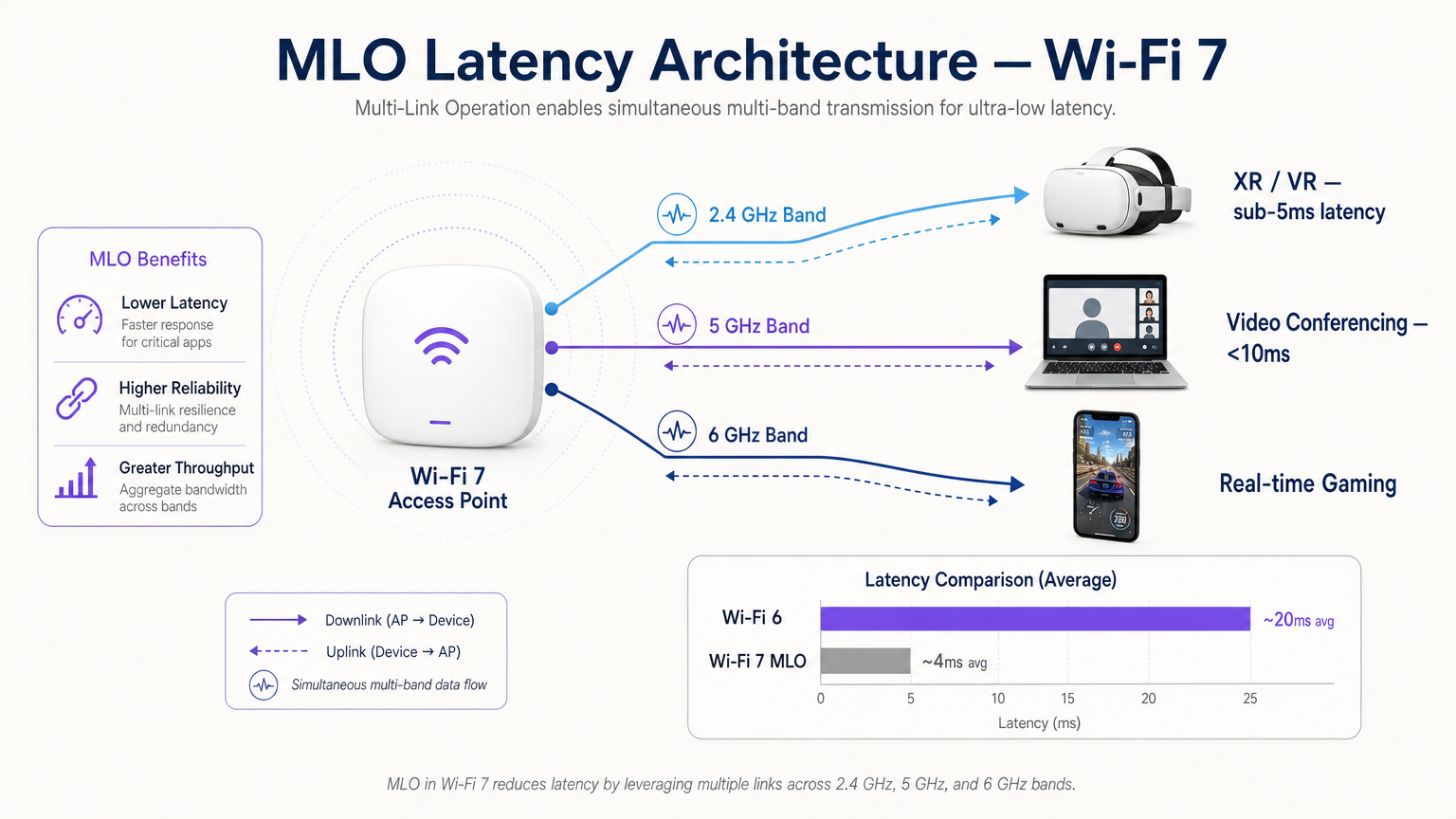
Questa architettura offre tre vantaggi principali:
- Latenza Deterministica: Avendo più percorsi disponibili, lo scheduler può trasmettere dati sul primo link disponibile, bypassando i ritardi di contesa del canale.
- Affidabilità Senza Interruzioni: Se l'interferenza aumenta su una banda, il traffico continua senza soluzione di continuità sull'altra senza un evento di riconnessione.
- Throughput Aggregato: Per trasferimenti di file di grandi dimensioni, i dati possono essere suddivisi su più link simultaneamente.
Le Tre Modalità di MLO
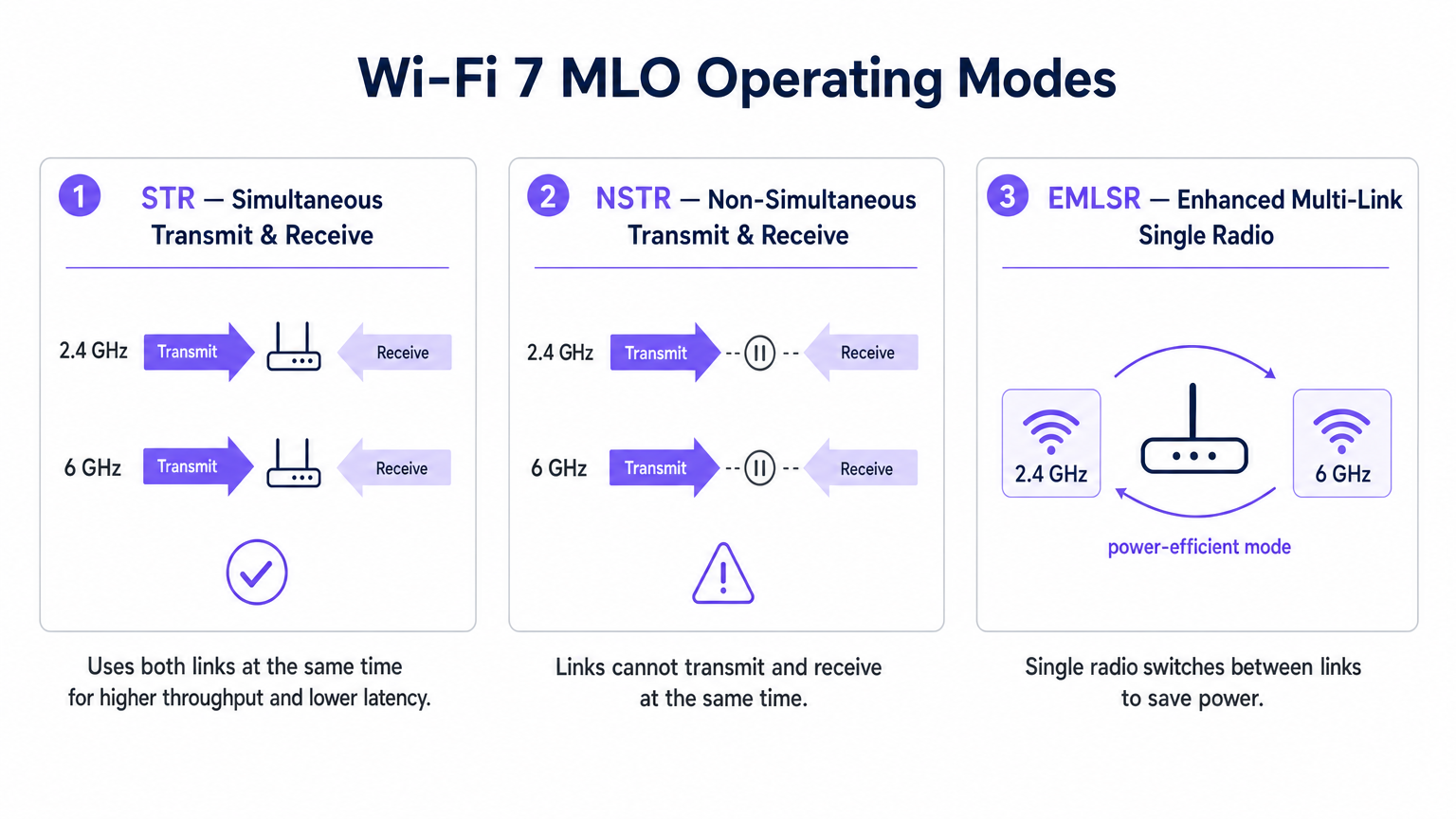
Non tutte le implementazioni MLO sono uguali. Lo standard definisce tre modalità operative basate sulle capacità di isolamento radio del dispositivo client.
1. STR (Simultaneous Transmit and Receive)
Questa è l'implementazione MLO ottimale. Un dispositivo compatibile con STR ha un isolamento fisico sufficiente tra le sue catene radio per trasmettere su un link (ad esempio, 5 GHz) mentre riceve simultaneamente su un altro (ad esempio, 6 GHz) senza causare auto-interferenza. Questa modalità offre una vera operazione parallela ed è la chiave per raggiungere una latenza inferiore a 5 ms per carichi di lavoro di realtà estesa (XR) e spatial computing.
2. NSTR (Non-Simultaneous Transmit and Receive)
Molti client Wi-Fi 7 di prima generazione, inclusi diversi smartphone e laptop, mancano dell'isolamento dell'antenna richiesto per STR. In modalità NSTR, il dispositivo mantiene più link, ma il livello MAC deve coordinarli in modo che le operazioni di trasmissione e ricezione non si sovrappongano. Anche se si perde il parallelismo completo, NSTR offre comunque significativi vantaggi in termini di affidabilità e capacità di bilanciamento del carico rispetto al Wi-Fi 6 a link singolo.
3. EMLSR (Enhanced Multi-Link Single Radio)
Progettato per dispositivi con limitazioni di potenza come sensori IoT e dispositivi indossabili, EMLSR utilizza una singola radio che può passare tra le bande di frequenza in microsecondi. Il dispositivo ascolta su più link in uno stato a basso consumo e commuta rapidamente la sua radio attiva al link dove viene rilevato un frame in arrivo. Ciò fornisce la resilienza della MLO senza il consumo della batteria derivante dall'esecuzione di più radio attive.
Guida all'Implementazione
L'implementazione della MLO in un ambiente aziendale richiede un'attenta pianificazione. Ecco un framework pratico per IT manager e architetti di rete.
1. Audit del Parco Client
I vantaggi della MLO dipendono interamente dal supporto client. All'inizio del 2025, la MLO è supportata da chipset premium come Qualcomm Snapdragon 8 Gen 3, MediaTek Filogic 380/680 e Intel BE200. Tuttavia, è necessario determinare se i vostri dispositivi critici supportano STR o NSTR. Se il vostro ambiente è dominato da client NSTR, calibrate le vostre aspettative di latenza di conseguenza.
2. Dare Priorità alla Copertura a 6 GHz
Per raggiungere le metriche di performance principali del Wi-Fi 7, l'accoppiamento di un link a 5 GHz con un link a 6 GHz è essenziale. La banda a 6 GHz offre uno spettro pulito e canali a 320 MHz. Se state implementando in una sede Hospitality o Transport , assicuratevi che il vostro piano di densità AP tenga conto delle caratteristiche di propagazione dei 6 GHz, che si attenuano più rapidamente attraverso gli ostacoli fisici rispetto ai 5 GHz.
3. Verificare la configurazione MLD
MLO non viene abilitato automaticamente semplicemente installando access point Wi-Fi 7. L'AP deve essere configurato per trasmettere un Multi-Link Element nei suoi frame beacon, e il BSS deve essere configurato come Multi-Link BSS. Consultare la documentazione del proprio fornitore, poiché alcuni AP aziendali vengono forniti con MLO disabilitato per impostazione predefinita in attesa di ulteriore convalida dell'interoperabilità.
4. Aggiornare il Backhaul Cablato
Un access point che offre throughput wireless multi-gigabit e latenza inferiore a 5ms esporrà immediatamente i colli di bottiglia nella vostra infrastruttura cablata. Assicurarsi che i vostri switch di rete supportino 2.5GbE o 5GbE (NBASE-T) e che i vostri uplink WAN siano configurati per gestire il traffico aggregato.
Migliori Pratiche
Quando si progetta per MLO, attenersi a queste migliori pratiche indipendenti dal fornitore:
- Postura di Sicurezza: MLO opera al di sopra del livello PHY, il che significa che WPA3 rimane lo standard. Assicurarsi che i server RADIUS e l'infrastruttura 802.1X siano pienamente compatibili con WPA3-Enterprise. Per le implementazioni pubbliche, rivedere i requisiti di conformità come PIPEDA Compliance for Guest WiFi in Canada .
- Pianificazione dei Canali: In implementazioni dense, i dispositivi NSTR possono generare un overhead aggiuntivo di frame di gestione a causa della coordinazione dei link. Implementare una rigorosa pianificazione dei canali per minimizzare l'interferenza co-canale, in particolare sulla banda a 5 GHz.
- Integrazione con gli Analytics: Sfruttare la telemetria generata da MLO. I dati di utilizzo per link e di roaming sono input inestimabili per una robusta piattaforma di WiFi Analytics , che consente di ottimizzare l'esperienza Guest WiFi basata sulle condizioni RF in tempo reale.
- Strategia IoT: Per un contesto più ampio sull'integrazione di dispositivi EMLSR a bassa potenza, fare riferimento alla nostra Internet of Things Architecture: A Complete Guide .
Risoluzione dei Problemi e Mitigazione dei Rischi
Anche con un'attenta pianificazione, le implementazioni MLO possono incontrare problemi. Prestare attenzione a queste modalità di guasto comuni:
- Qualità del Link Asimmetrica: Se il link a 5 GHz ha un'eccellente potenza del segnale ma il link a 6 GHz è debole a causa dell'attenuazione delle pareti, lo scheduler MLD potrebbe avere difficoltà a bilanciare il traffico in modo efficiente. Mitigazione: Condurre un'indagine approfondita del sito attiva utilizzando strumenti di misurazione compatibili con Wi-Fi 7 per garantire una copertura sovrapposta su entrambe le bande.
- Starvation dei Client Legacy: In ambienti misti, i client Wi-Fi 5/6 legacy potrebbero essere privati del tempo di trasmissione se l'AP prioritizza le trasmissioni MLO aggregate. Mitigazione: Utilizzare le funzionalità di Airtime Fairness e sintonizzare attentamente i parametri EDCA (Enhanced Distributed Channel Access) per garantire un accesso equo.
- Latenza di Switching in EMLSR: Se i dispositivi EMLSR sperimentano un'elevata latenza, il meccanismo di switching a microsecondi potrebbe fallire a causa di interferenze eccessive sui link di monitoraggio. Mitigazione: Indagare potenziali fonti di interferenza non-Wi-Fi utilizzando l'analisi dello spettro. Per gli ambienti che utilizzano servizi di localizzazione, assicurarsi la compatibilità con il vostro Indoor Positioning System: UWB, BLE, & WiFi Guide .
ROI e Impatto sul Business
Per i CTO e gli operatori di sedi, il ROI di una rete Wi-Fi 7 compatibile con MLO si estende oltre la velocità pura.
- Ospitalità: Il vantaggio principale è l'affidabilità senza interruzioni. Un ospite che si sposta dalla hall alla propria stanza durante una videochiamata non sperimenterà il fastidioso blocco di un secondo associato al tradizionale band steering. Ciò influisce direttamente sui punteggi di soddisfazione degli ospiti.
- Aziendale/Corporate: Ottenendo una latenza deterministica, le organizzazioni possono implementare con fiducia applicazioni di formazione XR wireless e videoconferenze ad alta densità senza richiedere connessioni Ethernet cablate, riducendo i costi di cablaggio.
- Settore Pubblico/Eventi: Il throughput aggregato e la mitigazione della congestione di MLO consentono alle sedi di supportare una maggiore densità di utenti concorrenti, aprendo opportunità per applicazioni di coinvolgimento dei fan ad alta larghezza di banda e servizi basati sulla posizione.
Termini chiave e definizioni
Multi-Link Operation (MLO)
A Wi-Fi 7 feature allowing a single logical connection to simultaneously use multiple frequency bands and channels.
Crucial for network architects designing networks that require deterministic latency and hitless reliability, moving away from legacy band steering.
Simultaneous Transmit and Receive (STR)
An MLO mode where a device can transmit on one frequency link while receiving on another at the exact same time.
The gold standard for XR, VR, and ultra-low latency applications, requiring advanced radio isolation in client devices.
Non-Simultaneous Transmit and Receive (NSTR)
An MLO mode where a device maintains multiple links but must coordinate them so transmit and receive operations do not overlap.
The most common mode for early Wi-Fi 7 smartphones and laptops, offering reliability benefits but not the full latency reduction of STR.
Enhanced Multi-Link Single Radio (EMLSR)
An MLO mode using a single radio that rapidly switches between multiple listening links to receive incoming frames.
Ideal for battery-powered IoT devices and wearables that need network resilience without the power draw of multiple active radios.
Multi-Link Device (MLD)
A logical entity in Wi-Fi 7 that contains multiple affiliated stations (STAs) or access points (APs) operating across different links.
The foundational relationship established between a Wi-Fi 7 client and AP to enable MLO capabilities.
Band Steering
A legacy technique where a wireless controller attempts to force a client device to connect to a specific frequency band (usually 5 GHz).
A reactive, disruptive process that MLO replaces by allowing seamless, simultaneous multi-band operation.
Hitless Reliability
The ability of a network connection to survive interference or signal degradation on one link without dropping packets or disconnecting.
A key business driver for MLO in enterprise and hospitality environments, ensuring uninterrupted VoIP and video calls.
Deterministic Latency
Network performance where data delivery times are highly predictable and consistent, with minimal jitter.
Essential for industrial automation, real-time gaming, and spatial computing, achieved in Wi-Fi 7 via STR MLO.
Casi di studio
A 400-room luxury hotel is upgrading to Wi-Fi 7 to support a new wireless IPTV system and improve guest video conferencing. The IT team is concerned about roaming drops in the corridors.
Deploy Wi-Fi 7 APs with 5 GHz and 6 GHz radios enabled for MLO. Configure the BSS as a Multi-Link BSS. Ensure the IPTV devices support at least NSTR MLO. This allows the devices to maintain a logical connection across both bands. As the guest moves and the 6 GHz signal attenuates faster than the 5 GHz signal, the MAC layer seamlessly shifts traffic to the 5 GHz link without a deauthentication or steering event.
A retail chain is deploying real-time AR (Augmented Reality) inventory headsets for warehouse staff. They require sub-5ms latency, but the warehouse has high 2.4 GHz interference from legacy scanners.
Audit the AR headsets to ensure they feature STR (Simultaneous Transmit and Receive) capable Wi-Fi 7 chipsets. Deploy 6 GHz-capable Wi-Fi 7 APs. Configure an MLO profile aggregating the 5 GHz and 6 GHz bands, completely excluding the congested 2.4 GHz band from the MLD relationship for these specific devices.
Analisi degli scenari
Q1. You are designing the Wi-Fi 7 infrastructure for a high-density university lecture theatre. You have provisioned 2.4 GHz, 5 GHz, and 6 GHz coverage. During testing, you notice that while overall throughput is high, management frame overhead is causing utilization spikes on the 5 GHz band. What is the most likely cause related to MLO?
💡 Suggerimento:Consider the operational overhead of the most common early Wi-Fi 7 client devices.
Mostra l'approccio consigliato
The environment likely has a high concentration of NSTR (Non-Simultaneous Transmit and Receive) capable smartphones and laptops. NSTR requires the MAC layer to coordinate transmit and receive windows across links to prevent self-interference, which generates additional management frame overhead. To mitigate this, you should optimize your channel planning to reduce co-channel interference and consider tuning EDCA parameters.
Q2. A hospital IT director wants to deploy Wi-Fi 7 to support wireless telemetry monitors on patient beds. Battery life is the primary concern, as the monitors must run for 48 hours between charges, but the connection must be highly resilient to interference. Which MLO mode should the procurement team ensure the new telemetry monitors support?
💡 Suggerimento:Which mode provides multi-link resilience without running multiple active radios simultaneously?
Mostra l'approccio consigliato
The procurement team should specify EMLSR (Enhanced Multi-Link Single Radio) support. EMLSR uses a single radio that listens in a low-power state and rapidly switches between bands (e.g., 5 GHz and 6 GHz) to receive data. This provides the reliability benefits of MLO—avoiding interference on a single band—without the heavy battery drain associated with STR or NSTR modes.
Q3. Your network monitoring dashboard shows that a VIP user's Wi-Fi 7 laptop is utilizing MLO, but the latency metrics are hovering around 15-20ms, similar to Wi-Fi 6, rather than the expected sub-5ms range. The AP is broadcasting on 2.4 GHz and 5 GHz only, as the venue has not yet upgraded to 6 GHz APs. Why is the latency not improving significantly?
💡 Suggerimento:Consider the spectrum characteristics required to achieve the lowest possible latency in MLO.
Mostra l'approccio consigliato
To achieve sub-5ms deterministic latency, MLO relies on the clean spectrum and wide channels (up to 320 MHz) available in the 6 GHz band. While MLO can aggregate 2.4 GHz and 5 GHz links, the 2.4 GHz band is typically too congested and narrow to provide a reliable low-latency path. Upgrading to 6 GHz-capable APs is required to unlock the full latency benefits of STR MLO.




