

Multi-Link Operation (MLO) em Wi-Fi 7: Como Funciona e Por Que É Importante
Este guia de referência técnica oferece uma análise aprofundada da Multi-Link Operation (MLO) em Wi-Fi 7, explicando como ela muda fundamentalmente a conectividade sem fio ao permitir a transmissão simultânea em múltiplas bandas. Ele equipa gerentes de TI, arquitetos de rede e CTOs com estratégias práticas de implantação, explorando os modos STR, NSTR e EMLSR para otimizar redes para cargas de trabalho de baixa latência em ambientes corporativos e de locais públicos.
🎧 Ouça este Guia
Ver Transcrição
Resumo Executivo
A Multi-Link Operation (MLO) é a mudança arquitetônica definidora no padrão IEEE 802.11be (Wi-Fi 7). Ao contrário do band steering legado, que força reativamente um cliente a escolher uma única banda de frequência, a MLO permite uma única conexão lógica através de múltiplas bandas (2.4 GHz, 5 GHz e 6 GHz) simultaneamente. Para arquitetos de rede corporativa, CTOs e operadores de locais, isso representa uma mudança fundamental na forma como a latência, a confiabilidade e o throughput são gerenciados na camada MAC.
Este guia oferece uma análise técnica aprofundada da MLO para líderes de TI que projetam para cargas de trabalho de baixa latência. Ele explora as distinções críticas entre os modos Simultaneous Transmit and Receive (STR), Non-Simultaneous Transmit and Receive (NSTR) e Enhanced Multi-Link Single Radio (EMLSR). Crucialmente, ele detalha onde a MLO realmente oferece latência inferior a 5ms para XR e voz em tempo real, e como ela mitiga o congestionamento em implantações densas nos setores público e de hospitalidade. Também abordaremos as realidades da implementação, incluindo a necessidade do espectro de 6 GHz e o estado atual do suporte a dispositivos cliente, para ajudá-lo a planejar sua próxima atualização de infraestrutura com confiança.
Análise Técnica Aprofundada
Para entender o impacto da MLO Wi-Fi 7, devemos primeiro contrastá-la com a abordagem histórica para ambientes multibanda.
O Problema com o Band Steering
Historicamente, os pontos de acesso usavam o band steering para gerenciar clientes. O controlador observava um cliente na banda de 2.4 GHz e tentava forçá-lo para a banda de 5 GHz ignorando suas solicitações de sonda ou enviando quadros de desautenticação. Essa abordagem sempre foi reativa e disruptiva. O dispositivo cliente mantém apenas um link de rádio ativo por vez. Se o ambiente de RF mudar, um evento de steering deve ocorrer, resultando em uma breve desconexão. Para aplicações em tempo real, como sistemas de ponto de venda de Varejo ou telemetria de Saúde , essas micro-interrupções se acumulam em uma degradação perceptível do desempenho.
A Arquitetura MLO
A Multi-Link Operation substitui esse paradigma. Em um ambiente MLO, o AP e o dispositivo cliente estabelecem um relacionamento de Multi-Link Device (MLD). Isso permite que a camada MAC agregue múltiplos links físicos (por exemplo, um link de 5 GHz e um link de 6 GHz) em uma única conexão lógica. A adaptação do link e a distribuição de tráfego ocorrem abaixo da camada de aplicação, completamente invisíveis para o usuário.
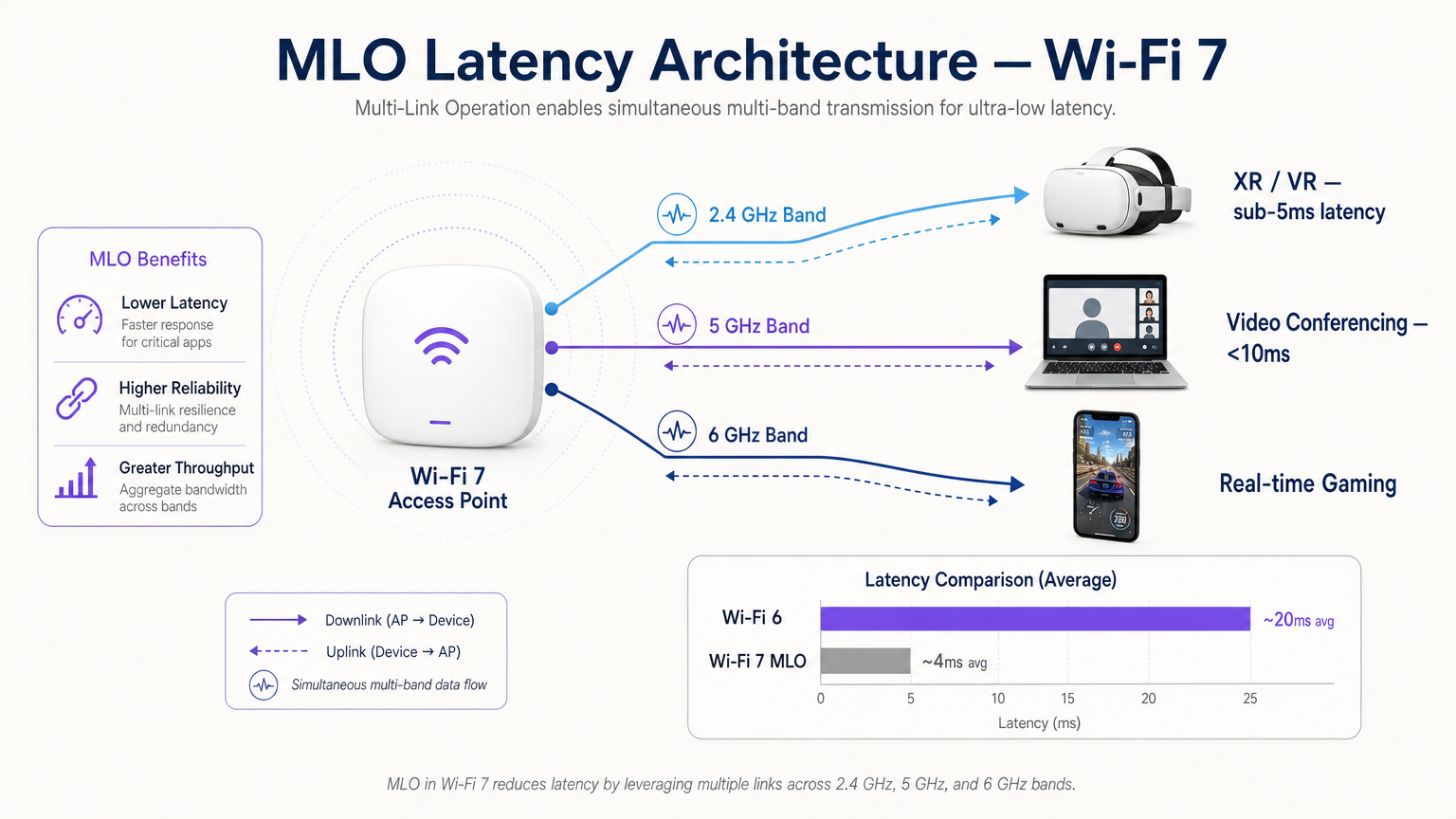
Esta arquitetura oferece três benefícios principais:
- Latência Determinística: Ao ter múltiplos caminhos disponíveis, o agendador pode transmitir dados no primeiro link disponível, contornando atrasos de contenção de canal.
- Confiabilidade Sem Interrupções: Se a interferência aumentar em uma banda, o tráfego continua sem problemas na outra sem um evento de reconexão.
- Throughput Agregado: Para grandes transferências de arquivos, os dados podem ser distribuídos por múltiplos links simultaneamente.
Os Três Modos de MLO
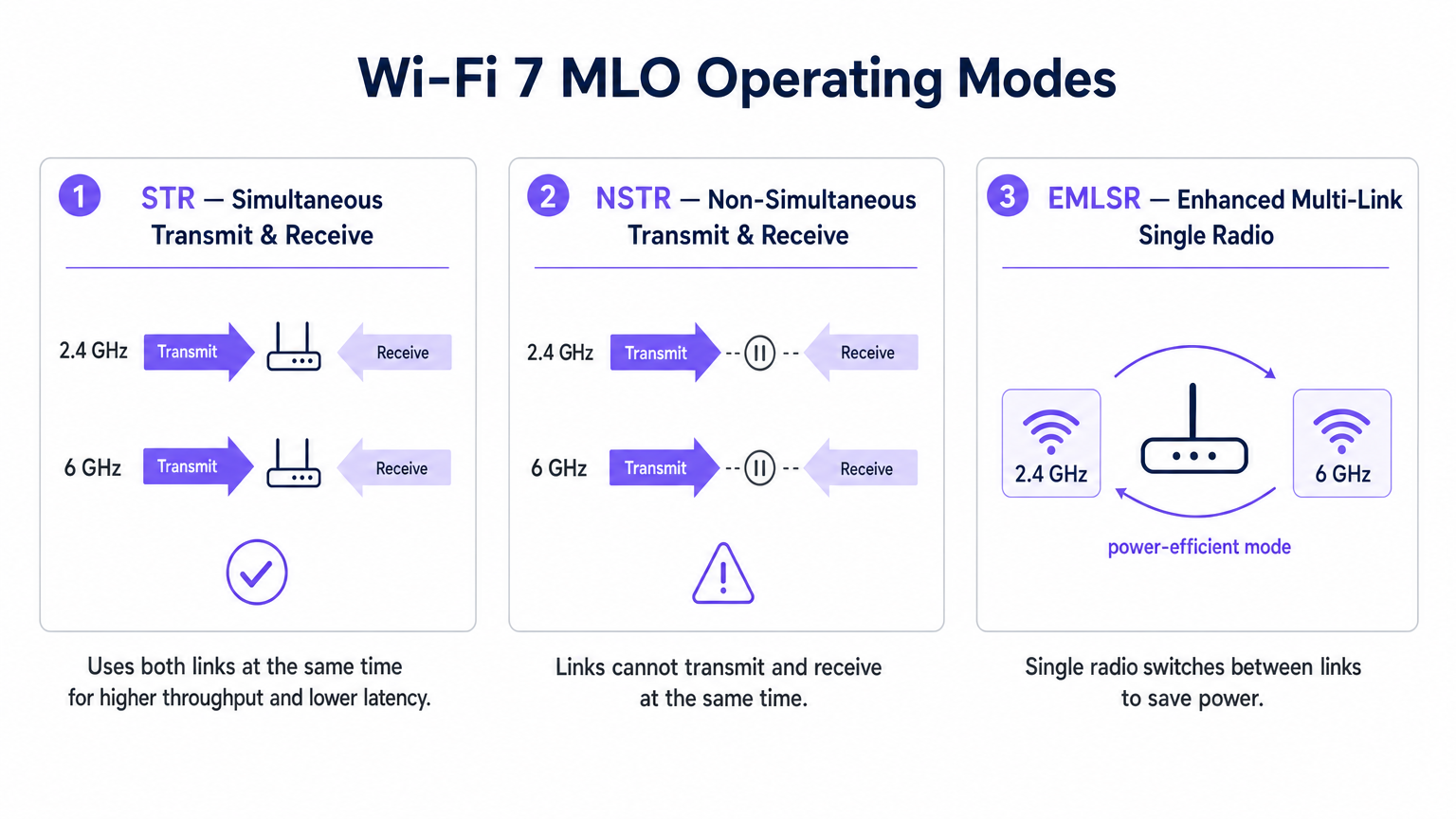
Nem todas as implementações de MLO são iguais. O padrão define três modos de operação baseados nas capacidades de isolamento de rádio do dispositivo cliente.
1. STR (Transmissão e Recepção Simultâneas)
Esta é a implementação MLO ideal. Um dispositivo compatível com STR possui isolamento físico suficiente entre suas cadeias de rádio para transmitir em um link (por exemplo, 5 GHz) enquanto recebe simultaneamente em outro (por exemplo, 6 GHz) sem causar autointerferência. Este modo oferece verdadeira operação paralela e é a chave para alcançar latência inferior a 5ms para cargas de trabalho de realidade estendida (XR) e computação espacial.
2. NSTR (Transmissão e Recepção Não Simultâneas)
Muitos clientes Wi-Fi 7 de primeira geração, incluindo vários smartphones e laptops, não possuem o isolamento de antena necessário para STR. No modo NSTR, o dispositivo mantém múltiplos links, mas a camada MAC deve coordená-los para que as operações de transmissão e recepção não se sobreponham. Embora se perca o paralelismo total, o NSTR ainda oferece benefícios significativos de confiabilidade e capacidades de balanceamento de carga em relação ao Wi-Fi 6 de link único.
3. EMLSR (Rádio Único Multi-Link Aprimorado)
Projetado para dispositivos com restrição de energia, como sensores IoT e wearables, o EMLSR utiliza um único rádio que pode alternar entre bandas de frequência em microssegundos. O dispositivo escuta em múltiplos links em um estado de baixa energia e rapidamente alterna seu rádio ativo para o link onde um quadro de entrada é detectado. Isso proporciona a resiliência da MLO sem o consumo de bateria de operar múltiplos rádios ativos.
Guia de Implementação
A implantação de MLO em um ambiente corporativo requer planejamento cuidadoso. Aqui está uma estrutura prática para gerentes de TI e arquitetos de rede.
1. Auditar o Parque de Clientes
Os benefícios da MLO dependem inteiramente do suporte do cliente. No início de 2025, a MLO é suportada por chipsets premium como Qualcomm Snapdragon 8 Gen 3, MediaTek Filogic 380/680 e Intel BE200. No entanto, você deve determinar se seus dispositivos críticos suportam STR ou NSTR. Se o seu ambiente for dominado por clientes NSTR, calibre suas expectativas de latência de acordo.
2. Priorizar a Cobertura de 6 GHz
Para alcançar as métricas de desempenho de destaque do Wi-Fi 7, o emparelhamento de um link de 5 GHz com um link de 6 GHz é essencial. A banda de 6 GHz oferece espectro limpo e canais de 320 MHz. Se você estiver implantando em um local de Hotelaria ou Transporte , certifique-se de que seu plano de densidade de APs leve em conta as características de propagação de 6 GHz, que atenua mais rapidamente através de obstáculos físicos do que 5 GHz.
3. Verificar Configuração MLD
MLO não é ativado automaticamente apenas instalando pontos de acesso Wi-Fi 7. O AP deve ser configurado para transmitir um Elemento Multi-Link em seus quadros de beacon, e o BSS deve ser configurado como um BSS Multi-Link. Consulte a documentação do seu fornecedor, pois alguns APs empresariais são enviados com MLO desativado por padrão, aguardando validação adicional de interoperabilidade.
4. Atualizar o Backhaul Cabeado
Um ponto de acesso que oferece taxa de transferência sem fio multi-gigabit e latência inferior a 5ms exporá imediatamente gargalos em sua infraestrutura cabeada. Certifique-se de que seus switches de acesso suportam 2.5GbE ou 5GbE (NBASE-T) e que seus uplinks WAN estão provisionados para lidar com o tráfego agregado.
Melhores Práticas
Ao projetar para MLO, siga estas melhores práticas neutras em relação ao fornecedor:
- Postura de Segurança: MLO opera acima da camada PHY, o que significa que WPA3 permanece o padrão. Certifique-se de que seus servidores RADIUS e infraestrutura 802.1X sejam totalmente compatíveis com WPA3-Enterprise. Para implantações públicas, revise os requisitos de conformidade, como Conformidade PIPEDA para Guest WiFi no Canadá .
- Planejamento de Canais: Em implantações densas, dispositivos NSTR podem gerar sobrecarga adicional de quadros de gerenciamento devido à coordenação de links. Implemente um planejamento de canais rigoroso para minimizar a interferência de co-canal, particularmente na banda de 5 GHz.
- Integração com Analytics: Aproveite a telemetria gerada por MLO. A utilização por link e os dados de roaming são entradas inestimáveis para uma plataforma robusta de WiFi Analytics , permitindo otimizar a experiência do Guest WiFi com base nas condições de RF em tempo real.
- Estratégia de IoT: Para um contexto mais amplo sobre a integração de dispositivos EMLSR de baixa potência, consulte nosso Arquitetura da Internet das Coisas: Um Guia Completo .
Solução de Problemas e Mitigação de Riscos
Mesmo com planejamento cuidadoso, as implantações de MLO podem encontrar problemas. Fique atento a esses modos de falha comuns:
- Qualidade de Link Assimétrica: Se o link de 5 GHz tiver excelente intensidade de sinal, mas o link de 6 GHz estiver fraco devido à atenuação da parede, o agendador MLD pode ter dificuldade em equilibrar o tráfego de forma eficiente. Mitigação: Conduza um levantamento de site ativo completo usando ferramentas de medição compatíveis com Wi-Fi 7 para garantir cobertura sobreposta em ambas as bandas.
- Privação de Clientes Legados: Em ambientes mistos, clientes Wi-Fi 5/6 legados podem ser privados de tempo de antena se o AP priorizar transmissões MLO agregadas. Mitigação: Utilize os recursos de Airtime Fairness e ajuste cuidadosamente os parâmetros EDCA (Enhanced Distributed Channel Access) para garantir acesso equitativo.
- Latência de Comutação em EMLSR: Se os dispositivos EMLSR experimentarem alta latência, o mecanismo de comutação de microssegundos pode estar falhando devido à interferência excessiva nos links de monitoramento. Mitigação: Investigue possíveis fontes de interferência não-Wi-Fi usando análise de espectro. Para ambientes que utilizam serviços de localização, garanta a compatibilidade com seu Sistema de Posicionamento Interno: Guia UWB, BLE e WiFi .
ROI e Impacto nos Negócios
Para CTOs e operadores de locais, o ROI de uma rede Wi-Fi 7 com capacidade MLO se estende além da velocidade bruta.
- Hospitalidade: O principal benefício é a confiabilidade sem interrupções. Um hóspede caminhando do lobby para seu quarto em uma chamada de vídeo não experimentará o congelamento disruptivo de um segundo associado ao band steering tradicional. Isso impacta diretamente as pontuações de satisfação do hóspede.
- Empresarial/Corporativo: Ao alcançar latência determinística, as organizações podem implantar com confiança aplicativos de treinamento XR sem fio e videoconferência de alta densidade sem a necessidade de conexões Ethernet cabeadas, reduzindo os custos de cabeamento.
- Setor Público/Eventos: A taxa de transferência agregada e a mitigação de congestionamento do MLO permitem que os locais suportem uma densidade maior de usuários simultâneos, abrindo oportunidades para aplicativos de engajamento de fãs de alta largura de banda e serviços baseados em localização.
Termos-Chave e Definições
Multi-Link Operation (MLO)
A Wi-Fi 7 feature allowing a single logical connection to simultaneously use multiple frequency bands and channels.
Crucial for network architects designing networks that require deterministic latency and hitless reliability, moving away from legacy band steering.
Simultaneous Transmit and Receive (STR)
An MLO mode where a device can transmit on one frequency link while receiving on another at the exact same time.
The gold standard for XR, VR, and ultra-low latency applications, requiring advanced radio isolation in client devices.
Non-Simultaneous Transmit and Receive (NSTR)
An MLO mode where a device maintains multiple links but must coordinate them so transmit and receive operations do not overlap.
The most common mode for early Wi-Fi 7 smartphones and laptops, offering reliability benefits but not the full latency reduction of STR.
Enhanced Multi-Link Single Radio (EMLSR)
An MLO mode using a single radio that rapidly switches between multiple listening links to receive incoming frames.
Ideal for battery-powered IoT devices and wearables that need network resilience without the power draw of multiple active radios.
Multi-Link Device (MLD)
A logical entity in Wi-Fi 7 that contains multiple affiliated stations (STAs) or access points (APs) operating across different links.
The foundational relationship established between a Wi-Fi 7 client and AP to enable MLO capabilities.
Band Steering
A legacy technique where a wireless controller attempts to force a client device to connect to a specific frequency band (usually 5 GHz).
A reactive, disruptive process that MLO replaces by allowing seamless, simultaneous multi-band operation.
Hitless Reliability
The ability of a network connection to survive interference or signal degradation on one link without dropping packets or disconnecting.
A key business driver for MLO in enterprise and hospitality environments, ensuring uninterrupted VoIP and video calls.
Deterministic Latency
Network performance where data delivery times are highly predictable and consistent, with minimal jitter.
Essential for industrial automation, real-time gaming, and spatial computing, achieved in Wi-Fi 7 via STR MLO.
Estudos de Caso
A 400-room luxury hotel is upgrading to Wi-Fi 7 to support a new wireless IPTV system and improve guest video conferencing. The IT team is concerned about roaming drops in the corridors.
Deploy Wi-Fi 7 APs with 5 GHz and 6 GHz radios enabled for MLO. Configure the BSS as a Multi-Link BSS. Ensure the IPTV devices support at least NSTR MLO. This allows the devices to maintain a logical connection across both bands. As the guest moves and the 6 GHz signal attenuates faster than the 5 GHz signal, the MAC layer seamlessly shifts traffic to the 5 GHz link without a deauthentication or steering event.
A retail chain is deploying real-time AR (Augmented Reality) inventory headsets for warehouse staff. They require sub-5ms latency, but the warehouse has high 2.4 GHz interference from legacy scanners.
Audit the AR headsets to ensure they feature STR (Simultaneous Transmit and Receive) capable Wi-Fi 7 chipsets. Deploy 6 GHz-capable Wi-Fi 7 APs. Configure an MLO profile aggregating the 5 GHz and 6 GHz bands, completely excluding the congested 2.4 GHz band from the MLD relationship for these specific devices.
Análise de Cenário
Q1. You are designing the Wi-Fi 7 infrastructure for a high-density university lecture theatre. You have provisioned 2.4 GHz, 5 GHz, and 6 GHz coverage. During testing, you notice that while overall throughput is high, management frame overhead is causing utilization spikes on the 5 GHz band. What is the most likely cause related to MLO?
💡 Dica:Consider the operational overhead of the most common early Wi-Fi 7 client devices.
Mostrar Abordagem Recomendada
The environment likely has a high concentration of NSTR (Non-Simultaneous Transmit and Receive) capable smartphones and laptops. NSTR requires the MAC layer to coordinate transmit and receive windows across links to prevent self-interference, which generates additional management frame overhead. To mitigate this, you should optimize your channel planning to reduce co-channel interference and consider tuning EDCA parameters.
Q2. A hospital IT director wants to deploy Wi-Fi 7 to support wireless telemetry monitors on patient beds. Battery life is the primary concern, as the monitors must run for 48 hours between charges, but the connection must be highly resilient to interference. Which MLO mode should the procurement team ensure the new telemetry monitors support?
💡 Dica:Which mode provides multi-link resilience without running multiple active radios simultaneously?
Mostrar Abordagem Recomendada
The procurement team should specify EMLSR (Enhanced Multi-Link Single Radio) support. EMLSR uses a single radio that listens in a low-power state and rapidly switches between bands (e.g., 5 GHz and 6 GHz) to receive data. This provides the reliability benefits of MLO—avoiding interference on a single band—without the heavy battery drain associated with STR or NSTR modes.
Q3. Your network monitoring dashboard shows that a VIP user's Wi-Fi 7 laptop is utilizing MLO, but the latency metrics are hovering around 15-20ms, similar to Wi-Fi 6, rather than the expected sub-5ms range. The AP is broadcasting on 2.4 GHz and 5 GHz only, as the venue has not yet upgraded to 6 GHz APs. Why is the latency not improving significantly?
💡 Dica:Consider the spectrum characteristics required to achieve the lowest possible latency in MLO.
Mostrar Abordagem Recomendada
To achieve sub-5ms deterministic latency, MLO relies on the clean spectrum and wide channels (up to 320 MHz) available in the 6 GHz band. While MLO can aggregate 2.4 GHz and 5 GHz links, the 2.4 GHz band is typically too congested and narrow to provide a reliable low-latency path. Upgrading to 6 GHz-capable APs is required to unlock the full latency benefits of STR MLO.




