

Multi-Link Operation (MLO) in Wi-Fi 7: Funktionsweise und Bedeutung
Dieser technische Leitfaden bietet einen tiefen Einblick in die Multi-Link Operation (MLO) in Wi-Fi 7 und erklärt, wie sie die drahtlose Konnektivität durch die Ermöglichung gleichzeitiger Multiband-Übertragung grundlegend verändert. Er stattet IT-Manager, Netzwerkarchitekten und CTOs mit praktischen Bereitstellungsstrategien aus und untersucht die Modi STR, NSTR und EMLSR, um Netzwerke für latenzarme Workloads in Unternehmens- und öffentlichen Umgebungen zu optimieren.
🎧 Diesen Leitfaden anhören
Transkript anzeigen
Executive Summary
Multi-Link Operation (MLO) ist die entscheidende architektonische Neuerung im IEEE 802.11be (Wi-Fi 7) Standard. Im Gegensatz zum herkömmlichen Band Steering, das einen Client reaktiv zwingt, ein einzelnes Frequenzband zu wählen, ermöglicht MLO eine einzige logische Verbindung über mehrere Bänder (2,4 GHz, 5 GHz und 6 GHz) gleichzeitig. Für Netzwerkarchitekten in Unternehmen, CTOs und Betreiber von Veranstaltungsorten stellt dies eine grundlegende Änderung in der Verwaltung von Latenz, Zuverlässigkeit und Durchsatz auf der MAC-Schicht dar.
Dieser Leitfaden bietet IT-Führungskräften, die für latenzarme Workloads konzipieren, einen technischen Tiefenblick in MLO. Er untersucht die kritischen Unterschiede zwischen den Modi Simultaneous Transmit and Receive (STR), Non-Simultaneous Transmit and Receive (NSTR) und Enhanced Multi-Link Single Radio (EMLSR). Entscheidend ist, dass er aufzeigt, wo MLO tatsächlich Latenzen von unter 5 ms für XR und Echtzeit-Sprache liefert und wie es Überlastungen in dichten Bereitstellungen im öffentlichen Sektor und im Gastgewerbe mindert. Wir werden auch die Implementierungsrealitäten behandeln, einschließlich der Notwendigkeit des 6-GHz-Spektrums und des aktuellen Stands der Client-Geräteunterstützung, um Ihnen zu helfen, Ihre nächste Infrastrukturaktualisierung mit Zuversicht zu planen.
Technical Deep-Dive
Um die Auswirkungen von MLO Wi-Fi 7 zu verstehen, müssen wir es zunächst mit dem historischen Ansatz für Multiband-Umgebungen vergleichen.
The Problem with Band Steering
Historisch gesehen nutzten Access Points Band Steering, um Clients zu verwalten. Der Controller würde einen Client im 2,4-GHz-Band beobachten und versuchen, ihn durch Ignorieren seiner Probe Requests oder Senden von Deauthentifizierungs-Frames auf das 5-GHz-Band zu zwingen. Dieser Ansatz war schon immer reaktiv und störend. Das Client-Gerät unterhält immer nur eine aktive Funkverbindung gleichzeitig. Ändert sich die HF-Umgebung, muss ein Steering-Ereignis eintreten, was zu einer kurzen Trennung führt. Für Echtzeitanwendungen wie Retail Kassensysteme oder Healthcare Telemetrie summieren sich diese Mikroausfälle zu einer spürbaren Leistungsverschlechterung.
The MLO Architecture
Multi-Link Operation ersetzt dieses Paradigma. In einer MLO-Umgebung etablieren der AP und das Client-Gerät eine Multi-Link Device (MLD)-Beziehung. Dies ermöglicht der MAC-Schicht, mehrere physische Links (z.B. einen 5-GHz-Link und einen 6-GHz-Link) zu einer einzigen logischen Verbindung zu aggregieren. Die Link-Anpassung und Verkehrsverteilung erfolgen unterhalb der Anwendungsschicht und sind für den Benutzer völlig unsichtbar.
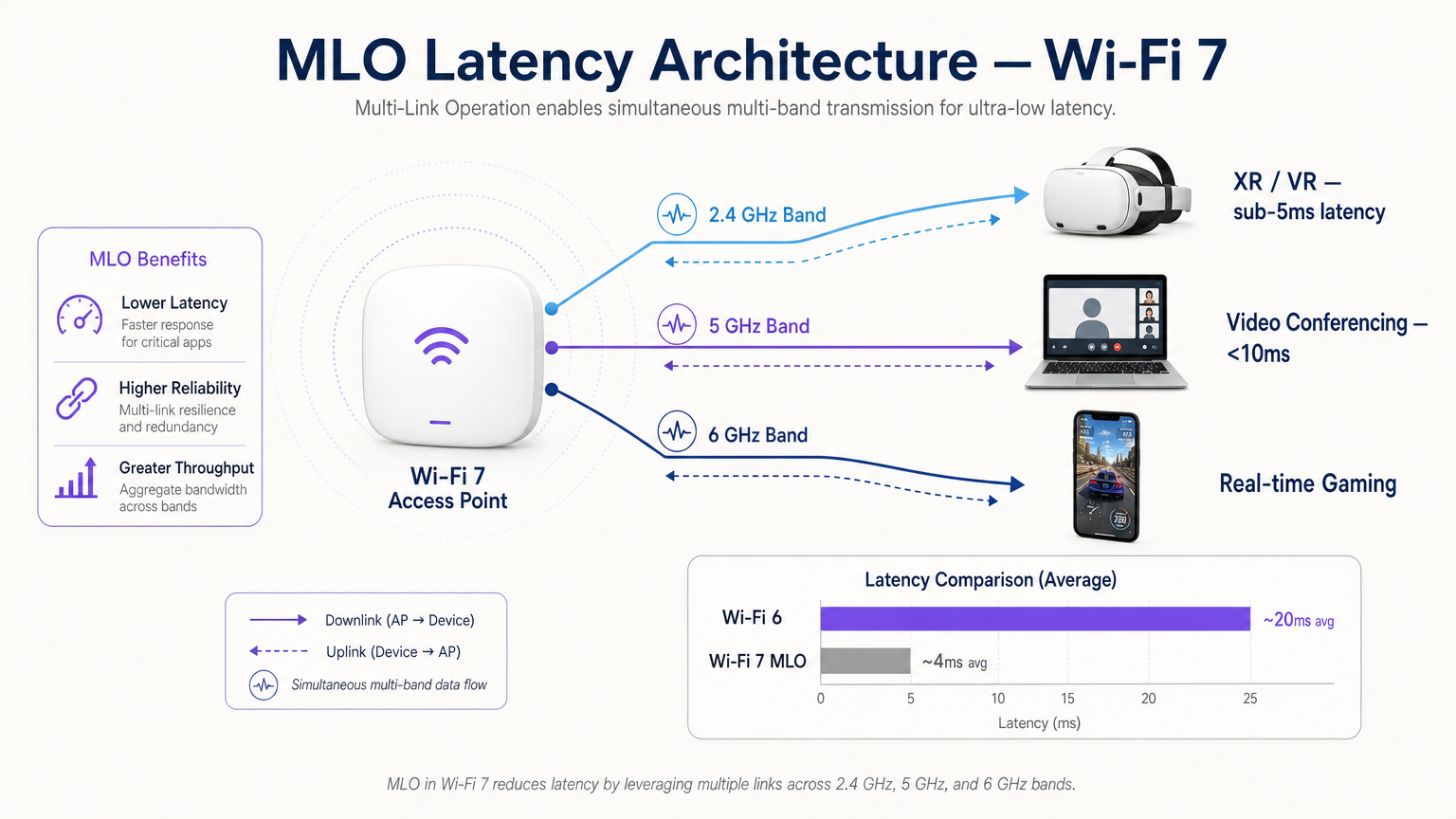
Diese Architektur bietet drei primäre Vorteile:
- Deterministic Latency: Durch die Verfügbarkeit mehrerer Pfade kann der Scheduler Daten über den ersten verfügbaren Link übertragen und so Kanal-Contention-Verzögerungen umgehen.
- Hitless Reliability: Wenn Interferenzen auf einem Band auftreten, wird der Datenverkehr nahtlos auf dem anderen fortgesetzt, ohne dass ein erneutes Verbindungsereignis erforderlich ist.
- Aggregated Throughput: Bei großen Dateiübertragungen können Daten gleichzeitig über mehrere Links verteilt werden.
The Three Modes of MLO
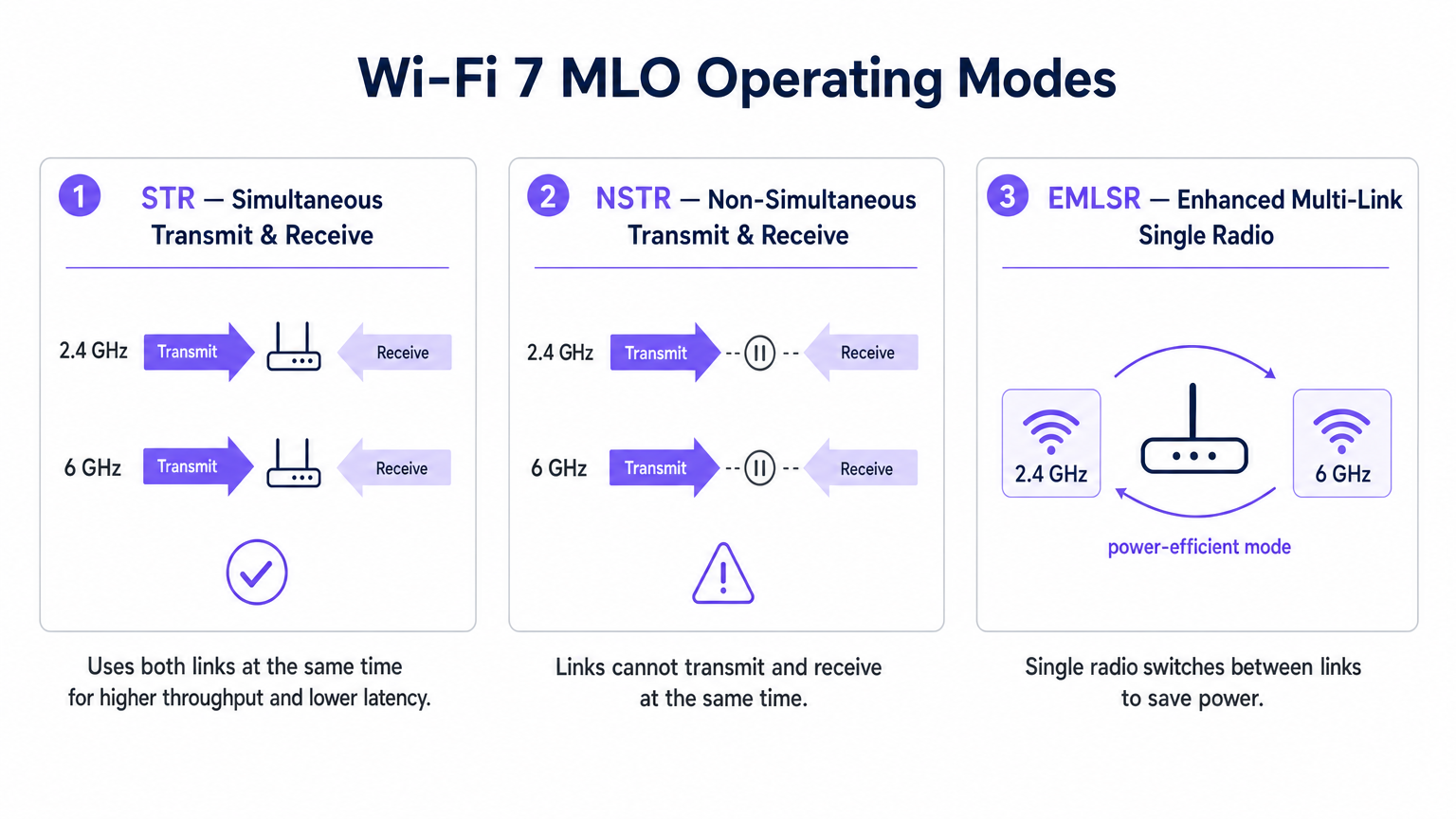
Nicht alle MLO-Implementierungen sind gleich. Der Standard definiert drei Betriebsmodi basierend auf den Funkisolationsfähigkeiten des Client-Geräts.
1. STR (Simultaneous Transmit and Receive)
Dies ist die optimale MLO-Implementierung. Ein STR-fähiges Gerät verfügt über ausreichende physische Isolation zwischen seinen Funkketten, um auf einem Link (z.B. 5 GHz) zu senden, während es gleichzeitig auf einem anderen (z.B. 6 GHz) empfängt, ohne Selbstinterferenzen zu verursachen. Dieser Modus ermöglicht echten Parallelbetrieb und ist der Schlüssel zur Erzielung von Latenzen unter 5 ms für Extended Reality (XR) und Spatial Computing Workloads.
2. NSTR (Non-Simultaneous Transmit and Receive)
Vielen Wi-Fi 7 Clients der ersten Generation, darunter mehrere Smartphones und Laptops, fehlt die für STR erforderliche Antennenisolation. Im NSTR-Modus unterhält das Gerät mehrere Links, aber die MAC-Schicht muss diese so koordinieren, dass Sende- und Empfangsvorgänge sich nicht überlappen. Obwohl Sie die volle Parallelität verlieren, bietet NSTR immer noch erhebliche Zuverlässigkeitsvorteile und Lastverteilungsfunktionen gegenüber Single-Link Wi-Fi 6.
3. EMLSR (Enhanced Multi-Link Single Radio)
Entwickelt für stromsparende Geräte wie IoT-Sensoren und Wearables, nutzt EMLSR ein einziges Funkmodul, das in Mikrosekunden zwischen Frequenzbändern wechseln kann. Das Gerät lauscht auf mehreren Links in einem Energiesparzustand und schaltet sein aktives Funkmodul schnell auf den Link um, auf dem ein eingehender Frame erkannt wird. Dies bietet die Resilienz von MLO ohne den Batterieverbrauch, der durch den Betrieb mehrerer aktiver Funkmodule entstehen würde.
Implementation Guide
Die Bereitstellung von MLO in einer Unternehmensumgebung erfordert sorgfältige Planung. Hier ist ein praktischer Rahmen für IT-Manager und Netzwerkarchitekten.
1. Audit the Client Estate
Die Vorteile von MLO hängen vollständig von der Client-Unterstützung ab. Anfang 2025 wird MLO von Premium-Chipsätzen wie dem Qualcomm Snapdragon 8 Gen 3, MediaTek Filogic 380/680 und Intel BE200 unterstützt. Sie müssen jedoch feststellen, ob Ihre kritischen Geräte STR oder NSTR unterstützen. Wenn Ihre Umgebung von NSTR-Clients dominiert wird, passen Sie Ihre Latenzerwartungen entsprechend an.
2. Prioritize 6 GHz Coverage
Um die Spitzenleistungsmetriken von Wi-Fi 7 zu erreichen, ist die Kopplung eines 5-GHz-Links mit einem 6-GHz-Link unerlässlich. Das 6-GHz-Band bietet ein sauberes Spektrum und 320-MHz-Kanäle. Wenn Sie in einem Hospitality - oder Transport -Veranstaltungsort bereitstellen, stellen Sie sicher, dass Ihr AP-Dichteplan die Ausbreitungscharakteristiken von 6 GHz berücksichtigt, das durch physische Hindernisse schneller gedämpft wird als 5 GHz.
3. MLD-Konfiguration überprüfen
MLO wird nicht automatisch aktiviert, indem einfach Wi-Fi 7 Access Points installiert werden. Der AP muss so konfiguriert werden, dass er ein Multi-Link-Element in seinen Beacon-Frames sendet, und das BSS muss als Multi-Link-BSS konfiguriert werden. Konsultieren Sie die Dokumentation Ihres Anbieters, da einige Enterprise-APs standardmäßig mit deaktiviertem MLO ausgeliefert werden, bis weitere Interoperabilitätsprüfungen abgeschlossen sind.
4. Verkabeltes Backhaul aufrüsten
Ein Access Point, der Multi-Gigabit-Wireless-Durchsatz und eine Latenz von unter 5 ms liefert, wird Engpässe in Ihrer kabelgebundenen Infrastruktur sofort aufdecken. Stellen Sie sicher, dass Ihre Netzwerk-Switches 2.5GbE oder 5GbE (NBASE-T) unterstützen und dass Ihre WAN-Uplinks für die Bewältigung des aggregierten Datenverkehrs bereitgestellt sind.
Best Practices
Beachten Sie beim Design für MLO diese herstellerneutralen Best Practices:
- Sicherheitslage: MLO arbeitet oberhalb der PHY-Schicht, was bedeutet, dass WPA3 der Standard bleibt. Stellen Sie sicher, dass Ihre RADIUS-Server und die 802.1X-Infrastruktur vollständig mit WPA3-Enterprise kompatibel sind. Überprüfen Sie für öffentliche Bereitstellungen die Compliance-Anforderungen, wie z.B. PIPEDA Compliance for Guest WiFi in Canada .
- Kanalplanung: In dichten Bereitstellungen können NSTR-Geräte aufgrund der Link-Koordination zusätzlichen Management-Frame-Overhead erzeugen. Implementieren Sie eine strikte Kanalplanung, um Gleichkanalstörungen zu minimieren, insbesondere im 5-GHz-Band.
- Integration mit Analytics: Nutzen Sie die von MLO generierte Telemetrie. Die Pro-Link-Auslastungs- und Roaming-Daten sind unschätzbare Eingaben für eine robuste WiFi Analytics -Plattform, die es Ihnen ermöglicht, das Guest WiFi -Erlebnis basierend auf Echtzeit-HF-Bedingungen zu optimieren.
- IoT-Strategie: Für einen breiteren Kontext zur Integration von stromsparenden EMLSR-Geräten verweisen wir auf unseren Internet of Things Architecture: A Complete Guide .
Fehlerbehebung & Risikominderung
Selbst bei sorgfältiger Planung können MLO-Bereitstellungen auf Probleme stoßen. Achten Sie auf diese häufigen Fehlerursachen:
- Asymmetrische Link-Qualität: Wenn der 5-GHz-Link eine ausgezeichnete Signalstärke aufweist, der 6-GHz-Link jedoch aufgrund von Wanddämpfung schwach ist, kann der MLD-Scheduler Schwierigkeiten haben, den Datenverkehr effizient auszugleichen. Minderung: Führen Sie eine gründliche aktive Standortuntersuchung mit Wi-Fi 7-fähigen Messwerkzeugen durch, um eine überlappende Abdeckung auf beiden Bändern sicherzustellen.
- Verhungern von Legacy-Clients: In gemischten Umgebungen können ältere Wi-Fi 5/6-Clients unter Luftzeit-Mangel leiden, wenn der AP aggregierte MLO-Übertragungen priorisiert. Minderung: Nutzen Sie Airtime Fairness-Funktionen und stimmen Sie die EDCA (Enhanced Distributed Channel Access)-Parameter sorgfältig ab, um einen gerechten Zugang zu gewährleisten.
- Schaltlatenz in EMLSR: Wenn EMLSR-Geräte eine hohe Latenz aufweisen, kann der Mikrosekunden-Schaltmechanismus aufgrund übermäßiger Interferenzen auf den Monitor-Links fehlschlagen. Minderung: Untersuchen Sie potenzielle Quellen von Nicht-Wi-Fi-Interferenzen mittels Spektralanalyse. Stellen Sie für Umgebungen, die Ortungsdienste nutzen, die Kompatibilität mit Ihrem Indoor Positioning System: UWB, BLE, & WiFi Guide sicher.
ROI & Geschäftsauswirkungen
Für CTOs und Veranstaltungsortbetreiber geht der ROI eines MLO-fähigen Wi-Fi 7-Netzwerks über die reine Geschwindigkeit hinaus.
- Gastgewerbe: Der Hauptvorteil ist die unterbrechungsfreie Zuverlässigkeit. Ein Gast, der während eines Videoanrufs von der Lobby zu seinem Zimmer geht, wird das störende einsekündige Einfrieren, das mit traditionellem Band Steering verbunden ist, nicht erleben. Dies wirkt sich direkt auf die Gästezufriedenheit aus.
- Unternehmen/Corporate: Durch die Erzielung deterministischer Latenz können Organisationen drahtlose XR-Trainingsanwendungen und hochdichte Videokonferenzen zuverlässig bereitstellen, ohne kabelgebundene Ethernet-Verbindungen zu benötigen, was die Verkabelungskosten senkt.
- Öffentlicher Sektor/Veranstaltungen: Der aggregierte Durchsatz und die Stauvermeidung von MLO ermöglichen es Veranstaltungsorten, eine höhere Dichte gleichzeitiger Benutzer zu unterstützen, was Möglichkeiten für bandbreitenintensive Fan-Engagement-Anwendungen und standortbasierte Dienste eröffnet.
Schlüsselbegriffe & Definitionen
Multi-Link Operation (MLO)
A Wi-Fi 7 feature allowing a single logical connection to simultaneously use multiple frequency bands and channels.
Crucial for network architects designing networks that require deterministic latency and hitless reliability, moving away from legacy band steering.
Simultaneous Transmit and Receive (STR)
An MLO mode where a device can transmit on one frequency link while receiving on another at the exact same time.
The gold standard for XR, VR, and ultra-low latency applications, requiring advanced radio isolation in client devices.
Non-Simultaneous Transmit and Receive (NSTR)
An MLO mode where a device maintains multiple links but must coordinate them so transmit and receive operations do not overlap.
The most common mode for early Wi-Fi 7 smartphones and laptops, offering reliability benefits but not the full latency reduction of STR.
Enhanced Multi-Link Single Radio (EMLSR)
An MLO mode using a single radio that rapidly switches between multiple listening links to receive incoming frames.
Ideal for battery-powered IoT devices and wearables that need network resilience without the power draw of multiple active radios.
Multi-Link Device (MLD)
A logical entity in Wi-Fi 7 that contains multiple affiliated stations (STAs) or access points (APs) operating across different links.
The foundational relationship established between a Wi-Fi 7 client and AP to enable MLO capabilities.
Band Steering
A legacy technique where a wireless controller attempts to force a client device to connect to a specific frequency band (usually 5 GHz).
A reactive, disruptive process that MLO replaces by allowing seamless, simultaneous multi-band operation.
Hitless Reliability
The ability of a network connection to survive interference or signal degradation on one link without dropping packets or disconnecting.
A key business driver for MLO in enterprise and hospitality environments, ensuring uninterrupted VoIP and video calls.
Deterministic Latency
Network performance where data delivery times are highly predictable and consistent, with minimal jitter.
Essential for industrial automation, real-time gaming, and spatial computing, achieved in Wi-Fi 7 via STR MLO.
Fallstudien
A 400-room luxury hotel is upgrading to Wi-Fi 7 to support a new wireless IPTV system and improve guest video conferencing. The IT team is concerned about roaming drops in the corridors.
Deploy Wi-Fi 7 APs with 5 GHz and 6 GHz radios enabled for MLO. Configure the BSS as a Multi-Link BSS. Ensure the IPTV devices support at least NSTR MLO. This allows the devices to maintain a logical connection across both bands. As the guest moves and the 6 GHz signal attenuates faster than the 5 GHz signal, the MAC layer seamlessly shifts traffic to the 5 GHz link without a deauthentication or steering event.
A retail chain is deploying real-time AR (Augmented Reality) inventory headsets for warehouse staff. They require sub-5ms latency, but the warehouse has high 2.4 GHz interference from legacy scanners.
Audit the AR headsets to ensure they feature STR (Simultaneous Transmit and Receive) capable Wi-Fi 7 chipsets. Deploy 6 GHz-capable Wi-Fi 7 APs. Configure an MLO profile aggregating the 5 GHz and 6 GHz bands, completely excluding the congested 2.4 GHz band from the MLD relationship for these specific devices.
Szenarioanalyse
Q1. You are designing the Wi-Fi 7 infrastructure for a high-density university lecture theatre. You have provisioned 2.4 GHz, 5 GHz, and 6 GHz coverage. During testing, you notice that while overall throughput is high, management frame overhead is causing utilization spikes on the 5 GHz band. What is the most likely cause related to MLO?
💡 Hinweis:Consider the operational overhead of the most common early Wi-Fi 7 client devices.
Empfohlenen Ansatz anzeigen
The environment likely has a high concentration of NSTR (Non-Simultaneous Transmit and Receive) capable smartphones and laptops. NSTR requires the MAC layer to coordinate transmit and receive windows across links to prevent self-interference, which generates additional management frame overhead. To mitigate this, you should optimize your channel planning to reduce co-channel interference and consider tuning EDCA parameters.
Q2. A hospital IT director wants to deploy Wi-Fi 7 to support wireless telemetry monitors on patient beds. Battery life is the primary concern, as the monitors must run for 48 hours between charges, but the connection must be highly resilient to interference. Which MLO mode should the procurement team ensure the new telemetry monitors support?
💡 Hinweis:Which mode provides multi-link resilience without running multiple active radios simultaneously?
Empfohlenen Ansatz anzeigen
The procurement team should specify EMLSR (Enhanced Multi-Link Single Radio) support. EMLSR uses a single radio that listens in a low-power state and rapidly switches between bands (e.g., 5 GHz and 6 GHz) to receive data. This provides the reliability benefits of MLO—avoiding interference on a single band—without the heavy battery drain associated with STR or NSTR modes.
Q3. Your network monitoring dashboard shows that a VIP user's Wi-Fi 7 laptop is utilizing MLO, but the latency metrics are hovering around 15-20ms, similar to Wi-Fi 6, rather than the expected sub-5ms range. The AP is broadcasting on 2.4 GHz and 5 GHz only, as the venue has not yet upgraded to 6 GHz APs. Why is the latency not improving significantly?
💡 Hinweis:Consider the spectrum characteristics required to achieve the lowest possible latency in MLO.
Empfohlenen Ansatz anzeigen
To achieve sub-5ms deterministic latency, MLO relies on the clean spectrum and wide channels (up to 320 MHz) available in the 6 GHz band. While MLO can aggregate 2.4 GHz and 5 GHz links, the 2.4 GHz band is typically too congested and narrow to provide a reliable low-latency path. Upgrading to 6 GHz-capable APs is required to unlock the full latency benefits of STR MLO.




