

Opération Multi-Lien (MLO) en Wi-Fi 7 : Comment ça fonctionne et pourquoi c'est important
Ce guide de référence technique offre une analyse approfondie de l'Opération Multi-Lien (MLO) en Wi-Fi 7, expliquant comment elle modifie fondamentalement la connectivité sans fil en permettant la transmission simultanée sur plusieurs bandes. Il fournit aux responsables informatiques, aux architectes réseau et aux CTO des stratégies de déploiement pratiques, explorant les modes STR, NSTR et EMLSR pour optimiser les réseaux pour les charges de travail à faible latence dans les environnements d'entreprise et les lieux publics.
🎧 Écouter ce guide
Voir la transcription
Résumé Exécutif
L'Opération Multi-Lien (MLO) est le changement architectural déterminant de la norme IEEE 802.11be (Wi-Fi 7). Contrairement à la direction de bande (band steering) traditionnelle qui force réactivement un client à choisir une seule bande de fréquence, MLO permet une connexion logique unique sur plusieurs bandes (2.4 GHz, 5 GHz et 6 GHz) simultanément. Pour les architectes réseau d'entreprise, les CTO et les opérateurs de sites, cela représente un changement fondamental dans la gestion de la latence, de la fiabilité et du débit au niveau de la couche MAC.
Ce guide offre une analyse technique approfondie de MLO pour les leaders informatiques concevant des charges de travail à faible latence. Il explore les distinctions critiques entre les modes de Transmission et Réception Simultanées (STR), de Transmission et Réception Non Simultanées (NSTR) et de Radio Unique Multi-Lien Améliorée (EMLSR). De manière cruciale, il explique où MLO offre réellement une latence inférieure à 5 ms pour la XR et la voix en temps réel, et comment il atténue la congestion dans les déploiements denses du secteur public et de l'hôtellerie. Nous aborderons également les réalités de l'implémentation, y compris la nécessité du spectre 6 GHz et l'état actuel de la prise en charge des appareils clients, pour vous aider à planifier votre prochaine mise à jour d'infrastructure en toute confiance.
Analyse Technique Approfondie
Pour comprendre l'impact de MLO Wi-Fi 7, nous devons d'abord le comparer à l'approche historique des environnements multi-bandes.
Le Problème de la Direction de Bande
Historiquement, les points d'accès utilisaient la direction de bande pour gérer les clients. Le contrôleur observait un client sur la bande 2.4 GHz et tentait de le forcer sur la bande 5 GHz en ignorant ses requêtes de sondage ou en envoyant des trames de désauthentification. Cette approche a toujours été réactive et perturbatrice. L'appareil client ne maintient qu'une seule liaison radio active à la fois. Si l'environnement RF change, un événement de direction doit se produire, entraînant une brève déconnexion. Pour les applications en temps réel comme les systèmes de point de vente Retail ou la télémétrie Healthcare , ces micro-coupures s'accumulent en une dégradation notable des performances.
L'Architecture MLO
L'Opération Multi-Lien remplace ce paradigme. Dans un environnement MLO, le point d'accès (AP) et l'appareil client établissent une relation de Dispositif Multi-Lien (MLD). Cela permet à la couche MAC d'agréger plusieurs liaisons physiques (par exemple, une liaison 5 GHz et une liaison 6 GHz) en une seule connexion logique. L'adaptation de liaison et la distribution du trafic se produisent sous la couche application, complètement invisibles pour l'utilisateur.
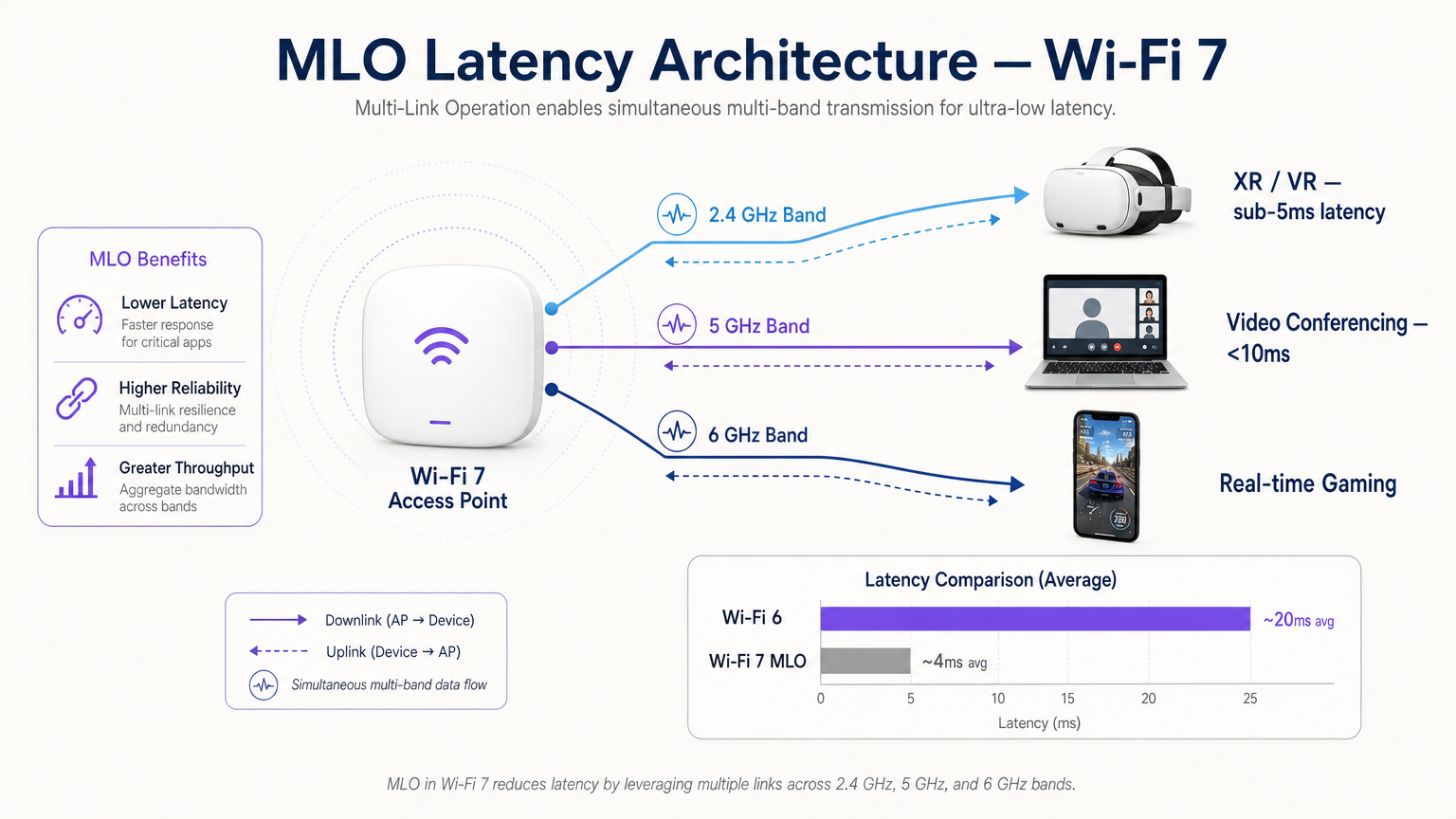
Cette architecture offre trois avantages principaux :
- Latence Déterministe : En disposant de plusieurs chemins, l'ordonnanceur peut transmettre des données sur la première liaison disponible, en contournant les délais de contention de canal.
- Fiabilité Sans Interruption : Si des interférences surviennent sur une bande, le trafic continue de manière transparente sur l'autre sans événement de reconnexion.
- Débit Agrégé : Pour les transferts de fichiers volumineux, les données peuvent être réparties sur plusieurs liaisons simultanément.
Les Trois Modes de MLO
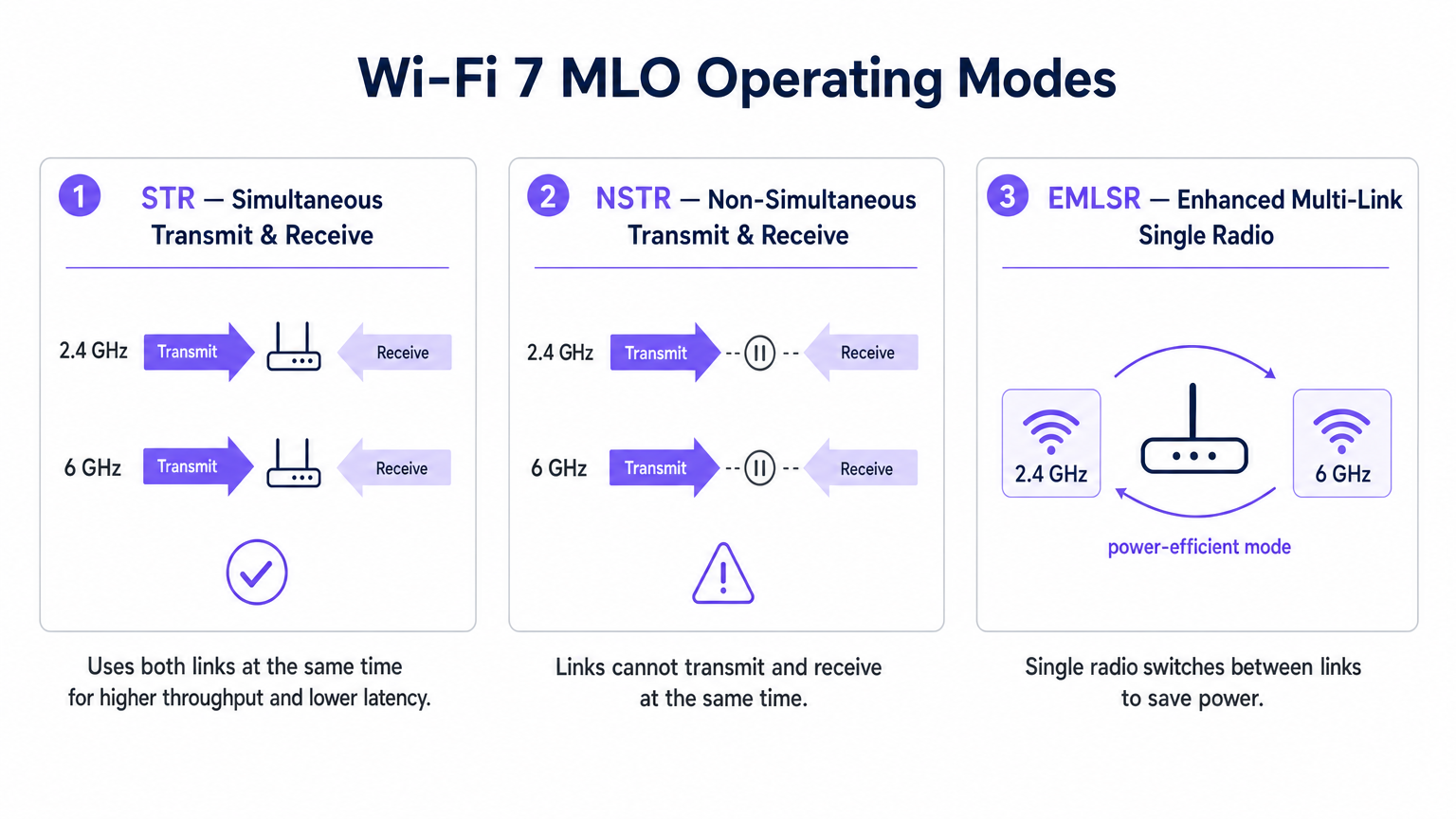
Toutes les implémentations MLO ne sont pas égales. La norme définit trois modes de fonctionnement basés sur les capacités d'isolation radio de l'appareil client.
1. STR (Transmission et Réception Simultanées)
C'est l'implémentation MLO optimale. Un appareil compatible STR dispose d'une isolation physique suffisante entre ses chaînes radio pour transmettre sur une liaison (par exemple, 5 GHz) tout en recevant simultanément sur une autre (par exemple, 6 GHz) sans provoquer d'auto-interférence. Ce mode offre un véritable fonctionnement parallèle et est la clé pour atteindre une latence inférieure à 5 ms pour la réalité étendue (XR) et les charges de travail de calcul spatial.
2. NSTR (Transmission et Réception Non Simultanées)
De nombreux clients Wi-Fi 7 de première génération, y compris plusieurs smartphones et ordinateurs portables, manquent de l'isolation d'antenne requise pour STR. En mode NSTR, l'appareil maintient plusieurs liaisons, mais la couche MAC doit les coordonner afin que les opérations de transmission et de réception ne se chevauchent pas. Bien que vous perdiez le parallélisme complet, NSTR offre toujours des avantages significatifs en termes de fiabilité et des capacités d'équilibrage de charge par rapport au Wi-Fi 6 à liaison unique.
3. EMLSR (Radio Unique Multi-Lien Améliorée)
Conçu pour les appareils à faible consommation d'énergie comme les capteurs IoT et les appareils portables, EMLSR utilise une seule radio qui peut basculer entre les bandes de fréquences en microsecondes. L'appareil écoute sur plusieurs liaisons dans un état de faible consommation et bascule rapidement sa radio active vers la liaison où une trame entrante est détectée. Cela offre la résilience de MLO sans la consommation de batterie liée à l'exécution de plusieurs radios actives.
Guide d'Implémentation
Le déploiement de MLO dans un environnement d'entreprise nécessite une planification minutieuse. Voici un cadre pratique pour les responsables informatiques et les architectes réseau.
1. Auditer le Parc Client
Les avantages de MLO dépendent entièrement du support client. Début 2025, MLO est pris en charge par des chipsets premium comme le Qualcomm Snapdragon 8 Gen 3, le MediaTek Filogic 380/680 et l'Intel BE200. Cependant, vous devez déterminer si vos appareils critiques prennent en charge STR ou NSTR. Si votre environnement est dominé par des clients NSTR, calibrez vos attentes en matière de latence en conséquence.
2. Prioriser la Couverture 6 GHz
Pour atteindre les performances phares du Wi-Fi 7, l'association d'une liaison 5 GHz avec une liaison 6 GHz est essentielle. La bande 6 GHz offre un spectre propre et des canaux de 320 MHz. Si vous déployez dans un lieu Hospitality ou Transport , assurez-vous que votre plan de densité d'AP tient compte des caractéristiques de propagation du 6 GHz, qui s'atténue plus rapidement à travers les obstacles physiques que le 5 GHz.
3. Vérifier la configuration MLD
MLO n'est pas activé automatiquement par la simple installation de points d'accès Wi-Fi 7. Le point d'accès doit être configuré pour diffuser un élément multi-lien dans ses trames de balise, et le BSS doit être configuré comme un BSS multi-lien. Consultez la documentation de votre fournisseur, car certains points d'accès d'entreprise sont livrés avec MLO désactivé par défaut en attendant une validation d'interopérabilité supplémentaire.
4. Mettre à niveau le réseau de liaison filaire
Un point d'accès offrant un débit sans fil multi-gigabit et une latence inférieure à 5 ms exposera immédiatement les goulots d'étranglement de votre infrastructure filaire. Assurez-vous que vos commutateurs d'accès prennent en charge le 2.5GbE ou le 5GbE (NBASE-T) et que vos liaisons montantes WAN sont provisionnées pour gérer le trafic agrégé.
Bonnes pratiques
Lors de la conception pour MLO, respectez ces bonnes pratiques indépendantes des fournisseurs :
- Posture de sécurité : MLO fonctionne au-dessus de la couche PHY, ce qui signifie que WPA3 reste la norme. Assurez-vous que vos serveurs RADIUS et votre infrastructure 802.1X sont entièrement compatibles avec WPA3-Enterprise. Pour les déploiements publics, examinez les exigences de conformité telles que Conformité PIPEDA pour le WiFi invité au Canada .
- Planification des canaux : Dans les déploiements denses, les appareils NSTR peuvent générer une surcharge de trames de gestion supplémentaire due à la coordination des liens. Mettez en œuvre une planification stricte des canaux pour minimiser les interférences de co-canal, en particulier sur la bande des 5 GHz.
- Intégration avec l'analyse : Tirez parti de la télémétrie générée par MLO. L'utilisation par lien et les données d'itinérance sont des entrées inestimables pour une plateforme robuste de WiFi Analytics , vous permettant d'optimiser l'expérience Guest WiFi en fonction des conditions RF en temps réel.
- Stratégie IoT : Pour un contexte plus large sur l'intégration des appareils EMLSR à faible consommation, consultez notre Architecture de l'Internet des objets : Un guide complet .
Dépannage et atténuation des risques
Même avec une planification minutieuse, les déploiements MLO peuvent rencontrer des problèmes. Surveillez ces modes de défaillance courants :
- Qualité de liaison asymétrique : Si la liaison 5 GHz a une excellente force de signal mais que la liaison 6 GHz est faible en raison de l'atténuation murale, l'ordonnanceur MLD peut avoir du mal à équilibrer le trafic efficacement. Atténuation : Effectuez une étude de site active approfondie à l'aide d'outils de mesure compatibles Wi-Fi 7 pour assurer une couverture superposée sur les deux bandes.
- Sous-alimentation des clients hérités : Dans les environnements mixtes, les clients Wi-Fi 5/6 hérités peuvent être privés de temps d'antenne si le point d'accès priorise les transmissions MLO agrégées. Atténuation : Utilisez les fonctionnalités Airtime Fairness et ajustez soigneusement les paramètres EDCA (Enhanced Distributed Channel Access) pour assurer un accès équitable.
- Latence de commutation dans EMLSR : Si les appareils EMLSR subissent une latence élevée, le mécanisme de commutation en microsecondes peut échouer en raison d'interférences excessives sur les liens de surveillance. Atténuation : Enquêtez sur les sources potentielles d'interférences non-Wi-Fi à l'aide de l'analyse spectrale. Pour les environnements utilisant des services de localisation, assurez la compatibilité avec votre Système de positionnement intérieur : Guide UWB, BLE et WiFi .
ROI et impact commercial
Pour les CTO et les opérateurs de sites, le ROI d'un réseau Wi-Fi 7 compatible MLO s'étend au-delà de la vitesse brute.
- Hôtellerie : Le principal avantage est la fiabilité sans interruption. Un client se déplaçant du hall à sa chambre lors d'un appel vidéo ne subira pas le gel perturbateur d'une seconde associé à la direction de bande traditionnelle. Cela a un impact direct sur les scores de satisfaction des clients.
- Entreprise/Corporate : En atteignant une latence déterministe, les organisations peuvent déployer en toute confiance des applications de formation XR sans fil et des vidéoconférences haute densité sans nécessiter de connexions Ethernet filaires, réduisant ainsi les coûts de câblage.
- Secteur public/Événements : Le débit agrégé et l'atténuation de la congestion de MLO permettent aux sites de prendre en charge une densité plus élevée d'utilisateurs simultanés, ouvrant des opportunités pour des applications d'engagement des fans à large bande passante et des services basés sur la localisation.
Termes clés et définitions
Multi-Link Operation (MLO)
A Wi-Fi 7 feature allowing a single logical connection to simultaneously use multiple frequency bands and channels.
Crucial for network architects designing networks that require deterministic latency and hitless reliability, moving away from legacy band steering.
Simultaneous Transmit and Receive (STR)
An MLO mode where a device can transmit on one frequency link while receiving on another at the exact same time.
The gold standard for XR, VR, and ultra-low latency applications, requiring advanced radio isolation in client devices.
Non-Simultaneous Transmit and Receive (NSTR)
An MLO mode where a device maintains multiple links but must coordinate them so transmit and receive operations do not overlap.
The most common mode for early Wi-Fi 7 smartphones and laptops, offering reliability benefits but not the full latency reduction of STR.
Enhanced Multi-Link Single Radio (EMLSR)
An MLO mode using a single radio that rapidly switches between multiple listening links to receive incoming frames.
Ideal for battery-powered IoT devices and wearables that need network resilience without the power draw of multiple active radios.
Multi-Link Device (MLD)
A logical entity in Wi-Fi 7 that contains multiple affiliated stations (STAs) or access points (APs) operating across different links.
The foundational relationship established between a Wi-Fi 7 client and AP to enable MLO capabilities.
Band Steering
A legacy technique where a wireless controller attempts to force a client device to connect to a specific frequency band (usually 5 GHz).
A reactive, disruptive process that MLO replaces by allowing seamless, simultaneous multi-band operation.
Hitless Reliability
The ability of a network connection to survive interference or signal degradation on one link without dropping packets or disconnecting.
A key business driver for MLO in enterprise and hospitality environments, ensuring uninterrupted VoIP and video calls.
Deterministic Latency
Network performance where data delivery times are highly predictable and consistent, with minimal jitter.
Essential for industrial automation, real-time gaming, and spatial computing, achieved in Wi-Fi 7 via STR MLO.
Études de cas
A 400-room luxury hotel is upgrading to Wi-Fi 7 to support a new wireless IPTV system and improve guest video conferencing. The IT team is concerned about roaming drops in the corridors.
Deploy Wi-Fi 7 APs with 5 GHz and 6 GHz radios enabled for MLO. Configure the BSS as a Multi-Link BSS. Ensure the IPTV devices support at least NSTR MLO. This allows the devices to maintain a logical connection across both bands. As the guest moves and the 6 GHz signal attenuates faster than the 5 GHz signal, the MAC layer seamlessly shifts traffic to the 5 GHz link without a deauthentication or steering event.
A retail chain is deploying real-time AR (Augmented Reality) inventory headsets for warehouse staff. They require sub-5ms latency, but the warehouse has high 2.4 GHz interference from legacy scanners.
Audit the AR headsets to ensure they feature STR (Simultaneous Transmit and Receive) capable Wi-Fi 7 chipsets. Deploy 6 GHz-capable Wi-Fi 7 APs. Configure an MLO profile aggregating the 5 GHz and 6 GHz bands, completely excluding the congested 2.4 GHz band from the MLD relationship for these specific devices.
Analyse de scénario
Q1. You are designing the Wi-Fi 7 infrastructure for a high-density university lecture theatre. You have provisioned 2.4 GHz, 5 GHz, and 6 GHz coverage. During testing, you notice that while overall throughput is high, management frame overhead is causing utilization spikes on the 5 GHz band. What is the most likely cause related to MLO?
💡 Astuce :Consider the operational overhead of the most common early Wi-Fi 7 client devices.
Afficher l'approche recommandée
The environment likely has a high concentration of NSTR (Non-Simultaneous Transmit and Receive) capable smartphones and laptops. NSTR requires the MAC layer to coordinate transmit and receive windows across links to prevent self-interference, which generates additional management frame overhead. To mitigate this, you should optimize your channel planning to reduce co-channel interference and consider tuning EDCA parameters.
Q2. A hospital IT director wants to deploy Wi-Fi 7 to support wireless telemetry monitors on patient beds. Battery life is the primary concern, as the monitors must run for 48 hours between charges, but the connection must be highly resilient to interference. Which MLO mode should the procurement team ensure the new telemetry monitors support?
💡 Astuce :Which mode provides multi-link resilience without running multiple active radios simultaneously?
Afficher l'approche recommandée
The procurement team should specify EMLSR (Enhanced Multi-Link Single Radio) support. EMLSR uses a single radio that listens in a low-power state and rapidly switches between bands (e.g., 5 GHz and 6 GHz) to receive data. This provides the reliability benefits of MLO—avoiding interference on a single band—without the heavy battery drain associated with STR or NSTR modes.
Q3. Your network monitoring dashboard shows that a VIP user's Wi-Fi 7 laptop is utilizing MLO, but the latency metrics are hovering around 15-20ms, similar to Wi-Fi 6, rather than the expected sub-5ms range. The AP is broadcasting on 2.4 GHz and 5 GHz only, as the venue has not yet upgraded to 6 GHz APs. Why is the latency not improving significantly?
💡 Astuce :Consider the spectrum characteristics required to achieve the lowest possible latency in MLO.
Afficher l'approche recommandée
To achieve sub-5ms deterministic latency, MLO relies on the clean spectrum and wide channels (up to 320 MHz) available in the 6 GHz band. While MLO can aggregate 2.4 GHz and 5 GHz links, the 2.4 GHz band is typically too congested and narrow to provide a reliable low-latency path. Upgrading to 6 GHz-capable APs is required to unlock the full latency benefits of STR MLO.




