
Como Escanear Interferência WiFi e Encontrar o Melhor Canal
Este guia técnico abrangente fornece aos líderes de TI corporativos metodologias acionáveis para identificar interferência de RF e selecionar os canais de 5GHz ideais. Ele aborda análise de espectro, considerações de DFS e estratégias práticas de implantação para maximizar o throughput e reduzir a latência sem exigir novos investimentos em hardware.
Ouça este guia
Ver transcrição do podcast
Resumo Executivo
Para diretores de TI corporativos que gerenciam locais de alta densidade, identificar o melhor canal para implantações de 5GHz é um mandato operacional crítico. A má seleção de canais causa picos de latência, falhas de roaming e throughput degradado, impactando diretamente a experiência do usuário e as operações do local.
Este guia de referência técnica descreve uma metodologia estruturada para identificar interferência de RF, executar análise de espectro e selecionar canais ideais na banda de 5GHz. Ao mudar de solução de problemas reativa para gerenciamento proativo de RF, as equipes de TI podem maximizar o throughput, mitigar a contenção de co-canal e suportar densidades de dispositivos mais altas sem o investimento de capital na compra de novos pontos de acesso.
Seja você implantando Guest WiFi em uma propriedade de varejo ou protegendo a tecnologia operacional de back-of-house, entender a utilização do canal é a base de uma arquitetura sem fio robusta.
Análise Técnica Aprofundada: O Espectro de 5GHz e Vetores de Interferência
Entendendo o Cenário de 5GHz
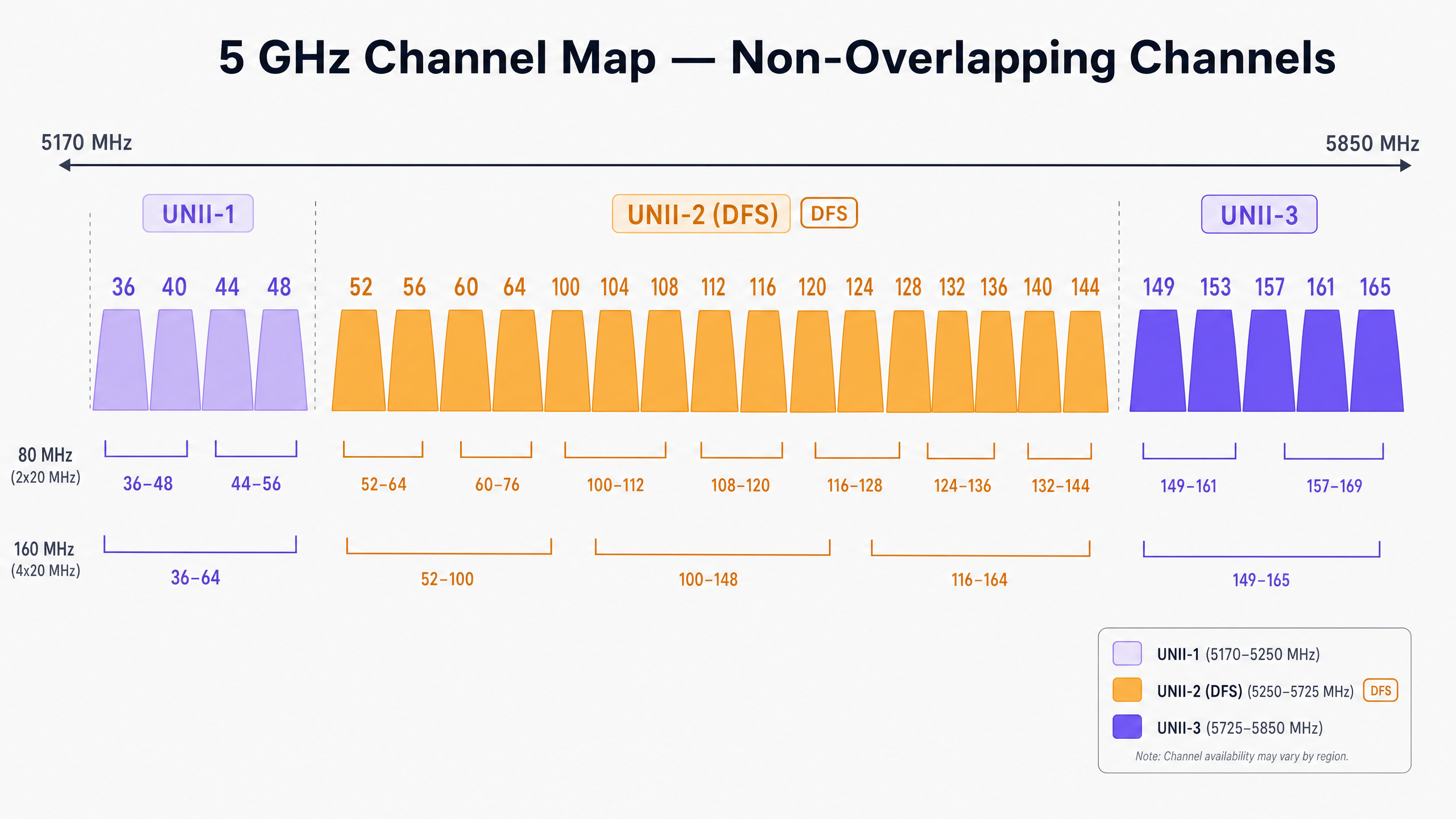
Ao contrário da banda de 2.4GHz restrita, que oferece apenas três canais não sobrepostos, o espectro de 5GHz oferece até 25 canais de 20MHz não sobrepostos (dependendo do domínio regulatório). No entanto, nem todos os canais de 5GHz são iguais. Eles são divididos em bandas específicas de Unlicensed National Information Infrastructure (UNII), cada uma com regras operacionais distintas.
UNII-1 e UNII-3: Os Portos Seguros
Os canais nas bandas UNII-1 (36, 40, 44, 48) e UNII-3 (149, 153, 157, 161, 165) são geralmente livres de restrições de interferência de radar na maioria das regiões. Para implantações de alta densidade em Varejo ou Hotelaria , esses canais representam o ponto de partida de menor risco para o seu plano de canais. Como o UNII-3 opera em uma frequência ligeiramente mais alta, ele experimenta uma atenuação marginalmente maior através das paredes, o que pode ser vantajoso para limitar a interferência de co-canal entre salas ou andares adjacentes.
UNII-2 e DFS (Seleção Dinâmica de Frequência)
As bandas UNII-2 (canais 52–144) compartilham espectro com sistemas de radar militar e meteorológico existentes. Para usar esses canais, os pontos de acesso devem suportar DFS. Se um AP detectar um pulso de radar, ele deve desocupar imediatamente o canal e não pode retornar por 30 minutos.
Em ambientes próximos a aeroportos, portos ou estações meteorológicas, eventos de DFS podem causar desconexões súbitas e inexplicáveis de clientes. Se o seu local experimentar quedas intermitentes, revisar os logs do controlador para eventos de DFS é um primeiro passo obrigatório.
Tipos de Interferência
A interferência em redes sem fio corporativas geralmente se enquadra em duas categorias:
- Interferência de Co-Canal (CCI): Isso ocorre quando múltiplos APs (seus ou de um vizinho) operam no mesmo canal. Como o WiFi é um meio half-duplex governado por Carrier Sense Multiple Access with Collision Avoidance (CSMA/CA), todos os dispositivos no mesmo canal devem esperar sua vez para transmitir. Alta CCI leva ao aumento da contenção de tempo de antena e latência elevada.
- Interferência Não-WiFi: Dispositivos que emitem energia de RF na banda de 5GHz sem aderir aos protocolos 802.11. Os culpados comuns incluem telefones sem fio, transmissores AV sem fio e sensores IoT proprietários. Ao contrário da CCI, a interferência não-WiFi eleva o piso de ruído, corrompendo quadros WiFi e acionando retransmissões.
Guia de Implementação: Escaneamento e Seleção de Canais
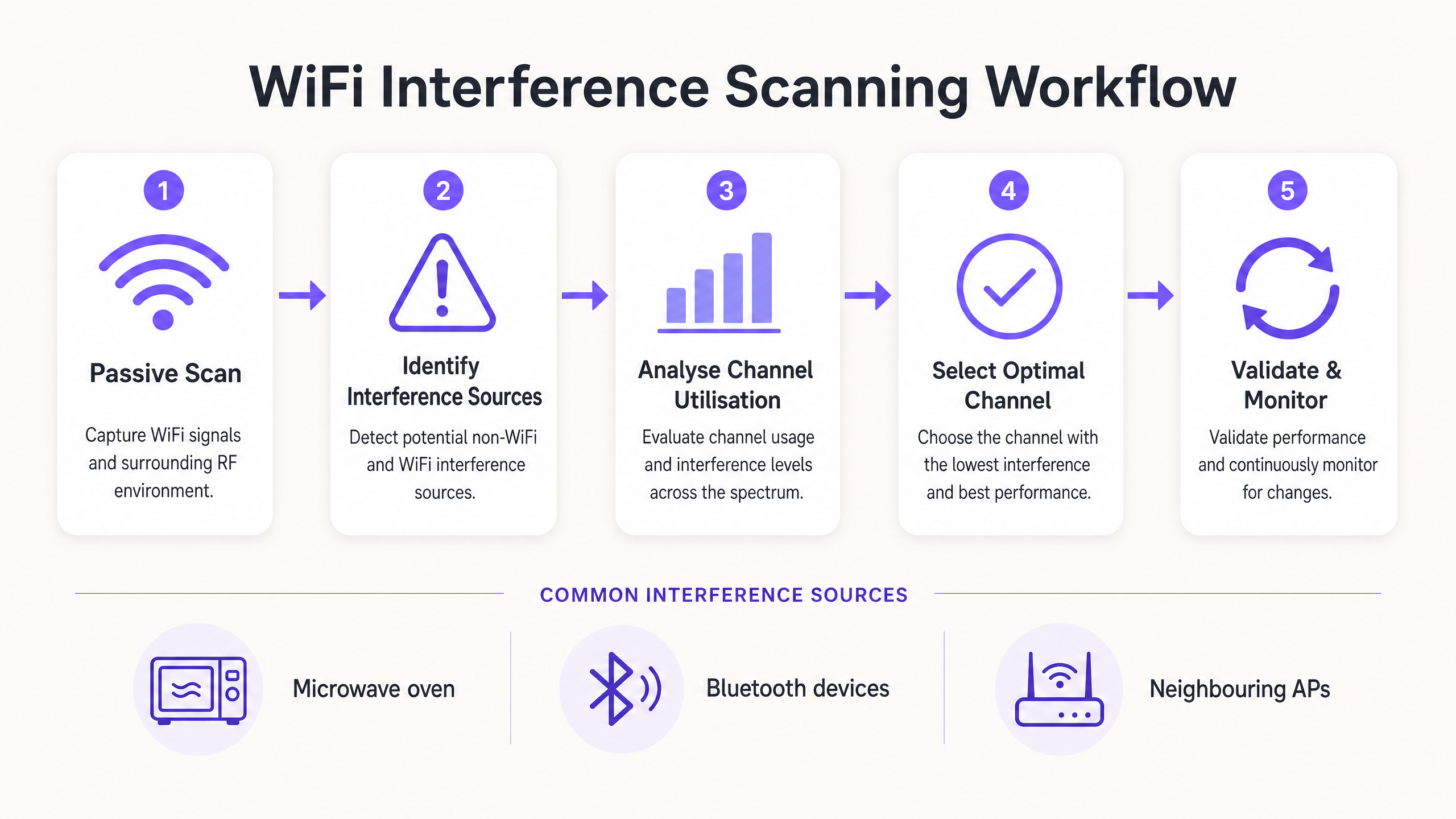
Para determinar o melhor canal para 5GHz, você deve ir além das configurações padrão de "Auto-RF" e implementar uma metodologia de escaneamento estruturada.
Passo 1: Estabelecer a Linha de Base do Ambiente
Antes de fazer alterações, estabeleça uma linha de base. Utilize as ferramentas de monitoramento integradas do seu controlador ou integre com uma plataforma de WiFi Analytics para capturar:
- Percentuais de utilização de canal médios e de pico.
- Taxas de associação de clientes e métricas de sucesso de roaming.
- Throughput de linha de base durante as horas de pico operacional.
> Regra Crucial: Nunca realize sua varredura de RF inicial em um local vazio. Uma varredura às 2:00 da manhã de um domingo não revelará a interferência gerada por 5.000 participantes em uma conferência.
Passo 2: Executar Análise de Espectro
Confiar apenas na varredura padrão de APs detecta apenas outras redes 802.11. Para identificar interferência não-WiFi, você precisa de análise de espectro de hardware.
- Nível 1 (Básico): Monitores de espectro de AP baseados em controlador. Muitos APs corporativos possuem um rádio de varredura dedicado que pode identificar assinaturas não-WiFi.
- Nível 2 (Avançado): Hardware dedicado como o Ekahau Sidekick ou MetaGeek Chanalyzer. Essas ferramentas capturam energia de RF bruta em todo o espectro, permitindo que os engenheiros identifiquem as assinaturas específicas de dispositivos Bluetooth, transmissores AV ou hardware defeituoso.
Passo 3: Analisar a Utilização do Canal
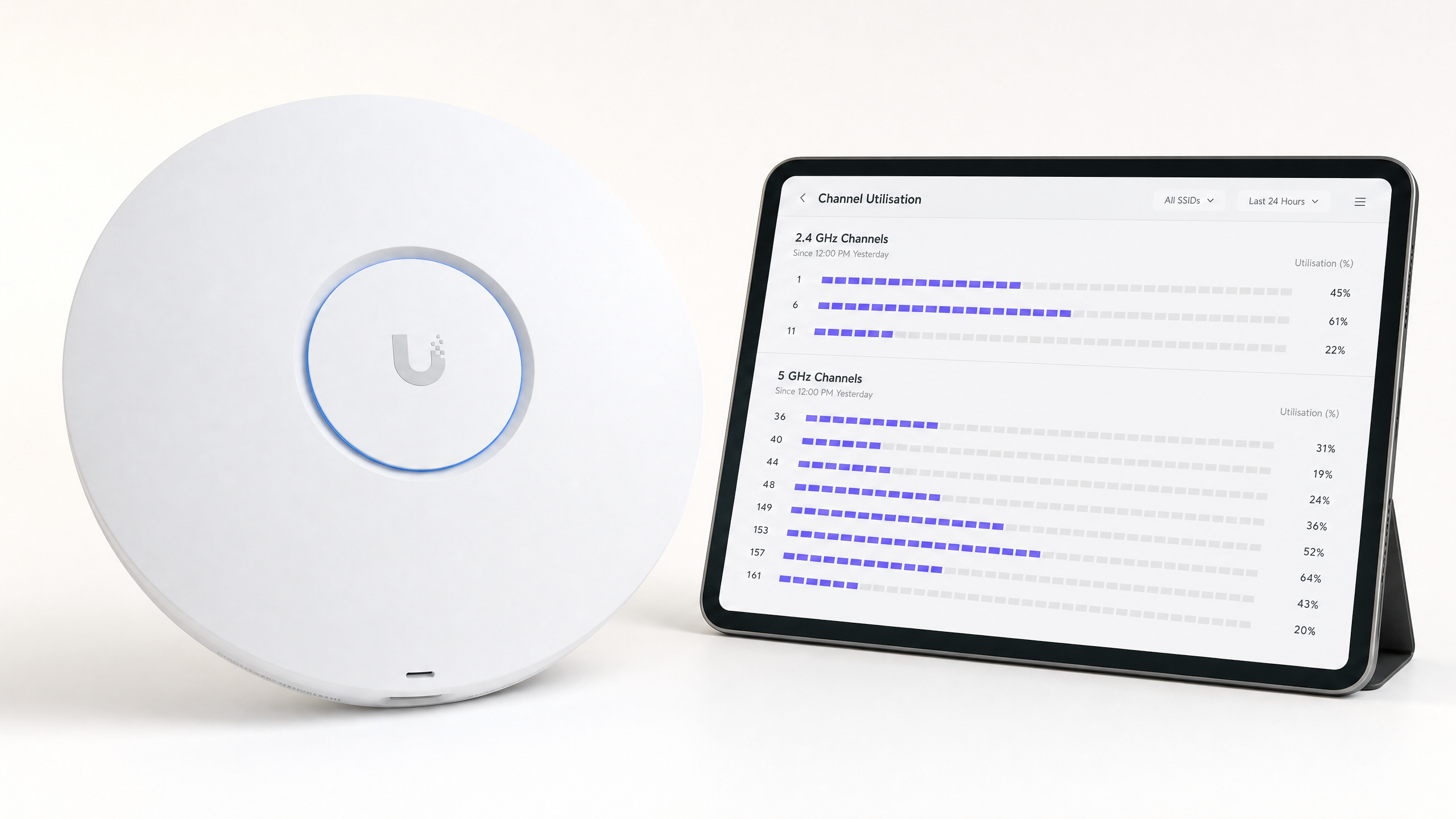
A utilização do canal é a métrica mais crítica para o desempenho. Ela representa a porcentagem de tempo em que o canal está ocupado (seja transmitindo dados ou bloqueado por interferência).
- < 20%: Excelente. Muita capacidade para aplicações de alto throughput.
- 20% - 50%: Normal para ambientes corporativos ativos.
- > 70%: Limiar crítico. Com 70% de utilização, a latência aumenta exponencialmente e a experiência do cliente degrada-se rapidamente.
Se um AP reportar >70% de utilização no seu canal de 5GHz, é necessária uma remediação imediata.
Passo 4: Selecione o Canal Ideal
Ao selecionar o melhor canal para 5GHz, siga esta matriz de decisão:
- Identifique canais com < 20% de utilização durante as horas de pico.
- Priorize os canais UNII-1 e UNII-3 para evitar desconexões relacionadas a DFS, especialmente em zonas críticas como departamentos de emergência hospitalar ( Saúde ) ou centros de tráfego intenso ( Transporte ).
- Se UNII-1/3 estiverem saturados, ative seletivamente os canais DFS (UNII-2), mas monitore os logs agressivamente para eventos de detecção de radar nos próximos 14 dias.
- Padronize larguras de canal de 20MHz em ambientes de ultra-alta densidade (como estádios). Use canais agrupados de 40MHz ou 80MHz apenas em áreas de baixa densidade onde é necessário um throughput individual de pico.
Melhores Práticas e Resolução de Problemas
Desativar o Canal Automático em Zonas de Alta Densidade
Embora a Gestão de Recursos de Rádio (RRM) e os algoritmos de canal automático sejam adequados para ambientes de escritório padrão, eles frequentemente falham em locais complexos. Mudanças de canal descontroladas durante um evento ao vivo podem causar desconexões em massa de clientes. Em estádios ou grandes centros de conferências, um design de canal estático e meticulosamente planejado é obrigatório.
Reduzir o Tamanho da Célula
Se todos os canais de 5GHz mostrarem alta utilização, mudar o canal não resolverá o problema. Em vez disso, você deve reduzir a Interferência Co-Canal diminuindo a pegada de RF dos seus APs. Reduza a potência de transmissão (Tx) dos APs e aumente a taxa de dados mínima obrigatória (por exemplo, desative taxas abaixo de 12 Mbps ou 24 Mbps). Isso força os clientes a fazerem roaming mais cedo e evita que clientes distantes consumam tempo de antena excessivo.
Leitura Relacionada
Para mais estratégias sobre otimização de infraestrutura, leia nosso guia sobre Como Melhorar a Velocidade do WiFi Sem Comprar Novos Access Points (ou a versão em alemão: Wie man die WiFi-Geschwindigkeit verbessert, ohne neue Access Points zu kaufen ). Para insights sobre acesso moderno, veja Como um assistente de Wi-Fi Habilita Acesso Sem Senha em 2026 e nosso recente lançamento do Modo de Mapas Offline . Além disso, leia sobre nossa direção estratégica no Anúncio de Iain Fox .
ROI e Impacto nos Negócios
Otimizar a alocação de canais de 5GHz oferece valor de negócio mensurável sem investimento de CapEx:
| Métrica | Pré-Otimização (Típico) | Meta Pós-Otimização | Impacto nos Negócios |
|---|---|---|---|
| Utilização do Canal | > 75% | < 40% | Elimina picos de latência durante as horas de pico. |
| Falhas de Roaming | 10-15% | < 2% | Chamadas de voz/vídeo sem interrupções para a equipe em roaming. |
| Tickets de Suporte | Alto volume (Quedas) | Mínimo | Reduz despesas operacionais de TI (OpEx). |
| Evitar CapEx | N/A | Alto | Atrasa a necessidade de atualizações caras de hardware. |
Ao tratar o espectro de RF como um ativo gerenciado, em vez de uma utilidade invisível, os líderes de TI podem garantir que sua infraestrutura sem fio suporte as crescentes demandas das operações empresariais modernas.
Definições principais
Co-Channel Interference (CCI)
Interference caused when multiple access points operate on the exact same channel, forcing them to share airtime.
CCI is the primary cause of slow WiFi in dense deployments. IT teams must manage CCI by carefully planning channel reuse and managing AP transmit power.
Dynamic Frequency Selection (DFS)
A regulatory requirement for devices operating in the UNII-2 bands to detect radar systems and automatically vacate the channel.
While DFS channels offer valuable extra spectrum, radar detection events can cause sudden client disconnections, making them risky near airports or weather stations.
Channel Utilisation
The percentage of time a specific RF channel is busy transmitting or receiving data, or blocked by interference.
This is the most critical metric for WiFi health. High utilisation (>70%) directly correlates with poor user experience and high latency.
UNII Bands
Unlicensed National Information Infrastructure radio bands. The 5GHz spectrum is divided into UNII-1, UNII-2 (DFS), and UNII-3.
Understanding UNII band rules is essential for channel planning, as different bands have different transmit power limits and radar avoidance requirements.
CSMA/CA
Carrier Sense Multiple Access with Collision Avoidance. The protocol WiFi uses to ensure only one device transmits on a channel at a time.
Because WiFi is half-duplex and uses CSMA/CA, it is highly sensitive to interference. If the channel is noisy, devices will wait indefinitely to transmit.
Spectrum Analysis
The process of measuring raw RF energy across a frequency band, rather than just decoding WiFi frames.
Essential for finding non-WiFi interference sources like microwaves, Bluetooth devices, or faulty AV equipment that standard AP scans cannot see.
RSSI
Received Signal Strength Indicator. A measurement of how well a device can hear a signal from an access point.
While strong RSSI is necessary, it is not sufficient for good performance if channel utilisation is high or interference is present.
Bonded Channels
Combining multiple 20MHz channels into a wider channel (e.g., 40MHz, 80MHz) to increase maximum theoretical throughput.
Bonding channels reduces the total number of non-overlapping channels available, making it a poor choice for high-density enterprise deployments.
Exemplos práticos
A 400-room hotel in a dense urban centre is experiencing severe guest complaints regarding WiFi dropouts during the evening peak (7 PM - 10 PM). The controller shows APs are randomly changing channels, and channel utilisation on the 5GHz band frequently exceeds 85%.
- Disable the controller's Auto-RF/RRM feature to stop unpredictable channel changes during peak hours. 2. Perform a passive RF scan specifically between 7 PM and 10 PM to capture the true interference baseline. 3. Identify that neighbouring residential routers are saturating UNII-1 channels. 4. Manually reassign the hotel's corridor APs to DFS channels (UNII-2), as the venue is not near an airport. 5. Reduce AP transmit power by 3dBm to shrink cell sizes and reduce co-channel interference between adjacent rooms.
A retail distribution centre relies on handheld scanners for inventory management. The scanners frequently disconnect when moving between aisles, despite strong signal strength (-60 dBm). The APs are configured to use 80MHz channel widths on the 5GHz band.
- Reconfigure the entire 5GHz channel plan to use 20MHz channel widths instead of 80MHz. 2. Increase the minimum mandatory data rate to 24 Mbps to prune slow clients and clear airtime faster. 3. Audit the environment for non-WiFi interference using a spectrum analyser, as industrial environments often have legacy RF equipment.
Questões práticas
Q1. You are deploying WiFi in a hospital located 2 miles from a major international airport. The IT director wants to use all available 5GHz channels to maximise capacity. Do you recommend using UNII-2 (DFS) channels?
Dica: Consider the impact of weather and aviation radar systems on UNII-2 channels.
Ver resposta modelo
No, it is highly discouraged. Proximity to a major airport means frequent radar detection events are highly likely. When an AP detects radar, it must immediately drop all clients and vacate the channel. In a hospital environment where critical medical telemetry may rely on WiFi, these sudden disconnections pose an unacceptable operational risk. Stick to UNII-1 and UNII-3 channels.
Q2. A stadium deployment is suffering from massive Co-Channel Interference (CCI) during matches. The APs are currently set to 80MHz channel widths on the 5GHz band to 'maximise speed'. What architectural change should you implement?
Dica: Think about the relationship between channel width and the number of available non-overlapping channels.
Ver resposta modelo
Reduce the channel width from 80MHz to 20MHz across the entire deployment. Using 80MHz channels consumes four standard 20MHz channels per AP, drastically reducing the number of non-overlapping channels available. In a stadium, capacity (handling thousands of devices) is far more important than peak throughput for a single device. Reverting to 20MHz channels provides up to 25 non-overlapping channels, massively reducing CCI.
Q3. A retail store reports that their wireless point-of-sale (POS) terminals frequently drop offline, but only between 12:00 PM and 2:00 PM. Standard AP logs show strong signal strength. What is the next troubleshooting step?
Dica: What happens in a retail or office environment between noon and 2 PM?
Ver resposta modelo
Perform a hardware spectrum analysis (using a tool like Ekahau Sidekick) during the 12:00 PM - 2:00 PM window. The specific timing strongly suggests non-WiFi interference, likely from a microwave oven in a staff breakroom. Standard AP scans only decode WiFi frames and will not 'see' the raw RF energy from a microwave, which operates in the 2.4GHz band and can completely corrupt WiFi transmissions.