
O Custo Oculto dos Dados de Telemetria em WLANs Corporativas
Este guia detalha os custos ocultos de largura de banda e conformidade de telemetria IoT não solicitada em WLANs corporativas. Ele fornece estratégias práticas de arquitetura, incluindo segmentação de VLAN e filtragem de DNS na borda, para mitigar riscos e recuperar o throughput para serviços de negócios críticos.
Ouça este guia
Ver transcrição do podcast
Parte da nossa série principal: Guest WiFi Guide →
Resumo Executivo
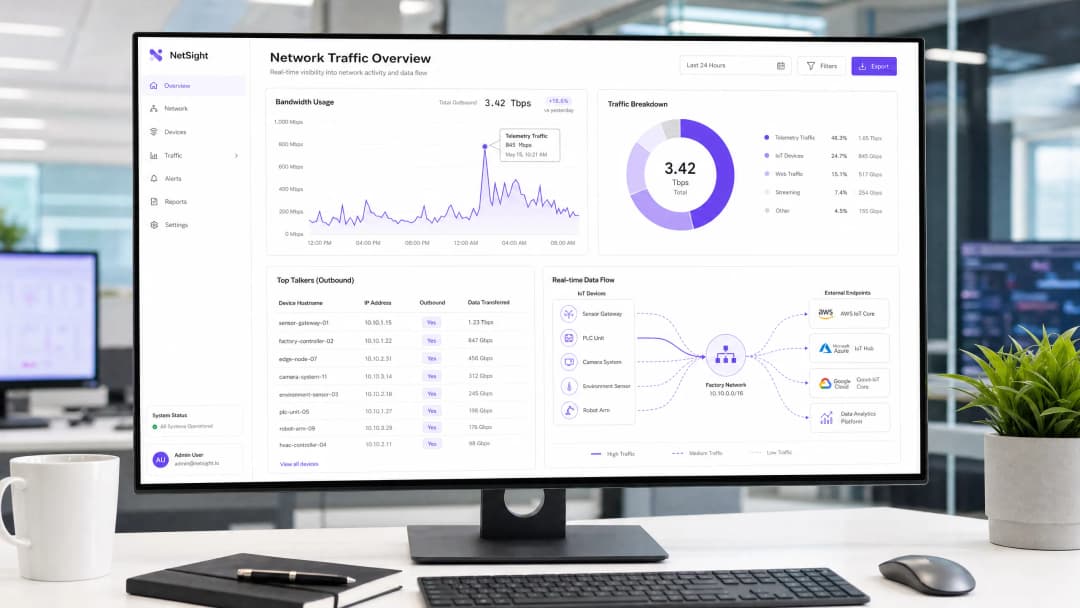
Para CTOs e arquitetos de rede que gerenciam ambientes de alta densidade nos setores de hotelaria, varejo e setor público, a proliferação de dispositivos IoT introduziu uma taxa oculta nas WLANs corporativas: dados de telemetria não solicitados. Cada smart TV, controlador de HVAC e terminal de PDV envia continuamente dados de diagnóstico, estatísticas de uso e verificações de firmware para endpoints de fornecedores. No agregado, esse tráfego pode consumir até 48% da largura de banda de saída, impactando severamente o Guest WiFi legítimo e as operações corporativas. Além de reduzir o throughput, a telemetria não gerenciada representa um risco de conformidade significativo sob o GDPR e PCI-DSS, criando vetores de exfiltração de dados não auditados. Este guia fornece um roteiro técnico para identificar, isolar e filtrar o tráfego de telemetria na borda, ajudando as equipes de TI a recuperar a largura de banda, aplicar políticas de segurança e melhorar o ROI geral da rede sem interromper a funcionalidade crítica dos dispositivos.
Análise Técnica Detalhada
O principal desafio da telemetria de IoT é que ela opera de forma autônoma fora das políticas de rede padrão. Os dispositivos são codificados rigidamente para se comunicar com endpoints controlados por fornecedores e, muitas vezes, empregam uma lógica de repetição agressiva se a conectividade for interrompida.
Anatomia do Tráfego de Telemetria
Os payloads de telemetria variam de acordo com o fornecedor, mas geralmente incluem métricas de integridade do dispositivo, logs de erros e padrões de uso. Por exemplo, uma smart TV em um quarto de hotel pode fazer ping nos servidores da Samsung ou LG a cada poucos minutos. Embora cada pacote individual seja pequeno, o volume acumulado em milhares de dispositivos é substancial. Nossa análise mostra que o dispositivo IoT empresarial médio gera aproximadamente 340 MB de tráfego de saída por dia.

Implicações de Segurança e Conformidade
A telemetria não filtrada cria um ponto cego na segurança da rede. Quando os dispositivos ignoram os controles organizacionais para se comunicar externamente, eles violam o princípio do privilégio mínimo. Isso é particularmente problemático em ambientes sujeitos a estruturas regulatórias rígidas.
Sob a PCI-DSS v4.0, qualquer dispositivo que compartilhe um segmento de rede com o Ambiente de Dados de Portadores de Cartão (CDE) entra no escopo de conformidade. Se um terminal de PDV gera telemetria de saída, ele deve ser estritamente isolado. Da mesma forma, o Artigo 32 do GDPR exige a implementação de medidas técnicas adequadas para proteger os dados. Conexões de saída não auditadas, mesmo que pareçam inofensivas, não cumprem este padrão. Embora o 802.1X forneça autenticação robusta em nível de porta, ele não inspeciona ou controla a carga útil dos dispositivos autenticados. O WPA3 protege a transmissão sem fio, mas não impede que um dispositivo inicie conexões de telemetria.
A Necessidade de Filtragem de Borda
Para resolver isso, as organizações devem implementar a filtragem na borda da rede. Isso envolve uma abordagem em várias camadas: DNS sinkholing para interceptar solicitações de resolução de domínios de telemetria conhecidos, e Deep Packet Inspection (DPI) com listas de bloqueio de FQDN para interceptar comunicações de IP codificadas diretamente no hardware. Essa arquitetura garante que apenas o tráfego comercial autorizado passe pelo gateway de internet, conforme discutido detalhadamente em nosso guia sobre Melhorar as Velocidades do WiFi Bloqueando Redes de Anúncios na Borda.

Tem dúvidas sobre a sua configuração específica?
A nossa equipa trabalha com operadores de espaços, gestores de TI e engenheiros de rede em 80.000 locais. Agende uma chamada de 20 minutos e mostraremos como outros profissionais na sua situação o resolveram.
Guia de Implementação
A implantação de uma arquitetura robusta de filtragem de telemetria requer uma abordagem sistemática para garantir que o tráfego operacional legítimo não seja interrompido.
Fase 1: Segmentação de Rede
O passo principal é a segmentação estrita de VLAN. Dispositivos IoT nunca devem residir na mesma sub-rede que usuários corporativos, redes de convidados ou sistemas no escopo do PCI. Crie VLANs dedicadas para IoT com Listas de Controle de Acesso (ACLs) estritas que neguem o roteamento inter-VLAN por padrão.
Fase 2: Auditoria e Definição de Linha de Base do Tráfego
Antes de aplicar os bloqueios, estabeleça uma linha de base de tráfego. Implante ferramentas de análise de fluxo (NetFlow/sFlow) ou use uma plataforma abrangente de WiFi Analytics para monitorar conexões de saída. Identifique os principais transmissores e mapeie seus endpoints de destino. Esta auditoria revelará a verdadeira escala do problema de telemetria.
Fase 3: DNS Sinkholing
Configure o escopo DHCP para a VLAN de IoT para atribuir um resolvedor DNS interno que aplique as políticas. Implemente o bloqueio baseado em categorias para endpoints de telemetria e diagnóstico conhecidos. Use listas de bloqueio mantidas pela comunidade ou feeds comerciais de inteligência contra ameaças. Monitore os logs no modo "apenas relatório" por 72 horas para identificar possíveis falsos positivos antes de aplicar os bloqueios.
Fase 4: Filtragem de Saída e DPI
Para dispositivos que ignoram o DNS usando endereços IP codificados diretamente, implemente a filtragem de saída no firewall de perímetro. Configure regras de DPI para identificar e descartar assinaturas de telemetria. Certifique-se de que essas regras sejam atualizadas regularmente para acompanhar as mudanças na infraestrutura dos fornecedores.
Melhores Práticas
- Adote uma postura de negação por padrão para IoT: Por padrão, as VLANs de IoT não devem ter acesso à internet. Adicione à whitelist explicitamente apenas os FQDNs e portas necessários para a funcionalidade principal do dispositivo (por exemplo, NTP, endpoints de API específicos).
- Implemente limitação de taxa: Mesmo o tráfego autorizado deve estar sujeito à modelagem de largura de banda. Aplique políticas de QoS para limitar o throughput máximo disponível para os segmentos de IoT, evitando que eles saturem o uplink durante atualizações de firmware em massa.
- Manutenção regular de blocklists: Os endpoints de telemetria mudam. Automatize a ingestão de blocklists de FQDN atualizadas em seu mecanismo de filtragem de borda para manter a eficácia.
- Monitore redes de convidados: Aplique princípios de filtragem semelhantes às redes de convidados. Embora você não possa controlar os dispositivos dos convidados, pode evitar que a telemetria deles degrade a qualidade da experiência compartilhada.
Resolução de Problemas e Mitigação de Riscos
O maior risco da filtragem de telemetria é o bloqueio excessivo, que pode interromper a funcionalidade do dispositivo. Por exemplo, bloquear a CDN de um fornecedor pode, inadvertidamente, bloquear atualizações de segurança críticas.
- Sintoma: Os dispositivos mostram um status offline no console de gerenciamento.
- Solução: Revise os logs de DNS em busca de consultas bloqueadas a partir do IP do dispositivo afetado. Adicione temporariamente o domínio bloqueado à whitelist e verifique se a funcionalidade foi restaurada. Frequentemente, os fornecedores usam subdomínios separados para telemetria e gerenciamento (por exemplo,
telemetry.vendor.comem vez deapi.vendor.com).
Outro modo de falha comum é a segmentação incompleta, onde uma VLAN de gerenciamento conecta inadvertidamente o segmento de IoT à rede corporativa. Testes de intrusão regulares e auditorias de VLAN são essenciais para verificar o isolamento.
Retorno sobre o Investimento (ROI) e Impacto no Negócio
A implementação da filtragem de telemetria gera retornos imediatos e mensuráveis.
- Recuperação de largura de banda: As organizações normalmente observam uma redução de 15 a 30% na utilização de WAN de saída, adiando atualizações dispendiosas de largura de banda.
- Melhoria na experiência do usuário: A largura de banda recuperada se traduz diretamente em uma conectividade WiFi mais rápida e confiável para convidados e funcionários, melhorando as pontuações de satisfação em ambientes de Hospitalidade e Varejo.
- Mitigação de riscos: A eliminação de conexões de saída não autorizadas reduz significativamente a superfície de ataque e simplifica as auditorias de conformidade, diminuindo o risco de multas regulatórias.
Em implantações do setor público, onde os orçamentos são apertados e a fiscalização é alta, essas eficiências são cruciais para a prestação de serviços confiáveis que se alinham com as iniciativas para impulsionar a inclusão digital, conforme discutido em nosso anúncio recente: Purple Appoints Iain Fox as VP Growth - Public Sector to Drive Digital Inclusion and Smart City Innovation.
-
Ouça o Briefing
Para se aprofundar nas considerações de arquitetura, ouça nosso briefing técnico de 10 minutos:
Definições principais
Dados de Telemetria
Transmissão automatizada de dados operacionais, de diagnóstico ou de uso de um dispositivo conectado de volta ao seu fabricante ou a um serviço de nuvem de terceiros.
Frequentemente transmitidos sem autorização explícita de TI, consumindo largura de banda e criando pontos cegos de conformidade.
DNS Sinkhole
Um servidor DNS configurado para fornecer endereços IP incorretos (frequentemente 0.0.0.0) para nomes de domínio específicos, impedindo efetivamente que os dispositivos se conectem a esses domínios.
Utilizado como um método leve e altamente eficaz para bloquear endpoints conhecidos de telemetria e rastreamento na borda da rede.
Deep Packet Inspection (DPI)
Filtragem avançada de pacotes de rede que examina a parte de dados (e possivelmente o cabeçalho) de um pacote à medida que ele passa por um ponto de inspeção, buscando inconformidades com protocolos, vírus, spam, invasões ou critérios definidos.
Necessário para identificar e bloquear o tráfego de telemetria que usa endereços IP codificados rigidamente ou portas não padrão, ignorando os controles de DNS.
Lista de Bloqueio de FQDN
Uma lista de Nomes de Domínio Totalmente Qualificados (por exemplo, telemetry.vendor.com) que têm o acesso explicitamente negado por meio do gateway de rede ou do resolvedor DNS.
Mais preciso do que o bloqueio de IP, pois os endpoints de telemetria hospedados na nuvem mudam frequentemente de endereço IP, mas mantêm nomes de domínio consistentes.
Segmentação de VLAN
A prática de dividir uma rede física em várias redes lógicas para isolar o tráfego, melhorar o desempenho e reforçar a segurança.
O primeiro passo crítico no gerenciamento de dispositivos IoT, garantindo que o tráfego de telemetria não possa atravessar segmentos de rede corporativos ou no escopo de PCI.
Filtragem de Saída
A prática de monitorar e potencialmente restringir o fluxo de informações que saem de uma rede para outra, normalmente a internet.
Crucial para evitar a exfiltração não autorizada de dados e aplicar a postura de "Negação por Padrão" para segmentos de IoT.
Escopo do PCI DSS
Todos os componentes do sistema, pessoas e processos que estão incluídos ou conectados ao Ambiente de Dados do Portador de Cartão (CDE).
A telemetria não controlada de dispositivos no mesmo segmento de rede que os terminais de pagamento pode acidentalmente trazer esses dispositivos para o escopo de auditoria.
IEEE 802.1X
Um padrão IEEE para Controle de Acesso à Rede baseado em porta (PNAC), que fornece um mecanismo de autenticação para dispositivos que desejam se conectar a uma LAN ou WLAN.
Embora proteja a entrada na rede, ele não inspeciona ou controla as cargas úteis de telemetria enviadas por dispositivos autenticados.
Exemplos práticos
Um resort de 400 quartos está enfrentando um congestionamento severo na rede todas as manhãs entre 2:00 e 4:00, impactando os hóspedes que acordam cedo e as operações de back-office. A equipe de rede suspeita que as smart TVs instaladas recentemente em todos os quartos sejam as responsáveis. Como eles devem diagnosticar e resolver isso?
- Diagnóstico: Implante um coletor NetFlow no switch central para analisar o tráfego durante a janela de congestionamento. A análise revela que todas as 400 TVs estão baixando atualizações de firmware simultaneamente e enviando dados agregados de telemetria de uso diário para a CDN do fabricante. 2. Resolução: Primeiro, garanta que as TVs estejam em uma VLAN de IoT dedicada. Segundo, implemente uma política de QoS no firewall para limitar a taxa de tráfego de saída e entrada da VLAN de IoT a 10% da capacidade total do link WAN. Terceiro, implemente o redirecionamento de DNS (sinkhole) para bloquear os FQDNs específicos usados para o envio de telemetria, permitindo os FQDNs usados para atualizações de firmware. Por fim, escalone as janelas de atualização se o console de gerenciamento do fornecedor permitir.
Uma grande rede de varejo com 200 lojas usa uma mistura de sistemas de PDV legados e modernos. Durante uma auditoria PCI DSS, o avaliador observa que vários terminais de PDV modernos estão gerando tráfego HTTPS de saída para endpoints de nuvem desconhecidos. Como o arquiteto de rede deve remediar essa descoberta?
- Contenção Imediata: Verifique se os terminais de PDV estão em uma VLAN de CDE (Cardholder Data Environment) estritamente isolada. 2. Análise de Tráfego: Realize capturas de pacotes (PCAP) na interface de saída da VLAN de CDE. Identifique os endereços IP de destino e tente realizar consultas de DNS reverso para determinar o fornecedor. 3. Aplicação de Políticas: Implemente uma regra de saída "Default-Deny" no firewall para a VLAN de CDE. Permita apenas explicitamente na lista de permissões os endereços IP e portas necessários para o processamento de pagamentos e tráfego de gerenciamento autorizado. 4. Documentação: Documente os endpoints na lista de permissões e a justificativa de negócios para cada um na base de regras do firewall, fornecendo esta documentação ao avaliador PCI.
Questões práticas
Q1. Você está implantando uma nova frota de controladores inteligentes de HVAC em um campus corporativo. O fornecedor afirma que os controladores precisam de acesso à internet para enviar dados de diagnóstico para sua plataforma em nuvem para suporte de garantia. Como você integra esses dispositivos de forma segura?
Dica: Considere o princípio do privilégio mínimo e como equilibrar os requisitos operacionais com os controles de segurança.
Ver resposta modelo
- Coloque os controladores de HVAC em uma VLAN de IoT dedicada e isolada. 2. Solicite ao fornecedor os FQDNs e portas específicos necessários para o relatório de diagnóstico. 3. Configure o firewall de perímetro com uma regra de saída de negação por padrão para a VLAN de IoT. 4. Crie uma regra de permissão explícita apenas para os FQDNs e portas fornecidos pelo fabricante. 5. Implemente limitação de taxa (rate limiting) na VLAN para evitar que os controladores consumam largura de banda excessiva.
Q2. Durante uma análise de rotina dos logs, você percebe um volume significativo de solicitações de DNS da VLAN de IoT sendo bloqueadas pelo DNS sinkhole. No entanto, a equipe de operações relata que as telas de sinalização digital não estão mais atualizando seu conteúdo. Qual é a causa provável e a solução?
Dica: Pense em como os fornecedores costumam estruturar seus serviços em nuvem e nos riscos de bloqueio excessivo.
Ver resposta modelo
A causa provável é o bloqueio excessivo. O fornecedor provavelmente está usando o mesmo domínio (ou um subdomínio intimamente relacionado) tanto para relatórios de telemetria quanto para entrega de conteúdo. Solução: 1. Identifique o domínio bloqueado específico nos logs de DNS. 2. Adicione temporariamente o domínio à lista de permissões. 3. Use a captura de pacotes para analisar o tráfego para esse domínio. 4. Se possível, use DPI no firewall para bloquear os caminhos de URI de telemetria específicos enquanto permite os caminhos de atualização de conteúdo, ou trabalhe com o fornecedor para identificar FQDNs distintos para cada função.
Q3. O diretor de TI de um estádio deseja implementar a filtragem de telemetria, mas está preocupado com a sobrecarga de processamento no firewall principal em dias de jogos, quando 50.000 torcedores estão conectados. Qual arquitetura oferece a filtragem mais eficiente?
Dica: Qual método de filtragem consome menos ciclos de CPU no firewall?
Ver resposta modelo
A abordagem mais eficiente é depender fortemente do DNS sinkholing para a maior parte da filtragem. Ao configurar os servidores DHCP para apontar os dispositivos clientes para um resolvedor DNS interno que bloqueia domínios de telemetria conhecidos, o tráfego é descartado antes mesmo de uma conexão ser tentada, economizando entradas na tabela de estado do firewall e ciclos de processamento de DPI. O firewall deve ser usado apenas como uma medida secundária para IPs codificados permanentemente ou regras de bloqueio altamente específicas.
Continue a ler esta série
Como verificar a interferência de WiFi e encontrar o melhor canal
Este guia técnico abrangente fornece aos líderes de TI corporativos metodologias práticas para identificar interferências de RF e selecionar os canais de 5GHz ideais. Ele abrange análise de espectro, considerações sobre DFS e estratégias práticas de implantação para maximizar o rendimento e reduzir a latência sem a necessidade de novos investimentos em hardware.
Como Melhorar a Velocidade do WiFi Sem Comprar Novos Pontos de Acesso
Este guia detalha como locais corporativos podem recuperar mais de 30% de sua largura de banda de WiFi sem a necessidade de adquirir novos pontos de acesso. Ao implementar filtragem de DNS, band steering e políticas de QoS, as equipes de TI podem estender a vida útil do hardware, reduzir o CapEx e melhorar o desempenho e a segurança da rede.
Reduzindo a Latência em Redes WiFi de Alta Densidade
Este guia detalha como a eliminação de consultas DNS desnecessárias para domínios de rastreamento reduz drasticamente a latência em redes WiFi de alta densidade. Ele fornece orientações práticas de arquitetura, implementação e ROI para líderes de TI que gerenciam ambientes de locais congestionados.
Tem dúvidas sobre a sua configuração específica?
A nossa equipa trabalha com operadores de espaços, gestores de TI e engenheiros de rede em 80.000 locais. Agende uma chamada de 20 minutos e mostraremos como outros profissionais na sua situação o resolveram.