
As Melhores Ferramentas de Análise de WiFi para Solução de Problemas de Sobreposição de Canais
Este guia abrangente fornece a gerentes de TI e arquitetos de rede estratégias acionáveis para identificar e resolver a sobreposição de canais WiFi em ambientes de alta densidade. Ele avalia as melhores ferramentas de análise de WiFi e descreve uma metodologia comprovada para otimizar o desempenho de RF, a fim de garantir uma experiência perfeita para o hóspede e maximizar o ROI da infraestrutura.
Ouça este guia
Ver transcrição do podcast
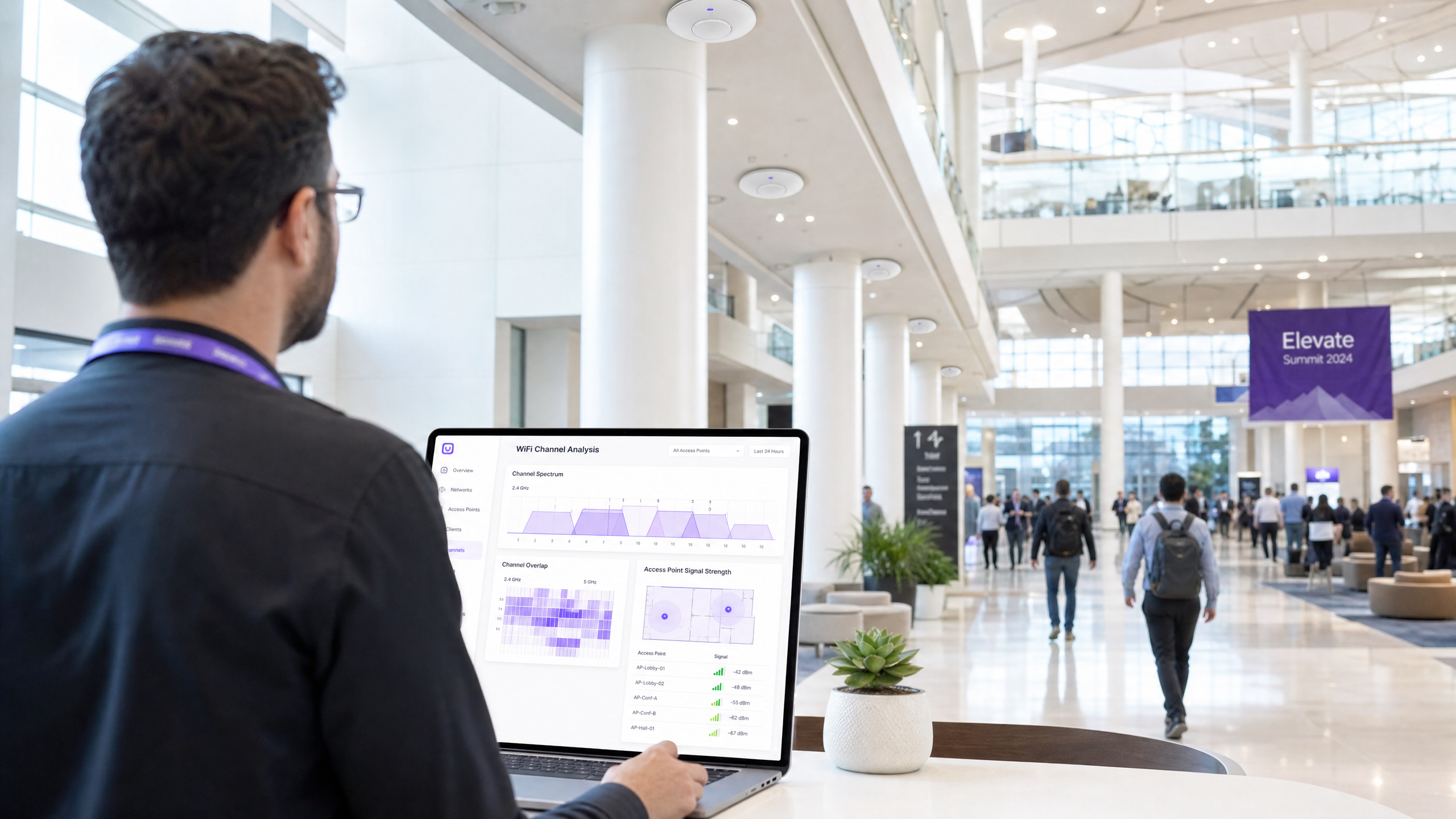
Resumo Executivo
Para gerentes de TI e arquitetos de rede que gerenciam ambientes de alta densidade, a sobreposição de canais continua sendo uma das causas mais persistentes de degradação do desempenho do WiFi. Quando os pontos de acesso competem pelo mesmo espectro, a interferência de co-canal e de canal adjacente impacta diretamente a taxa de transferência, aumenta as taxas de repetição e compromete a experiência do hóspede. Este guia fornece uma referência técnica definitiva para identificar, diagnosticar e resolver a sobreposição de canais usando as melhores ferramentas de análise de WiFi do setor.
Ao compreender a mecânica de RF subjacente e implantar o software de diagnóstico correto, as equipes técnicas podem otimizar as atribuições de canais, mitigar a interferência e maximizar o retorno sobre o investimento para implantações sem fio corporativas. Seja você gerenciando um hotel de 200 quartos, uma rede Retail multi-site ou um extenso local do setor público, as metodologias detalhadas aqui o equiparão para manter uma rede sem fio robusta e de alto desempenho. Além disso, a integração dessas práticas com plataformas avançadas de WiFi Analytics , como a Purple, garante visibilidade contínua e gerenciamento proativo do ambiente de RF.
Análise Técnica Detalhada
A Física da Sobreposição de Canais
Na camada física, as redes WiFi operam dentro de bandas de frequência definidas, principalmente 2.4GHz, 5GHz e, cada vez mais, 6GHz. O desafio fundamental na implantação de WiFi é gerenciar o espectro limitado disponível nessas bandas para atender a múltiplos pontos de acesso (APs) e dispositivos clientes sem causar interferência destrutiva.
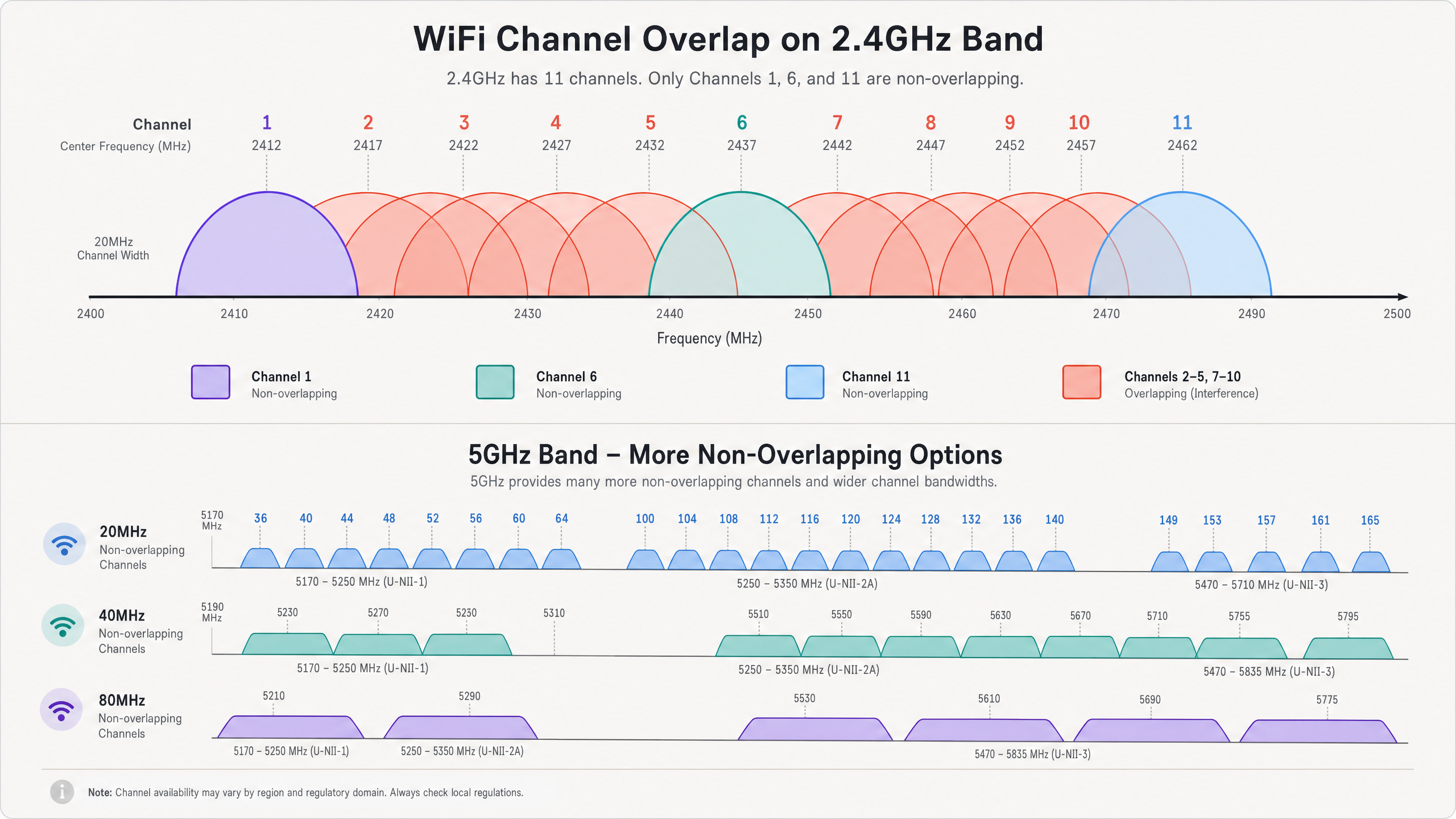
Na banda de 2.4GHz, há 11 canais disponíveis na América do Norte e até 13 na Europa. No entanto, cada canal ocupa 20MHz de espectro, enquanto os próprios canais estão espaçados em apenas 5MHz. Essa realidade física dita que apenas os canais 1, 6 e 11 são completamente não sobrepostos. Quando um AP transmite no canal 2, seu sinal se espalha para os canais 1, 3 e 4. Isso é conhecido como interferência de canal adjacente (ACI). A ACI é particularmente prejudicial porque o protocolo 802.11 CSMA/CA (Carrier Sense Multiple Access with Collision Avoidance) não consegue gerenciar efetivamente as colisões entre transmissões parcialmente sobrepostas, levando a quadros corrompidos e altas taxas de repetição.
Por outro lado, a interferência de co-canal (CCI) ocorre quando múltiplos APs operam exatamente no mesmo canal. Embora o protocolo CSMA/CA possa gerenciar a CCI forçando os dispositivos a transmitirem em turnos, isso efetivamente reduz o tempo de antena disponível e a taxa de transferência para todos os dispositivos que compartilham o canal. Em ambientes de alta densidade, a CCI excessiva pode tornar uma rede inutilizável. Para uma compreensão mais aprofundada das características da banda, consulte nosso guia sobre Por que 5GHz é Mais Rápido, mas 2.4GHz é Mais Confiável .
A Vantagem de 5GHz e 6GHz
A banda de 5GHz oferece um alívio significativo do congestionamento de 2.4GHz. Ela fornece até 25 canais de 20MHz não sobrepostos. Essa abundância de espectro permite que os arquitetos de rede utilizem canais mais amplos (40MHz ou 80MHz) para aumentar a taxa de transferência sem causar imediatamente CCI ou ACI. No entanto, um planejamento cuidadoso dos canais ainda é necessário, especialmente ao usar canais mais amplos, pois a união de dois canais de 20MHz reduz pela metade o número de canais não sobrepostos disponíveis.
A introdução do WiFi 6E e da banda de 6GHz oferece ainda mais espectro — até 59 canais de 20MHz não sobrepostos ou 14 canais de 80MHz não sobrepostos. Esse aumento massivo na capacidade permite um verdadeiro desempenho sem fio gigabit em ambientes densos, desde que os dispositivos clientes suportem o novo padrão.
Capacidades Essenciais do Analisador
Para diagnosticar efetivamente a sobreposição de canais, as equipes de TI precisam de ferramentas capazes de visualizar o ambiente de RF. As principais capacidades incluem:
- Análise de Espectro: A capacidade de visualizar a energia de RF bruta em todo o espectro. Isso é crucial para identificar fontes de interferência não-WiFi, como fornos de micro-ondas, dispositivos Bluetooth ou câmeras de segurança sem fio, que operam na banda de 2.4GHz, mas não transmitem quadros 802.11.
- Medição de Utilização de Canal: A capacidade de quantificar quanto da capacidade de um canal está sendo ativamente usado pelo tráfego WiFi versus quanto está disponível. Alta utilização indica congestionamento e a necessidade de realocação de canais.
- Mapeamento de Relação Sinal-Ruído (SNR): SNR é a diferença entre a força do sinal (RSSI) e o piso de ruído de fundo. Um SNR alto é necessário para esquemas de modulação complexos (como 256-QAM ou 1024-QAM) que fornecem altas taxas de dados.
- Rastreamento de BSSID: A capacidade de rastrear Identificadores de Conjunto de Serviço Básico (BSSIDs) individuais — os endereços MAC de rádios AP individuais — para identificar APs não autorizados ou infraestrutura mal configurada.
Guia de Implementação
A implantação eficaz de uma ferramenta de análise de WiFi requer uma metodologia estruturada. As etapas a seguir descrevem uma abordagem de melhores práticas para solucionar problemas e otimizar uma rede sem fio.
Etapa 1: Avaliação da Linha de Base
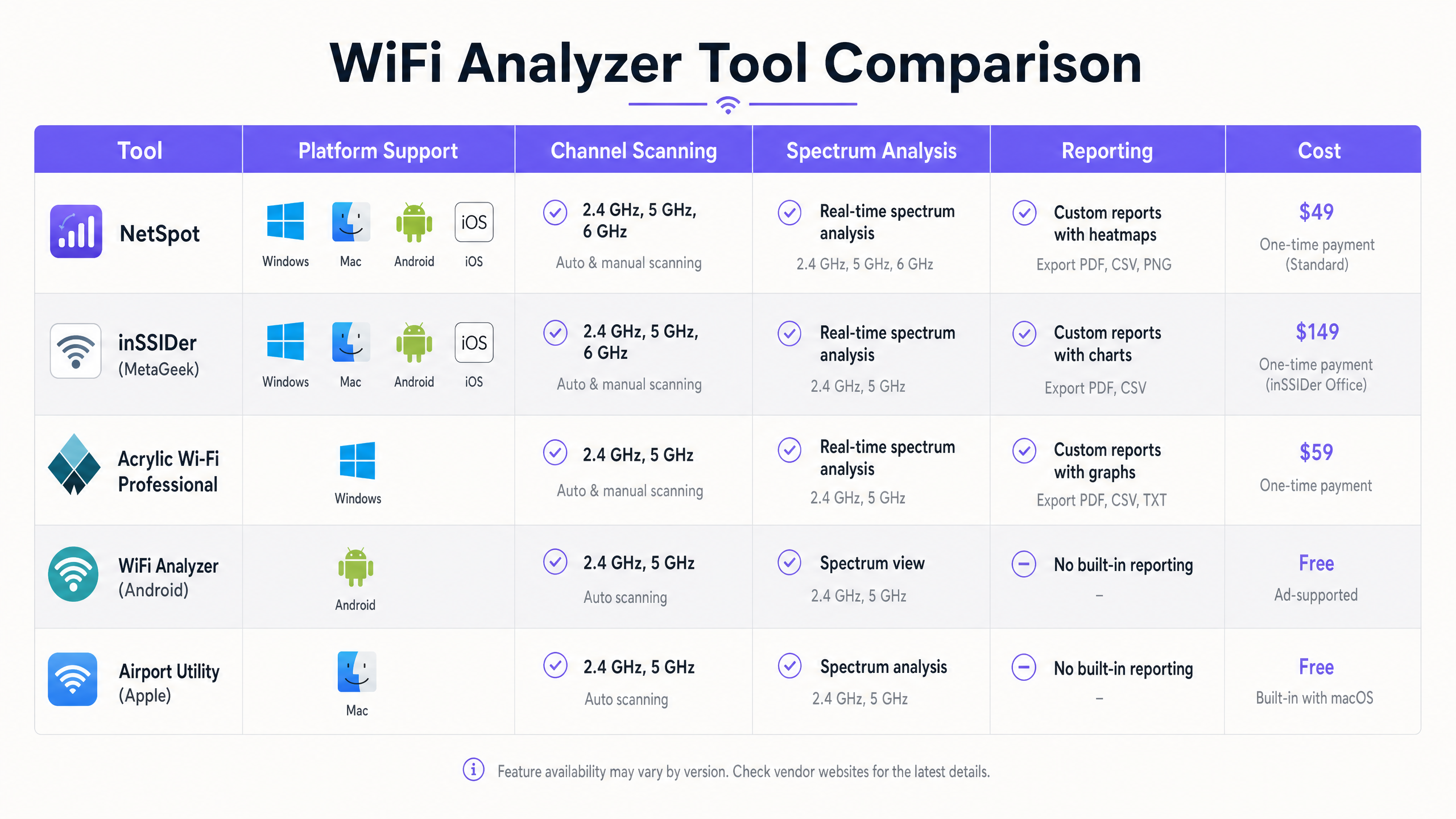
Antes de fazer qualquer alteração de configuração, estabeleça uma linha de base do ambiente de RF atual. Use uma ferramenta como Ekahau ou NetSpot para conduzir uma pesquisa de site passiva. Percorra a área de cobertura e capture dados sobre a força do sinal, atribuições de canais e piso de ruído. Esta linha de base servirá como um ponto de comparação após os esforços de remediação.
Passo 2: Identificar Zonas de Interferência
Analise os dados da pesquisa para identificar áreas com alto CCI ou ACI. Procure locais onde três ou mais APs operando nos mesmos canais ou em canais sobrepostos são recebidos com uma intensidade de sinal superior a -70 dBm. Estas são suas principais zonas de interferência. Em um ambiente de Hospitalidade , estas são frequentemente interseções de corredores; no Varejo , elas podem estar perto de terminais de ponto de venda.
Passo 3: Varreduras de Espectro
Realize varreduras de espectro usando uma ferramenta com capacidades de análise de espectro verdadeiras (por exemplo, Ekahau Sidekick ou um analisador de espectro dedicado). Procure por assinaturas de energia não-WiFi contínuas ou intermitentes que elevem o piso de ruído. Se a interferência não-WiFi for identificada, a fonte deve ser localizada e removida ou mitigada antes que o planejamento de canais possa ser eficaz.
Passo 4: Realocação de Canais
Com base nos dados da pesquisa e do espectro, redesenhe o plano de canais.
- 2.4GHz: Adira estritamente à regra 1-6-11. Se a densidade de APs for alta, considere desabilitar os rádios de 2.4GHz em APs alternados para reduzir o CCI.
- 5GHz: Utilize canais de seleção dinâmica de frequência (DFS) se as regulamentações locais permitirem e a interferência de radar não estiver presente. Selecione cuidadosamente as larguras de canal; enquanto os canais de 80MHz oferecem maior taxa de transferência de pico, os canais de 40MHz ou mesmo 20MHz são frequentemente mais apropriados em implantações densas para maximizar o número de canais não sobrepostos.
Passo 5: Ajuste do Nível de Potência
A sobreposição de canais é frequentemente exacerbada por potência de transmissão excessiva. Se o sinal de um AP se propaga muito longe, ele causa CCI desnecessário para APs vizinhos. Reduza a potência de transmissão para o nível mínimo necessário para fornecer cobertura adequada e manter um SNR alvo na borda da célula. Isso diminui a célula de cobertura e reduz a interferência.
Passo 6: Validação Pós-Remediação
Após aplicar o novo plano de canais e as configurações de potência, realize uma pesquisa de site de acompanhamento. Compare os novos dados com a linha de base para verificar se o CCI e o ACI foram reduzidos e se os requisitos de cobertura ainda são atendidos.
Melhores Práticas
Para manter um ambiente de RF otimizado, siga as seguintes melhores práticas da indústria:
- Padronize em Ferramentas Empresariais: Embora aplicativos gratuitos para smartphone sejam úteis para verificações rápidas, a solução de problemas e o planejamento abrangentes exigem ferramentas de nível empresarial como Ekahau, OmniPeek ou AirMagnet.
- Integre com Análise: Combine a análise de RF com uma plataforma abrangente de Guest WiFi e análise. Purple oferece visibilidade contínua da qualidade de associação do cliente, duração da sessão e saúde geral da rede, permitindo que as equipes de TI detectem degradações antes que os usuários relatem problemas.
- Auditorias Regulares: O ambiente de RF é dinâmico. Novas redes vizinhas, mudanças no layout do edifício ou a introdução de novos equipamentos podem alterar o cenário de RF. Agende pesquisas de site regulares (por exemplo, trimestrais) para garantir que a rede permaneça otimizada.
- Utilize o Auto-RF com Cautela: A maioria dos controladores WLAN empresariais modernos possui gerenciamento automatizado de recursos de rádio (RRM). Embora esses algoritmos sejam sofisticados, eles podem, às vezes, causar "channel thrashing" (troca excessiva de canais) em ambientes altamente dinâmicos. Monitore o comportamento do RRM de perto e esteja preparado para bloquear manualmente as atribuições de canais, se necessário.
- Mantenha-se Atualizado com os Padrões: Garanta que sua infraestrutura e metodologias de solução de problemas estejam alinhadas com os mais recentes padrões IEEE (por exemplo, 802.11ax/WiFi 6) e protocolos de segurança (por exemplo, WPA3).
Solução de Problemas e Mitigação de Riscos
Mesmo com um planejamento meticuloso, as redes WiFi podem apresentar problemas de desempenho. Compreender os modos de falha comuns e as estratégias de mitigação é essencial.
Modos de Falha Comuns
- O Problema do "Cliente Pegajoso": Os clientes frequentemente se mantêm conectados a um AP distante com uma conexão fraca, mesmo quando um AP mais próximo e mais forte está disponível. Isso degrada o desempenho para o cliente pegajoso e consome tempo de ar excessivo, impactando todos os outros clientes naquele canal. Mitigação: Implemente taxas básicas mínimas e limites de RSSI para forçar os clientes a fazerem roaming para APs melhores.
- Eventos de Radar DFS: Na banda de 5GHz, os APs operando em canais DFS devem escutar por assinaturas de radar e desocupar imediatamente o canal se o radar for detectado. Isso pode causar interrupções súbitas na rede. Mitigação: Monitore os logs do controlador para eventos DFS. Se ocorrerem detecções frequentes de radar, evite usar canais DFS naquele local específico.
- Problema do Nó Oculto: Ocorre quando dois clientes podem se comunicar com o mesmo AP, mas não conseguem se ouvir. Eles podem transmitir simultaneamente, causando colisões no AP. Mitigação: Habilite os mecanismos RTS/CTS (Request to Send/Clear to Send), embora isso adicione sobrecarga e reduza a taxa de transferência geral.
Estratégias de Mitigação de Riscos
- Implemente Autenticação Robusta: Proteja a rede usando 802.1X/EAP para dispositivos corporativos e captive portals seguros para acesso de convidados. Para acesso moderno e seguro, considere soluções como How a wi fi assistant Enables Passwordless Access in 2026 .
- Segmentação de Rede: Isole diferentes tipos de tráfego (por exemplo, convidado, corporativo, IoT, PoS) em VLANs e SSIDs separados para melhorar a segurança e gerenciar domínios de broadcast.
- Monitoramento Contínuo: Utilize plataformas como Purple para monitorar continuamente as métricas de desempenho da rede e o comportamento do usuário. Por exemplo, entender como os usuários navegam em um espaço pode informar o posicionamento do AP, um conceito explorado em Purple Launches Offline Maps Mode for Seamless, Secure Navigation to WiFi Hotspots .
ROI e Impacto nos Negócios
Otimizar a rede WiFi através de um planejamento e análise rigorosos de canais proporciona resultados mensuráveiso valor de negócio em várias dimensões:
- Experiência do Usuário Aprimorada: Reduzir a sobreposição de canais aumenta diretamente o throughput e diminui a latência. Em um hub de Transporte , isso significa que os passageiros podem acessar de forma confiável cartões de embarque e entretenimento; em um hotel, isso se traduz em maiores pontuações de satisfação dos hóspedes e menos reclamações na recepção.
- Eficiência Operacional Aumentada: Uma rede estável e de alto desempenho reduz a carga sobre os helpdesks de TI. Menos tickets de conectividade significam que a equipe de TI pode se concentrar em iniciativas estratégicas em vez de solução de problemas reativa.
- Coleta de Dados Aprimorada: Uma rede confiável é a base para análises de localização precisas e engajamento do usuário. Quando a rede funciona bem, plataformas como Purple podem coletar dados de maior qualidade, permitindo campanhas de marketing mais eficazes e insights operacionais. Conforme destacado por movimentos estratégicos recentes, como Purple Appoints Iain Fox as VP Growth – Public Sector to Drive Digital Inclusion and Smart City Innovation , uma infraestrutura robusta é crítica para iniciativas digitais avançadas.
- Vida Útil Estendida do Hardware: Ao otimizar o ambiente de RF, a infraestrutura existente pode frequentemente suportar maiores densidades de clientes sem exigir atualizações imediatas de hardware, maximizando o retorno sobre o investimento de capital.
Definições principais
Co-Channel Interference (CCI)
Interference that occurs when two or more access points operate on the exact same frequency channel.
Forces devices to share airtime, reducing overall throughput. Often caused by overly dense AP deployments or excessive transmit power.
Adjacent-Channel Interference (ACI)
Interference that occurs when transmissions on one channel bleed into and disrupt communications on a neighboring, overlapping channel.
More destructive than CCI because the CSMA/CA protocol cannot effectively manage the collisions. Common when channels other than 1, 6, or 11 are used in the 2.4GHz band.
Signal-to-Noise Ratio (SNR)
The difference (in decibels) between the received signal strength (RSSI) and the background noise floor.
A critical metric for performance. High SNR is required for high data rates. A strong signal is useless if the noise floor is equally high.
Received Signal Strength Indicator (RSSI)
A measurement of the power level being received by the antenna.
Used to determine basic coverage boundaries. Typically, enterprise deployments aim for an RSSI of -65 dBm to -70 dBm at the cell edge.
Dynamic Frequency Selection (DFS)
A mechanism that allows unlicensed devices to share the 5GHz spectrum with legacy radar systems.
APs must monitor DFS channels for radar signatures and immediately switch channels if detected, which can cause temporary client disconnects.
Radio Resource Management (RRM)
Automated algorithms used by WLAN controllers to dynamically adjust AP transmit power and channel assignments.
Useful for initial setup, but can cause instability ('channel thrashing') in highly dynamic environments if not monitored.
Basic Service Set Identifier (BSSID)
The MAC address of the wireless access point radio.
Essential for tracking specific hardware during a site survey and identifying rogue APs.
Spectrum Analysis
The process of measuring and visualizing all RF energy within a specific frequency band, not just 802.11 traffic.
Necessary for identifying non-WiFi interference sources like microwaves or Bluetooth devices that standard WiFi scanners cannot see.
Exemplos práticos
A 300-room hotel is experiencing widespread guest complaints regarding slow WiFi speeds and dropped connections during peak evening hours, particularly in the central atrium where multiple access points are deployed.
- Deploy a tool like Ekahau Site Survey to conduct a passive RF sweep of the atrium during peak hours.
- Analyze the resulting heatmaps to identify areas where more than two APs operating on the 2.4GHz band are visible on the same channel (e.g., channel 6) with RSSI > -70 dBm.
- Implement a strict 1-6-11 channel plan for the 2.4GHz radios, ensuring adjacent APs use non-overlapping channels.
- Reduce the transmit power on the 2.4GHz radios in the atrium to minimize cell overlap.
- Conduct a post-remediation survey to verify CCI reduction and monitor Purple Analytics for improved session stability.
A large retail store recently upgraded its PoS terminals to wireless tablets, but transactions are frequently timing out. The IT team suspects interference but standard WiFi scans show only the store's own SSIDs.
- Utilize a spectrum analyzer (like Ekahau Sidekick or a dedicated tool) rather than a standard WiFi scanner.
- Perform a spectrum sweep in the 2.4GHz and 5GHz bands around the PoS areas.
- Identify non-802.11 energy signatures (e.g., from a nearby microwave oven, wireless security cameras, or Bluetooth beacons) that are elevating the noise floor and causing a low SNR.
- If possible, remove the source of interference. If not, migrate the PoS tablets to the 5GHz band, selecting channels far removed from the identified interference frequencies.
Questões práticas
Q1. You are auditing a new retail deployment. The 2.4GHz APs are currently set to channels 1, 4, 8, and 11 to 'spread out' the signals. What is the immediate risk, and what is the recommended action?
Dica: Consider the 20MHz width of a 2.4GHz channel and the 5MHz spacing between channel numbers.
Ver resposta modelo
The immediate risk is severe adjacent-channel interference (ACI). Channel 4 overlaps with 1 and 8; channel 8 overlaps with 4 and 11. ACI is highly destructive to throughput. The recommended action is to immediately reconfigure all 2.4GHz radios to use only channels 1, 6, and 11.
Q2. During a site survey in a conference center, you notice the noise floor on channel 6 is elevated to -75 dBm, but your WiFi scanner shows no BSSIDs broadcasting on that channel. What is the likely cause?
Dica: Think about what a standard WiFi scanner can and cannot detect.
Ver resposta modelo
The likely cause is a non-802.11 interference source, such as a microwave oven, wireless AV equipment, or Bluetooth devices operating in the 2.4GHz band. A standard WiFi scanner only sees 802.11 management frames. A dedicated spectrum analyzer is required to visualize this raw RF energy.
Q3. A hotel IT manager wants to maximize throughput by configuring all 5GHz APs to use 80MHz channel widths. The hotel has a dense deployment with APs in every other room. Why might this approach degrade performance rather than improve it?
Dica: Consider the total number of available non-overlapping channels in the 5GHz band when using wider channels.
Ver resposta modelo
Using 80MHz channels significantly reduces the number of available non-overlapping channels (typically to 5 or 6, depending on regulatory domain and DFS usage). In a dense deployment, this will inevitably lead to co-channel interference (CCI) as neighboring APs are forced to reuse the same wide channels, ultimately reducing aggregate capacity and stability.