
2.4GHz vs 5GHz na Empresa: Quando Utilizar Cada Uma
Um guia de referência técnica abrangente para diretores de TI e arquitetos de rede sobre a otimização de WLANs empresariais. Detalha as características físicas das bandas de 2.4GHz e 5GHz, as melhores práticas para segmentação de SSID e como configurar o band steering para maximizar o rendimento enquanto suporta dispositivos legados.
Video overview
Ouça este guia
Ver transcrição do podcast
Parte da nossa série principal: WiFi RF Engineering Guide →

Resumo Executivo
Para espaços empresariais - desde estádios de alta densidade a grandes superfícies comerciais - a escolha entre 2.4GHz e 5GHz já não é uma escolha simples. É uma decisão estratégica com impacto direto na eficiência operacional, na experiência do visitante e nos resultados financeiros. Este guia fornece aos diretores de TI e arquitetos de rede informações práticas sobre quando implementar cada banda, como configurar o band steering de forma eficaz e os impactos reais destas escolhas.
A física básica permanece inalterada: a banda de 2.4GHz oferece melhor penetração e alcance em detrimento da capacidade do canal e do congestionamento, enquanto a de 5GHz proporciona um débito massivo e grande disponibilidade de canais, mas sofre de atenuação rápida. Nas implementações modernas, o sucesso baseia-se numa coexistência inteligente. Ao tirar partido de ambas as bandas com SSIDs concebidos à medida e um band steering preciso, as organizações podem suportar dispositivos IoT legados ao mesmo tempo que fornecem velocidades gigabit ao hardware de consumo moderno.
Este documento de referência descreve a arquitetura técnica, as melhores práticas de implementação e as estratégias de mitigação de riscos necessárias para otimizar a sua WLAN, tanto para as operações corporativas como para a monetização de Guest WiFi.
Análise Técnica Detalhada: Física, Canais e Capacidade
Compreender as diferenças fundamentais entre as duas bandas é essencial para desenhar uma arquitetura de rede robusta.
A Banda de 2.4GHz: O Cavalo de Batalha Transmissor
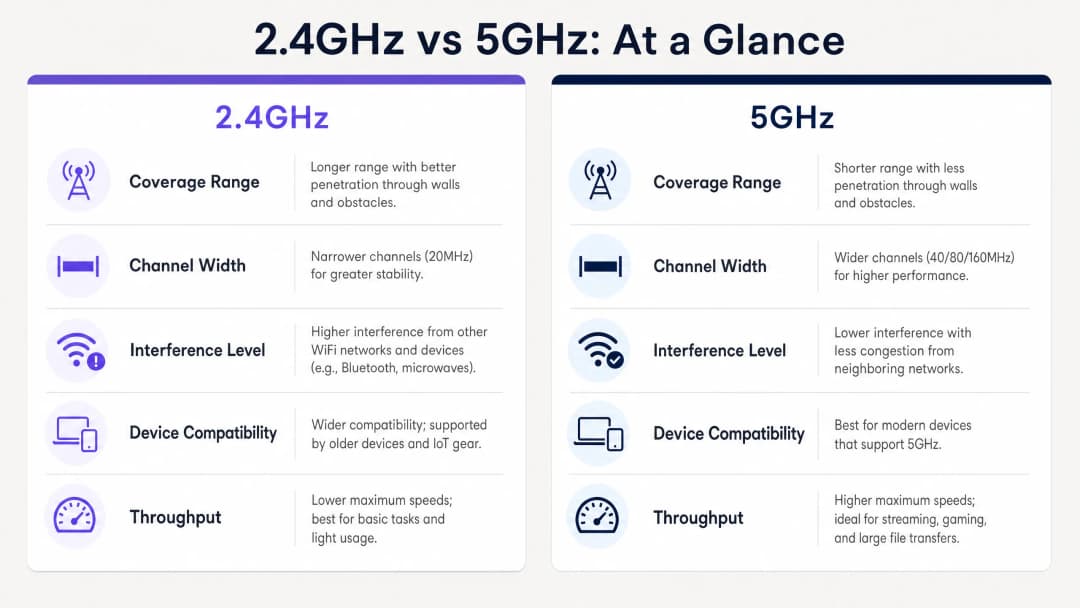
Operando numa frequência mais baixa, a banda de 2.4GHz tem comprimentos de onda mais longos que penetram facilmente obstáculos físicos, tais como paredes de betão, prateleiras de aço e poços de elevador. Isto torna-a ideal para ambientes de Hospitality com paredes internas espessas ou grandes espaços de armazém.
No entanto, o espetro de 2.4GHz é severamente limitado pela sua arquitetura de canais. Na maioria dos domínios regulamentares, existem apenas três canais de 20MHz que não se sobrepõem (canais 1, 6 e 11). Esta escassez leva a uma interferência de cocanal (CCI) e interferência de canal adjacente (ACI) significativa, especialmente em ambientes densos onde redes vizinhas, dispositivos Bluetooth e até micro-ondas competem pelo tempo de antena.
A Banda de 5GHz: A Autoestrada de Alta Capacidade
Em contrapartida, a banda de 5GHz opera numa frequência mais alta, resultando em comprimentos de onda mais curtos. Embora isto reduza a sua capacidade de penetrar obstáculos físicos, proporciona uma vasta expansão do espetro disponível. Dependendo do domínio regulamentar e da utilização de canais com Seleção Dinâmica de Frequência (DFS), pode aceder a até 25 canais de 20MHz que não se sobrepõem.
Esta abundância permite a vinculação de canais (larguras de 40MHz, 80MHz ou 160MHz), possibilitando o elevado rendimento necessário para as aplicações modernas. Sob as normas IEEE 802.11ac (WiFi 5) e 802.11ax (WiFi 6), as redes de 5GHz podem fornecer velocidades de gigabit, tornando-as a banda preferida para ambientes de alta densidade, tais como centros de conferências e hubs de Transporte.
Tem dúvidas sobre a sua configuração específica?
A nossa equipa trabalha com operadores de espaços, gestores de TI e engenheiros de rede em 80.000 espaços. Agende uma chamada de 20 minutos e mostraremos como outros profissionais na sua área o resolveram.
Guia de Implementação: Coexistência Inteligente
A implementação de uma WLAN empresarial moderna exige uma abordagem diferenciada na atribuição de bandas. O objetivo é direcionar os dispositivos compatíveis para a banda de 5GHz, reservando a banda de 2.4GHz para os dispositivos que realmente necessitam dela.
1. Segmentação de SSID
A estratégia mais eficaz para gerir uma população mista de dispositivos é a segmentação de SSID. Crie SSIDs dedicados para diferentes casos de utilização:
- SSID Operacional (apenas 2.4GHz): Reservado para hardware antigo, sensores IoT, leitores de códigos de barras e terminais EPOS. Isto garante um tempo de antena limpo para os dispositivos operacionais críticos.
- SSID de Convidado/Corporativo (Banda dupla ou primário em 5GHz): Concebido para smartphones, tablets e computadores portáteis modernos. Este SSID deve tirar partido do direcionamento de banda (band steering) para empurrar os clientes compatíveis para os 5GHz.
2. Configurar o Band Steering
O band steering é o mecanismo através do qual a infraestrutura sem fios incentiva os clientes de banda dupla a ligarem-se ao rádio de 5GHz.

Ao configurar o band steering, considere os seguintes parâmetros:
- Supressão de Resposta de Sonda (Probe Response Suppression): O AP ignora os pedidos de sonda na banda de 2.4GHz dos clientes que sabe serem compatíveis com 5GHz, forçando-os a ligarem-se em 5GHz.
- Limiares de RSSI: Implemente limiares rigorosos de Indicador de Força do Sinal Recebido (RSSI). Se o sinal de 5GHz de um cliente cair abaixo de um determinado nível (ex.: -72 dBm), o AP deve permitir que o cliente mude suavemente para os 2.4GHz para evitar quedas de ligação.
3. Verificar o Design de RF
O band steering não é uma solução mágica para um mau design de rede. Se existirem lacunas na sua cobertura de 5GHz, um band steering agressivo resultará em quedas frequentes de ligação e numa má experiência do utilizador. Verifique sempre o seu design de RF com um levantamento detalhado do local (site survey) antes de ativar as funcionalidades de steering.
Boas Práticas e Considerações de Segurança
Optimização da Largura de Canal
Embora os canais de 80MHz ofereçam um rendimento teórico impressionante, consomem quatro canais padrão de 20MHz, aumentando a probabilidade de CCI em implementações de alta densidade. Para a maioria dos ambientes empresariais, a padronização na largura de canal de 40MHz na banda de 5GHz oferece o equilíbrio ideal entre rendimento e disponibilidade de canais.
Segurança e Conformidade
A natureza congestionada da banda de 2.4GHz torna-a mais suscetível a certos tipos de interferência e ataques de desautenticação. Para manter uma postura de segurança robusta, especialmente para ambientes sujeitos a PCI-DSS ou GDPR:
- Imponha WPA3 com Protected Management Frames (PMF) em todos os SSIDs corporativos.
- Garanta uma segregação estrita de VLAN entre o tráfego de convidados e as redes corporativas ou de pagamento.
- Audite regularmente o seu ambiente em busca de APs não autorizados, que são mais prevalentes na banda de 2.4GHz, que é facilmente acessível.
Para mais informações sobre a gestão segura de dados de rede, consulte o nosso guia sobre The Hidden Cost of Telemetry Data on Corporate WLANs (também disponível em francês: Le coût caché des données de télémétrie sur les WLAN d'entreprise).
-
Resolução de Problemas e Mitigação de Riscos
Quando surgem problemas, estes manifestam-se frequentemente como conectividade degradada ou fraco desempenho. Aqui estão os modos de falha comuns e como mitigá-los:
- Sticky Clients: Dispositivos que se agarram a um sinal fraco de 2.4GHz mesmo quando está disponível um sinal mais forte de 5GHz. Mitigação: Ajuste os seus limiares de RSSI e ative o 802.11k/v/r (Fast BSS Transition) para apoiar as decisões de roaming dos clientes.
- Interferência de Canais DFS: Os sistemas de radar podem forçar os APs a abandonar os canais DFS, interrompendo a conectividade. Mitigação: Monitorize os registos do controlador para eventos DFS. Se ocorrerem com frequência, exclua os canais afetados do seu plano de atribuição dinâmica de canais.
- Falhas de Conectividade IoT: Muitos dispositivos inteligentes não possuem rádios de 5GHz e têm dificuldades com autenticações complexas. Mitigação: Garanta que o seu SSID dedicado a IoT funciona estritamente em 2.4GHz e utiliza métodos de autenticação mais simples (por exemplo, WPA2-PSK ou bypass de autenticação MAC), mantendo um isolamento de rede estrito.
-
ROI e Impacto no Negócio
A otimização da sua estratégia de banda tem um impacto direto nos resultados financeiros da sua organização. Uma rede bem sintonizada reduz os pedidos de suporte, aumenta a eficiência operacional dos colaboradores que utilizam dispositivos móveis e melhora a experiência dos convidados.
Quando integrada com a WiFi Analytics, uma implementação robusta de 5GHz fornece os dados de localização de alta precisão necessários para iniciativas avançadas de marketing. Como se verificou em desenvolvimentos recentes, tais como a forma como um WiFi assistant Enables Passwordless Access in 2026, a conectividade contínua é a base para impulsionar a inclusão digital e maximizar o valor do seu espaço físico. Além disso, funcionalidades como o Offline Maps Mode dependem de uma ligação inicial estável para descarregar recursos essenciais, sublinhando a importância de um ambiente de RF fiável.
Para aprofundar estas estratégias, oiça o nosso briefing detalhado em podcast abaixo:
Definições Principais
Band Steering
Uma funcionalidade de infraestrutura de rede que deteta clientes capazes de banda dupla e os incentiva ativamente a ligarem-se à banda de 5GHz, menos congestionada, em vez da banda de 2.4GHz.
Crucial para otimizar a utilização do tempo de antena em ambientes com uma mistura de smartphones modernos e dispositivos IoT legados.
Interferência de Canal Partilhado (CCI)
Interferência que ocorre quando dois ou mais pontos de acesso operam exatamente no mesmo canal de frequência, forçando-os a partilhar o tempo de antena disponível.
Uma causa primária de fraco desempenho da rede na banda de 2.4GHz devido ao número limitado de canais não sobrepostos.
Dynamic Frequency Selection (DFS)
Um mecanismo que permite às redes WiFi utilizar canais de 5GHz tipicamente reservados para sistemas de radar, desde que o AP consiga detetar impulsos de radar e mudar automaticamente para um canal diferente.
Desbloqueia canais de 5GHz adicionais para utilização empresarial, mas requer um planeamento cuidadoso para evitar alterações repentinas de canal que desliguem os clientes.
RSSI (Indicador de Intensidade do Sinal Recebido)
Uma medição do nível de potência que está a ser recebido pela antena, normalmente expressa em decibéis negativos (dBm). Quanto mais próximo de zero, mais forte é.
Utilizado por administradores de rede para definir limiares para decisões de roaming e band steering (por exemplo, direcionar clientes para 2.4GHz quando o RSSI de 5GHz desce abaixo de -75 dBm).
Segmentação de SSID
A prática de transmitir diferentes nomes de rede (SSIDs) para diferentes grupos de utilizadores ou tipos de dispositivos, frequentemente associada a bandas de frequência ou políticas de segurança específicas.
Essencial para isolar dispositivos IoT vulneráveis em 2.4GHz do tráfego corporativo de alta velocidade em 5GHz.
Atenuação
A perda gradual de força do sinal à medida que as ondas de rádio viajam pelo espaço ou passam por objetos físicos, como paredes e pisos.
Explica por que razão os sinais de 5GHz exigem uma colocação de AP mais densa em comparação com os sinais de 2.4GHz em ambientes com forte interferência estrutural.
Fluxo Espacial
Múltiplos sinais de dados independentes transmitidos em simultâneo através de diferentes antenas utilizando a tecnologia MIMO (Multiple Input, Multiple Output) para aumentar o débito.
Determina a velocidade máxima potencial de uma ligação; os clientes modernos de 5GHz suportam frequentemente fluxos espaciais de 2x2 ou 3x3 para desempenho gigabit.
Protected Management Frames (PMF)
Um padrão de segurança (obrigatório em WPA3) que encripta as tramas de gestão utilizadas para controlar as ligações WiFi, prevenindo ataques de desautenticação.
Crítico para proteger a banda de 2.4GHz, facilmente acessível, contra agentes maliciosos que tentem perturbar as operações da rede.
Exemplos Práticos
Um hotel com 200 quartos está a registar um fraco desempenho do guest WiFi no átrio durante as horas de ponta do check-in, enquanto a conectividade nos quartos permanece estável. A configuração atual utiliza um único SSID de banda dupla em toda a propriedade.
Implemente uma abordagem de estratégia dupla. Primeiro, ative o band steering no SSID de convidados com um limiar de RSSI rigoroso (-70 dBm) para forçar os smartphones e computadores portáteis modernos na área densa do átrio a utilizarem a banda de 5GHz de alta capacidade. Segundo, reduza a potência de transmissão de 2.4GHz nos APs do átrio para encolher o tamanho da célula e reduzir a interferência de canal partilhado. Finalmente, garanta que as larguras de canal de 5GHz estão definidas para 40MHz para maximizar os canais não sobrepostos disponíveis no espaço de alta densidade.
Uma grande cadeia de Retalho está a implementar novos leitores de código de barras sem fios de apenas 2.4GHz para gestão de inventário. Simultaneamente, desejam oferecer Guest WiFi de alta velocidade aos clientes. Como deve a rede ser configurada para evitar que os dispositivos dos consumidores degradem o desempenho dos leitores?
Implemente a segmentação de SSID. Crie um SSID 'Ops-Inventory' dedicado, transmitido apenas na rádio de 2.4GHz, utilizando WPA3-Personal ou 802.1X para segurança, e atribua-o a uma VLAN restrita. Crie um SSID 'Guest-WiFi' separado, transmitido em ambas as bandas, mas com band steering agressivo ativado para empurrar os dispositivos de consumo para os 5GHz. Aplique políticas de Qualidade de Serviço (QoS) priorizando o tráfego da VLAN operacional.
Perguntas de Prática
Q1. Está a implementar uma nova WLAN num armazém amplo em espaço aberto. Os dispositivos principais são scanners de códigos de barras antigos 802.11b/g utilizados por operadores de empilhadoras. Existem muito poucos dispositivos modernos no espaço. Que estratégia de banda deve priorizar?
Dica: Considere as capacidades dos principais dispositivos clientes e o ambiente físico.
Ver resposta modelo
Priorize um design robusto de 2.4GHz. Como os scanners antigos apenas suportam 2.4GHz, um design focado em 5GHz seria inútil para as operações. Garanta que a colocação dos AP fornece cobertura de 2.4GHz adequada e faça uma gestão cuidadosa do planeamento de canais (utilizando apenas os canais 1, 6 e 11) para minimizar a interferência de canal partilhado no espaço aberto.
Q2. Durante uma conferência movimentada, os participantes queixam-se de velocidades de WiFi lentas, apesar de mostrarem sinal máximo nos seus dispositivos. Uma captura de pacotes revela uma forte utilização nos canais 1, 6 e 11, mas os canais 36-48 estão relativamente calmos. Qual é o problema de configuração mais provável?
Dica: Pense no motivo pelo qual os dispositivos modernos se podem estar a concentrar nos canais congestionados em vez de nos canais disponíveis.
Ver resposta modelo
O direcionamento de banda (band steering) está provavelmente desativado ou configurado incorretamente. Os dispositivos estão a optar por defeito pela banda de 2.4GHz (canais 1, 6, 11) porque esta apresenta frequentemente um sinal inicial mais forte, levando ao congestionamento. Ativar o band steering forçaria os dispositivos modernos compatíveis a aceder aos canais calmos de 5GHz (36-48), aliviando o congestionamento e melhorando as velocidades.
Q3. Uma equipa de TI de um hospital quer implementar larguras de canal de 80MHz na sua rede de 5GHz para suportar transferências de imagens médicas de alta resolução. No entanto, operam num ambiente de alta densidade com muitos APs implementados muito próximos uns dos outros. Qual é o principal risco desta abordagem?
Dica: Considere a relação entre a largura do canal e o número de canais não sobrepostos disponíveis.
Ver resposta modelo
O principal risco é um aumento massivo na Interferência de Canal Partilhado (CCI). A utilização de canais de 80MHz consome quatro canais padrão de 20MHz por AP. Numa implementação de alta densidade, isto reduz drasticamente o número de canais não sobrepostos disponíveis, o que significa que os APs vizinhos acabarão provavelmente na mesma frequência, causando interferência que degrada o desempenho global da rede em vez de o melhorar.
Continue a ler esta série
Compreender o RSSI e a Força do Sinal para um Planeamento de Canais Ideal
Este guia fornece uma análise técnica aprofundada sobre RSSI, Relação Sinal-Ruído (SNR) e princípios de propagação de RF para um planeamento de canais ideal. Capacita gestores de TI, arquitetos de rede e diretores de operações de espaços com estratégias práticas para mitigar a Interferência de Co-Canal e Canal Adjacente, otimizar a colocação de APs e tirar partido de analítica para um impacto comercial mensurável em ambientes de hotelaria, retalho e setor público.
20MHz vs 40MHz vs 80MHz: Qual Largura de Canal Deve Utilizar?
Este guia fornece uma referência técnica definitiva e neutra em relação a fabricantes para gestores de TI, arquitetos de rede e diretores de operações de instalações sobre a seleção da largura de canal WiFi correta - 20MHz, 40MHz ou 80MHz - em implementações empresariais em hotelaria, retalho, eventos e ambientes do setor público. Abrange a mecânica subjacente do IEEE 802.11, as compensações de capacidade no mundo real e orientações de implementação passo a passo para ajudar as equipas a tomar a decisão certa neste trimestre. Compreender a seleção da largura de canal é uma das decisões de maior impacto em qualquer design de rede LAN sem fios, afetando diretamente o débito, a interferência, o suporte à densidade de clientes e a fiabilidade dos serviços orientados para convidados.
WiFi 6 vs WiFi 5: Resolve a Interferência de Canais?
Este guia fornece uma análise técnica detalhada sobre como o WiFi 6 (802.11ax) aborda a interferência de canais em ambientes empresariais de alta densidade através de OFDMA e BSS Coloring. Equipas de gestão de TI, arquitetos de rede e CTOs encontrarão estratégias de implementação práticas, estudos de caso reais dos setores da hotelaria e saúde, e uma estrutura para avaliar o ROI de atualizações de infraestrutura em locais onde o desempenho sem fios é crítico para o negócio.
Tem dúvidas sobre a sua configuração específica?
A nossa equipa trabalha com operadores de espaços, gestores de TI e engenheiros de rede em 80.000 espaços. Agende uma chamada de 20 minutos e mostraremos como outros profissionais na sua área o resolveram.