

Aumentar a Produtividade da Equipa ao Filtrar Anúncios e Rastreadores Intrusivos
Este guia de referência técnica fornece estratégias acionáveis para gestores de TI e arquitetos de rede implementarem filtragem ao nível de DNS em redes corporativas. Explora como o bloqueio de anúncios e rastreadores intrusivos mitiga riscos de segurança como o malvertising, ao mesmo tempo que recupera significativamente largura de banda e aumenta a produtividade da equipa.
Ouça este guia
Ver transcrição do podcast
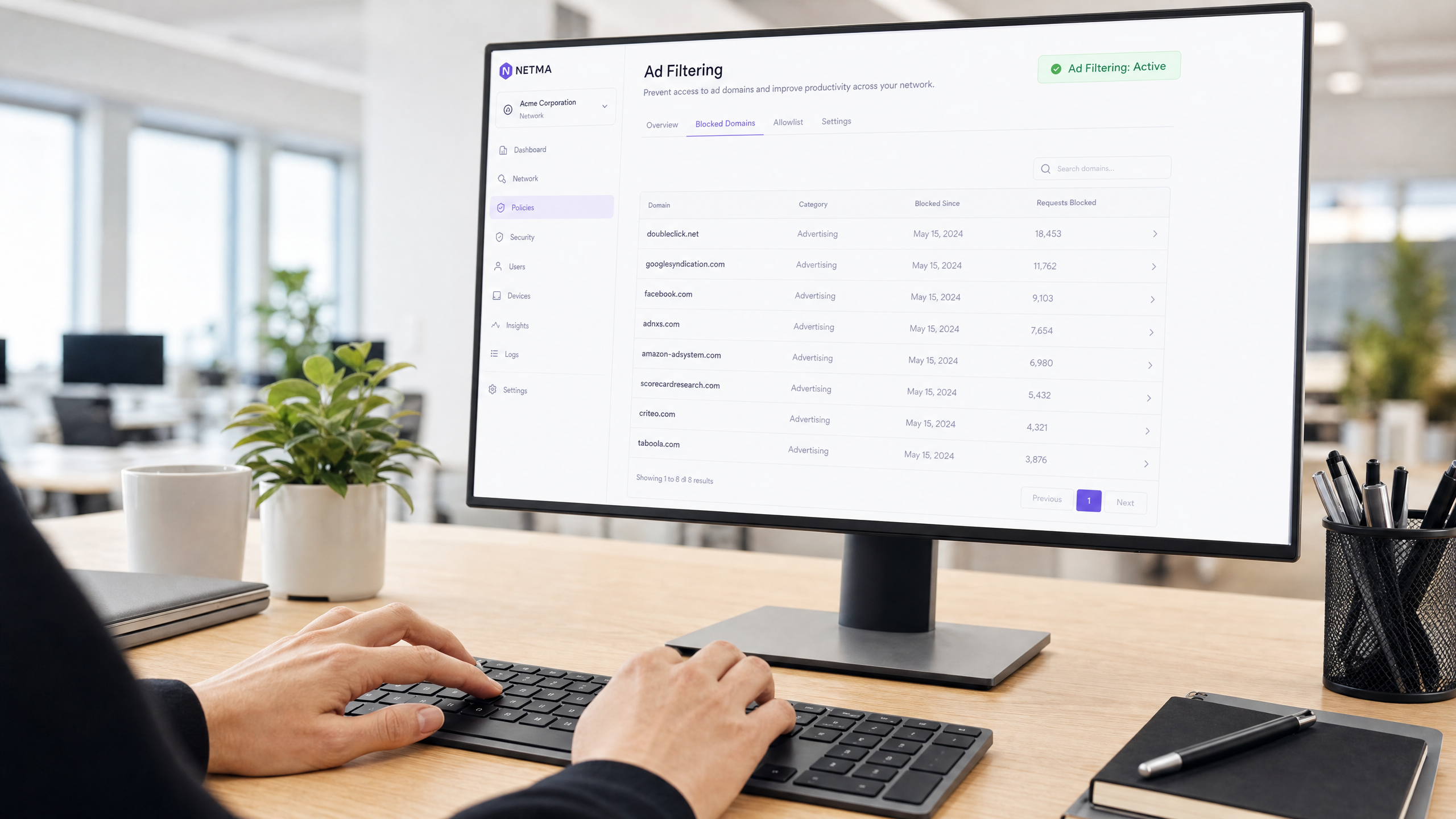
Resumo Executivo
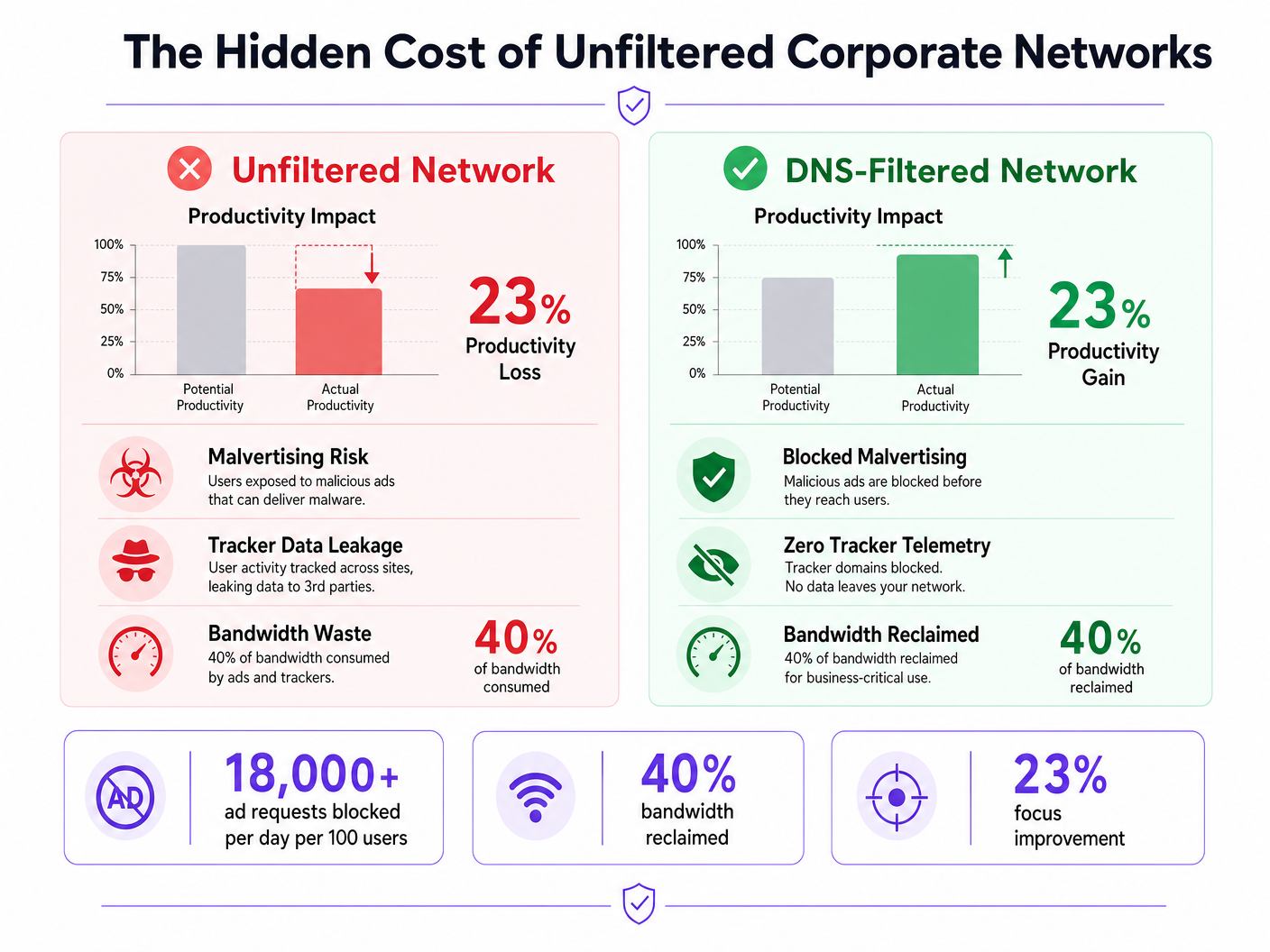
Redes corporativas não filtradas expõem as organizações a vulnerabilidades de segurança significativas e a perdas de produtividade ocultas. Quando os dispositivos da equipa se conectam à internet, até 40% das consultas DNS podem ter origem em redes de publicidade, rastreadores de terceiros e pontos de extremidade de telemetria. Este tráfego de fundo não só consome largura de banda valiosa, como também introduz vetores de malvertising diretamente no ambiente empresarial.
Para gestores de TI e arquitetos de rede que operam em Hotelaria , Retalho , Saúde e Transportes , a implementação de filtragem de anúncios e rastreadores ao nível da rede é uma intervenção de alto ROI. Ao intercetar pedidos na camada DNS, as organizações podem impedir a execução de cargas maliciosas, garantir a conformidade com regulamentos de privacidade de dados como o GDPR e recuperar produtividade perdida. Este guia detalha a arquitetura técnica da filtragem DNS, estratégias de implementação neutras em relação a fornecedores e impactos comerciais mensuráveis para redes empresariais modernas.
Análise Técnica Aprofundada
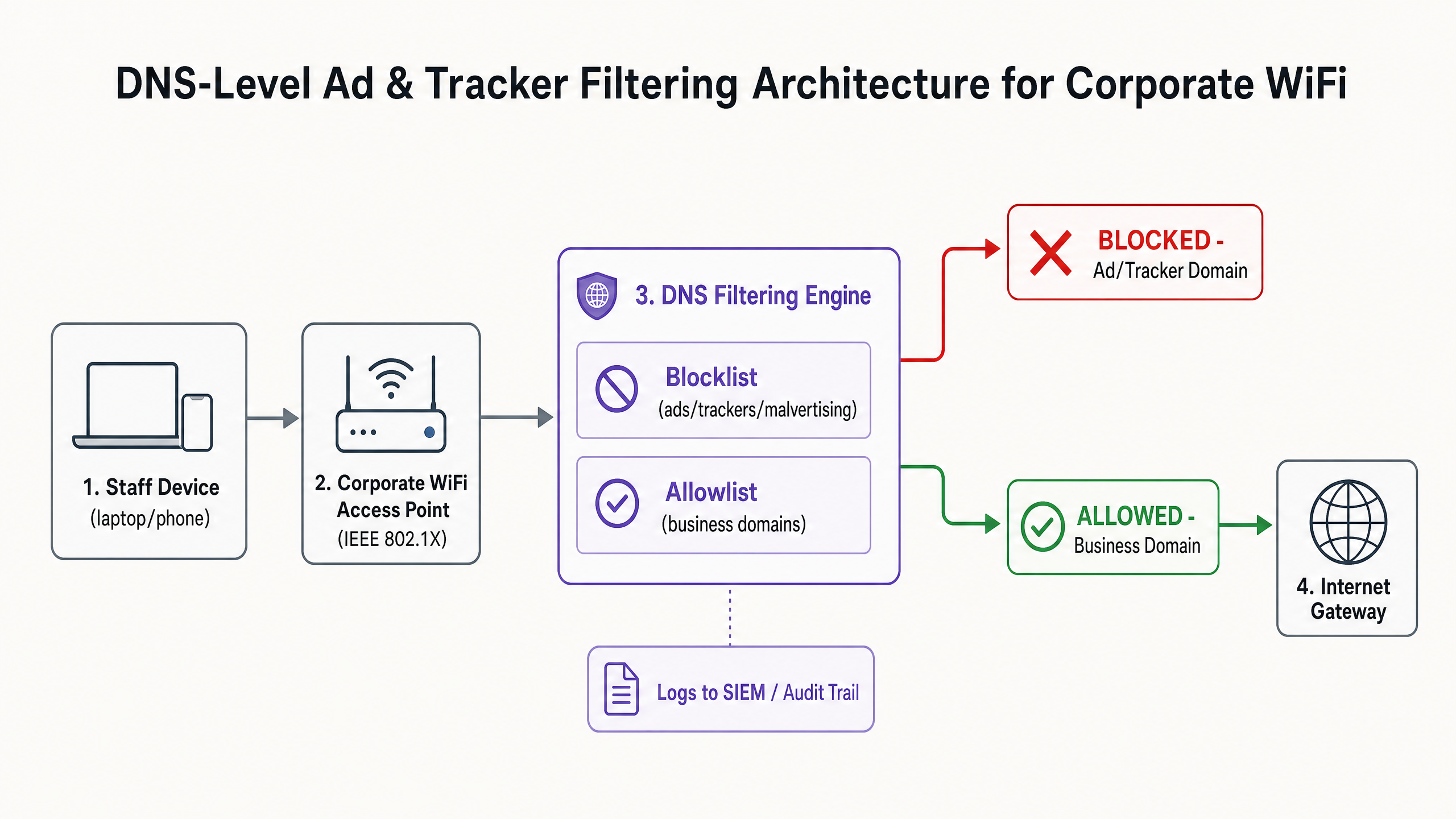
A base para uma mitigação eficaz de anúncios e rastreadores é a filtragem ao nível de DNS. Ao contrário das extensões baseadas em navegador que operam na camada de aplicação e exigem gestão individual de endpoints, a filtragem DNS oferece aplicação em toda a infraestrutura. Quando um dispositivo — seja gerido pela empresa ou Bring Your Own Device (BYOD) — tenta resolver um domínio, o resolvedor DNS verifica a consulta em relação a listas de bloqueio de inteligência de ameaças selecionadas.
Arquitetura e Fluxo
O motor de filtragem situa-se entre o ponto de acesso e o gateway de internet. Se um domínio solicitado corresponder a uma rede de publicidade conhecida (por exemplo, doubleclick.net) ou rastreador, o resolvedor retorna uma resposta nula (0.0.0.0) ou um erro NXDOMAIN. O conteúdo malicioso ou distrativo nunca chega ao endpoint.
Inteligência de Ameaças e Listas de Bloqueio
Uma arquitetura de filtragem robusta depende de inteligência de ameaças dinâmica. Listas de bloqueio estáticas são insuficientes contra domínios de malvertising que mudam rapidamente. As implementações empresariais geralmente agregam múltiplas fontes, incluindo listas de código aberto (como EasyList e EasyPrivacy) e feeds de ameaças comerciais. Estas listas devem categorizar os domínios com precisão para evitar falsos positivos que possam perturbar aplicações críticas para o negócio.
Lidar com DNS Encriptado (DoH/DoT)
Sistemas operativos e navegadores modernos estão cada vez mais a usar DNS over HTTPS (DoH) ou DNS over TLS (DoT) por predefinição, encriptando consultas para resolvedores externos como Cloudflare (1.1.1.1) ou Google (8.8.8.8). Isto contorna a filtragem DNS local. Para manter o controlo, os arquitetos de rede devem configurar firewalls de borda para bloquear a porta TCP/UDP 853 (DoT) de saída e intercetar ou bloquear endereços IP de provedores DoH conhecidos, forçando os clientes a recorrer ao resolvedor local fornecido.
Guia de Implementação
A implementação da filtragem DNS requer uma abordagem faseada para evitar interrupções nas operações. Uma implementação súbita e agressiva de listas de bloqueio irá inevitavelmente quebrar aplicações SaaS legítimas e gerar tickets de suporte.
Fase 1: Segmentação de Rede e Autenticação
Antes de alterar a resolução DNS, certifique-se de que a rede da equipa está logicamente separada dos ambientes Guest WiFi e IoT usando VLANs. Implemente WPA3-Enterprise com autenticação IEEE 802.1X. Isto garante que apenas utilizadores autenticados acedem ao SSID corporativo e permite a aplicação de políticas por utilizador. Se ainda depende de chaves pré-partilhadas (PSKs), a atualização do seu modelo de autenticação é o passo pré-requisito. Para mais informações sobre a modernização da sua infraestrutura, consulte o nosso guia sobre Office Wi Fi: Otimize a Sua Rede Wi-Fi de Escritório Moderna .
Fase 2: Implementação do Resolvedor
Selecione uma arquitetura de filtragem DNS que se alinhe com as suas capacidades operacionais:
- Dispositivo Local: Oferece a menor latência e garante que todos os registos de consulta permanecem dentro da sua infraestrutura, crucial para requisitos rigorosos de soberania de dados.
- Serviço Baseado na Nuvem: Transfere a manutenção da inteligência de ameaças para o fornecedor, ideal para ambientes de retalho ou hotelaria distribuídos.
- Modelo Híbrido: Utiliza um encaminhador local para resolução DNS interna, enquanto encaminha consultas externas para um serviço de nuvem filtrado.
Fase 3: Modo Apenas de Monitorização
Implemente o motor de filtragem em modo apenas de monitorização por 14 a 28 dias. Não bloqueie qualquer tráfego. Em vez disso, ingira os registos de consulta no seu SIEM para estabelecer uma linha de base. Analise os domínios mais bloqueados em relação às suas aplicações de negócio.
Fase 4: Configuração e Aplicação da Lista de Permissões
Com base na fase de monitorização, construa uma lista de permissões explícita para domínios de terceiros necessários usados pelo seu CRM, ERP ou gateways de pagamento. Assim que a lista de permissões for verificada, mude o motor para o modo de aplicação. Certifique-se de que mantém um registo de auditoria claro de todas as alterações de configuração e eventos bloqueados.
Melhores Práticas
Para garantir uma implementação bem-sucedida e manter a integridade da rede, siga as seguintes melhores práticas neutras em relação a fornecedores:
- Comunique Antes de Aplicar: Notifique a equipa antes de ativar a filtragem. Enquadre-o como uma atualização de segurança e desempenho, em vez de uma medida de vigilância de RH. Forneça um processo claro, com suporte de SLA, para os utilizadores solicitarem o desbloqueio de domínios.
- Imponha a Atribuição de DNS por DHCP: Impeça os utilizadores de configurar manualmente servidores DNS alternativos, impondo o uso do resolvedor fornecido por DHCP.
- Reveja Regularmente a Lista de Permissões: As aplicações de negócio evoluem. Realize revisões trimestrais da sua lista de permissões para remover domínios obsoletos e avalisatisfazer novos requisitos.
- Integrar com Proteção de Endpoint: A filtragem de DNS é uma defesa de perímetro. Deve ser combinada com soluções robustas de Deteção e Resposta de Endpoint (EDR) para proteger contra ameaças introduzidas via USB ou anexos de e-mail.
Resolução de Problemas e Mitigação de Riscos
O risco mais significativo durante a implementação é o bloqueio excessivo, que impacta diretamente as operações de negócio.
Falsos Positivos
Quando um serviço legítimo não carrega, muitas vezes depende de um domínio de rastreamento em segundo plano para autenticação ou análise.
- Mitigação: Capacite o suporte técnico com capacidades de bypass temporário ou um fluxo de trabalho de allowlisting simplificado. Utilize os registos de consulta para identificar o domínio bloqueado específico que está a causar a falha.
Bypass de DNS Encriptado
Utilizadores tecnicamente proficientes ou malware sofisticado podem tentar contornar o resolvedor local utilizando DoH/DoT.
- Mitigação: Implemente regras de firewall rigorosas que bloqueiem o tráfego de saída para resolvedores DoH conhecidos. Monitorize os registos da firewall para tentativas de ligação repetidas à porta 853.
Interferência na Rede de Convidados
A aplicação de políticas de filtragem agressivas para funcionários na rede de convidados pode degradar a experiência do visitante.
- Mitigação: Mantenha um isolamento VLAN rigoroso. Aplique um perfil de filtragem mais leve e focado na segurança (bloqueando malware e conteúdo adulto) à rede de convidados, gerido através de uma plataforma dedicada de WiFi Analytics .
ROI e Impacto no Negócio
O impacto no negócio da filtragem ao nível da rede estende-se para além da segurança; é um impulsionador mensurável da produtividade.
Recuperação de Largura de Banda
Ao eliminar até 40% de pedidos desnecessários em segundo plano, as organizações recuperam uma largura de banda significativa. Isto reduz a necessidade de atualizações dispendiosas de circuitos WAN e melhora o desempenho de aplicações críticas na cloud.
Ganhos de Produtividade
Reduzir a exposição a anúncios intrusivos e malvertising minimiza as interrupções cognitivas. Embora os números exatos variem, a mitigação destas distrações recupera centenas de horas de tempo de trabalho focado anualmente em toda a empresa. Para estratégias semelhantes aplicadas a ambientes educacionais, consulte o nosso guia sobre Minimizar as Distrações dos Alunos com Bloqueio de Anúncios ao Nível da Rede e a versão em espanhol Minimizar las distracciones de los estudiantes con el bloqueo de anuncios a nivel de red .
Conformidade e Redução de Riscos
A filtragem de rastreadores ao nível da rede demonstra conformidade proativa com frameworks de proteção de dados como GDPR e PCI DSS. Ao prevenir a exfiltração de dados e bloquear cargas de malvertising antes que cheguem ao endpoint, as organizações reduzem significativamente a sua exposição ao risco e os potenciais custos de resposta a incidentes.
Ouça o Briefing
Para uma análise mais aprofundada das estratégias de implementação, ouça o nosso briefing de áudio:
Definições Principais
DNS-Level Filtering
The process of blocking access to specific domains by intercepting DNS queries and returning a null response or redirect, preventing the device from connecting to the target server.
Used by IT teams to enforce security and productivity policies across an entire network without requiring endpoint software.
Malvertising
The use of online advertising to distribute malware. Malicious code is injected into legitimate advertising networks and displayed on trusted websites.
A primary vector for ransomware and spyware, making ad blocking a critical cybersecurity control, not just a productivity tool.
DNS over HTTPS (DoH)
A protocol for performing remote Domain Name System resolution via the HTTPS protocol, encrypting the data between the DoH client and the DoH-based DNS resolver.
While improving user privacy, DoH can bypass corporate DNS filtering policies if not actively managed and blocked at the firewall.
IEEE 802.1X
An IEEE Standard for port-based Network Access Control (PNAC), providing an authentication mechanism to devices wishing to attach to a LAN or WLAN.
Essential for enterprise WiFi security, replacing shared passwords (PSKs) with individual user credentials or certificates.
Telemetry
The automatic recording and transmission of data from remote or inaccessible sources to an IT system in a different location for monitoring and analysis.
Often generated by software and devices tracking user behaviour; blocking unnecessary telemetry reclaims bandwidth and protects privacy.
False Positive
An error in data reporting in which a test result improperly indicates presence of a condition, such as when a legitimate business domain is incorrectly categorised as malware or advertising.
The main cause of operational disruption during DNS filtering rollouts, mitigated by proper allowlisting.
SIEM (Security Information and Event Management)
A solution that provides real-time analysis of security alerts generated by applications and network hardware.
DNS query logs should be exported to the SIEM to identify compromised devices attempting to contact command-and-control servers.
Allowlist
A mechanism that explicitly allows access to specific entities (domains, IP addresses) while denying access to all others by default, or overriding a broader blocklist.
Critical for ensuring third-party integrations (like payment gateways or CRMs) function correctly behind a strict DNS filter.
Exemplos Práticos
A 200-room hotel needs to secure its staff network (used by reception, housekeeping, and management) against malvertising, while ensuring the property management system (PMS) remains fully operational. The current network uses a single WPA2-PSK SSID for all staff.
- Upgrade the staff network to WPA3-Enterprise using IEEE 802.1X authentication to ensure individual accountability and encryption.
- Segment the staff network onto a dedicated VLAN, isolated from the guest WiFi.
- Deploy a cloud-based DNS filtering service with a local forwarder.
- Run the filter in monitor-only mode for 14 days.
- Analyze logs to identify all domains accessed by the PMS (e.g., third-party booking engine APIs, payment gateways) and add them to the allowlist.
- Enforce blocking for 'Advertising', 'Trackers', and 'Malware' categories.
- Block outbound TCP/UDP port 853 at the firewall to prevent DoT bypass.
A retail chain is experiencing high latency on its point-of-sale (POS) terminals during peak hours. Packet analysis reveals 35% of DNS traffic consists of tracking and telemetry requests from staff BYOD devices connected to the corporate network.
- Implement DNS-level filtering targeting 'Trackers' and 'Advertising' categories.
- Ensure POS terminals are on a strictly isolated VLAN with restricted outbound internet access (PCI DSS Requirement 1.3).
- Route the BYOD staff VLAN through the DNS filtering engine.
- Communicate the change to staff, emphasising the performance benefits for the POS systems.
- Monitor bandwidth utilisation post-enforcement to quantify the reclaimed capacity.
Perguntas de Prática
Q1. Your organisation is implementing DNS filtering. During the monitor-only phase, you notice that a high volume of requests to 'api.segment.io' are being flagged under the 'Trackers' category. This domain is used by your marketing team's analytics dashboard. How should you proceed?
Dica: Consider the impact of blocking versus the business requirement for the tool.
Ver resposta modelo
Add 'api.segment.io' to the explicit allowlist before moving to enforcement mode. While it is technically a tracker, it is a sanctioned business application. Failing to allowlist it will break the marketing dashboard and generate support tickets.
Q2. After deploying DNS filtering, you observe that devices using the latest version of a popular web browser are still loading ads and resolving domains that should be blocked. Older devices are filtered correctly. What is the most likely cause?
Dica: Modern browsers often try to encrypt their DNS queries.
Ver resposta modelo
The modern browser has likely enabled DNS over HTTPS (DoH) by default, bypassing the local DNS resolver and communicating directly with an external provider (like Cloudflare). You must configure the firewall to block or intercept known DoH IP addresses to force the browser to fall back to the local filtered DNS.
Q3. A venue operations director asks if they can use the same aggressive ad-blocking DNS policy on the public Guest WiFi as they do on the corporate Staff WiFi to save bandwidth. What is the architectural recommendation?
Dica: Consider the user experience and the different risk profiles of staff versus guests.
Ver resposta modelo
No. The Staff and Guest networks must remain on isolated VLANs with separate DNS policies. Applying aggressive corporate filtering to the Guest WiFi will likely break captive portals, cause false positives on diverse guest devices, and lead to a poor user experience. Guest networks should use a lighter filtering profile focused strictly on malware and legal compliance.