
Compreender o Significado da Velocidade WiFi: Débito vs Largura de Banda
Este guia de referência técnica e autoritário desmistifica as métricas de velocidade WiFi para líderes de TI empresariais, distinguindo claramente entre velocidade de ligação, largura de banda e débito. Fornece metodologias acionáveis para medir o desempenho no mundo real, mitigar o congestionamento de RF e otimizar a infraestrutura WLAN em implementações de locais de alta densidade. Gestores de TI, arquitetos de rede e diretores de operações de locais sairão com estruturas concretas para alinhar os investimentos em infraestrutura com resultados de negócio mensuráveis.
Ouça este guia
Ver transcrição do podcast

Resumo Executivo
Para gestores de TI e arquitetos de rede que implementam WLANs empresariais, a discrepância entre as velocidades WiFi anunciadas e a experiência real do utilizador é um desafio operacional persistente. A causa raiz é quase sempre uma má interpretação de três métricas distintas: velocidade de ligação (taxa PHY), largura de banda e débito. Embora os fornecedores comercializem velocidades de ligação teóricas máximas — por exemplo, 1200 Mbps em 802.11ax — o débito real entregue a uma aplicação é tipicamente 40–60% desse valor devido à sobrecarga do protocolo, operação de rádio half-duplex e contenção ambiental.
Este guia de referência técnica fornece uma estrutura definitiva para compreender o significado da velocidade WiFi em ambientes empresariais. Equipa as equipas de TI em hotéis, cadeias de retalho e grandes locais com o conhecimento para medir com precisão o desempenho no mundo real, projetar para capacidade em vez de cobertura, e alinhar os investimentos em infraestrutura com resultados de negócio mensuráveis. Ao mudar o foco dos máximos teóricos para o débito sustentado e a alocação ótima da largura de banda, os operadores de locais podem fornecer a conectividade fiável que as plataformas modernas de Guest WiFi e WiFi Analytics exigem.
Análise Técnica Detalhada: Descodificar as Métricas de Velocidade WiFi
Para projetar uma WLAN robusta, os profissionais de TI devem distinguir entre as capacidades teóricas do meio de RF e a entrega prática de cargas de dados. As três métricas — velocidade de ligação, largura de banda e débito — são frequentemente confundidas no marketing de fornecedores, discussões de aquisição e até mesmo em relatórios internos de TI. Acertar nisto é fundamental para todas as outras decisões de otimização.
Velocidade de Ligação (Taxa PHY): O Teto Teórico
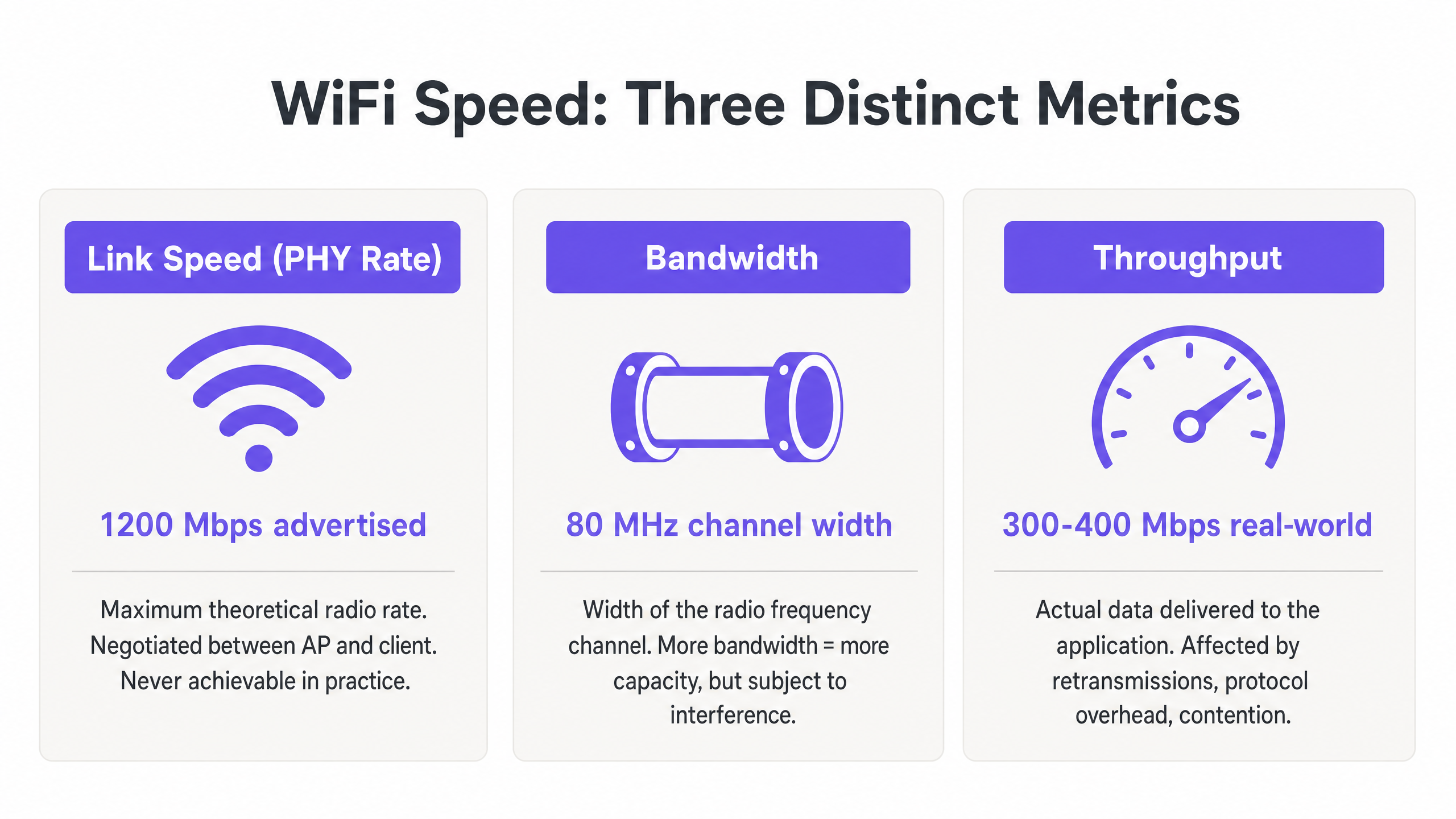
A velocidade de ligação, ou taxa da Camada Física (PHY), representa a taxa máxima teórica de transferência de dados entre um Ponto de Acesso (AP) e um dispositivo cliente ao nível do rádio. Esta taxa é negociada dinamicamente com base no esquema de modulação e codificação (MCS), no número de fluxos espaciais e na relação sinal/ruído (SNR) no momento da associação.
Crucialmente, a velocidade de ligação nunca é alcançável na prática. Representa a taxa de bits bruta, incluindo todos os frames de gestão 802.11, frames de controlo (RTS/CTS e ACKs) e espaçamento entre frames (AIFS/DIFS). Em implementações empresariais em ambientes de Retalho ou Hotelaria , um cliente que reporta uma velocidade de ligação de 866 Mbps numa rede 802.11ac é, na verdade, capaz de cerca de 400–500 Mbps de transferência de dados real em condições ideais e isoladas — e muito menos num ambiente partilhado e multi-cliente.
Largura de Banda: A Capacidade do Canal de RF
A largura de banda refere-se à largura do canal de radiofrequência alocado para transmissão, tipicamente medida em Megahertz (MHz). Nas bandas de 5 GHz e 6 GHz, os canais podem ter 20, 40, 80 ou 160 MHz de largura. Canais mais largos oferecem velocidades de ligação potenciais mais altas — duplicar a largura do canal duplica aproximadamente a taxa de dados potencial — mas também aumentam o ruído de fundo em 3 dB por duplicação e reduzem significativamente o número de canais não sobrepostos disponíveis.
Em ambientes de alta densidade, como estádios, centros de conferências ou corredores de hotéis, a implementação de canais de 80 MHz frequentemente leva a interferências cocanais (CCI) catastróficas. A melhor prática empresarial dita, portanto, o uso de canais de 20 MHz ou 40 MHz para maximizar a reutilização espectral e a capacidade geral do sistema, em vez de procurar velocidades individuais máximas. Esta é uma filosofia de design que prioriza o débito agregado em todos os utilizadores em detrimento do máximo teórico para qualquer utilizador individual.
Débito: A Medição no Mundo Real
O débito é a carga de dados real entregue à camada de aplicação (Camada 7), medida em Megabits por segundo (Mbps). Esta é a única métrica que importa para o utilizador final, e é a única métrica que deve impulsionar as decisões de design de rede.
O débito é fundamentalmente limitado pela natureza half-duplex do WiFi — apenas um dispositivo pode transmitir num determinado canal de cada vez. Quando vários dispositivos competem por tempo de antena, o débito diminui proporcionalmente. Além disso, clientes legados que transmitem a taxas de dados mais baixas consomem tempo de antena desproporcionado, penalizando clientes mais rápidos que partilham o mesmo canal. Compreender o verdadeiro custo do consumo de tempo de antena é crítico ao avaliar o impacto da recolha de dados em segundo plano na sua WLAN, como explorado em profundidade em O Custo Oculto dos Dados de Telemetria em WLANs Corporativas .
A tabela abaixo resume a relação prática entre estas três métricas:
| Métrica | Definição | Valor Típico (802.11ax) | O Que as Equipas de TI Devem Fazer |
|---|---|---|---|
| Velocidade de Ligação (Taxa PHY) | Taxa de rádio teórica bruta | Até 9.6 Gbps | Usar apenas como indicador de linha de base; nunca como objetivo de desempenho |
| Largura de Banda (Largura do Canal) | Largura do canal de RF em MHz | 20, 40, 80 ou 160 MHz | Predefinir para 40 MHz em ambientes empresariais; 20 MHz em alta densidade |
| Débito | Taxa de dados real da camada de aplicação | 300–500 Mbps por cliente (ideal) | Este é o KPI primário para todas as avaliações de desempenho de WLAN |
Guia de Implementação: Medir e Otimizar o Desempenho
A transição da teoria para a prática requer uma metodologia de medição rigorosa e um ajuste sistemático. Os passos seguintes refletem as melhores práticas neutras em relação ao fornecedor aplicáveis emabranger todas as principais plataformas WLAN.
Passo 1: Estabelecer Linhas de Base Precisas
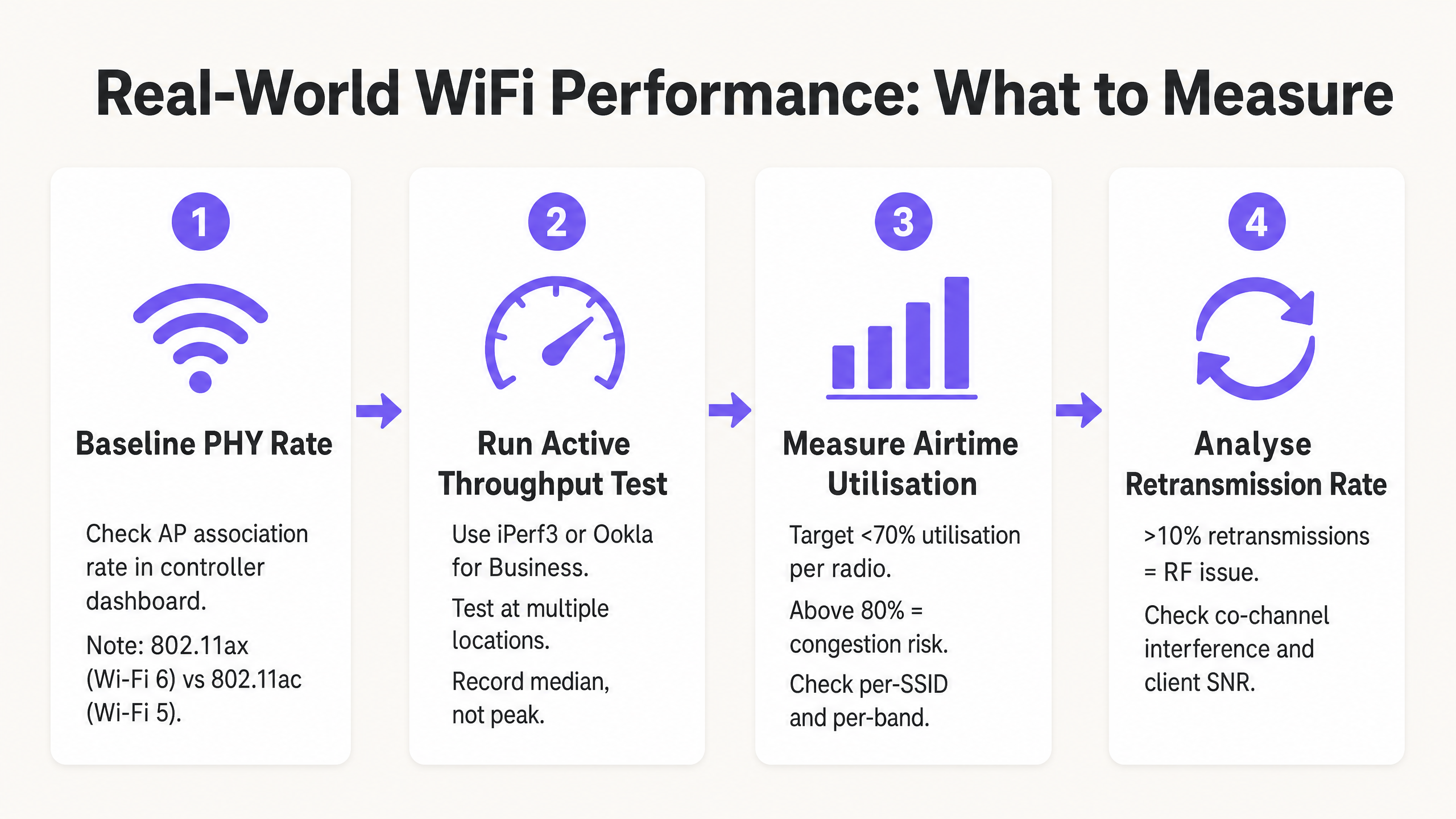
Não dependa de testes de velocidade de internet para consumidores (como fast.com ou Speedtest.net) para medir o desempenho da WLAN. Estes testes introduzem latência WAN, variáveis de encaminhamento do ISP e estrangulamentos do lado do servidor que são totalmente alheios à sua rede sem fios. Em vez disso, implemente um servidor iPerf3 local na mesma VLAN que a interface de gestão do AP para isolar o segmento RF. Execute testes de débito UDP para avaliar a capacidade bruta do canal e testes de débito TCP para avaliar o desempenho ao nível da aplicação — o TCP é altamente sensível à perda de pacotes e à latência, tornando-o um proxy preciso para o comportamento real da aplicação.
Passo 2: Conceber para Eficiência de Airtime
O Airtime é o recurso mais precioso em qualquer implementação WiFi. Para maximizar o débito em todo o local, três alterações de configuração proporcionam o maior impacto:
Desativar Taxas Básicas Baixas. Desative as taxas 802.11b (1, 2, 5.5, 11 Mbps) e defina uma taxa básica mínima de 12 Mbps ou 24 Mbps. Isto força os clientes a transmitir tramas de gestão mais rapidamente, libertando airtime para cargas de dados. Uma única trama de gestão enviada a 1 Mbps consome 54 vezes mais airtime do que a mesma trama enviada a 54 Mbps.
Ativar Airtime Fairness (ATF). Onde suportado pelo fornecedor, ative o ATF para alocar tempo de transmissão igual aos clientes, em vez de contagens de pacotes iguais. Isto impede que clientes legados lentos monopolizem o canal em detrimento de dispositivos modernos mais rápidos.
Otimizar Larguras de Canal. Por predefinição, utilize canais de 20 MHz na banda de 2.4 GHz (sempre os canais 1, 6 e 11) e 40 MHz na banda de 5 GHz para implementações empresariais de alta densidade. Reserve canais de 80 MHz apenas para ambientes isolados e de baixa densidade.
Passo 3: Implementar Autenticação e Segurança Modernas
Os protocolos de segurança impactam o débito através da sobrecarga de encriptação e da latência de roaming. Implemente WPA3 onde o parque de clientes o suporte, ou WPA2-Enterprise (IEEE 802.1X) com Fast BSS Transition (802.11r) para minimizar atrasos de roaming abaixo de 50 ms. Para redes de convidados, a conformidade com o GDPR e o PCI DSS exige uma segmentação de rede robusta — o tráfego de convidados deve ser isolado da infraestrutura corporativa e de pagamentos através de VLANs dedicadas e políticas de firewall. Soluções modernas de onboarding que reduzem o atrito de autenticação, mantendo a conformidade, são discutidas em Como um wi fi assistant permite o acesso sem palavra-passe em 2026 .
Melhores Práticas e Padrões da Indústria
Os seguintes princípios representam o consenso das recomendações do grupo de trabalho IEEE 802.11 e a experiência de implementação de WLAN empresarial em Saúde , Transportes e ambientes de grandes espaços.
Capacidade Acima da Cobertura. Em ambientes empresariais modernos, os APs devem ser implementados para lidar com a densidade de clientes, não apenas para fornecer um sinal. Um sinal forte (cobertura) não garante um débito elevado (capacidade) se o canal estiver congestionado. Os dois são objetivos de engenharia totalmente diferentes.
Band Steering. Direcione agressivamente os clientes de banda dupla e tripla para as bandas de 5 GHz e 6 GHz para aliviar o congestionamento no espectro estreito de 2.4 GHz. A banda de 2.4 GHz oferece apenas três canais não sobrepostos (1, 6, 11) e está sujeita a interferências significativas de dispositivos não-WiFi.
Limiares Mínimos de SNR. Configure os rádios dos APs para rejeitar associações de clientes abaixo de um limiar mínimo de SNR (tipicamente 20 dB). Isto impede que clientes distantes e fracos se associem e transmitam a baixas taxas MCS, o que consumiria airtime excessivo.
Auditorias RF Regulares. Realize análises de espectro e testes de débito ativos pelo menos trimestralmente, e imediatamente após qualquer alteração significativa no ambiente físico (novas divisórias, equipamento AV ou mudanças de inquilinos). O ambiente RF é dinâmico; um plano de canais que funcionou na implementação pode ser subótimo seis meses depois.
Resolução de Problemas e Mitigação de Riscos
Quando o débito degrada, as equipas de TI devem diagnosticar o ambiente RF sistematicamente, em vez de recorrerem imediatamente a atualizações de hardware. A maioria dos problemas de desempenho de WLAN empresarial são problemas de configuração e design, não limitações de hardware.
Altas Taxas de Retransmissão. Uma taxa de retransmissão acima de 10% indica tipicamente interferência RF, problemas de nó oculto ou SNR deficiente do cliente. Utilize ferramentas de análise de espectro para identificar fontes de interferência não-WiFi — fornos de micro-ondas, equipamento AV e redes vizinhas são culpados comuns em ambientes de hotelaria e retalho.
Interferência Co-Canal (CCI). Se múltiplos APs no mesmo canal se conseguem ouvir a -85 dBm ou mais alto, partilham o mesmo domínio de colisão, reduzindo drasticamente o débito para todos os clientes nesse canal. Mitigue isto reduzindo a potência de transmissão do AP, estreitando as larguras de canal e garantindo que os algoritmos de atribuição dinâmica de canais (DCA) estão a funcionar corretamente.
Clientes "Presos" (Sticky Clients). Clientes que não conseguem fazer roaming de um AP distante para um mais próximo mantêm um SNR baixo, forçando o AP a usar uma taxa MCS baixa e consumindo airtime excessivo. Mitigue com limiares mínimos de RSSI para associação, 802.11v BSS Transition Management e 802.11r Fast Roaming.
Problemas de Driver do Cliente. Drivers sem fios desatualizados em dispositivos de utilizador final podem causar negociação MCS incorreta, falha na utilização de fluxos espaciais MIMO ou comportamento agressivo de poupança de energia que perturba o débito. Mantenha uma política de gestão de dispositivos cliente que inclua padrões de versão de drivers sem fios.
ROI e Impacto no Negócio
Otimizar o WiFi para débito em vez de velocidade de ligação teórica impacta diretamente os resultados financeiros em todos os setores. Em centros de Transportes e grandes espaços, a conectividade fiável é essencial para a eficiência operacional — desde sistemas de ponto de venda móveis (mPOS) a sinalização digital e controlo de acesso.
Para os operadores de espaços, as redes de alto débito permitem serviços avançados baseados na localização e análises. Garantir uma conectividade consistente e fiável é um pré-requisito para funcionalidades como as introduzidas em Purple Lança Modo de Mapas Offline para Navegação Contínua e Segura para Hotspots WiFi , que melhoram a experiência do hóspede e impulsionam um envolvimento mensurável. A expansão da Purple no setor público, detalhada em Purple Nomeia Iain Fox como VP de Crescimento – Setor Público para Impulsionar a Inclusão Digital e a Inovação em Cidades Inteligentes , sublinha ainda mais a importância de uma infraestrutura pública de WiFi fiável e de alto débito como base para os serviços de cidades inteligentes.
O caso de negócio para um design de WLAN focado no débito é simples: uma rede que oferece 200 Mbps consistentes por cliente durante as horas de pico é mais valiosa do que uma que oferece uma velocidade de ligação de 866 Mbps com 85% de utilização do tempo de antena e desempenho imprevisível no mundo real. Ao alinhar as métricas de TI — débito, utilização do tempo de antena, taxa de retransmissão — com os resultados de negócio — pontuações de satisfação do hóspede, fiabilidade das transações mPOS, tempo de atividade operacional — os líderes de TI podem justificar os investimentos em infraestrutura e demonstrar um ROI claro e mensurável.
Definições Principais
Link Speed (PHY Rate)
The maximum theoretical physical layer data rate negotiated between a client and an AP, measured in Mbps. Determined by MCS index, spatial streams, and channel width.
Frequently cited in vendor marketing and procurement documents. IT teams must understand this is a gross rate that includes massive protocol overhead and is never achievable as application throughput.
Throughput
The actual rate of successful payload data delivery over a communication channel to the application layer, measured in Mbps.
The primary KPI for any WLAN performance assessment. The only metric that accurately reflects end-user experience and application performance.
Bandwidth (RF Channel Width)
The width of the frequency spectrum allocated for a transmission channel, typically 20, 40, 80, or 160 MHz in the 5 GHz band.
Determines the potential capacity of the channel. Wider bandwidths increase peak link speed but reduce the number of non-overlapping channels and increase susceptibility to interference in dense deployments.
Co-Channel Interference (CCI)
Performance degradation caused when multiple APs operate on the same frequency channel and can detect each other's transmissions, forcing them to share airtime via the CSMA/CA contention mechanism.
The primary cause of poor throughput in dense enterprise deployments. Mitigated by proper channel planning, reduced transmit power, and narrower channel widths.
Airtime Utilisation
The percentage of time a specific RF channel is occupied with transmissions (data, management, or control frames).
A critical operational metric. Sustained utilisation above 70–80% indicates severe congestion and impending throughput collapse. Should be monitored per-radio and per-SSID.
Half-Duplex
A communication mode where data can be transmitted in both directions, but only one direction at a time on a shared medium.
The fundamental characteristic of WiFi that limits throughput to significantly below the theoretical link speed. Unlike wired Ethernet (full-duplex), WiFi requires all devices to take turns transmitting.
Spatial Streams (MIMO)
Multiple independent data signals transmitted simultaneously using Multiple Input Multiple Output (MIMO) antenna technology, increasing throughput without requiring wider bandwidth.
A key differentiator between 802.11ac (up to 8 spatial streams) and 802.11ax (Wi-Fi 6). Effective only when both the AP and client device support multiple antennas.
Basic Rates
The mandatory data rates that all clients must support to associate with a BSS. Management and control frames are transmitted at the lowest enabled basic rate.
Disabling low basic rates (1, 2, 5.5, 11 Mbps) is a standard and highly effective IT configuration practice. A frame sent at 1 Mbps consumes 54 times more airtime than the same frame at 54 Mbps.
MCS (Modulation and Coding Scheme)
An index value that defines the combination of modulation technique (e.g., 256-QAM, 1024-QAM) and forward error correction coding rate used for a given transmission.
Higher MCS indices deliver higher throughput but require a stronger signal-to-noise ratio. The AP and client negotiate the highest feasible MCS based on current RF conditions.
Exemplos Práticos
A 400-room hotel is experiencing guest complaints about slow WiFi speeds during the evening peak (7 PM – 10 PM). The IT manager notes that the APs are reporting link speeds of 866 Mbps, but guests are struggling to stream video. The network uses 80 MHz channels on the 5 GHz band with APs deployed in corridors at maximum transmit power.
- Conduct an airtime utilisation assessment during peak hours using the WLAN controller's built-in analytics or a dedicated tool such as Ekahau Sidekick. Expect to find utilisation above 80% on the primary 5 GHz channels, confirming Co-Channel Interference (CCI). 2. Reconfigure the WLAN controller to reduce channel widths on the 5 GHz band from 80 MHz to 40 MHz. This doubles the number of available non-overlapping channels from 6 to 12 in the UNII-1/UNII-3 bands, significantly reducing CCI. 3. Reduce AP transmit power to approximately 11–14 dBm to shrink cell sizes and reduce the number of APs that can hear each other on the same channel. 4. Enable dynamic channel assignment (DCA) to allow the controller to optimise channel allocation automatically. 5. Implement per-client bandwidth throttling (e.g., 15 Mbps downstream per device) to prevent individual users from monopolising the internet uplink during peak hours.
A large retail chain is deploying mobile Point-of-Sale (mPOS) tablets across 50 stores. The tablets require reliable, low-latency connections for payment processing, but are frequently dropping sessions when staff move between aisles. The WLAN uses WPA2-Personal with default basic rates enabled.
- Implement IEEE 802.11r (Fast BSS Transition) on the corporate mPOS SSID to reduce roaming authentication delays from 300–500 ms to under 50 ms. This is critical for session-sensitive payment applications. 2. Adjust the AP minimum mandatory basic rate to 12 Mbps. This reduces the effective cell size, encouraging tablets to roam to closer APs sooner rather than maintaining a weak connection to a distant AP (sticky client behaviour). 3. Migrate the mPOS SSID from WPA2-Personal to WPA2-Enterprise (802.1X) with certificate-based authentication to meet PCI DSS requirements for cardholder data environments. 4. Apply WMM (Wi-Fi Multimedia) QoS tags to the mPOS SSID, prioritising traffic in the Voice or Video queue to protect throughput during periods of high guest network usage. 5. Implement 802.11k (Neighbour Reports) and 802.11v (BSS Transition Management) to assist tablets in identifying and roaming to optimal APs proactively.
Perguntas de Prática
Q1. You are designing the WLAN for a high-density university lecture theatre with 300 seats. Your goal is to maximise aggregate throughput for all users simultaneously. The venue has 8 APs deployed in the ceiling. Should you configure the 5 GHz radios to use 20 MHz, 40 MHz, or 80 MHz channel widths?
Dica: Consider the number of non-overlapping channels available in the 5 GHz UNII-1 and UNII-3 bands, and the impact of Co-Channel Interference in a single open room with multiple APs.
Ver resposta modelo
Use 20 MHz channels. In a high-density, single-room environment with 8 APs, you need each AP to operate on a distinct, non-overlapping channel to avoid CCI. The 5 GHz band offers approximately 24 non-overlapping 20 MHz channels (in regions with full UNII band access), but only 6 non-overlapping 40 MHz channels and 3 non-overlapping 80 MHz channels. With 8 APs using 80 MHz channels, at least 5 APs would be sharing channels, creating severe CCI. By using 20 MHz channels, you can assign unique channels to all 8 APs, allowing them to transmit simultaneously without contention. The individual link speed per client will be lower, but the aggregate throughput across all 300 users will be dramatically higher.
Q2. A client complains that their new 802.11ax (Wi-Fi 6) laptop only achieves 480 Mbps on a local iPerf3 test, despite Windows reporting a link speed of 1.2 Gbps. The client believes the AP is faulty. How do you assess and explain this situation?
Dica: Apply the Rule of Half and consider the relationship between PHY rate and TCP throughput in a half-duplex medium.
Ver resposta modelo
The AP is almost certainly functioning correctly. The 1.2 Gbps is the negotiated Link Speed (PHY rate) — the gross theoretical radio rate. Because WiFi is half-duplex, and because the 802.11 protocol requires significant overhead (management frames, ACKs, inter-frame spacing), actual TCP throughput is typically 40–60% of the link speed. 480 Mbps from a 1.2 Gbps link represents a 40% efficiency ratio, which is within the expected range and indicates the network is performing well. To confirm, check the retransmission rate (should be below 5%) and airtime utilisation (should be below 50% for a single-client test). If both are healthy, the result is excellent and the AP should not be replaced.
Q3. During a site survey in a busy retail warehouse, you notice the airtime utilisation on channel 6 (2.4 GHz) is consistently at 88%, but there are only 6 active clients connected to the AP. The AP is a modern 802.11ax device. What are the two most likely causes, and what is the remediation for each?
Dica: Think about how legacy data rates affect airtime consumption, and consider sources of non-WiFi interference common in warehouse environments.
Ver resposta modelo
Cause 1: Legacy basic rates are enabled. If the AP is transmitting management frames (beacons, probe responses) at 1 Mbps, each frame takes 54 times longer than at 54 Mbps, consuming enormous amounts of airtime even with few clients. Remediation: Disable 802.11b rates and set the minimum basic rate to 12 Mbps or 24 Mbps. Cause 2: Non-WiFi interference in the 2.4 GHz band. Warehouses commonly contain microwave ovens, Bluetooth devices, and older industrial wireless equipment that generate broadband interference in the 2.4 GHz band, artificially inflating airtime utilisation figures. Remediation: Conduct a spectrum analysis using a tool such as Ekahau Sidekick or a dedicated spectrum analyser to identify the interference source, and where possible migrate clients to the 5 GHz band.