
Compreender o Cisco SUDI: Identidade de Dispositivo Baseada em Hardware no Controlo de Acesso à Rede
Este guia detalha a arquitetura técnica do Cisco SUDI, explicando como a identidade ancorada em hardware protege o controlo de acesso à rede. Oferece etapas de implementação práticas para líderes de TI implementarem a autenticação 802.1X EAP-TLS e automatizarem o Provisionamento Zero Touch em espaços empresariais.
Video overview
Ouça este guia
Ver transcrição do podcast
Parte da nossa série principal: Guia de Segurança de WiFi Empresarial →

Resumo Executivo
A autenticação de hardware protege a base física das redes empresariais. O Cisco Secure Unique Device Identifier (SUDI) fornece uma identidade imutável e criptograficamente verificável para dispositivos de infraestrutura, incorporada diretamente num chip inviolável durante o fabrico. Para os líderes de TI que gerem implementações em grande escala nos setores da hotelaria, retalho e setor público, o SUDI elimina o risco de hardware não autorizado e permite o Provisionamento Zero Touch automatizado.
Este guia detalha a arquitetura técnica do Cisco SUDI, a sua integração com o Network Access Control (NAC) IEEE 802.1X e as etapas operacionais necessárias para implementar e manter a identidade baseada em hardware à escala. Irá aprender a fazer a transição de um bypass de endereço MAC fraco para uma autenticação EAP-TLS robusta, a gerir o ciclo de vida do certificado SUDI-2099 e a alinhar a segurança da infraestrutura com plataformas de gestão de identidade de utilizadores como a Purple.
Aprofundamento Técnico
A Arquitetura da Identidade de Hardware
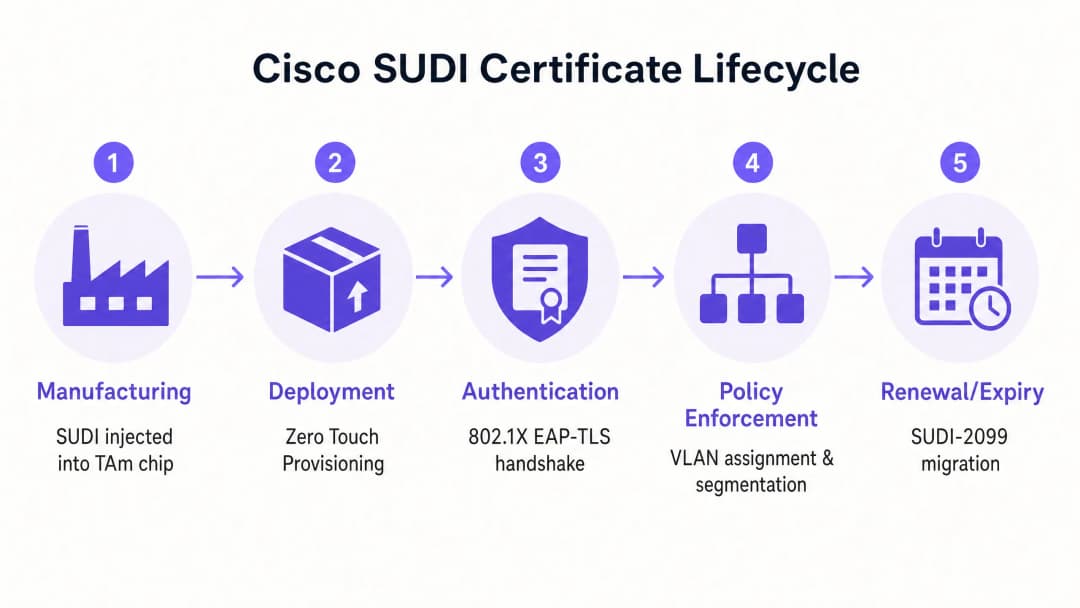
O Cisco Secure Unique Device Identifier (SUDI) é um certificado X.509v3 que fornece uma identidade permanente para dispositivos de rede. Ao contrário dos certificados de software que as equipas de TI geram e implementam, a Cisco injeta o certificado SUDI e o seu par de chaves associado no dispositivo durante o processo de fabrico.
O certificado é armazenado de forma segura no módulo Trust Anchor (TAm), um chip proprietário e inviolável. O TAm gera a chave privada internamente, garantindo que esta nunca possa ser exportada ou clonada. Esta raiz de confiança de hardware garante que, se um dispositivo for autenticado com sucesso utilizando o seu SUDI, trata-se de um produto Cisco genuíno.
O SUDI implementa a norma IEEE 802.1AR para Identificadores de Dispositivos Seguros. Ao abrigo desta norma, o certificado fornecido pelo fabricante é conhecido como um Identificador Inicial de Dispositivo (IDevID). As organizações podem complementar o IDevID com um Identificador de Dispositivo Localmente Significativo (LDevID) emitido pela sua própria Infraestrutura de Chaves Públicas (PKI) empresarial.

Integração com o Network Access Control
Num ambiente empresarial, o SUDI integra-se com sistemas de Network Access Control (NAC) principalmente através da autenticação baseada em porta IEEE 802.1X. Quando um ponto de acesso ou switch Cisco se liga à rede, atua como um suplicante e apresenta o seu certificado SUDI a um servidor RADIUS, como o Cisco Identity Services Engine (ISE). O processo de autenticação utiliza o Extensible Authentication Protocol com Transport Layer Security (EAP-TLS). O servidor RADIUS valida o certificado SUDI face à Cisco Public Key Infrastructure. Uma vez validado, o servidor RADIUS autoriza o dispositivo e atribui-o à VLAN correta com base na política de acesso à rede.
Esta abordagem substitui o MAC Address Bypass (MAB), um método legado que depende de endereços MAC facilmente falsificáveis. O MAB oferece zero garantia criptográfica da identidade do dispositivo, deixando as redes vulneráveis a pontos de acesso não autorizados.
Impressão Digital de Hardware e Deteção de Violação
O módulo Trust Anchor oferece mais do que armazenamento seguro. Protege ativamente o dispositivo contra violações físicas durante o transporte ou a implementação.
Durante o fabrico, a Cisco regista uma impressão digital criptográfica dos componentes de hardware críticos, tais como CPUs e ASICs. Esta impressão digital é armazenada permanentemente no TAm. Quando o dispositivo arranca, o firmware UEFI calcula uma nova impressão digital do hardware detetado e compara-a com a impressão digital mestre no TAm. Se as impressões digitais não coincidirem, o dispositivo interrompe o processo de arranque. Este mecanismo garante que o hardware implementado num hotel ou loja de retalho não foi comprometido entre a fábrica e o local de instalação.
Tem dúvidas sobre a sua configuração específica?
A nossa equipa trabalha com operadores de espaços, gestores de TI e engenheiros de rede em 80.000 espaços. Agende uma chamada de 20 minutos e mostraremos como outros profissionais na sua área o resolveram.
Guia de Implementação
A implementação da autenticação baseada em SUDI requer a coordenação entre a sua infraestrutura de switching, o seu servidor RADIUS e a sua plataforma de gestão de rede. Siga estes passos para implementar a identidade de hardware.
Passo 1: Configurar a Confiança RADIUS
O seu servidor RADIUS deve confiar na Cisco Certificate Authority que emitiu o SUDI.
- Transfira os certificados Cisco Root CA e ACT2 SUDI CA a partir do portal Cisco PKI.
- Importe estes certificados para o repositório de certificados fidedignos do seu servidor RADIUS (por exemplo, Cisco ISE).
- Configure o servidor RADIUS para utilizar estes certificados para autenticação EAP-TLS.
Passo 2: Definir Políticas 802.1X
Crie políticas de autenticação específicas para dispositivos de infraestrutura, separadas das políticas de autenticação de utilizadores.
- Crie um conjunto de políticas no Cisco ISE que corresponda aos atributos do certificado SUDI (por exemplo, fazendo a correspondência do Subject Alternative Name com os PIDs de dispositivo esperados).
- Atribua as autenticações bem-sucedidas à VLAN de gestão da infraestrutura.
- Configure uma VLAN de quarentena para dispositivos que falhem a autenticação SUDI. Não configure uma alternativa para MAB em portas de infraestrutura.
Passo 3: Ativar o Zero Touch Provisioning
Utilize o SUDI para automatizar a integração de dispositivos.
- Configure o seu sistema de gestão de rede (como o Cisco Catalyst Center) para funcionar como o servidor ZTP.
- Quando um novo dispositivo se liga, apresenta o seu certificado SUDI.
- O sistema de gestão verifica o certificado, confirma o número de série do dispositivo em relação à base de dados de inventário e envia a configuração inicial.
Passo 4: Gerir a Migração para SUDI-2099
Os certificados SUDI emitidos antes de maio de 2019 expiram 10 anos após a data de fabrico ou a 14 de maio de 2029, o que ocorrer primeiro. Quando um SUDI expira, as funcionalidades que dependem dele, incluindo HTTPS, SSH e Zero Touch Provisioning, irão falhar.
A Cisco introduziu os certificados SUDI-2099, que permanecem válidos até dezembro de 2099. Para garantir a continuidade:
- Audite o seu inventário utilizando o comando
show crypto pki certificateem dispositivos IOS-XE. Verifique aend datedo trustpointCISCO_IDEVID_SUDI. - Atualize o hardware afetado para as versões de software recomendadas. Por exemplo, os switches Catalyst 9200 requerem o IOS-XE 17.12.2 ou posterior para processar corretamente a data de expiração de 2099.
Melhores Práticas
Para maximizar os benefícios de segurança da identidade de hardware, siga estes princípios neutros em termos de fornecedor.
- Impor EAP-TLS Estrito: Exija EAP-TLS para todos os dispositivos de infraestrutura. Não permita métodos EAP mais fracos, como PEAP, para autenticação de dispositivos.
- Isolar a Identidade da Infraestrutura da Identidade do Utilizador: O SUDI autentica o hardware, não o utilizador. Utilize uma plataforma dedicada para gerir a identidade humana. Por exemplo, utilize o Purple para gerir a autenticação de convidados, captura de consentimento e recolha de dados primários, enquanto confia no SUDI para proteger o hardware Cisco Meraki ou HPE Aruba subjacente.
- Automatizar a Monitorização de Certificados: Implemente ferramentas de monitorização para acompanhar as datas de expiração dos certificados em todo o seu parque de TI. A monitorização proativa evita falhas de autenticação repentinas.
- Implementar Micro-segmentação: Utilize a identidade verificada pelo SUDI para atribuir dispositivos a VLANs estritamente controladas. Um ponto de acesso deve ter apenas alcançabilidade de rede para o seu controlador e sistemas de gestão, e nada mais.
Resolução de Problemas e Mitigação de Riscos
Ao implementar a autenticação baseada em SUDI, prepare-se para estes modos de falha comuns.
| Modo de Falha | Causa Raiz | Estratégia de Mitigação |
|---|---|---|
| Falha na Autenticação EAP-TLS | O servidor RADIUS não possui os certificados Cisco Root ou Intermediate CA corretos. | Verifique se a cadeia de confiança completa da Cisco está instalada no repositório de confiança do servidor RADIUS. |
| O Dispositivo Recusa-se a Iniciar | A assinatura de hardware calculada no arranque não corresponde à assinatura principal no TAm. | Trate o dispositivo como comprometido. Devolva o hardware ao fornecedor através do processo de RMA. |
| Falha no Acesso de Gestão | O certificado SUDI expirou, quebrando a autenticação de certificados HTTPS e SSH. | Atualize o firmware do dispositivo para uma versão que suporte SUDI-2099, ou implemente um LDevID utilizando a PKI da sua empresa. |
| Dispositivo Não Autorizado Obtém Acesso | A porta do switch está configurada para reverter para MAC Address Bypass (MAB) se o 802.1X falhar. | Remova as configurações de reversão MAB das portas de infraestrutura. Imponha uma política 802.1X rigorosa. |
ROI e Impacto no Negócio
A implementação da identidade de dispositivos baseada em hardware proporciona um valor comercial mensurável em três áreas.
1. Redução dos Custos de Aprovisionamento O Zero Touch Provisioning protegido por SUDI elimina a preparação manual. Em vez de um engenheiro passar 45 minutos a pré-configurar um ponto de acesso antes de o enviar para uma loja de retalho, o dispositivo é enviado diretamente do distribuidor. Este autentica-se de forma segura ao ligar-se e descarrega a sua configuração automaticamente. Para uma implementação de retalho em 500 locais, isto poupa aproximadamente 375 horas de engenharia.
2. Eliminação do Risco de Dispositivos Não Autorizados Ao descontinuar o MAC Address Bypass em favor da identidade criptográfica por hardware, elimina o risco de um atacante ligar um dispositivo não autorizado a uma porta de infraestrutura. Isto apoia diretamente a conformidade com os requisitos das normas PCI-DSS e ISO 27001 para controlo de acessos à rede.
3. Limites de Identidade Claros A implementação do SUDI estabelece um limite arquitetónico claro. A camada de hardware autentica-se criptograficamente, permitindo-lhe focar os seus recursos na camada de identidade do utilizador. Ao integrar uma plataforma como a Purple para gerir o Guest WiFi e o WiFi Analytics, fá-lo sobre uma base de infraestrutura verificável e segura.
Definições Principais
SUDI (Secure Unique Device Identifier)
Um certificado X.509v3 e chave privada associada integrados num dispositivo Cisco durante o fabrico para fornecer uma identidade de hardware imutável.
Utilizado por equipas de TI para verificar criptograficamente se um dispositivo que se liga à rede é um produto Cisco genuíno.
TAm (Trust Anchor module)
Um chip de hardware proprietário e resistente a adulterações que armazena de forma segura o certificado SUDI, gera chaves criptográficas e gere a impressão digital do hardware.
Fornece a raiz de confiança do hardware. Se o TAm for comprometido, o dispositivo falhará ao arrancar ou ao autenticar-se.
IDevID (Initial Device Identifier)
O identificador de dispositivo seguro instalado pelo fabricante definido pela norma IEEE 802.1AR. O Cisco SUDI é uma implementação de um IDevID.
Fornece a identidade fundamental para um dispositivo antes de este ser integrado no ambiente PKI próprio de uma organização.
LDevID (Locally Significant Device Identifier)
Um certificado de dispositivo emitido pela Infraestrutura de Chaves Públicas própria de uma organização, complementando o IDevID do fabricante.
Utilizado quando as equipas de TI exigem que os dispositivos se autentiquem usando certificados emitidos pela sua CA corporativa interna em vez da CA do fornecedor.
IEEE 802.1X
O padrão IEEE para controlo de acesso à rede baseado em portas, fornecendo um mecanismo de autenticação para dispositivos que se desejam ligar a uma LAN ou WLAN.
O protocolo principal utilizado para aplicar a segurança da rede, garantindo que apenas dispositivos e utilizadores autorizados possam enviar tráfego através de uma porta de switch.
EAP-TLS (Extensible Authentication Protocol-Transport Layer Security)
Um protocolo de autenticação altamente seguro que exige que tanto o cliente quanto o servidor de autenticação provem as suas identidades utilizando certificados digitais.
O método específico utilizado no 802.1X para validar o certificado SUDI entre o dispositivo de rede e o servidor RADIUS.
Zero Touch Provisioning (ZTP)
Um processo automatizado que permite que os dispositivos de rede sejam aprovisionados e configurados automaticamente sem intervenção manual.
O SUDI protege o ZTP ao garantir que o sistema de gestão apenas envia configurações para hardware verificado e genuíno.
MAC Address Bypass (MAB)
Um método de autenticação legado onde um switch utiliza o endereço MAC do dispositivo que se está a ligar como a sua credencial de identidade.
Um método de fallback inseguro que deve ser eliminado e substituído pela autenticação 802.1X baseada em SUDI.
Exemplos Práticos
Um hotel de 400 quartos está a atualizar a sua infraestrutura de rede e precisa de implementar 250 novos pontos de acesso Cisco Catalyst. A equipa de TI quer evitar a configuração manual de cada dispositivo antes da instalação, garantindo ao mesmo tempo que nenhum dispositivo não autorizado se possa ligar à VLAN de gestão.
- A equipa de TI configura o Cisco ISE com a Cisco Root CA para confiar nos certificados SUDI.
- Cria uma política 802.1X no ISE que atribui os dispositivos que apresentam um SUDI válido a uma VLAN de provisionamento restrita.
- Os pontos de acesso são enviados diretamente para o hotel e ligados aos switches PoE.
- Cada AP arranca, apresenta o seu SUDI via EAP-TLS e é autenticado pelo ISE.
- O sistema de gestão (Catalyst Centre) verifica o número de série, provisiona o AP e o ISE altera a porta para a VLAN de gestão de produção.
Uma cadeia de retalho nacional com 1200 lojas descobre que os seus switches antigos utilizam o MAC Address Bypass (MAB) para autenticar pontos de acesso. Precisa de migrar para um padrão seguro sem causar interrupções de serviço nas lojas.
- A equipa de rede inspeciona o inventário de switches para confirmar se todos os dispositivos suportam 802.1X e SUDI.
- Implementa os certificados Cisco CA na sua infraestrutura RADIUS.
- Configura as portas dos switches em "modo de monitorização" (autenticação aberta), permitindo que os dispositivos tentem o 802.1X EAP-TLS utilizando o SUDI, enquanto recorrem ao MAB em caso de falha, registando os resultados.
- Após verificar nos registos RADIUS que todos os APs legítimos estão a autenticar-se com sucesso via SUDI, altera as portas para o "modo fechado", aplicando o 802.1X estrito e desativando o MAB.
Perguntas de Prática
Q1. Está a implementar 50 novos switches Cisco Catalyst num ambiente de estádio. A política de segurança exige autenticação 802.1X rigorosa para todos os dispositivos de infraestrutura. Durante os testes, os switches falham a autenticação no seu servidor Cisco ISE. Qual é a causa mais provável?
Dica: Considere a cadeia de confiança necessária para a autenticação EAP-TLS.
Ver resposta modelo
O servidor Cisco ISE não tem os certificados Cisco Root CA ou ACT2 SUDI CA no seu repositório de certificados fidedignos. Sem estes, o ISE não consegue validar o certificado SUDI apresentado pelos switches. Deve descarregar os certificados do portal Cisco PKI e importá-los para o ISE.
Q2. Um engenheiro de rede propõe configurar as portas do switch para tentar primeiro a autenticação 802.1X, mas recorrer ao MAC Address Bypass (MAB) se o dispositivo não tiver um certificado válido. Por que razão deve rejeitar esta proposta para portas de infraestrutura?
Dica: Avalie a robustez de segurança do mecanismo de fallback.
Ver resposta modelo
O recurso ao MAB compromete todo o modelo de segurança. Um atacante pode simplesmente ligar um dispositivo não autorizado, aguardar pelo timeout do 802.1X e falsificar o endereço MAC de um ponto de acesso legítimo para obter acesso à VLAN de infraestrutura. As portas de infraestrutura devem impor 802.1X rigoroso com SUDI, e os dispositivos não conformes devem ser colocados numa VLAN de quarentena restrita.
Q3. Está a auditar uma rede de switches Catalyst 9200 implementados em 2018. Executa o comando 'show crypto pki certificate' e nota que o trustpoint CISCO_IDEVID_SUDI expira em maio de 2029. Que ação deve tomar para evitar futuras interrupções de serviço?
Dica: Reveja os requisitos de migração do SUDI-2099 para hardware legado.
Ver resposta modelo
Deve atualizar o software IOS-XE nos switches Catalyst 9200 para a versão 17.12.2 ou posterior. Esta atualização garante que o hardware suporta corretamente a extensão de certificado SUDI-2099, prolongando a identidade válida do dispositivo até dezembro de 2099 e prevenindo falhas de autenticação em serviços como HTTPS e ZTP.
Continue a ler esta série
Como Segmentar Redes WiFi de Colaboradores e de Convidados com Segurança: Melhores Práticas para LANs Empresariais
Este guia fornece aos gestores de TI e arquitetos de rede um modelo técnico e neutro em termos de fornecedor para proteger LANs empresariais através da segmentação correta do tráfego WiFi de colaboradores e convidados. Abrange a autenticação 802.1X, RADIUS na nuvem, isolamento de VLAN e a gestão do ciclo de vida das credenciais necessária para eliminar palavras-passe partilhadas e proteger os ativos corporativos.
Melhor filtragem DNS: um guia completo para empresas
Este guia de referência técnica explica como a filtragem DNS empresarial protege as redes públicas bloqueando domínios maliciosos na camada de resolução - antes de uma ligação ser estabelecida. Oferece aos diretores de TI, arquitetos de rede e equipas de operações de locais a arquitetura de implementação, configuração de firewall e contexto de conformidade necessários para proteger o Guest WiFi em ambientes de hotelaria, retalho e setor público. O Purple Shield bloqueia malware, botnets e conteúdos inadequados ao nível do DNS em mais de 80.000 locais ativos.
Compreender o Cisco SUDI: Identidade Ancorada em Hardware no Controlo de Acesso Seguro à Rede
Este guia explica como o Cisco SUDI fornece uma identidade criptograficamente segura e ancorada em hardware para a infraestrutura de rede empresarial. Saiba como substituir endereços MAC clonáveis por certificados 802.1AR imutáveis para proteger o controlo de acesso à rede do seu espaço.
Tem dúvidas sobre a sua configuração específica?
A nossa equipa trabalha com operadores de espaços, gestores de TI e engenheiros de rede em 80.000 espaços. Agende uma chamada de 20 minutos e mostraremos como outros profissionais na sua área o resolveram.