
Melhorar as Velocidades de WiFi ao Bloquear Redes de Anúncios no Edge
Este guia fornece a IT managers, network architects e CTOs uma estratégia prática, ao nível da arquitetura, para implementar o bloqueio de anúncios ao nível do edge em redes WiFi de locais. Explica a relação técnica entre publicidade programática, volume de consultas DNS e latência de rede percebida, e detalha como a interceção de pedidos DNS relacionados com anúncios no gateway de edge pode recuperar largura de banda significativa e melhorar a experiência do hóspede. Desde implementações em hotéis a eventos em estádios e propriedades de retalho distribuídas, o guia abrange os passos de implementação, mitigação de riscos, considerações de conformidade e ROI mensurável.
Ouça este guia
Ver transcrição do podcast
Resumo Executivo
Para IT managers e CTOs que supervisionam redes de locais de alta densidade, gerir o consumo de largura de banda e reduzir a latência são desafios operacionais constantes. Embora as políticas tradicionais de Quality of Service (QoS) e o limite de largura de banda abordem alguns sintomas, não conseguem resolver um dreno oculto significativo: a publicidade programática. Páginas web e aplicações modernas executam dezenas de pedidos DNS em segundo plano para trocas de anúncios, rastreadores e serviços de telemetria antes de renderizar o conteúdo principal. Num local com milhares de utilizadores simultâneos, isto cria um efeito multiplicador de latência que degrada o desempenho percebido do WiFi, mesmo quando a largura de banda bruta está disponível.
Este guia detalha como a implementação de filtragem DNS ao nível do edge pode melhorar a velocidade do WiFi, reduzir os tempos de resolução DNS em até 86% e recuperar 15–30% da largura de banda consumida em implementações empresariais. A abordagem não requer software do lado do cliente, é transparente para os utilizadores finais e oferece benefícios de segurança secundários ao bloquear domínios maliciosos conhecidos. É particularmente eficaz em Hospitality , Retail , Transport e ambientes do setor público onde a densidade de hóspedes é alta e a duração da ligação varia.
Análise Técnica Detalhada
O Efeito Multiplicador de Latência
A relação técnica entre publicidade programática e latência de rede está enraizada no processo de resolução do Domain Name System (DNS). Quando um dispositivo de hóspede se conecta ao Guest WiFi de um local e acede a um site de notícias ou aplicação moderna, o pedido HTTP inicial desencadeia uma cascata de pedidos secundários. Estes pedidos secundários visam trocas de anúncios, Demand-Side Platforms (DSPs), Data Management Platforms (DMPs), rastreadores de visibilidade e píxeis de conversão — tudo antes de um único byte de conteúdo primário ser entregue.
Cada unidade de anúncio nesta cadeia programática requer:
- Uma pesquisa DNS para o domínio do servidor de anúncios
- Um estabelecimento de ligação TCP (SYN, SYN-ACK, ACK)
- Uma negociação de handshake TLS (tipicamente 2–3 viagens de ida e volta)
- O pedido HTTP GET e a entrega da carga útil
Num ambiente denso, como um estádio ou centro de conferências, milhares de dispositivos a executar simultaneamente este processo geram um enorme volume de consultas DNS. Mais criticamente, cada ligação TCP ocupa uma entrada na tabela de estado de ligação do router de edge — uma estrutura de memória finita. Quando esta tabela atinge a capacidade, o router começa a descartar ligações indiscriminadamente. Esta é a principal causa da degradação percebida do WiFi em locais de alta densidade, mesmo quando a ligação WAN está a operar bem abaixo da capacidade.
| Métrica | Sem Bloqueio no Edge | Com Bloqueio no Edge |
|---|---|---|
| Consultas DNS médias por utilizador/min | 180–240 | 65–90 |
| Tempo de resolução DNS (média) | 280–340 ms | 40–55 ms |
| Tempo médio de carregamento da página | 4.0–4.5 s | 1.6–2.0 s |
| Largura de banda consumida por anúncios/rastreadores | 18–32% do total | <5% do total |
| Utilização da tabela de estado do router (pico) | 85–95% | 35–50% |
Arquitetura de Filtragem DNS no Edge
A implementação do bloqueio de anúncios no edge envolve o redirecionamento das consultas DNS do cliente para um resolvedor DNS local ou baseado na cloud, configurado com extensas listas de bloqueio. Quando um cliente solicita a resolução para um domínio de servidor de anúncios conhecido, o resolvedor de edge retorna um endereço IP nulo (0.0.0.0) ou uma resposta NXDOMAIN. Isto impede todas as tentativas subsequentes de ligação TCP e TLS, poupando largura de banda e entradas na tabela de estado do router.
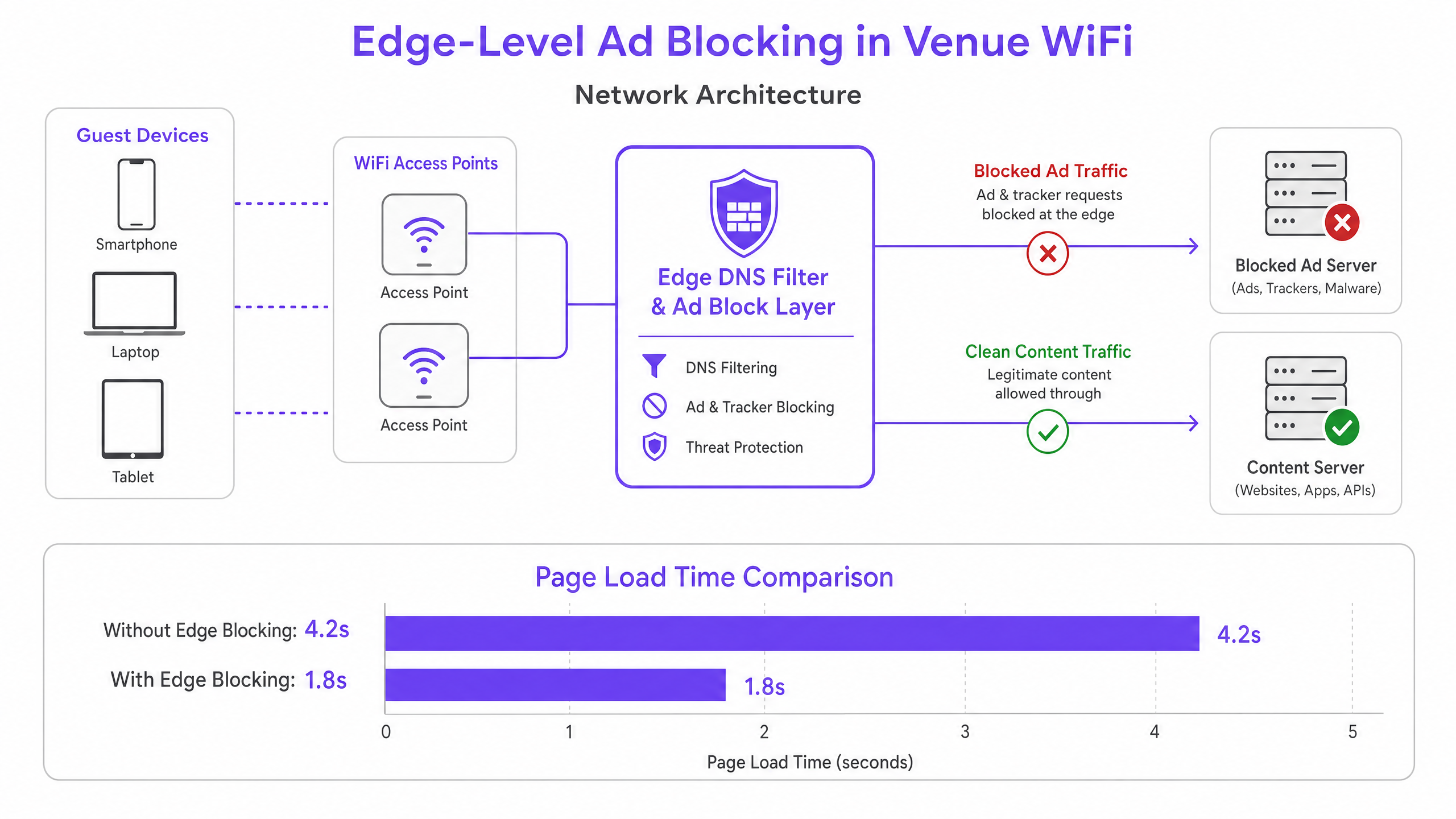
Esta arquitetura é totalmente transparente para os utilizadores finais e não requer instalação de software em dispositivos de hóspedes. Complementa também as plataformas existentes de WiFi Analytics , garantindo que o tráfego legítimo do captive portal e as métricas de envolvimento permanecem desimpedidos. A camada DNS situa-se logicamente entre a VLAN de hóspedes e o resolvedor a montante, intercetando todas as consultas DNS antes que saiam do perímetro da rede.
DNS sobre HTTPS (DoH) e o Problema do Bypass
Os navegadores modernos — Chrome, Firefox e Edge — estão a adotar cada vez mais o DNS over HTTPS (DoH) por predefinição, que encripta as consultas DNS e as encaminha pela port 443. Como o tráfego DoH é indistinguível do HTTPS padrão, as regras de interceção baseadas em portas são ineficazes. A melhor prática atual da indústria é manter e aplicar uma lista de bloqueio de intervalos de IP address de fornecedores DoH conhecidos na camada da firewall, forçando os navegadores a reverter para o DNS padrão não encriptado, que pode então ser filtrado. Esta abordagem é consistente com os padrões de gestão de redes empresariais e não viola as obrigações de privacidade do utilizador, uma vez que a filtragem se aplica a domínios de publicidade e maliciosos, não a conteúdo de navegação pessoal.
Guia de Implementação
A implementação do bloqueio de anúncios no edge requer um planeamento cuidadoso para evitar a interrupção de serviços legítimos ou a quebra de fluxos de trabalho de autenticação do captive portal.
Passo 1 — Auditar o Volume Atual de Consultas DNS. Antes da implementação, estabeleça uma linha de base. A maioria das firewalls empresariais e servidores DNS podem exportar registos de consultas. Identifique os domínios mais consultados e compare-os com listas conhecidas de redes de anúncios. Isto quantifica a oportunidade e fornece uma métrica de comparação pré/pós.
Passo 2 — Selecionar a Arquitetura de Resolução. Determine se um resolvedor local on-premises ou um serviço baseado na cloud é apropriado. Os resolvedores on-premises (por exemplo, Pi-hole, AdGuard Home, Infoblox) oferecem a menor latência, mas exigem recursos de hardware e manutenção. Os resolvedores na cloud (por exemplo, Cisco Umbrella, Cloudflare Gateway) simplificam a gestão em locais distribuídos e são fortemente recomendados para cadeias de retalho ou hospitality com múltiplos locais sem pessoal IT local.
Passo 3 — Configure DHCP and DNS Interception. Atualize os âmbitos DHCP para distribuir o endereço IP do resolvedor de borda aos clientes. Criticamente, implemente regras de Destination NAT (DNAT) na firewall para intercetar todo o tráfego de saída UDP/TCP na porta 53 da VLAN de convidados e redirecioná-lo para o resolvedor de borda. Sem este passo, os dispositivos com configurações DNS codificadas ignorarão o filtro por completo.
Passo 4 — Gerir o Fallback de DoH. Compile e mantenha uma blocklist de intervalos de endereços IP de fornecedores de DoH conhecidos. Aplique uma regra de negação na firewall para estes intervalos da VLAN de convidados. Isto força os navegadores com DoH ativado a recorrer ao DNS padrão, que o resolvedor pode filtrar.
Passo 5 — Curar Blocklists e Allowlisting. Comece com blocklists conservadoras e bem mantidas. Adicione imediatamente à allowlist todos os domínios necessários para o seu captive portal, fornecedores de social login, gateways de pagamento e quaisquer aplicações específicas do local. Estabeleça um processo de resposta rápida para a allowlisting de falsos positivos — um SLA de menos de duas horas durante o horário comercial é um objetivo razoável.
Passo 6 — Monitorizar, Registar e Iterar. Utilize os registos de consulta do resolvedor para monitorizar as taxas de bloqueio e identificar anomalias. Um pico súbito de consultas bloqueadas de um único dispositivo pode indicar malware a tentar contactar a infraestrutura de comando e controlo — um benefício de segurança secundário da filtragem DNS. Integre estes registos com o seu SIEM ou plataforma de monitorização de rede sempre que possível.
Melhores Práticas
Design Fail-Open para Redes de Convidados. Num contexto de WiFi para convidados, a conectividade é a obrigação principal. Configure um resolvedor upstream secundário e não filtrado como fallback. Se o resolvedor de borda primário falhar, as consultas DNS devem ser encaminhadas para o fallback para manter a conectividade, aceitando a perda temporária de filtragem de anúncios em vez de causar uma interrupção completa.
Teste de Compatibilidade do Captive Portal. Antes de entrar em produção, teste todos os métodos de autenticação que o seu captive portal suporta — social login (Facebook, Google, Apple), email, SMS e quaisquer integrações de pagamento. Adicione explicitamente à allowlist todos os domínios necessários. Consulte a documentação do seu fornecedor de captive portal para uma lista completa dos domínios necessários.
Conformidade e Governança de Dados. Os registos de consulta DNS podem revelar o comportamento de navegação do utilizador e, portanto, estão sujeitos a regulamentações de proteção de dados, incluindo o GDPR. Garanta que os registos são armazenados de forma segura, retidos apenas pelo período mínimo exigido para fins operacionais e não são utilizados para criação de perfis ou marketing. Para orientação detalhada sobre os requisitos de registo de auditoria, consulte Explain what is audit trail for IT Security in 2026 .
Políticas Separadas para Redes de Colaboradores. Aplique políticas de filtragem diferentes, potencialmente mais permissivas, às VLANs de colaboradores. Os colaboradores podem necessitar de acesso a plataformas de publicidade, ferramentas de análise ou redes sociais para fins comerciais legítimos. Para orientação mais abrangente sobre segurança de rede para colaboradores, consulte Secure BYOD Policies for Staff WiFi Networks .
Proveniência e Manutenção de Blocklists. Utilize blocklists bem mantidas e verificadas pela comunidade (por exemplo, lista de hosts de Steven Black, EasyList, OISD) e agende atualizações automáticas pelo menos semanalmente. Blocklists desatualizadas perdem novos domínios de anúncios e podem reter entradas categorizadas incorretamente.
Resolução de Problemas e Mitigação de Riscos
Falsos Positivos — Websites ou Aplicações Quebradas. O modo de falha mais comum é o bloqueio de um domínio que serve conteúdo legítimo juntamente com anúncios. Um domínio CDN pode alojar tanto scripts de publicidade como as folhas de estilo CSS para um grande site de notícias. Mitigação: Comece com blocklists conservadoras, estabeleça um SLA claro para allowlisting e forneça aos colaboradores um mecanismo simples de comunicação para sites com problemas.
Falhas de Autenticação do Captive Portal. Se o social login ou os fluxos de pagamento falharem após a implementação, o resolvedor está a bloquear um domínio necessário. Mitigação: Utilize as ferramentas de desenvolvimento do navegador para identificar o pedido com falha e adicione o domínio à allowlist. Teste sempre num ambiente de staging antes da implementação em produção.
Bypass de DoH Persistente. Se o volume de consultas DNS pós-implementação permanecer alto, alguns dispositivos podem ainda estar a usar DoH. Mitigação: Audite a sua blocklist de IPs de fornecedores de DoH para garantir a sua completude. Considere implementar uma regra de inspeção profunda de pacotes (DPI) para detetar e bloquear padrões de tráfego DoH na porta 443, se a sua firewall o suportar.
Desempenho do Resolvedor Sob Carga. Em implementações de muito alta densidade (mais de 5.000 utilizadores concorrentes), uma única instância de resolvedor pode tornar-se um gargalo. Mitigação: Implemente instâncias de resolvedor num par de alta disponibilidade com balanceamento de carga, ou utilize um serviço anycast baseado na cloud que escala automaticamente.
ROI e Impacto no Negócio
A implementação de bloqueio de anúncios na borda proporciona resultados de negócio mensuráveis e quantificáveis em várias dimensões.
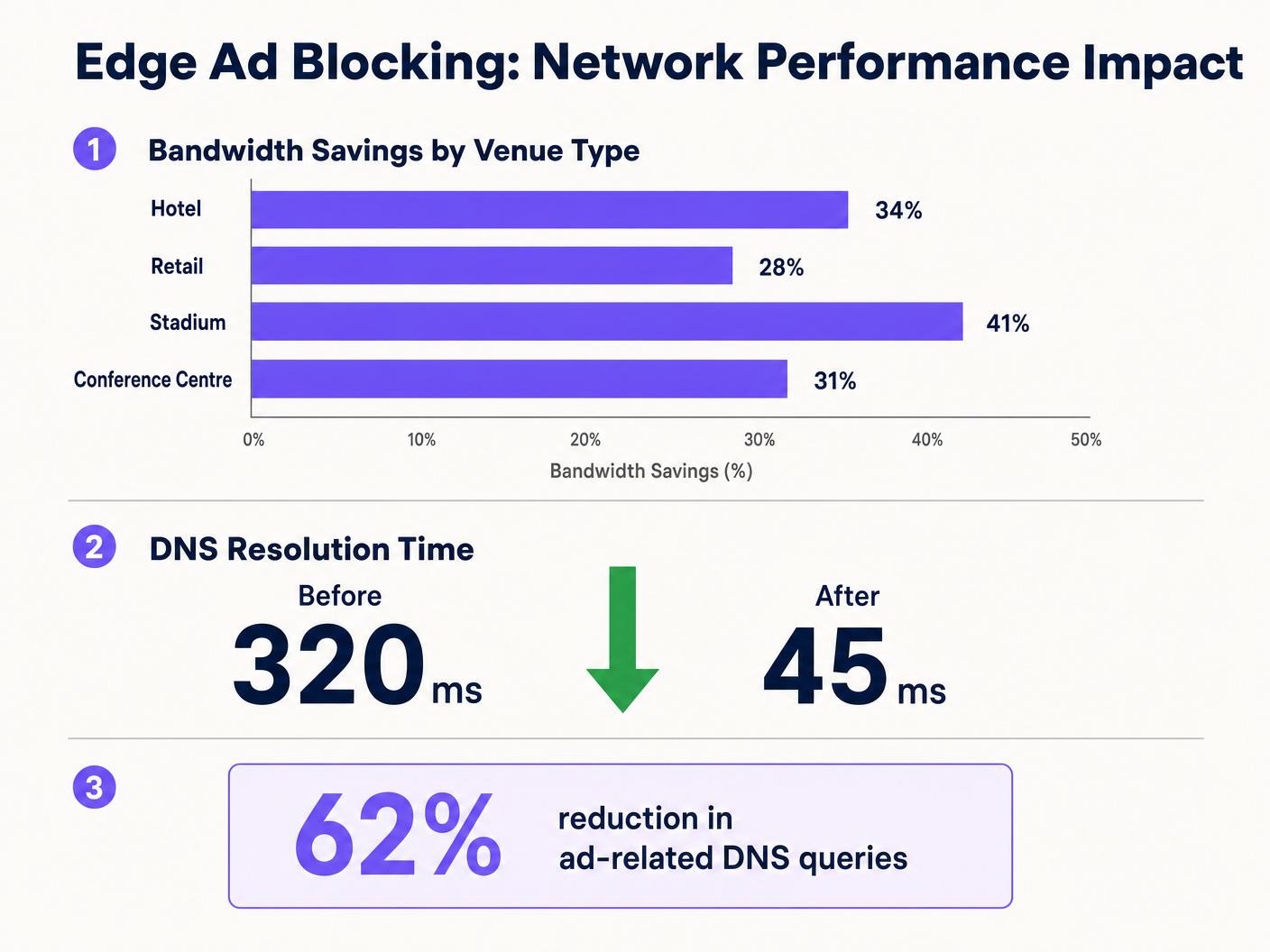
Recuperação de Largura de Banda. Os locais reportam consistentemente reduções de 15–30% no consumo total de largura de banda após a implementação. Para um local que gasta £3.000 por mês num circuito WAN de 1Gbps, uma redução de 20% na utilização efetiva pode adiar uma atualização de circuito em 12–18 meses, representando uma poupança de £36.000–£54.000 durante esse período.
Melhoria da Satisfação do Convidado. Os tempos de carregamento das páginas diminuem visivelmente — de uma média de mais de 4 segundos para menos de 2 segundos em implementações típicas. Isto correlaciona-se diretamente com pontuações mais altas de satisfação do convidado e menos reclamações relacionadas com o WiFi na receção ou no helpdesk. Em ambientes de hospitalidade, a qualidade do WiFi é consistentemente citada como um fator principal nas avaliações dos convidados.
Postura de Segurança Reforçada. As blocklists DNS cobrem inerentemente domínios de distribuição de malware conhecidos, sites de phishing e infraestrutura de comando e controlo. Isto reduz o risco de dispositivos de convidados serem comprometidos enquanto na rede do local, limitando a exposição do operador a riscos reputacionais e potenciais responsabilidades.
Eficiência Operacional. A redução do volume de chamadas para o helpdesk relacionadas com o desempenho do WiFi traduz-se diretamente em poupança de tempo para a equipa de TI. Num grupo hoteleiro com várias propriedades, isto pode representar várias horas de FTE por semana em todo o património.
Ao integrar o bloqueio na edge com iniciativas mais amplas de infraestrutura digital — como as discutidas em Purple Nomeia Iain Fox como VP de Crescimento – Setor Público para Impulsionar a Inclusão Digital e a Inovação em Cidades Inteligentes e Purple Lança Modo de Mapas Offline para Navegação Contínua e Segura para Hotspots WiFi — as organizações podem oferecer uma experiência de conectividade verdadeiramente premium que apoia tanto a eficiência operacional como os objetivos de envolvimento dos hóspedes.
Definições Principais
Edge DNS Resolver
A DNS server deployed at or near the network perimeter that handles domain name resolution for local clients, applying custom filtering policies before forwarding queries upstream.
Deploying this at the venue level reduces reliance on ISP DNS, enables custom filtering, and minimises the round-trip time for DNS resolution.
Connection State Table
A memory structure maintained by routers and firewalls that records the details of every active TCP/UDP connection passing through the device.
High-density venues frequently exhaust this table due to the volume of micro-connections initiated by ad networks, causing indiscriminate packet drops and perceived WiFi degradation.
Destination NAT (DNAT)
A firewall technique that rewrites the destination IP address of a packet as it traverses the router, redirecting it to a different host than originally intended.
Used to force DNS requests destined for public resolvers (e.g., 8.8.8.8) to route through the venue's filtered DNS server, preventing bypass of the ad-blocking policy.
DNS over HTTPS (DoH)
A protocol that performs DNS resolution over an encrypted HTTPS connection on port 443, preventing interception by traditional port 53 filtering rules.
Increasingly the default in modern browsers, DoH requires network administrators to block known DoH provider IP ranges to enforce local DNS filtering policies.
NXDOMAIN
A DNS response code indicating that the queried domain name does not exist in the DNS namespace.
Edge resolvers return this response for blocked ad domains, causing the client to immediately abandon the connection attempt without consuming router state table resources.
Programmatic Advertising
The automated, real-time buying and selling of digital advertising inventory, typically involving multiple intermediary platforms (ad exchanges, DSPs, DMPs) each requiring separate network connections.
The multi-platform nature of programmatic advertising is the root cause of the DNS query multiplication effect that degrades guest network performance.
Captive Portal
A web-based authentication mechanism that intercepts a new network user's HTTP traffic and redirects them to a login or terms-acceptance page before granting full network access.
Ad blocking policies must be carefully configured to avoid blocking domains required for captive portal functionality, including social login providers and payment gateways.
Allowlisting
The explicit configuration of a DNS resolver or firewall to permit access to specific domains or IP addresses, overriding any broader blocking policies that would otherwise apply.
Essential for resolving false positives and ensuring that business-critical services — including the captive portal, loyalty apps, and payment processors — remain accessible.
Anycast Routing
A network addressing method where the same IP address is assigned to multiple servers in different locations, with traffic automatically routed to the nearest instance.
Cloud-based DNS filtering services use anycast to ensure low-latency DNS resolution regardless of the venue's geographic location.
Exemplos Práticos
A 400-room hotel is experiencing severe WiFi latency during peak evening hours (7 PM–10 PM) despite having a 1 Gbps fibre connection. The IT manager suspects high DNS query volume from streaming and browsing is exhausting the edge router's state table. The hotel uses a social login captive portal and has no dedicated server infrastructure.
The IT team deploys a lightweight DNS resolver as a virtual machine on an existing hypervisor (1 vCPU, 512 MB RAM is sufficient for this scale). They configure the DHCP helper on the core switch to distribute the resolver's IP to the guest VLAN only, leaving the management and staff VLANs on the existing ISP DNS. They apply a standard combined blocklist (EasyList + OISD) covering approximately 200,000 known ad and tracker domains. Before going live, they test the captive portal and explicitly allowlist all Facebook, Google, and Apple authentication domains. They add a DNAT firewall rule redirecting all outbound port 53 traffic from the guest VLAN to the local resolver. They also add firewall deny rules for the IP ranges of Cloudflare (1.1.1.1), Google (8.8.8.8), and other major DoH providers. Post-deployment, DNS query volume drops by 62%, average page load time falls from 4.2 seconds to 1.8 seconds, and peak router state table utilisation drops from 91% to 44%.
A retail chain with 50 stores wants to improve the performance of their in-store guest WiFi app for customers. The app is the primary vehicle for loyalty programme sign-ups and promotional offers. The chain has no on-site IT staff and uses a managed SD-WAN service from a third-party provider.
The architecture team selects a cloud-based DNS filtering service with a management portal. They work with the SD-WAN provider to configure all branch routers to forward DNS queries from the guest VLAN to the cloud provider's anycast resolver IP addresses. They apply a centralised policy blocking ad networks and known malicious domains. Critically, they create an explicit allowlist covering all domains associated with their loyalty app, payment processor, and the captive portal provider. They configure the cloud portal to generate weekly reports on blocked query volume and top blocked domains per site. The rollout is completed remotely across all 50 sites within three days. Average bandwidth consumption across the estate drops by 28%, and the loyalty app's average load time improves from 3.1 seconds to 1.4 seconds.
Perguntas de Prática
Q1. A stadium IT team has deployed edge ad blocking via a local DNS resolver and configured DHCP to distribute the resolver's IP. However, post-deployment monitoring shows that approximately 30% of devices are still generating high volumes of external DNS traffic to 1.1.1.1 and 8.8.8.8. What is the most likely cause, and what is the correct remediation?
Dica: Consider both hardcoded DNS settings and modern browser privacy features that bypass traditional port 53 filtering.
Ver resposta modelo
There are two likely causes. First, devices with hardcoded DNS settings are ignoring the DHCP-assigned resolver. The remediation is to implement a DNAT firewall rule that intercepts all outbound UDP/TCP port 53 traffic from the guest VLAN and redirects it to the local resolver, regardless of the destination IP. Second, some devices may be using DNS over HTTPS (DoH), which bypasses port 53 filtering entirely. The remediation is to add firewall deny rules for the IP addresses of known DoH providers (Cloudflare 1.1.1.1, Google 8.8.8.8, etc.), forcing browsers to fall back to standard DNS.
Q2. Following the deployment of an edge DNS filter at a hotel, guests are reporting that they cannot complete the WiFi login process using their Facebook accounts. The captive portal social login button returns an error. The IT team confirms the resolver is operational. What is the most likely cause and how should it be resolved?
Dica: Review the interaction between the blocklist categories and the domains required for OAuth-based social authentication.
Ver resposta modelo
The blocklist has categorised one or more domains required by Facebook's OAuth authentication flow as advertising or tracking domains and is returning NXDOMAIN for them. The IT team should use browser developer tools (Network tab) to identify the specific domain(s) failing to resolve during the login attempt. These domains — typically in the facebook.com, fbcdn.net, or connect.facebook.net namespaces — should be added to the resolver's allowlist. Going forward, all social login provider domains should be pre-allowlisted as part of the standard deployment checklist before any blocklist is activated.
Q3. A CTO at a multi-site conference centre group is evaluating two options: deploying an on-premises Pi-hole resolver at each of their 12 venues versus adopting a cloud-based DNS filtering service. Each venue has limited local IT support. The primary driver is reducing bandwidth costs and improving attendee WiFi experience during large events. Which approach is recommended and why?
Dica: Weigh management overhead, failure risk, scalability during peak event load, and the cost of local IT resource allocation against the slight latency difference between approaches.
Ver resposta modelo
The cloud-based DNS filtering service is the recommended approach for this scenario. While an on-premises Pi-hole would offer marginally lower DNS resolution latency, the operational risks outweigh this benefit. With limited local IT support, a failed on-premises resolver could cause a complete DNS outage at a venue during a major event — a high-visibility, high-impact failure. A cloud-based service with anycast routing provides geographic redundancy, automatic failover, and centralised policy management across all 12 venues from a single portal. The slight increase in DNS latency (typically 5–15ms to the nearest anycast node) is negligible compared to the latency savings from blocking ad traffic. The cloud service also scales automatically to handle peak event query volumes without manual intervention.