

O que é IPSK? Chaves Pré-Partilhadas de Identidade Explicadas
Este guia técnico abrangente explica as Chaves Pré-Partilhadas de Identidade (IPSK/DPSK), detalhando como estas fornecem segurança de nível empresarial e direcionamento dinâmico de VLAN para unidades de habitação multifamiliar (MDUs) e alojamento estudantil sem a fricção do 802.1X.
Ouça este guia
Ver transcrição do podcast
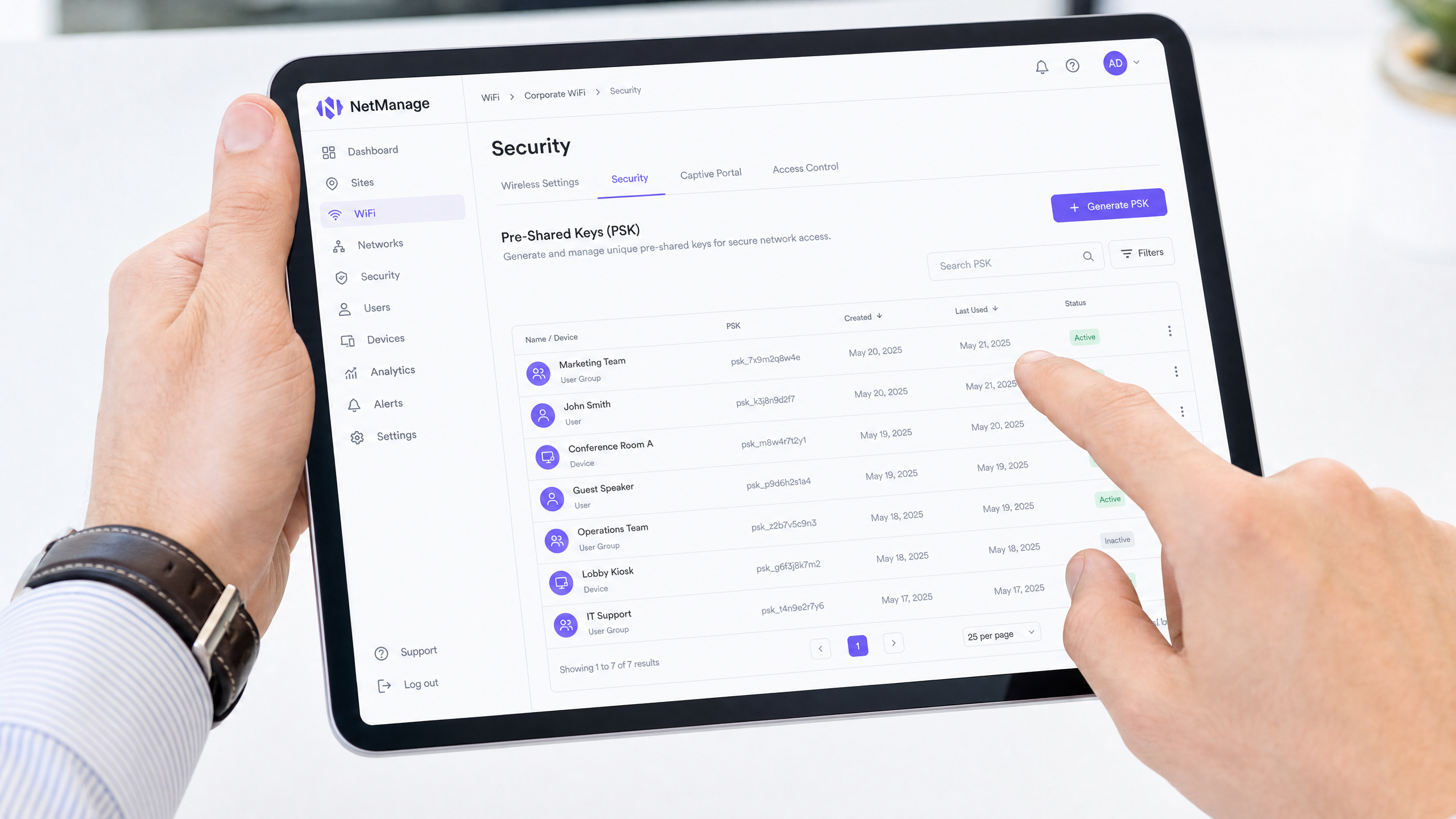
Ouça o nosso arquiteto sénior de soluções a detalhar a arquitetura IPSK nesta apresentação de 10 minutos:
Resumo Executivo
Para gestores de propriedades e diretores de TI que operam Unidades de Habitação Multifamiliar (MDUs), particularmente em alojamento estudantil, gerir o acesso sem fios apresenta um desafio único. É necessário equilibrar a experiência de integração de nível de consumidor que os residentes esperam com a segurança de nível empresarial, a responsabilização e a segmentação de rede que as conformidades exigem.
O WPA2-Personal padrão (uma única palavra-passe partilhada) não consegue fornecer responsabilização do utilizador ou segmentação dinâmica da rede. Por outro lado, o 802.1X empresarial (RADIUS) oferece excelente segurança, mas introduz uma fricção significativa para a integração de dispositivos sem interface, como consolas de jogos, smart TVs e hardware IoT comuns em ambientes residenciais.
Identity Pre-Shared Keys (IPSK), também conhecidas como Dynamic PSK (DPSK), preenchem esta lacuna. Fornecem a integração contínua do WPA2-Personal, ao mesmo tempo que oferecem a responsabilização por utilizador, o direcionamento dinâmico de VLAN e a gestão granular do ciclo de vida, tipicamente reservados para arquiteturas 802.1X. Este guia detalha a mecânica técnica do IPSK, estratégias de implementação e por que é a arquitetura definitiva para redes modernas de MDU e alojamento estudantil.
Análise Técnica Aprofundada: O que é IPSK e Como Funciona?
Na sua essência, o IPSK é um mecanismo de autenticação que permite que um único Service Set Identifier (SSID) suporte múltiplas Chaves Pré-Partilhadas (PSKs) únicas, onde cada chave está ligada a uma identidade específica (um utilizador, um quarto ou um grupo de dispositivos) ao nível do controlador.
O Problema Arquitetural com PSKs Partilhadas
Numa implementação tradicional de WPA2-Personal, todos os clientes que se conectam ao SSID utilizam a mesma palavra-passe. Isto cria várias vulnerabilidades arquiteturais:
- Falta de Contexto de Identidade: A rede não consegue distinguir entre o tráfego do Residente A e o tráfego do Residente B na camada de autenticação.
- Zero Segmentação de Rede: Todos os dispositivos aterram no mesmo domínio de broadcast (VLAN), a menos que sejam implementadas substituições complexas baseadas em MAC.
- Gestão de Ciclo de Vida Quebrada: Revogar o acesso para um único dispositivo comprometido ou um residente que parte requer a alteração da PSK global, forçando um evento de reconexão disruptivo em toda a rede para todos os utilizadores.
A Solução IPSK
O IPSK transfere a inteligência do dispositivo de ponta para o controlador sem fios ou plataforma de gestão na cloud.
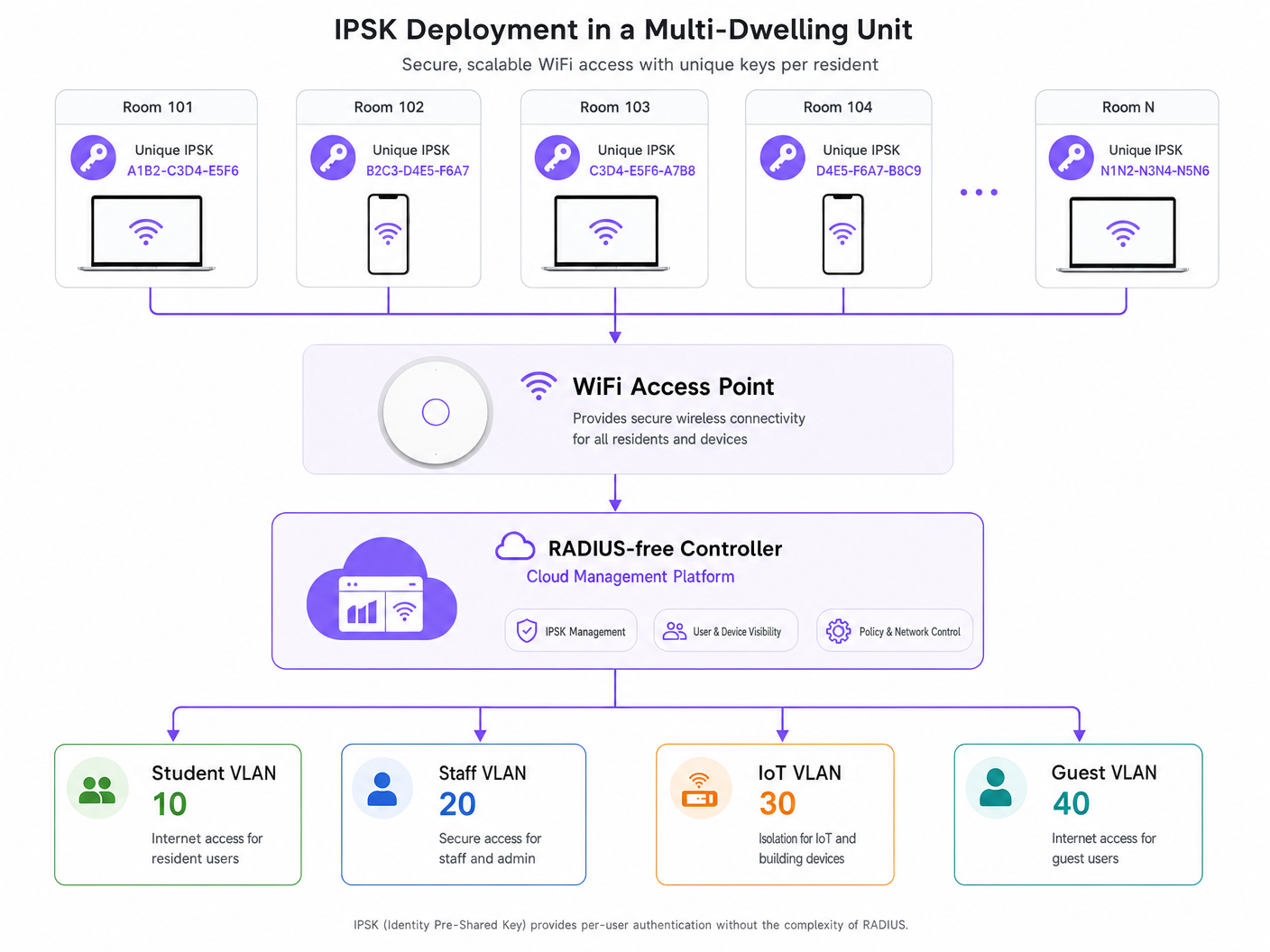
Quando um dispositivo se associa ao SSID, apresenta a sua PSK atribuída. O ponto de acesso encaminha este pedido para o controlador. O controlador consulta a sua base de dados interna (ou um fornecedor de identidade externo via API) para validar a chave. Após validação bem-sucedida, o controlador devolve o perfil de autorização associado a essa chave específica.
Este perfil de autorização tipicamente dita:
- Atribuição de VLAN: Direcionar dinamicamente o dispositivo para um segmento de rede específico (por exemplo, VLAN 10 para o Quarto 101, VLAN 20 para o Quarto 102).
- Controlo de Acesso Baseado em Funções (RBAC): Aplicação de regras de firewall específicas ou Listas de Controlo de Acesso (ACLs).
- Limitação de Taxa: Imposição de limites de largura de banda por utilizador ou por quarto.
Como a chave é única para o utilizador, consegue-se uma rede baseada em identidade sem a necessidade de suplicantes 802.1X nos dispositivos cliente.
Comparação: WPA2-Personal vs. IPSK vs. 802.1X
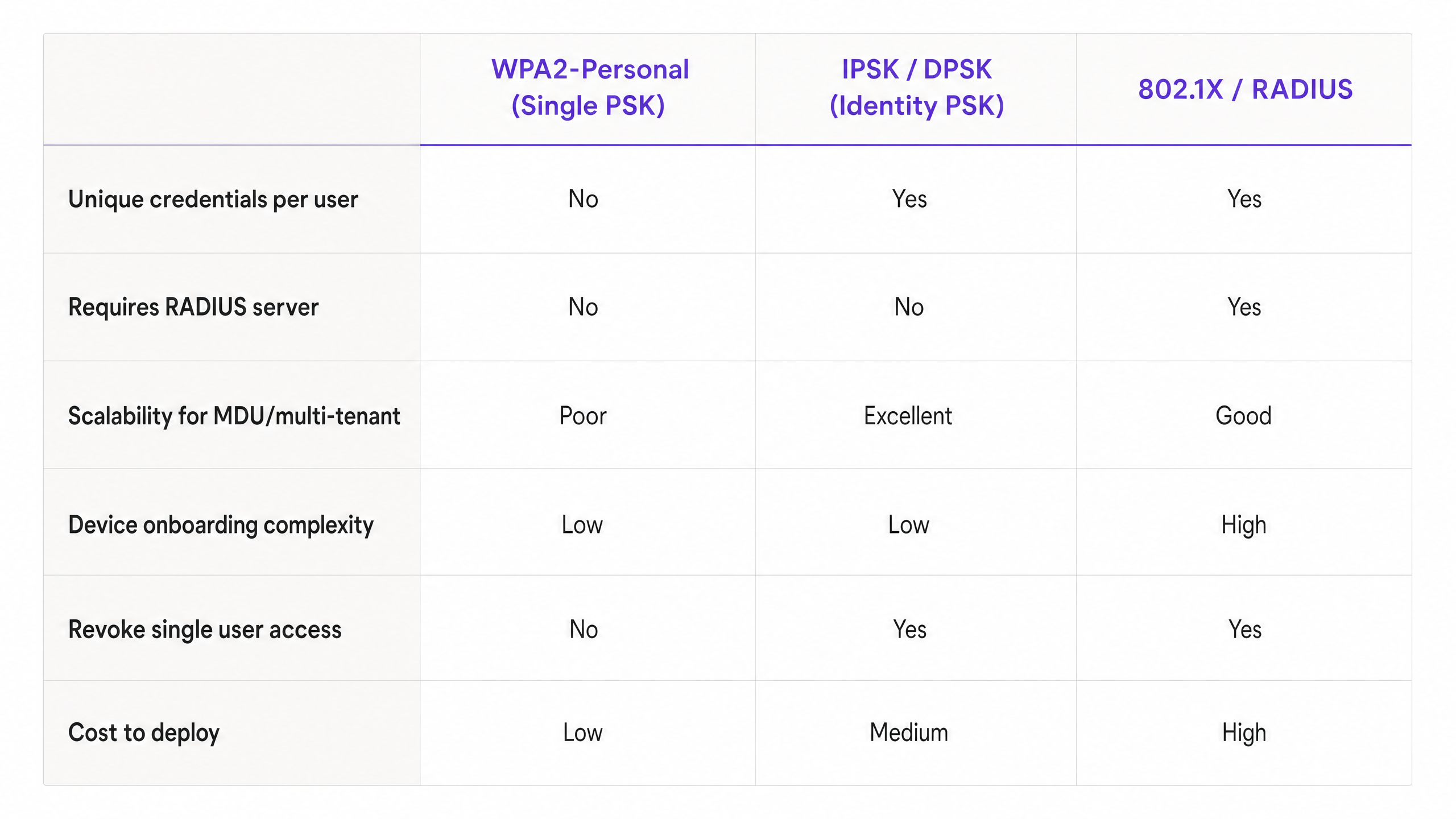
Compreender onde o IPSK se encaixa requer compará-lo com as alternativas. Embora o 802.1X continue a ser o padrão ouro para escritórios corporativos (consulte o nosso guia sobre Office Wi Fi: Optimize Your Modern Office Wi-Fi Network ), é frequentemente inadequado para MDUs devido a problemas de compatibilidade de dispositivos. O IPSK oferece os benefícios de segurança do 802.1X com a simplicidade do WPA2-Personal.
Guia de Implementação: Implementar IPSK em Ambientes MDU
Implementar IPSK eficazmente requer um planeamento cuidadoso em torno da geração de chaves, distribuição e gestão do ciclo de vida.
1. Geração de Chaves e Entropia
As chaves devem ser criptograficamente seguras. Evite usar números sequenciais, números de quartos ou frases facilmente adivinháveis. Gere chaves programaticamente (mínimo de 16-20 caracteres, alfanuméricos). Se estiver a utilizar uma plataforma como a solução Guest WiFi da Purple, esta geração pode ser automatizada e ligada ao perfil do residente.
2. Imposição de Limite de Dispositivos
Um passo de implementação crítico é impor um Número Máximo de Dispositivos por IPSK. Se um residente tiver uma chave atribuída, deve ser restrito a um número razoável de autenticações simultâneas (por exemplo, 5 a 8 dispositivos). Não impor isto permite que uma única chave vazada seja usada por dezenas de utilizadores não autorizados, degradando o desempenho da rede e comprometendo o rasto de auditoria.
3. Configuração de Direcionamento Dinâmico de VLAN
Configure o seu controlador sem fios para mapear IPSKs específicos para VLANs específicas. Num ambiente de alojamento estudantil, a arquitetura tipicamente parece-se com isto:
- VLANs de Residentes: Ou uma VLAN única por quarto (microssegmentação) ou uma VLAN de residente partilhada com isolamento de cliente ativado.
- VLAN IoT: Para gestão de edifícios, termostatos inteligentes e beacons BLE (saiba mais sobre BLE Low Energy Explained for Enterprise ).
- VLAN de Pessoal/Administração: Acesso seguro para gestão de propriedades.
Istoabordagem é detalhada no nosso guia abrangente: Designing a Multi-Tenant WiFi Architecture for MDU .
4. Integração com Sistemas de Gestão de Propriedades (PMS)
O verdadeiro ROI do IPSK é alcançado quando o ciclo de vida da chave é automatizado. Integre a API do seu controlador sem fios com o seu PMS ou base de dados de arrendamento.
- Provisionamento: Quando um contrato de arrendamento é assinado, uma chamada API gera automaticamente um IPSK e envia-o por e-mail ao residente.
- Revogação: Quando o contrato de arrendamento termina, uma chamada API revoga instantaneamente a chave, terminando o acesso à rede sem intervenção de TI.
Melhores Práticas e Padrões da Indústria
- Transição para WPA3: Certifique-se de que o seu hardware suporta WPA3-SAE (Simultaneous Authentication of Equals). O WPA3 melhora significativamente a segurança das chaves pré-partilhadas, mitigando ataques de dicionário offline e fornecendo sigilo de encaminhamento. As implementações modernas de IPSK devem aproveitar o WPA3 sempre que a compatibilidade do cliente o permitir.
- Isolamento de Cliente: Se estiver a colocar vários residentes numa VLAN partilhada em vez de VLANs por quarto, DEVE ativar o Isolamento de Cliente (isolamento de Camada 2) ao nível do AP para evitar movimentos laterais e ataques peer-to-peer entre residentes.
- Conformidade: Para operadores nos setores de Hospitality ou MDU, o IPSK fornece os registos de auditoria necessários para cumprir regulamentos como o GDPR, uma vez que os fluxos de rede podem ser diretamente atribuídos à credencial de um utilizador específico.
Resolução de Problemas e Mitigação de Riscos
Modos de Falha Comuns
1. Limites de Escala do Controlador Risco: Controladores sem fios mais antigos ou de nível básico têm limites rígidos no número de PSKs únicos que podem armazenar (por exemplo, máximo de 500 chaves por SSID). Mitigação: Verifique a escala máxima de IPSK suportada pelo seu hardware antes da implementação. Para grandes MDUs, são necessárias arquiteturas geridas na nuvem (como Cisco Meraki ou Aruba Central) ou motores de políticas dedicados.
2. Latência de Roaming Risco: Se a base de dados do controlador demorar a responder durante eventos de roaming de AP para AP, as chamadas de voz e vídeo serão interrompidas. Mitigação: Certifique-se de que a infraestrutura do controlador está localizada ou é altamente disponível. Ative o Fast BSS Transition (802.11r) se for suportado pela sua implementação IPSK.
3. Acumulação de Chaves/Chaves Obsoletas Risco: A falha na revogação de chaves quando os residentes saem resulta numa base de dados inchada e numa enorme vulnerabilidade de segurança. Mitigação: Implemente a gestão automatizada do ciclo de vida através da integração da API com o seu PMS. Realize auditorias trimestrais das chaves ativas.
ROI e Impacto no Negócio
A transição para uma arquitetura IPSK oferece resultados de negócio mensuráveis para gestores de propriedades e diretores de TI:
- Redução de Custos de Suporte: A eliminação de problemas de configuração de suplicantes 802.1X e da necessidade de bypass de autenticação MAC (MAB) para dispositivos sem interface reduz os tickets de Helpdesk em até 60% durante o período crítico de integração de setembro.
- Monetização Melhorada: Ao associar a identidade ao acesso à rede, os operadores podem oferecer pacotes de largura de banda por níveis (por exemplo, nível básico incluído no arrendamento, nível premium para jogadores).
- Análise Acionável: Com redes sensíveis à identidade, os gestores de propriedades podem aproveitar WiFi Analytics para compreender a utilização do espaço, os tempos de permanência em áreas comuns e o envolvimento geral do edifício, semelhante a implementações em Retail e Transport .
O IPSK não é apenas uma funcionalidade de segurança; é a arquitetura fundamental que permite redes multi-inquilino seguras, escaláveis e geríveis.
Definições Principais
IPSK (Identity Pre-Shared Key)
An authentication method that allows multiple unique pre-shared keys to be used on a single SSID, with each key tied to a specific user policy or VLAN.
Used in MDUs to provide per-user security without the complexity of 802.1X.
DPSK (Dynamic Pre-Shared Key)
A vendor-specific (primarily Ruckus) term for the same underlying technology as IPSK.
You will encounter this term when evaluating different vendor data sheets.
Dynamic VLAN Steering
The process where a network controller automatically assigns a connecting device to a specific Virtual LAN based on the authentication credentials provided.
Essential for multi-tenant environments to isolate resident traffic from staff or IoT traffic on the same physical access points.
802.1X
The IEEE standard for port-based Network Access Control, requiring a RADIUS server and client supplicants.
The enterprise alternative to IPSK, but often unsuitable for residential environments due to headless device incompatibility.
Headless Device
A network-connected device lacking a web browser or advanced configuration interface (e.g., gaming consoles, smart TVs, IoT sensors).
These devices drive the requirement for IPSK, as they cannot navigate captive portals or configure 802.1X supplicants.
WPA3-SAE
Simultaneous Authentication of Equals, the secure key establishment protocol used in WPA3 to prevent offline dictionary attacks.
The modern security standard that should be paired with IPSK deployments on compatible hardware.
Client Isolation
A wireless network setting that prevents devices connected to the same AP from communicating directly with each other.
Mandatory security control if multiple residents are placed into a single shared VLAN.
MAC Authentication Bypass (MAB)
A fallback mechanism in 802.1X networks where a device's MAC address is used as its identity credential.
A cumbersome administrative process that IPSK eliminates by providing native PSK support for headless devices.
Exemplos Práticos
A 400-bed student accommodation block currently uses a single WPA2-Personal password. Residents complain about poor performance, and IT cannot prevent departing students from continuing to use the network from the car park. They need to secure the network, segment traffic per room, and support gaming consoles without increasing helpdesk tickets.
Deploy an IPSK architecture on a single SSID. Integrate the wireless controller API with the property management system. Upon lease signing, generate a unique 20-character IPSK per resident. Configure the controller to dynamically steer each resident's key to a unique Per-Room VLAN. Set a device limit of 6 concurrent devices per key. Automate key revocation upon lease termination.
A boutique hotel wants to offer secure, segmented WiFi to guests but cannot rely on captive portals because guests increasingly travel with smart speakers and streaming sticks that cannot navigate web logins.
Implement IPSK tied to the hotel reservation system. When a guest checks in, the PMS triggers an API call to generate a unique IPSK valid only for the duration of their stay. The key is printed on the room key sleeve or sent via SMS. The network dynamically assigns their devices to a private VLAN for that specific room, allowing their phone to cast to the room's smart TV securely.
Perguntas de Prática
Q1. You are designing the network for a 200-unit build-to-rent property. The client wants to use 802.1X for maximum security. However, their demographic research shows residents bring an average of 3 headless devices (smart TVs, consoles) per unit. What is your architectural recommendation?
Dica: Consider the operational overhead of onboarding 600 headless devices onto an 802.1X network.
Ver resposta modelo
Recommend an IPSK architecture instead of 802.1X. While 802.1X provides excellent security, the 600 headless devices would require MAC Authentication Bypass (MAB), creating a massive administrative burden for the helpdesk. IPSK provides the necessary per-user accountability and VLAN segmentation while allowing headless devices to connect seamlessly using standard PSK methods.
Q2. During an IPSK deployment, the property manager requests that residents be allowed to choose their own custom WiFi passwords to improve the user experience. How do you respond?
Dica: Think about cryptographic entropy and dictionary attacks.
Ver resposta modelo
Advise strongly against this. User-selected passwords lack sufficient entropy and are vulnerable to dictionary attacks. In an IPSK environment, weak keys compromise the security of the entire SSID. Keys must be programmatically generated (minimum 16-20 random alphanumeric characters) and distributed securely via the property management system integration.
Q3. A network utilizing IPSK is experiencing IP address exhaustion in the main DHCP pool, despite the building only being at 60% occupancy. What configuration oversight likely caused this?
Dica: Think about what happens if a key is shared freely.
Ver resposta modelo
The network likely failed to enforce a Maximum Device Count per IPSK. Without a device limit, residents can share their unique key with non-residents or connect an unlimited number of devices, rapidly exhausting DHCP scopes and bandwidth. A strict concurrent device limit (e.g., 5-8 devices per key) must be enforced at the controller level.