
Os Benefícios de Segurança do RADIUS-as-a-Service para Equipas de Trabalho Híbridas
Este guia de referência técnica explica como o RADIUS-as-a-Service protege o acesso à rede para equipas de trabalho híbridas em locais distribuídos. Abrange a arquitetura, os benefícios de segurança e as etapas de implementação para substituir a infraestrutura RADIUS local por um serviço de autenticação gerido na nuvem. Para gestores de TI e arquitetos de rede em hotéis, cadeias de retalho, estádios e organizações do setor público, este guia fornece as provas necessárias para avaliar e avançar com uma migração para RADIUS na nuvem este trimestre.
Video overview
Ouça este guia
Ver transcrição do podcast
Parte da nossa série principal: Guia de Segurança de WiFi Empresarial →

Resumo Executivo
A transição para uma força de trabalho híbrida expôs uma fraqueza fundamental na segurança de rede tradicional: os servidores RADIUS locais foram concebidos para um mundo onde os colaboradores se sentavam num único edifício e se ligavam a uma única rede. Esse mundo já não existe. Hoje em dia, os seus colaboradores autenticam-se a partir de quartos de hotel, lojas de retalho, escritórios remotos e locais de eventos. Os seus fornecedores de identidade estão na cloud. Os seus pontos de acesso estão espalhados por centenas de localizações. No entanto, muitas organizações ainda dependem de servidores RADIUS físicos que exigem patches manuais, não se conseguem integrar nativamente com o Microsoft Entra ID ou com o Google Workspace e falham sem aviso prévio quando o hardware se degrada.
O RADIUS-as-a-Service substitui esta infraestrutura por um motor de autenticação cloud-native. Direciona os seus pontos de acesso para endpoints na cloud. O fornecedor gere os servidores, as atualizações de segurança e a elevada disponibilidade. O utilizador gere as políticas. Para as equipas de TI em grupos de hotelaria, cadeias de retalho e espaços públicos, esta mudança elimina os custos de hardware, impõe a segmentação de rede baseada na identidade e fornece o registo de auditoria necessário para PCI-DSS e GDPR.
Análise Técnica Detalhada
Por que razão o RADIUS Local Enfrenta Dificuldades
O RADIUS, definido na norma RFC 2865, fornece autenticação, autorização e contabilização (AAA) centralizadas para acesso à rede. Todas as organizações que executam WiFi WPA2-Enterprise ou WPA3-Enterprise dependem dele. O protocolo em si é robusto. O problema reside no modelo de infraestrutura que evoluiu em seu redor.
A implementação, proteção e manutenção do FreeRADIUS em Linux requerem conhecimentos significativos. O Microsoft Network Policy Server (NPS) está fortemente interligado com o Active Directory e não possui suporte nativo para o Microsoft Entra ID, Okta ou Google Workspace. O Cisco Identity Services Engine (ISE) fornece funcionalidades de política de nível empresarial, mas requer hardware dedicado, licenciamento complexo e uma equipa de especialistas para o operar. Para os três, é necessário construir e manter manualmente uma elevada disponibilidade, normalmente executando dois servidores com replicação de base de dados e um balanceador de carga à frente deles.
Para uma organização com um único local e um Active Directory estático, este modelo é gerível. Para um grupo hoteleiro com 50 propriedades, uma cadeia de retalho com 400 lojas ou uma universidade com um campus disperso, torna-se impossível. Ou centraliza os servidores RADIUS e aceita a latência de autenticação de locais remotos, ou implementa servidores em cada localização e os gere individualmente. Nenhuma das opções é escalável.
A Arquitetura do RADIUS-as-a-Service
O RADIUS-as-a-Service é um modelo de fornecimento baseado na cloud para o protocolo RADIUS. O protocolo em si permanece inalterado, aderindo à norma RFC 2865 e às suas extensões. O que muda é quem faz a manutenção da infraestrutura. Quando um dispositivo se liga à sua rede WiFi, o ponto de acesso (cliente RADIUS) encaminha o pedido de autenticação através de um túnel seguro e encriptado para os endpoints do cloud RADIUS. O serviço de nuvem verifica as credenciais no seu fornecedor de identidade e devolve uma mensagem de Access-Accept ou Access-Reject, juntamente com atributos de política, tais como atribuições dinâmicas de VLAN. Do ponto de vista do ponto de acesso, o fluxo de autenticação é idêntico ao RADIUS local.

O fornecedor de nuvem opera servidores RADIUS em vários centros de dados geograficamente diversos. O failover é automático. Se um endpoint ficar indisponível, o tráfego é encaminhado para o endpoint ativo seguinte sem qualquer intervenção da sua equipa. Para organizações com escritórios em múltiplas regiões, a autenticação ocorre no endpoint de nuvem mais próximo, mantendo a latência baixa independentemente da localização geográfica.
Métodos IEEE 802.1X e EAP
O IEEE 802.1X é o padrão para controlo de acesso à rede baseado em porta (NAC). Este força um dispositivo a autenticar-se antes de poder obter um endereço IP e ter permissão para transmitir tráfego. Numa implementação 802.1X, o RADIUS funciona como o servidor de autenticação.
O Extensible Authentication Protocol (EAP) define como as credenciais são trocadas. O cloud RADIUS suporta todos os métodos EAP:
| Método EAP | Tipo de Autenticação | Nível de Segurança | Utilização Recomendada |
|---|---|---|---|
| EAP-TLS | Baseado em Certificado Mútuo | O mais alto | Dispositivos corporativos com certificados geridos por MDM |
| PEAP-MSCHAPv2 | Nome de utilizador e palavra-passe | Médio | Dispositivos antigos ou BYOD sem MDM |
| EAP-TTLS | Credenciais em túnel | Médio | Ambientes mistos |
| MAC Authentication Bypass | Endereço MAC do dispositivo | Baixo | Dispositivos IoT que não suportam 802.1X |
O EAP-TLS, definido na RFC 5216, é considerado o padrão de excelência. Tanto o dispositivo cliente como o servidor RADIUS apresentam certificados digitais um ao outro. Esta autenticação mútua elimina completamente a necessidade de palavras-passe do processo de acesso à rede. O certificado está criptograficamente vinculado ao dispositivo e, ao contrário de uma palavra-passe, não pode ser alvo de phishing, adivinhado ou roubado. Para organizações que já enfrentaram violações de dados baseadas em credenciais, este é o remédio técnico mais direto.
Atribuição Dinâmica de VLAN
Além da autenticação, o servidor RADIUS aplica a autorização. Quando aceita uma ligação, devolve atributos de política ao ponto de acesso, incluindo o ID da VLAN a atribuir ao dispositivo. Esta atribuição dinâmica de VLAN é o mecanismo fundamental que viabiliza redes baseadas em identidade.
Uma recepcionista de um hotel autentica-se e é colocada numa VLAN de front-of-house com acesso ao sistema de gestão de propriedade. Um membro da equipa de limpeza é colocado numa VLAN restrita apenas com acesso à Internet. O dispositivo de um hóspede é colocado numa VLAN de Guest WiFi, completamente isolado dos recursos corporativos. Um dispositivo IoT, como uma câmara de segurança, é colocado numa VLAN IoT dedicada. Tudo isto acontece automaticamente com base na identidade verificada pelo servidor RADIUS, sem qualquer configuração manual de VLAN para cada dispositivo.
Este é o princípio do privilégio mínimo aplicado ao acesso à rede. Não está a confiar num dispositivo apenas porque este se ligou a um SSID específico. Está a conceder acesso com base numa identidade verificada e a restringir esse acesso apenas ao que é necessário para essa identidade. Para uma análise mais aprofundada sobre como isto se enquadra numa estratégia mais ampla de controlo de acesso à rede, consulte o nosso guia sobre network access control systems.
Integração Nativa de Identidade na Nuvem
O benefício operacional mais significativo do cloud RADIUS é a sua integração nativa com fornecedores de identidade modernos. O cloud RADIUS liga-se diretamente ao Microsoft Entra ID, Okta e Google Workspace através de protocolos padrão como OIDC, SAML e LDAP. Quando regista um novo funcionário no seu fornecedor de identidade, este pode autenticar-se imediatamente na rede WiFi. Quando remove um funcionário, desativa a sua conta no diretório e o seu acesso WiFi é revogado instantaneamente em todos os pontos de acesso de cada localização.
Esta sincronização em tempo real elimina uma das vulnerabilidades de segurança mais difíceis no WiFi empresarial: ex-funcionários que ainda possuem uma PSK partilhada, ou cujas contas RADIUS não foram eliminadas manualmente após a sua saída. Com o cloud RADIUS e um fornecedor de identidade na nuvem, a saída de um funcionário torna-se uma ação única com efeito imediato em toda a rede.
-
Tem dúvidas sobre a sua configuração específica?
A nossa equipa trabalha com operadores de espaços, gestores de TI e engenheiros de rede em 80.000 espaços. Agende uma chamada de 20 minutos e mostraremos como outros profissionais na sua área o resolveram.
Guia de Implementação
Passo 1: Ligar o Seu Fornecedor de Identidade
Ligue o serviço cloud RADIUS ao seu fornecedor de identidade. Para o Microsoft Entra ID ou Google Workspace, isto normalmente envolve autorizar uma aplicação empresarial através de OAuth ou configurar um conector LDAP. Mapeie os seus grupos de diretório para políticas de rede específicas. Defina a sua taxonomia de funções antes de começar: quais os grupos que se mapeiam para quais VLANs e que direitos de acesso cada VLAN possui. Fazer isto corretamente logo no início poupa um trabalho significativo mais tarde.
Passo 2: Implementar Certificados para Dispositivos Corporativos
Para dispositivos de propriedade corporativa, configure a sua plataforma de gestão de dispositivos móveis (MDM), como o Microsoft Intune ou Jamf, para enviar certificados de cliente para os dispositivos. Isto permite a autenticação EAP-TLS. Certifique-se de que a Autoridade de Certificação (CA) raiz que emitiu o certificado do servidor RADIUS é confiável para todos os dispositivos clientes. Uma cadeia não confiável é a causa mais comum de falhas de autenticação silenciosas.
Passo 3: Configurar o Seu Hardware de Rede
Adicione os endereços IP de RADIUS na cloud e os segredos partilhados ao seu controlador sem fios ou pontos de acesso. Configure sempre os endpoints primários e secundários para utilizar a redundância incorporada do fornecedor. Certifique-se de que as portas UDP 1812 (autenticação) e 1813 (accounting) estão abertas na saída dos seus pontos de acesso para os endpoints de RADIUS na cloud. Verifique isto antes de entrar em produção. Regras de firewall mal configuradas são a segunda causa mais comum de falhas na implementação.
O RADIUS na cloud funciona com Cisco Meraki, HPE Aruba, Ruckus, Juniper Mist, Ubiquiti UniFi, Cambium, Extreme e Fortinet. Os passos de configuração variam consoante o fabricante, mas o protocolo RADIUS é padronizado, pelo que os parâmetros principais (IP do servidor, segredo partilhado, porta de autenticação) permanecem consistentes.
Passo 4: Definir Políticas de VLAN
Configure a atribuição dinâmica de VLAN no seu motor de políticas RADIUS. Mapeie cada função de utilizador ou tipo de dispositivo para um ID de VLAN específico. Teste cada política antes de a lançar em produção. Uma matriz de teste simples - um dispositivo por função, uma VLAN por função, verificando a atribuição - deteta a maioria dos erros de configuração antes que afetem os utilizadores.
-
Melhores Práticas
Imponha EAP-TLS para todos os dispositivos corporativos. Descontinue o PEAP-MSCHAPv2 assim que a sua implementação de MDM o permitir. O PEAP depende de palavras-passe, que podem ser comprometidas. O EAP-TLS depende de certificados, que não podem.
Segmente tudo. Nunca coloque funcionários, convidados e dispositivos IoT na mesma sub-rede. Utilize o RADIUS para impor limites estritos de VLAN. Isto é crítico para ambientes de retalho que lidam com dados de cartões de pagamento sob o PCI-DSS, e ambientes de saúde que protegem dados de doentes.
Alinhe com o WPA3-Enterprise. O WPA3-Enterprise, o atual padrão de segurança WiFi, exige autenticação 802.1X. Certifique-se de que os seus pontos de acesso suportam WPA3-Enterprise e configure-o como o padrão de segurança mínimo para as redes de funcionários.
Audite os seus registos RADIUS regularmente. O RADIUS na cloud fornece registos de auditoria centralizados. Reveja as falhas de autenticação semanalmente. Um pico súbito de falhas num dispositivo ou local específico é um indicador precoce de má configuração ou de um potencial ataque.
Realize testes de failover. Pelo menos uma vez por trimestre, simule uma falha no endpoint RADIUS primário e verifique se a autenticação continua sem interrupções através do endpoint secundário. Documente o resultado. Este é um teste simples que a maioria das equipas nunca executa até que seja mesmo necessário.
Para espaços que implementam WiFi em ambientes complexos, incluindo localizações marítimas ou remotas, consulte o nosso guia sobre configurar um captive portal no Starlink para considerações relativas à dependência de WAN.
-
Resolução de Problemas e Mitigação de Riscos
Timeouts de Autenticação
Se um dispositivo falhar na autenticação, primeiro verifique a conectividade entre os seus pontos de acesso e os endpoints de RADIUS na nuvem. Verifique se as portas UDP 1812 e 1813 estão abertas para o exterior. A inspeção profunda de pacotes em firewalls modernas pode atrasar ou descartar pacotes RADIUS. Se observar tempos de espera excedidos, verifique a política da sua firewall para regras que possam estar a inspecionar ou a limitar a largura de banda do tráfego UDP para os endpoints RADIUS.
Falhas na Cadeia de Confiança do Certificado
Se estiver a utilizar EAP-TLS, certifique-se de que os dispositivos clientes confiam na CA raiz que emitiu o certificado do servidor RADIUS. Se a cadeia de confiança estiver quebrada, o dispositivo rejeitará silenciosamente a ligação para evitar um ataque do tipo man-in-the-middle. Isto manifesta-se como uma falha de ligação sem qualquer mensagem de erro clara. Verifique os registos do servidor RADIUS para identificar falhas de handshake EAP-TLS. Distribua o certificado da CA raiz para todos os dispositivos geridos através de MDM.
Dependência de WAN
O RADIUS na nuvem requer uma ligação ativa à internet. Se a ligação WAN falhar, os pedidos de autenticação não conseguem chegar ao servidor. Para recursos locais de missão crítica, avalie pontos de acesso que suportem sobrevivência local ou cache de autenticação. Para a maioria das implementações, a dependência de WAN é aceitável, pois um site sem internet não conseguiria aceder a aplicações SaaS de qualquer forma.
Incompatibilidade de Segredos Partilhados
Cada ponto de acesso ou controlador sem fios deve ser configurado como um cliente RADIUS com o segredo partilhado correto. Uma incompatibilidade resulta no descarte silencioso de todos os pedidos de autenticação desse dispositivo. Se um ponto de acesso específico estiver a falhar enquanto outros têm sucesso, verifique a configuração do segredo partilhado nesse dispositivo.
-
ROI e Impacto no Negócio
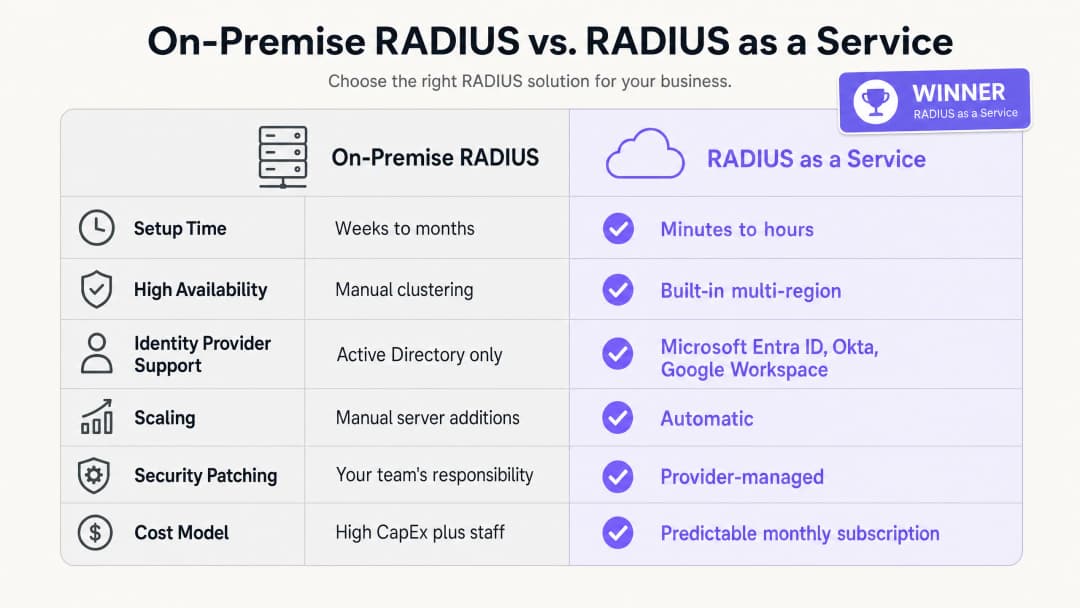
Os benefícios empresariais do RADIUS-as-a-Service baseiam-se em três pilares: redução de despesas de capital, menor sobrecarga operacional e uma postura de segurança melhorada.
Em termos de despesas de capital, elimina completamente o custo de aquisição, licenciamento e renovação de servidores físicos. Uma implementação RADIUS local mínima viável requer dois servidores para alta disponibilidade, licenças de sistema operativo e renovação de hardware a cada três a cinco anos. Para um grupo hoteleiro de 50 propriedades, isto representa um investimento significativo em hardware em todo o portefólio.
Em termos de sobrecarga operacional, a sua equipa de engenharia já não precisa de gastar tempo a aplicar patches em servidores Windows, a resolver erros de configuração do FreeRADIUS ou a gerir renovações de certificados em infraestruturas físicas. Esse tempo pode ser redirecionado para o trabalho de políticas de segurança que melhora diretamente a sua postura de segurança.
Olhando para a postura de segurança, a transição para o EAP-TLS e a atribuição dinâmica de VLAN reduz significativamente a superfície de ataque da rede. O roubo de credenciais é uma das principais causas de violações de rede. A remoção de palavras-passe do processo de autenticação de rede aborda diretamente esta ameaça. O registo de auditoria centralizado ajuda na conformidade com o PCI-DSS v4.0 e o GDPR, reduzindo o custo e a complexidade das auditorias de conformidade. Para organizações que gerem centros de transporte ou recintos de alta densidade, a capacidade de aplicar políticas de segurança consistentes em todos os locais a partir de um único painel é uma melhoria operacional mensurável. A Purple está ativa em mais de 80.000 recintos em direto e processou 440 milhões de inícios de sessão em 2024 (dados internos da Purple, 2024). A infraestrutura que suporta esta escala é cloud-native por design.
Para uma visão mais ampla de como a análise de WiFi e a inteligência de rede se ligam aos resultados de negócio, consulte a nossa plataforma de WiFi Analytics.
-
Referências
[1] IEEE Standard for Local and metropolitan area networks - Port-Based Network Access Control. IEEE Std 802.1X-2020. [2] IETF. Remote Authentication Dial In User Service (RADIUS). RFC 2865. 1997. [3] IETF. The EAP-TLS Authentication Protocol. RFC 5216. 2008. [4] IronWiFi. Benefits of a Cloud RADIUS Server: Why Enterprises Are Moving Authentication Online. Fevereiro de 2026. [5] SecureW2. Cloud vs. On-Site RADIUS: Which is Better? Maio de 2026. [6] Portnox. RADIUS-as-a-Service. 2026. [7] PCI Security Standards Council. PCI DSS v4.0. Março de 2022. [8] Purple. Dados internos da plataforma: 440 milhões de inícios de sessão, mais de 80.000 recintos. 2024.
Definições Principais
RADIUS
Remote Authentication Dial-In User Service. Um protocolo de rede definido no RFC 2865 que fornece gestão centralizada de Autenticação, Autorização e Auditoria (AAA) para utilizadores que se ligam a um serviço de rede.
As equipas de TI utilizam o RADIUS como o motor de decisão central para verificar se um dispositivo ou utilizador tem permissão para aceder à rede WiFi corporativa. Este posiciona-se entre o ponto de acesso e o fornecedor de identidade.
802.1X
Uma norma IEEE para controlo de acesso à rede baseado em portas. Fornece um mecanismo de autenticação a dispositivos que pretendem ligar-se a uma LAN ou WLAN, forçando-os a autenticarem-se antes de receberem um endereço IP.
Este é o padrão que serve de base à segurança do WiFi empresarial. Sem o 802.1X, qualquer dispositivo que se ligue ao SSID obtém acesso à rede. Com o 802.1X, cada dispositivo deve provar a sua identidade primeiro.
EAP-TLS
Extensible Authentication Protocol - Transport Layer Security. Um método de autenticação definido no RFC 5216 que exige que tanto o dispositivo cliente como o servidor RADIUS apresentem certificados digitais, fornecendo autenticação mútua sem palavras-passe.
Considerado o padrão de ouro para a segurança de WiFi empresarial. Os certificados são implementados em dispositivos corporativos através de MDM. O EAP-TLS elimina o risco de roubo de palavras-passe e ataques de phishing na rede.
PEAP
Protected Extensible Authentication Protocol. Um método EAP que encapsula uma troca de nome de utilizador e palavra-passe dentro de uma sessão TLS. É menos seguro do que o EAP-TLS por depender de palavras-passe.
O PEAP-MSCHAPv2 é amplamente implementado em ambientes legados. As equipas de TI devem planear uma migração para EAP-TLS para dispositivos corporativos, utilizando o PEAP apenas como alternativa para dispositivos não geridos ou BYOD.
Atribuição dinâmica de VLAN
Um processo em que o servidor RADIUS indica ao ponto de acesso em que Virtual LAN deve colocar um dispositivo, com base na identidade e função verificadas do utilizador, em vez do SSID ao qual se ligou.
Essencial para a segmentação de rede em ambientes com múltiplas funções. Um único SSID de "Pessoal" pode separar com segurança o tráfego de limpeza, receção e gestão em diferentes VLANs com diferentes direitos de acesso.
AAA
Autenticação, Autorização e Contabilização (Authentication, Authorisation, and Accounting). As três funções realizadas por um servidor RADIUS: verificar a identidade (autenticação), determinar que acesso é permitido (autorização) e registar os dados da sessão para fins de auditoria (contabilização).
As equipas de TI e os auditores utilizam o AAA como uma estrutura para avaliar o controlo de acesso à rede. O Cloud RADIUS fornece as três funções a partir de um serviço gerido.
WPA3-Enterprise
O padrão atual de segurança WiFi para redes empresariais, que exige autenticação 802.1X através de um servidor RADIUS. Oferece uma maior força criptográfica em comparação com o WPA2-Enterprise, incluindo o modo de segurança de 192 bits para ambientes de alta segurança.
Os gestores de TI devem configurar o WPA3-Enterprise como o padrão mínimo de segurança para redes de funcionários. As redes de convidados podem utilizar WPA2 ou autenticação aberta com um Captive Portal.
Controlo de Acesso à Rede (NAC)
Uma abordagem de segurança que aplica políticas em dispositivos que tentam aceder aos recursos da rede, combinando a avaliação de segurança do endpoint, a autenticação de identidade e a aplicação de regras na rede.
O RADIUS é um componente fundamental do NAC. O Cloud RADIUS estende o NAC a ambientes distribuídos e multi-site sem necessitar de infraestrutura local em cada localização.
Captive Portal
Uma página web com a qual o utilizador de uma rede de acesso público deve interagir antes de lhe ser concedido acesso à internet. Normalmente utilizada em WiFi de convidados para recolher consentimento ou apresentar os termos de utilização.
Os portais cativos gerem o acesso de convidados não autenticados, enquanto o 802.1X gere o acesso de funcionários autenticados. Os dois mecanismos operam em SSIDs e VLANs separados.
Exemplos Práticos
Um hotel de 200 quartos precisa de proteger a sua rede de funcionários para a limpeza, receção e administração, mantendo o Guest WiFi totalmente separado. Atualmente, utilizam uma PSK partilhada para a rede de funcionários, a qual não é alterada há dois anos.
Implementar o RADIUS-as-a-Service integrado com o Microsoft Entra ID. Configurar os pontos de acesso Cisco Meraki para usar WPA3-Enterprise com 802.1X. A equipa de limpeza autentica-se utilizando as suas credenciais do Entra ID; o servidor RADIUS lê o seu grupo de diretório e atribui-lhes dinamicamente a VLAN 10 (apenas acesso ao sistema de tarefas de limpeza). A equipa da receção é atribuída à VLAN 20 (acesso ao sistema de gestão de propriedade). A administração é atribuída à VLAN 30 (acesso mais amplo). O Guest WiFi permanece num SSID separado com um Captive Portal, isolado na VLAN 40. Quando um funcionário sazonal sai, a sua conta do Entra ID é desativada, revogando instantaneamente o acesso ao WiFi em todos os pontos de acesso da propriedade.
Uma cadeia de retalho nacional com 400 lojas precisa de garantir a conformidade com o PCI-DSS para os seus terminais de ponto de venda. Atualmente, gerem 400 instâncias independentes de FreeRADIUS em servidores locais de lojas, exigindo atualizações de segurança individuais para cada uma.
Migrar para uma única instância de RADIUS-as-a-Service. Configurar os pontos de acesso HPE Aruba nas 400 lojas para autenticar dispositivos POS usando EAP-TLS com certificados de máquina distribuídos via Microsoft Intune. O servidor RADIUS na nuvem autentica os certificados e coloca os dispositivos POS numa VLAN em conformidade com o PCI (VLAN 30), isolada de todo o restante tráfego de rede. Os funcionários das lojas utilizam um SSID separado autenticado via Okta, que os coloca numa VLAN geral de funcionários (VLAN 20). Os clientes na rede de convidados são isolados na VLAN 40. A equipa de segurança gere todas as políticas a partir de um único painel de controlo.
Perguntas de Prática
Q1. O campus da sua universidade utiliza atualmente o Microsoft NPS no Windows Server para autenticar estudantes através de PEAP-MSCHAPv2. A instituição está a migrar para o Google Workspace e pretende desativar todos os servidores locais no prazo de 12 meses. Qual é a alteração arquitetónica mais segura e operacionalmente eficiente para a infraestrutura de autenticação WiFi?
Dica: O Microsoft NPS não suporta nativamente o Google Workspace. Considere o que substitui tanto o servidor como o método de autenticação.
Ver resposta modelo
Migre para o RADIUS-as-a-Service com integração nativa com o Google Workspace. O serviço de RADIUS na nuvem liga-se diretamente ao Google Workspace via LDAP ou OIDC, eliminando a necessidade de Active Directory ou NPS. Simultaneamente, mude os dispositivos geridos de alunos e funcionários de PEAP-MSCHAPv2 para EAP-TLS através da implementação de certificados de cliente via plataforma MDM da instituição. Isto remove as palavras-passe do processo de autenticação e garante que apenas dispositivos geridos e fidedignos possam aceder às redes de funcionários e alunos. A migração pode ser faseada: implemente o RADIUS na nuvem em paralelo com o NPS, migre um SSID de cada vez e, em seguida, desative o NPS quando todos os dispositivos estiverem a utilizar o novo serviço.
Q2. Um estádio com capacidade para 80.000 pessoas necessita de WiFi seguro para funcionários corporativos, terminais de bilheteira, membros da imprensa e prestadores de serviços em dias de eventos. Como deve a rede ser configurada utilizando RADIUS na nuvem para aplicar o acesso adequado a cada grupo?
Dica: Considere a forma como o RADIUS lida com a autorização, e não apenas com a autenticação. Cada grupo necessita de direitos de acesso diferentes.
Ver resposta modelo
Implemente um único SSID 802.1X para todos os grupos autenticados. Configure o serviço de RADIUS na nuvem para utilizar a atribuição dinâmica de VLAN com base na função do utilizador no fornecedor de identidade. Os funcionários corporativos são atribuídos à VLAN 10 com acesso aos sistemas internos. Os terminais de bilheteira, autenticados através de certificados de máquina (EAP-TLS), são colocados numa VLAN 20 restrita com acesso exclusivo à plataforma de bilheteira. Os membros da imprensa são atribuídos à VLAN 30 com acesso à internet de alta largura de banda, mas sem acesso aos sistemas internos. Os prestadores de serviços em dias de eventos são atribuídos à VLAN 40 apenas com acesso limitado à internet. Um SSID aberto separado com um Captive Portal gere o acesso de convidados de adeptos e visitantes na VLAN 50, isolado de todo o restante tráfego.
Q3. Durante uma auditoria de segurança, descobriu-se que o servidor FreeRADIUS da sua organização não recebe uma atualização de segurança há oito meses. A equipa tem demonstrado relutância em atualizá-lo porque a última atualização causou uma interrupção na autenticação de duas horas. De que forma a migração para o RADIUS-as-a-Service resolve tanto o risco de segurança como o risco operacional?
Dica: Considere a divisão de responsabilidades num modelo de serviço gerido e a forma como os fornecedores realizam a aplicação de patches sem tempo de inatividade.
Ver resposta modelo
O RADIUS-as-a-Service transfere a responsabilidade pela aplicação de patches no SO e pela gestão de vulnerabilidades para o fornecedor. O fornecedor opera clusters multi-região de elevada disponibilidade, o que lhe permite aplicar patches em endpoints individuais e lançar atualizações progressivamente sem causar tempos de inatividade na autenticação. A sua equipa já não necessita de agendar janelas de manutenção nem de aceitar o risco de uma interrupção induzida por uma atualização. O risco de segurança é eliminado porque o fornecedor aplica patches na infraestrutura à medida que as vulnerabilidades são divulgadas, frequentemente antes de a CVE ser amplamente publicada. O risco operacional é eliminado porque o SLA do fornecedor garante o tempo de atividade independentemente da atividade de aplicação de patches. O papel da sua equipa muda da manutenção da infraestrutura para a gestão de políticas.
Continue a ler esta série
Integrar RADIUS-as-a-Service com Diretórios na Nuvem (Azure AD e Google Workspace)
Este guia de referência técnica detalha como integrar o RADIUS-as-a-Service com diretórios na nuvem - Microsoft Entra ID e Google Workspace - para autenticação WiFi empresarial. Aborda a transição de arquitetura do NPS local para o RADIUS nativo na nuvem, a implementação de autenticação EAP-TLS baseada em certificados e as melhores práticas operacionais para proteger o acesso sem fios em ambientes de hotelaria, retalho e setor público. Para gestores de TI e arquitetos de rede que já investem em identidade na nuvem, este guia preenche a lacuna entre a gestão de diretórios e a segurança de rede física.
Como Implementar a Autenticação 802.1X com Cloud RADIUS
Este guia de referência técnica fornece um enquadramento abrangente para a implementação da autenticação 802.1X com Cloud RADIUS em infraestruturas empresariais distribuídas. Detalha a arquitetura, a seleção do método EAP, a sequência de implementação e as estratégias de mitigação de riscos necessárias para proteger o acesso à rede, eliminando ao mesmo tempo os custos operacionais da infraestrutura local.
O que é Cloud RADIUS? Um Guia Completo para RADIUS-as-a-Service
Este guia completo explora o Cloud RADIUS (RADIUS-as-a-Service), detalhando a sua arquitetura, métodos EAP e estratégias de implementação. Fornece aos líderes de TI perspetivas práticas sobre a migração de servidores locais para um modelo de autenticação baseado na nuvem escalável, seguro e em conformidade.
Tem dúvidas sobre a sua configuração específica?
A nossa equipa trabalha com operadores de espaços, gestores de TI e engenheiros de rede em 80.000 espaços. Agende uma chamada de 20 minutos e mostraremos como outros profissionais na sua área o resolveram.