What is Cloud RADIUS? A Comprehensive Guide to RADIUS as a Service

This comprehensive guide explores Cloud RADIUS (RADIUS as a Service), detailing its architecture, EAP methods, and implementation strategies. It provides IT leaders with actionable insights on migrating from on-premise servers to a scalable, secure, and compliant cloud-based authentication model.

📖 5 min read📝 1,077 words🔧 2 worked examples3 practice questions📚 8 key definitions

Listen to this guide

View podcast transcript
What is Cloud RADIUS? A Comprehensive Guide to RADIUS as a Service. Welcome to the Purple WiFi Intelligence Podcast. I'm your host, and today we're doing a deep-dive briefing on Cloud RADIUS — what it is, how it works under the hood, and critically, how to evaluate whether it's the right move for your organisation this quarter. Whether you're running a hotel group, a retail estate, a stadium, or a public-sector network, this one's for you. Let's set the scene. Introduction and Context. If you've ever had to explain to a board why your network authentication server went down at 2am — and why it took three hours to bring back up — you already understand the core problem Cloud RADIUS solves. Traditional on-premises RADIUS infrastructure is powerful, but it carries significant operational overhead. Hardware to procure, patch cycles to manage, redundancy to architect manually, and a single point of failure sitting in your server room. Cloud RADIUS, or RADIUS as a Service, moves that authentication layer into a managed, highly available cloud environment. The protocol itself — Remote Authentication Dial-In User Service — hasn't changed. It's still the backbone of IEEE 802.1X network access control, still the mechanism your access points use to validate who gets onto your network. But the infrastructure running it is now someone else's problem. And in enterprise IT, that's a significant shift. So let's get into the technical detail. Technical Deep-Dive. RADIUS was originally defined in RFC 2865, published back in 2000, and it's remained remarkably durable. The protocol operates on a client-server model. Your network access device — whether that's a WiFi access point, a VPN concentrator, or a wired switch — acts as the RADIUS client, also called the Network Access Server or NAS. When a user attempts to connect, the NAS forwards an Access-Request packet to the RADIUS server, which validates the credentials against a user directory — typically Active Directory, LDAP, or a cloud identity provider — and returns either an Access-Accept or Access-Reject. That's the core exchange. But the real complexity sits in what happens around it: EAP methods, VLAN assignment, policy enforcement, accounting records, and certificate management. In a traditional on-premises deployment, you're running FreeRADIUS or Microsoft NPS on dedicated hardware, managing your own certificates, configuring your own failover, and maintaining your own user database sync. For a single-site deployment with a competent IT team, that's manageable. For a 50-site retail estate or a hotel group with properties across multiple countries, it becomes a significant operational burden. Cloud RADIUS abstracts all of that. The authentication logic, the certificate infrastructure, the redundancy, and the policy engine are all delivered as a managed service. Your access points point to cloud-hosted RADIUS endpoints — typically a primary and secondary IP address — and the service handles everything behind that. Now, let's talk about the authentication methods, because this is where the technical decisions really matter. The most common EAP method in enterprise WiFi is PEAP — Protected EAP — which tunnels MSCHAPv2 inside a TLS session. It's widely supported, works with Active Directory natively, and is the default for most Windows and Android devices. However, PEAP has known vulnerabilities, particularly around certificate validation. If your client devices aren't configured to verify the server certificate, you're exposed to credential harvesting attacks via rogue access points. EAP-TLS is the gold standard. It uses mutual certificate authentication — both the server and the client present certificates — which eliminates the password attack surface entirely. The trade-off is client certificate deployment, which requires a PKI infrastructure and MDM integration. For managed device fleets, this is absolutely the right choice. For BYOD environments, it's more complex. EAP-TTLS and EAP-FAST are also worth knowing. TTLS is particularly common in environments where you need to support a wide range of client devices, including Linux systems. EAP-FAST was developed by Cisco as an alternative to PEAP that avoids the certificate validation dependency, using Protected Access Credentials instead. A well-architected Cloud RADIUS service supports all of these methods and lets you configure per-SSID policy — so your corporate SSID uses EAP-TLS with certificate validation, your staff SSID uses PEAP with Active Directory, and your guest network uses a captive portal or social login flow entirely separate from the RADIUS stack. Speaking of which — RADIUS and guest WiFi are often conflated, but they serve different purposes. RADIUS is your authentication and authorisation layer for known users and devices. Guest WiFi typically uses a captive portal flow, which is a different mechanism entirely. Purple's platform, for instance, handles guest authentication through a separate identity layer, capturing first-party data and enabling marketing automation, while RADIUS handles the corporate and staff network access control. These are complementary, not competing, systems. Now, let's talk about what "cloud-hosted" actually means in practice. A properly architected Cloud RADIUS service runs across multiple availability zones, with automatic failover. Authentication requests are load-balanced across nodes, and the service maintains sub-100-millisecond response times even under peak load. For a stadium handling 40,000 concurrent connections during an event, that latency and throughput profile is critical. A single on-premises server simply cannot match that elasticity. From a compliance perspective, Cloud RADIUS providers operating in the UK and EU need to be GDPR-compliant in how they handle authentication logs and user data. For retail and hospitality environments that also process payment card data, PCI DSS requirements around network segmentation and access control are directly relevant — RADIUS is part of your control environment, and your QSA will want to see evidence of proper configuration and audit logging. WPA3 is also worth addressing. The transition from WPA2 to WPA3 introduces Simultaneous Authentication of Equals — SAE — for personal networks, and WPA3-Enterprise for corporate environments. WPA3-Enterprise mandates 192-bit security mode for the highest classification, which requires specific EAP methods and cipher suites. A Cloud RADIUS service needs to support these configurations to be future-proof. Implementation Recommendations and Pitfalls. Right, let's get practical. If you're evaluating Cloud RADIUS for deployment this quarter, here's what I'd focus on. First, integration with your identity provider. Your Cloud RADIUS service needs to sync with wherever your users actually live — whether that's Microsoft Entra ID, formerly Azure AD, Google Workspace, Okta, or an on-premises Active Directory via LDAP proxy. The quality of this integration determines your operational overhead. Native SAML or SCIM provisioning is far preferable to manual CSV imports. Second, certificate management. If you're deploying EAP-TLS, you need a clear answer on how client certificates are issued, renewed, and revoked. The best Cloud RADIUS services include an integrated PKI or integrate cleanly with your existing certificate authority. Certificate expiry is one of the most common causes of authentication failures in enterprise WiFi — it's entirely avoidable with proper automation. Third, network device compatibility. Your access points need to support RADIUS authentication — virtually all enterprise-grade APs do — but you need to verify the specific EAP methods and RADIUS attributes your chosen service supports against your AP vendor's implementation. Cisco, Aruba, Juniper Mist, and Ruckus all have their own nuances in how they handle RADIUS attributes and CoA — Change of Authorisation — messages. Fourth, redundancy configuration. Always configure both a primary and secondary RADIUS server IP. The failover timeout on your NAS devices matters — if it's set too high, users will experience a 30-second authentication delay when the primary is unreachable. A 3-to-5-second timeout with immediate failover is the right configuration for most environments. Fifth — and this is the one people miss — accounting. RADIUS accounting records are your audit trail. They tell you who connected, from which device, at what time, and for how long. For compliance purposes, particularly in healthcare and public-sector environments, these records need to be retained and accessible. Make sure your Cloud RADIUS provider gives you access to accounting data, not just authentication logs. Common pitfalls: shared secret complexity. Your RADIUS shared secret — the pre-shared key between your NAS and the RADIUS server — needs to be long and random. Short or guessable shared secrets are a real attack vector. Use at least 32 characters, generated randomly, and rotate them on a schedule. Also watch out for IP whitelisting. Many Cloud RADIUS services require you to whitelist the source IPs of your NAS devices. In a dynamic cloud environment where your AP management platform might use NAT, this can cause unexpected authentication failures. Confirm the NAT behaviour of your network before deployment. Rapid-Fire Q&A. Let me run through a few questions I get asked regularly. Can Cloud RADIUS support multi-tenant environments? Yes — most enterprise Cloud RADIUS services support tenant isolation, so a managed service provider can run separate RADIUS policies for multiple clients from a single platform. What's the typical latency for a Cloud RADIUS authentication? Sub-100 milliseconds for a well-architected service. The 802.1X handshake itself adds some overhead, but for most EAP methods, total authentication time should be under 500 milliseconds end-to-end. Does Cloud RADIUS work with OpenRoaming? Yes. OpenRoaming — the Wireless Broadband Alliance's roaming framework — uses RADIUS federation at its core. A Cloud RADIUS service that supports Hotspot 2.0 and OpenRoaming allows your users to authenticate automatically across participating networks globally. Purple supports OpenRoaming under its Connect licence, acting as an identity provider in the federation. Is Cloud RADIUS suitable for high-security environments? For most enterprise environments, yes. For environments with classified data or specific government security classifications, you may need to evaluate whether a managed cloud service meets your specific accreditation requirements. Summary and Next Steps. To bring this together: Cloud RADIUS is a mature, production-ready approach to network access control that removes the operational burden of on-premises RADIUS infrastructure without compromising on security or capability. For multi-site organisations, the ROI case is straightforward — you eliminate hardware capex, reduce IT overhead, gain built-in redundancy, and get a service that scales with your estate. The key decisions are: which EAP method is right for your device fleet, how you integrate with your existing identity provider, and whether your chosen service gives you the compliance and audit capabilities your organisation requires. If you're running a hotel group, a retail chain, or managing public-sector networks, I'd recommend starting with a proof-of-concept on a single site — get your RADIUS configuration right, validate the integration with your identity provider, and measure authentication latency before rolling out across your estate. For more on WiFi analytics, guest network management, and how Purple's platform integrates with RADIUS-based authentication, visit purple.ai. Thanks for listening.

header_image.png

Executive Summary

For modern enterprise networks, the traditional on-premise RADIUS (Remote Authentication Dial-In User Service) architecture represents a significant operational bottleneck. Managing physical servers, patching operating systems, handling certificate authorities, and engineering multi-site redundancy consumes valuable IT resources. Cloud RADIUS (or RADIUS as a Service) addresses this by migrating the IEEE 802.1X authentication layer to a managed, highly available cloud infrastructure. This guide provides a comprehensive technical overview of Cloud RADIUS for IT managers, network architects, and CTOs evaluating deployment strategies. By shifting from capex-heavy, manually maintained systems to an elastic, globally distributed model, organisations in Retail , Hospitality , and Transport can enforce robust access policies, achieve compliance (such as PCI DSS and GDPR), and integrate seamlessly with modern identity providers like Microsoft Entra ID and Google Workspace.

Technical Deep-Dive

The Evolution of RADIUS Architecture

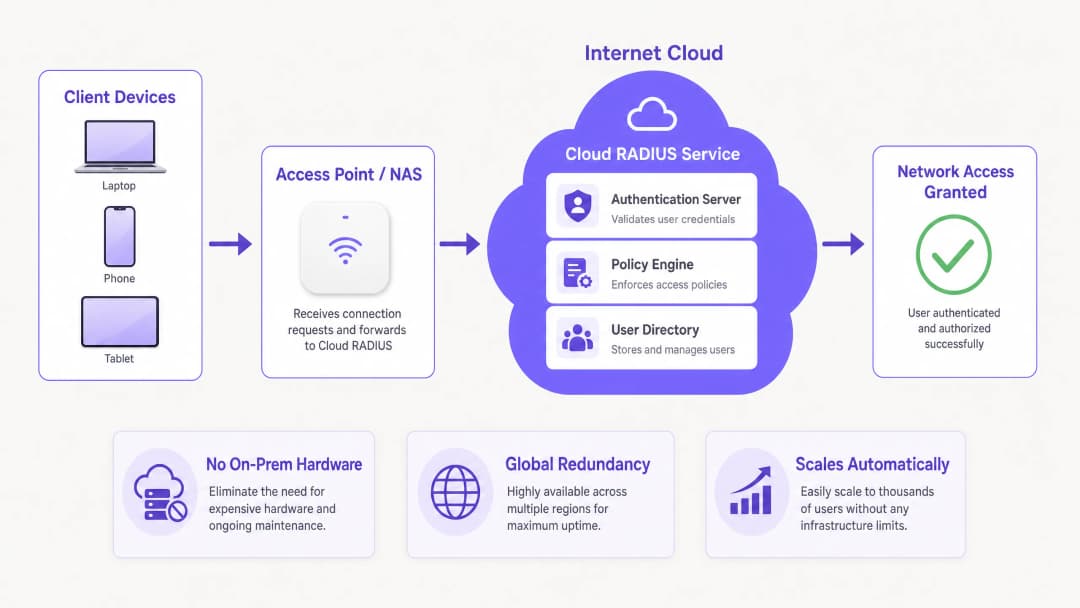
RADIUS, defined initially in RFC 2865, operates on a client-server model where Network Access Servers (NAS)—such as WiFi access points or VPN concentrators—forward authentication requests to a central server. Historically, this meant deploying FreeRADIUS or Microsoft Network Policy Server (NPS) on dedicated hardware. While functional for single-site deployments, scaling this architecture across distributed environments introduces significant latency and redundancy challenges.

Cloud RADIUS abstracts the underlying infrastructure. Authentication requests are routed to globally distributed cloud endpoints, ensuring sub-100ms response times even under peak loads. This elasticity is crucial for high-density environments like stadiums or conference centres.

architecture_overview.png

EAP Methods and Security Posture

The choice of Extensible Authentication Protocol (EAP) method fundamentally dictates your security posture:

  • PEAP (Protected EAP): Tunnels MSCHAPv2 within a TLS session. While widely supported and easy to integrate with Active Directory, PEAP is vulnerable to credential harvesting via rogue access points if client devices are not strictly configured to validate the server certificate.
  • EAP-TLS: The enterprise gold standard. It requires mutual certificate authentication—both the server and the client must present valid certificates. This eliminates password-based attacks entirely but necessitates a robust Public Key Infrastructure (PKI) and Mobile Device Management (MDM) integration for certificate deployment.
  • EAP-TTLS and EAP-FAST: Provide alternatives where broad client compatibility (including legacy or Linux systems) is required, or where certificate validation dependencies need to be bypassed using Protected Access Credentials (PACs).

WPA3 and OpenRoaming Integration

Modern deployments must account for WPA3-Enterprise, which mandates 192-bit security mode for the highest classifications, requiring specific cipher suites. Furthermore, Cloud RADIUS facilitates participation in federation frameworks like OpenRoaming. Purple, for instance, acts as a free identity provider for OpenRoaming under its Connect licence, allowing seamless, secure authentication across participating global networks.

Implementation Guide

Deploying Cloud RADIUS requires a systematic approach to ensure zero downtime during the transition.

Step 1: Identity Provider (IdP) Integration

Your Cloud RADIUS instance must synchronize with your authoritative user directory. Native SAML or SCIM provisioning with Microsoft Entra ID, Google Workspace, or Okta is highly recommended over manual LDAP proxies or CSV imports. This ensures that when an employee is offboarded in the HR system, their network access is revoked instantly.

Step 2: Certificate Management Strategy

If deploying EAP-TLS, define your certificate lifecycle. Select a Cloud RADIUS provider that includes an integrated PKI or integrates cleanly with your existing Certificate Authority (CA). Automate certificate issuance and revocation via your MDM platform (e.g., Intune or Jamf) to prevent authentication failures due to expired certificates.

Step 3: Network Device Configuration

Configure your NAS devices (access points, switches) to point to the primary and secondary Cloud RADIUS IP addresses. Ensure the shared secret is cryptographically complex (minimum 32 random characters). Adjust the failover timeout settings; a 3-to-5-second timeout is optimal to prevent prolonged authentication delays if the primary node is unreachable.

Step 4: Policy Definition

Establish per-SSID policies. For example, mandate EAP-TLS for the corporate network, PEAP for legacy IoT devices, and isolate guest access. Note that RADIUS handles known users; for visitors, deploy a dedicated Guest WiFi solution with a captive portal to capture first-party data, integrating with a WiFi Analytics platform. For more on guest engagement, refer to How To Improve Guest Satisfaction: The Ultimate Playbook .

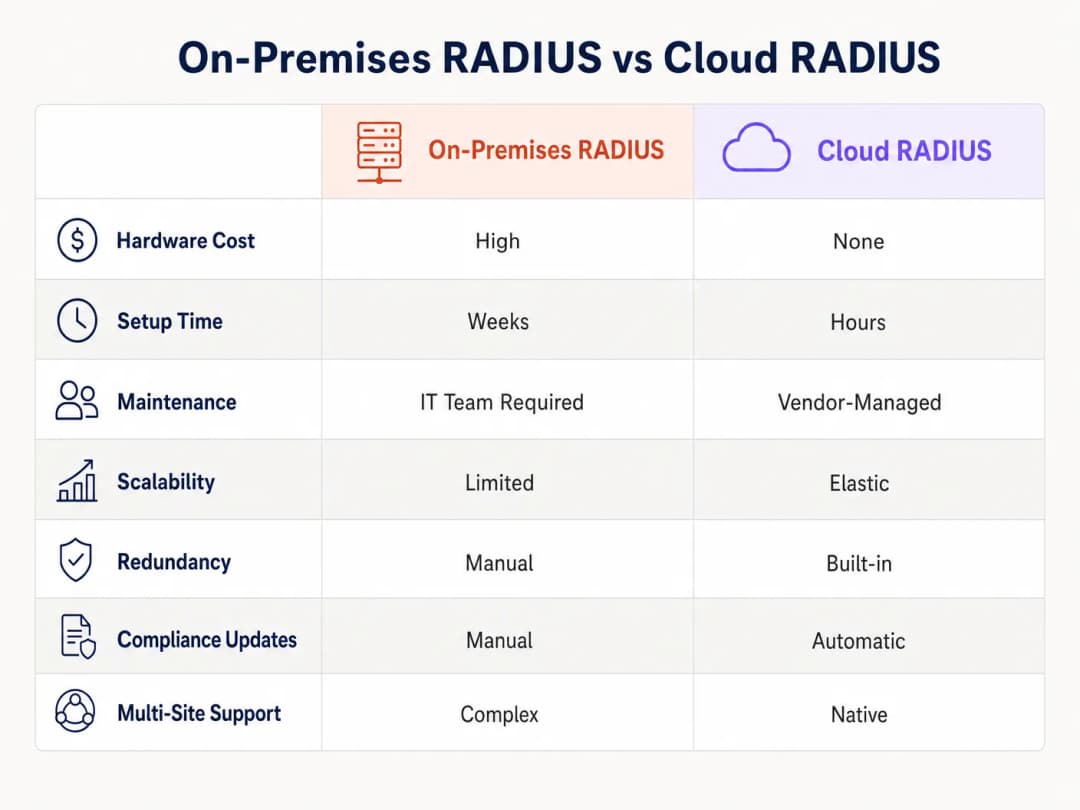
comparison_chart.png

Best Practices

  • Implement Strict Server Certificate Validation: For PEAP deployments, push group policies or MDM profiles that force clients to validate the RADIUS server certificate and restrict trust to specific Root CAs.
  • Segment Accounting and Authentication Traffic: Ensure RADIUS accounting data is actively monitored and retained. This audit trail is critical for compliance reporting (e.g., PCI DSS, HIPAA).
  • Monitor Authentication Latency: High latency often indicates suboptimal routing or IdP sync issues. Use monitoring tools to track the time taken from the Access-Request to the Access-Accept packet.
  • Optimise Signal and Channel Planning: Reliable authentication relies on a stable physical layer. Review guides such as Understanding RSSI and Signal Strength for Optimal Channel Planning to ensure your RF environment supports seamless 802.1X roaming.

Troubleshooting & Risk Mitigation

Even with managed services, misconfigurations can cause access failures. Common failure modes include:

  • Certificate Expiry: The number one cause of EAP-TLS failures. Mitigation: Implement automated alerting 30 days prior to CA or server certificate expiration.
  • Shared Secret Mismatch: Often occurs when adding new access points. Mitigation: Standardise configuration templates in your network management system.
  • NAT and IP Whitelisting Issues: Cloud RADIUS providers typically require NAS IP whitelisting. If your branch offices use dynamic IPs or complex NAT configurations, authentication requests may be dropped. Mitigation: Use static egress IPs or deploy a local RADIUS proxy if necessary.
  • IdP Synchronisation Failures: If the cloud directory fails to sync with the on-premise AD, new users cannot authenticate. Mitigation: Monitor the SCIM/LDAP connector status actively.

ROI & Business Impact

Transitioning to Cloud RADIUS delivers measurable business value:

  1. Reduced Infrastructure Capex: Eliminates the need to purchase, rack, and power physical RADIUS servers at every major site.
  2. Lower Operational Overhead: IT teams no longer spend hours patching OS vulnerabilities or manually managing server failover. Vendor-managed updates ensure continuous compliance.
  3. Enhanced Security Posture: Transitioning to EAP-TLS via cloud PKI mitigates the risk of credential theft, directly reducing the potential cost of a data breach.
  4. Agility and Scalability: When opening a new retail branch or hotel, network authentication can be provisioned in minutes rather than weeks. For practical rollout strategies, see Setting Up WiFi for Business: A 2026 Playbook .

By centralising access control, organisations not only secure their perimeters but also free up senior engineering talent to focus on strategic initiatives rather than maintaining legacy infrastructure.

Key Definitions

Cloud RADIUS

A managed service that hosts the Remote Authentication Dial-In User Service protocol in a highly available cloud environment, eliminating the need for on-premises authentication servers.

Evaluated by IT teams seeking to reduce hardware capex and operational overhead while maintaining secure 802.1X network access.

EAP-TLS (Extensible Authentication Protocol-Transport Layer Security)

A highly secure authentication method requiring both the client and the server to present digital certificates to prove their identity.

The recommended standard for enterprise networks to prevent password-based attacks, requiring PKI and MDM for deployment.

NAS (Network Access Server)

The device—such as a WiFi access point, switch, or VPN concentrator—that acts as the RADIUS client, forwarding user credentials to the RADIUS server.

Network engineers must configure the NAS with the correct RADIUS server IPs and shared secrets to enable 802.1X authentication.

Shared Secret

A cryptographic text string known only to the NAS and the RADIUS server, used to encrypt RADIUS packets and verify the sender's authenticity.

A weak shared secret is a major security vulnerability; enterprise deployments should use long, randomly generated strings.

SCIM (System for Cross-domain Identity Management)

An open standard that automates the exchange of user identity information between IT systems or cloud applications.

Used to automatically provision and de-provision users in the Cloud RADIUS directory when changes are made in the primary HR or IT identity system.

OpenRoaming

A federation framework developed by the Wireless Broadband Alliance that allows users to automatically and securely connect to participating WiFi networks globally.

Cloud RADIUS providers that support OpenRoaming (like Purple) allow venues to offer seamless, secure connectivity to visitors without captive portals.

Accounting Logs

Records generated by the RADIUS server detailing user connection events, including start time, end time, data transferred, and IP address assigned.

Critical for security audits, troubleshooting, and demonstrating compliance with frameworks like PCI DSS and GDPR.

Change of Authorization (CoA)

A RADIUS feature that allows the server to dynamically modify a user's active session, such as changing their VLAN or disconnecting them, without requiring a reconnection.

Used by network administrators to instantly quarantine a compromised device or apply new policy restrictions mid-session.

Worked Examples

A 200-room hotel currently uses on-premises Microsoft NPS for staff WiFi authentication via PEAP. They are experiencing authentication timeouts during peak check-in hours and want to migrate to Cloud RADIUS with EAP-TLS for better security and reliability. How should the IT Director architect this migration?

  1. Deploy a Cloud RADIUS tenant and integrate it with the hotel's Microsoft Entra ID via SCIM for automated user lifecycle management. 2. Configure the Cloud RADIUS integrated PKI to issue client certificates. 3. Use the existing MDM (e.g., Intune) to push the Root CA, client certificates, and a new WiFi profile configured for EAP-TLS to all staff devices. 4. Configure the hotel's access points to point to the primary and secondary Cloud RADIUS IPs, using a new, complex 32-character shared secret. 5. Run both the old NPS and new Cloud RADIUS in parallel on different SSIDs for a two-week transition period before decommissioning the on-premise servers.
Examiner's Commentary: This approach minimizes risk by running parallel SSIDs during the transition. Moving to EAP-TLS eliminates the credential harvesting risks associated with PEAP, and leveraging MDM for certificate deployment ensures zero friction for the end users. The SCIM integration guarantees that when staff leave, their access is instantly revoked.

A national retail chain with 500 locations needs to ensure PCI DSS compliance for its point-of-sale (POS) terminals, which connect via WiFi. They are moving to Cloud RADIUS. What specific configurations are required to meet compliance?

  1. Implement strict network segmentation: POS terminals must authenticate to a dedicated, hidden SSID mapped to an isolated VLAN. 2. Enforce EAP-TLS authentication for all POS devices to ensure mutual authentication and prevent rogue devices from joining the POS network. 3. Configure the Cloud RADIUS service to retain all accounting logs (Access-Accept, Access-Reject, connection duration) for a minimum of one year, as mandated by PCI DSS. 4. Ensure the RADIUS shared secrets between the branch APs and the Cloud RADIUS service are rotated every 90 days using an automated script.
Examiner's Commentary: This solution directly addresses PCI DSS requirements for logical segmentation, strong access control, and auditability. Relying on MAC address filtering is insufficient for compliance; EAP-TLS provides the necessary cryptographic proof of device identity. Retaining accounting logs in the cloud simplifies the audit process for the QSA.

Practice Questions

Q1. Your organisation is migrating from an on-premises Active Directory to Google Workspace. You currently use PEAP-MSCHAPv2 for WiFi authentication. Why is this a problem, and what is the recommended solution?

Hint: Consider how PEAP validates credentials against the directory protocol.

View model answer

PEAP-MSCHAPv2 relies on the NT hash of a user's password, which Google Workspace does not store or expose natively. The recommended solution is to migrate to EAP-TLS using a Cloud RADIUS provider that features an integrated PKI. The Cloud RADIUS service can sync user identities from Google Workspace via SAML/SCIM, and authenticate devices using client certificates rather than passwords.

Q2. A branch office reports that users are experiencing 30-second delays when connecting to the WiFi network, followed by a successful connection. The primary Cloud RADIUS IP in that region is currently undergoing maintenance. What configuration error is causing this delay?

Hint: Look at the communication between the NAS and the RADIUS servers.

View model answer

The NAS (Access Point or Switch) has the RADIUS server timeout configured too high (e.g., 30 seconds). It is waiting for the primary server to respond before failing over to the secondary server. The timeout should be reduced to 3-5 seconds to ensure rapid failover without impacting the user experience.

Q3. You are deploying Cloud RADIUS for a hospital. The security team mandates that only corporate-owned devices can connect to the internal network, even if an employee knows a valid username and password. How do you enforce this?

Hint: Which EAP method verifies the device's identity, not just the user's knowledge?

View model answer

Deploy EAP-TLS. Configure the hospital's MDM solution to push a unique client certificate only to enrolled, corporate-owned devices. Configure the Cloud RADIUS policy to reject any authentication request that does not present a valid certificate signed by the trusted internal PKI, effectively blocking BYOD or rogue devices regardless of password knowledge.