
হাইব্রিড ওয়ার্কফোর্সের জন্য RADIUS as a Service-এর সুরক্ষাজনিত সুবিধাসমূহ
এই প্রযুক্তিগত রেফারেন্স গাইডটি ব্যাখ্যা করে যে কীভাবে RADIUS as a Service বিভিন্ন স্থানে ছড়িয়ে থাকা হাইব্রিড ওয়ার্কফোর্সের জন্য নেটওয়ার্ক অ্যাক্সেস সুরক্ষিত করে। এটি অন-প্রিমিসেস RADIUS ইনফ্রাস্ট্রাকচারকে একটি ক্লাউড-পরিচালিত অথেন্টিকেশন পরিষেবা দিয়ে প্রতিস্থাপন করার আর্কিটেকচার, সুরক্ষাজনিত সুবিধা এবং ডেপ্লয়মেন্টের ধাপগুলো কভার করে। হোটেল, রিটেল চেইন, স্টেডিয়াম এবং পাবলিক সেক্টর প্রতিষ্ঠানের IT ম্যানেজার এবং নেটওয়ার্ক আর্কিটেক্টদের জন্য, এই গাইডটি এই ত্রৈমাসিকে ক্লাউড RADIUS মাইগ্রেশন মূল্যায়ন এবং কার্যকর করার জন্য প্রয়োজনীয় প্রমাণ সরবরাহ করে।
এই গাইডটি শুনুন
পডকাস্ট ট্রান্সক্রিপ্ট দেখুন
আমাদের মূল সিরিজের অংশ: Enterprise WiFi Security Guide →

কার্যনির্বাহী সারসংক্ষেপ
হাইব্রিড ওয়ার্কফোর্সের দিকে পরিবর্তনের ফলে ঐতিহ্যবাহী নেটওয়ার্ক সুরক্ষায় একটি মৌলিক দুর্বলতা প্রকাশ পেয়েছে: অন-প্রিমিসেস RADIUS সার্ভারগুলো এমন একটি বিশ্বের জন্য ডিজাইন করা হয়েছিল যেখানে কর্মীরা একই ভবনে বসে একই নেটওয়ার্কের সাথে সংযুক্ত হতেন। সেই বিশ্ব আর নেই। আজ, আপনার কর্মীরা হোটেলের রুম, রিটেল ফ্লোর, রিমোট অফিস এবং ইভেন্টের স্থান থেকে অথেন্টিকেট করেন। আপনার আইডেন্টিটি প্রোভাইডাররা ক্লাউডে রয়েছে। আপনার অ্যাক্সেস পয়েন্টগুলো শত শত স্থানে ছড়িয়ে ছিটিয়ে রয়েছে। তবুও অনেক প্রতিষ্ঠান এখনও ফিজিক্যাল RADIUS সার্ভারের উপর নির্ভর করে যেগুলোর ম্যানুয়াল প্যাচিং প্রয়োজন, যা Microsoft Entra ID বা Google Workspace-এর সাথে নেটিভলি ইন্টিগ্রেট হতে পারে না এবং হার্ডওয়্যার নষ্ট হলে কোনো পূর্ব নোটিশ ছাড়াই বন্ধ হয়ে যায়।
RADIUS as a Service এই ইনফ্রাস্ট্রাকচারের জায়গা একটি ক্লাউড-নেটিভ অথেন্টিকেশন ইঞ্জিন দিয়ে প্রতিস্থাপন করে। আপনি আপনার অ্যাক্সেস পয়েন্টগুলোকে ক্লাউড এন্ডপয়েন্টের দিকে নির্দেশ করেন। প্রোভাইডার সার্ভার, প্যাচিং এবং হাই অ্যাভেইলেবিলিটি পরিচালনা করে। আপনি পলিসি পরিচালনা করেন। হসপিটালিটি গ্রুপ, রিটেল চেইন এবং পাবলিক ভেন্যুগুলোর IT টিমের জন্য, এই পরিবর্তনটি হার্ডওয়্যার ওভারহেড দূর করে, আইডেন্টিটি-ভিত্তিক নেটওয়ার্ক সেগমেন্টেশন প্রয়োগ করে এবং PCI DSS এবং GDPR-এর জন্য প্রয়োজনীয় একটি অডিট ট্রেইল প্রদান করে।
প্রযুক্তিগত গভীর বিশ্লেষণ
অন-প্রিমিসেস RADIUS কেন সমস্যার সম্মুখীন হচ্ছে
RFC 2865-এ সংজ্ঞায়িত RADIUS, নেটওয়ার্ক অ্যাক্সেসের জন্য কেন্দ্রীভূত অথেন্টিকেশন, অথরাইজেশন এবং অ্যাকাউন্টিং (AAA) প্রদান করে। WPA2-Enterprise বা WPA3-Enterprise WiFi চালানো প্রতিটি প্রতিষ্ঠান এর উপর নির্ভর করে। এই প্রোটোকলটি নিজেই শক্তিশালী। समस्याটি এর চারপাশে গড়ে ওঠা ইনফ্রাস্ট্রাকচার মডেলে।
Linux-এ FreeRADIUS ডেপ্লয় করা, সুরক্ষিত করা এবং রক্ষণাবেক্ষণ করার জন্য প্রচুর দক্ষতার প্রয়োজন হয়। Microsoft Network Policy Server (NPS) অত্যন্ত ঘনিষ্ঠভাবে Active Directory-র সাথে যুক্ত এবং এতে Microsoft Entra ID, Okta, বা Google Workspace-এর জন্য কোনো নেটিভ সাপোর্ট নেই। Cisco Identity Services Engine (ISE) এন্টারপ্রাইজ-গ্রেড পলিসি ফিচার প্রদান করে তবে এর জন্য ডেডিকেটেড হার্ডওয়্যার, জটিল লাইসেন্সিং এবং এটি পরিচালনা করার জন্য একটি বিশেষজ্ঞ টিমের প্রয়োজন হয়। এই তিনটির জন্যই আপনাকে ম্যানুয়ালি হাই অ্যাভেইলেবিলিটি তৈরি এবং রক্ষণাবেক্ষণ করতে হবে, সাধারণত ডেটাবেস রেপ্লিকেশন সহ দুটি সার্ভার এবং সেগুলোর সামনে একটি লোড ব্যালেন্সার চালিয়ে।
একটি স্থিতিশীল Active Directory সহ সিঙ্গেল-সাইট প্রতিষ্ঠানের জন্য, এই মডেলটি পরিচালনা করা সম্ভব। ৫০টি প্রোপার্টি থাকা একটি হোটেল গ্রুপ, ৪০০টি স্টোর থাকা একটি রিটেল চেইন বা একটি বিস্তৃত ক্যাম্পাস থাকা ইউনিভার্সিটির জন্য এটি অসম্ভব হয়ে পড়ে। আপনি হয় RADIUS সার্ভারগুলোকে কেন্দ্রীভূত করেন এবং রিমোট সাইটগুলো থেকে অথেন্টিকেশন ল্যাটেন্সি মেনে নেন, অথবা আপনি প্রতিটি স্থানে সার্ভার ডেপ্লয় করেন এবং সেগুলো পৃথকভাবে পরিচালনা করেন। এর কোনোটিই স্কেল করে না।
RADIUS as a Service-এর আর্কিটেকচার
RADIUS as a Service হলো RADIUS প্রোটোকলের জন্য একটি ক্লাউড-ভিত্তিক ডেলিভারি মডেল। RFC 2865 এবং এর সম্প্রসারণগুলো মেনে চলার মাধ্যমে প্রোটোকলটি নিজেই অপরিবর্তित থাকে। যা পরিবর্তিত হয় তা হলো ইনফ্রাস্ট্রাকচার কে রক্ষণাবেক্ষণ করছে।
যখন কোনো ডিভাইস আপনার WiFi নেটওয়ার্কের সাথে সংযুক্ত হয়, তখন অ্যাক্সেস পয়েন্ট (RADIUS ক্লায়েন্ট) একটি সুরক্ষিত, এনক্রিপ্ট করা টানেলের মাধ্যমে ক্লাউড RADIUS এন্ডপয়েন্টে অথেন্টিকেশন অনুরোধ ফরোয়ার্ড করে। ক্লাউড পরিষেবাটি আপনার আইডেন্টিটি প্রোভাইডারের মাধ্যমে ক্রেডেনশিয়াল যাচাই করে এবং ডায়নামিক VLAN অ্যাসাইনমেন্টের মতো পলিসি অ্যাট্রিবিউট সহ Access-Accept বা Access-Reject মেসেজ পাঠায়। অ্যাক্সেস পয়েন্টের দৃষ্টিকোণ থেকে, অথেন্টিকেশন ফ্লো অন-প্রিমিসেস RADIUS-এর মতোই থাকে।

ক্লাউড প্রোভাইডার ভৌগোলিকভাবে বিভিন্ন স্থানে অবস্থিত একাধিক ডেটা সেন্টারে RADIUS সার্ভার পরিচালনা করে। ফেইলওভার স্বয়ংক্রিয় হয়। যদি একটি এন্ডপয়েন্ট অনুপলব্ধ হয়, তবে আপনার টিমের কোনো হস্তক্ষেপ ছাড়াই ট্রাফিক পরবর্তী সক্রিয় এন্ডপয়েন্টে রুট করা হয়। একাধিক অঞ্চলে অফিস থাকা প্রতিষ্ঠানের জন্য, অথেন্টিকেশন সবচেয়ে কাছের ক্লাউড এন্ডপয়েন্টে ঘটে, যার ফলে ভৌগোলিক অবস্থান যাই হোক না কেন ল্যাটেন্সি কম থাকে।
IEEE 802.1X आणि EAP पद्धती
IEEE 802.1X হলো পোর্ট-ভিত্তিক নেটওয়ার্ক অ্যাক্সেস কন্ট্রোল (NAC)-এর স্ট্যান্ডার্ড। এটি কোনো ডিভাইসকে IP অ্যাড্রেস পাওয়ার আগে এবং ট্রাফিক পাস করার অনুমতি পাওয়ার আগে অথেন্টিকেট হতে বাধ্য করে। 802.1X ডেপ্লয়মেন্টে RADIUS হলো অথেন্টিকেশন সার্ভার।
Extensible Authentication Protocol (EAP) ক্রেডেনশিয়াল কীভাবে আদান-প্রদান করা হয় তা সংজ্ঞায়িত করে। ক্লাউড RADIUS সমস্ত EAP পদ্ধতি সমর্থন করে:
| EAP পদ্ধতি | অথেন্টিকেশন ধরন | সুরক্ষার স্তর | প্রস্তাবিত ব্যবহার |
|---|---|---|---|
| EAP-TLS | মিউচুয়াল সার্টিফিকেট-ভিত্তিক | সর্বোচ্চ | MDM-পরিচালিত সার্টিফিকেট সহ কর্পোরেট ডিভাইসসমূহ |
| PEAP-MSCHAPv2 | ইউজারনেম এবং পাসওয়ার্ড | মাঝারি | পুরোনো ডিভাইস বা MDM ছাড়া BYOD |
| EAP-TTLS | টানেলড ক্রেডেনশিয়াল | মাঝারি | মিশ্র পরিবেশ |
| MAC Authentication Bypass | ডিভাইসের MAC অ্যাড্রেস | কম | IoT ডিভাইস যা 802.1X সমর্থন করতে পারে না |
RFC 5216-এ সংজ্ঞায়িত EAP-TLS-কে গোল্ড স্ট্যান্ডার্ড হিসেবে বিবেচনা করা হয়। ক্লায়েন্ট ডিভাইস এবং RADIUS সার্ভার উভয়ই একে অপরের কাছে ডিজিটাল সার্টিফিকেট উপস্থাপন করে। এই মিউচুয়াল অথেন্টিকেশন নেটওয়ার্ক অ্যাক্সেস প্রক্রিয়া থেকে পাসওয়ার্ডের প্রয়োজনীয়তা সম্পূর্ণরূপে দূর করে। সার্টিফিকেটটি ক্রিপ্টোগ্রাফিকভাবে ডিভাইসের সাথে যুক্ত থাকে এবং পাসওয়ার্ডের মতো এটি ফিশিংয়ের মাধ্যমে হাতিয়ে নেওয়া, অনুমান করা বা চুরি করা যায় না। ক্রেডেনশিয়াল-ভিত্তিক ডেটা ব্রিচের সম্মুখীন হওয়া প্রতিষ্ঠানের জন্য এটি সবচেয়ে সরাসরি প্রযুক্তিগত সমাধান।
ডায়নামিক VLAN অ্যাসাইনমেন্ট
অথেন্টিকেশনের পাশাপাশি, RADIUS সার্ভার অথরাইজেশন প্রয়োগ করে। যখন এটি একটি সংযোগ গ্রহণ করে, তখন এটি অ্যাক্সেস পয়েন্টে পলিসি অ্যাট্রিবিউট ফেরত পাঠায়, যার মধ্যে ডিভাইসটিকে অ্যাসাইন করার জন্য VLAN ID অন্তর্ভুক্ত থাকে। এই ডায়নামিক VLAN অ্যাসাইনমেন্ট হলো আইডেন্টিটি-ভিত্তিক নেটওয়ার্ক সক্ষম করার মূল প্রক্রিয়া।
হোটেলের একজন রিসেপশনিস্ট অথেন্টিকেট করেন এবং তাকে প্রোপার্টি ম্যানেজমেন্ট系统中 অ্যাক্সেস সহ ফ্রন্ট-অফ-হাউস VLAN-এ রাখা হয়। হাউসকিপিং কর্মীকে শুধুমাত্র ইন্টারনেট অ্যাক্সেস সহ একটি সীমিত VLAN-এ রাখা হয়। অতিথির ডিভাইসটিকে কর্পোরেট রিসোর্স থেকে সম্পূর্ণ আলাদা একটি Guest WiFi VLAN-এ রাখা হয়। সিকিউরিটি ক্যামেরার মতো একটি IoT ডিভাইসকে একটি ডেডিকেটেড IoT VLAN-এ রাখা হয়। এই সমস্ত কিছু RADIUS সার্ভার দ্বারা যাচাইকৃত আইডেন্টিটির ভিত্তিতে স্বয়ংক্রিয়ভাবে ঘটে, প্রতিটি ডিভাইসের জন্য কোনো ম্যানুয়াল VLAN কনফিগারেশন ছাড়াই।
এটি নেটওয়ার্ক অ্যাক্সেসের জন্য প্রয়োগ করা ন্যূনতম বিশেষাধিকারের (least privilege) নীতি। কোনো ডিভাইস একটি নির্দিষ্ট SSID-এর সাথে সংযুক্ত হয়েছে বলেই আপনি সেটিকে বিশ্বাস করছেন না। আপনি যাচাইকৃত আইডেন্টিটির ভিত্তিতে অ্যাক্সেস মঞ্জুর করছেন এবং সেই অ্যাক্সেসকে শুধুমাত্র সেই আইডেন্টিটির জন্য প্রয়োজনীয় জিনিসের মধ্যে সীমাবদ্ধ করছেন। এটি কীভাবে একটি আরও ব্যাপক নেটওয়ার্ক অ্যাক্সেস কন্ট্রোল কৌশলের সাথে খাপ খায় সে সম্পর্কে বিস্তারিত জানতে, আমাদের network access control systems সংক্রান্ত গাইডটি দেখুন।
নেটিভ ক্লাউড আইডেন্টিটি ইন্টিগ্রেশন
ক্লাউড RADIUS-এর সবচেয়ে গুরুত্বপূর্ণ অপারেশনাল সুবিধা হলো আধুনিক আইডেন্টিটি প্রোভাইডারদের সাথে এর নেটিভ ইন্টিগ্রেশন। ক্লাউড RADIUS সরাসরি Microsoft Entra ID, Okta এবং Google Workspace-এর সাথে OIDC, SAML এবং LDAP-এর মতো স্ট্যান্ডার্ড প্রোটোকলের মাধ্যমে সংযুক্ত হয়। যখন আপনি আপনার আইডেন্টিটি প্রোভাইডারে কোনো নতুন কর্মী যোগ করেন, তখন তারা অবিলম্বে WiFi নেটওয়ার্কে অথেন্টিকেট হতে পারেন। যখন আপনি কোনো কর্মীকে ছাঁটাই করেন, তখন আপনি ডিরেক্টরিতে তাদের অ্যাকাউন্ট নিষ্ক্রিয় করেন এবং প্রতিটি স্থানের প্রতিটি অ্যাক্সেস পয়েন্টে তাদের WiFi অ্যাক্সেস অবিলম্বে বাতিল হয়ে যায়।
এই রিয়েল-টাইম সিঙ্ক্রোনাইজেশন এন্টারপ্রাইজ WiFi-এর সবচেয়ে কঠিন নিরাপত্তা দুর্বলতাগুলোর একটি দূর করে: প্রাক্তন কর্মী যাদের কাছে এখনও একটি শেয়ার্ড PSK রয়েছে বা চলে যাওয়ার পর যাদের RADIUS অ্যাকাউন্ট ম্যানুয়ালি মুছে ফেলা হয়নি। ক্লাউড RADIUS এবং ক্লাউড আইডেন্টিটি প্রোভাইডারের মাধ্যমে, কর্মীকে ছাঁটাই করা তাৎক্ষণিক নেটওয়ার্ক-ব্যাপী কার্যকারিতা সহ একটি একক পদক্ষেপে পরিণত হয়।
আপনার নির্দিষ্ট সেটআপ নিয়ে কোনো প্রশ্ন আছে?
আমাদের টিম ৮০,০০০ ভেন্যুতে ভেন্যু অপারেটর, IT ম্যানেজার এবং নেটওয়ার্ক ইঞ্জিনিয়ারদের সাথে কাজ করে। একটি ২০ মিনিটের কল বুক করুন এবং আপনার মতো অন্যরা কীভাবে এর সমাধান করেছেন তা আমরা আপনাকে দেখাব।
ডেপ্লয়মেন্ট গাইড
ধাপ ১: আপনার আইডেন্টিটি প্রোভাইডার সংযুক্ত করুন
ক্লাউড RADIUS পরিষেবাকে আপনার আইডেন্টিটি প্রোভাইডারের সাথে সংযুক্ত করুন। Microsoft Entra ID বা Google Workspace-এর জন্য, এতে সাধারণত OAuth-এর মাধ্যমে একটি এন্টারপ্রাইজ অ্যাপ্লিকেশন অনুমোদন করা বা একটি LDAP কানেক্টর কনফিগার করা অন্তর্ভুক্ত থাকে। আপনার ডিরেক্টরি গ্রুপগুলোকে নির্দিষ্ট নেটওয়ার্ক পলিসির সাথে ম্যাপ করুন। শুরু করার আগে আপনার রোল ট্যাক্সোনমি (role taxonomy) সংজ্ঞায়িত করুন: কোন গ্রুপগুলো কোন VLAN-এ ম্যাপ হবে এবং প্রতিটি VLAN-এর কী কী অ্যাক্সেস অধিকার রয়েছে। শুরুতেই এটি সঠিকভাবে করলে পরবর্তীতে অনেক পরিশ্রম বেঁচে যায়।
ধাপ ২: কর্পোরেট ডিভাইসের জন্য সার্টিফিকেট ডেপ্লয় করুন
কর্পোরেট-মালিকানাধীন ডিভাইসের জন্য, ডিভাইসে ক্লায়েন্ট সার্টিফিকেট পাঠাতে Microsoft Intune বা Jamf-এর মতো আপনার মোবাইল ডিভাইস ম্যানেজমেন্ট (MDM) প্ল্যাটফর্ম কনফিগার করুন। এটি EAP-TLS অথেন্টিকেশন সক্ষম করে। RADIUS সার্ভারের সার্টিফিকেট ইস্যুকারী রুট সার্টিফিকেট অথরিটি (CA)-কে সমস্ত ক্লায়েন্ট ডিভাইস বিশ্বাস করে তা নিশ্চিত করুন। একটি অবিশ্বাস্য চেইন হলো অথেন্টিকেশন ব্যর্থ হওয়ার সবচেয়ে সাধারণ কারণ।
ধাপ ৩: আপনার নেটওয়ার্ক হার্ডওয়্যার কনফিগার করুন
আপনার ওয়্যারলেস কন্ট্রোলার বা অ্যাক্সেস পয়েন্টে ক্লাউড RADIUS IP অ্যাড্রেস এবং শেয়ার্ড সিক্রেট যোগ করুন। প্রোভাইডারের বিল্ট-ইন রিডান্ডেন্সি ব্যবহার করতে সর্বদা প্রাইমারি এবং সেকেন্ডারি উভয় এন্ডপয়েন্ট কনফিগার করুন। আপনার অ্যাক্সেস পয়েন্ট থেকে ক্লাউড RADIUS এন্ডপয়েন্টে যাওয়া UDP পোর্ট ১৮১২ (অথেন্টিকেশন) এবং ১৮১৩ (অ্যাকাউন্টিং) আউটবাউন্ড খোলা আছে কিনা তা নিশ্চিত করুন। লাইভ করার আগে এটি যাচাই করুন। ভুলভাবে কনফিগার করা ফায়ারওয়াল নিয়ম হলো ডেপ্লয়মেন্ট ব্যর্থতার দ্বিতীয় সবচেয়ে সাধারণ কারণ।
ক্লাউড RADIUS Cisco Meraki, HPE Aruba, Ruckus, Juniper Mist, Ubiquiti UniFi, Cambium, Extreme এবং Fortinet-এর সাথে কাজ করে। কনফিগারেশনের ধাপগুলো ভেন্ডর ভেদে ভিন্ন হতে পারে, তবে RADIUS প্রোটোকলটি স্ট্যান্ডার্ডাইজড, তাই মূল প্যারামিটারগুলো (সার্ভার IP, শেয়ার্ড সিক্রেট, অথেন্টিকেশন পোর্ট) একই থাকে।
ধাপ ৪: VLAN পলিসি সংজ্ঞায়িত করুন
আপনার RADIUS পলিসি ইঞ্জিনে ডায়নামিক VLAN অ্যাসাইনমেন্টকনফিগার করুন। প্রতিটি ব্যবহারকারীর ভূমিকা বা ডিভাইসের ধরনকে একটি নির্দিষ্ট VLAN ID-র সাথে ম্যাপ করুন। প্রোডাকশনে রোল আউট করার আগে প্রতিটি পলিসি পরীক্ষা করুন। একটি সাধারণ টেস্ট ম্যাট্রিক্স — প্রতি ভূমিকায় একটি ডিভাইস, প্রতি ভূমিকায় একটি VLAN, প্লেসমেন্ট যাচাই করা — ব্যবহারকারীদের প্রভাবিত করার আগেই বেশিরভাগ কনফিগারেশন ত্রুটি সনাক্ত করতে পারে।
সর্বোত্তম অনুশীলনসমূহ
সমস্ত কর্পোরেট ডিভাইসের জন্য EAP-TLS প্রয়োগ করুন। আপনার MDM রোলআউট অনুমতি দেওয়ার সাথে সাথেই PEAP-MSCHAPv2 ব্যবহার করা বন্ধ করুন। PEAP পাসওয়ার্ডের উপর নির্ভর করে, যা আপস করা যেতে পারে। EAP-TLS সার্টিফিকেটের উপর নির্ভর করে, যা আপস করা অসম্ভব।
সবকিছু সেগমেন্ট করুন। কর্মী, অতিথি এবং IoT ডিভাইসগুলোকে কখনই একই সাবনেটে রাখবেন না। কঠোর VLAN সীমানা প্রয়োগ করতে RADIUS ব্যবহার করুন। PCI DSS-এর অধীনে পেমেন্ট কার্ড ডেটা হ্যান্ডেল করা রিটেল পরিবেশের জন্য এবং রোগীদের ডেটা রক্ষা করা হেলথকেয়ার পরিবেশের জন্য এটি অত্যন্ত গুরুত্বপূর্ণ।
WPA3-Enterprise-এর সাথে সামঞ্জস্যপূর্ণ হোন। WPA3-Enterprise, যা বর্তমান WiFi নিরাপত্তা স্ট্যান্ডার্ড, এর জন্য 802.1X অথেন্টিকেশন প্রয়োজন। আপনার অ্যাক্সেস পয়েন্টগুলো WPA3-Enterprise সমর্থন করে তা নিশ্চিত করুন এবং কর্মীদের নেটওয়ার্কের জন্য এটিকে ন্যূনতম নিরাপত্তা স্ট্যান্ডার্ড হিসেবে কনফিগার করুন।
আপনার RADIUS লগগুলো নিয়মিত অডিট করুন। ক্লাউড RADIUS কেন্দ্রীভূত অডিট লগ প্রদান করে। প্রতি সপ্তাহে অথেন্টিকেশন ব্যর্থতার হার পর্যালোচনা করুন। কোনো নির্দিষ্ট ডিভাইস বা স্থানে ব্যর্থতার আকস্মিক বৃদ্ধি ভুল কনফিগারেশন বা সম্ভাব্য আক্রমণের প্রাথমিক লক্ষণ হতে পারে।
ফেইলওভার পরীক্ষা করুন। প্রতি ত্রৈমাসিকে অন্তত একবার, প্রাইমারি RADIUS এন্ডপয়েন্ট ব্যর্থতার সিমুলেশন করুন এবং সেকেন্ডারি এন্ডপয়েন্টের মাধ্যমে অথেন্টিকেশন চালু থাকে কিনা তা যাচাই করুন। ফলাফল রেকর্ড করুন। এটি একটি সহজ পরীক্ষা যা বেশিরভাগ টিম প্রয়োজন না হওয়া পর্যন্ত কখনই চালায় না।
সামুদ্রিক বা প্রত্যন্ত অঞ্চলসহ জটিল পরিবেশে WiFi ডেপ্লয় করা ভেন্যুগুলোর জন্য, WAN নির্ভরতার বিবেচনার বিষয়ে আমাদের Starlink-এ ক্যাপটিভ পোর্টাল সেট আপ করা সংক্রান্ত গাইডটি দেখুন।
ট্রাবলশুটিং এবং ঝুঁকি হ্রাস
অথেন্টিকেশন টাইমআউট
ডিভাইস অথেন্টিকেট হতে ব্যর্থ হলে, প্রথমে আপনার অ্যাক্সেস পয়েন্ট এবং ক্লাউড RADIUS এন্ডপয়েন্টের মধ্যে কানেক্টিভিটি পরীক্ষা করুন। UDP পোর্ট ১৮১২ এবং ১৮১৩ আউটবাউন্ডের জন্য খোলা আছে কিনা তা যাচাই করুন। আধুনিক ফায়ারওয়ালের ডিপ প্যাকেট ইন্সপেকশন RADIUS প্যাকেটগুলোকে বিলম্বিত বা ড্রপ করতে পারে। আপনি যদি টাইমআউট দেখতে পান, তবে RADIUS এন্ডপয়েন্টে UDP ট্রাফিক ইন্সপেকশন বা রেট-লিমিট করতে পারে এমন নিয়মের জন্য আপনার ফায়ারওয়াল পলিসি পরীক্ষা করুন।
সার্টিফিকেট ট্রাস্ট চেইন ব্যর্থতা
আপনি যদি EAP-TLS ব্যবহার করেন, তবে নিশ্চিত করুন যে ক্লায়েন্ট ডিভাইসগুলো RADIUS সার্ভার সার্টিফিকেট ইস্যুকারী রুট CA-কে বিশ্বাস করে। ট্রাস্ট চেইন ভেঙে গেলে, ম্যান-ইন-দ্য-মিডল আক্রমণ প্রতিরোধ করতে ডিভাইসটি নীরবে সংযোগ প্রত্যাখ্যান করবে। এটি কোনো স্পষ্ট ত্রুটি বার্তা ছাড়াই সংযোগ ব্যর্থতা হিসেবে দেখায়। EAP-TLS হ্যান্ডশেক ব্যর্থতার জন্য RADIUS সার্ভার লগ পরীক্ষা করুন। MDM-এর মাধ্যমে সমস্ত পরিচালিত ডিভাইসে রুট CA সার্টিফিকেট ডেপ্লয় করুন।
WAN নির্ভরতা
ক্লাউড RADIUS-এর জন্য একটি সক্রিয় ইন্টারনেট সংযোগ প্রয়োজন। WAN লিঙ্ক ব্যর্থ হলে, অথেন্টিকেশন অনুরোধগুলো সার্ভারে পৌঁছাতে পারে না। মিশন-ক্রিটিক্যাল স্থানীয় রিসোর্সের জন্য, স্থানীয় সার্ভাইভেবিলিটি বা অথেন্টিকেশন ক্যাশিং সমর্থন করে এমন অ্যাক্সেস পয়েন্টগুলো মূল্যায়ন করুন। বেশিরভাগ ডেপ্লয়মেন্টের জন্য, WAN নির্ভরতা গ্রহণযোগ্য কারণ ইন্টারনেট ছাড়া সাইটটি এমনিতেও ক্লাউড অ্যাপ্লিকেশনগুলোতে অ্যাক্সেস করতে পারবে না।
শেয়ার্ড সিক্রেট অমিল (Shared secret mismatches)
প্রতিটি অ্যাক্সেস পয়েন্ট বা ওয়্যারলেস কন্ট্রোলারকে সঠিক শেয়ার্ড সিক্রেট সহ একটি RADIUS ক্লায়েন্ট হিসেবে কনফিগার করতে হবে। অমিলের কারণে সেই ডিভাইসের সমস্ত অথেন্টিকেশন অনুরোধ নীরবে প্রত্যাখ্যান করা হবে। অন্যগুলো সফল হলেও যদি কোনো নির্দিষ্ট অ্যাক্সেস পয়েন্ট ব্যর্থ হয়, তবে সেই ডিভাইসের শেয়ার্ড সিক্রেট কনফিগারেশন যাচাই করুন।
ROI आणि व्यावसायिक प्रभाव
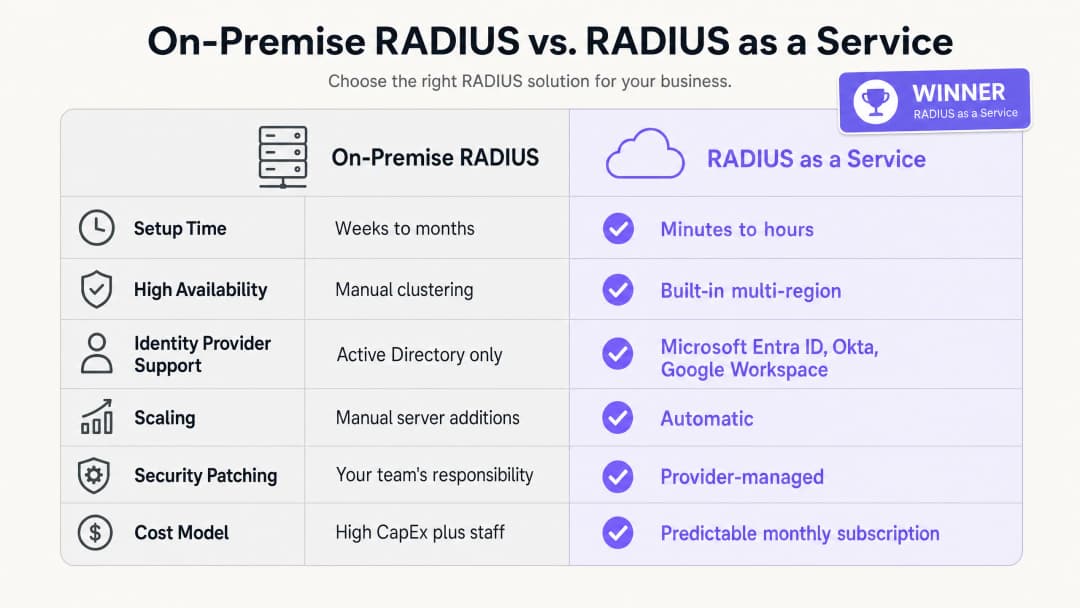
RADIUS as a Service-এর ব্যবসায়িক সুবিধাগুলো তিনটি স্তম্ভের উপর ভিত্তি করে গড়ে উঠেছে: ক্যাপিটাল খরচ কমানো, অপারেশনাল ওভারহেড হ্রাস এবং উন্নত নিরাপত্তা ব্যবস্থা।
ক্যাপিটাল খরচের ক্ষেত্রে, আপনি ফিজিক্যাল সার্ভার কেনা, লাইসেন্সিং এবং রিনিউ করার খরচ সম্পূর্ণরূপে দূর করেন। একটি ন্যূনতম ব্যবহারিক অন-প্রিমিসেস RADIUS ডেপ্লয়মেন্টের জন্য উচ্চ প্রাপ্যতার জন্য দুটি সার্ভার, অপারেটিং সিস্টেম লাইসেন্স এবং প্রতি তিন থেকে পাঁচ বছরে হার্ডওয়্যার রিনিউয়াল প্রয়োজন। ৫০টি প্রোপার্টি থাকা একটি হোটেল গ্রুপের জন্য, এটি একটি উল্লেখযোগ্য হার্ডওয়্যার বিনিয়োগ হবে।
অপারেশনাল ওভারহেডের ক্ষেত্রে, আপনার ইঞ্জিনিয়ারিং টিমকে আর Windows সার্ভার প্যাচ করতে, FreeRADIUS কনফিগারেশন ট্রাবলশুট করতে বা ফিজিক্যাল ইনফ্রাস্ট্রাকচারে সার্টিফিকেট রিনিউয়াল পরিচালনা করতে সময় ব্যয় করতে হবে না। সেই সময়টি নিরাপত্তা পলিসির কাজে লাগানো যেতে পারে যা সরাসরি আপনার নিরাপত্তা উন্নত করে।
নিরাপত্তা ব্যবস্থার কথা বিবেচনা করলে, EAP-TLS এবং ডায়নামিক VLAN অ্যাসাইনমেন্টে স্থানান্তরিত হওয়ার ফলে নেটওয়ার্কে আক্রমণের সম্ভাবনা উল্লেখযোগ্যভাবে হ্রাস পায়। ক্রেডেনশিয়াল চুরি হলো নেটওয়ার্ক লঙ্ঘনের প্রধান কারণ। নেটওয়ার্ক অথেন্টিকেশন প্রক্রিয়া থেকে পাসওয়ার্ড সরিয়ে ফেলা এই হুমকির সরাসরি সমাধান করে। কেন্দ্রীভূত অডিট লগিং PCI DSS v4.0 এবং GDPR মেনে চলতে সাহায্য করে, যা কমপ্লায়েন্স অডিটের খরচ এবং জটিলতা কমিয়ে দেয়।
পরিবহন হাব বা উচ্চ-ট্রাফিক ভেন্যু পরিচালনাকারী প্রতিষ্ঠানের জন্য, একটি একক ড্যাশবোর্ড থেকে সমস্ত স্থানে সুসংগত নিরাপত্তা পলিসি প্রয়োগ করার ক্ষমতা একটি পরিমাপযোগ্য অপারেশনাল উন্নতি। Purple ৮০,০০০+-এরও বেশি লাইভ ভেন্যুতে কাজ করছে এবং ২০২৪ সালে ৪৪০ মিলিয়ন লগইন প্রসেস করেছে (Purple-এর অভ্যন্তরীণ ডেটা, ২০২৪)। এই স্কেলকে সমর্থনকারী ইনফ্রাস্ট্রাকচারটি ডিজাইন অনুযায়ী ক্লাউড-নেটিভ।
WiFi অ্যানালিটিক্স এবং নেটওয়ার্ক ইন্টেলিজেন্স কীভাবে ব্যবসায়িক ফলাফলের সাথে যুক্ত হয় সে সম্পর্কে আরও জানতে, আমাদের WiFi Analytics platform দেখুন।
তথ্যসূত্র
[1] IEEE Standard for Local and metropolitan area networks - Port-Based Network Access Control. IEEE Std 802.1X-2020. [2] IETF. Remote Authentication Dial In User Service (RADIUS). RFC 2865. 1997. [3] IETF. The EAP-TLS Authentication Protocol. RFC 5216. 2008. [4] IronWiFi. Benefits of a Cloud RADIUS Server: Why Enterprises Are Moving Authentication Online. ফেব্রুয়ারি ২০২৬। [5] SecureW2. Cloud vs. On-Site RADIUS: Which is Better? মে ২০২৬। [6] Portnox. RADIUS as a Service. ২০২৬। [7] PCI Security Standards Council. PCI DSS v4.0. মার্চ ২০২২। [8] Purple. অভ্যন্তরীণ প্ল্যাটফর্ম ডেটা: ৪৪০ মিলিয়ন লগইন, ৮০,০০০+ ভেন্যু। ২০২৪।
মূল সংজ্ঞাসমূহ
RADIUS
Remote Authentication Dial-In User Service। RFC 2865-এ সংজ্ঞায়িত একটি নেটওয়ার্কিং প্রোটোকল যা একটি নেটওয়ার্ক পরিষেবার সাথে সংযুক্ত ব্যবহারকারীদের জন্য কেন্দ্রীভূত অথেন্টিকেশন, অথরাইজেশন এবং অ্যাকাউন্टिंग (AAA) ব্যবস্থাপনা প্রদান করে।
IT টিমগুলো একটি ডিভাইস বা ব্যবহারকারীকে কর্পোরেট WiFi নেটওয়ার্কে প্রবেশের অনুমতি দেওয়া হবে কিনা তা যাচাই করতে কেন্দ্রীয় সিদ্ধান্ত ইঞ্জিন হিসেবে RADIUS ব্যবহার করে। এটি অ্যাক্সেস পয়েন্ট এবং আইডেন্টিটি প্রোভাইডারের মধ্যে অবস্থান করে।
802.1X
পোর্ট-ভিত্তিক নেটওয়ার্ক অ্যাক্সেস কন্ট্রোল (NAC)-এর জন্য একটি IEEE স্ট্যান্ডার্ড। এটি LAN বা WLAN-এর সাথে যুক্ত হতে চাওয়া ডিভাইসগুলোকে একটি অথেন্টিকেশন প্রক্রিয়া প্রদান করে, যা তাদের IP অ্যাড্রেস পাওয়ার আগে অথেন্টিকেট হতে বাধ্য করে।
এটি এমন একটি স্ট্যান্ডার্ড যা এন্টারপ্রাইজ WiFi সুরক্ষাকে ভিত্তি প্রদান করে। 802.1X ছাড়া, SSID-এর সাথে সংযুক্ত যেকোনো ডিভাইস নেটওয়ার্ক অ্যাক্সেস পেয়ে যায়। 802.1X-এর মাধ্যমে, প্রতিটি ডিভাইসকে প্রথমে তার আইডেন্টিটি প্রমাণ করতে হবে।
EAP-TLS
Extensible Authentication Protocol - Transport Layer Security। RFC 5216-এ সংজ্ঞায়িত একটি অথেন্টিকেশন পদ্ধতি যার জন্য ক্লায়েন্ট ডিভাইস এবং RADIUS সার্ভার উভয়কেই ডিজিটাল সার্টিফিকেট উপস্থাপন করতে হয়, যা পাসওয়ার্ড ছাড়াই মিউচুয়াল অথেন্টিকেশন প্রদান করে।
এন্টারপ্রাইজ WiFi সুরক্ষার জন্য গোল্ড স্ট্যান্ডার্ড হিসেবে বিবেচিত। MDM-এর মাধ্যমে কর্পোরেট ডিভাইসগুলোতে সার্টিফিকেট ডেপ্লয় করা হয়। EAP-TLS নেটওয়ার্কে পাসওয়ার্ড চুরি এবং ফিশিং আক্রমণের ঝুঁকি দূর করে।
PEAP
Protected Extensible Authentication Protocol। একটি EAP পদ্ধতি যা একটি TLS সেশনের ভিতরে ইউজারনেম এবং পাসওয়ার্ডের আদান-প্রদানকে টানেল করে। এটি পাসওয়ার্ডের উপর নির্ভর করার কারণে EAP-TLS-এর চেয়ে কম নিরাপদ।
PEAP-MSCHAPv2 লিগ্যাসি পরিবেশে ব্যাপকভাবে ডেপ্লয় করা হয়। IT টিমগুলোর উচিত কর্পোরেট ডিভাইসের জন্য EAP-TLS-এ মাইগ্রেশনের পরিকল্পনা করা, এবং PEAP শুধুমাত্র অনিয়ন্ত্রিত বা BYOD ডিভাইসের জন্য একটি ফলব্যাক হিসেবে ব্যবহার করা।
Dynamic VLAN assignment
এমন একটি প্রক্রিয়া যেখানে RADIUS সার্ভার অ্যাক্সেস পয়েন্টকে নির্দেশ দেয় যে ব্যবহারকারী কোন SSID-এর সাথে সংযুক্ত হয়েছেন তার পরিবর্তে তার যাচাইকৃত আইডেন্টিটি এবং ভূমিকার উপর ভিত্তি করে ডিভাইসটিকে কোন ভার্চুয়াল LAN (VLAN)-এ রাখা হবে।
বহু-ভূমিকা বিশিষ্ট পরিবেশে নেটওয়ার্ক সেগমেন্টেশনের জন্য অপরিহার্য। একটি একক 'Staff' SSID নিরাপদে হাউসকিপিং, রিসেপশন এবং ম্যানেজমেন্ট ট্রাফিককে বিভিন্ন অ্যাক্সেস অধিকার সহ বিভিন্ন VLAN-এ আলাদা করতে পারে।
AAA
Authentication, Authorisation, and Accounting। একটি RADIUS সার্ভার দ্বারা সম্পাদিত তিনটি কাজ: আইডেন্টিটি যাচাই করা (অথেন্টিকেশন), কোন অ্যাক্সেসের অনুমতি দেওয়া হয়েছে তা নির্ধারণ করা (অথরাইজেশন), এবং অডিটের উদ্দেশ্যে সেশন ডেটা রেকর্ড করা (অ্যাকাউন্টিং)।
IT টিম এবং অডিটররা নেটওয়ার্ক অ্যাক্সেস কন্ট্রোল মূল্যায়নের জন্য একটি ফ্রেমওয়ার্ক হিসেবে AAA ব্যবহার করেন। ক্লাউড RADIUS একটি পরিচালিত পরিষেবা থেকে এই তিনটি ফাংশনই প্রদান করে।
WPA3-Enterprise
এন্টারপ্রাইজ নেটওয়ার্কের জন্য বর্তমান WiFi নিরাপত্তা স্ট্যান্ডার্ড, যার জন্য একটি RADIUS সার্ভারের মাধ্যমে 802.1X অথেন্টিকেশন প্রয়োজন। এটি WPA2-Enterprise-এর চেয়ে উন্নত ক্রিপ্টোগ্রাফিক শক্তি প্রদান করে, যার মধ্যে উচ্চ-নিরাপত্তা পরিবেশের জন্য ১৯২-বিট সিকিউরিটি মোড অন্তর্ভুক্ত রয়েছে।
IT ম্যানেজারদের উচিত কর্মীদের নেটওয়ার্কের জন্য ন্যূনতম নিরাপত্তা স্ট্যান্ডার্ড হিসেবে WPA3-Enterprise কনফিগার করা। গেস্ট নেটওয়ার্কগুলো WPA2 বা একটি ক্যাপটিভ পোর্টাল সহ ওপেন অথেন্টিকেশন ব্যবহার করতে পারে।
Network Access Control (NAC)
একটি নিরাপত্তা পদ্ধতি যা নেটওয়ার্ক রিসোর্স অ্যাক্সেস করতে চাওয়া ডিভাইসগুলোর উপর পলিসি প্রয়োগ করে, যা এন্ডপয়েন্ট সিকিউরিটি অ্যাসেসমেন্ট, আইডেন্টিটি অথেন্টিকেশন এবং নেটওয়ার্ক এনফোর্সমেন্টকে একত্রিত করে।
RADIUS হলো NAC-এর একটি মৌলিক উপাদান। ক্লাউড RADIUS প্রতিটি স্থানে অন-প্রিমিসেস ইনফ্রাস্ট্রাকচারের প্রয়োজন ছাড়াই বিস্তৃত, মাল্টি-সাইট পরিবেশে NAC-কে প্রসারিত করে।
Captive portal
একটি ওয়েব পেজ যার সাথে একটি পাবলিক-অ্যাক্সেস নেটওয়ার্কের ব্যবহারকারীকে ইন্টারনেট অ্যাক্সেস পাওয়ার আগে ইন্টারঅ্যাক্ট করতে হয়। সাধারণত সম্মতি সংগ্রহ করতে বা ব্যবহারের শর্তাবলী প্রদর্শন করতে Guest WiFi-এর জন্য ব্যবহৃত হয়।
ক্যাপটিভ পোর্টালগুলো আনঅথেন্টিকেটেড গেস্ট অ্যাক্সেস হ্যান্ডেল করে, যেখানে 802.1X অথেন্টিকেটেড স্টাফ অ্যাক্সেস হ্যান্ডেল করে। এই দুটি প্রক্রিয়া পৃথক SSID এবং VLAN-এ কাজ করে।
সমাধানকৃত উদাহরণসমূহ
একটি ২০০-রুমের হোটেলের হাউসকিপিং, রিসেপশন এবং ম্যানেজমেন্ট জুড়ে তার কর্মীদের নেটওয়ার্ক সুরক্ষিত করতে হবে, পাশাপাশি Guest WiFi সম্পূর্ণ আলাদা রাখতে হবে। তারা বর্তমানে কর্মীদের নেটওয়ার্কের জন্য একটি শেয়ার্ড PSK ব্যবহার করে, যা দুই বছর ধরে পরিবর্তন করা হয়নি।
Microsoft Entra ID-এর সাথে ইন্টিগ্রেটেড RADIUS as a Service ডেপ্লয় করুন। 802.1X সহ WPA3-Enterprise ব্যবহার করতে Cisco Meraki অ্যাক্সেস পয়েন্টগুলো কনফিগার করুন। হাউসকিপিং কর্মীরা তাদের Entra ID ক্রেডেনশিয়াল ব্যবহার করে অথেন্টিকেট করেন; RADIUS সার্ভার তাদের ডিরেক্টরি গ্রুপ পড়ে এবং তাদের ডায়নামিকভাবে VLAN ১০-এ অ্যাসাইন করে (শুধুমাত্র হাউসকিপিং টাস্ক সিস্টেম অ্যাক্সেস)। রিসেপশন কর্মীদের VLAN ২০-এ অ্যাসাইন করা হয় (প্রোপার্টি ম্যানেজমেন্ট সিস্টেম অ্যাক্সেস)। ম্যানেজমেন্টকে VLAN ৩০-এ অ্যাসাইন করা হয় (আরও ব্যাপক অ্যাক্সেস)। Guest WiFi একটি ক্যাপটিভ পোর্টাল সহ একটি পৃথক SSID-এ থাকে, যা VLAN ৪০-এ আইসোলেটেড। যখন কোনো খণ্ডকালীন কর্মী চলে যান, তখন তাদের Entra ID অ্যাকাউন্ট নিষ্ক্রিয় করা হয়, যা অবিলম্বে প্রোপার্টির সমস্ত অ্যাক্সেস পয়েন্টে WiFi অ্যাক্সেস বাতিল করে দেয়।
৪০০টি স্টোর থাকা একটি জাতীয় রিটেল চেইনের তার পয়েন্ট-অফ-সেল (POS) টার্মিনালগুলোর জন্য PCI DSS কমপ্লায়েন্স নিশ্চিত করতে হবে। তারা বর্তমানে স্থানীয় স্টোর সার্ভারগুলোতে ৪০০টি পৃথক FreeRADIUS ইনস্ট্যান্স পরিচালনা করে, যার প্রতিটির জন্য আলাদা প্যাচিং প্রয়োজন।
একটি একক RADIUS as a Service ইনস্ট্যান্সে মাইগ্রেট করুন। Microsoft Intune-এর মাধ্যমে পুশ করা মেশিন সার্টিফিকেট সহ EAP-TLS ব্যবহার করে POS ডিভাইসগুলোকে অথেন্টিকেট করতে ৪০০টি স্টোরের সবকটিতে HPE Aruba অ্যাক্সেস পয়েন্ট কনফিগার করুন। ক্লাউড RADIUS সার্ভার সার্টিফিকেটগুলো অথেন্টিকেট করে এবং POS ডিভাইসগুলোকে একটি PCI-কমপ্লায়েন্ট VLAN (VLAN ৩০)-এ রাখে, যা অন্য সমস্ত নেটওয়ার্ক ট্রাফিক থেকে আইসোলেটেড। স্টোরের কর্মীরা Okta-র মাধ্যমে অথেন্টিকেটেড একটি পৃথক SSID ব্যবহার করেন, যা তাদের একটি সাধারণ স্টাফ VLAN (VLAN ২০)-এ রাখে। গেস্ট নেটওয়ার্কে থাকা ক্রেতারা VLAN ৪০-এ আইসোলেটেড থাকেন। সিকিউরিটি টিম একটি একক ড্যাশবোর্ড থেকে সমস্ত পলিসি পরিচালনা করে।
অনুশীলনী প্রশ্নসমূহ
Q1. আপনার ইউনিভার্সিটি ক্যাম্পাস বর্তমানে PEAP-MSCHAPv2-এর মাধ্যমে শিক্ষার্থীদের অথেন্টিকেট করতে Windows Server-এ Microsoft NPS ব্যবহার করে। প্রতিষ্ঠানটি Google Workspace-এ মাইগ্রেট করছে এবং ১২ মাসের মধ্যে সমস্ত অন-প্রিমিসেস সার্ভার নিষ্ক্রিয় করতে চায়। WiFi অথেন্টিকেশন ইনফ্রাস্ট্রাকচারের জন্য সবচেয়ে নিরাপদ এবং অপারেশনালভাবে দক্ষ আর্কিটেকচারাল পরিবর্তন কী?
ইঙ্গিত: Microsoft NPS নেটিভলি Google Workspace সমর্থন করে না। সার্ভার এবং অথেন্টিকেশন পদ্ধতি উভয়কেই কী প্রতিস্থাপন করে তা বিবেচনা করুন।
মডেল উত্তর দেখুন
নেটিভ Google Workspace ইন্টিগ্রেশন সহ RADIUS as a Service-এ মাইগ্রেট করুন। ক্লাউড RADIUS পরিষেবাটি LDAP বা OIDC-এর মাধ্যমে সরাসরি Google Workspace-এর সাথে সংযুক্ত হয়, যা Active Directory বা NPS-এর প্রয়োজনীয়তা দূর করে। একই সাথে, প্রতিষ্ঠানের MDM প্ল্যাটফর্মের মাধ্যমে ক্লায়েন্ট সার্টিফিকেট ডেপ্লয় করে পরিচালিত শিক্ষার্থী এবং কর্মীদের ডিভাইসগুলোকে PEAP-MSCHAPv2 থেকে EAP-TLS-এ স্থানান্তরিত করুন। এটি অথেন্টিকেশন প্রক্রিয়া থেকে পাসওয়ার্ড সরিয়ে দেয় এবং নিশ্চিত করে যে কেবল পরিচালিত, বিশ্বস্ত ডিভাইসগুলোই কর্মী এবং শিক্ষার্থীদের নেটওয়ার্ক অ্যাক্সেস করতে পারে। মাইগ্রেশনটি ধাপে ধাপে করা যেতে পারে: NPS-এর পাশাপাশি ক্লাউড RADIUS ডেপ্লয় করুন, একবারে একটি SSID মাইগ্রেট করুন, তারপর সমস্ত ডিভাইস নতুন পরিষেবা ব্যবহার শুরু করলে NPS নিষ্ক্রিয় করুন।
Q2. ৮০,০০০ ধারণক্ষমতার একটি স্টেডিয়ামে কর্পোরেট কর্মী, টিকিট টার্মিনাল, মিডিয়া প্রেস সদস্য এবং ইভেন্টের দিনের ঠিকাদারদের জন্য নিরাপদ WiFi প্রয়োজন। প্রতিটি গ্রুপের জন্য উপযুক্ত অ্যাক্সেস প্রয়োগ করতে ক্লাউড RADIUS ব্যবহার করে নেটওয়ার্কটি কীভাবে কনফিগার করা উচিত?
ইঙ্গিত: RADIUS কীভাবে কেবল অথেন্টিকেশন নয়, অথরাইজেশনও হ্যান্ডেল করে তা বিবেচনা করুন। প্রতিটি গ্রুপের বিভিন্ন অ্যাক্সেস অধিকার প্রয়োজন।
মডেল উত্তর দেখুন
সমস্ত অথেন্টিকেটেড গ্রুপের জন্য একটি একক 802.1X SSID ডেপ্লয় করুন। আইডেন্টিটি প্রোভাইডারে ব্যবহারকারীর ভূমিকার উপর ভিত্তি করে ডায়নামিক VLAN অ্যাসাইনমেন্ট ব্যবহার করতে ক্লাউড RADIUS পরিষেবা কনফিগার করুন। কর্পোরেট কর্মীদের অভ্যন্তরীণ সিস্টেমে অ্যাক্সেস সহ VLAN ১০-এ অ্যাসাইন করা হয়। মেশিন সার্টিফিকেট (EAP-TLS) এর মাধ্যমে অথেন্টিকেটেড টিকিট টার্মিনালগুলোকে একটি সীমাবদ্ধ VLAN ২০-এ রাখা হয় যেখানে কেবল টিকিট প্ল্যাটফর্মে অ্যাক্সেস থাকে। মিডিয়া প্রেস সদস্যদের উচ্চ-ব্যান্ডউইথ ইন্টারনেট অ্যাক্সেস সহ VLAN ৩০-এ অ্যাসাইন করা হয় তবে অভ্যন্তরীণ সিস্টেমে কোনো অ্যাক্সেস থাকে না। ইভেন্টের দিনের ঠিকাদারদের কেবল সীমিত ইন্টারনেট অ্যাক্সেস সহ VLAN ৪০-এ অ্যাসাইন করা হয়। একটি ক্যাপটিভ পোর্টাল সহ একটি পৃথক ওপেন SSID অন্য সমস্ত ট্রাফিক থেকে আইসোলেটেড VLAN ৫০-এ দর্শক এবং উপস্থিত অতিথিদের অ্যাক্সেস হ্যান্ডেল করে।
Q3. একটি নিরাপত্তা অডিটের সময় দেখা গেছে যে আপনার প্রতিষ্ঠানের FreeRADIUS সার্ভার আট মাস ধরে কোনো নিরাপত্তা প্যাচ পায়নি। টিম এটি প্যাচ করতে অনিচ্ছুক ছিল কারণ শেষ আপডেটের ফলে দুই ঘণ্টার অথেন্টিকেশন আউটএজ হয়েছিল। RADIUS as a Service-এ মাইগ্রেট করা কীভাবে নিরাপত্তা ঝুঁকি এবং অপারেশনাল ঝুঁকি উভয়ই সমাধান করে?
ইঙ্গিত: একটি পরিচালিত পরিষেবা মডেলে দায়িত্বের বিভাজন এবং কীভাবে প্রোভাইডাররা ডাউনটাইম ছাড়াই প্যাচিং পরিচালনা করে তা বিবেচনা করুন।
মডেল উত্তর দেখুন
RADIUS as a Service ওএস প্যাচिंग এবং দুর্বলতা ব্যবস্থাপনার দায়িত্ব প্রোভাইডারের উপর স্থানান্তরিত করে। প্রোভাইডার অত্যন্ত উপলব্ধ, মাল্টি-রিজিয়ন ক্লাস্টার পরিচালনা করে, যা তাদের অথেন্টিকেশন ডাউনটাইম না ঘটিয়ে পৃথক এন্ডপয়েন্ট প্যাচ করতে এবং পর্যায়ক্রমে আপডেট রোল আউট করতে দেয়। আপনার টিমকে আর রক্ষণাবেক্ষণের সময়সূচী নির্ধারণ করতে হবে না বা প্যাচ-জনিত আউটএজের ঝুঁকি নিতে হবে না। নিরাপত্তা ঝুঁকি দূর হয় কারণ প্রোভাইডার দুর্বলতাগুলো প্রকাশ পাওয়ার সাথে সাথে ইনফ্রাস্ট্রাকচার প্যাচ করে, যা প্রায়শই CVE ব্যাপকভাবে প্রচারিত হওয়ার আগেই করা হয়। অপারেশনাল ঝুঁকি দূর হয় কারণ প্রোভাইডারের SLA প্যাচিং কার্যক্রম নির্বিশেষে আপটাইমের গ্যারান্টি দেয়। আপনার টিমের ভূমিকা ইনফ্রাস্ট্রাকচার রক্ষণাবেক্ষণ থেকে পলিসি ব্যবস্থাপনায় পরিবর্তিত হয়।
এই সিরিজে পড়া চালিয়ে যান
ক্লাউড ডিরেক্টরি (Azure AD এবং Google Workspace)-এর সাথে RADIUS as a Service একীকরণ করা
এই টেকনিক্যাল রেফারেন্স গাইডটিতে এন্টারপ্রাইজ WiFi অথেন্টিকেশনের জন্য ক্লাউড ডিরেক্টরি - Microsoft Entra ID এবং Google Workspace - এর সাথে RADIUS as a Service কীভাবে একীভূত করতে হয় তা বিস্তারিতভাবে আলোচনা করা হয়েছে। এটি অন-প্রেমিস NPS থেকে ক্লাউড-নেটিভ RADIUS-এ আর্কিটেকচারাল স্থানান্তর, সার্টিফিকেট-ভিত্তিক EAP-TLS অথেন্টিকেশনের ডেপ্লয়মেন্ট এবং হসপিটালিটি, রিটেল এবং পাবলিক-সেক্টর এনভায়রনমেন্ট জুড়ে ওয়্যারলেস অ্যাক্সেস সুরক্ষিত করার জন্য অপারেশনাল সেরা অনুশীলনগুলো কভার করে। ইতিমধ্যে ক্লাউড আইডেন্টিটিতে বিনিয়োগকারী IT ম্যানেজার এবং নেটওয়ার্ক আর্কিটেক্টদের জন্য, এই গাইডটি ডিরেক্টরি ম্যানেজমেন্ট এবং ফিজিক্যাল নেটওয়ার্ক সিকিউরিটির মধ্যকার ব্যবধান দূর করে।
Cloud RADIUS এর সাথে কীভাবে 802.1X প্রমাণীকরণ প্রয়োগ করবেন
এই প্রযুক্তিগত রেফারেন্স গাইডটি বিতরণ করা এন্টারপ্রাইজ এস্টেট জুড়ে Cloud RADIUS এর সাথে 802.1X প্রমাণীকরণ প্রয়োগের জন্য একটি ব্যাপক কাঠামো প্রদান করে। এটি নেটওয়ার্ক অ্যাক্সেস সুরক্ষিত করার সাথে সাথে অন-প্রিমিসেস অবকাঠামোর অপারেশনাল ওভারহেড দূর করার জন্য প্রয়োজনীয় আর্কিটেকচার, EAP পদ্ধতি নির্বাচন, স্থাপনার ক্রম এবং ঝুঁকি হ্রাস করার কৌশলগুলির বিস্তারিত বিবরণ দেয়।
Cloud RADIUS কী? RADIUS-as-a-Service এর একটি পুঙ্খানুপুঙ্খ নির্দেশিকা
এই পুঙ্খানুপুঙ্খ নির্দেশিকাটি Cloud RADIUS (RADIUS-as-a-Service) অন্বেষণ করে, এর আর্কিটেকচার, EAP পদ্ধতি এবং বাস্তবায়ন কৌশল বিস্তারিতভাবে আলোচনা করে। এটি IT লিডারদের অন-প্রিমিসেস সার্ভার থেকে একটি স্কেলযোগ্য, সুরক্ষিত এবং কমপ্লায়েন্ট ক্লাউড-ভিত্তিক অথেন্টিকেশন মডেলে স্থানান্তরিত হওয়ার জন্য কার্যকর অন্তর্দৃষ্টি প্রদান করে।
আপনার নির্দিষ্ট সেটআপ নিয়ে কোনো প্রশ্ন আছে?
আমাদের টিম ৮০,০০০ ভেন্যুতে ভেন্যু অপারেটর, IT ম্যানেজার এবং নেটওয়ার্ক ইঞ্জিনিয়ারদের সাথে কাজ করে। একটি ২০ মিনিটের কল বুক করুন এবং আপনার মতো অন্যরা কীভাবে এর সমাধান করেছেন তা আমরা আপনাকে দেখাব।