
Los beneficios de seguridad de RADIUS-as-a-Service para plantillas híbridas
Esta guía de referencia técnica explica cómo RADIUS-as-a-Service protege el acceso a la red para plantillas híbridas en centros distribuidos. Cubre la arquitectura, los beneficios de seguridad y los pasos de implementación para reemplazar la infraestructura RADIUS local por un servicio de autenticación gestionado en la nube. Para responsables de TI y arquitectos de red en hoteles, cadenas minoristas, estadios y organizaciones del sector público, esta guía proporciona las pruebas necesarias para evaluar y ejecutar una migración a RADIUS en la nube este trimestre.
Video overview
Escuchar esta guía
Ver transcripción del podcast
Parte de nuestra serie principal: Guía de seguridad WiFi para empresas →

Resumen Ejecutivo
El cambio hacia una fuerza de trabajo híbrida ha expuesto una debilidad fundamental en la seguridad de red tradicional: los servidores RADIUS locales se diseñaron para un mundo en el que los empleados se sentaban en un único edificio y se conectaban a una única red. Ese mundo ya no existe. Hoy en día, sus empleados se autentican desde habitaciones de hotel, tiendas, oficinas remotas y recintos de eventos. Sus proveedores de identidad están en la nube. Sus puntos de acceso están distribuidos en cientos de ubicaciones. Sin embargo, muchas organizaciones siguen dependiendo de servidores RADIUS físicos que requieren parches manuales, no pueden integrarse de forma nativa con Microsoft Entra ID o Google Workspace y fallan sin previo aviso cuando el hardware se degrada.
RADIUS-as-a-Service reemplaza esta infraestructura con un motor de autenticación nativo de la nube. Usted apunta sus puntos de acceso a endpoints en la nube. El proveedor gestiona los servidores, el parcheo y la alta disponibilidad. Usted gestiona las políticas. Para los equipos de TI en grupos de hostelería, cadenas de retail y recintos públicos, este cambio elimina los costes indirectos de hardware, aplica la segmentación de red basada en la identidad y proporciona el registro de auditoría necesario para PCI-DSS y GDPR.
Análisis Técnico Detallado
Por Qué el RADIUS Local Tiene Dificultades
RADIUS, definido en RFC 2865, proporciona autenticación, autorización y contabilidad (AAA) centralizadas para el acceso a la red. Cada organización que ejecuta WiFi con WPA2 o WPA3 en su versión Enterprise depende de él. El protocolo en sí es robusto. El problema radica en el modelo de infraestructura que ha evolucionado a su alrededor.
Implementar, proteger y mantener FreeRADIUS en Linux requiere una experiencia significativa. Microsoft Network Policy Server (NPS) está estrechamente vinculado con Active Directory y no tiene soporte nativo para Microsoft Entra ID, Okta o Google Workspace. Cisco Identity Services Engine (ISE) proporciona características de políticas de nivel empresarial pero requiere hardware dedicado, licencias complejas y un equipo de expertos para operar. Para los tres, debe crear y mantener manualmente la alta disponibilidad, normalmente ejecutando dos servidores con replicación de base de datos y un equilibrador de carga frente a ellos.
Para una organización con un único sitio y un Active Directory estático, este modelo es manejable. Para un grupo hotelero con 50 propiedades, una cadena de retail con 400 tiendas o una universidad con un campus disperso, se vuelve imposible. O bien centraliza los servidores RADIUS y acepta la latencia de autenticación de los sitios remotos, o bien implementa servidores en cada ubicación y los gestiona individualmente. Ninguna de las dos opciones es escalable.
La Arquitectura de RADIUS-as-a-Service
RADIUS-as-a-Service es un modelo de entrega basado en la nube para el protocolo RADIUS. El protocolo en sí permanece sin cambios, adhiriéndose a la norma RFC 2865 y sus extensiones. Lo que cambia es quién mantiene la infraestructura. Cuando un dispositivo se conecta a su red WiFi, el punto de acceso (cliente RADIUS) reenvía la solicitud de autenticación a través de un túnel seguro y cifrado a los endpoints de RADIUS en la nube. El servicio en la nube verifica las credenciales con su proveedor de identidad y devuelve un mensaje de Access-Accept o Access-Reject junto con atributos de política como asignaciones dinámicas de VLAN. Desde la perspectiva del punto de acceso, el flujo de autenticación es idéntico a un RADIUS local.

El proveedor de la nube gestiona servidores RADIUS en varios centros de datos geográficamente diversos. La conmutación por error es automática. Si un endpoint deja de estar disponible, el tráfico se redirige al siguiente endpoint activo sin necesidad de intervención por parte de su equipo. Para organizaciones con oficinas en múltiples regiones, la autenticación se realiza en el endpoint en la nube más cercano, lo que mantiene una latencia baja independientemente de la ubicación geográfica.
IEEE 802.1X y Métodos EAP
IEEE 802.1X es el estándar para el control de acceso a la red basado en puertos (NAC). Obliga a un dispositivo a autenticarse antes de que pueda obtener una dirección IP y se le permita transmitir tráfico. En un despliegue 802.1X, RADIUS actúa como el servidor de autenticación.
El protocolo de autenticación extensible (EAP) define cómo se intercambian las credenciales. El servicio RADIUS en la nube admite todos los métodos EAP:
| Método EAP | Tipo de Autenticación | Nivel de Seguridad | Uso Recomendado |
|---|---|---|---|
| EAP-TLS | Basado en certificados mutuos | El más alto | Dispositivos corporativos con certificados gestionados por MDM |
| PEAP-MSCHAPv2 | Nombre de usuario y contraseña | Medio | Dispositivos heredados o BYOD sin MDM |
| EAP-TTLS | Credenciales en túnel | Medio | Entornos mixtos |
| MAC Authentication Bypass | Dirección MAC del dispositivo | Bajo | Dispositivos IoT que no admiten 802.1X |
EAP-TLS, definido en RFC 5216, se considera el estándar de oro. Tanto el dispositivo cliente como el servidor RADIUS se presentan mutuamente certificados digitales. Esta autenticación mutua elimina por completo la necesidad de contraseñas en el proceso de acceso a la red. El certificado está vinculado criptográficamente al dispositivo y, a diferencia de una contraseña, no se puede pescar, adivinar ni robar. Para las organizaciones que han sufrido filtraciones de datos basadas en credenciales, esta es la solución técnica más directa.
Asignación Dinámica de VLAN
Además de la autenticación, el servidor RADIUS aplica la autorización. Cuando acepta una conexión, devuelve atributos de política al punto de acceso, incluido el ID de VLAN que se debe asignar al dispositivo. Esta asignación dinámica de VLAN es el mecanismo clave que permite las redes basadas en la identidad.
Un recepcionista de un hotel se autentica y es asignado a una VLAN de recepción con acceso al sistema de gestión hotelera. Un miembro del personal de limpieza es asignado a una VLAN restringida con acceso exclusivo a internet. El dispositivo de un huésped es asignado a una VLAN de WiFi para huéspedes, completamente aislado de los recursos corporativos. Un dispositivo IoT, como una cámara de seguridad, es asignado a una VLAN de IoT dedicada. Todo esto ocurre automáticamente según la identidad verificada por el servidor RADIUS, sin necesidad de configurar manualmente la VLAN para cada dispositivo.
Este es el principio de mínimo privilegio aplicado al acceso a la red. No se confía en un dispositivo simplemente porque se ha conectado a un SSID específico. Se concede el acceso en función de una identidad verificada y se restringe ese acceso únicamente a lo que es necesario para dicha identidad. Para analizar en mayor detalle cómo encaja esto en una estrategia de control de acceso a la red más amplia, consulte nuestra guía sobre sistemas de control de acceso a la red.
Integración nativa con identidades en la nube
El beneficio operativo más importante de RADIUS en la nube es su integración nativa con los proveedores de identidad modernos. El servicio RADIUS en la nube se conecta directamente con Microsoft Entra ID, Okta y Google Workspace a través de protocolos estándar como OIDC, SAML y LDAP. Al incorporar a un nuevo empleado en su proveedor de identidad, este puede autenticarse de inmediato en la red WiFi. Al dar de baja a un empleado, se desactiva su cuenta en el directorio y su acceso a la red WiFi se revoca al instante en cada punto de acceso de todas las ubicaciones.
Esta sincronización en tiempo real elimina una de las vulnerabilidades de seguridad más difíciles de gestionar en las redes WiFi empresariales: los antiguos empleados que todavía conservan una PSK compartida, o cuyas cuentas RADIUS no se eliminaron manualmente al marchar de la empresa. Con RADIUS en la nube y un proveedor de identidad en la nube, dar de baja a un empleado se convierte en una única acción con un efecto inmediato en toda la red.
-
¿Tiene preguntas sobre su configuración específica?
Nuestro equipo trabaja con operadores de recintos, responsables de TI e ingenieros de redes en 80 000 espacios. Reserve una llamada de 20 minutos y le mostraremos cómo lo han solucionado otros profesionales como usted.
Guía de implementación
Paso 1: Conectar su proveedor de identidad
Conecte el servicio RADIUS en la nube a su proveedor de identidad. En el caso de Microsoft Entra ID o Google Workspace, esto suele implicar la autorización de una aplicación empresarial mediante OAuth o la configuración de un conector LDAP. Vincule sus grupos de directorio a políticas de red específicas. Defina su taxonomía de roles antes de comenzar: qué grupos se asocian a qué VLAN y qué derechos de acceso tiene cada VLAN. Realizar este proceso correctamente desde el principio ahorrará un trabajo considerable más adelante.
Paso 2: Implementar certificados para dispositivos corporativos
Para los dispositivos propiedad de la empresa, configure su plataforma de gestión de dispositivos móviles (MDM), como Microsoft Intune o Jamf, para enviar certificados de cliente a los dispositivos. Esto permite la autenticación EAP-TLS. Asegúrese de que todos los dispositivos cliente confíen en la Autoridad de Certificación (CA) raíz que emitió el certificado del servidor RADIUS. Una cadena que no es de confianza es la causa más común de fallos de autenticación silenciosos.
Paso 3: Configurar el hardware de red
Añada las direcciones IP de RADIUS en la nube y los secretos compartidos a su controlador inalámbrico o puntos de acceso. Configure siempre tanto el extremo primario como el secundario para aprovechar la redundancia integrada del proveedor. Asegúrese de que los puertos UDP 1812 (autenticación) y 1813 (contabilidad) estén abiertos en sentido saliente desde sus puntos de acceso hacia los extremos de RADIUS en la nube. Verifique esto antes de la puesta en marcha. Las reglas de firewall mal configuradas son la segunda causa más común de fallos en la implementación.
RADIUS en la nube funciona con Cisco Meraki, HPE Aruba, Ruckus, Juniper Mist, Ubiquiti UniFi, Cambium, Extreme y Fortinet. Los pasos de configuración varían según el fabricante, pero el protocolo RADIUS está estandarizado, por lo que los parámetros principales (IP del servidor, secreto compartido, puerto de autenticación) siguen siendo los mismos.
Paso 4: Definir políticas de VLAN
Configure la asignación dinámica de VLAN en su motor de políticas de RADIUS. Asocie cada rol de usuario o tipo de dispositivo a un ID de VLAN específico. Pruebe cada política antes de lanzarla a producción. Una matriz de prueba sencilla (un dispositivo por rol, una VLAN por rol, verificando la asignación) detecta la mayoría de los errores de configuración antes de que afecten a los usuarios.
Buenas prácticas
Imponga EAP-TLS para todos los dispositivos corporativos. Deje de utilizar PEAP-MSCHAPv2 tan pronto como su despliegue de MDM lo permita. PEAP depende de contraseñas, que pueden verse comprometidas. EAP-TLS depende de certificados, que no se pueden comprometer.
Segmente todo. Nunca coloque a empleados, invitados y dispositivos IoT en la misma subred. Utilice RADIUS para imponer límites estrictos de VLAN. Esto es fundamental para entornos de comercio minorista que gestionan datos de tarjetas de pago bajo PCI-DSS, y entornos de sanidad que protegen datos de pacientes.
Alinéese con WPA3-Enterprise. WPA3-Enterprise, el estándar de seguridad WiFi actual, requiere autenticación 802.1X. Asegúrese de que sus puntos de acceso sean compatibles con WPA3-Enterprise y configúrelo como el estándar de seguridad mínimo para las redes de empleados.
Audite sus registros de RADIUS periódicamente. RADIUS en la nube proporciona registros de auditoría centralizados. Revise los fallos de autenticación semanalmente. Un aumento repentino de fallos desde un dispositivo o ubicación específicos es un indicador temprano de una configuración incorrecta o de un posible ataque.
Realice pruebas de conmutación por error. Al menos una vez al trimestre, simule un fallo en el extremo primario de RADIUS y verifique que la autenticación continúe sin problemas a través del extremo secundario. Documente el resultado. Esta es una prueba sencilla que la mayoría de los equipos nunca realizan hasta que se ven obligados a ello.
Para espacios que despliegan WiFi en entornos complejos, incluidos lugares marítimos o remotos, consulte nuestra guía sobre cómo configurar un Captive Portal en Starlink para conocer las consideraciones sobre la dependencia de WAN.
Resolución de problemas y mitigación de riesgos
Tiempos de espera de autenticación de red
Si un dispositivo no se autentica, compruebe primero la conectividad entre sus puntos de acceso y los endpoints de cloud RADIUS. Verifique que los puertos UDP 1812 y 1813 estén abiertos de salida. La inspección profunda de paquetes en los firewalls modernos puede retrasar o descartar los paquetes RADIUS. Si observa tiempos de espera agotados, revise la política de su firewall para buscar reglas que puedan estar inspeccionando o limitando el ancho de banda del tráfico UDP hacia los endpoints de RADIUS.
Fallos en la cadena de confianza del certificado
Si utiliza EAP-TLS, asegúrese de que los dispositivos cliente confíen en la CA raíz que emitió el certificado del servidor RADIUS. Si la cadena de confianza se rompe, el dispositivo rechazará la conexión de forma silenciosa para evitar un ataque de tipo man-in-the-middle. Esto se manifiesta como un fallo de conexión sin ningún mensaje de error claro. Revise los registros del servidor RADIUS en busca de negociaciones EAP-TLS fallidas. Distribuya el certificado de la CA raíz a todos los dispositivos gestionados a través de un MDM.
Dependencia de la red WAN
Cloud RADIUS requiere una conexión activa a internet. Si el enlace WAN falla, las solicitudes de autenticación no podrán llegar al servidor. Para recursos locales de misión crítica, evalúe puntos de acceso que admitan la supervivencia local o el almacenamiento en caché de la autenticación. Para la mayoría de las implementaciones, la dependencia de la WAN es aceptable porque, de todos modos, un centro sin internet no puede acceder a las aplicaciones en la nube.
Discordancia en el secreto compartido
Cada punto de acceso o controlador inalámbrico debe estar configurado como un cliente RADIUS con el secreto compartido correcto. Si no coinciden, todas las solicitudes de autenticación de ese dispositivo se descartarán de forma silenciosa. Si un punto de acceso específico falla mientras que otros funcionan correctamente, verifique la configuración del secreto compartido en ese dispositivo.
-
ROI e impacto empresarial
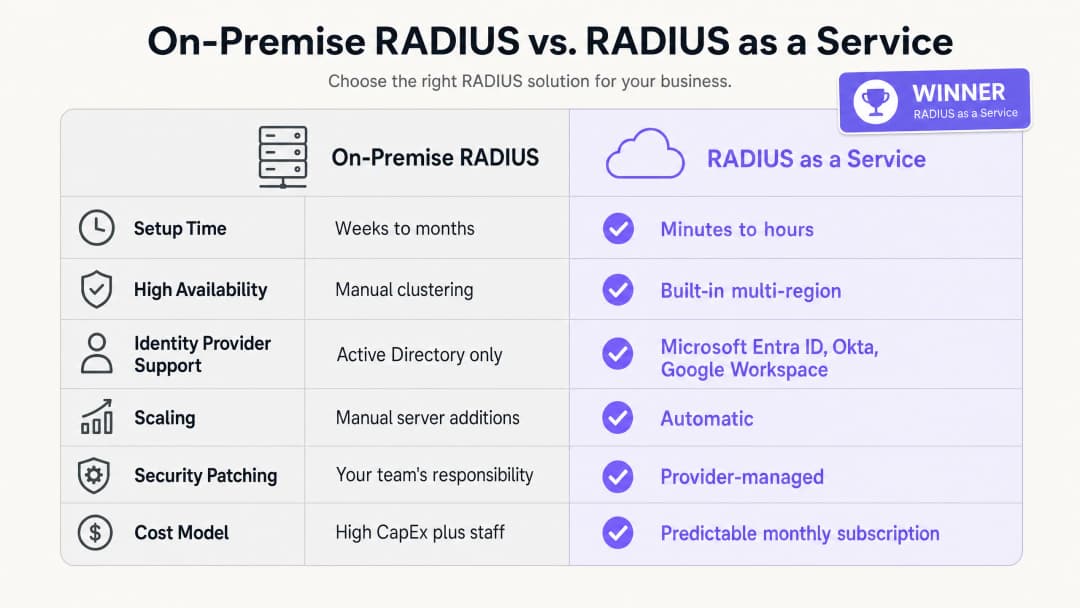
Los beneficios empresariales de RADIUS-as-a-Service se basan en tres pilares: reducción de los gastos de capital (CAPEX), menor sobrecarga operativa y una postura de seguridad mejorada.
En cuanto a los gastos de capital, se elimina por completo el coste de adquisición, licencia y renovación de servidores físicos. Una implementación mínima viable de RADIUS local requiere dos servidores para garantizar la alta disponibilidad, licencias del sistema operativo y la renovación del hardware cada tres o cinco años. Para un grupo hotelero de 50 propiedades, esto representa una inversión en hardware muy significativa en todo su patrimonio.
En cuanto a la sobrecarga operativa, su equipo de ingeniería ya no necesita dedicar tiempo a aplicar parches en servidores Windows, solucionar errores de configuración de FreeRADIUS o gestionar renovaciones de certificados en la infraestructura física. Ese tiempo se puede redirigir a tareas de políticas de seguridad que mejoran directamente su postura de seguridad.
En cuanto al nivel de seguridad, la transición a EAP-TLS y la asignación dinámica de VLAN reduce significativamente la superficie de ataque de la red. El robo de credenciales es una de las principales causas de brechas de red. Eliminar las contraseñas del proceso de autenticación de red aborda directamente esta amenaza. El registro de auditoría centralizado ayuda al cumplimiento de PCI-DSS v4.0 y GDPR, reduciendo el coste y la complejidad de las auditorías de cumplimiento. Para organizaciones que gestionan centros de transporte o recintos de alta densidad, la capacidad de aplicar políticas de seguridad consistentes en todas las ubicaciones desde un único panel es una mejora operativa medible. Purple está activo en más de 80.000 recintos en vivo y procesó 440 millones de inicios de sesión en 2024 (datos internos de Purple, 2024). La infraestructura que soporta esta escala es nativa de la nube por diseño.
Para obtener una visión más amplia de cómo la analítica de WiFi y la inteligencia de red se conectan con los resultados empresariales, consulte nuestra plataforma de analítica de WiFi.
Referencias
[1] IEEE Standard for Local and metropolitan area networks - Port-Based Network Access Control. IEEE Std 802.1X-2020. [2] IETF. Remote Authentication Dial In User Service (RADIUS). RFC 2865. 1997. [3] IETF. The EAP-TLS Authentication Protocol. RFC 5216. 2008. [4] IronWiFi. Benefits of a Cloud RADIUS Server: Why Enterprises Are Moving Authentication Online. Febrero de 2026. [5] SecureW2. Cloud vs. On-Site RADIUS: Which is Better? Mayo de 2026. [6] Portnox. RADIUS-as-a-Service. 2026. [7] PCI Security Standards Council. PCI DSS v4.0. Marzo de 2022. [8] Purple. Datos internos de la plataforma: 440 millones de inicios de sesión, más de 80.000 recintos. 2024.
Definiciones clave
RADIUS
Remote Authentication Dial-In User Service. Un protocolo de red definido en RFC 2865 que proporciona una gestión centralizada de autenticación, autorización y contabilidad (AAA) para los usuarios que se conectan a un servicio de red.
Los equipos de TI utilizan RADIUS como el motor de decisión central para verificar si un dispositivo o usuario tiene permiso para acceder a la red WiFi corporativa. Se sitúa entre el punto de acceso y el proveedor de identidad.
802.1X
Un estándar de IEEE para el control de acceso a redes basado en puertos. Proporciona un mecanismo de autenticación para los dispositivos que desean conectarse a una LAN o WLAN, obligándolos a autenticarse antes de recibir una dirección IP.
Este es el estándar en el que se basa la seguridad WiFi para empresas. Sin 802.1X, cualquier dispositivo que se conecte al SSID obtiene acceso a la red. Con 802.1X, cada dispositivo debe demostrar primero su identidad.
EAP-TLS
Protocolo de autenticación extensible - Seguridad de la capa de transporte. Un método de autenticación definido en RFC 5216 que requiere tanto al dispositivo cliente como al servidor RADIUS presentar certificados digitales, proporcionando una autenticación mutua sin contraseñas.
Considerado el estándar de oro para la seguridad WiFi empresarial. Los certificados se implementan en los dispositivos corporativos a través de un MDM. EAP-TLS elimina el riesgo de robo de contraseñas y ataques de phishing en la red.
PEAP
Protocolo de autenticación extensible protegido. Un método de EAP que encapsula un intercambio de nombre de usuario y contraseña dentro de una sesión TLS. Es menos seguro que EAP-TLS porque depende de contraseñas.
PEAP-MSCHAPv2 está ampliamente implementado en entornos heredados. Los equipos de TI deben planificar una migración a EAP-TLS para los dispositivos corporativos, utilizando PEAP solo como alternativa para dispositivos no gestionados o BYOD.
Asignación dinámica de VLAN
Un proceso mediante el cual el servidor RADIUS indica al punto de acceso en qué VLAN (red de área local virtual) debe colocar un dispositivo, basándose en la identidad y el rol verificados del usuario, en lugar del SSID al que se conectó.
Esencial para la segmentación de redes en entornos con múltiples roles. Un único SSID de personal puede separar de forma segura el tráfico de limpieza, recepción y dirección en diferentes VLAN con distintos derechos de acceso.
AAA
Autenticación, autorización y contabilidad. Las tres funciones realizadas por un servidor RADIUS: verificar la identidad (autenticación), determinar qué acceso está permitido (autorización) y registrar los datos de la sesión para fines de auditoría (contabilidad).
Los equipos de TI y los auditores utilizan AAA como un marco de trabajo para evaluar el control de acceso a la red. Cloud RADIUS ofrece las tres funciones desde un servicio gestionado.
WPA3-Enterprise
El estándar de seguridad WiFi actual para redes empresariales, que requiere autenticación 802.1X a través de un servidor RADIUS. Ofrece una resistencia criptográfica mejorada en comparación con WPA2-Enterprise, incluido el modo de seguridad de 192 bits para entornos de alta seguridad.
Los responsables de TI deben configurar WPA3-Enterprise como el estándar de seguridad mínimo para las redes del personal. Las redes de invitados pueden usar WPA2 o autenticación abierta con un Captive Portal.
Control de acceso a la red (NAC)
Un enfoque de seguridad que aplica políticas a los dispositivos que intentan acceder a los recursos de la red, combinando la evaluación de la seguridad del endpoint, la autenticación de la identidad y la aplicación de políticas de red.
RADIUS es un componente fundamental de NAC. Cloud RADIUS extiende NAC a entornos distribuidos y multisitio sin necesidad de infraestructura local en cada ubicación.
Captive Portal
Una página web con la que el usuario de una red de acceso público debe interactuar antes de recibir acceso a Internet. Se utiliza habitualmente en redes WiFi de invitados para recopilar el consentimiento o mostrar las condiciones de uso.
Los Captive Portals gestionan el acceso de invitados no autenticados, mientras que 802.1X gestiona el acceso del personal autenticado. Ambos mecanismos funcionan en SSID y VLAN independientes.
Ejemplos prácticos
Un hotel de 200 habitaciones necesita proteger su red de personal para los equipos de limpieza, recepción y dirección, mientras mantiene el WiFi de invitados totalmente separado. Actualmente utilizan una clave PSK compartida para la red de personal, que no se ha cambiado en dos años.
Implementar RADIUS-as-a-Service integrado con Microsoft Entra ID. Configurar los puntos de acceso Cisco Meraki para utilizar WPA3 con 802.1X. El personal de limpieza se autentica utilizando sus credenciales de Entra ID; el servidor RADIUS lee su grupo de directorio y los asigna dinámicamente a la VLAN 10 (con acceso exclusivo al sistema de tareas de limpieza). El personal de recepción se asigna a la VLAN 20 (con acceso al sistema de gestión hotelera). La dirección se asigna a la VLAN 30 (acceso más amplio). El WiFi de invitados permanece en un SSID independiente con un Captive Portal, aislado en la VLAN 40. Cuando un empleado de temporada se marcha, su cuenta de Entra ID se deshabilita, revocando al instante el acceso WiFi en todos los puntos de acceso del establecimiento.
Una cadena minorista nacional con 400 tiendas necesita garantizar el cumplimiento de PCI-DSS para sus terminales de punto de venta. Actualmente gestionan 400 instancias independientes de FreeRADIUS en servidores locales de tienda, cada una de las cuales requiere actualizaciones individuales.
Migrar a una única instancia de RADIUS-as-a-Service. Configurar los puntos de acceso HPE Aruba en las 400 tiendas para autenticar los dispositivos TPV mediante EAP-TLS con certificados de máquina distribuidos a través de Microsoft Intune. El servidor RADIUS en la nube autentica los certificados y ubica los dispositivos TPV en una VLAN que cumple con PCI-DSS (VLAN 30), aislada de todo el resto del tráfico de red. El personal de la tienda utiliza un SSID independiente autenticado a través de Okta, que los ubica en una VLAN de personal general (VLAN 20). Los compradores en la red de invitados quedan aislados en la VLAN 40. El equipo de seguridad gestiona todas las políticas desde un único panel.
Preguntas de práctica
Q1. El campus de su universidad utiliza actualmente Microsoft NPS en Windows Server para autenticar a los estudiantes mediante PEAP-MSCHAPv2. La institución va a migrar a Google Workspace y desea retirar todos los servidores locales en un plazo de 12 meses. ¿Cuál es el cambio de arquitectura más seguro y operativamente eficiente para la infraestructura de autenticación WiFi?
Sugerencia: Microsoft NPS no es compatible de forma nativa con Google Workspace. Piense en qué sustituye tanto al servidor como al método de autenticación.
Ver respuesta modelo
Migre a RADIUS-as-a-Service con integración nativa con Google Workspace. El servicio RADIUS en la nube se conecta directamente a Google Workspace a través de LDAP u OIDC, eliminando la necesidad de Active Directory o NPS. Simultáneamente, realice la transición de los dispositivos gestionados de estudiantes y personal de PEAP-MSCHAPv2 a EAP-TLS mediante el despliegue de certificados de cliente a través de la plataforma MDM de la institución. Esto elimina las contraseñas del proceso de autenticación y garantiza que solo los dispositivos gestionados y de confianza puedan acceder a las redes del personal y de los estudiantes. La migración se puede realizar por fases: despliegue el RADIUS en la nube junto con NPS, migre un SSID a la vez y luego retire el NPS una vez que todos los dispositivos estén utilizando el nuevo servicio.
Q2. Un estadio con capacidad para 80.000 personas requiere WiFi seguro para el personal corporativo, los terminales de venta de entradas, los miembros de la prensa y los contratistas los días de partido. ¿Cómo se debe configurar la red utilizando RADIUS en la nube para aplicar el acceso adecuado a cada grupo?
Sugerencia: Considere cómo maneja RADIUS la autorización, no solo la autenticación. Cada grupo necesita diferentes derechos de acceso.
Ver respuesta modelo
Despliegue un único SSID 802.1X para todos los grupos autenticados. Configure el servicio RADIUS en la nube para utilizar la asignación dinámica de VLAN basada en el rol del usuario en el proveedor de identidad. Al personal corporativo se le asigna la VLAN 10 con acceso a los sistemas internos. Los terminales de venta de entradas, autenticados mediante certificados de máquina (EAP-TLS), se ubican en una VLAN 20 restringida con acceso exclusivo a la plataforma de venta de entradas. A los miembros de la prensa se les asigna la VLAN 30 con acceso a internet de banda ancha pero sin acceso a los sistemas internos. A los contratistas los días de partido se les asigna la VLAN 40 con acceso limitado únicamente a internet. Un SSID abierto independiente con un Captive Portal gestiona el acceso de los aficionados y asistentes en la VLAN 50, aislado de todo el demás tráfico.
Q3. Durante una auditoría de seguridad, se descubre que el servidor FreeRADIUS de su organización no ha recibido un parche de seguridad en ocho meses. El equipo se ha mostrado reacio a aplicar parches porque la última actualización causó una interrupción de la autenticación de dos horas. ¿Cómo resuelve la migración a RADIUS-as-a-Service tanto el riesgo de seguridad como el riesgo operativo?
Sugerencia: Considere la división de responsabilidades en un modelo de servicio gestionado y cómo los proveedores gestionan los parches sin tiempo de inactividad.
Ver respuesta modelo
RADIUS-as-a-Service traslada la responsabilidad del parcheado del sistema operativo y la gestión de vulnerabilidades al proveedor. El proveedor opera clústeres multirregión de alta disponibilidad, lo que le permite parchear endpoints individuales y aplicar actualizaciones de forma progresiva sin causar interrupciones en la autenticación. Su equipo ya no necesita programar ventanas de mantenimiento ni asumir el riesgo de una interrupción provocada por un parche. El riesgo de seguridad se elimina porque el proveedor parchea la infraestructura a medida que se revelan las vulnerabilidades, a menudo antes de que la CVE se haga pública. El riesgo operativo se elimina porque el SLA del proveedor garantiza el tiempo de actividad independientemente de la actividad de parcheado. El rol de su equipo pasa del mantenimiento de la infraestructura a la gestión de políticas.
Continúe leyendo esta serie
Integración de RADIUS-as-a-Service con directorios en la nube (Azure AD y Google Workspace)
Esta guía de referencia técnica detalla cómo integrar RADIUS-as-a-Service con directorios en la nube - Microsoft Entra ID y Google Workspace - para la autenticación WiFi empresarial. Cubre la transición arquitectónica de NPS local a RADIUS nativo de la nube, el despliegue de autenticación EAP-TLS basada en certificados y las mejores prácticas operativas para proteger el acceso inalámbrico en entornos de hostelería, comercio minorista y sector público. Para los responsables de TI y arquitectos de redes que ya han invertido en identidad en la nube, esta guía cierra la brecha entre la gestión de directorios y la seguridad física de la red.
Cómo implementar la autenticación 802.1X con Cloud RADIUS
Esta guía de referencia técnica proporciona un marco integral para implementar la autenticación 802.1X con Cloud RADIUS en entornos empresariales distribuidos. Detalla la arquitectura, la selección del método EAP, la secuencia de implementación y las estrategias de mitigación de riesgos necesarias para proteger el acceso a la red y, al mismo tiempo, eliminar los costes operativos de la infraestructura local.
¿Qué es Cloud RADIUS? Una guía completa sobre RADIUS-as-a-Service
Esta guía completa analiza Cloud RADIUS (RADIUS-as-a-Service), detallando su arquitectura, métodos de EAP y estrategias de implementación. Proporciona a los líderes de TI información práctica sobre la migración de servidores locales a un modelo de autenticación en la nube escalable, seguro y compatible.
¿Tiene preguntas sobre su configuración específica?
Nuestro equipo trabaja con operadores de recintos, responsables de TI e ingenieros de redes en 80 000 espacios. Reserve una llamada de 20 minutos y le mostraremos cómo lo han solucionado otros profesionales como usted.