
The Security Benefits of RADIUS as a Service for Hybrid Workforces
This technical reference guide explains how RADIUS as a Service secures network access for hybrid workforces across distributed venues. It covers the architecture, security benefits, and deployment steps for replacing on-premises RADIUS infrastructure with a cloud-managed authentication service. For IT managers and network architects at hotels, retail chains, stadiums, and public-sector organizations, this guide provides the evidence needed to evaluate and act on a cloud RADIUS migration this quarter.
Video overview
Listen to this guide
View podcast transcript
Part of our core series: Enterprise WiFi Security Guide →

Executive Summary
The shift to a hybrid workforce has exposed a fundamental weakness in traditional network security: on-premises RADIUS servers were designed for a world where employees sat in a single building and connected to a single network. That world no longer exists. Today, your employees authenticate from hotel rooms, retail floors, remote offices, and event venues. Your identity providers are in the cloud. Your access points are spread across hundreds of locations. Yet many organizations still rely on physical RADIUS servers that require manual patching, cannot integrate natively with Microsoft Entra ID or Google Workspace, and fail without warning when hardware degrades.
RADIUS as a Service replaces this infrastructure with a cloud-native authentication engine. You point your access points to cloud endpoints. The provider manages the servers, patching, and high availability. You manage the policies. For IT teams in hospitality groups, retail chains, and public venues, this shift eliminates hardware overhead, enforces identity-based network segmentation, and provides the audit trail required for PCI DSS and CCPA/CPRA.
Technical Deep Dive
Why On-Premises RADIUS Struggles
RADIUS, defined in RFC 2865, provides centralized authentication, authorization, and accounting (AAA) for network access. Every organization running WPA2-Enterprise or WPA3-Enterprise WiFi relies on it. The protocol itself is robust. The problem lies in the infrastructure model that has evolved around it.
Deploying, securing, and maintaining FreeRADIUS on Linux requires significant expertise. Microsoft Network Policy Server (NPS) is tightly coupled with Active Directory and has no native support for Microsoft Entra ID, Okta, or Google Workspace. Cisco Identity Services Engine (ISE) provides enterprise-grade policy features but requires dedicated hardware, complex licensing, and an expert team to operate. For all three, you must manually build and maintain high availability, typically by running two servers with database replication and a load balancer in front of them.
For a single-site organization with a static Active Directory, this model is manageable. For a hotel group with 50 properties, a retail chain with 400 stores, or a university with a dispersed campus, it becomes impossible. You either centralize RADIUS servers and accept authentication latency from remote sites, or you deploy servers at every location and manage them individually. Neither option scales.
The Architecture of RADIUS as a Service
RADIUS as a Service is a cloud-based delivery model for the RADIUS protocol. The protocol itself remains unchanged, adhering to RFC 2865 and its extensions. What changes is who maintains the infrastructure.When a device connects to your WiFi network, the access point (RADIUS client) forwards the authentication request through a secure, encrypted tunnel to the cloud RADIUS endpoints. The cloud service verifies the credentials against your identity provider and returns an Access-Accept or Access-Reject message along with policy attributes such as dynamic VLAN assignments. From the perspective of the access point, the authentication flow is identical to on-premises RADIUS.

The cloud provider operates RADIUS servers across multiple geographically diverse data centers. Failover is automatic. If one endpoint becomes unavailable, traffic is routed to the next active endpoint without any intervention from your team. For organizations with offices in multiple regions, authentication occurs at the nearest cloud endpoint, keeping latency low regardless of geographic location.
IEEE 802.1X and EAP Methods
IEEE 802.1X is the standard for port-based network access control (NAC). It forces a device to authenticate before it can obtain an IP address and be allowed to pass traffic. In an 802.1X deployment, RADIUS acts as the authentication server.
Extensible Authentication Protocol (EAP) defines how credentials are exchanged. Cloud RADIUS supports all EAP methods:
| EAP Method | Authentication Type | Security Level | Recommended Use |
|---|---|---|---|
| EAP-TLS | Mutual Certificate-based | Highest | Corporate devices with MDM-managed certificates |
| PEAP-MSCHAPv2 | Username and password | Medium | Legacy devices or BYOD without MDM |
| EAP-TTLS | Tunneled credentials | Medium | Mixed environments |
| MAC Authentication Bypass | Device MAC address | Low | IoT devices that cannot support 802.1X |
EAP-TLS, defined in RFC 5216, is considered the gold standard. Both the client device and the RADIUS server present digital certificates to each other. This mutual authentication completely eliminates the need for passwords from the network access process. The certificate is cryptographically bound to the device and, unlike a password, cannot be phished, guessed, or stolen. For organizations that have faced credential-based data breaches, this is the most direct technical remedy.
Dynamic VLAN Assignment
In addition to authentication, the RADIUS server enforces authorization. When it accepts a connection, it returns policy attributes to the access point, including the VLAN ID to assign to the device. This dynamic VLAN assignment is the key mechanism enabling identity-based networks.
A receptionist at a hotel authenticates and is placed into a front-of-house VLAN with access to the property management system. A housekeeping staff member is placed into a restricted VLAN with internet-only access. A guest's device is placed into a Guest WiFi VLAN, completely isolated from corporate resources. An IoT device like a security camera is placed into a dedicated IoT VLAN. This all happens automatically based on the identity verified by the RADIUS server, without any manual VLAN configuration for each device.
This is the principle of least privilege applied to network access. You are not trusting a device simply because it connected to a specific SSID. You are granting access based on verified identity and restricting that access only to what is necessary for that identity. For a deeper look at how this fits into a broader network access control strategy, see our guide on network access control systems.
Native Cloud Identity Integration
The most significant operational benefit of cloud RADIUS is its native integration with modern identity providers. Cloud RADIUS connects directly to Microsoft Entra ID, Okta, and Google Workspace via standard protocols like OIDC, SAML, and LDAP. When you onboard a new employee in your identity provider, they can immediately authenticate on the WiFi network. When you offboard an employee, you deactivate their account in the directory, and their WiFi access is instantly revoked across every access point at every location.
This real-time synchronization eliminates one of the most difficult security vulnerabilities in enterprise WiFi: former employees who still have a shared PSK, or whose RADIUS accounts were not manually deleted when they departed. With cloud RADIUS and a cloud identity provider, offboarding an employee becomes a single action with immediate network-wide effect.
-
Got questions about your specific setup?
Our team works with venue operators, IT managers, and network engineers across 80,000 venues. Book a 20-minute call and we will show you how others like you solved it.
Implementation Guide
Step 1: Connect Your Identity Provider
Connect the cloud RADIUS service to your identity provider. For Microsoft Entra ID or Google Workspace, this typically involves authorizing an enterprise application via OAuth or configuring an LDAP connector. Map your directory groups to specific network policies. Define your role taxonomy before you begin: which groups map to which VLANs, and what access rights each VLAN has. Doing this correctly at the outset saves significant work later.
Step 2: Deploy Certificates for Corporate Devices
For corporate-owned devices, configure your mobile device management (MDM) platform, such as Microsoft Intune or Jamf, to push client certificates to the devices. This enables EAP-TLS authentication. Ensure that the root Certificate Authority (CA) that issued the RADIUS server's certificate is trusted by all client devices. An untrusted chain is the most common cause of silent authentication failures.
Step 3: Configure Your Network Hardware
Add the cloud RADIUS IP addresses and shared secrets to your wireless controller or access points. Always configure both primary and secondary endpoints to utilize the provider's built-in redundancy. Ensure that UDP ports 1812 (authentication) and 1813 (accounting) are open outbound from your access points to the cloud RADIUS endpoints. Verify this before going live. Misconfigured firewall rules are the second most common cause of deployment failures.
Cloud RADIUS works with Cisco Meraki, HPE Aruba, Ruckus, Juniper Mist, Ubiquiti UniFi, Cambium, Extreme, and Fortinet. Configuration steps vary by vendor, but the RADIUS protocol is standardized, so the core parameters (server IP, shared secret, authentication port) remain consistent.
Step 4: Define VLAN Policies
Configure dynamic VLAN assignment in your RADIUS policy engine. Map each user role or device type to a specific VLAN ID. Test each policy before rolling out to production. A simple test matrix - one device per role, one VLAN per role, verifying placement - catches most configuration errors before they affect users.
Best Practices
Enforce EAP-TLS for all corporate devices. Deprecate PEAP-MSCHAPv2 as soon as your MDM rollout allows. PEAP relies on passwords, which can be compromised. EAP-TLS relies on certificates, which cannot.
Segment everything. Never place employees, guests, and IoT devices on the same subnet. Use RADIUS to enforce strict VLAN boundaries. This is critical for retail environments handling payment card data under PCI-DSS, and healthcare environments protecting patient data.
Align with WPA3-Enterprise. WPA3-Enterprise, the current WiFi security standard, requires 802.1X authentication. Ensure your access points support WPA3-Enterprise and configure it as the minimum security standard for employee networks.
Audit your RADIUS logs regularly. Cloud RADIUS provides centralized audit logs. Review authentication failures weekly. A sudden spike in failures from a specific device or location is an early indicator of misconfiguration or a potential attack.
Perform failover testing. At least once a quarter, simulate a primary RADIUS endpoint failure and verify that authentication continues seamlessly via the secondary endpoint. Document the result. This is a simple test that most teams never run until they have to.
For venues deploying WiFi in complex environments, including maritime or remote locations, see our guide on setting up a captive portal on Starlink for considerations regarding WAN dependency.
Troubleshooting and Risk Mitigation
Authentication Timeouts
If a device fails to authenticate, first check the connectivity between your access points and the cloud RADIUS endpoints. Verify that UDP ports 1812 and 1813 are open outbound. Deep packet inspection on modern firewalls can delay or drop RADIUS packets. If you observe timeouts, check your firewall policy for rules that might be inspecting or rate-limiting UDP traffic to the RADIUS endpoints.
Certificate Trust Chain Failures
If you are using EAP-TLS, ensure that client devices trust the root CA that issued the RADIUS server certificate. If the trust chain is broken, the device will silently reject the connection to prevent a man-in-the-middle attack. This manifests as a connection failure without any clear error message. Check the RADIUS server logs for failed EAP-TLS handshakes. Deploy the root CA certificate to all managed devices via MDM.
WAN Dependency
Cloud RADIUS requires an active internet connection. If the WAN link fails, authentication requests cannot reach the server. For mission-critical local resources, evaluate access points that support local survivability or authentication caching. For most deployments, WAN dependency is acceptable because a site without internet cannot access cloud applications anyway.
Shared Secret Mismatches
Each access point or wireless controller must be configured as a RADIUS client with the correct shared secret. A mismatch results in all authentication requests from that device being silently discarded. If a specific access point is failing while others succeed, verify the shared secret configuration on that device.
-
ROI and Business Impact
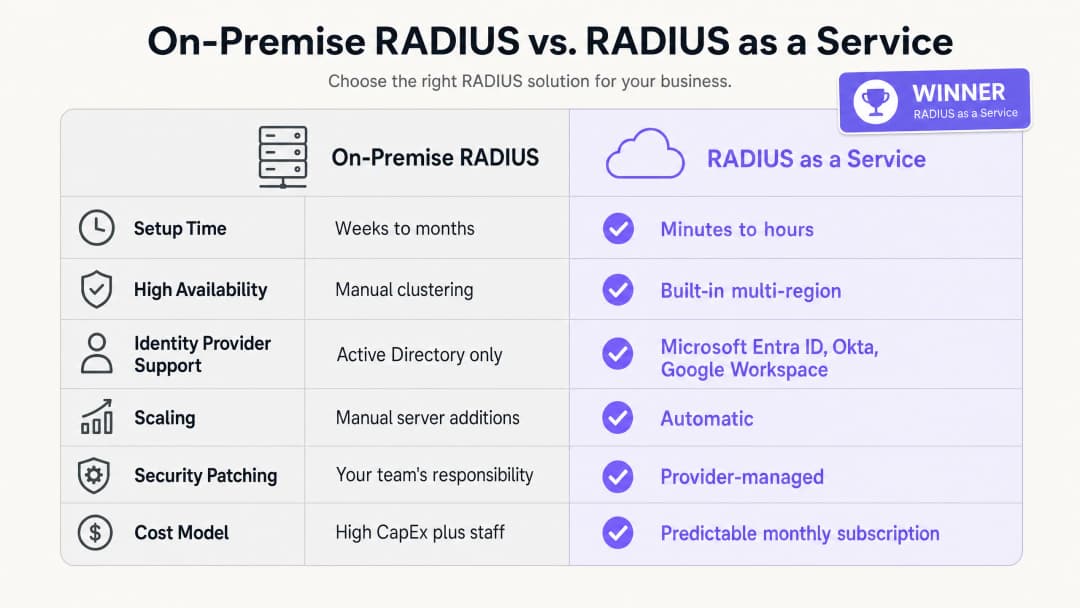
The business benefits of RADIUS as a Service are built on three pillars: capital expenditure reduction, lower operational overhead, and an improved security posture.
In terms of capital expenditure, you completely eliminate the cost of purchasing, licensing, and renewing physical servers. A minimum viable on-premises RADIUS deployment requires two servers for high availability, operating system licenses, and hardware renewal every three to five years. For a 50-property hotel group, this represents a significant hardware investment across the estate.
In terms of operational overhead, your engineering team no longer needs to spend time patching Windows servers, troubleshooting FreeRADIUS configuration errors, or managing certificate renewals on physical infrastructure. That time can be redirected toward security policy work that directly improves your security posture.
Looking at security posture, moving to EAP-TLS and dynamic VLAN assignment significantly reduces the network attack surface. Credential theft is a leading cause of network breaches. Removing passwords from the network authentication process directly addresses this threat. Centralized audit logging aids in compliance with PCI DSS v4.0 and CCPA/CPRA, reducing the cost and complexity of compliance audits. For organizations managing transport hubs or high-density venues, the ability to enforce consistent security policies across all locations from a single dashboard is a measurable operational improvement. Purple is active in over 80,000+ live venues and processed 440 million logins in 2024 (internal Purple data, 2024). The infrastructure supporting this scale is cloud-native by design.
For a broader view of how WiFi analytics and network intelligence connect to business outcomes, see our WiFi Analytics platform.
References
[1] IEEE Standard for Local and metropolitan area networks - Port-Based Network Access Control. IEEE Std 802.1X-2020. [2] IETF. Remote Authentication Dial In User Service (RADIUS). RFC 2865. 1997. [3] IETF. The EAP-TLS Authentication Protocol. RFC 5216. 2008. [4] IronWiFi. Benefits of a Cloud RADIUS Server: Why Enterprises Are Moving Authentication Online. February 2026. [5] SecureW2. Cloud vs. On-Site RADIUS: Which is Better? May 2026. [6] Portnox. RADIUS as a Service. 2026. [7] PCI Security Standards Council. PCI DSS v4.0. March 2022. [8] Purple. Internal platform data: 440 million logins, 80,000+ venues. 2024.
Key Definitions
RADIUS
Remote Authentication Dial-In User Service. A networking protocol defined in RFC 2865 that provides centralized Authentication, Authorization, and Accounting (AAA) management for users connecting to a network service.
IT teams use RADIUS as the central decision engine to verify whether a device or user is allowed onto the corporate WiFi network. It sits between the access point and the identity provider.
802.1X
An IEEE Standard for port-based Network Access Control. It provides an authentication mechanism to devices wishing to attach to a LAN or WLAN, forcing them to authenticate before receiving an IP address.
This is the standard that underpins enterprise WiFi security. Without 802.1X, any device that connects to the SSID gets network access. With 802.1X, every device must prove its identity first.
EAP-TLS
Extensible Authentication Protocol - Transport Layer Security. An authentication method defined in RFC 5216 that requires both the client device and the RADIUS server to present digital certificates, providing mutual authentication without passwords.
Considered the gold standard for enterprise WiFi security. Certificates are deployed to corporate devices via MDM. EAP-TLS eliminates the risk of password theft and phishing attacks on the network.
PEAP
Protected Extensible Authentication Protocol. An EAP method that tunnels a username and password exchange inside a TLS session. Less secure than EAP-TLS because it relies on passwords.
PEAP-MSCHAPv2 is widely deployed in legacy environments. IT teams should plan a migration to EAP-TLS for corporate devices, using PEAP only as a fallback for unmanaged or BYOD devices.
Dynamic VLAN assignment
A process where the RADIUS server instructs the access point which Virtual LAN to place a device in, based on the user's verified identity and role, rather than the SSID they connected to.
Essential for network segmentation in multi-role environments. A single 'Staff' SSID can securely separate housekeeping, reception, and management traffic into different VLANs with different access rights.
AAA
Authentication, Authorization, and Accounting. The three functions performed by a RADIUS server: verifying identity (authentication), determining what access is permitted (authorization), and recording session data for audit purposes (accounting).
IT teams and auditors use AAA as a framework for evaluating network access control. Cloud RADIUS delivers all three functions from a managed service.
WPA3-Enterprise
The current WiFi security standard for enterprise networks, requiring 802.1X authentication via a RADIUS server. It offers improved cryptographic strength over WPA2-Enterprise, including 192-bit security mode for high-security environments.
IT managers should configure WPA3-Enterprise as the minimum security standard for staff networks. Guest networks can use WPA2 or open authentication with a captive portal.
Network Access Control (NAC)
A security approach that enforces policy on devices seeking to access network resources, combining endpoint security assessment, identity authentication, and network enforcement.
RADIUS is a foundational component of NAC. Cloud RADIUS extends NAC to distributed, multi-site environments without requiring on-premises infrastructure at each location.
Captive portal
A web page that a user of a public-access network must interact with before being granted internet access. Typically used for Guest WiFi to collect consent or display terms of use.
Captive portals handle unauthenticated guest access, while 802.1X handles authenticated staff access. The two mechanisms operate on separate SSIDs and VLANs.
Worked Examples
A 200-room hotel needs to secure its staff network across housekeeping, reception, and management, while keeping Guest WiFi entirely separate. They currently use a shared PSK for the staff network, which has not been changed in two years.
Deploy RADIUS as a Service integrated with Microsoft Entra ID. Configure the Cisco Meraki access points to use WPA3-Enterprise with 802.1X. Housekeeping staff authenticate using their Entra ID credentials; the RADIUS server reads their directory group and dynamically assigns them to VLAN 10 (housekeeping task system access only). Reception staff are assigned to VLAN 20 (property management system access). Management are assigned to VLAN 30 (broader access). Guest WiFi remains on a separate SSID with a Captive Portal, isolated on VLAN 40. When a seasonal staff member leaves, their Entra ID account is disabled, instantly revoking WiFi access across all access points on the property.
A national retail chain with 400 stores needs to ensure PCI DSS compliance for its point-of-sale terminals. They currently manage 400 separate FreeRADIUS instances on local store servers, each requiring individual patching.
Migrate to a single RADIUS as a Service instance. Configure HPE Aruba access points at all 400 stores to authenticate POS devices using EAP-TLS with machine certificates pushed via Microsoft Intune. The cloud RADIUS server authenticates the certificates and places POS devices into a PCI-compliant VLAN (VLAN 30), isolated from all other network traffic. Store staff use a separate SSID authenticated via Okta, placing them in a general staff VLAN (VLAN 20). Shoppers on the guest network are isolated on VLAN 40. The security team manages all policies from a single dashboard.
Practice Questions
Q1. Your university campus currently uses Microsoft NPS on Windows Server to authenticate students via PEAP-MSCHAPv2. The institution is migrating to Google Workspace and wants to decommission all on-premises servers within 12 months. What is the most secure and operationally efficient architectural change for the WiFi authentication infrastructure?
Hint: Microsoft NPS does not natively support Google Workspace. Consider what replaces both the server and the authentication method.
View model answer
Migrate to RADIUS-as-a-Service with native Google Workspace integration. The cloud RADIUS service connects directly to Google Workspace via LDAP or OIDC, eliminating the need for Active Directory or NPS. Simultaneously, transition managed student and staff devices from PEAP-MSCHAPv2 to EAP-TLS by deploying client certificates via the institution's MDM platform. This removes passwords from the authentication process and ensures that only managed, trusted devices can access the staff and student networks. The migration can be phased: deploy cloud RADIUS alongside NPS, migrate one SSID at a time, then decommission NPS once all devices are using the new service.
Q2. A stadium with 80,000 capacity requires secure WiFi for corporate staff, ticketing terminals, media press members, and event-day contractors. How should the network be configured using cloud RADIUS to enforce appropriate access for each group?
Hint: Consider how RADIUS handles authorization, not just authentication. Each group needs different access rights.
View model answer
Deploy a single 802.1X SSID for all authenticated groups. Configure the cloud RADIUS service to use dynamic VLAN assignment based on the user's role in the identity provider. Corporate staff are assigned to VLAN 10 with access to internal systems. Ticketing terminals, authenticated via machine certificates (EAP-TLS), are placed in a restricted VLAN 20 with access only to the ticketing platform. Media press members are assigned to VLAN 30 with high-bandwidth internet access but no access to internal systems. Event-day contractors are assigned to VLAN 40 with limited internet access only. A separate open SSID with a Captive Portal handles fan and attendee guest access on VLAN 50, isolated from all other traffic.
Q3. During a security audit, it is discovered that your organization's FreeRADIUS server has not received a security patch for eight months. The team has been reluctant to patch it because the last update caused a two-hour authentication outage. How does migrating to RADIUS-as-a-Service resolve both the security risk and the operational risk?
Hint: Consider the division of responsibility in a managed service model and how providers handle patching without downtime.
View model answer
RADIUS-as-a-Service shifts the responsibility for OS patching and vulnerability management to the provider. The provider operates highly available, multi-region clusters, allowing them to patch individual endpoints and roll updates progressively without causing authentication downtime. Your team no longer needs to schedule maintenance windows or accept the risk of a patch-induced outage. The security risk is eliminated because the provider patches the infrastructure as vulnerabilities are disclosed, often before the CVE is widely publicized. The operational risk is eliminated because the provider's SLA guarantees uptime regardless of patching activity. Your team's role changes from infrastructure maintenance to policy management.
Continue reading in this series
Integrating RADIUS as a Service with Cloud Directories (Azure AD & Google Workspace)
This technical reference guide details how to integrate RADIUS as a Service with cloud directories - Microsoft Entra ID and Google Workspace - for enterprise WiFi authentication. It covers the architectural shift from on-premise NPS to cloud-native RADIUS, the deployment of certificate-based EAP-TLS authentication, and the operational best practices for securing wireless access across hospitality, retail, and public-sector environments. For IT managers and network architects already invested in cloud identity, this guide bridges the gap between directory management and physical network security.
How to Implement 802.1X Authentication with Cloud RADIUS
This technical reference guide provides a comprehensive framework for implementing 802.1X authentication with Cloud RADIUS across distributed enterprise estates. It details the architecture, EAP method selection, deployment sequencing, and risk mitigation strategies required to secure network access while eliminating the operational overhead of on-premises infrastructure.
What is Cloud RADIUS? A Comprehensive Guide to RADIUS as a Service
This comprehensive guide explores Cloud RADIUS (RADIUS as a Service), detailing its architecture, EAP methods, and implementation strategies. It provides IT leaders with actionable insights on migrating from on-premises servers to a scalable, secure, and compliant cloud-based authentication model.
Got questions about your specific setup?
Our team works with venue operators, IT managers, and network engineers across 80,000 venues. Book a 20-minute call and we will show you how others like you solved it.