
Die Sicherheitsvorteile von RADIUS as a Service für hybride Belegschaften
Dieser technische Leitfaden erklärt, wie RADIUS as a Service den Netzwerkzugriff für hybride Belegschaften an verteilten Standorten sichert. Er behandelt die Architektur, die Sicherheitsvorteile und die Bereitstellungsschritte für den Ersatz von On-Premises-RADIUS-Infrastrukturen durch einen cloudverwalteten Authentifizierungsdienst. Für IT-Manager und Netzwerkarchitekten in Hotels, Einzelhandelsketten, Stadien und Organisationen des öffentlichen Sektors liefert dieser Leitfaden die notwendigen Argumente, um eine Migration zu Cloud-RADIUS in diesem Quartal zu bewerten und umzusetzen.
Diesen Leitfaden anhören
Podcast-Transkript ansehen
Teil unserer Kernserie: Enterprise WiFi Security Guide →

Executive Summary
Der Wandel hin zu hybriden Belegschaften hat eine grundlegende Schwachstelle der traditionellen Netzwerksicherheit offengelegt: On-Premises-RADIUS-Server wurden für eine Welt entwickelt, in der Mitarbeiter im selben Gebäude saßen und sich mit demselben Netzwerk verbanden. Diese Welt existiert nicht mehr. Heute authentifizieren sich Ihre Mitarbeiter aus Hotelzimmern, Verkaufsflächen, Remote-Offices und Veranstaltungsorten. Ihre Identity Provider befinden sich in der Cloud. Ihre Access Points sind über Hunderte von Standorten verteilt. Dennoch verlassen sich viele Unternehmen immer noch auf physische RADIUS-Server, die manuell gepatcht werden müssen, sich nicht nativ in Microsoft Entra ID oder Google Workspace integrieren lassen und bei Hardwareausfällen ohne Vorwarnung ausfallen.
RADIUS as a Service ersetzt diese Infrastruktur durch eine cloudnative Authentifizierungs-Engine. Sie leiten Ihre Access Points einfach an Cloud-Endpunkte weiter. Der Anbieter übernimmt die Verwaltung der Server, das Patching und die Hochverfügbarkeit. Sie verwalten die Richtlinien. Für IT-Teams in Hotellerie-Gruppen, Einzelhandels-Ketten und öffentlichen Veranstaltungsorten eliminiert dieser Wechsel den Hardware-Overhead, setzt eine identitätsbasierte Netzwerksegmentierung durch und liefert den für PCI-DSS und GDPR erforderlichen Audit-Trail.
Technische Tiefenanalyse
Warum On-Premises-RADIUS an seine Grenzen stößt
RADIUS, definiert in RFC 2865, bietet eine zentrale Authentifizierung, Autorisierung und Benutzerabrechnung (AAA) für den Netzwerkzugriff. Jedes Unternehmen, das WPA2-Enterprise oder WPA3-Enterprise WiFi nutzt, verlässt sich darauf. Das Protokoll selbst ist robust. Das Problem liegt in dem Infrastrukturmodell, das sich darum herum entwickelt hat.
Die Bereitstellung, Absicherung und Wartung von FreeRADIUS auf Linux erfordert tiefgehendes Fachwissen. Der Microsoft Network Policy Server (NPS) ist eng an das Active Directory gebunden und bietet keine native Unterstützung für Microsoft Entra ID, Okta oder Google Workspace. Die Cisco Identity Services Engine (ISE) bietet Richtlinienfunktionen der Enterprise-Klasse, erfordert jedoch dedizierte Hardware, eine komplexe Lizenzierung und ein spezialisiertes Team für den Betrieb. Bei allen drei Optionen müssen Sie die Hochverfügbarkeit manuell einrichten und verwalten, in der Regel durch den Betrieb von zwei Servern mit Datenbankreplikation und einem davor geschalteten Load Balancer.
Für ein Einzelstandort-Unternehmen mit einem stabilen Active Directory ist dieses Modell handhabbar. Für eine Hotelgruppe mit 50 Standorten, eine Einzelhandelskette mit 400 Filialen oder eine Universität mit einem weitläufigen Campus wird es jedoch unmöglich. Entweder zentralisieren Sie die RADIUS-Server und akzeptieren Authentifizierungslatenzen an entfernten Standorten, oder Sie stellen an jedem Standort Server bereit und verwalten diese einzeln. Keine der beiden Optionen ist skalierbar.
Die Architektur von RADIUS as a Service
RADIUS as a Service ist ein cloudbasiertes Bereitstellungsmodell für das RADIUS-Protokoll. Das Protokoll selbst bleibt unverändert und entspricht RFC 2865 und seinen Erweiterungen. Was sich ändert, ist die Frage, wer die Infrastruktur wartet.
Wenn sich ein Gerät mit Ihrem WiFi-Netzwerk verbindet, leitet der Access Point (der RADIUS-Client) die Authentifizierungsanfrage über einen sicheren, verschlüsselten Tunnel an die Cloud-RADIUS-Endpunkte weiter. Der Cloud-Dienst überprüft die Anmeldedaten über Ihren Identity Provider und sendet eine Access-Accept- oder Access-Reject-Nachricht zurück, die Richtlinienattribute wie dynamische VLAN-Zuweisungen enthält. Aus Sicht des Access Points ist der Authentifizierungsfluss identisch mit dem eines On-Premises-RADIUS.

Der Cloud-Anbieter betreibt RADIUS-Server in mehreren, geografisch verteilten Rechenzentren. Das Failover erfolgt automatisch. Wenn ein Endpunkt nicht verfügbar ist, wird der Datenverkehr ohne Eingreifen Ihres Teams zum nächsten aktiven Endpunkt umgeleitet. Für Unternehmen mit Niederlassungen in mehreren Regionen erfolgt die Authentifizierung am nächstgelegenen Cloud-Endpunkt, wodurch die Latenz unabhängig vom geografischen Standort minimal bleibt.
IEEE 802.1X und EAP-Methoden
IEEE 802.1X ist der Standard für portbasierte Netzwerkzugriffskontrolle (NAC). Er zwingt ein Gerät dazu, sich zu authentifizieren, bevor es eine IP-Adresse erhält und Datenverkehr zulassen darf. Bei einer 802.1X-Bereitstellung fungiert RADIUS als Authentierungsserver.
Das Extensible Authentication Protocol (EAP) definiert, wie Anmeldedaten ausgetauscht werden. Cloud-RADIUS unterstützt alle gängigen EAP-Methoden:
| EAP-Methode | Authentifizierungstyp | Sicherheitsstufe | Empfohlene Nutzung |
|---|---|---|---|
| EAP-TLS | Gegenseitig zertifikatsbasiert | Höchste | MDM-verwaltete Unternehmensgeräte mit Zertifikaten |
| PEAP-MSCHAPv2 | Benutzername und Passwort | Mittel | Ältere Geräte oder BYOD ohne MDM |
| EAP-TTLS | Getunnelte Anmeldedaten | Mittel | Gemischte Umgebungen |
| MAC Authentication Bypass | Geräte-MAC-Adresse | Niedrig | IoT-Geräte, die 802.1X nicht unterstützen |
Das in RFC 5216 definierte EAP-TLS gilt als Goldstandard. Sowohl das Client-Gerät als auch der RADIUS-Server weisen sich gegenseitig durch digitale Zertifikate aus. Diese gegenseitige Authentifizierung macht Passwörter beim Netzwerkzugriff überflüssig. Ein Zertifikat ist kryptografisch an das Gerät gebunden und kann im Gegensatz zu Passwörtern nicht durch Phishing erlangt, erraten oder gestohlen werden. Für Unternehmen, die von passwortbasierten Datenpannen betroffen waren, ist dies die direkteste technische Gegenmaßnahme.
Dynamische VLAN-Zuweisung
Neben der Authentifizierung setzt der RADIUS-Server auch die Autorisierung durch. Wenn er eine Verbindung akzeptiert, sendet er Richtlinienattribute an den Access Point zurück, einschließlich der VLAN-ID, die dem Gerät zugewiesen werden soll. Diese dynamische VLAN-Zuweisung ist der Kernmechanismus für identitätsbasierte Netzwerke.
Ein Rezeptionist im Hotel authentifiziert sich und wird dem Front-of-House-VLAN mit Zugriff auf das Hotelmanagementsystem zugewiesen. Eine Reinigungskraft wird in ein eingeschränktes VLAN mit reinem Internetzugang eingestuft. Das Gerät eines Gastes wird in das Gäste-WiFi-VLAN geleitet, das vollständig von den Unternehmensressourcen isoliert ist. Ein IoT-Gerät wie eine Sicherheitskamera wird in ein dediziertes IoT-VLAN verschoben. All dies geschieht automatisch auf Basis der vom RADIUS-Server verifizierten Identität, ohne dass eine manuelle VLAN-Konfiguration für jedes einzelne Gerät erforderlich ist.
Dies ist das Prinzip der geringsten Rechte (Least Privilege), angewendet auf den Netzwerkzugriff. Sie vertrauen einem Gerät nicht einfach deshalb, weil es mit einer bestimmten SSID verbunden ist. Sie gewähren Zugriff auf Basis einer verifizierten Identität und beschränken diesen Zugriff auf das, was für diese Identität absolut notwendig ist. Weitere Informationen darüber, wie sich dies in eine umfassendere Netzwerkzugriffskontrollstrategie einfügt, finden Sie in unserem Leitfaden zu Netzwerkzugriffskontrollsystemen.
Native Cloud-Identitätsintegration
Der größte betriebliche Vorteil von Cloud-RADIUS ist seine native Integration in moderne Identity Provider. Cloud-RADIUS verbindet sich direkt mit Microsoft Entra ID, Okta und Google Workspace über Standardprotokolle wie OIDC, SAML und LDAP. Wenn Sie einen neuen Mitarbeiter in Ihrem Identity Provider anlegen, kann sich dieser sofort im WiFi-Netzwerk authentifizieren. Wenn ein Mitarbeiter das Unternehmen verlässt und Sie sein Konto im Verzeichnis deaktivieren, wird sein WiFi-Zugriff an jedem Access Point an jedem Standort sofort entzogen.
Diese Echtzeitsynchronisierung schließt eine der kritischsten Sicherheitslücken im Enterprise-WiFi: ehemalige Mitarbeiter, die immer noch im Besitz des gemeinsamen PSK sind oder deren RADIUS-Konto nach dem Ausscheiden nicht manuell gelöscht wurde. Mit Cloud-RADIUS und einem Cloud-Identity-Provider ist das Offboarding eines Mitarbeiters ein einziger Vorgang mit sofortiger, netzwerkweiter Wirkung.
Haben Sie Fragen zu Ihrem spezifischen Setup?
Unser Team arbeitet mit Standortbetreibern, IT-Managern und Netzwerktechnikern an über 80.000 Standorten zusammen. Buchen Sie ein 20-minütiges Gespräch und wir zeigen Ihnen, wie andere diese Herausforderungen gelöst haben.
Implementierungsleitfaden
Schritt 1: Verbinden Sie Ihren Identity Provider
Verbinden Sie den Cloud-RADIUS-Dienst mit Ihrem Identity Provider. Für Microsoft Entra ID oder Google Workspace umfasst dies in der Regel die Autorisierung einer Enterprise-Anwendung über OAuth oder die Konfiguration eines LDAP-Connectors. Ordnen Sie Ihre Verzeichnisgruppen bestimmten Netzwerkrichtlinien zu. Definieren Sie Ihre Rollentaxonomie, bevor Sie beginnen: Welche Gruppen werden welchen VLANs zugeordnet und welche Zugriffsrechte gelten für das jeweilige VLAN. Wenn Sie dies von Anfang an richtig aufsetzen, sparen Sie später erheblichen Aufwand.
Schritt 2: Zertifikate für Unternehmensgeräte bereitstellen
Konfigurieren Sie für firmeneigene Geräte Ihre Mobile-Device-Management-Plattform (MDM) wie Microsoft Intune oder Jamf so, dass Client-Zertifikate auf die Geräte verteilt werden. Dies ermöglicht die EAP-TLS-Authentifizierung. Stellen Sie sicher, dass alle Client-Geräte der Root-Zertifizierungsstelle (Root-CA) vertrauen, die das Zertifikat des RADIUS-Servers ausgestellt hat. Eine unvollständige Vertrauenskette ist die häufigste Ursache für fehlgeschlagene Authentifizierungen.
Schritt 3: Konfigurieren Sie Ihre Netzwerkhardware
Fügen Sie die Cloud-RADIUS-IP-Adressen und Shared Secrets in Ihren Wireless-Controllern oder Access Points hinzu. Konfigurieren Sie immer sowohl den primären als auch den sekundären Endpunkt, um die integrierte Redundanz des Anbieters zu nutzen. Stellen Sie sicher, dass die UDP-Ports 1812 (Authentifizierung) und 1813 (Accounting) von Ihren Access Points zu den Cloud-RADIUS-Endpunkten ausgehend geöffnet sind. Überprüfen Sie dies vor dem Go-Live. Fehlerhafte Firewall-Regeln sind die zweithäufigste Ursache für Fehler bei der Bereitstellung.
Cloud-RADIUS funktioniert nahtlos mit Cisco Meraki, HPE Aruba, Ruckus, Juniper Mist, Ubiquiti UniFi, Cambium, Extreme und Fortinet. Die Konfigurationsschritte variieren je nach Hersteller, aber das RADIUS-Protokoll ist standardisiert, sodass die Kernparameter (Server-IP, Shared Secret, Authentifizierungsport) einheitlich sind.
Schritt 4: VLAN-Richtlinien definieren
Konfigurieren Sie die dynamische VLAN-Zuweisung in Ihrer RADIUS-Policy-Engine. Ordnen Sie jede Benutzerrolle oder jeden Gerätetyp einer bestimmten VLAN-ID zu. Testen Sie jede Richtlinie, bevor Sie sie in der Produktionsumgebung einführen. Eine einfache Testmatrix – ein Gerät pro Rolle, ein VLAN pro Rolle zur Überprüfung der Zuweisung – fängt die meisten Konfigurationsfehler ab, bevor sie sich auf die Benutzer auswirken.
Best Practices
Erzwingen Sie EAP-TLS für alle Unternehmensgeräte. Deaktivieren Sie PEAP-MSCHAPv2, sobald Ihr MDM-Rollout dies zulässt. PEAP basiert auf Passwörtern, die kompromittiert werden können. EAP-TLS basiert auf Zertifikaten, die nicht kompromittiert werden können.
Segmentieren Sie alles. Platzieren Sie Mitarbeiter, Gäste und IoT-Geräte niemals im selben Subnetz. Nutzen Sie RADIUS, um strikte VLAN-Grenzen durchzusetzen. Dies ist für Einzelhandels-Umgebungen, die Zahlungskartendaten gemäß PCI-DSS verarbeiten, und für Gesundheitswesen-Umgebungen, die Patientendaten schützen, absolut unerlässlich.
Setzen Sie auf WPA3-Enterprise. WPA3-Enterprise, der aktuelle WiFi-Sicherheitsstandard, erfordert eine 802.1X-Authentifizierung. Stellen Sie sicher, dass Ihre Access Points WPA3-Enterprise unterstützen, und konfigurieren Sie es als Mindestsicherheitsstandard für Mitarbeiternetzwerke.
Auditieren Sie Ihre RADIUS-Protokolle regelmäßig. Cloud-RADIUS bietet zentrale Audit-Logs. Überprüfen Sie Authentifizierungsfehler wöchentlich. Ein plötzlicher Anstieg von Fehlern an einem bestimmten Gerät oder Standort ist oft ein frühes Anzeichen für eine Fehlkonfiguration oder einen potenziellen Angriff.
Führen Sie Failover-Tests durch. Simulieren Sie mindestens einmal pro Quartal den Ausfall des primären RADIUS-Endpunkts und überprüfen Sie, ob die Authentifizierung über den sekundären Endpunkt nahtlos fortgesetzt wird. Dokumentieren Sie das Ergebnis. Dies ist ein einfacher Test, den die meisten Teams erst dann durchführen, wenn ein Ernstfall eintritt.
Für Standorte, die WiFi in komplexen Umgebungen wie maritimen oder abgelegenen Gebieten bereitstellen, finden Sie in unserem Leitfaden zur Einrichtung eines Captive Portals auf Starlink wichtige Hinweise zu WAN-Abhängigkeiten.
Fehlerbehebung und Risikominderung
Authentifizierungs-Timeouts
Wenn die Authentifizierung eines Geräts fehlschlägt, überprüfen Sie zuerst die Konnektivität zwischen Ihren Access Points und den Cloud-RADIUS-Endpunkten. Stellen Sie sicher, dass die UDP-Ports 1812 und 1813 für ausgehenden Datenverkehr geöffnet sind. Deep Packet Inspection auf modernen Firewalls kann RADIUS-Pakete verzögern oder verwerfen. Wenn Timeouts auftreten, überprüfen Sie Ihre Firewall-Richtlinien auf Regeln, die den UDP-Datenverkehr zu den RADIUS-Endpunkten prüfen oder drosseln könnten.
Fehler in der Zertifikatsvertrauenskette
Wenn Sie EAP-TLS verwenden, stellen Sie sicher, dass die Client-Geräte der Root-CA vertrauen, die das Zertifikat des RADIUS-Servers ausgestellt hat. Wenn die Vertrauenskette unterbrochen ist, lehnt das Gerät die Verbindung stillschweigend ab, um einen Man-in-the-Middle-Angriff zu verhindern. Dies äußert sich als Verbindungsfehler ohne klare Fehlermeldung. Überprüfen Sie die RADIUS-Server-Logs auf fehlgeschlagene EAP-TLS-Handshakes. Verteilen Sie das Root-CA-Zertifikat über das MDM auf alle verwalteten Geräte.
WAN-Abhängigkeit
Cloud-RADIUS erfordert eine aktive Internetverbindung. Wenn die WAN-Verbindung ausfällt, können Authentifizierungsanfragen den Server nicht erreichen. Evaluieren Sie für geschäftskritische lokale Ressourcen Access Points, die lokale Ausfallsicherheit oder Authentifizierungscaching unterstützen. Für die meisten Bereitstellungen ist die WAN-Abhängigkeit jedoch akzeptabel, da ein Standort ohne Internet ohnehin nicht auf Cloud-Anwendungen zugreifen kann.
Abweichungen beim Shared Secret
Jeder Access Point oder Wireless-Controller muss als RADIUS-Client mit dem korrekten Shared Secret konfiguriert sein. Eine Abweichung führt dazu, dass alle Authentifizierungsanfragen dieses Geräts stillschweigend verworfen werden. Wenn ein bestimmter Access Point fehlschlägt, während andere funktionieren, überprüfen Sie die Konfiguration des Shared Secrets auf diesem Gerät.
ROI und geschäftliche Auswirkungen
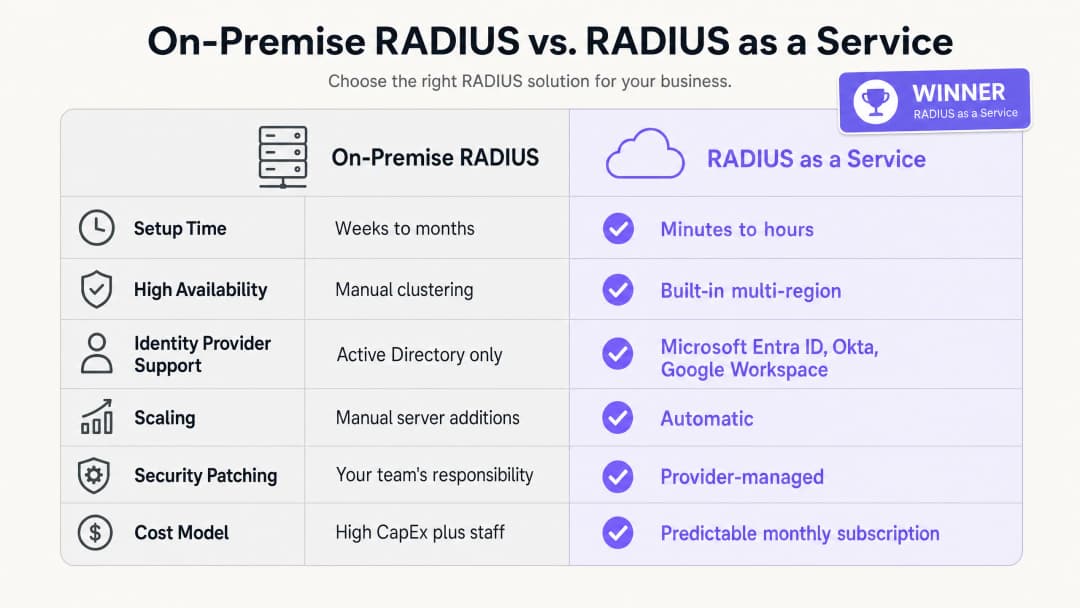
Die geschäftlichen Vorteile von RADIUS as a Service basieren auf drei Säulen: Reduzierung der Investitionskosten (CapEx), geringerer betrieblicher Aufwand (OpEx) und eine verbesserte Sicherheitslage.
In Bezug auf die Investitionskosten sparen Sie die Kosten für die Anschaffung, Lizenzierung und Erneuerung physischer Server vollständig ein. Eine minimale On-Premises-RADIUS-Bereitstellung erfordert für die Hochverfügbarkeit zwei Server, Betriebssystemlizenzen und alle drei bis fünf Jahre eine Hardware-Erneuerung. Für eine Hotelgruppe mit 50 Standorten wäre dies eine erhebliche Hardware-Investition über das gesamte Portfolio hinweg.
Was den betrieblichen Aufwand betrifft, muss Ihr Engineering-Team keine Zeit mehr mit dem Patchen von Windows-Servern, der Fehlerbehebung bei FreeRADIUS-Konfigurationen oder der Verwaltung von Zertifikatsverlängerungen auf physischer Infrastruktur verbringen. Diese Zeit kann stattdessen in die strategische Sicherheitsarbeit fließen, was Ihre Sicherheitslage direkt verbessert.
Mit Blick auf die Sicherheitslage reduziert der Wechsel zu EAP-TLS und dynamischer VLAN-Zuweisung die Angriffsfläche des Netzwerks erheblich. Der Diebstahl von Anmeldedaten ist eine der Hauptursachen für Netzwerkverletzungen. Die Eliminierung von Passwörtern aus dem Netzwerk-Authentifizierungsprozess löst dieses Problem direkt. Die zentrale Audit-Protokollierung erleichtert die Einhaltung von PCI-DSS v4.0 und GDPR, was die Kosten und die Komplexität von Compliance-Audits reduziert.
Für Unternehmen, die Transport-Hubs oder stark frequentierte Veranstaltungsorte verwalten, ist die Möglichkeit, konsistente Sicherheitsrichtlinien über alle Standorte hinweg von einem einzigen Dashboard aus durchzusetzen, eine messbare betriebliche Verbesserung. Purple ist an über 80.000 Live-Standorten im Einsatz und hat im Jahr 2024 440 Millionen Logins verarbeitet (interne Daten von Purple, 2024). Die Infrastruktur, die diese Skalierung unterstützt, ist von Grund auf cloudnative konzipiert.
Für einen umfassenden Überblick darüber, wie WiFi-Analysen und Network Intelligence mit geschäftlichen Ergebnissen verknüpft sind, besuchen Sie unsere WiFi-Analyseplattform.
Referenzen
[1] IEEE Standard for Local and metropolitan area networks - Port-Based Network Access Control. IEEE Std 802.1X-2020. [2] IETF. Remote Authentication Dial In User Service (RADIUS). RFC 2865. 1997. [3] IETF. The EAP-TLS Authentication Protocol. RFC 5216. 2008. [4] IronWiFi. Benefits of a Cloud RADIUS Server: Why Enterprises Are Moving Authentication Online. Februar 2026. [5] SecureW2. Cloud vs. On-Site RADIUS: Which is Better? Mai 2026. [6] Portnox. RADIUS as a Service. 2026. [7] PCI Security Standards Council. PCI DSS v4.0. März 2022. [8] Purple. Interne Plattformdaten: 440 Millionen Logins, 80.000+ Standorte. 2024.
Schlüsseldefinitionen
RADIUS
Remote Authentication Dial-In User Service. Ein in RFC 2865 definiertes Netzwerkprotokoll, das eine zentrale Verwaltung von Authentifizierung, Autorisierung und Benutzerabrechnung (AAA) für Benutzer bietet, die sich mit einem Netzwerkdienst verbinden.
IT-Teams nutzen RADIUS as die zentrale Entscheidungsinstanz, um zu prüfen, ob ein Gerät oder Benutzer berechtigt ist, auf das WiFi-Netzwerk des Unternehmens zuzugreifen. Es befindet sich zwischen dem Access Point und dem Identity Provider.
802.1X
Ein IEEE-Standard für portbasierte Netzwerkzugriffskontrolle. Er bietet einen Authentifizierungsmechanismus für Geräte, die sich mit einem LAN oder WLAN verbinden möchten, und zwingt sie zur Authentifizierung, bevor sie eine IP-Adresse erhalten.
Dies ist der Standard, der die WiFi-Sicherheit in Unternehmen sichert. Ohne 802.1X erhält jedes Gerät, das sich mit der SSID verbindet, Netzwerkzugriff. Mit 802.1X muss jedes Gerät zuerst seine Identität nachweisen.
EAP-TLS
Extensible Authentication Protocol - Transport Layer Security. Eine in RFC 5216 definierte Authentifizierungsmethode, bei der sowohl das Client-Gerät als auch der RADIUS-Server digitale Zertifikate vorlegen müssen, was eine gegenseitige Authentifizierung ohne Passwörter ermöglicht.
Gilt als Goldstandard für die WiFi-Sicherheit in Unternehmen. Zertifikate werden über MDM auf Unternehmensgeräten bereitgestellt. EAP-TLS eliminiert das Risiko von Passwortdiebstahl und Phishing-Angriffen im Netzwerk.
PEAP
Protected Extensible Authentication Protocol. Eine EAP-Methode, die den Austausch von Benutzernamen und Passwörtern in einer TLS-Sitzung tunnelt. Weniger sicher als EAP-TLS, da sie auf Passwörtern basiert.
PEAP-MSCHAPv2 ist in Altsystemen weit verbreitet. IT-Teams sollten eine migration zu EAP-TLS für Unternehmensgeräte planen und PEAP nur als Fallback für nicht verwaltete oder BYOD-Geräte nutzen.
Dynamische VLAN-Zuweisung
Ein Prozess, bei dem der RADIUS-Server dem Access Point mitteilt, in welches virtuelle LAN ein Gerät platziert werden soll, basierend auf der verifizierten Identität und Rolle des Benutzers und nicht auf der SSID, mit der es verbunden ist.
Unerlässlich für die Netzwerksegmentierung in Umgebungen mit mehreren Rollen. Eine einzige 'Mitarbeiter'-SSID kann den Datenverkehr von Reinigung, Rezeption und Management sicher in verschiedene VLANs mit unterschiedlichen Zugriffsrechten aufteilen.
AAA
Authentication, Authorisation, and Accounting (Authentifizierung, Autorisierung und Benutzerabrechnung). Die drei von einem RADIUS-Server ausgeführten Funktionen: Überprüfung der Identität (Authentifizierung), Bestimmung des zulässigen Zugriffs (Autorisierung) und Erfassung von Sitzungsdaten für Audit-Zwecke (Benutzerabrechnung).
IT-Teams und Auditoren nutzen AAA als Framework zur Bewertung der Netzwerkzugriffskontrolle. Cloud-RADIUS stellt alle drei Funktionen über einen verwalteten Dienst bereit.
WPA3-Enterprise
Der aktuelle WiFi-Sicherheitsstandard für Unternehmensnetzwerke, der eine 802.1X-Authentifizierung über einen RADIUS-Server erfordert. Er bietet eine verbesserte kryptografische Stärke gegenüber WPA2-Enterprise, einschließlich eines 192-Bit-Sicherheitsmodus für Hochsicherheitsumgebungen.
IT-Manager sollten WPA3-Enterprise als Mindestsicherheitsstandard für Mitarbeiternetzwerke konfigurieren. Gästenetzwerke können WPA2 oder eine offene Authentifizierung mit einem Captive Portal nutzen.
Network Access Control (NAC)
Ein Sicherheitsansatz, der Richtlinien für Geräte durchsetzt, die auf Netzwerkressourcen zugreifen wollen, indem er Endpunktsicherheitsbewertung, Identitätsauthentifizierung und Netzwerkdurchsetzung kombiniert.
RADIUS ist eine grundlegende Komponente von NAC. Cloud-RADIUS erweitert NAC auf verteilte Umgebungen mit mehreren Standorten, ohne dass eine On-Premises-Infrastruktur an jedem Standort erforderlich ist.
Captive Portal
Eine Webseite, mit der ein Benutzer eines öffentlich zugänglichen Netzwerks interagieren muss, bevor ihm der Internetzugang gewährt wird. Wird typischerweise für Gäste-WiFi verwendet, um Einwilligungen einzuholen oder Nutzungsbedingungen anzuzeigen.
Captive Portals regeln den unauthentifizierten Gästezugriff, während 802.1X den authentifizierten Mitarbeiterzugriff steuert. Die beiden Mechanismen arbeiten auf separaten SSIDs und VLANs.
Ausgearbeitete Beispiele
Ein Hotel mit 200 Zimmern muss sein Mitarbeiternetzwerk für Reinigung, Rezeption und Management absichern und gleichzeitig das Gäste-WiFi vollständig getrennt halten. Derzeit verwenden sie einen gemeinsamen PSK für das Mitarbeiternetzwerk, der seit zwei Jahren nicht mehr geändert wurde.
Stellen Sie RADIUS as a Service integriert in Microsoft Entra ID bereit. Konfigurieren Sie die Cisco Meraki Access Points so, dass sie WPA3-Enterprise mit 802.1X verwenden. Das Reinigungspersonal authentifiziert sich mit seinen Entra-ID-Anmeldedaten; der RADIUS-Server liest seine Verzeichnisgruppe aus und weist ihm dynamisch das VLAN 10 zu (Zugriff nur auf das Aufgabenverwaltungssystem der Reinigung). Die Mitarbeiter an der Rezeption werden dem VLAN 20 zugewiesen (Zugriff auf das Hotelmanagementsystem). Dem Management wird das VLAN 30 zugewiesen (weitergehender Zugriff). Das Gäste-WiFi verbleibt auf einer separaten SSID mit einem Captive Portal, isoliert im VLAN 40. Wenn ein saisonaler Mitarbeiter das Unternehmen verlässt, wird sein Entra-ID-Konto deaktiviert, wodurch der WiFi-Zugriff an allen Access Points des Hotels sofort entzogen wird.
Eine nationale Einzelhandelskette mit 400 Filialen muss die PCI-DSS-Compliance für ihre Point-of-Sale-Terminals sicherstellen. Derzeit verwalten sie 400 separate FreeRADIUS-Instanzen auf lokalen Filialservern, von denen jede einzeln gepatcht werden muss.
Migrieren Sie zu einer einzigen RADIUS as a Service-Instanz. Konfigurieren Sie die HPE Aruba Access Points in allen 400 Filialen so, dass sie POS-Geräte mittels EAP-TLS mit Gerätezertifikaten authentifizieren, die über Microsoft Intune verteilt werden. Der Cloud-RADIUS-Server authentifiziert die Zertifikate und verschiebt die POS-Geräte in ein PCI-konformes VLAN (VLAN 30), das von jeglichem anderen Netzwerkverkehr isoliert ist. Das Filialpersonal nutzt eine separate SSID, die über Okta authentifiziert wird, was sie in ein allgemeines Mitarbeiter-VLAN (VLAN 20) einstuft. Kunden im Gästenetzwerk werden im VLAN 40 isoliert. Das Sicherheitsteam verwaltet alle Richtlinien über ein einziges Dashboard.
Übungsfragen
Q1. Ihr Universitätscampus nutzt derzeit Microsoft NPS auf Windows Server, um Studenten über PEAP-MSCHAPv2 zu authentifizieren. Die Einrichtung migriert zu Google Workspace und möchte alle On-Premises-Server innerhalb von 12 Monaten stilllegen. Was ist die sicherste und betrieblich effizienteste architektonische Änderung für die WiFi-Authentifizierungsinfrastruktur?
Hinweis: Microsoft NPS unterstützt Google Workspace nicht nativ. Überlegen Sie, was sowohl den Server als auch die Authentifizierungsmethode ersetzt.
Musterlösung anzeigen
Migrieren Sie zu RADIUS as a Service mit nativer Google Workspace-Integration. Der Cloud-RADIUS-Dienst verbindet sich direkt über LDAP oder OIDC mit Google Workspace, wodurch Active Directory oder NPS überflüssig werden. Stellen Sie gleichzeitig verwaltete Geräte von Studenten und Mitarbeitern von PEAP-MSCHAPv2 auf EAP-TLS um, indem Sie Client-Zertifikate über die MDM-Plattform der Einrichtung verteilen. Dies entfernt Passwörter aus dem Authentifizierungsprozess und stellt sicher, dass nur verwaltete, vertrauenswürdige Geräte auf die Mitarbeiter- und Studentennetzwerke zugreifen können. Die Migration kann phasenweise erfolgen: Stellen Sie Cloud-RADIUS parallel zu NPS bereit, migrieren Sie eine SSID nach der anderen und legen Sie NPS still, sobald alle Geräte den neuen Dienst nutzen.
Q2. Ein Stadion mit einer Kapazität von 80.000 Zuschauern benötigt sicheres WiFi für das eigene Personal, Ticket-Terminals, Pressevertreter und externe Dienstleister am Spieltag. Wie sollte das Netzwerk unter Verwendung von Cloud-RADIUS konfiguriert werden, um den angemessenen Zugriff für jede Gruppe durchzusetzen?
Hinweis: Überlegen Sie, wie RADIUS die Autorisierung handhabt, nicht nur die Authentifizierung. Jede Gruppe benötigt unterschiedliche Zugriffsrechte.
Musterlösung anzeigen
Stellen Sie eine einzige 802.1X-SSID für alle authentifizierten Gruppen bereit. Konfigurieren Sie den Cloud-RADIUS-Dienst so, dass er eine dynamische VLAN-Zuweisung basierend auf der Rolle des Benutzers im Identity Provider verwendet. Das eigene Personal wird dem VLAN 10 mit Zugriff auf interne Systeme zugewiesen. Ticket-Terminals, die über Gerätezertifikate (EAP-TLS) authentifiziert werden, werden in ein eingeschränktes VLAN 20 mit Zugriff ausschließlich auf die Ticket-Plattform platziert. Pressevertreter werden dem VLAN 30 mit hoher Internet-Bandbreite, aber ohne Zugriff auf interne Systeme zugewiesen. Externe Dienstleister am Spieltag werden dem VLAN 40 mit reinem, eingeschränktem Internetzugang zugewiesen. Eine separate offene SSID mit einem Captive Portal regelt den Gästezugang für Fans und Besucher im VLAN 50, isoliert von jeglichem anderen Datenverkehr.
Q3. Bei einem Sicherheitsaudit wird festgestellt, dass der FreeRADIUS-Server Ihres Unternehmens seit acht Monaten kein Sicherheits-Patch erhalten hat. Das Team zögerte mit dem Patchen, da das letzte Update zu einem zweistündigen Authentifizierungsausfall führte. Wie löst die Migration zu RADIUS as a Service sowohl das Sicherheits- als auch das Betriebsrisiko?
Hinweis: Berücksichtigen Sie die Aufteilung der Verantwortlichkeiten bei einem Managed-Service-Modell und wie Anbieter das Patchen ohne Ausfallzeiten handhaben.
Musterlösung anzeigen
RADIUS as a Service verlagert die Verantwortung für das Patchen des Betriebssystems und das Schwachstellenmanagement auf den Anbieter. Der Anbieter betreibt hochverfügbare, über mehrere Regionen verteilte Cluster, was es ihm ermöglicht, einzelne Endpunkte zu patchen und Updates schrittweise einzuspielen, ohne Ausfallzeiten bei der Authentifizierung zu verursachen. Ihr Team muss keine Wartungsfenster mehr planen oder das Risiko eines patchbedingten Ausfalls in Kauf nehmen. Das Sicherheitsrisiko wird eliminiert, da der Anbieter die Infrastruktur patcht, sobald Schwachstellen bekannt werden – oft noch bevor die CVE öffentlich bekannt gemacht wird. Das Betriebsrisiko wird eliminiert, da die SLA des Anbieters die Betriebszeit unabhängig von Patch-Aktivitäten garantiert. Die Rolle Ihres Teams wandelt sich von der Infrastrukturwartung hin zur Richtlinienverwaltung.
Weiterlesen in dieser Reihe
Integration von RADIUS as a Service mit Cloud-Verzeichnissen (Azure AD & Google Workspace)
Dieser technische Referenzleitfaden beschreibt detailliert, wie Sie RADIUS as a Service mit Cloud-Verzeichnissen – Microsoft Entra ID und Google Workspace – für die WiFi-Authentifizierung in Unternehmen integrieren. Er behandelt den architektonischen Wechsel von On-Premises-NPS zu Cloud-nativem RADIUS, die Bereitstellung der zertifikatsbasierten EAP-TLS-Authentifizierung sowie die bewährten Betriebsmethoden zur Absicherung des drahtlosen Zugangs in den Bereichen Gastgewerbe, Einzelhandel und im öffentlichen Sektor. Für IT-Manager und Netzwerkarchitekten, die bereits in Cloud-Identitäten investieren, schließt dieser Leitfaden die Lücke zwischen Verzeichnisverwaltung und physischer Netzwerksicherheit.
Wie Sie eine 802.1X-Authentifizierung mit Cloud RADIUS implementieren
Dieser technische Leitfaden bietet einen umfassenden Rahmen für die Implementierung der 802.1X-Authentifizierung mit Cloud RADIUS in verteilten Unternehmensstandorten. Er beschreibt die Architektur, die Auswahl der EAP-Methode, die Bereitstellungssequenzierung und die Strategien zur Risikominderung, die erforderlich sind, um den Netzwerkzugriff zu sichern und gleichzeitig den operativen Aufwand für eine On-Premises-Infrastruktur zu eliminieren.
Was ist Cloud RADIUS? Ein umfassender Leitfaden zu RADIUS-as-a-Service
Dieser umfassende Leitfaden befasst sich mit Cloud RADIUS (RADIUS-as-a-Service) und erläutert dessen Architektur, EAP-Methoden und Implementierungsstrategien. Er bietet IT-Entscheidern praxisnahe Einblicke für die Migration von lokalen Servern zu einem skalierbaren, sicheren und konformen cloudbasierten Authentifizierungsmodell.
Haben Sie Fragen zu Ihrem spezifischen Setup?
Unser Team arbeitet mit Standortbetreibern, IT-Managern und Netzwerktechnikern an über 80.000 Standorten zusammen. Buchen Sie ein 20-minütiges Gespräch und wir zeigen Ihnen, wie andere diese Herausforderungen gelöst haben.