跳至主要内容

The Security Benefits of RADIUS as a Service for Hybrid Workforces

本技术参考指南阐述了 RADIUS as a Service 如何为分布式场所的混合办公员工保障网络访问安全。它涵盖了用云托管身份验证服务取代本地 RADIUS 基础设施的架构、安全优势和部署步骤。对于酒店、零售连锁、体育场馆和公共部门组织的 IT 经理和网络架构师,本指南提供了在本季度评估并实施云 RADIUS 迁移所需的依据。

📖 9 分钟阅读📝 2,171 🔧 2 应用实例3 练习题📚 9 关键定义

收听本指南

查看播客转录
Welcome to this technical briefing from Purple. I am your host, and today we are examining a critical shift in enterprise network architecture: moving from on-premise RADIUS servers to RADIUS as a Service. If you manage IT for a hotel group, a retail chain, a stadium, or any large public venue, you know that securing network access for a hybrid workforce is no longer a peripheral concern. It is central to your operational security, your compliance posture, and frankly, your ability to sleep at night. Today we will cover five areas. First, the context: why traditional on-premise RADIUS infrastructure is struggling to keep pace with hybrid work. Second, the technical architecture of RADIUS as a Service and how it actually works. Third, the specific security benefits you gain. Fourth, practical implementation guidance and the pitfalls to avoid. And fifth, a rapid-fire question and answer section covering the questions we hear most often from IT managers and network architects. Let us start with the context. For two decades, 802.1X authentication relied on physical servers running FreeRADIUS on Linux, Microsoft Network Policy Server on Windows, or Cisco Identity Services Engine on dedicated hardware. These systems worked. They still work. But they require constant attention. You had to patch operating systems, manage certificate chains, configure high availability manually, and build redundancy across multiple servers. In a world where workers move constantly between the office, remote locations, hotel rooms, and client sites, that static, on-premise infrastructure becomes a genuine liability. The problem is compounded by the shift to cloud identity providers. Microsoft NPS, for example, is tightly coupled to Active Directory. It has no native support for Microsoft Entra ID, Google Workspace, or Okta. If your organisation has migrated to any of these cloud directories, you face a painful choice: maintain a parallel Active Directory just to support your RADIUS server, or invest significant engineering effort in custom integrations. Neither option is attractive. RADIUS as a Service changes the equation entirely. It moves the authentication engine to the cloud. You no longer manage the infrastructure; you manage the policies. The provider handles the servers, the patching, the high availability, and the integrations. You define who gets access to what, and the service enforces it. Now let us get into the technical architecture. RADIUS, which stands for Remote Authentication Dial-In User Service, is the protocol defined in RFC 2865. It provides centralised Authentication, Authorisation, and Accounting, what we call AAA, for network access. When a device connects to your WiFi network, the access point acts as a RADIUS client. It forwards the authentication request to the RADIUS server. The server validates the credentials against your identity store and returns either an Access-Accept or an Access-Reject. In a cloud RADIUS deployment, the server is hosted by the provider across multiple geographically distributed data centres. Your access points, whether they are Cisco Meraki, HPE Aruba, Ruckus, Juniper Mist, or Ubiquiti UniFi, point to the cloud RADIUS endpoints via secure, encrypted tunnels. The authentication flow is identical to on-premise RADIUS from the access point's perspective. The difference is that the server itself is managed, patched, and scaled by the provider. The most important security enhancement in modern cloud RADIUS deployments is the move to EAP-TLS, which stands for Extensible Authentication Protocol with Transport Layer Security. EAP-TLS is defined in RFC 5216 and provides mutual authentication using digital certificates. Both the client device and the RADIUS server present certificates to each other. This eliminates passwords entirely from the authentication process. A certificate is cryptographically tied to the device and cannot be phished, guessed, or stolen in the way a password can. The second major security capability is dynamic VLAN assignment. When the RADIUS server authenticates a user, it does not just grant or deny access. It also tells the access point which Virtual LAN to place the device in, based on the user's identity and role. A hotel receptionist authenticates and is placed in the front-of-house VLAN with access to the property management system. A housekeeping staff member is placed in a restricted VLAN with internet access only. A guest device is placed in the guest VLAN, completely isolated from all corporate resources. An IoT device, like a security camera, is placed in a dedicated IoT VLAN. This identity-based network segmentation is fundamental to a Zero Trust security model. You are no longer trusting a device because it connected to a particular SSID. You are granting access based on verified identity, and you are limiting that access to only what that identity requires. This is the principle of least privilege applied to network access. Let us also address the compliance angle. PCI DSS version 4.0 requires strong access controls for any network that touches cardholder data. Requirement 8 mandates unique authentication for all users. Requirement 1 requires network segmentation. Cloud RADIUS, with EAP-TLS and dynamic VLAN assignment, satisfies both requirements directly. For GDPR, the centralised audit logging provided by cloud RADIUS gives you a complete record of who accessed the network, when, and from which device. That audit trail is essential for demonstrating compliance and for investigating any potential data breach. Now let me walk you through two concrete implementation scenarios that illustrate how this works in practice. The first scenario is a hotel group. Consider a two-hundred room hotel property. They currently use a shared pre-shared key for their staff WiFi. Every member of staff, from the general manager to the seasonal housekeeping team, uses the same password. When a seasonal employee leaves at the end of summer, the password is rarely changed because changing it means updating every device on the property. This is a textbook security vulnerability. The solution is to deploy RADIUS as a Service integrated with Microsoft Entra ID. The hotel configures its Cisco Meraki access points to use WPA3-Enterprise with 802.1X. Each staff member authenticates using their Entra ID credentials. The RADIUS server reads their role from the directory and assigns them to the appropriate VLAN dynamically. Housekeeping staff are placed in VLAN 10 with access to the housekeeping task management system only. Reception staff are placed in VLAN 20 with access to the property management system. Management are placed in VLAN 30 with broader access. When a seasonal employee's contract ends, their Entra ID account is disabled, and their WiFi access is revoked instantly, across every access point on the property. No password changes required. The second scenario is a national retail chain. Consider a chain with four hundred stores. They currently manage four hundred separate FreeRADIUS instances on local store servers. Each server requires individual patching, monitoring, and maintenance. When a critical vulnerability is disclosed, the security team must patch four hundred servers, often over a period of weeks, leaving the estate exposed during that window. The solution is to migrate to a single RADIUS as a Service instance. All four hundred stores point their HPE Aruba access points to the same cloud RADIUS endpoints. Point-of-sale terminals are authenticated using EAP-TLS with machine certificates pushed via the MDM platform. The RADIUS server places them in a PCI-compliant VLAN, isolated from all other network traffic. Store staff use a separate SSID authenticated via Okta, placing them in a general staff VLAN. The security team now manages one set of policies from a single dashboard. When a vulnerability is disclosed, the provider patches the infrastructure. The retail chain's security team focuses on policy, not plumbing. Now let us cover implementation recommendations and the pitfalls to avoid. Step one is to connect the cloud RADIUS service to your identity provider. For Microsoft Entra ID or Google Workspace, this typically involves authorising an enterprise application. Map your directory groups to specific network policies. Think carefully about your role taxonomy before you start. Getting this right at the beginning saves significant rework later. Step two is to set up certificate deployment for corporate devices. Configure your MDM platform to push client certificates to managed devices. This enables EAP-TLS authentication and removes passwords from the equation entirely. For devices you do not manage, you can use PEAP with a user credential as a fallback, but EAP-TLS should be the target for all corporate-owned devices. Step three is to configure your network hardware. Add the cloud RADIUS IP addresses and shared secrets to your wireless controllers or access points. Always configure both the primary and secondary endpoints to use the provider's built-in redundancy. Step four is to define your VLAN policies. When the RADIUS server authenticates a user, it returns the correct VLAN ID to the access point. Map this out before you deploy. Know which VLAN each user role should land in, and test it thoroughly before rolling out to production. Now, the pitfalls. The most common mistake is a misconfigured firewall blocking UDP ports 1812 and 1813, which are the RADIUS authentication and accounting ports. Always verify connectivity between your access points and the cloud RADIUS endpoints before go-live. The second pitfall is a broken certificate trust chain. If your client devices do not trust the Root Certificate Authority that issued the RADIUS server's certificate, they will silently reject the connection. This can look like a network outage when it is actually a PKI configuration issue. Let us move to the rapid-fire questions. Question one: What happens if our internet connection goes down? If the site loses internet, it cannot reach the cloud RADIUS. However, if the site has no internet, users cannot access cloud applications anyway. For mission-critical local resources, some access points offer local survivability modes. But the primary dependency is your WAN link, and that is true of almost every cloud service your organisation uses. Question two: Is cloud RADIUS compliant with GDPR and PCI DSS? Yes. Centralised authentication with encrypted transport supports strong compliance postures. The audit logs satisfy PCI DSS requirements, and the strict access controls support GDPR principles of data minimisation and access limitation. Question three: Does this work with our existing hardware? Yes. RADIUS is a standard protocol defined in RFC 2865. If your hardware supports 802.1X, and all enterprise gear from Juniper Mist, Ubiquiti UniFi, Cambium, Extreme, and Fortinet does, it will work with any standards-compliant RADIUS as a Service. To summarise the key takeaways. First, RADIUS as a Service replaces on-premise servers with a managed cloud platform, reducing capital expenditure and maintenance overhead. Second, cloud RADIUS integrates natively with Microsoft Entra ID, Okta, and Google Workspace, eliminating the need for complex middleware. Third, it enables dynamic VLAN assignment, ensuring users and devices land in the correct network segment based on their verified identity. Fourth, transitioning to EAP-TLS eliminates the risk of password theft and phishing attacks on your network. Fifth, centralised cloud management ensures consistent security policies across hundreds of distributed venue locations. Sixth, providers handle security patching and high availability. And seventh, cloud RADIUS supports compliance with PCI DSS and GDPR by enforcing strict, identity-based access controls with full audit logging. Your next step is to evaluate your current RADIUS infrastructure. Calculate the true cost of ownership, including licensing, hardware refresh cycles, and the engineering time spent on maintenance. Then, run a proof of concept with a cloud RADIUS provider. You will likely find that the deployment takes hours, not weeks. Thank you for listening. Secure your networks, segment your traffic, and stop managing servers you do not need to own.

header_image.png

执行摘要

向混合办公模式的转变暴露了传统网络安全的一个根本性弱点:本地 RADIUS 服务器是为员工坐在同一栋大楼内并连接到同一个网络的时代而设计的。那个时代已不复存在。如今,您的员工会从酒店客房、零售卖场、远程办公室和活动场馆进行身份验证。您的身份提供商托管在云端。您的接入点跨越数百个位置。然而,许多组织仍依赖于物理 RADIUS 服务器,这些服务器需要手动打补丁,无法与 Microsoft Entra ID 或 Google Workspace 进行原生集成,且在硬件出现故障时会无声无息地失效。

RADIUS as a Service 用云原生身份验证引擎取代了该基础设施。您只需将接入点指向云端端点。服务商负责管理服务器、补丁和高可用性。您只需管理策略。对于 酒店 集团、 零售 连锁和公共场所的 IT 团队而言,这一转变消除了硬件开销,强制执行了基于身份的网络分段,并提供了 PCI DSS 和 GDPR 所要求的审计轨迹。


技术深度解析

为什么本地 RADIUS 面临困境

RADIUS 在 RFC 2865 中定义,为网络访问提供集中式的认证、授权和计费 (AAA)。每个运行 WPA2-EnterpriseWPA3-Enterprise WiFi 的企业都依赖它。协议本身是完善的。问题在于围绕它建立起来的基础设施模式。

Linux 上的 FreeRADIUS 需要大量的专业知识来进行部署、加固和维护。微软网络策略服务器 (NPS) 与 Active Directory 紧密耦合,且不支持与 Microsoft Entra ID、Okta 或 Google Workspace 的原生集成。思科身份服务引擎 (ISE) 提供了企业级的策略功能,但需要专用硬件、复杂的许可授权以及专门的团队来运营。这三者都需要您手动构建和维护高可用性,通常是通过运行两台具有数据库复制功能的服务器并在其前端部署负载均衡器来实现。

对于拥有稳定 Active Directory 的单站点组织,这种模式是可控的。对于拥有 50 家物业的酒店集团、拥有 400 家门店的零售连锁或拥有分布式校园的大学,这种模式就变得行不通了。您要么将 RADIUS 服务器集中化并接受来自远程站点的身份验证延迟,要么在每个位置部署服务器并进行单独管理。这两种选择都无法实现扩展。

RADIUS as a Service 的架构

RADIUS as a Service 是 RADIUS 协议的一种基于云的交付模式。协议本身保持不变,遵循 RFC 2865 及其扩展。改变的是由谁来维护基础设施。

当设备连接 to 您的 WiFi 网络时,接入点(即 RADIUS 客户端)会通过安全的加密隧道将身份验证请求转发到云端 RADIUS 端点。云服务会根据您的身份提供商验证凭据,并返回 Access-Accept 或 Access-Reject 消息,以及动态 VLAN 分配等策略属性。从接入点的角度来看,身份验证流程与本地 RADIUS 完全相同。

architecture_overview.png

云服务商在多个地理分布的数据中心运营 RADIUS 服务器。故障转移是自动进行的。如果某个端点不可用,流量会自动路由到下一个健康的端点,无需您的团队进行任何干预。对于在多个地区设有分支机构的组织,身份验证会在最近的云端点进行,无论地理位置如何,都能保持低延迟。

IEEE 802.1X 和 EAP 方法

IEEE 802.1X 是基于端口的网络访问控制 (NAC) 的标准。它强制设备在获得 IP 地址并允许传输流量之前进行身份验证。RADIUS 是 802.1X 部署中的身份验证服务器。

可扩展身份验证协议 (EAP) 定义了凭据的交换方式。云 RADIUS 支持全套 EAP 方法:

EAP 方法 身份验证类型 安全级别 推荐用途
EAP-TLS 基于双向证书 最高 带有 MDM 托管证书的企业设备
PEAP-MSCHAPv2 用户名和密码 中等 传统设备或无 MDM 的 BYOD
EAP-TTLS 隧道凭据 中等 混合环境
MAC 认证绕过 设备 MAC 地址 无法支持 802.1X 的 IoT 设备

在 RFC 5216 中定义的 EAP-TLS 是黄金标准。客户端设备和 RADIUS 服务器会相互出示数字证书。这种双向身份验证完全消除了网络访问过程中的密码。证书在密码学上与设备绑定,无法像密码那样被钓鱼、猜测或窃取。对于遭受过基于凭据泄露的组织而言,这是目前最直接的技术缓解措施。

动态 VLAN 分配

除了身份验证之外,RADIUS 服务器还执行授权。当它接受连接时,会向接入点返回策略属性,包括要分配给设备的 VLAN ID。这种动态 VLAN 分配是实现基于身份的网络的机制。

酒店前台接待员通过身份验证后,会被分配到前台 VLAN,并获得物业管理系统的访问权限。客房部员工会被分配到仅限互联网访问的受限 VLAN。访客设备会被分配到 Guest WiFi VLAN,与所有企业资源完全隔离。IoT 设备(如安全摄像头)会被分配到专用的 IoT VLAN。所有这些都是基于 RADIUS 服务器验证的身份自动发生的,无需针对每个设备进行任何手动的 VLAN 配置。

这是应用于网络访问的最小特权原则。您不会因为某个设备连接到了特定的 SSID 就信任它。您是基于经过验证的身份来授予访问权限,并将该访问权限限制在仅该身份所需的范围内。要深入了解这如何融入更广泛的网络访问控制策略,请参阅我们的 网络访问控制系统 指南。

原生云身份集成

云 RADIUS 在运营上最显著的优势在于它与现代身份提供商的原生集成。云 RADIUS 通过包括 OIDC、SAML 和 LDAP 在内的标准协议,直接连接到 Microsoft Entra ID、Okta 和 Google Workspace。当您在身份提供商中配置新员工时,他们可以立即通过 WiFi 网络进行身份验证。当您办理员工离职时,您在目录中禁用其帐户,其 WiFi 访问权限将立即在每个地点的每个接入点被撤销。

这种实时同步消除了企业 WiFi 中最持久的安全漏洞之一:前员工仍然拥有共享的 PSK,或者在他们离职时未手动删除其 RADIUS 帐户。通过云 RADIUS 和云身份提供商,离职办理只需一次操作,即可立即在整个网络范围内生效。


实施指南

步骤 1:连接您的身份提供商

将云 RADIUS 服务连接到您的身份提供商。对于 Microsoft Entra ID 或 Google Workspace,这通常涉及通过 OAuth 授权企业应用程序或配置 LDAP 连接器。将您的目录组映射到特定的网络策略。在开始之前定义您的角色分类:哪些组映射到哪些 VLAN,以及每个 VLAN 承载哪些访问权限。在开始时做好这一点可以避免以后大量的返工。

步骤 2:为公司设备部署证书

对于公司拥有的设备,配置您的移动设备管理 (MDM) 平台(例如 Microsoft Intune 或 Jamf)以将客户端证书推送到设备。这可以启用 EAP-TLS 身份验证。确保签发 RADIUS 服务器证书的根证书颁发机构 (CA) 受到所有客户端设备的信任。信任链断裂是导致静默身份验证失败最常见的原因。

步骤 3:配置您的网络硬件

将云 RADIUS IP 地址和共享密钥添加到您的无线控制器或接入点。务必将主端点和备用端点都配置为使用提供商的内置冗余。确保从您的接入点到云 RADIUS 端点的出站 UDP 端口 1812(身份验证)和 1813(计费)已打开。在上线前验证这一点。配置错误的防火墙规则是导致部署失败的第二大常见原因。

云 RADIUS 适用于 Cisco Meraki、HPE Aruba、Ruckus、Juniper Mist、Ubiquiti UniFi、Cambium、Extreme 和 Fortinet。配置步骤因厂商而异,但 RADIUS 协议是标准化的,因此核心参数(服务器 IP、共享密钥、身份验证端口)是一致的。

步骤 4:定义 VLAN 策略

在您的 RADIUS 策略引擎中配置动态 VLAN 分配。将每个用户角色或设备类型映射到特定的 VLAN ID。在部署到生产环境之前测试每个策略。一个简单的测试矩阵——每个角色一个设备,每个角色一个 VLAN,验证定位——可以在影响用户之前捕获大多数配置错误。


最佳实践

对所有公司设备强制执行 EAP-TLS。 在您的 MDM 部署允许的情况下,尽快弃用 PEAP-MSCHAPv2。PEAP 依赖于密码,而密码可能会被泄露。EAP-TLS 依赖于证书,而证书则不会。

细分一切。 切勿将员工、访客和 IoT 设备放在同一个子网中。使用 RADIUS 强制执行严格 VLAN 边界。这对于在 PCI DSS 下处理支付卡数据的 零售 环境,以及保护患者数据的 医疗保健 环境至关重要。

与 WPA3-Enterprise 保持一致。 WPA3-Enterprise 是当前的 WiFi 安全标准,需要 802.1X 身份验证。确保您的接入点支持 WPA3-Enterprise,并将其配置为员工网络的最低安全标准。

定期审计您的 RADIUS 日志。 云 RADIUS 提供集中式审计日志。每周审查身份验证失败情况。来自特定设备或地点的失败次数激增是配置错误或潜在攻击的早期迹象。

测试故障转移。 至少每季度一次,模拟主 RADIUS 端点故障,并验证身份验证是否通过备用端点继续进行。记录结果。这是一个非常直接的测试,大多数团队在需要之前从未运行过。

对于在包括海洋或偏远地区在内的复杂环境中部署 WiFi 的场所,请参阅我们的 在 Starlink 上设置 Captive Portal 指南,以了解有关 WAN 依赖性的注意事项。


故障排除与风险缓解

身份验证超时

如果设备无法通过身份验证,请先检查接入点与云 RADIUS 端点之间的连接。验证出站 UDP 端口 1812 和 1813 是否已打开。现代防火墙上的深度包检测可能会延迟或丢弃 RADIUS 数据包。如果您看到超时,请检查您的防火墙策略,看是否存在可能正在检测或限制流向 RADIUS 端点的 UDP 流量的规则。

证书信任链失败

如果使用 EAP-TLS,请确保客户端设备信任签发 RADIUS 服务器证书的根 CA。如果信任链断裂,设备将静默拒绝连接,以防止中间人攻击。这表现为连接失败,且没有明显的错误消息。检查 RADIUS 服务器日志以获取 EAP-TLS 握手失败。通过 MDM 将根 CA 证书部署到所有受管理设备。

WAN 依赖性

Cloud RADIUS 需要活跃的互联网连接。如果 WAN 链路发生故障,身份验证请求将无法到达服务器。对于关键任务本地资源,请评估支持本地生存能力或身份验证缓存的接入点。对于大多数部署而言,WAN 依赖性是可以接受的,因为没有互联网的站点无论如何都无法访问云端应用程序。

共享密钥不匹配

每个接入点或无线控制器都必须配置为具有正确共享密钥的 RADIUS 客户端。不匹配会导致来自该设备的所有身份验证请求被静默丢弃。如果特定接入点发生故障而其他接入点正常,请验证该设备上的共享密钥配置。


投资回报率(ROI)与业务影响

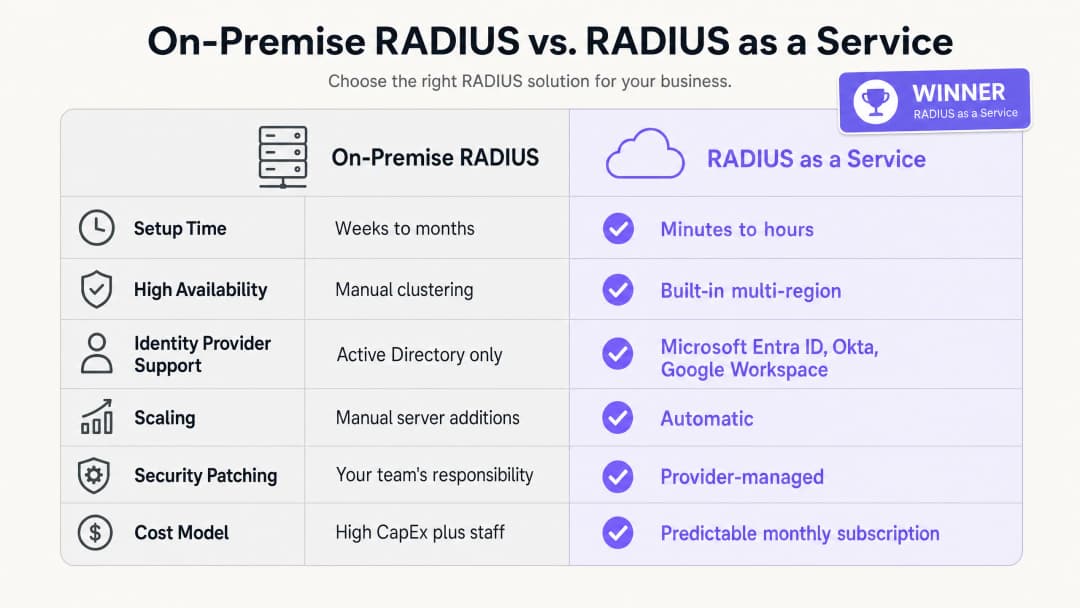
comparison_chart.png

RADIUS 即服务(RADIUS as a Service)的商业价值基于三大支柱:降低资本支出、减少运维开销以及提升安全态势。

在资本支出方面,您无需再支付购买、许可和更新物理服务器的费用。一个最小可行性的本地 RADIUS 部署需要两台服务器以实现高可用性、操作系统许可,以及每三到五年进行一次硬件更新。对于一个拥有 50 家物业的酒店集团来说,这意味着在整个资产中需要进行大量的硬件投资。

在运维开销方面,您的工程团队无需再花费时间为 Windows Server 打补丁、排查 FreeRADIUS 配置故障或在物理基础设施上管理证书更新。这些时间可以重新投入到能直接改善安全态势的安全策略工作中。

在安全态势方面,向 EAP-TLS 和 dynamic VLAN 分配的转变实质上减少了攻击面。凭据窃取是导致网络入侵的首要原因。从网络身份验证过程中消除密码可以直接应对这一风险。集中式审计日志支持符合 PCI DSS v4.0 和 GDPR,从而降低了合规性审计的成本和复杂性。

对于管理 交通 枢纽或高客流量场所的组织而言,能够通过单一控制面板在所有位置实施一致的安全策略是一项可衡量的运维提升。Purple 在全球 80,000 多个活跃场所中运营,并在 2024 年处理了 4.4 亿次登录(Purple 内部数据,2024 年)。支持如此规模的基础设施在设计上是云原生的。

要更广泛地了解 WiFi 分析和网络智能如何与业务成果相联系,请参阅我们的 WiFi 分析平台


参考文献

[1] IEEE 局域网和城域网标准 - 基于端口的网络访问控制。IEEE Std 802.1X-2020。 [2] IETF。远程用户拨号认证服务 (RADIUS)。RFC 2865。1997年。 [3] IETF。EAP-TLS 身份验证协议。RFC 5216。2008年。 [4] IronWiFi。云 RADIUS 服务器的优势:为什么企业正在将身份验证转移到线上。2026年2月。 [5] SecureW2。云端与本地 RADIUS:哪一个更好?2026年5月。 [6] Portnox。RADIUS as a Service。2026年。 [7] PCI 安全标准委员会。PCI DSS v4.0。2022年3月。 [8] Purple。内部平台数据:4.4 亿次登录,80,000 多个场所。2024年。

关键定义

RADIUS

Remote Authentication Dial-In User Service. A networking protocol defined in RFC 2865 that provides centralised Authentication, Authorisation, and Accounting (AAA) management for users connecting to a network service.

IT teams use RADIUS as the central decision engine to verify whether a device or user is allowed onto the corporate WiFi network. It sits between the access point and the identity provider.

802.1X

An IEEE Standard for port-based Network Access Control. It provides an authentication mechanism to devices wishing to attach to a LAN or WLAN, forcing them to authenticate before receiving an IP address.

This is the standard that underpins enterprise WiFi security. Without 802.1X, any device that connects to the SSID gets network access. With 802.1X, every device must prove its identity first.

EAP-TLS

Extensible Authentication Protocol - Transport Layer Security. An authentication method defined in RFC 5216 that requires both the client device and the RADIUS server to present digital certificates, providing mutual authentication without passwords.

Considered the gold standard for enterprise WiFi security. Certificates are deployed to corporate devices via MDM. EAP-TLS eliminates the risk of password theft and phishing attacks on the network.

PEAP

Protected Extensible Authentication Protocol. An EAP method that tunnels a username and password exchange inside a TLS session. Less secure than EAP-TLS because it relies on passwords.

PEAP-MSCHAPv2 is widely deployed in legacy environments. IT teams should plan a migration to EAP-TLS for corporate devices, using PEAP only as a fallback for unmanaged or BYOD devices.

Dynamic VLAN assignment

A process where the RADIUS server instructs the access point which Virtual LAN to place a device in, based on the user's verified identity and role, rather than the SSID they connected to.

Essential for network segmentation in multi-role environments. A single 'Staff' SSID can securely separate housekeeping, reception, and management traffic into different VLANs with different access rights.

AAA

Authentication, Authorisation, and Accounting. The three functions performed by a RADIUS server: verifying identity (authentication), determining what access is permitted (authorisation), and recording session data for audit purposes (accounting).

IT teams and auditors use AAA as a framework for evaluating network access control. Cloud RADIUS delivers all three functions from a managed service.

WPA3-Enterprise

The current WiFi security standard for enterprise networks, requiring 802.1X authentication via a RADIUS server. It offers improved cryptographic strength over WPA2-Enterprise, including 192-bit security mode for high-security environments.

IT managers should configure WPA3-Enterprise as the minimum security standard for staff networks. Guest networks can use WPA2 or open authentication with a captive portal.

Network Access Control (NAC)

A security approach that enforces policy on devices seeking to access network resources, combining endpoint security assessment, identity authentication, and network enforcement.

RADIUS is a foundational component of NAC. Cloud RADIUS extends NAC to distributed, multi-site environments without requiring on-premise infrastructure at each location.

Captive portal

A web page that a user of a public-access network must interact with before being granted internet access. Typically used for Guest WiFi to collect consent or display terms of use.

Captive portals handle unauthenticated guest access, while 802.1X handles authenticated staff access. The two mechanisms operate on separate SSIDs and VLANs.

应用实例

A 200-room hotel needs to secure its staff network across housekeeping, reception, and management, while keeping Guest WiFi entirely separate. They currently use a shared PSK for the staff network, which has not been changed in two years.

Deploy RADIUS as a Service integrated with Microsoft Entra ID. Configure the Cisco Meraki access points to use WPA3-Enterprise with 802.1X. Housekeeping staff authenticate using their Entra ID credentials; the RADIUS server reads their directory group and dynamically assigns them to VLAN 10 (housekeeping task system access only). Reception staff are assigned to VLAN 20 (property management system access). Management are assigned to VLAN 30 (broader access). Guest WiFi remains on a separate SSID with a captive portal, isolated on VLAN 40. When a seasonal staff member leaves, their Entra ID account is disabled, instantly revoking WiFi access across all access points on the property.

考官评语: This approach eliminates the shared PSK vulnerability and the risk of former employees retaining access. Dynamic VLAN assignment ensures a compromised housekeeping device cannot reach the property management system. Using cloud RADIUS removes the need for a physical server in the hotel's limited IT closet. The integration with Entra ID means offboarding is a single action with immediate network-wide effect.

A national retail chain with 400 stores needs to ensure PCI DSS compliance for its point-of-sale terminals. They currently manage 400 separate FreeRADIUS instances on local store servers, each requiring individual patching.

Migrate to a single RADIUS as a Service instance. Configure HPE Aruba access points at all 400 stores to authenticate POS devices using EAP-TLS with machine certificates pushed via Microsoft Intune. The cloud RADIUS server authenticates the certificates and places POS devices into a PCI-compliant VLAN (VLAN 30), isolated from all other network traffic. Store staff use a separate SSID authenticated via Okta, placing them in a general staff VLAN (VLAN 20). Shoppers on the guest network are isolated on VLAN 40. The security team manages all policies from a single dashboard.

考官评语: Centralising the RADIUS infrastructure eliminates the maintenance burden of patching 400 local servers. Using EAP-TLS for POS devices removes passwords entirely, preventing credential theft. This architecture satisfies PCI DSS v4.0 Requirement 8 (unique authentication) and Requirement 1 (network segmentation). When a vulnerability is disclosed, the provider patches the cloud infrastructure rather than the retail chain's security team patching 400 servers over several weeks.

练习题

Q1. Your university campus currently uses Microsoft NPS on Windows Server to authenticate students via PEAP-MSCHAPv2. The institution is migrating to Google Workspace and wants to decommission all on-premise servers within 12 months. What is the most secure and operationally efficient architectural change for the WiFi authentication infrastructure?

提示:Microsoft NPS does not natively support Google Workspace. Consider what replaces both the server and the authentication method.

查看标准答案

Migrate to RADIUS as a Service with native Google Workspace integration. The cloud RADIUS service connects directly to Google Workspace via LDAP or OIDC, eliminating the need for Active Directory or NPS. Simultaneously, transition managed student and staff devices from PEAP-MSCHAPv2 to EAP-TLS by deploying client certificates via the institution's MDM platform. This removes passwords from the authentication process and ensures that only managed, trusted devices can access the staff and student networks. The migration can be phased: deploy cloud RADIUS alongside NPS, migrate one SSID at a time, then decommission NPS once all devices are using the new service.

Q2. A stadium with 80,000 capacity requires secure WiFi for corporate staff, ticketing terminals, media press members, and event-day contractors. How should the network be configured using cloud RADIUS to enforce appropriate access for each group?

提示:Consider how RADIUS handles authorisation, not just authentication. Each group needs different access rights.

查看标准答案

Deploy a single 802.1X SSID for all authenticated groups. Configure the cloud RADIUS service to use dynamic VLAN assignment based on the user's role in the identity provider. Corporate staff are assigned to VLAN 10 with access to internal systems. Ticketing terminals, authenticated via machine certificates (EAP-TLS), are placed in a restricted VLAN 20 with access only to the ticketing platform. Media press members are assigned to VLAN 30 with high-bandwidth internet access but no access to internal systems. Event-day contractors are assigned to VLAN 40 with limited internet access only. A separate open SSID with a captive portal handles fan and attendee guest access on VLAN 50, isolated from all other traffic.

Q3. During a security audit, it is discovered that your organisation's FreeRADIUS server has not received a security patch for eight months. The team has been reluctant to patch it because the last update caused a two-hour authentication outage. How does migrating to RADIUS as a Service resolve both the security risk and the operational risk?

提示:Consider the division of responsibility in a managed service model and how providers handle patching without downtime.

查看标准答案

RADIUS as a Service shifts the responsibility for OS patching and vulnerability management to the provider. The provider operates highly available, multi-region clusters, allowing them to patch individual endpoints and roll updates progressively without causing authentication downtime. Your team no longer needs to schedule maintenance windows or accept the risk of a patch-induced outage. The security risk is eliminated because the provider patches the infrastructure as vulnerabilities are disclosed, often before the CVE is widely publicised. The operational risk is eliminated because the provider's SLA guarantees uptime regardless of patching activity. Your team's role changes from infrastructure maintenance to policy management.