
Les avantages de sécurité de RADIUS-as-a-Service pour les effectifs hybrides
Ce guide de référence technique explique comment RADIUS-as-a-Service sécurise l'accès au réseau pour les effectifs hybrides au sein des sites distribués. Il couvre l'architecture, les avantages en matière de sécurité et les étapes de déploiement pour remplacer l'infrastructure RADIUS sur site par un service d'authentification géré dans le cloud. Pour les directeurs informatiques et les architectes réseau des hôtels, des chaînes de vente au détail, des stades et des organisations du secteur public, ce guide fournit les preuves nécessaires pour évaluer et mettre en œuvre une migration vers le cloud RADIUS ce trimestre.
Video overview
Écouter ce guide
Voir la transcription du podcast
Fait partie de notre série principale : Guide de sécurité WiFi d'entreprise →

Résumé exécutif
Le passage à des effectifs hybrides a révélé une faiblesse fondamentale de la sécurité réseau traditionnelle : les serveurs RADIUS sur site ont été conçus pour un monde où les collaborateurs travaillaient dans un seul bâtiment et se connectaient à un seul réseau. Ce monde n'existe plus. Aujourd'hui, vos collaborateurs s'authentifient depuis des chambres d'hôtel, des surfaces de vente, des bureaux distants et des lieux événementiels. Vos fournisseurs d'identité sont dans le cloud. Vos points d'accès sont répartis sur des centaines de sites. Pourtant, de nombreuses entreprises s'appuient encore sur des serveurs RADIUS physiques qui nécessitent des correctifs manuels, ne peuvent pas s'intégrer nativement à Microsoft Entra ID ou Google Workspace, et tombent en panne sans préavis en cas de défaillance matérielle.
Le RADIUS-as-a-Service remplace cette infrastructure par un moteur d'authentification cloud-native. Vous orientez vos points d'accès vers des endpoints cloud. Le fournisseur gère les serveurs, les correctifs et la haute disponibilité. Vous gérez les politiques. Pour les équipes informatiques des groupes de l'hôtellerie, des chaînes de commerce de détail et des espaces publics, cette transition élimine les coûts matériels, impose une segmentation du réseau basée sur l'identité et fournit la piste d'audit requise par la norme PCI-DSS et le GDPR.
Analyse technique approfondie
Les limites du RADIUS sur site
Le protocole RADIUS, défini par la norme RFC 2865, assure la centralisation de l'authentification, de l'autorisation et de la traçabilité (AAA) pour l'accès au réseau. Chaque entreprise qui exploite un réseau WiFi WPA2 ou WPA3 d'entreprise s'appuie sur ce protocole. Le protocole lui-même est robuste. Le problème réside dans le modèle d'infrastructure qui s'est développé autour de lui.
Le déploiement, la sécurisation et la maintenance de FreeRADIUS sur Linux exigent des compétences approfondies. Le service NPS (Network Policy Server) de Microsoft est étroitement lié à Active Directory et ne propose aucun support natif pour Microsoft Entra ID, Okta ou Google Workspace. Cisco Identity Services Engine (ISE) propose des fonctionnalités de gestion des politiques de niveau entreprise, mais nécessite du matériel dédié, un système de licences complexe et une équipe d'experts pour son exploitation. Pour ces trois solutions, vous devez concevoir et maintenir manuellement la haute disponibilité, généralement en exploitant deux serveurs avec réplication de base de données et un répartiteur de charge en amont.
Pour une entreprise sur site unique avec un Active Directory statique, ce modèle reste gérable. Pour un groupe hôtelier de 50 établissements, une chaîne de vente au détail de 400 magasins ou une université avec un campus dispersé, cela devient impossible. Soit vous centralisez les serveurs RADIUS et acceptez la latence d'authentification des sites distants, soit vous déployez des serveurs sur chaque site et les gérez individuellement. Aucune de ces options n'est évolutive.
L'architecture du RADIUS-as-a-Service
Le RADIUS-as-a-Service est un modèle de diffusion basé sur le cloud pour le protocole RADIUS. Le protocole lui-même reste inchangé, respectant la norme RFC 2865 et ses extensions. Ce qui change, c'est la responsabilité de la maintenance de l'infrastructure. Lorsqu'un appareil se connecte à votre réseau WiFi, l'point d'accès (client RADIUS) transmet la demande d'authentification via un tunnel sécurisé et chiffré aux terminaux cloud RADIUS. Le service cloud vérifie les identifiants auprès de votre fournisseur d'identité et renvoie un message Access-Accept ou Access-Reject accompagné d'attributs de politique tels que les affectations dynamiques de VLAN. Du point de vue de l'point d'accès, le flux d'authentification est identique à celui d'un RADIUS sur site.

Le fournisseur cloud exploite des serveurs RADIUS répartis sur plusieurs centres de données géographiquement distincts. Le basculement est automatique. Si un terminal devient indisponible, le trafic est acheminé vers le terminal actif suivant sans aucune intervention de votre équipe. Pour les organisations disposant de bureaux dans plusieurs régions, l'authentification s'effectue au terminal cloud le plus proche, ce qui maintient une faible latence quel que soit l'emplacement géographique.
Méthodes IEEE 802.1X et EAP
La norme IEEE 802.1X est le standard pour le contrôle d'accès réseau basé sur les ports (NAC). Elle oblige un appareil à s'authentifier avant de pouvoir obtenir une adresse IP et être autorisé à transmettre du trafic. Dans un déploiement 802.1X, RADIUS fait office de serveur d'authentification.
Le protocole EAP (Extensible Authentication Protocol) définit la manière dont les identifiants sont échangés. Le service cloud RADIUS prend en charge toutes les méthodes EAP :
| Méthode EAP | Type d'authentification | Niveau de sécurité | Utilisation recommandée |
|---|---|---|---|
| EAP-TLS | Basée sur des certificats mutuels | Le plus élevé | Appareils d'entreprise avec certificats gérés par MDM |
| PEAP-MSCHAPv2 | Nom d'utilisateur et mot de passe | Moyen | Appareils hérités ou BYOD sans MDM |
| EAP-TTLS | Identifiants tunnelisés | Moyen | Environnements mixtes |
| MAC Authentication Bypass | Adresse MAC de l'appareil | Faible | Appareils IoT ne pouvant pas prendre en charge le 802.1X |
La méthode EAP-TLS, définie par la norme RFC 5216, est considérée comme la référence absolue. L'appareil client et le serveur RADIUS se présentent mutuellement des certificats numériques. Cette authentification mutuelle élimine complètement le besoin de mots de passe dans le processus d'accès au réseau. Le certificat est lié de manière cryptographique à l'appareil et, contrairement à un mot de passe, ne peut pas être hameçonné, deviné ou volé. Pour les organisations ayant été confrontées à des violations de données liées aux identifiants, il s'agit du remède technique le plus direct.
Affectation dynamique de VLAN
En plus de l'authentification, le serveur RADIUS applique l'autorisation. Lorsqu'il accepte une connexion, il renvoie des attributs de politique à l'point d'accès, y compris l'identifiant VLAN à attribuer à l'appareil. Cette affectation dynamique de VLAN est le mécanisme clé permettant d'établir des réseaux basés sur l'identité.
Un réceptionniste d'un hôtel s'authentifie et se retrouve placé dans un VLAN frontal avec un accès au système de gestion de l'établissement. Un membre du personnel d'entretien est placé dans un VLAN restreint avec un accès uniquement à Internet. Le terminal d'un client est placé dans un VLAN Guest WiFi, complètement isolé des ressources de l'entreprise. Un objet connecté comme une caméra de sécurité est placé dans un VLAN IoT dédié. Tout cela se produit automatiquement en fonction de l'identité vérifiée par le serveur RADIUS, sans aucune configuration manuelle de VLAN pour chaque terminal.
C'est le principe du moindre privilège appliqué à l'accès réseau. Vous ne faites pas confiance à un terminal simplement parce qu'il s'est connecté à un SSID spécifique. Vous accordez l'accès en fonction d'une identité vérifiée et vous limitez cet accès uniquement à ce qui est nécessaire pour cette identité. Pour en savoir plus sur la façon dont cela s'intègre dans une stratégie plus large de contrôle d'accès au réseau, consultez notre guide sur les systèmes de contrôle d'accès réseau.
Intégration Native de l'Identité Cloud
Le principal avantage opérationnel du cloud RADIUS réside dans son intégration native avec les fournisseurs d'identité modernes. Le cloud RADIUS se connecte directement à Microsoft Entra ID, Okta et Google Workspace via des protocoles standard tels que OIDC, SAML et LDAP. Lorsque vous intégrez un nouvel employé dans votre fournisseur d'identité, il peut immédiatement s'authentifier sur le réseau WiFi. Lorsque vous désactivez l'accès d'un collaborateur, vous désactivez son compte dans l'annuaire, et son accès WiFi est instantanément révoqué sur chaque point d'accès de chaque site.
Cette synchronisation en temps réel élimine l'une des failles de sécurité les plus complexes du WiFi d'entreprise : les anciens employés qui disposent toujours d'une clé PSK partagée, ou dont les comptes RADIUS n'ont pas été supprimés manuellement à leur départ. Avec le cloud RADIUS et un fournisseur d'identité cloud, le départ d'un collaborateur devient une action unique aux effets immédiats sur l'ensemble du réseau.
-
Vous avez des questions sur votre configuration spécifique ?
Notre équipe collabore avec des exploitants de sites, des responsables informatiques et des ingénieurs réseau au sein de 80 000 sites. Réservez un appel de 20 minutes et nous vous montrerons comment d'autres professionnels comme vous ont résolu ce problème.
Guide de mise en œuvre
Étape 1 : Connectez votre fournisseur d'identité
Connectez le service cloud RADIUS à votre fournisseur d'identité. Pour Microsoft Entra ID ou Google Workspace, cela implique généralement d'autoriser une application d'entreprise via OAuth ou de configurer un connecteur LDAP. Associez vos groupes d'annuaire à des politiques réseau spécifiques. Définissez la taxonomie de vos rôles avant de commencer : quels groupes correspondent à quels VLAN, et quels droits d'accès possède chaque VLAN. Effectuer cette configuration correctement dès le départ vous évitera un travail fastidieux par la suite.
Étape 2 : Déployez des certificats pour les terminaux d'entreprise
Pour les terminaux appartenant à l'entreprise, configurez votre plateforme de gestion des terminaux mobiles (MDM), telle que Microsoft Intune ou Jamf, pour pousser les certificats clients vers les terminaux. Cela permet l'authentification EAP-TLS. Assurez-vous que l'autorité de certification (CA) racine qui a émis le certificat du serveur RADIUS est approuvée par tous les terminaux clients. Une chaîne de confiance non validée est la cause la plus fréquente d'échecs d'authentification silencieux.
Étape 3 : Configurez votre matériel réseau
Ajoutez les adresses IP RADIUS dans le cloud et les secrets partagés à votre contrôleur sans fil ou à vos points d'accès. Configurez toujours les points de terminaison principal et secondaire pour utiliser la redondance intégrée du fournisseur. Assurez-vous que les ports UDP 1812 (authentification) et 1813 (comptabilité) sont ouverts en sortie depuis vos points d'accès vers les points de terminaison RADIUS cloud. Vérifiez ce point avant la mise en service. Des règles de pare-feu mal configurées sont la deuxième cause la plus fréquente d'échecs de déploiement.
Le RADIUS cloud fonctionne avec Cisco Meraki, HPE Aruba, Ruckus, Juniper Mist, Ubiquiti UniFi, Cambium, Extreme et Fortinet. Les étapes de configuration varient selon le constructeur, mais le protocole RADIUS est standardisé, de sorte que les paramètres de base (IP du serveur, secret partagé, port d'authentification) restent identiques.
Étape 4 : Définir les politiques de VLAN
Configurez l'attribution dynamique de VLAN dans votre moteur de politique RADIUS. Associez chaque rôle d'utilisateur ou type d'appareil à un ID de VLAN spécifique. Testez chaque politique avant le déploiement en production. Une matrice de test simple - un appareil par rôle, un VLAN par rôle, avec vérification du positionnement - permet de détecter la plupart des erreurs de configuration avant qu'elles n'affectent les utilisateurs.
Bonnes pratiques
Imponez le protocole EAP-TLS pour tous les appareils de l'entreprise. Abandonnez PEAP-MSCHAPv2 dès que votre déploiement MDM le permet. PEAP repose sur des mots de passe, qui peuvent être compromis. EAP-TLS repose sur des certificats, ce qui n'est pas le cas.
Segmentez tout. Ne placez jamais les employés, les invités et les appareils IoT sur le même sous-réseau. Utilisez RADIUS pour appliquer des limites de VLAN strictes. C'est un point essentiel pour les environnements du commerce de détail qui gèrent des données de cartes de paiement sous PCI-DSS, et les environnements de la santé qui protègent les données des patients.
Alignez-vous sur WPA3-Enterprise. WPA3-Enterprise, la norme de sécurité WiFi actuelle, requiert une authentification 802.1X. Assurez-vous que vos points d'accès prennent en charge WPA3-Enterprise et configurez-le comme norme de sécurité minimale pour les réseaux des employés.
Auditez régulièrement vos journaux RADIUS. Le RADIUS cloud fournit des journaux d'audit centralisés. Examinez les échecs d'authentification chaque semaine. Une augmentation soudaine des échecs à partir d'un appareil ou d'un emplacement spécifique est un indicateur précoce d'une mauvaise configuration ou d'une attaque potentielle.
Effectuez des tests de basculement. Au moins une fois par trimestre, simulez une panne du point de terminaison RADIUS principal et vérifiez que l'authentification se poursuit de manière transparente via le point de terminaison secondaire. Documentez le résultat. Il s'agit d'un test simple que la plupart des équipes n'exécutent jamais avant d'y être contraintes.
Pour les établissements qui déploient du WiFi dans des environnements complexes, y compris des sites maritimes ou isolés, consultez notre guide sur la configuration d'un captive portal sur Starlink pour les considérations relatives à la dépendance au réseau WAN.
Dépannage et atténuation des risques
Expirations de l'authentification
Si un appareil ne parvient pas à s'authentifier, vérifiez d'abord la connectivité entre vos points d'accès et les points de terminaison RADIUS cloud. Vérifiez que les ports UDP 1812 et 1813 sont ouverts en sortie. L'inspection approfondie des paquets (DPI) sur les pare-feu modernes peut retarder ou abandonner les paquets RADIUS. Si vous constatez des expirations de délai, vérifiez les règles de votre politique de pare-feu qui pourraient inspecter ou limiter le débit du trafic UDP vers les points de terminaison RADIUS.
Échecs de la chaîne de confiance des certificats
Si vous utilisez EAP-TLS, assurez-vous que les appareils clients font confiance à l'AC racine qui a émis le certificat du serveur RADIUS. Si la chaîne de confiance est rompue, l'appareil rejettera discrètement la connexion pour empêcher une attaque de l'homme du milieu. Cela se manifeste par un échec de connexion sans message d'erreur clair. Vérifiez les journaux du serveur RADIUS pour identifier les échecs de handshake EAP-TLS. Déployez le certificat de l'AC racine sur tous les appareils gérés via un MDM.
Dépendance WAN
Le cloud RADIUS nécessite une connexion internet active. Si la liaison WAN échoue, les demandes d'authentification ne peuvent pas atteindre le serveur. Pour les ressources locales critiques, évaluez les points d'accès qui prennent en charge la survie locale ou la mise en cache de l'authentification. Pour la plupart des déploiements, la dépendance au WAN est acceptable car un site sans internet ne peut de toute façon pas accéder aux applications SaaS.
Incompatibilités de secrets partagés
Chaque point d'accès ou contrôleur sans fil doit être configuré en tant que client RADIUS avec le secret partagé correct. Une incompatibilité entraîne le rejet silencieux de toutes les demandes d'authentification provenant de cet appareil. Si un point d'accès spécifique échoue alors que d'autres réussissent, vérifiez la configuration du secret partagé sur cet appareil.
-
ROI et impact commercial
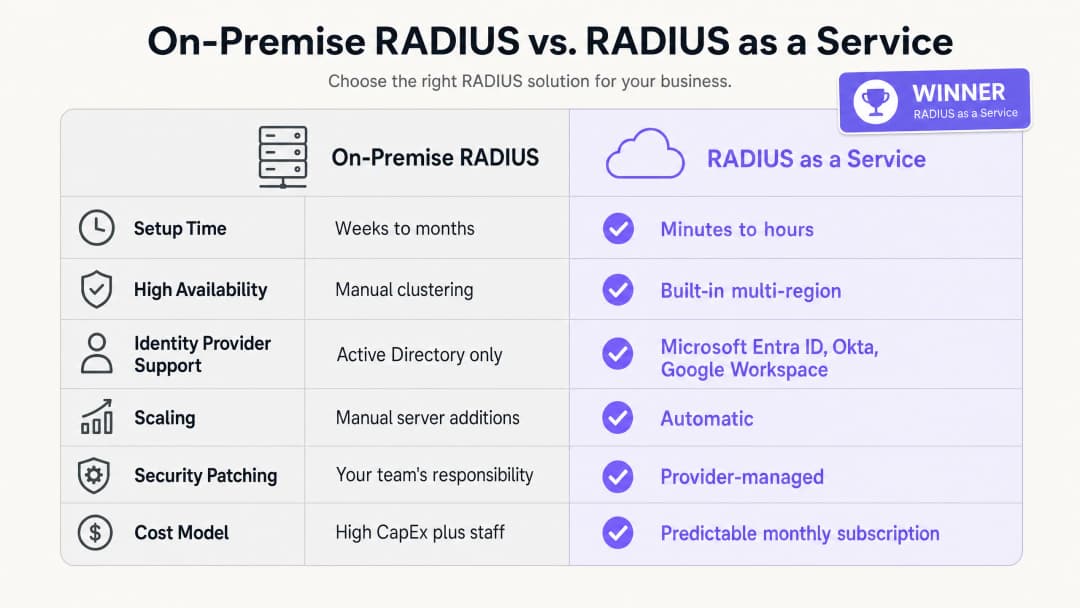
Les avantages commerciaux de RADIUS-as-a-Service reposent sur trois piliers : la réduction des dépenses d'investissement, la diminution des coûts opérationnels et l'amélioration de la posture de sécurité.
En termes de dépenses d'investissement, vous éliminez complètement les coûts d'achat, de licence et de renouvellement des serveurs physiques. Un déploiement RADIUS sur site minimal viable nécessite deux serveurs pour la haute disponibilité, des licences de système d'exploitation et le renouvellement du matériel tous les trois à cinq ans. Pour un groupe hôtelier de 50 propriétés, cela représente un investissement matériel important sur l'ensemble du parc.
En termes de coûts opérationnels, votre équipe d'ingénierie n'a plus besoin de passer du temps à corriger des serveurs Windows, à dépanner des erreurs de configuration FreeRADIUS ou à gérer les renouvellements de certificats sur l'infrastructure physique. Ce temps peut être réorienté vers des travaux sur les politiques de sécurité qui améliorent directement votre posture de sécurité.
En examinant la posture de sécurité, le passage à EAP-TLS et à l'attribution dynamique de VLAN réduit considérablement la surface d'attaque du réseau. Le vol d'identifiants est une cause majeure de failles réseau. L'élimination des mots de passe du processus d'authentification réseau répond directement à cette menace. La journalisation centralisée des audits facilite la conformité avec PCI DSS v4.0 et le GDPR, réduisant ainsi le coût et la complexité des audits de conformité. Pour les organisations gérant des hubs de transport ou des sites à haute densité, la possibilité d'appliquer des politiques de sécurité cohérentes sur tous les sites à partir d'un tableau de bord unique constitue une amélioration opérationnelle mesurable. Purple est actif dans plus de 80 000 sites physiques et a traité 440 millions de connexions en 2024 (données internes Purple, 2024). L'infrastructure qui soutient cette échelle est cloud-native par conception.
Pour une vision plus large de la manière dont les analyses WiFi et l'intelligence réseau sont liées aux résultats commerciaux, consultez notre plateforme d'analyse WiFi.
-
Références
[1] Norme IEEE pour les réseaux locaux et métropolitains - Contrôle d'accès réseau basé sur les ports. IEEE Std 802.1X-2020. [2] IETF. Remote Authentication Dial In User Service (RADIUS). RFC 2865. 1997. [3] IETF. Le protocole d'authentification EAP-TLS. RFC 5216. 2008. [4] IronWiFi. Avantages d'un serveur Cloud RADIUS : pourquoi les entreprises migrent l'authentification en ligne. Février 2026. [5] SecureW2. Cloud vs. RADIUS sur site : quel est le meilleur ? Mai 2026. [6] Portnox. RADIUS-as-a-Service. 2026. [7] Conseil des normes de sécurité PCI. PCI DSS v4.0. Mars 2022. [8] Purple. Données de la plateforme interne : 440 millions de connexions, plus de 80 000 sites. 2024.
Définitions clés
RADIUS
Remote Authentication Dial-In User Service. Un protocole réseau défini dans la spécification RFC 2865 qui fournit une gestion centralisée de l'Authentification, de l'Autorisation et de la Comptabilité (AAA) pour les utilisateurs se connectant à un service réseau.
Les équipes informatiques utilisent RADIUS comme moteur de décision central pour vérifier si un appareil ou un utilisateur est autorisé à accéder au réseau WiFi de l'entreprise. Il se situe entre le point d'accès et le fournisseur d'identité.
802.1X
Une norme IEEE pour le contrôle d'accès réseau basé sur les ports. Elle fournit un mécanisme d'authentification aux appareils souhaitant se connecter à un réseau local ou à un réseau WLAN, les forçant à s'authentifier avant de recevoir une adresse IP.
Il s'agit de la norme qui sous-tend la sécurité WiFi d'entreprise. Sans le protocole 802.1X, tout appareil qui se connecte au SSID obtient un accès au réseau. Avec le protocole 802.1X, chaque appareil doit d'abord prouver son identité.
EAP-TLS
Extensible Authentication Protocol - Transport Layer Security. Une méthode d'authentification définie dans la RFC 5216 qui exige que l'appareil client et le serveur RADIUS présentent tous deux des certificats numériques, offrant ainsi une authentification mutuelle sans mot de passe.
Considéré comme la référence absolue pour la sécurité WiFi d'entreprise. Les certificats sont déployés sur les appareils de l'entreprise via MDM. L'EAP-TLS élimine le risque de vol de mot de passe et d'attaques de phishing sur le réseau.
PEAP
Protected Extensible Authentication Protocol. Une méthode EAP qui encapsule un échange de nom d'utilisateur et de mot de passe dans une session TLS. Moins sécurisée que l'EAP-TLS car elle repose sur des mots de passe.
PEAP-MSCHAPv2 est largement déployé dans les environnements existants. Les équipes informatiques doivent planifier une migration vers EAP-TLS pour les appareils de l'entreprise, en utilisant PEAP uniquement comme solution de secours pour les appareils non gérés ou BYOD.
Attribution dynamique de VLAN
Un processus par lequel le serveur RADIUS indique au point d'accès dans quel réseau virtuel local (VLAN) placer un appareil, en fonction de l'identité et du rôle vérifiés de l'utilisateur, plutôt que du SSID auquel il s'est connecté.
Indispensable pour la segmentation du réseau dans les environnements multi-rôles. Un seul SSID "Personnel" peut séparer de manière sécurisée le trafic de l'entretien, de la réception et de la direction dans différents VLANs avec des droits d'accès distincts.
AAA
Authentication, Authorisation, and Accounting (Authentification, Autorisation et Comptabilité). Les trois fonctions exécutées par un serveur RADIUS : vérifier l'identité (authentification), déterminer l'accès autorisé (autorisation) et enregistrer les données de session à des fins d'audit (comptabilité).
Les équipes informatiques et les auditeurs utilisent le protocole AAA comme cadre d'évaluation du contrôle d'accès au réseau. Le RADIUS cloud fournit ces trois fonctions à partir d'un service géré.
WPA3-Enterprise
La norme de sécurité WiFi actuelle pour les réseaux d'entreprise, nécessitant une authentification 802.1X via un serveur RADIUS. Elle offre une résistance cryptographique améliorée par rapport au WPA2-Enterprise, incluant un mode de sécurité 192 bits pour les environnements hautement sécurisés.
Les responsables informatiques doivent configurer le WPA3-Enterprise comme norme de sécurité minimale pour les réseaux du personnel. Les réseaux invités peuvent utiliser le WPA2 ou une authentification ouverte avec un Captive Portal.
Contrôle d'accès au réseau (NAC)
Une approche de sécurité qui applique des politiques aux appareils cherchant à accéder aux ressources du réseau, combinant l'évaluation de la sécurité des terminaux, l'authentification de l'identité et l'application des règles réseau.
Le RADIUS est un composant fondamental du NAC. Le cloud RADIUS étend le NAC aux environnements distribués et multi-sites sans nécessiter d'infrastructure sur site à chaque emplacement.
Captive Portal
Une page web avec laquelle l'utilisateur d'un réseau public doit interagir avant de pouvoir accéder à Internet. Généralement utilisée pour le WiFi invité afin de recueillir le consentement ou d'afficher les conditions d'utilisation.
Les portails captifs gèrent l'accès des invités non authentifiés, tandis que le 802.1X gère l'accès du personnel authentifié. Les deux mécanismes fonctionnent sur des SSIDs et des VLANs distincts.
Exemples concrets
Un hôtel de 200 chambres doit sécuriser le réseau de son personnel (ménage, réception et direction) tout en séparant complètement le WiFi invité. Il utilise actuellement une clé PSK partagée pour le réseau du personnel, qui n'a pas été modifiée depuis deux ans.
Déployer RADIUS-as-a-Service intégré à Microsoft Entra ID. Configurer les points d'accès Cisco Meraki pour utiliser WPA3-Enterprise avec 802.1X. Le personnel de ménage s'authentifie à l'aide de ses identifiants Entra ID ; le serveur RADIUS lit son groupe d'annuaire et l'affecte de manière dynamique au VLAN 10 (accès uniquement au système de tâches ménagères). Le personnel de réception est affecté au VLAN 20 (accès au système de gestion de l'établissement). La direction est affectée au VLAN 30 (accès plus large). Le WiFi invité reste sur un SSID distinct avec un Captive Portal, isolé sur le VLAN 40. Lorsqu'un membre du personnel saisonnier s'en va, son compte Entra ID est désactivé, ce qui révoque instantanément son accès WiFi sur tous les points d'accès de l'établissement.
Une chaîne nationale de vente au détail comptant 400 magasins doit garantir la conformité PCI-DSS pour ses terminaux de point de vente. Elle gère actuellement 400 instances FreeRADIUS distinctes sur des serveurs de magasins locaux, chacune nécessitant des correctifs individuels.
Migrer vers une seule instance RADIUS-as-a-Service. Configurer les points d'accès HPE Aruba dans les 400 magasins pour authentifier les terminaux de point de vente via EAP-TLS avec des certificats d'appareil déployés par Microsoft Intune. Le serveur RADIUS dans le cloud authentifie les certificats et place les terminaux de point de vente dans un VLAN conforme aux normes PCI (VLAN 30), isolé de tout autre trafic réseau. Le personnel du magasin utilise un SSID distinct authentifié via Okta, ce qui le place dans un VLAN général pour le personnel (VLAN 20). Les clients sur le réseau invité sont isolés sur le VLAN 40. L'équipe de sécurité gère l'ensemble des politiques à partir d'un tableau de bord unique.
Questions d'entraînement
Q1. Votre campus universitaire utilise actuellement Microsoft NPS sur Windows Server pour authentifier les étudiants via PEAP-MSCHAPv2. L'établissement migre vers Google Workspace et souhaite démanteler tous les serveurs sur site d'ici 12 mois. Quel est le changement d'architecture le plus sécurisé et le plus efficace sur le plan opérationnel pour l'infrastructure d'authentification WiFi ?
Conseil : Microsoft NPS ne prend pas en charge nativement Google Workspace. Réfléchissez à ce qui remplace à la fois le serveur et la méthode d'authentification.
Voir la réponse type
Migrez vers un RADIUS-as-a-Service avec une intégration native à Google Workspace. Le service cloud RADIUS se connecte directement à Google Workspace via LDAP ou OIDC, éliminant ainsi le besoin d'Active Directory ou de NPS. Parallèlement, effectuez la transition des appareils gérés des étudiants et du personnel de PEAP-MSCHAPv2 vers EAP-TLS en déployant des certificats clients via la plateforme MDM de l'établissement. Cela supprime les mots de passe du processus d'authentification et garantit que seuls les appareils gérés et approuvés peuvent accéder aux réseaux du personnel et des étudiants. La migration peut être progressive : déployez le cloud RADIUS aux côtés de NPS, migrez un SSID à la fois, puis mettez hors service NPS une fois que tous les appareils utilisent le nouveau service.
Q2. Un stade d'une capacité de 80 000 personnes a besoin d'un WiFi sécurisé pour le personnel de l'entreprise, les terminaux de billetterie, les membres de la presse écrite et les prestataires présents les jours d'événement. Comment le réseau doit-il être configuré à l'aide du cloud RADIUS pour appliquer un accès approprié à chaque groupe ?
Conseil : Considérez la façon dont RADIUS gère l'autorisation, et pas seulement l'authentification. Chaque groupe a besoin de droits d'accès différents.
Voir la réponse type
Déployez un seul SSID 802.1X pour tous les groupes authentifiés. Configurez le service cloud RADIUS pour utiliser l'attribution dynamique de VLAN en fonction du rôle de l'utilisateur dans le fournisseur d'identité. Le personnel de l'entreprise est attribué au VLAN 10 avec accès aux systèmes internes. Les terminaux de billetterie, authentifiés via des certificats d'appareil (EAP-TLS), sont placés dans un VLAN 20 restreint avec un accès uniquement à la plateforme de billetterie. Les membres de la presse écrite sont attribués au VLAN 30 avec un accès internet haut débit mais sans accès aux systèmes internes. Les prestataires présents les jours d'événement sont attribués au VLAN 40 avec un accès internet limité uniquement. Un SSID ouvert distinct avec un Captive Portal gère l'accès des supporters et des visiteurs sur le VLAN 50, isolé de tout autre trafic.
Q3. Lors d'un audit de sécurité, il est découvert que le serveur FreeRADIUS de votre organisation n'a pas reçu de correctif de sécurité depuis huit mois. L'équipe a hésité à appliquer les correctifs car la dernière mise à jour a provoqué une interruption de l'authentification de deux heures. Comment la migration vers un RADIUS-as-a-Service résout-elle à la fois le risque de sécurité et le risque opérationnel ?
Conseil : Considérez le partage des responsabilités dans un modèle de service géré et la façon dont les fournisseurs gèrent les correctifs sans interruption de service.
Voir la réponse type
Le RADIUS-as-a-Service transfère la responsabilité des correctifs du système d'exploitation et de la gestion des vulnérabilités au fournisseur. Le fournisseur exploite des clusters hautement disponibles et multi-régions, ce qui lui permet de corriger les points de terminaison individuels et de déployer les mises à jour de manière progressive sans provoquer d'interruption de l'authentification. Votre équipe n'a plus besoin de planifier des fenêtres de maintenance ni d'accepter le risque d'une panne provoquée par un correctif. Le risque de sécurité est éliminé car le fournisseur corrige l'infrastructure à mesure que les vulnérabilités sont révélées, souvent avant que la CVE ne soit largement divulguée. Le risque opérationnel est éliminé car le SLA du fournisseur garantit la disponibilité, quelle que soit l'activité de correction. Le rôle de votre équipe passe de la maintenance de l'infrastructure à la gestion des politiques.
Continuer la lecture de cette série
Intégration de RADIUS-as-a-Service avec les annuaires cloud (Azure AD & Google Workspace)
Ce guide de référence technique détaille comment intégrer RADIUS-as-a-Service avec les annuaires cloud - Microsoft Entra ID et Google Workspace - pour l'authentification WiFi d'entreprise. Il couvre la transition architecturale du NPS sur site vers le RADIUS cloud-native, le déploiement de l'authentification EAP-TLS basée sur les certificats et les meilleures pratiques opérationnelles pour sécuriser l'accès sans fil dans les secteurs de l'hôtellerie, du commerce de détail et du secteur public. Pour les responsables informatiques et les architectes réseau ayant déjà investi dans l'identité cloud, ce guide comble le fossé entre la gestion des annuaires et la sécurité physique du réseau.
Comment implémenter l'authentification 802.1X avec Cloud RADIUS
Ce guide de référence technique fournit un cadre complet pour implémenter l'authentification 802.1X avec Cloud RADIUS sur des parcs d'entreprises distribués. Il détaille l'architecture, la sélection de la méthode EAP, le séquençage du déploiement et les stratégies d'atténuation des risques nécessaires pour sécuriser l'accès au réseau tout en éliminant les coûts opérationnels liés aux infrastructures sur site.
Qu'est-ce que Cloud RADIUS ? Le guide complet du RADIUS-as-a-Service
Ce guide complet explore Cloud RADIUS (RADIUS-as-a-Service), détaillant son architecture, ses méthodes EAP et ses stratégies d'implémentation. Il fournit aux responsables IT des conseils pratiques pour migrer de serveurs sur site vers un modèle d'authentification basé sur le cloud, évolutif, sécurisé et conforme.
Vous avez des questions sur votre configuration spécifique ?
Notre équipe collabore avec des exploitants de sites, des responsables informatiques et des ingénieurs réseau au sein de 80 000 sites. Réservez un appel de 20 minutes et nous vous montrerons comment d'autres professionnels comme vous ont résolu ce problème.