
Comment implémenter l'authentification 802.1X avec Cloud RADIUS
Ce guide de référence technique fournit un cadre complet pour implémenter l'authentification 802.1X avec Cloud RADIUS sur des parcs d'entreprises distribués. Il détaille l'architecture, la sélection de la méthode EAP, le séquençage du déploiement et les stratégies d'atténuation des risques nécessaires pour sécuriser l'accès au réseau tout en éliminant les coûts opérationnels liés aux infrastructures sur site.
Écouter ce guide
Voir la transcription du podcast
Fait partie de notre série principale : Enterprise WiFi Security Guide →
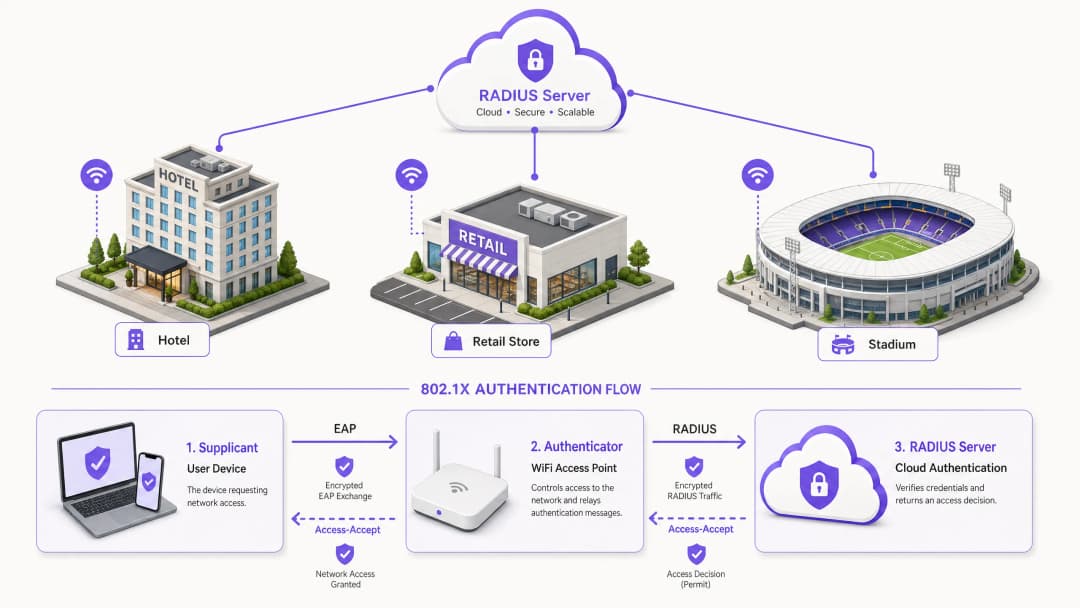
Synthèse décisionnelle
Pour les décideurs informatiques qui gèrent des parcs de réseaux distribués dans les secteurs de l'hôtellerie, du commerce de détail et du secteur public, la sécurisation des accès réseau est passée d'une préférence opérationnelle à un mandat de conformité strict. S'en remettre à des clés pré-partagées (PSK) introduit un risque inacceptable, échoue aux normes d'audit modernes telles que PCI-DSS et expose l'organisation à des mouvements latéraux en cas de compromission des identifiants. La transition vers le contrôle d'accès réseau basé sur les ports IEEE 802.1X atténue efficacement ces risques en authentifiant les appareils avant que la connectivité IP ne soit accordée.
Historiquement, le déploiement de la norme 802.1X sur des parcs multisites était entravé par la nécessité d'une infrastructure RADIUS localisée pour gérer la latence et la disponibilité. La maturation de l'architecture Cloud RADIUS a fondamentalement changé la donne. En centralisant les décisions d'authentification et en s'intégrant directement aux fournisseurs d'identité cloud (tels que Azure AD ou Okta), les organisations peuvent appliquer des politiques d'accès robustes de manière uniforme sur tous les sites, sans les dépenses d'investissement et la charge de maintenance des serveurs sur site. Ce guide présente l'architecture technique, la méthodologie de déploiement et les meilleures pratiques opérationnelles pour mettre en œuvre avec succès l'authentification 802.1X avec Cloud RADIUS, garantissant ainsi la sécurité et l'évolutivité du WiFi invité Guest WiFi d'entreprise et des réseaux d'entreprise.
Analyse technique approfondie
Le fondement de la sécurité sans fil moderne des entreprises repose sur la norme IEEE 802.1X. Contrairement à l'authentification au niveau de la couche applicative, la norme 802.1X fonctionne au niveau de la couche 2 du modèle OSI. Lorsqu'un appareil (le suppliant) tente de s'associer à un point d'accès (l'authentificateur), le port reste dans un état non autorisé, ne permettant que le trafic EAP (Extensible Authentication Protocol). Ce trafic est encapsulé dans des paquets RADIUS et transmis au serveur d'authentification - l'instance Cloud RADIUS. Ce n'est qu'à la réception d'un message Access-Accept que l'authentificateur fait passer le port à un état autorisé, accordant ainsi l'accès au réseau.
Architecture Cloud RADIUS
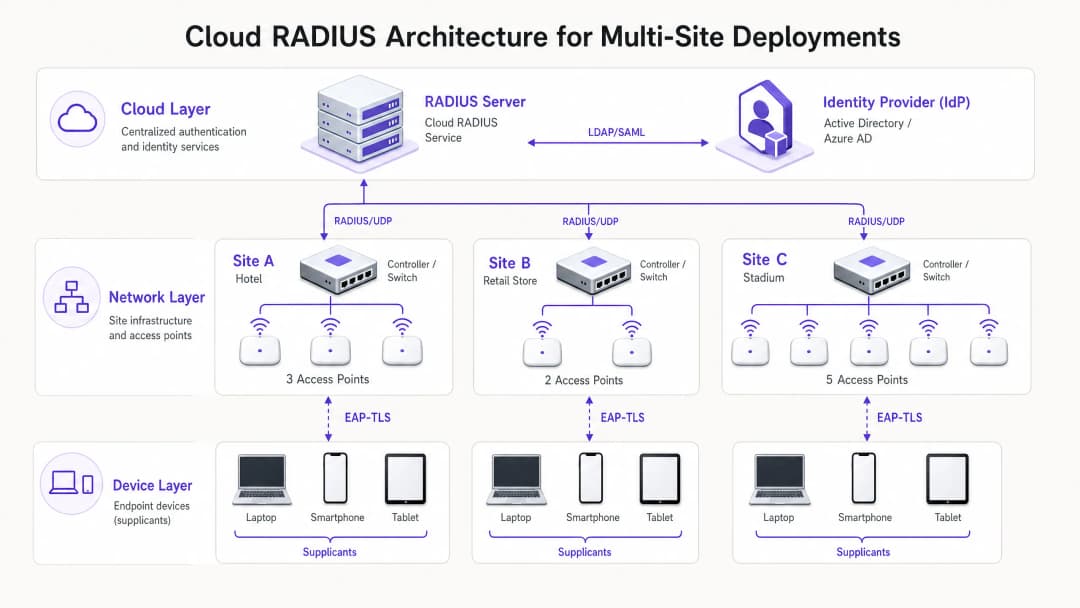
La transition architecturale du site vers le Cloud RADIUS supprime le besoin de serveurs distribués FreeRADIUS ou Microsoft NPS. Dans le modèle cloud, les points d'accès ou les contrôleurs LAN sans fil communiquent directement sur internet avec un service RADIUS distribué mondialement. Pour sécuriser ce transit, l'implémentation de RadSec (RADIUS sur TLS) est essentielle, chiffrant le contenu de l'authentification et le protégeant contre l'interception. Le service Cloud RADIUS sert d'intermédiaire, validant les identifiants par rapport à un fournisseur d'identité (IdP) central via des intégrations LDAP, SAML ou des API natives. Cela permet une application dynamique des politiques, comme l'attribution de VLANs en fonction de l'appartenance à un groupe Azure AD, intégrant de manière transparente l'accès au réseau à la stratégie globale de gestion des identités de l'entreprise.
Sélection de la méthode EAP
Le choix de la méthode EAP détermine le niveau de sécurité et la complexité opérationnelle du déploiement.
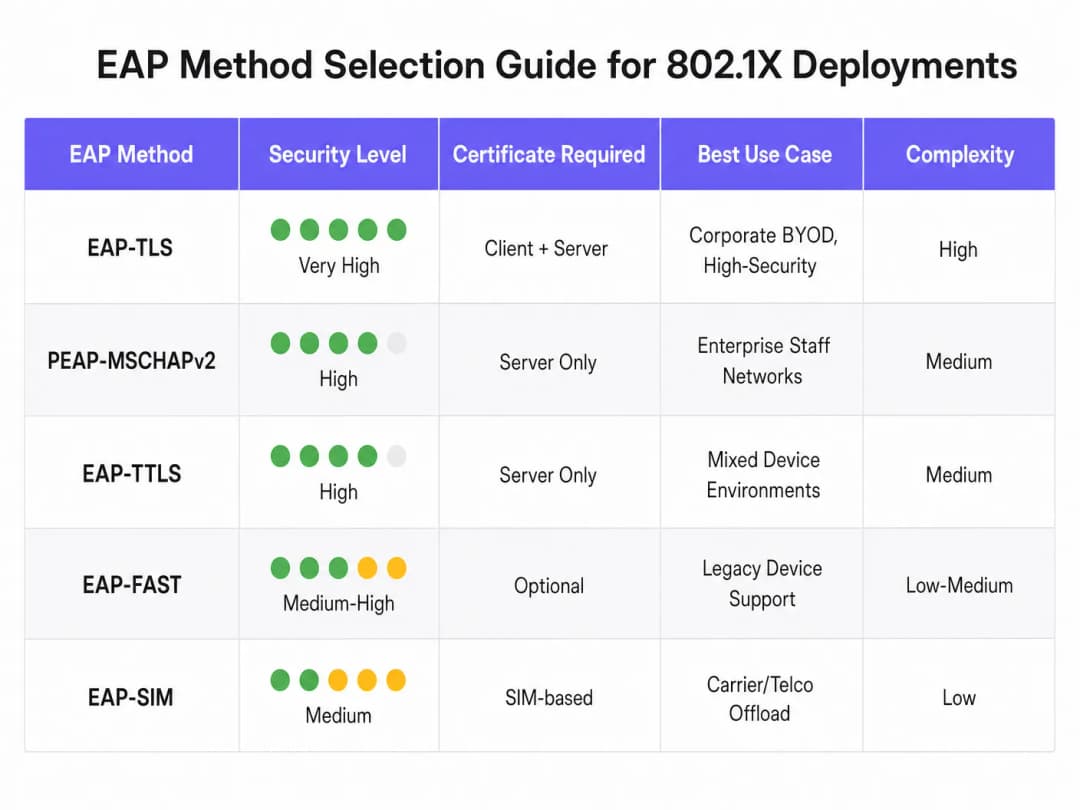
- EAP-TLS (Transport Layer Security) : La méthode la plus sécurisée, nécessitant des certificats serveur et client pour une authentification mutuelle. Comme aucun mot de passe n'est échangé, elle élimine le risque de vol d'identifiants. Cependant, elle nécessite une infrastructure à clés publiques (PKI) et une gestion des appareils mobiles (MDM) pour distribuer les certificats clients. Fortement recommandé pour les appareils de l'entreprise.
- PEAP-MSCHAPv2 (Protected EAP) : Largement déployé grâce à un support natif dans Windows et à sa dépendance exclusive à un certificat côté serveur. Il tunnelise l'échange d'identifiants au sein d'une session TLS. Bien que plus facile à déployer, il est vulnérable aux attaques de collecte d'identifiants si la validation du certificat côté client n'est pas strictement appliquée.
- EAP-TTLS : Similaire au PEAP mais offrant une plus grande flexibilité dans le protocole d'authentification interne, ce qui le rend adapté aux environnements dotés d'un ensemble diversifié de systèmes d'exploitation clients.
Vous avez des questions sur votre configuration spécifique ?
Notre équipe collabore avec des exploitants de sites, des responsables informatiques et des ingénieurs réseau au sein de 80 000 sites. Réservez un appel de 20 minutes et nous vous montrerons comment d'autres professionnels comme vous ont résolu ce problème.
Guide d'implémentation
Le déploiement de 802.1X avec Cloud RADIUS nécessite une approche progressive et systématique afin de minimiser les perturbations pour l'entreprise.
- Intégration du fournisseur d'identité : Établissez et validez la connexion entre le service Cloud RADIUS et l'IdP de l'entreprise. Assurez-vous que la synchronisation de l'annuaire est exacte et que les attributs utilisateur nécessaires (tels que l'appartenance à un groupe) sont disponibles pour les décisions relatives aux politiques.
- Gestion des certificats : Pour les déploiements PEAP, obtenez un certificat de serveur auprès d'une autorité de certification (CA) publique de confiance. De manière cruciale, configurez les clients via un MDM ou une stratégie de groupe pour faire explicitement confiance à cette CA et valider le nom du certificat du serveur. Pour EAP-TLS, déployez une infrastructure CA interne et commencez à émettre des certificats clients pour les appareils gérés.
- Configuration de l'infrastructure réseau : Configurez les contrôleurs sans fil et les points d'accès pour qu'ils pointent vers les terminaux Cloud RADIUS. Implémentez RadSec lorsque le fournisseur de matériel le prend en charge. Définissez des secrets partagés RADIUS à l'aide de chaînes de caractères fortes et sécurisées sur le plan cryptographique, en veillant à ce que le secret soit unique par site ou par cluster de contrôleurs.
- Définition des politiques : Créez les politiques d'authentification au sein de la plateforme Cloud RADIUS. Définissez des conditions basées sur le groupe d'utilisateurs, le type d'appareil ou l'emplacement pour attribuer de manière dynamique des VLAN ou appliquer des listes de contrôle d'accès (ACL) après une authentification réussie.
- Pilote et déploiement progressif : Sélectionnez un sous-ensemble représentatif d'utilisateurs et d'appareils pour le pilote initial. Surveillez de près les journaux d'authentification pour identifier les problèmes de latence, les échecs de validation de certificat ou les mauvaises attributions de VLAN. Après un pilote réussi, procédez à un déploiement progressif, en donnant la priorité aux zones à haut risque comme les bureaux de direction ou les sites traitant des données sensibles.
Bonnes Pratiques
- Imposez la validation des certificats côté client : La vulnérabilité la plus courante dans les déploiements PEAP est le défaut de validation du certificat serveur par le client. Si les clients sont autorisés à faire aveuglément confiance à n'importe quel certificat présenté, ils sont vulnérables aux attaques par points d'accès malveillants.
- Implémentez le contournement d'authentification MAC (MAB) avec prudence : Pour les appareils sans écran qui ne peuvent pas exécuter un requérant 802.1X (comme les imprimantes et les capteurs IoT), le MAB peut être utilisé. Cependant, les adresses MAC sont facilement usurpées. Les appareils utilisant le MAB doivent être isolés sur des VLAN hautement restreints, avec des règles de pare-feu strictes limitant leur accès au réseau.
- Tirez parti de la norme 802.11r pour l'itinérance : Dans les environnements où les appareils se déplacent fréquemment entre les points d'accès, le processus complet d'authentification 802.1X peut introduire une latence inacceptable qui perturbe les applications en temps réel comme la voix. L'implémentation de la norme 802.11r (Fast BSS Transition) simplifie l'itinérance en mettant en cache les clés d'authentification.
- Intégrez les outils d'analyse : Pour les établissements qui exploitent à la fois un réseau d'entreprise 802.1X et un réseau d'accès public, l'intégration de l'infrastructure d'authentification avec WiFi Analytics offre une vue complète de l'utilisation du réseau et du comportement des appareils sur l'ensemble du parc.
Dépannage et atténuation des risques
Les échecs d'authentification dans un environnement 802.1X peuvent provoquer des pannes de connectivité généralisées. Un processus de dépannage robuste est essentiel.
- Expiration des certificats : Un certificat serveur ou client expiré entraînera un échec d'authentification immédiat. Mettez en place une surveillance et des alertes automatisées sur les périodes de validité des certificats, en veillant à ce que les renouvellements soient gérés bien avant l'expiration.
- Latence et délais d'expiration : Si le service Cloud RADIUS ou l'IdP subit une latence élevée, l'authentificateur peut dépasser le délai d'attente et interrompre la connexion. Configurez des valeurs de délai d'attente appropriées sur les contrôleurs sans fil (généralement 5 à 10 secondes) et déployez des serveurs RADIUS de secours pour assurer la redondance.
- Incompatibilité du secret partagé RADIUS : Un secret partagé configuré sur l'authentificateur qui ne correspond pas à celui du serveur RADIUS entraînera le rejet silencieux des paquets. Standardisez la gestion des secrets et évitez autant que possible la saisie manuelle.
ROI et impact commercial
La transition vers le 802.1X avec Cloud RADIUS offre une valeur commerciale mesurable. En éliminant les mots de passe partagés, elle réduit considérablement la surface d'attaque, soutenant directement la conformité avec les exigences de PCI-DSS (exigences 1 et 8) et les mandats de protection des données du GDPR. Sur le plan opérationnel, elle permet un contrôle d'accès centralisé, permettant aux équipes informatiques de révoquer instantanément l'accès d'un utilisateur sur tous les sites du monde entier, simplement en désactivant son compte dans l'annuaire central. De plus, en mettant hors service les serveurs RADIUS sur site existants, les organisations réduisent les coûts de maintenance matérielle, les frais de licence logicielle et la charge administrative liée au correctif et à la gestion d'une infrastructure distribuée. Pour les déploiements à l'échelle d'un parc dans des secteurs tels que le Commerce de détail et l'Hôtellerie, cette posture de sécurité centralisée est un catalyseur clé d'une transformation numérique sécurisée.
Écoutez notre briefing complet sur le sujet :
Définitions clés
Supplicant
Le client logiciel sur un appareil d'utilisateur final (ordinateur portable, smartphone) qui négocie l'accès au réseau en utilisant le protocole EAP.
Les équipes informatiques doivent s'assurer que le supplicant est correctement configuré (souvent via un MDM) pour valider les certificats de serveur afin d'éviter le vol d'identifiants.
Authentificateur
L'équipement réseau (généralement un point d'accès WiFi ou un commutateur) qui contrôle l'accès physique ou logique au réseau en fonction du statut d'authentification.
L'authentificateur agit comme un intermédiaire, relayant les messages EAP entre le supplicant et le serveur RADIUS.
Cloud RADIUS
Un service d'authentification centralisé et hébergé dans le cloud qui traite les demandes RADIUS provenant d'infrastructures réseau distribuées sans nécessiter de serveurs sur site.
Essentiel pour les organisations multisites qui cherchent à mettre en œuvre une sécurité de niveau entreprise sans les coûts de maintenance du matériel.
EAP (Extensible Authentication Protocol)
Le framework utilisé pour encapsuler les messages d'authentification entre le suppliant et le serveur d'authentification.
Le choix de la bonne méthode EAP (par exemple, PEAP par rapport à EAP-TLS) détermine le niveau de sécurité et la complexité du déploiement du réseau sans fil.
RadSec
Un protocole qui transmet les données RADIUS sur un tunnel TLS, garantissant le chiffrement du trafic d'authentification en transit.
Crucial lors de l'utilisation de Cloud RADIUS, car il protège les échanges d'identifiants sensibles contre l'interception sur l'internet public.
Dynamic VLAN Assignment
Le processus par lequel le serveur RADIUS ordonne à l'authentificateur de placer un appareil sur un segment de réseau virtuel spécifique en fonction de l'identité de l'utilisateur ou de son appartenance à un groupe.
Permet au service informatique de diffuser un seul SSID tout en segmentant le trafic en toute sécurité (par exemple, en plaçant le personnel des RH et le personnel informatique sur des sous-réseaux différents).
Mutual Authentication
Un processus de sécurité dans lequel le client vérifie l'identité du serveur et le serveur vérifie l'identité du client (généralement à l'aide de certificats).
La caractéristique déterminante de EAP-TLS, ce qui le rend hautement résistant aux attaques de type man-in-the-middle.
MAC Authentication Bypass (MAB)
Une méthode d'authentification de secours qui utilise l'adresse MAC d'un appareil comme identifiant lorsqu'il ne peut pas prendre en charge un suppliant 802.1X.
Utilisé pour le matériel hérité comme les imprimantes ou les appareils IoT, mais nécessite une segmentation réseau stricte en raison de la facilité d'usurpation d'adresse MAC.
Exemples concrets
Un hôtel de 200 chambres exploitant un réseau hérité basé sur des clés PSK pour ses opérations internes (tablettes du personnel de ménage, terminaux de point de vente, ordinateurs portables des responsables) doit se mettre en conformité avec la norme PCI-DSS avant un audit prochain. L'établissement ne dispose pas de personnel informatique sur place et ne peut pas déployer de serveurs locaux.
L'hôtel doit déployer une solution Cloud RADIUS intégrée directement à son tenant Azure AD central. Pour les ordinateurs portables des responsables (Windows/macOS), il convient d'implémenter PEAP-MSCHAPv2, en utilisant un profil MDM pour pousser le certificat de serveur de confiance et imposer sa validation. Pour les terminaux de point de vente qui peuvent manquer de supplicants robustes, il convient d'utiliser le contournement d'authentification MAC (MAB) mais d'assigner strictement ces appareils à un VLAN isolé qui n'autorise que la communication avec la passerelle de paiement. Le déploiement nécessite de configurer les points d'accès gérés par le cloud existants pour qu'ils pointent vers les adresses IP du Cloud RADIUS, en sécurisant la connexion avec RadSec.
Une chaîne nationale de magasins déploie une nouvelle flotte de tablettes d'entreprise pour la gestion des stocks dans 500 points de vente. Elle souhaite s'assurer que même si une tablette est volée, elle ne puisse pas être utilisée pour accéder au réseau, et elle souhaite éliminer les tickets d'assistance liés aux mots de passe.
Le distributeur doit implémenter EAP-TLS. Il déploiera une autorité de certification (CA) interne et l'intégrera à sa plateforme MDM. Lorsqu'une tablette est configurée, le MDM pousse un certificat client unique sur l'appareil. Le service Cloud RADIUS est configuré pour authentifier les appareils uniquement sur la base de la présence d'un certificat client valide. Si une tablette est signalée comme volée, l'équipe informatique révoque simplement ce certificat spécifique dans la CA. Le service Cloud RADIUS, en vérifiant la liste de révocation de certificats (CRL) ou via OCSP, refusera immédiatement l'accès au réseau.
Questions d'entraînement
Q1. Votre organisation migre d'un PSK partagé vers le 802.1X à l'aide de PEAP-MSCHAPv2. Pendant la phase pilote, les utilisateurs signalent qu'ils peuvent se connecter, mais un audit de sécurité révèle que les appareils acceptent silencieusement tout certificat de serveur qui leur est présenté. Quel est le risque immédiat et comment doit-il être corrigé ?
Conseil : Pensez à ce qui se passe si un attaquant configure un point d'accès diffusant le SSID de votre entreprise.
Voir la réponse type
Le risque immédiat est une attaque de type Man-in-the-Middle (MitM) via un point d'accès malveillant. Un attaquant peut diffuser le SSID de l'entreprise, présenter un certificat auto-signé et récupérer les identifiants des utilisateurs lorsque les appareils tentent de s'authentifier. Pour y remédier, l'équipe informatique doit configurer les profils de suppliants (via MDM ou stratégie de groupe) pour valider explicitement le certificat du serveur. Cela implique de spécifier l'autorité de certification racine de confiance exacte qui a émis le certificat du serveur RADIUS et de définir strictement le nom d'hôte attendu du serveur.
Q2. Une succursale de vente au détail à distance a perdu sa connexion internet. Les points d'accès locaux sont toujours sous tension. Les appareils du personnel actuellement connectés au réseau 802.1X resteront-ils connectés et les nouveaux appareils pourront-ils s'authentifier ? Supposez une architecture Cloud RADIUS standard sans nœuds de survie locaux.
Conseil : Pensez au chemin qu'une demande d'authentification doit emprunter et à l'état des ports déjà autorisés.
Voir la réponse type
Les appareils déjà authentifiés et connectés resteront généralement connectés jusqu'à ce que le délai d'expiration de leur session expire ou qu'ils se déconnectent, car le port de l'authentificateur est déjà dans l'état autorisé. Cependant, les nouveaux appareils tentant de se connecter, ou les appareils tentant de se réauthentifier, échoueront. La connexion internet étant coupée, les points d'accès ne peuvent pas joindre le serveur Cloud RADIUS pour traiter l'échange EAP. Cela souligne l'importance de liaisons WAN résilientes lors de l'utilisation d'une authentification basée sur le cloud.
Q3. Vous devez sécuriser l'accès réseau pour un parc de lecteurs de codes-barres existants dans un entrepôt. Ces lecteurs ne prennent pas en charge les suppliants 802.1X et ne prennent en charge que le WPA2-Personal (PSK). Vous ne pouvez pas mettre à niveau le matériel. Comment intégrez-vous ces appareils dans une architecture réseau sécurisée aux côtés de vos appareils d'entreprise 802.1X ?
Conseil : Vous avez besoin d'une alternative au 802.1X qui offre toujours un contrôle d'accès, combinée à une isolation au niveau du réseau.
Voir la réponse type
L'approche recommandée consiste à utiliser le MAC Authentication Bypass (MAB) pour les lecteurs de codes-barres. Le point d'accès utilisera l'adresse MAC du lecteur comme identifiant et l'enverra au serveur RADIUS. Les adresses MAC étant facilement usurpées, cela fournit une authentification faible. Par conséquent, le serveur RADIUS doit être configuré pour renvoyer un attribut VLAN spécifique en cas d'authentification MAB réussie. Ce VLAN doit être fortement restreint via des pare-feux ou des ACL, permettant aux lecteurs de communiquer uniquement avec les serveurs d'inventaire spécifiques dont ils ont besoin, et bloquant tout autre accès réseau latéral.
Continuer la lecture de cette série
Les avantages de sécurité de RADIUS-as-a-Service pour les effectifs hybrides
Ce guide de référence technique explique comment RADIUS-as-a-Service sécurise l'accès au réseau pour les effectifs hybrides au sein des sites distribués. Il couvre l'architecture, les avantages en matière de sécurité et les étapes de déploiement pour remplacer l'infrastructure RADIUS sur site par un service d'authentification géré dans le cloud. Pour les directeurs informatiques et les architectes réseau des hôtels, des chaînes de vente au détail, des stades et des organisations du secteur public, ce guide fournit les preuves nécessaires pour évaluer et mettre en œuvre une migration vers le cloud RADIUS ce trimestre.
Intégration de RADIUS-as-a-Service avec les annuaires cloud (Azure AD & Google Workspace)
Ce guide de référence technique détaille comment intégrer RADIUS-as-a-Service avec les annuaires cloud - Microsoft Entra ID et Google Workspace - pour l'authentification WiFi d'entreprise. Il couvre la transition architecturale du NPS sur site vers le RADIUS cloud-native, le déploiement de l'authentification EAP-TLS basée sur les certificats et les meilleures pratiques opérationnelles pour sécuriser l'accès sans fil dans les secteurs de l'hôtellerie, du commerce de détail et du secteur public. Pour les responsables informatiques et les architectes réseau ayant déjà investi dans l'identité cloud, ce guide comble le fossé entre la gestion des annuaires et la sécurité physique du réseau.
Qu'est-ce que Cloud RADIUS ? Le guide complet du RADIUS-as-a-Service
Ce guide complet explore Cloud RADIUS (RADIUS-as-a-Service), détaillant son architecture, ses méthodes EAP et ses stratégies d'implémentation. Il fournit aux responsables IT des conseils pratiques pour migrer de serveurs sur site vers un modèle d'authentification basé sur le cloud, évolutif, sécurisé et conforme.
Vous avez des questions sur votre configuration spécifique ?
Notre équipe collabore avec des exploitants de sites, des responsables informatiques et des ingénieurs réseau au sein de 80 000 sites. Réservez un appel de 20 minutes et nous vous montrerons comment d'autres professionnels comme vous ont résolu ce problème.