
Come implementare l'autenticazione 802.1X con Cloud RADIUS
Questa guida di riferimento tecnico fornisce un quadro completo per l'implementazione dell'autenticazione 802.1X con Cloud RADIUS in proprietà aziendali distribuite. Descrive dettagliatamente l'architettura, la selezione del metodo EAP, la sequenza di implementazione e le strategie di mitigazione del rischio necessarie per proteggere l'accesso alla rete eliminando al contempo i costi operativi dell'infrastruttura locale.
Ascolta questa guida
Visualizza trascrizione del podcast
Parte della nostra serie principale: Enterprise WiFi Security Guide →
Sintesi Esecutiva
Per i responsabili delle decisioni IT che gestiscono infrastrutture di rete distribuite nei settori dell'ospitalità, del retail e pubblico, la sicurezza dell'accesso alla rete è passata da preferenza operativa a un rigido vincolo di conformità. L'affidamento a chiavi precondivise (PSK) introduce rischi inaccettabili, non supera i moderni standard di audit come PCI-DSS ed espone l'organizzazione a movimenti laterali in caso di compromissione delle credenziali. Il passaggio al controllo dell'accesso alla rete basato su porte IEEE 802.1X mitiga efficacemente questi rischi autenticando i dispositivi prima che venga concessa la connettività IP.
In passato, l'implementazione di 802.1X su reti multi-sito era ostacolata dalla necessità di un'infrastruttura RADIUS locale per gestire la latenza e la disponibilità. L'evoluzione dell'architettura Cloud RADIUS ha radicalmente cambiato questo scenario. Centralizzando le decisioni di autenticazione e integrandole direttamente con gli identity provider cloud (come Azure AD o Okta), le organizzazioni possono applicare policy di accesso robuste in modo uniforme in tutte le sedi, eliminando le spese di capitale e l'onere di manutenzione dei server on-premises. Questa guida descrive l'architettura tecnica, la metodologia di implementazione e le best practice operative per implementare con successo l'autenticazione 802.1X con Cloud RADIUS, garantendo che sia il WiFi Guest WiFi aziendale sia le reti aziendali rimangano sicuri e scalabili.
Approfondimento Tecnico
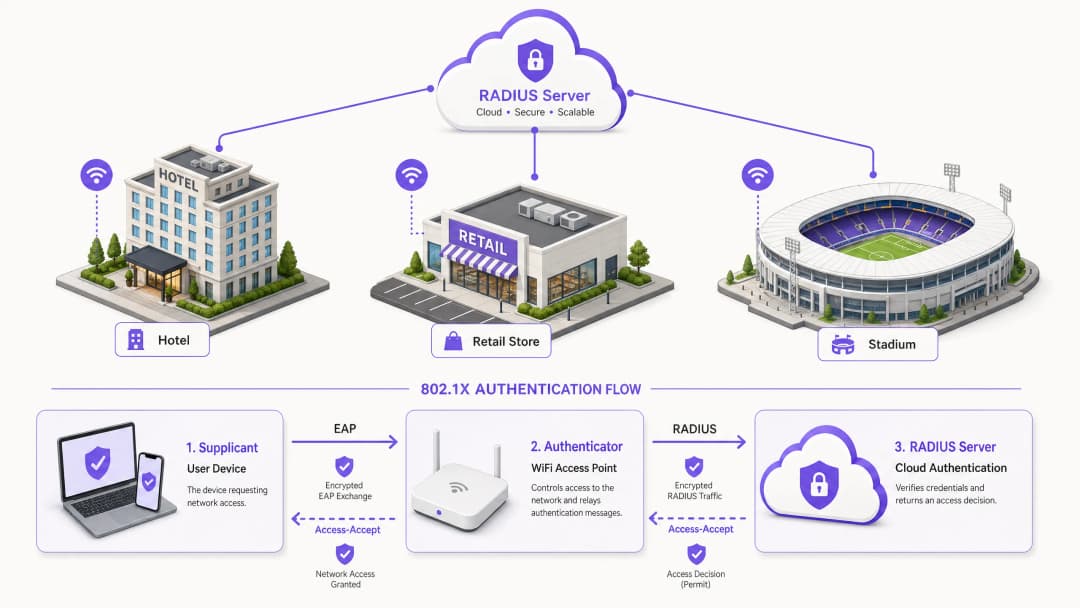
Le fondamenta della moderna sicurezza wireless aziendale si basano sullo standard IEEE 802.1X. A differenza dell'autenticazione a livello applicativo, 802.1X opera al livello 2 del modello OSI. Quando un dispositivo (il supplicant) tenta di associarsi a un access point (l'authenticator), la porta rimane in uno stato non autorizzato, consentendo solo il traffico Extensible Authentication Protocol (EAP). Questo traffico viene incapsulato in pacchetti RADIUS e inoltrato al server di autenticazione - l'istanza Cloud RADIUS. Solo dopo la ricezione di un messaggio di Access-Accept l'authenticator porta la porta in uno stato autorizzato, concedendo l'accesso alla rete.
Architettura Cloud RADIUS
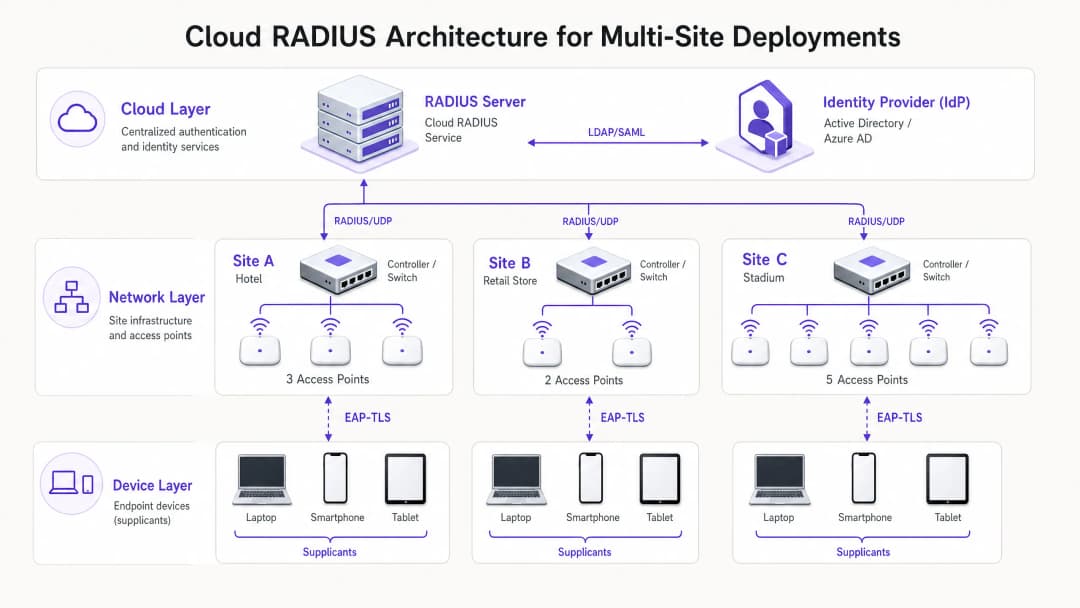
La transizione architetturale da soluzioni on-premises a Cloud RADIUS elimina la necessità di server distribuiti FreeRADIUS o Microsoft NPS. Nel modello cloud, gli access point o i controller LAN wireless comunicano direttamente su internet con un servizio RADIUS distribuito a livello globale. Per proteggere questo transito, è essenziale implementare RadSec (RADIUS su TLS), crittografando il payload di autenticazione e proteggendolo dalle intercettazioni. Il servizio Cloud RADIUS funge da intermediario, convalidando le credenziali a fronte di un Identity Provider (IdP) centrale tramite integrazioni LDAP, SAML o API native. Ciò consente l'applicazione dinamica delle policy, come l'assegnazione di VLAN in base all'appartenenza ai gruppi di Azure AD, integrando perfettamente l'accesso alla rete con la più ampia strategia aziendale di gestione delle identità.
Selezione del metodo EAP
La scelta del metodo EAP determina il livello di sicurezza e la complessità operativa dell'implementazione.
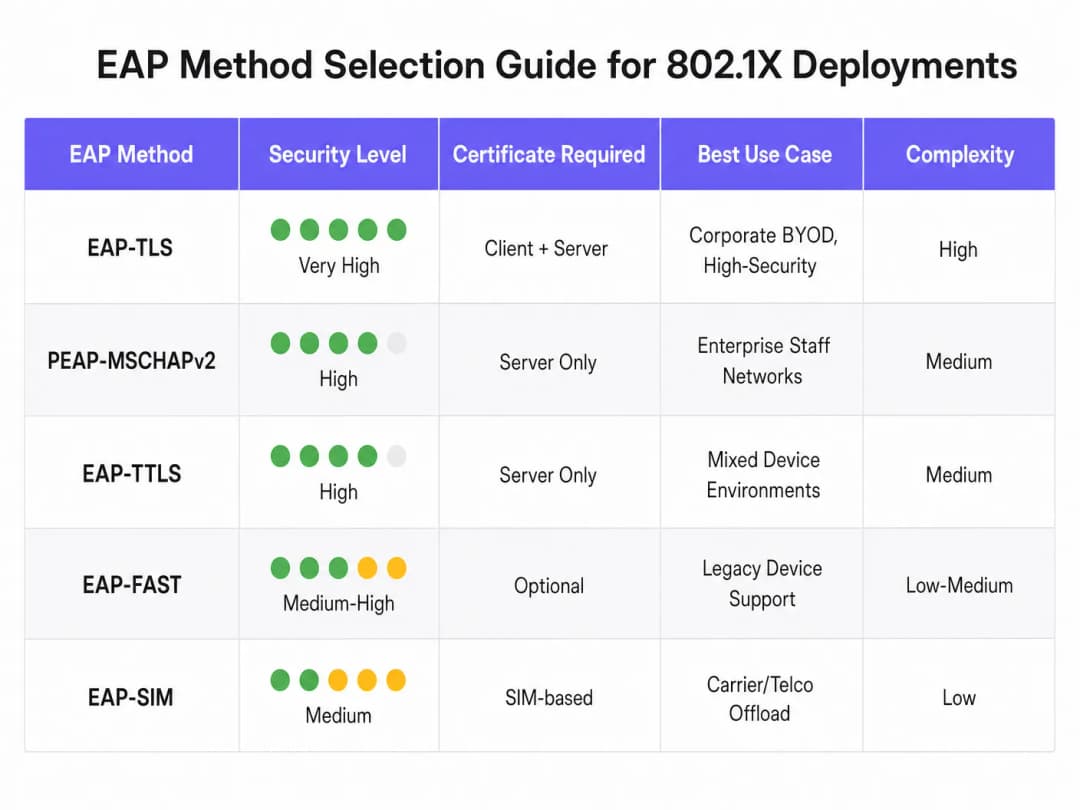
- EAP-TLS (Transport Layer Security): Il metodo più sicuro, che richiede certificati sia lato server sia lato client per la mutua autenticazione. Poiché non vengono scambiate password, elimina il rischio di furto delle credenziali. Richiede tuttavia una Public Key Infrastructure (PKI) e un Mobile Device Management (MDM) per distribuire i certificati client. Fortemente raccomandato per i dispositivi aziendali.
- PEAP-MSCHAPv2 (Protected EAP): Ampiamente utilizzato grazie al supporto nativo in Windows e al fatto che si basa solo su un certificato lato server. Incanala lo scambio di credenziali all'interno di una sessione TLS. Sebbene sia più facile da implementare, è vulnerabile ad attacchi di raccolta delle credenziali se la convalida del certificato lato client non viene applicata rigorosamente.
- EAP-TTLS: Simile a PEAP ma offre una maggiore flessibilità nel protocollo di autenticazione interno, rendendolo adatto ad ambienti con un mix eterogeneo di sistemi operativi client.
Hai domande sulla tua configurazione specifica?
Il nostro team collabora con gestori di sedi, responsabili IT e ingegneri di rete in 80.000 sedi. Prenota una chiamata di 20 minuti e ti mostreremo come altri professionisti come te hanno risolto il problema.
Guida all'implementazione
L'implementazione di 802.1X con Cloud RADIUS richiede un approccio sistematico e graduale per ridurre al minimo le interruzioni delle attività aziendali esistenti.
- Integrazione dell'identity provider: Stabilire e convalidare la connessione tra il servizio Cloud RADIUS e l'IdP aziendale. Assicurarsi che la sincronizzazione della directory sia accurata e che gli attributi utente necessari (come l'appartenenza ai gruppi) siano disponibili per le decisioni relative alle policy.
- Gestione dei certificati: Per le distribuzioni PEAP, ottenere un certificato server da una Certificate Authority (CA) pubblica e attendibile. È fondamentale configurare i client tramite MDM o Criteri di gruppo per considerare esplicitamente attendibile questa CA e convalidare il nome del certificato del server. Per EAP-TLS, implementare l'infrastruttura CA interna e iniziare a rilasciare certificati client ai dispositivi gestiti.
- Configurazione dell'infrastruttura di rete: Configura i controller wireless e gli access point per puntare agli endpoint Cloud RADIUS. Implementa RadSec dove supportato dal fornitore dell'hardware. Definisci i segreti condivisi RADIUS utilizzando stringhe forti e crittograficamente sicure, garantendo che il segreto sia unico per sito o cluster di controller.
- Definizione delle policy: Costruisci le policy di autenticazione all'interno della piattaforma Cloud RADIUS. Definisci le condizioni basate sul gruppo di utenti, sul tipo di dispositivo o sulla posizione per assegnare dinamicamente le VLAN o applicare le liste di controllo degli accessi (ACL) in seguito a un'autenticazione riuscita.
- Fase pilota e roll-out graduale: Seleziona un sottoinsieme rappresentativo di utenti e dispositivi per il progetto pilota iniziale. Monitora attentamente i log di autenticazione per identificare problemi di latenza, errori di convalida dei certificati o assegnazioni errate delle VLAN. Dopo un progetto pilota di successo, esegui un roll-out graduale, dando priorità ai luoghi ad alto rischio come gli uffici direzionali o i siti che gestiscono dati sensibili.
Best Practice
- Imponi la convalida dei certificati lato client: La vulnerabilità più comune nelle distribuzioni PEAP è la mancata imposizione della convalida del certificato del server sul client. Se ai client è consentito considerare attendibile ciecamente qualsiasi certificato presentato, sono completamente esposti ad attacchi di rogue access point.
- Implementa il MAC Authentication Bypass (MAB) con cautela: Per i dispositivi headless che non possono eseguire un supplicant 802.1X (come stampanti e sensori IoT), è possibile utilizzare il MAB. Tuttavia, gli indirizzi MAC sono facilmente falsificabili. I dispositivi MAB devono essere isolati su VLAN fortemente limitate, con regole di firewall severe che ne limitino l'accesso alla rete.
- Sfrutta lo standard 802.11r per il roaming: In ambienti in cui i dispositivi si spostano frequentemente tra gli access point, il processo di autenticazione 802.1X completo può introdurre una latenza inaccettabile che interrompe le applicazioni in tempo reale come la voce. L'implementazione di 802.11r (Fast BSS Transition) semplifica il roaming memorizzando nella cache le chiavi di autenticazione.
- Integrazione con gli strumenti di analisi: Per le strutture che gestiscono sia una rete aziendale 802.1X sia una rete ad accesso pubblico, l'integrazione dell'infrastruttura di autenticazione con WiFi Analytics offre una visione completa dell'utilizzo della rete e del comportamento dei dispositivi in tutta l'infrastruttura.
Risoluzione dei problemi e mitigazione dei rischi
I problemi di autenticazione in un ambiente 802.1X possono causare interruzioni diffuse della connettività. Un processo di risoluzione dei problemi robusto è essenziale.
- Scadenza dei certificati: Un certificato server o client scaduto causerà un errore di autenticazione immediato. Implementa il monitoraggio e l'avviso automatizzati sui periodi di validità dei certificati, assicurando che i rinnovi vengano gestiti molto prima della scadenza.
- Latenza e timeout: Se il servizio Cloud RADIUS o l'IdP riscontrano un'elevata latenza, l'autenticatore potrebbe andare in timeout e interrompere la connessione. Configura valori di timeout appropriati sui controller wireless (solitamente 5 - 10 secondi) e distribuisci server RADIUS di backup per garantire la ridondanza.
- Mancata corrispondenza del shared secret RADIUS: Un shared secret configurato sull'autenticatore che non corrisponde a quello sul server RADIUS causerà lo scarto silenzioso dei pacchetti. Standardizza la gestione dei secret ed evita l'inserimento manuale ovunque possibile.
ROI e impatto aziendale
La transizione a 802.1X con Cloud RADIUS offre un valore aziendale misurabile. Eliminando le password condivise, riduce drasticamente la superficie di attacco, supportando direttamente la conformità con i requisiti di protezione dei dati PCI-DSS (Requisiti 1 e 8) e GDPR. Dal punto di vista operativo, consente un controllo degli accessi centralizzato, permettendo ai team IT di revocare istantaneamente l'accesso di un utente in ogni sede a livello globale semplicemente disabilitando il suo account nella directory centrale. Inoltre, dismettendo i server RADIUS legacy on-premises, le organizzazioni riducono i costi di manutenzione dell'hardware, le tariffe di licenza software e l'onere amministrativo di applicare patch e gestire un'infrastruttura distribuita. Per le installazioni sull'intero patrimonio in settori come il Retail e l' Hospitality, questa postura di sicurezza centralizzata è un fattore abilitante chiave per una trasformazione digitale sicura.
Ascolta il nostro briefing completo sull'argomento:
Definizioni chiave
Supplicant
Il client software su un dispositivo utente finale (laptop, smartphone) che negozia l'accesso alla rete utilizzando EAP.
I team IT devono garantire che il supplicant sia configurato correttamente (spesso tramite MDM) per convalidare i certificati del server al fine di prevenire il furto di credenziali.
Autenticatore
Il dispositivo di rete (in genere un access point WiFi o uno switch) che controlla l'accesso fisico o logico alla rete in base allo stato di autenticazione.
L'autenticatore funge da intermediario, inoltrando i messaggi EAP tra il supplicant e il server RADIUS.
Cloud RADIUS
Un servizio di autenticazione centralizzato e ospitato nel cloud che elabora le richieste RADIUS provenienti da un'infrastruttura di rete distribuita senza richiedere server locali.
Essenziale per le organizzazioni multi-sede che desiderano implementare una sicurezza di livello enterprise senza i costi di manutenzione dell'hardware.
EAP (Extensible Authentication Protocol)
Il framework utilizzato per incapsulare i messaggi di autenticazione tra il supplicant e il server di autenticazione.
La scelta del metodo EAP corretto (ad esempio, PEAP rispetto a EAP-TLS) determina il livello di sicurezza e la complessità di implementazione della rete wireless.
RadSec
Un protocollo che trasmette dati RADIUS su un tunnel TLS, garantendo la crittografia del traffico di autenticazione in transito.
Cruciale quando si utilizza Cloud RADIUS, poiché protegge lo scambio di credenziali sensibili da intercettazioni sulla rete internet pubblica.
Dynamic VLAN Assignment
Il processo in cui il server RADIUS indica all'autenticatore di inserire un dispositivo in uno specifico segmento di rete virtuale in base all'identità o all'appartenenza al gruppo dell'utente.
Consente all'IT di trasmettere un singolo SSID segmentando il traffico in modo sicuro (ad esempio, posizionando il personale delle risorse umane e il personale IT su subnet diverse).
Mutual Authentication
Un processo di sicurezza in cui sia il client verifica l'identità del server, sia il server verifica l'identità del client (in genere tramite certificati).
La caratteristica distintiva di EAP-TLS, che lo rende altamente resistente agli attacchi man-in-the-middle.
MAC Authentication Bypass (MAB)
Un metodo di autenticazione di fallback che utilizza l'indirizzo MAC di un dispositivo come credenziale quando non è in grado di supportare un supplicant 802.1X.
Utilizzato per hardware legacy come stampanti o dispositivi IoT, ma richiede una rigorosa segmentazione della rete a causa della facilità di spoofing del MAC.
Esempi pratici
Un hotel di 200 camere che gestisce una rete PSK legacy per le attività di back-of-house (tablet per il servizio di pulizia, terminali POS, laptop dei manager) deve ottenere la conformità PCI-DSS prima di un imminente audit. L'hotel non dispone di personale IT in loco e non può implementare server locali.
L'hotel dovrebbe implementare una soluzione Cloud RADIUS integrata direttamente con il proprio tenant Azure AD centrale. Per i laptop dei manager (Windows/macOS), dovrebbero implementare PEAP-MSCHAPv2, utilizzando un profilo MDM per distribuire il certificato del server attendibile e imporre la validazione. Per i terminali POS che potrebbero non disporre di supplicant robusti, dovrebbero utilizzare il MAC Authentication Bypass (MAB) ma assegnare rigorosamente questi dispositivi a una VLAN isolata che consenta solo la comunicazione con il gateway di pagamento. L'implementazione richiede la configurazione degli access point esistenti gestiti in cloud per puntare agli indirizzi IP di Cloud RADIUS, proteggendo la connessione con RadSec.
Una catena di vendita al dettaglio nazionale sta introducendo una nuova flotta di tablet aziendali per la gestione dell'inventario in 500 negozi. Desiderano garantire che, anche in caso di furto di un tablet, questo non possa essere utilizzato per accedere alla rete, e vogliono eliminare i ticket di assistenza relativi alle password.
Il rivenditore deve implementare EAP-TLS. Implementerà un'Autorità di Certificazione (CA) interna e la integrerà con la propria piattaforma MDM. Quando un tablet viene configurato, l'MDM invia un certificato client univoco al dispositivo. Il servizio Cloud RADIUS è configurato per autenticare i dispositivi basandosi esclusivamente sulla presenza di un certificato client valido. Se viene segnalato il furto di un tablet, il team IT revoca semplicemente quel certificato specifico nella CA. Il servizio Cloud RADIUS, verificando la Certificate Revocation List (CRL) o tramite OCSP, negherà immediatamente l'accesso alla rete.
Domande di esercitazione
Q1. La tua organizzazione sta migrando da una PSK condivisa a 802.1X utilizzando PEAP-MSCHAPv2. Durante la fase pilota, gli utenti riferiscono di potersi connettere, ma un audit di sicurezza rivela che i dispositivi accettano implicitamente qualsiasi certificato server presentato loro. Qual è il rischio immediato e come deve essere risolto?
Suggerimento: Considera cosa accade se un utente malintenzionato configura un access point che trasmette l'SSID aziendale.
Visualizza risposta modello
Il rischio immediato è un attacco Man-in-the-Middle (MitM) tramite un access point non autorizzato. Un utente malintenzionato può trasmettere l'SSID aziendale, presentare un certificato autofirmato e raccogliere le credenziali dell'utente mentre i dispositivi tentano di autenticarsi. Per rimediare a questo, il team IT deve configurare i profili del supplicant (tramite MDM o Criteri di gruppo) per convalidare esplicitamente il certificato del server. Ciò comporta la specifica della CA radice attendibile esatta che ha emesso il certificato del server RADIUS e la definizione rigorosa dell'hostname del server previsto.
Q2. Una filiale retail remota ha perso la connessione a internet. Gli access point locali sono ancora accesi. I dispositivi del personale attualmente connessi alla rete 802.1X rimarranno connessi e i nuovi dispositivi saranno in grado di autenticarsi? Si assuma un'architettura Cloud RADIUS standard senza nodi di sopravvivenza locali.
Suggerimento: Pensa al percorso che deve compiere una richiesta di autenticazione e allo stato delle porte già autorizzate.
Visualizza risposta modello
I dispositivi che sono già autenticati e connessi rimarranno in genere connessi fino alla scadenza del timeout della sessione o fino alla disconnessione, poiché la porta dell'autenticatore è già nello stato autorizzato. Tuttavia, i nuovi dispositivi che tentano di connettersi o i dispositivi che tentano di autenticarsi nuovamente non riusciranno. Poiché la connessione internet è interrotta, gli access point non possono raggiungere il server Cloud RADIUS per elaborare lo scambio EAP. Ciò evidenzia l'importanza di collegamenti WAN resilienti quando si fa affidamento sull'autenticazione basata su cloud.
Q3. È necessario proteggere l'accesso alla rete per una flotta di scanner di codici a barre legacy in un magazzino. Questi scanner non supportano i supplicant 802.1X e supportano solo WPA2-Personal (PSK). Non è possibile aggiornare l'hardware. Come si integrano questi dispositivi in un'architettura di rete sicura insieme ai dispositivi aziendali 802.1X?
Suggerimento: È necessaria un'alternativa a 802.1X che fornisca comunque il controllo degli accessi, combinata con l'isolamento a livello di rete.
Visualizza risposta modello
L'approccio consigliato consiste nell'utilizzare il MAC Authentication Bypass (MAB) per gli scanner di codici a barre. L'access point utilizzerà l'indirizzo MAC dello scanner come identità e lo invierà al server RADIUS. Poiché gli indirizzi MAC sono facilmente falsificabili, questo metodo fornisce un'autenticazione debole. Pertanto, il server RADIUS deve essere configurato per restituire uno specifico attributo VLAN in caso di autenticazione MAB riuscita. Questa VLAN deve essere fortemente limitata tramite firewall o ACL, consentendo agli scanner di comunicare solo con i server di inventario specifici di cui hanno bisogno e bloccando qualsiasi altro accesso alla rete laterale.
Continua a leggere questa serie
I vantaggi in termini di sicurezza di RADIUS-as-a-Service per il personale ibrido
Questa guida tecnica di riferimento spiega come RADIUS-as-a-Service protegge l'accesso alla rete per il personale ibrido in sedi distribuite. Copre l'architettura, i vantaggi in termini di sicurezza e i passaggi di implementazione per sostituire l'infrastruttura RADIUS on-premise con un servizio di autenticazione gestito in cloud. Per i responsabili IT e gli architetti di rete di hotel, catene di vendita al dettaglio, stadi e organizzazioni del settore pubblico, questa guida fornisce le prove necessarie per valutare e agire su una migrazione a un cloud RADIUS in questo trimestre.
Integrazione di RADIUS-as-a-Service con directory cloud (Azure AD e Google Workspace)
Questa guida di riferimento tecnico descrive in dettaglio come integrare RADIUS-as-a-Service con le directory cloud - Microsoft Entra ID e Google Workspace - per l'autenticazione WiFi aziendale. Copre il passaggio architetturale da NPS on-premises a RADIUS nativo del cloud, l'implementazione dell'autenticazione EAP-TLS basata su certificati e le migliori pratiche operative per proteggere l'accesso wireless negli ambienti di hospitality, vendita al dettaglio e settore pubblico. Per i manager IT e gli architetti di rete che hanno già investito nell'identità cloud, questa guida colma il divario tra la gestione delle directory e la sicurezza della rete fisica.
Cos'è Cloud RADIUS? Una Guida Completa a RADIUS-as-a-Service
Questa guida completa esplora Cloud RADIUS (RADIUS-as-a-Service), descrivendone in dettaglio l'architettura, i metodi EAP e le strategie di implementazione. Offre ai leader IT approfondimenti pratici sulla migrazione dai server on-premises a un modello di autenticazione basato su cloud scalabile, sicuro e conforme.
Hai domande sulla tua configurazione specifica?
Il nostro team collabora con gestori di sedi, responsabili IT e ingegneri di rete in 80.000 sedi. Prenota una chiamata di 20 minuti e ti mostreremo come altri professionisti come te hanno risolto il problema.