
Como implementar a autenticação 802.1X com Cloud RADIUS
Este guia de referência técnica fornece uma estrutura abrangente para implementar a autenticação 802.1X com Cloud RADIUS em propriedades empresariais distribuídas. Ele detalha a arquitetura, a seleção do método EAP, o sequenciamento de implantação e as estratégias de mitigação de riscos necessárias para garantir o acesso seguro à rede, eliminando a sobrecarga operacional da infraestrutura local.
Ouça este guia
Ver transcrição do podcast
Parte da nossa série principal: Enterprise WiFi Security Guide →
Resumo Executivo
Para tomadores de decisão de TI que gerenciam propriedades de rede distribuídas nos setores de hotelaria, varejo e setor público, a segurança do acesso à rede deixou de ser uma preferência operacional para se tornar um mandato de conformidade rigoroso. Depender de chaves pré-compartilhadas (PSKs) introduz um risco inaceitável, falha nos padrões de auditoria modernos, como o PCI-DSS, e expõe a organização ao movimento lateral no caso de comprometimento de credenciais. A transição para o controle de acesso à rede baseado em porta IEEE 802.1X mitiga esses riscos de forma eficaz, autenticando os dispositivos antes que a conectividade IP seja concedida.
Historicamente, a implantação do 802.1X em propriedades de vários locais era dificultada pela necessidade de uma infraestrutura RADIUS localizada para gerenciar a latência e a disponibilidade. O amadurecimento da arquitetura Cloud RADIUS mudou fundamentalmente esse cenário. Ao centralizar as decisões de autenticação e integrar-se diretamente com provedores de identidade em nuvem (como Azure AD ou Okta), as organizações podem aplicar políticas de acesso robustas de maneira uniforme em todos os locais, sem as despesas de capital e o fardo de manutenção de servidores locais. Este guia descreve a arquitetura técnica, a metodologia de implantação e as melhores práticas operacionais para implementar com sucesso a autenticação 802.1X com Cloud RADIUS, garantindo que o WiFi para visitantes empresariais Guest WiFi e as redes corporativas permaneçam seguros e escaláveis.
Aprofundamento Técnico
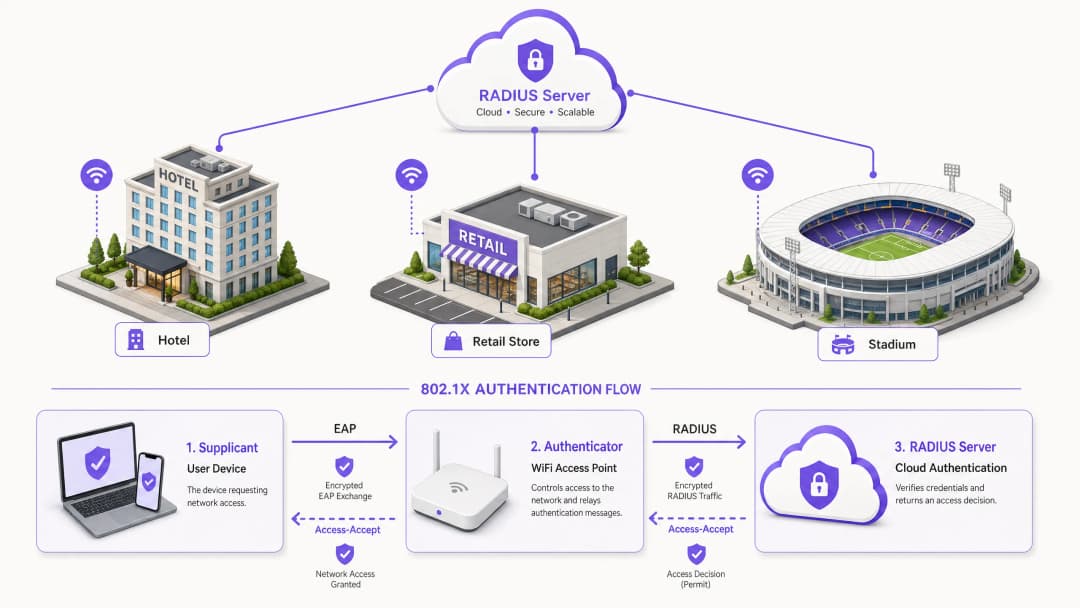
A base da segurança sem fio empresarial moderna é construída sobre o padrão IEEE 802.1X. Ao contrário da autenticação na camada de aplicação, o 802.1X opera na Camada 2 do modelo OSI. Quando um dispositivo (o suplicante) tenta se associar a um ponto de acesso (o autenticador), a porta permanece em um estado não autorizado, permitindo apenas o tráfego do protocolo de autenticação extensível (EAP). Esse tráfego é encapsulado em pacotes RADIUS e encaminhado para o servidor de autenticação - a instância do Cloud RADIUS. Somente após o recebimento de uma mensagem Access-Accept o autenticador faz a transição da porta para um estado autorizado, concedendo acesso à rede.
Arquitetura Cloud RADIUS
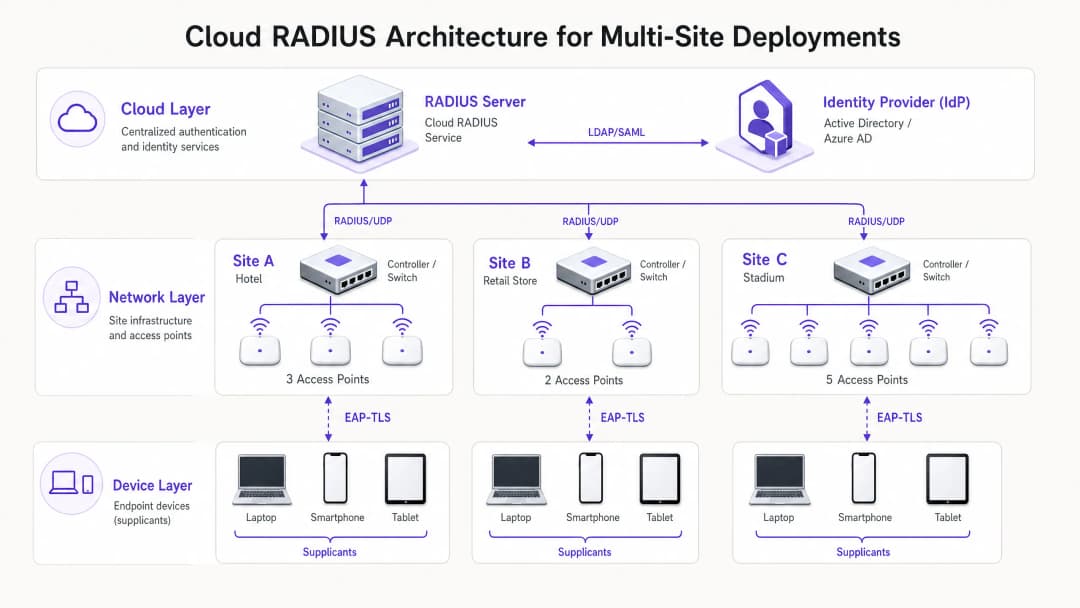
A transição arquitetônica de servidores locais para Cloud RADIUS elimina a necessidade de servidores distribuídos FreeRADIUS ou Microsoft NPS. No modelo em nuvem, os pontos de acesso ou controladores de LAN sem fio se comunicam diretamente pela internet com um serviço RADIUS globalmente distribuído. Para proteger esse trânsito, a implementação do RadSec (RADIUS sobre TLS) é essencial, criptografando o payload de autenticação e protegendo-o contra interceptações. O serviço Cloud RADIUS atua como intermediário, validando credenciais em um provedor de identidade (IdP) central via integrações LDAP, SAML ou APIs nativas. Isso possibilita a aplicação dinâmica de políticas, como a atribuição de VLANs com base na associação a grupos do Azure AD, integrando perfeitamente o acesso à rede com a estratégia mais ampla de gerenciamento de identidade corporativa.
Seleção do Método EAP
A escolha do método EAP determina a postura de segurança e a complexidade operacional da implantação.
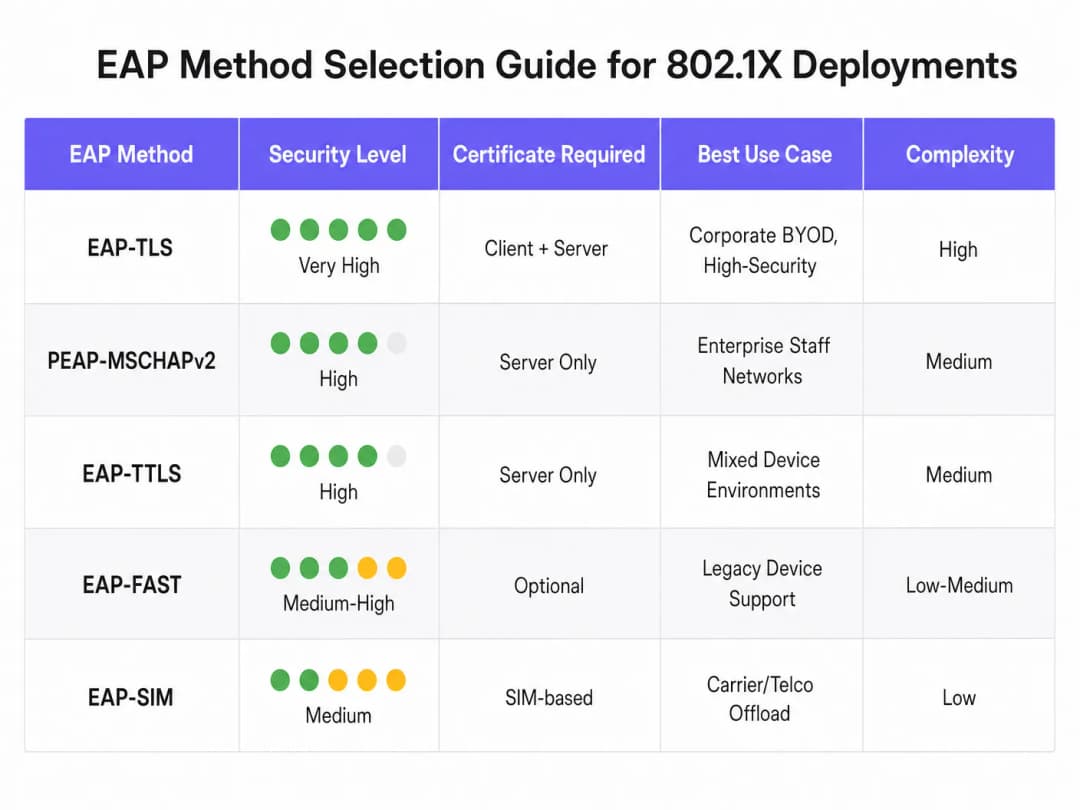
- EAP-TLS (Transport Layer Security): O método mais seguro, exigindo certificados tanto do servidor quanto do cliente para autenticação mútua. Como não há troca de senhas, ele elimina o risco de roubo de credenciais. No entanto, exige uma Infraestrutura de Chaves Públicas (PKI) e Gerenciamento de Dispositivos Móveis (MDM) para distribuir os certificados dos clientes. Fortemente recomendado para dispositivos corporativos.
- PEAP-MSCHAPv2 (Protected EAP): Amplamente implantado graças ao suporte nativo no Windows e por depender apenas de um certificado no lado do servidor. Ele cria um túnel para a troca de credenciais dentro de uma sessão TLS. Embora seja mais fácil de implantar, é vulnerável a ataques de captura de credenciais se a validação do certificado do lado do cliente não for rigidamente aplicada.
- EAP-TTLS: Semelhante ao PEAP, mas oferece maior flexibilidade no protocolo de autenticação interno, tornando-o adequado para ambientes com uma mistura diversificada de sistemas operacionais de clientes.
Tem dúvidas sobre a sua configuração específica?
A nossa equipa trabalha com operadores de espaços, gestores de TI e engenheiros de rede em 80.000 locais. Agende uma chamada de 20 minutos e mostraremos como outros profissionais na sua situação o resolveram.
Guia de Implantação
A implantação do 802.1X com Cloud RADIUS exige uma abordagem em fases e sistemática para minimizar interrupções nos negócios existentes.
- Integração com o provedor de identidade: Estabeleça e valide a conexão entre o serviço Cloud RADIUS e o IdP corporativo. Certifique-se de que a sincronização do diretório esteja precisa e que os atributos de usuário necessários (como associação a grupos) estejam disponíveis para as decisões de política.
- Gerenciamento de certificados: Para implantações PEAP, obtenha um certificado de servidor de uma Autoridade Certificadora (CA) pública confiável. Fundamentalmente, configure os clientes via MDM ou Diretiva de Grupo para confiar explicitamente nesta CA e validar o nome do certificado do servidor. Para EAP-TLS, implante a infraestrutura de CA interna e comece a emitir certificados de cliente para dispositivos gerenciados.
- Configuração da infraestrutura de rede: Configure controladores sem fio e pontos de acesso para apontar para os endpoints do Cloud RADIUS. Implemente RadSec onde o fornecedor de hardware oferecer suporte. Defina segredos compartilhados do RADIUS usando strings fortes e criptograficamente seguras, garantindo que o segredo seja exclusivo por site ou cluster de controlador.
- Definição de políticas: Crie as políticas de autenticação na plataforma Cloud RADIUS. Defina condições com base no grupo de usuários, tipo de dispositivo ou localização para atribuir dinamicamente VLANs ou aplicar Listas de Controle de Acesso (ACLs) após uma autenticação bem-sucedida.
- Projeto piloto e implantação em fases: Selecione um subconjunto representativo de usuários e dispositivos para o piloto inicial. Monitore os logs de autenticação de perto para identificar problemas de latência, falhas de validação de certificado ou atribuições incorretas de VLAN. Após um piloto bem-sucedido, execute uma implantação em fases, priorizando locais de alto risco, como escritórios executivos ou locais que lidam com dados confidenciais.
Melhores Práticas
- Exija a validação de certificado do lado do cliente: A vulnerabilidade mais comum em implantações PEAP é a falha em exigir a validação do certificado do servidor no cliente. Se os clientes tiverem permissão para confiar cegamente em qualquer certificado apresentado, eles estarão totalmente expostos a ataques de pontos de acesso falsos.
- Implemente o MAC Authentication Bypass (MAB) com cautela: Para dispositivos sem interface de usuário que não podem executar um suplicante 802.1X (como impressoras e sensores IoT), o MAB pode ser usado. No entanto, endereços MAC são facilmente falsificados. Os dispositivos MAB devem ser isolados em VLANs altamente restritas, com regras de firewall rígidas limitando seu acesso à rede.
- Aproveite o 802.11r para roaming: Em ambientes onde os dispositivos se movem com frequência entre pontos de acesso, o processo completo de autenticação 802.1X pode introduzir uma latência inaceitável que interrompe aplicativos em tempo real, como voz. A implementação do 802.11r (Fast BSS Transition) agiliza o roaming ao armazenar as chaves de autenticação em cache.
- Integre com análises: Para locais que operam tanto uma rede corporativa 802.1X quanto uma rede de acesso público, a integração da infraestrutura de autenticação com o WiFi Analytics fornece uma visão abrangente da utilização da rede e do comportamento dos dispositivos em toda a propriedade.
Solução de Problemas e Mitigação de Riscos
Falhas de autenticação em um ambiente 802.1X podem causar interrupções generalizadas de conectividade. Um processo robusto de solução de problemas é essencial.
- Expiração de certificado: Um certificado de servidor ou cliente expirado causará falha imediata na autenticação. Implemente monitoramento e alertas automatizados sobre os períodos de validade dos certificados, garantindo que as renovações sejam tratadas bem antes do vencimento.
- Latência e timeouts: Se o serviço Cloud RADIUS ou IdP apresentar alta latência, o autenticador poderá expirar o tempo limite e interromper a conexão. Configure valores de timeout apropriados nos controladores sem fio (normalmente de 5 a 10 segundos) e implante servidores RADIUS de backup para fornecer redundância.- Incompatibilidade de segredo compartilhado do RADIUS: Um segredo compartilhado configurado no autenticador que não corresponda ao do servidor RADIUS fará com que os pacotes sejam descartados silenciosamente. Padronize o gerenciamento de segredos e evite a inserção manual sempre que possível.
ROI e Impacto nos Negócios
A transição para o 802.1X com Cloud RADIUS oferece um valor comercial mensurável. Ao eliminar senhas compartilhadas, ela reduz drasticamente a superfície de ataque, apoiando diretamente a conformidade com o PCI DSS (Requisitos 1 e 8) e as exigências de proteção de dados do GDPR. Operacionalmente, ela permite o controle de acesso centralizado, permitindo que as equipes de TI revoguem instantaneamente o acesso de um usuário em todos os locais do mundo, simplesmente desativando sua conta no diretório central. Além disso, ao desativar servidores RADIUS legados locais, as organizações reduzem os custos de manutenção de hardware, taxas de licenciamento de software e a carga administrativa de aplicar patches e gerenciar infraestrutura distribuída. Para implantações em toda a propriedade em setores como Varejo e Hotelaria, essa postura de segurança centralizada é um facilitador essencial da transformação digital segura.
Ouça nosso briefing completo sobre o assunto:
Definições principais
Suplicante
O cliente de software em um dispositivo de usuário final (notebook, smartphone) que negocia o acesso à rede usando EAP.
As equipes de TI devem garantir que o suplicante esteja configurado corretamente (geralmente via MDM) para validar os certificados do servidor a fim de evitar o roubo de credenciais.
Autenticador
O dispositivo de rede (normalmente um ponto de acesso WiFi ou switch) que controla o acesso físico ou lógico à rede com base no status da autenticação.
O autenticador age como um intermediário, retransmitindo as mensagens EAP entre o suplicante e o servidor RADIUS.
Cloud RADIUS
Um serviço de autenticação centralizado e hospedado na nuvem que processa solicitações RADIUS de infraestrutura de rede distribuída sem a necessidade de servidores locais.
Essencial para organizações com vários locais que buscam implementar segurança de nível empresarial sem a sobrecarga de manutenção de hardware.
EAP (Protocolo de Autenticação Extensível)
O framework utilizado para encapsular mensagens de autenticação entre o solicitante e o servidor de autenticação.
A escolha do método EAP correto (por exemplo, PEAP vs. EAP-TLS) determina o nível de segurança e a complexidade de implantação da rede sem fio.
RadSec
Um protocolo que transmite dados RADIUS através de um túnel TLS, garantindo a criptografia do tráfego de autenticação em trânsito.
Crucial ao usar Cloud RADIUS, pois protege as trocas de credenciais confidenciais contra interceptação na internet pública.
Dynamic VLAN Assignment
O processo em que o servidor RADIUS instrui o autenticador a colocar um dispositivo em um segmento de rede virtual específico com base na identidade ou no grupo do usuário.
Permite que a TI transmita um único SSID enquanto segmenta o tráfego de forma segura (por exemplo, colocando a equipe de RH e a equipe de TI em sub-redes diferentes).
Autenticação Mútua
Um processo de segurança onde o cliente verifica a identidade do servidor e o servidor verifica a identidade do cliente (normalmente usando certificados).
A característica definidora do EAP-TLS, tornando-o altamente resistente a ataques man-in-the-middle.
MAC Authentication Bypass (MAB)
Um método de autenticação alternativo que usa o endereço MAC de um dispositivo como sua credencial quando ele não oferece suporte a um solicitante 802.1X.
Usado para hardware legado, como impressoras ou dispositivos IoT, mas exige uma segmentação de rede rigorosa devido à facilidade de falsificação de MAC.
Exemplos práticos
Um hotel de 200 quartos que opera uma rede PSK herdada para operações de bastidores (tablets de limpeza, terminais de ponto de venda, notebooks de gerentes) precisa obter a conformidade com o PCI-DSS antes de uma auditoria futura. Eles não têm equipe de TI no local e não podem implantar servidores locais.
O hotel deve implantar uma solução Cloud RADIUS integrada diretamente ao seu locatário central do Azure AD. Para notebooks de gerentes (Windows/macOS), eles devem implementar PEAP-MSCHAPv2, utilizando um perfil de MDM para enviar o certificado de servidor confiável e impor a validação. Para terminais de ponto de venda que possam não ter suplicantes robustos, eles devem utilizar o MAC Authentication Bypass (MAB), mas atribuir estritamente esses dispositivos a uma VLAN isolada que permita apenas a comunicação com o gateway de pagamento. A implantação exige a configuração dos pontos de acesso existentes gerenciados na nuvem para apontar para os endereços IP do Cloud RADIUS, protegendo a conexão com o RadSec.
Uma rede de varejo nacional está lançando uma nova frota de tablets corporativos para gerenciamento de estoque em 500 lojas. Eles querem garantir que, mesmo se um tablet for roubado, ele não possa ser usado para acessar a rede, e querem eliminar os chamados de suporte técnico relacionados a senhas.
O varejista deve implementar o EAP-TLS. Eles implantarão uma Autoridade Certificadora (CA) interna e a integrarão à sua plataforma de MDM. Quando um tablet é provisionado, o MDM envia um certificado de cliente exclusivo para o dispositivo. O serviço Cloud RADIUS é configurado para autenticar dispositivos com base exclusivamente na presença de um certificado de cliente válido. Se um tablet for relatado como roubado, a equipe de TI simplesmente revoga esse certificado específico na CA. O serviço Cloud RADIUS, verificando a Lista de Revogação de Certificados (CRL) ou via OCSP, negará imediatamente o acesso à rede.
Questões práticas
Q1. Sua organização está migrando de uma PSK compartilhada para 802.1X usando PEAP-MSCHAPv2. Durante a fase piloto, os usuários relatam que conseguem se conectar, mas uma auditoria de segurança revela que os dispositivos estão aceitando silenciosamente qualquer certificado de servidor apresentado a eles. Qual é o risco imediato e como ele deve ser corrigido?
Dica: Considere o que acontece se um invasor configurar um ponto de acesso transmitindo o seu SSID corporativo.
Ver resposta modelo
O risco imediato é um ataque Man-in-the-Middle (MitM) por meio de um ponto de acesso invasor. Um invasor pode transmitir o SSID corporativo, apresentar um certificado autoassinado e coletar credenciais de usuário à medida que os dispositivos tentam se autenticar. Para corrigir isso, a equipe de TI deve configurar os perfis de solicitante (via MDM ou Diretiva de Grupo) para validar explicitamente o certificado do servidor. Isso envolve especificar a CA Raiz Confiável exata que emitiu o certificado do servidor RADIUS e definir rigorosamente o nome de host do servidor esperado.
Q2. Uma filial de varejo remota perdeu sua conexão com a internet. Os pontos de acesso locais ainda estão ligados. Os dispositivos da equipe atualmente conectados à rede 802.1X permanecerão conectados e novos dispositivos conseguirão se autenticar? Assuma uma arquitetura padrão Cloud RADIUS sem nós de sobrevivência local.
Dica: Pense no caminho que uma solicitação de autenticação deve percorrer e no estado das portas já autorizadas.
Ver resposta modelo
Os dispositivos que já estão autenticados e conectados normalmente permanecerão conectados até que o tempo limite da sessão expire ou que eles se desconectem, pois a porta do autenticador já está no estado autorizado. No entanto, novos dispositivos que tentarem se conectar ou dispositivos que tentarem se reautenticar falharão. Como a conexão com a internet está inativa, os pontos de acesso não conseguem alcançar o servidor Cloud RADIUS para processar a troca EAP. Isso destaca a importância de links WAN resilientes ao depender de autenticação baseada em nuvem.
Q3. Você precisa proteger o acesso à rede para uma frota de leitores de código de barras legados em um depósito. Esses leitores não oferecem suporte a solicitantes 802.1X e suportam apenas WPA2-Personal (PSK). Você não pode atualizar o hardware. Como você integra esses dispositivos em uma arquitetura de rede segura junto com seus dispositivos corporativos 802.1X?
Dica: Você precisa de uma alternativa ao 802.1X que ainda forneça controle de acesso, combinada com isolamento no nível da rede.
Ver resposta modelo
A abordagem recomendada é utilizar o MAC Authentication Bypass (MAB) para os leitores de código de barras. O ponto de acesso usará o endereço MAC do leitor como identidade e o enviará para o servidor RADIUS. Como os endereços MAC são facilmente falsificados, isso fornece uma autenticação fraca. Portanto, o servidor RADIUS deve ser configurado para retornar um atributo VLAN específico após a autenticação MAB bem-sucedida. Esta VLAN deve ser fortemente restrita por meio de firewalls ou ACLs, permitindo que os leitores se comuniquem apenas com os servidores de inventário específicos que necessitam, e bloqueando qualquer outro acesso de rede lateral.
Continue a ler esta série
Os Benefícios de Segurança do RADIUS-as-a-Service para Equipes de Trabalho Híbrido
Este guia de referência técnica explica como o RADIUS-as-a-Service protege o acesso à rede para equipes híbridas em locais distribuídos. Ele aborda a arquitetura, os benefícios de segurança e as etapas de implantação para substituir a infraestrutura RADIUS local por um serviço de autenticação gerenciado na nuvem. Para gerentes de TI e arquitetos de rede em hotéis, redes de varejo, estádios e organizações do setor público, este guia fornece as evidências necessárias para avaliar e agir em uma migração para o RADIUS em nuvem neste trimestre.
Integrando RADIUS-as-a-Service com Diretórios em Nuvem (Azure AD e Google Workspace)
Este guia de referência técnica detalha como integrar o RADIUS-as-a-Service com diretórios em nuvem - Microsoft Entra ID e Google Workspace - para autenticação WiFi corporativa. Ele aborda a transição arquitetônica de NPS local para RADIUS nativo em nuvem, a implantação de autenticação EAP-TLS baseada em certificados e as melhores práticas operacionais para proteger o acesso sem fio em ambientes de hotelaria, varejo e setor público. Para gerentes de TI e arquitetos de rede que já investem em identidade em nuvem, este guia preenche a lacuna entre o gerenciamento de diretórios e a segurança da rede física.
O que é Cloud RADIUS? Um Guia Completo para RADIUS-as-a-Service
Este guia completo explora o Cloud RADIUS (RADIUS-as-a-Service), detalhando sua arquitetura, métodos EAP e estratégias de implementação. Ele fornece aos líderes de TI insights práticos sobre a migração de servidores locais para um modelo de autenticação baseado em nuvem escalável, seguro e em conformidade.
Tem dúvidas sobre a sua configuração específica?
A nossa equipa trabalha com operadores de espaços, gestores de TI e engenheiros de rede em 80.000 locais. Agende uma chamada de 20 minutos e mostraremos como outros profissionais na sua situação o resolveram.